Programs lag and NOT RESPONDING

L745

New member
Local time
10:12 AM
Messages
8
Every time I open a program it always lags and most of the time it displays "Not Responding." Almost all of my programs exhibit this. What is the cause of this and how can I fix it? I don't know much yet about computers, so please explain it in a way I would understand. Thank you so much!:)
 

My Computer

Computer type
Laptop
Computer Manufacturer/Model Number
Toshiba Satellite L745
OS
windows 7 Home Premium 32bit
CPU
i3-2330
Memory
8 GB (2.7 GB usable)
Graphics Card(s)
Intel(R) Graphics Family
Antivirus
Avira
Browser
Google Chrome
Every time I open a program it always lags and most of the time it displays "Not Responding." Almost all of my programs exhibit this. What is the cause of this and how can I fix it? I don't know much yet about computers, so please explain it in a way I would understand. Thank you so much!:)

What's using the 5.3 GB of ram? You can use "Task Manager" or download and use "Process Explorer" to see a list of programs and system processes.

The following link provides information on "Task Manager"

How to use the Windows Task Manager

HTH
 

My Computer

Computer type
PC/Desktop
Computer Manufacturer/Model Number
Custom Built
OS
Windows 7 Professional x64
CPU
Intel i5 quad processor
Motherboard
DP67BG
Memory
16 GB
Graphics Card(s)
Radeon HD 5770
Sound Card
Realtek High Definition Audio
Monitor(s) Displays
Samsung SyncMaster
Screen Resolution
1920X1080
Hard Drives
WD 2TB (SATA Internal)
WD 1TB (USB External)
PSU
Corsair GS800
Case
Tower (Generic)
Cooling
3 Internal Fans
Keyboard
MS Wireless
Mouse
MS Optical Wired
Internet Speed
54 mbps
Antivirus
Emsisoft
Browser
IE-Version 9, Palemoon-Version 24.2.0
Every time I open a program it always lags and most of the time it displays "Not Responding." Almost all of my programs exhibit this. What is the cause of this and how can I fix it? I don't know much yet about computers, so please explain it in a way I would understand. Thank you so much!:)


I also had a problem with this happening. on my pc I had too many things running on startup. if yours is the same reason, to stop certain things from starting upon startup click on start menu an on the search bar type msconfig an hit enter. go to the startup tab, uncheck anything you don't need to startup when you turn on the pc.

(note if the program has a unknown manufacturer it is best to uncheck it. and if the manufacturer is Microsoft then it is wise to leave it checked. anything else is usually user preference. )

hope this helps :thumbsup:
 

My Computer

Computer type
PC/Desktop
Computer Manufacturer/Model Number
hp
OS
windows 7 home premium 32bit
CPU
Processor Intel(R) Pentium(R) 4 CPU 3.00GHz, 2992 Mhz,1 Core
Motherboard
System Model HP dc5000 uT(PJ355UA)
Memory
Installed Physical Memory (RAM) 2.50 GB
Graphics Card(s)
Adapter Description Intel(R) 82865G Graphics Controller
Hard Drives
Model Maxtor 5T040H4 ATA Device
Antivirus
avg free
Browser
internet explorer 9
Every time I open a program it always lags and most of the time it displays "Not Responding." Almost all of my programs exhibit this. What is the cause of this and how can I fix it? I don't know much yet about computers, so please explain it in a way I would understand. Thank you so much!:)
The first thing I would do would be to scan your computer for viruses and malware. An infection can cause the problems you're seeing.

This is a very good malware checking tool:

Malwarebytes | Free Anti-Malware Detection & Removal Software


What's using the 5.3 GB of ram?
The OP's system spec says the computer is using a 32 bit version of Windows.
 

My Computer

Computer type
PC/Desktop
Computer Manufacturer/Model Number
Mellon Labs (custom build)
OS
Win 7 Pro x64/Win 10 Pro x64 dual boot
CPU
AMD FX 8350 Vishera @ 4200
Motherboard
ASUS M5A97 R2.0
Memory
16 GB Mushkin Blackline DDR3-2400 @ 1866 (9-10-10-10-31)
Graphics Card(s)
XFX Radeon R9 280 Double D Black Edition
Sound Card
Realtek HD Audio on MB. Sounds great.
Monitor(s) Displays
Acer 24", Acer 22"
Screen Resolution
3840 x 1080
Hard Drives
1 x Mushkin Chronos 120 GB SSD (Win 10)
1 x Samsung 850 EVO 250 GB SSD (Win 7)
1 x WD 1TB SATA Blue
1 x WD 1TB SATA Green
PSU
Corsair TX-750
Case
CoolerMaster HAF 912+
Cooling
Coolermaster Seidon 240M Liquid AIO. 6 case fans
Keyboard
Logitech G710+
Mouse
Logitech G500s
Internet Speed
Much better since I got fiber, but still way overpriced.
Antivirus
MSE, Malware Bytes for scanning
Browser
Firefox
Other Info
Corsair VOID USB headphones.

A Mellon Labs X-1 - LCD Smartie driven system status display.

Brought to you by the letter E
Every time I open a program it always lags and most of the time it displays "Not Responding." Almost all of my programs exhibit this. What is the cause of this and how can I fix it? I don't know much yet about computers, so please explain it in a way I would understand. Thank you so much!:)

What's using the 5.3 GB of ram? You can use "Task Manager" or download and use "Process Explorer" to see a list of programs and system processes.

The following link provides information on "Task Manager"

How to use the Windows Task Manager

HTH

Thank you for the Link!!! :D I'll search for what's using the 5.3 GB of ram..
 

My Computer

Computer type
Laptop
Computer Manufacturer/Model Number
Toshiba Satellite L745
OS
windows 7 Home Premium 32bit
CPU
i3-2330
Memory
8 GB (2.7 GB usable)
Graphics Card(s)
Intel(R) Graphics Family
Antivirus
Avira
Browser
Google Chrome
Every time I open a program it always lags and most of the time it displays "Not Responding." Almost all of my programs exhibit this. What is the cause of this and how can I fix it? I don't know much yet about computers, so please explain it in a way I would understand. Thank you so much!:)


I also had a problem with this happening. on my pc I had too many things running on startup. if yours is the same reason, to stop certain things from starting upon startup click on start menu an on the search bar type msconfig an hit enter. go to the startup tab, uncheck anything you don't need to startup when you turn on the pc.

(note if the program has a unknown manufacturer it is best to uncheck it. and if the manufacturer is Microsoft then it is wise to leave it checked. anything else is usually user preference. )

hope this helps :thumbsup:

I have tried unchecking some of the items running during start up.. and somehow my start up became a little smoother.. but now it has gotten worse again.. and also, i'm not familiar with most of the items in the start up tab so i just leave it there unchanged.. :D
 

My Computer

Computer type
Laptop
Computer Manufacturer/Model Number
Toshiba Satellite L745
OS
windows 7 Home Premium 32bit
CPU
i3-2330
Memory
8 GB (2.7 GB usable)
Graphics Card(s)
Intel(R) Graphics Family
Antivirus
Avira
Browser
Google Chrome

My Computer

Computer type
PC/Desktop
Computer Manufacturer/Model Number
Home made Desktop
OS
Windows 10 Pro. 64/ version 1709 Windows 7 Pro/64
CPU
Intel i7-6800K @ 4.3
Motherboard
ASUS X-99 Deluxe II
Memory
Corsair Platinum 16 gig @2400
Graphics Card(s)
EVGA GTX 1070 OC
Monitor(s) Displays
Asus 27" LED LCD/VE278Q
Screen Resolution
1920-1080 or 1280-720 HDMI
Hard Drives
INTEL SSD 730-240 Gb Sata 3.0/
PSU
EVGA Platium 1200W
Case
Phanteks Luxe Tempered Glass 8 fans/ one radiator
Cooling
XSPC/ Water Cooled CPU
Keyboard
Das 4 Professional
Mouse
Logitech M705/MX Anywhere 2-S
Internet Speed
100 mbits
Antivirus
Microsoft Security Essentials/ Malwarebytes Premium 3.0/ SAS
Browser
I.E. 11 default/Firefox/ ISP Time Warner Cable/Spectrum
Other Info
LG BluRay Burner/
Sound system-KLipsch-THX/
Icy Dock ssd Hot Swap bays.
Every time I open a program it always lags and most of the time it displays "Not Responding." Almost all of my programs exhibit this. What is the cause of this and how can I fix it? I don't know much yet about computers, so please explain it in a way I would understand. Thank you so much!:)


I also had a problem with this happening. on my pc I had too many things running on startup. if yours is the same reason, to stop certain things from starting upon startup click on start menu an on the search bar type msconfig an hit enter. go to the startup tab, uncheck anything you don't need to startup when you turn on the pc.

(note if the program has a unknown manufacturer it is best to uncheck it. and if the manufacturer is Microsoft then it is wise to leave it checked. anything else is usually user preference. )

hope this helps :thumbsup:

I have tried unchecking some of the items running during start up.. and somehow my start up became a little smoother.. but now it has gotten worse again.. and also, i'm not familiar with most of the items in the start up tab so i just leave it there unchanged.. :D


another thing that could be is that you need to do a (disk cleanup) and (disk defragmenter) easy way to get to it is just type it in the search bar in the start menu. :orb:
 

My Computer

Computer type
PC/Desktop
Computer Manufacturer/Model Number
hp
OS
windows 7 home premium 32bit
CPU
Processor Intel(R) Pentium(R) 4 CPU 3.00GHz, 2992 Mhz,1 Core
Motherboard
System Model HP dc5000 uT(PJ355UA)
Memory
Installed Physical Memory (RAM) 2.50 GB
Graphics Card(s)
Adapter Description Intel(R) 82865G Graphics Controller
Hard Drives
Model Maxtor 5T040H4 ATA Device
Antivirus
avg free
Browser
internet explorer 9
For Rage and Layback Bear

@Layback Bear: Ok i'll post my msconfig.. For the explanation part, i'll just post the specs of my laptop..

@rage: I always do a diskcleanup and my disk is 0% fragmented..
 

My Computer

Computer type
Laptop
Computer Manufacturer/Model Number
Toshiba Satellite L745
OS
windows 7 Home Premium 32bit
CPU
i3-2330
Memory
8 GB (2.7 GB usable)
Graphics Card(s)
Intel(R) Graphics Family
Antivirus
Avira
Browser
Google Chrome
You will not be able to run 8 gigs of ram on a Windows 32 system.
If you want to run more that 4 gigs you will need a Windows 7 64 bit system.

From your specs.

Memory 8 GB (2.7 GB usable)
 

My Computer

Computer type
PC/Desktop
Computer Manufacturer/Model Number
Home made Desktop
OS
Windows 10 Pro. 64/ version 1709 Windows 7 Pro/64
CPU
Intel i7-6800K @ 4.3
Motherboard
ASUS X-99 Deluxe II
Memory
Corsair Platinum 16 gig @2400
Graphics Card(s)
EVGA GTX 1070 OC
Monitor(s) Displays
Asus 27" LED LCD/VE278Q
Screen Resolution
1920-1080 or 1280-720 HDMI
Hard Drives
INTEL SSD 730-240 Gb Sata 3.0/
PSU
EVGA Platium 1200W
Case
Phanteks Luxe Tempered Glass 8 fans/ one radiator
Cooling
XSPC/ Water Cooled CPU
Keyboard
Das 4 Professional
Mouse
Logitech M705/MX Anywhere 2-S
Internet Speed
100 mbits
Antivirus
Microsoft Security Essentials/ Malwarebytes Premium 3.0/ SAS
Browser
I.E. 11 default/Firefox/ ISP Time Warner Cable/Spectrum
Other Info
LG BluRay Burner/
Sound system-KLipsch-THX/
Icy Dock ssd Hot Swap bays.
Same problem here a few months ago, sometimes its a sign of failing hard drive, check it
 

My Computer

Computer Manufacturer/Model Number
ASUS Ul80a
OS
Windows 7 Ultimate x64bit
CPU
Intel Core 2 Duo
Motherboard
ASUS
Memory
4 gig DDR3
Graphics Card(s)
Intel gma 4500mhd
Sound Card
Realtek HD
Monitor(s) Displays
LED
Hard Drives
seagate 320 gig
Start Up Items

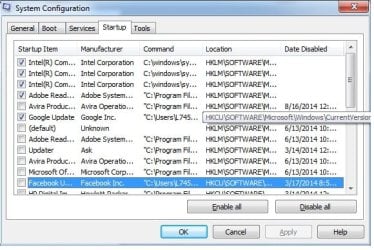
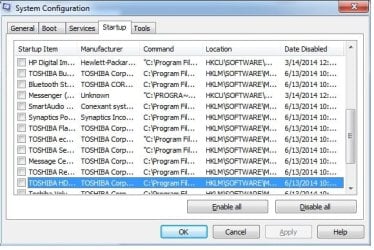
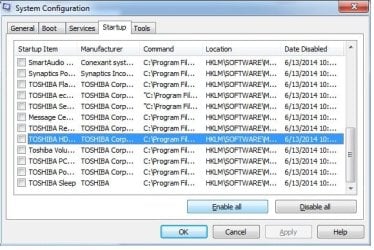
@Layback bear: Here are some scrn shots of my msconfig/startup
 

Attachments

  • su1.jpg
    su1.jpg
    52.5 KB · Views: 25
  • su2.jpg
    su2.jpg
    55.2 KB · Views: 25
  • su3.jpg
    su3.jpg
    53.1 KB · Views: 25

My Computer

Computer type
Laptop
Computer Manufacturer/Model Number
Toshiba Satellite L745
OS
windows 7 Home Premium 32bit
CPU
i3-2330
Memory
8 GB (2.7 GB usable)
Graphics Card(s)
Intel(R) Graphics Family
Antivirus
Avira
Browser
Google Chrome
You could use the spare 4 GB of RAM to create a 4 GB RAMDisk (that's what I've done in XP on my PC).
 

My Computer

Computer type
PC/Desktop
Computer Manufacturer/Model Number
n/a
OS
W7 Ultimate SP1, LM19.2 MATE, W10 Home 1703, W10 Pro 1703 VM, #All 64 bit
CPU
AMD Phenom II x6 1100T, 3.3 GHz
Motherboard
ASUS M4A88T-M/USB3 (AM3)
Memory
12GB DDR3 1333 G-Skill (4GB x 2), G-Skill (2GB x 2)
Graphics Card(s)
NVIDIA GeForce GTX 660
Sound Card
Realtek?
Monitor(s) Displays
Samsung S23B350
Screen Resolution
1920x1080
Hard Drives
WD Green 2TB (SATA), WD Green 3TB (SATA), WD Blue 4TB (SATA), WD Blue 6TB (SATA)
PSU
Cooler Master
Case
Antec GX300 Tower
Cooling
3x Antec TRICOOL 120mm Fans
Mouse
Wired Optical
Internet Speed
DSL
Antivirus
Avast
Browser
Pale Moon (64 bit)
Other Info
2018-12-27 Upgraded HDDs
2015-12-10 Upgraded case, graphics card, storage
2015-08-15 Upgraded motherboard & RAM
2015-07-15 Upgraded LM17.1 to LM17.2
@ K745 did you read and understand my post # 10?

Your Start Up items aren't to bad. I suggest at this time just having you security programs checked marked.

Remember that when you uncheck something doesn't mean it won't work when needed.
It just means it will not start at boot and run in the background when not needed.


Example:

Adobe Reader if unchecked will still when you or Windows needs them to run.

If you tick on Adobe Reader it will just start like it should.
When you close Adobe Reader it will just shut down and wait for your or Windows 7 next command when it's needed again.
 

My Computer

Computer type
PC/Desktop
Computer Manufacturer/Model Number
Home made Desktop
OS
Windows 10 Pro. 64/ version 1709 Windows 7 Pro/64
CPU
Intel i7-6800K @ 4.3
Motherboard
ASUS X-99 Deluxe II
Memory
Corsair Platinum 16 gig @2400
Graphics Card(s)
EVGA GTX 1070 OC
Monitor(s) Displays
Asus 27" LED LCD/VE278Q
Screen Resolution
1920-1080 or 1280-720 HDMI
Hard Drives
INTEL SSD 730-240 Gb Sata 3.0/
PSU
EVGA Platium 1200W
Case
Phanteks Luxe Tempered Glass 8 fans/ one radiator
Cooling
XSPC/ Water Cooled CPU
Keyboard
Das 4 Professional
Mouse
Logitech M705/MX Anywhere 2-S
Internet Speed
100 mbits
Antivirus
Microsoft Security Essentials/ Malwarebytes Premium 3.0/ SAS
Browser
I.E. 11 default/Firefox/ ISP Time Warner Cable/Spectrum
Other Info
LG BluRay Burner/
Sound system-KLipsch-THX/
Icy Dock ssd Hot Swap bays.
@Layback Bear

yes i've read ur post #10 but I don't have any idea with what u were talking.. please explain wat should i do..:)

Yep I know that about checking/unchecking the start up item.. thanks.. Ok now, so the start up programs are not the ones causing the 'not responding', are there other things u can think of causing this?
 

My Computer

Computer type
Laptop
Computer Manufacturer/Model Number
Toshiba Satellite L745
OS
windows 7 Home Premium 32bit
CPU
i3-2330
Memory
8 GB (2.7 GB usable)
Graphics Card(s)
Intel(R) Graphics Family
Antivirus
Avira
Browser
Google Chrome

My Computer

Computer type
Laptop
Computer Manufacturer/Model Number
Toshiba Satellite L745
OS
windows 7 Home Premium 32bit
CPU
i3-2330
Memory
8 GB (2.7 GB usable)
Graphics Card(s)
Intel(R) Graphics Family
Antivirus
Avira
Browser
Google Chrome
Same problem here a few months ago, sometimes its a sign of failing hard drive, check it

How do I check it?

Pardon me for being innocent.. but I really want to learn..
 

My Computer

Computer type
Laptop
Computer Manufacturer/Model Number
Toshiba Satellite L745
OS
windows 7 Home Premium 32bit
CPU
i3-2330
Memory
8 GB (2.7 GB usable)
Graphics Card(s)
Intel(R) Graphics Family
Antivirus
Avira
Browser
Google Chrome
You system specs.
You only want 4 gig of memory install on a 32b system.

System Manufacturer/Model Number Toshiba Satellite L745
OS windows 7 Home Premium 32bit
CPU i3-2330
Memory 8 GB (2.7 GB usable)
Graphics Card Intel(R) Graphics Family


http://msdn.microsoft.com/en-us/library/windows/desktop/aa366778%28v=vs.85%29.aspx#physical_memory_limits_windows_7

VersionLimit on X86Limit on X64 Windows 7 Ultimate 4 GB
192 GB
Windows 7 Enterprise 4 GB
192 GB
Windows 7 Professional 4 GB
192 GB
Windows 7 Home Premium 4 GB
16 GB
Windows 7 Home Basic 4 GB
8 GB
Windows 7 Starter 2 GB
N/A
 

My Computer

Computer type
PC/Desktop
Computer Manufacturer/Model Number
Home made Desktop
OS
Windows 10 Pro. 64/ version 1709 Windows 7 Pro/64
CPU
Intel i7-6800K @ 4.3
Motherboard
ASUS X-99 Deluxe II
Memory
Corsair Platinum 16 gig @2400
Graphics Card(s)
EVGA GTX 1070 OC
Monitor(s) Displays
Asus 27" LED LCD/VE278Q
Screen Resolution
1920-1080 or 1280-720 HDMI
Hard Drives
INTEL SSD 730-240 Gb Sata 3.0/
PSU
EVGA Platium 1200W
Case
Phanteks Luxe Tempered Glass 8 fans/ one radiator
Cooling
XSPC/ Water Cooled CPU
Keyboard
Das 4 Professional
Mouse
Logitech M705/MX Anywhere 2-S
Internet Speed
100 mbits
Antivirus
Microsoft Security Essentials/ Malwarebytes Premium 3.0/ SAS
Browser
I.E. 11 default/Firefox/ ISP Time Warner Cable/Spectrum
Other Info
LG BluRay Burner/
Sound system-KLipsch-THX/
Icy Dock ssd Hot Swap bays.
3rd Party Software

You could use the spare 4 GB of RAM to create a 4 GB RAMDisk (that's what I've done in XP on my PC).

How did you do that??:D
You would have to install a RAMDisk program.
I use a program that came with my external HDD.

Here are a couple of links:
How to Turn Extra Memory Into a RAM Disk - Windows 7 - LAPTOP
How to Supercharge Your PC With a RAM Disk | PCWorld

Some RAM drives when used with 32-bit operating systems (particularly 32-bit Microsoft Windows) on computers with IBM PC architecture allow memory above the 4 GB point in the memory map, if present, to be used; this memory is unmanaged and not normally accessible. Software using unmanaged memory can cause stability problems.
Wikipedia
http://en.wikipedia.org/wiki/List_of_RAM_drive_software
 
Last edited:

My Computer

Computer type
PC/Desktop
Computer Manufacturer/Model Number
n/a
OS
W7 Ultimate SP1, LM19.2 MATE, W10 Home 1703, W10 Pro 1703 VM, #All 64 bit
CPU
AMD Phenom II x6 1100T, 3.3 GHz
Motherboard
ASUS M4A88T-M/USB3 (AM3)
Memory
12GB DDR3 1333 G-Skill (4GB x 2), G-Skill (2GB x 2)
Graphics Card(s)
NVIDIA GeForce GTX 660
Sound Card
Realtek?
Monitor(s) Displays
Samsung S23B350
Screen Resolution
1920x1080
Hard Drives
WD Green 2TB (SATA), WD Green 3TB (SATA), WD Blue 4TB (SATA), WD Blue 6TB (SATA)
PSU
Cooler Master
Case
Antec GX300 Tower
Cooling
3x Antec TRICOOL 120mm Fans
Mouse
Wired Optical
Internet Speed
DSL
Antivirus
Avast
Browser
Pale Moon (64 bit)
Other Info
2018-12-27 Upgraded HDDs
2015-12-10 Upgraded case, graphics card, storage
2015-08-15 Upgraded motherboard & RAM
2015-07-15 Upgraded LM17.1 to LM17.2
L745 already has the ram installed and it would cost nothing to clean install Windows 7/64 using the all ready paid for COA.
 

My Computer

Computer type
PC/Desktop
Computer Manufacturer/Model Number
Home made Desktop
OS
Windows 10 Pro. 64/ version 1709 Windows 7 Pro/64
CPU
Intel i7-6800K @ 4.3
Motherboard
ASUS X-99 Deluxe II
Memory
Corsair Platinum 16 gig @2400
Graphics Card(s)
EVGA GTX 1070 OC
Monitor(s) Displays
Asus 27" LED LCD/VE278Q
Screen Resolution
1920-1080 or 1280-720 HDMI
Hard Drives
INTEL SSD 730-240 Gb Sata 3.0/
PSU
EVGA Platium 1200W
Case
Phanteks Luxe Tempered Glass 8 fans/ one radiator
Cooling
XSPC/ Water Cooled CPU
Keyboard
Das 4 Professional
Mouse
Logitech M705/MX Anywhere 2-S
Internet Speed
100 mbits
Antivirus
Microsoft Security Essentials/ Malwarebytes Premium 3.0/ SAS
Browser
I.E. 11 default/Firefox/ ISP Time Warner Cable/Spectrum
Other Info
LG BluRay Burner/
Sound system-KLipsch-THX/
Icy Dock ssd Hot Swap bays.
Back
Top