Programs not starting at all.

ihatemylaptop

New member
Local time
10:32 PM
Messages
11
Yesterday , due to being unbelievably pissed off as i was getting HUGE stuttering in all the games i played, i decided to download CrystalDiskInfo and AdvancedSystemCare 7.1 ( even activated a pro key ).
After setting up CDI and tuning all possible things with ASC i also downloaded the new mobility 14.1 beta drivers which did NOT install successfully even though the amd installer said so. Right after that , i checked into device manager and it said that the intel HD graphics driver was corrupted so i clicked update driver and it replaced the current drivers ( of both the Intel 3000 and Radeon 7690m xt) to the old 2011 ones.
Upon rebooting the screen became 600x480 so i ran a driver cleaner ( by iobit ) that downloaded a crapton of different useless drivers , strangely it fixed the deformed screen. So i rebooted again , AND after this boot no programs ( i.e games or other heavy software ) managed to start , they actually showed up on task manager , but it took a whole lot of time , and when they were supposed to launch , the process shut down itself , making nothing happen , no errors at all ( Windows Test Build 7601 also showed up on the bottom right of the screen , but i fixed that as it already happened twice.)
After that i also rolled back the pc status to 4 days ago , with no success sadly.
So i read that a possible fix for this would have been /scannow , ran it , no errors found.
After further research , i also downloaded malwarebytes , ran it for 2 hrs and half , and found 12 malwares , which got fixed , but the issue hasn't been addressed.
I really beg for some merciful soul's help as i 'm really desperate and have no idea how to fix all this , i tried all i knew.
I could roll back to the manufacturer status , but i don't feel like losing 25 GBs of music.
Thanks in advance to everyone willing to help me.
 

My Computer

Computer type
Laptop
Computer Manufacturer/Model Number
HP
OS
Windows 7 Home Premium 64
CPU
i7-2670QM
Memory
8GB RAM
Graphics Card(s)
HD 7690M XT / Intel hd 3000
Antivirus
MSE
Browser
Chrome
Actually; I have learned from some of the higher up gurus on these forums that those programs like advanced care; etc.; are just a waste of money as they can actually make problems worse then they already are; so do yourself a huge a favor and get your money back if you can.

In addition to the malwarebytes; i would download; install, and run the following to scan for spyware and adware:

SUPERAntiSpyware - Downloading File

Downloading AdwCleaner

If scanning and removing any of those above does not do anything: i would also try doing a system restore; which will restore the system to the point before these issues started happening; however; it should not affect any programs, videos, music, etc. it will just restore system settings, etc to before the issues started happening. Try the above and or restore and report back.

Also one side note here: I would stay away from beta drivers as they may not be a finalized product; and therefore may still have glitches, etc in them which could cause more issues.
 
Last edited:

My Computer

Computer type
PC/Desktop
Computer Manufacturer/Model Number
custom built
OS
Windows 7 ultimate 64-bit
CPU
Intel I7 2600K 3.4ghz
Motherboard
Asus Evo P8P67
Memory
Corsair 16gb ddr3 1600mhz
Graphics Card(s)
Nvidia Geforce gt 430
Sound Card
Sound Blaster Titanium x-fi pci express
Monitor(s) Displays
Dell E198WFP
Hard Drives
1 western digital 2TB drive.
PSU
Antec 1200 watt
Case
Inwin Dragon Rider
Cooling
6 case supplied cooling fans
Keyboard
logitech mk700
Mouse
logitech m705
Internet Speed
25-50mbps download; 10mbps upload(i think)
Antivirus
avg free 2014
Browser
mozilla firefox
Other Info
Also have a pretty bad speaker setup which is a klipsch promedia 5.1 surround speaker setup with huge subwoofer and lg blu ray player/writer. Also a hp officejet pro 8600 plus wireless all in one and a logitech s7500 webcam.
Actually; I have learned from some of the higher up gurus on these forums that those programs like advanced care; etc.; are just a waste of money as they can actually make problems worse then they already are; so do yourself a huge a favor and get your money back if you can.

In addition to the malwarebytes; i would download; install, and run the following to scan for spyware and adware:

SUPERAntiSpyware - Downloading File

Downloading AdwCleaner

If scanning and removing any of those above does not do anything: i would also try doing a system restore; which will restore the system to the point before these issues started happening; however; it should not affect any programs, videos, music, etc. it will just restore system settings, etc to before the issues started happening. Try the above and or restore and report back.

Also one side note here: I would stay away from beta drivers as they may not be a finalized product; and therefore may still have glitches, etc in them which could cause more issues.

Thanks for the reply , by the way do you think the issue is still a malware? Or some hardware problem? If i use the "cleaning" tools of those programs and then uninstall them forever , will they still slow it down instead of actually helping? (Running SuperAntiSpyware right now)
 

My Computer

Computer type
Laptop
Computer Manufacturer/Model Number
HP
OS
Windows 7 Home Premium 64
CPU
i7-2670QM
Memory
8GB RAM
Graphics Card(s)
HD 7690M XT / Intel hd 3000
Antivirus
MSE
Browser
Chrome
You can remove AdwCleaner when you're finished with it .... after cleaning all the bad junk out.


Removing/Uninstalling AdwCleaner:
Double click on AdwCleaner.exe to run the tool again. Click on the Uninstall button.
Click Yes when asked are you sure you want to uninstall.
Both AdwCleaner.exe, its folder and all logs will be removed.


You can keep SuperAntiSpyware and run it occasionally. To stop it from running when Windows starts, go into Services and set it to 'manual'. Click 'stop' then okay.
 

My Computer

Computer type
PC/Desktop
Computer Manufacturer/Model Number
Bruce ... somewhere in his 40's
OS
Windows 7 Ultimate 32bit SP1
CPU
Intel(R) Core(TM)2 Quad CPU @ 2.40GHz, 2400 MHz
Motherboard
INTEL/D975XBX2
Memory
4 GB
Graphics Card(s)
ATI Radeon HD 2600 Pro
Monitor(s) Displays
Samsung SyncMaster 914v
Screen Resolution
1280 x 1024
Hard Drives
2/500GB each ... ST3500630AS ATA Device.
One is not connected
PSU
Rocketfish 700 W
Case
G.Skill Gigabyte Chassis
Keyboard
Standard PS/2 Keyboard
Mouse
Microsoft PS/2 Mouse
Internet Speed
DSL
Antivirus
Avira Internet Security
Browser
IE 11
Other Info
ATI HDMI Audio
You can remove AdwCleaner when you're finished with it .... after cleaning all the bad junk out.


Removing/Uninstalling AdwCleaner:
Double click on AdwCleaner.exe to run the tool again. Click on the Uninstall button.
Click Yes when asked are you sure you want to uninstall.
Both AdwCleaner.exe, its folder and all logs will be removed.


You can keep SuperAntiSpyware and run it occasionally. To stop it from running when Windows starts, go into Services and set it to 'manual'. Click 'stop' then okay.

Done all what you both said , waited 6 hours and half without being able to use the pc after running admalware but games still won't start :'( . Only chrome and skype do , slowly :(
I really have no idea what to do
 

My Computer

Computer type
Laptop
Computer Manufacturer/Model Number
HP
OS
Windows 7 Home Premium 64
CPU
i7-2670QM
Memory
8GB RAM
Graphics Card(s)
HD 7690M XT / Intel hd 3000
Antivirus
MSE
Browser
Chrome
Both those programs you turned to in desperation could have hurt you more, since many downloads of Crystal Disk have spyware bundled within, and any optimizer is death to Win7.

Since you're interested in learning, you have with HP the worst possible install of Win7 one can have, with the worst load of bloatware in the industry and duplicate utiltiies that interfere with better versions in Win7. So you'll only experience true Win7 performance if you go completely clean with a perfect Clean Reinstall - Factory OEM Windows 7. Be sure to read the Special Note for HP Owners at the end.

You'll then have the best possible install of Win7 one can have, finally experience real Win7, no longer hate your laptop. We'll help you see to it.
 
Last edited:
Both those programs you turned to in desperation could have hurt you more, since many downloads of Crystal Disk have spyware bundled within, and any optimizer is death to Win7.

Since you're interested in learning what I would do since you have with HP the worst possible install of Win7 one can have, with the worst load of bloatware in the industry and duplicate utiltiies that interfere with better versions in Win7. So you'll only experience true Win7 performance if you go completely clean with a perfect Clean Reinstall - Factory OEM Windows 7. Be sure to read the Special Note for HP Owners at the end.

You'll then have the best possible install of Win7 one can have, finally experience real Win7, no longer hate your laptop. We'll help you see to it.
Just finished minimized restore through hp recovery manager. Could you send me a link with the drivers i should install now? I.E the best performing radeon mobility driver for my HD 7690M XT and intel hd 3000 if needed)
Thanks for the help :)
 

My Computer

Computer type
Laptop
Computer Manufacturer/Model Number
HP
OS
Windows 7 Home Premium 64
CPU
i7-2670QM
Memory
8GB RAM
Graphics Card(s)
HD 7690M XT / Intel hd 3000
Antivirus
MSE
Browser
Chrome
Drivers should be provided by the Recovery.

Now go online, enable Automatically deliver drivers via Windows Update (Step 3).
Run all rounds of Important and Optional Windows Updates, with reboots, until there are no more offered when you Check for Updates.

Then check Device Manager to see if there are any missing drivers to import from the HP Support Downloads web page for your model.

It seems you didn't read all of Clean Reinstall - Factory OEM Windows 7 since these steps are clearly given there and bolded in red. So I would look over it again to make sure that you stick with the tools and methods which assure you'll get and keep a perfect install.
 
Drivers should be provided by the Recovery.

Now go online, enable Automatically deliver drivers via Windows Update (Step 3).
Run all rounds of Important and Optional Windows Updates, with reboots, until there are no more offered when you Check for Updates.

Then check Device Manager to see if there are any missing drivers to import from the HP Support Downloads web page for your model.

It seems you didn't read all of Clean Reinstall - Factory OEM Windows 7 since these steps are clearly given there and bolded in red. So I would look over it again to make sure that you stick with the tools and methods which assure you'll get and keep a perfect install.
Oh well sorry , i first checked that link with my phone and for some reason the red text didn't show up , now enabled auto driver downloads . ty
 

My Computer

Computer type
Laptop
Computer Manufacturer/Model Number
HP
OS
Windows 7 Home Premium 64
CPU
i7-2670QM
Memory
8GB RAM
Graphics Card(s)
HD 7690M XT / Intel hd 3000
Antivirus
MSE
Browser
Chrome
No prob, it's a lot to absorb. We are only interested in seeing that you get and are able to keep a perfect install. Those steps compile what has worked best in tens of thousands of installs we've helped with here.

Feel free to ask back any other questions.
 

My Computer

Computer type
Laptop
Computer Manufacturer/Model Number
Packard Bell
OS
Windows 7 Home Premium 64Bit
CPU
AMD A6-3420M 1.5GHZ OC - 2.0GHZ
Memory
4GB DDR3 1600MHZ
Graphics Card(s)
AMD RADEON 6520G+AMD RADEON HD7470M 1GB DDR3
Screen Resolution
1366x768
Hard Drives
500GB SATA
Internet Speed
18Mb Unlimited
Antivirus
AVAST!
Browser
MOZILLA FIREFOX
AMD Catalyst 14.1 Beta Driver for Windows This is the latest Driver for your gpu
Just installed it , now the screen is 640x480 and after rebooting it says no amd driver has been found.
Now you may understand the reason behind my nickname here lol . On a serious note , what do i have to do?
As i expected this to happen i created a restore point before installing the driver , gonna roll back to that while waiting for an answer :)
 

My Computer

Computer type
Laptop
Computer Manufacturer/Model Number
HP
OS
Windows 7 Home Premium 64
CPU
i7-2670QM
Memory
8GB RAM
Graphics Card(s)
HD 7690M XT / Intel hd 3000
Antivirus
MSE
Browser
Chrome
Hmm. Thats unusual, Did you do a clean install of the drivers? Did you also make sure you chose the laptop version?
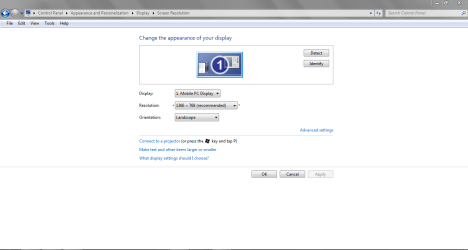
With the new driver installed, Go to the page in the picture and make sure your res is set to the highest(Native one for your monitor/screen)
 

Attachments

  • Capture.PNG
    Capture.PNG
    22.8 KB · Views: 0

My Computer

Computer type
Laptop
Computer Manufacturer/Model Number
Packard Bell
OS
Windows 7 Home Premium 64Bit
CPU
AMD A6-3420M 1.5GHZ OC - 2.0GHZ
Memory
4GB DDR3 1600MHZ
Graphics Card(s)
AMD RADEON 6520G+AMD RADEON HD7470M 1GB DDR3
Screen Resolution
1366x768
Hard Drives
500GB SATA
Internet Speed
18Mb Unlimited
Antivirus
AVAST!
Browser
MOZILLA FIREFOX
Hmm. Thats unusual, Did you do a clean install of the drivers? Did you also make sure you chose the laptop version?
With the new driver installed, Go to the page in the picture and make sure your res is set to the highest(Native one for your monitor/screen)
Yup , i chose the laptop version , ran the setup ( tried both custom and express install ) and i right clicked the desktop to see if there were other resolutions available , only 640x480 and 1024 x 768 were there.
 

My Computer

Computer type
Laptop
Computer Manufacturer/Model Number
HP
OS
Windows 7 Home Premium 64
CPU
i7-2670QM
Memory
8GB RAM
Graphics Card(s)
HD 7690M XT / Intel hd 3000
Antivirus
MSE
Browser
Chrome
Have you enabled Automatically deliver drivers via Windows Update (Step 3) then run all Important and Optional Updates, with reboots, until there are no more when you Check for Updates?

What display driver do you end up with then?

Next go to the HP Support Downloads webpage for your model PC to try the latest Display driver there. What is the difference? If you need help post back the HP model number.

Sometimes the driver is modded by the OEM making it preferred. You really need to try them all: Updates, HP, and AMD - for just the driver and not the Catalyst bloatware.
 
What was the aspect ratio set to?
 

My Computer

Computer type
Laptop
Computer Manufacturer/Model Number
Packard Bell
OS
Windows 7 Home Premium 64Bit
CPU
AMD A6-3420M 1.5GHZ OC - 2.0GHZ
Memory
4GB DDR3 1600MHZ
Graphics Card(s)
AMD RADEON 6520G+AMD RADEON HD7470M 1GB DDR3
Screen Resolution
1366x768
Hard Drives
500GB SATA
Internet Speed
18Mb Unlimited
Antivirus
AVAST!
Browser
MOZILLA FIREFOX
The catalyst is very useful...CPU overlooking as well as enabling/disable crossfire, force vsync and many many other useful features.
 

My Computer

Computer type
Laptop
Computer Manufacturer/Model Number
Packard Bell
OS
Windows 7 Home Premium 64Bit
CPU
AMD A6-3420M 1.5GHZ OC - 2.0GHZ
Memory
4GB DDR3 1600MHZ
Graphics Card(s)
AMD RADEON 6520G+AMD RADEON HD7470M 1GB DDR3
Screen Resolution
1366x768
Hard Drives
500GB SATA
Internet Speed
18Mb Unlimited
Antivirus
AVAST!
Browser
MOZILLA FIREFOX
Would there really be a reason the average consumer would need those? Catalyst is often problematic resolved by uninstalling it. I've always heard it is only needed for overclocking or special settings used by gamers. We may be talking about two separate audiences?
 
Have you enabled Automatically deliver drivers via Windows Update (Step 3) then run all Important and Optional Updates, with reboots, until there are no more when you Check for Updates?

What display driver do you end up with then?

Next go to the HP Support Downloads webpage for your model PC to try the latest Display driver there. What is the difference? If you need help post back the HP model number.

Sometimes the driver is modded by the OEM making it preferred. You really need to try them all: Updates, HP, and AMD - for just the driver and not the Catalyst bloatware.

Yes , stayed the same , hp drivers are old ( no difference in performance when i tried them whatsoever ).
Tried all drivers and updated everything.
 

My Computer

Computer type
Laptop
Computer Manufacturer/Model Number
HP
OS
Windows 7 Home Premium 64
CPU
i7-2670QM
Memory
8GB RAM
Graphics Card(s)
HD 7690M XT / Intel hd 3000
Antivirus
MSE
Browser
Chrome

My Computer

Computer type
Laptop
Computer Manufacturer/Model Number
HP
OS
Windows 7 Home Premium 64
CPU
i7-2670QM
Memory
8GB RAM
Graphics Card(s)
HD 7690M XT / Intel hd 3000
Antivirus
MSE
Browser
Chrome
Back
Top