Windows 7 not starting at all

MrZork

New member
Member
Local time
1:31 PM
Messages
78
(My specs are up to date: TL;DR Win7 HP, Samsung 960 SSD)

Background:


A couple days ago, I installed NordVPN on my PC. No problems with it. Last night my PC was running fine, except for some excessive lag on a game I was playing and I was the only one lagging. Shouldn't have been the VPN because I set a tunnel for it to get to the server. But, I decided to disconnect from the VPN and reboot to see if that affect the lag.

(BTW, I am not home. I am working remotely for the Summer and do not have my Win7 install CDs with me.)

Upon reboot, I get to a "Windows did not shut down properly" screen with an option to run a repair or start normally. If I chose start normally, I get booted to the BIOS. If I chose the repair, I would go into a loop of repair not working and reboot to the same two options.

I boot to my other HD, which has an older Win7 installation on it (which I stopped using because Windows Update stopped working there). From there, I could see the main drive and had no trouble checking that files were there in Windows Explorer.

On the older installation, I create a startup repair CD and boot from it, hoping it can fix Windows on the main drive. I am not sure it ever did anything useful. At some point, it said it was going to repair something and then it failed to repair it. I suspect that it never found the main drive and was busy doing bad things to my older installation. Now I cannot boot from the older installation, either. So, yay. Thinking, I am better off repairing the main drive and not getting confused with the repair trying to fix something that formerly worked, I disconnect the older drive.

Current state:


Now, startup repair CD seems not to find the main SSD (if it ever did) or any Windows installations. I suspect that it does not have the SSD drivers for my newer SSD or something. Anyway, I am currently unable to boot from the main Windows 7 installation (or the older one) and have no working Windows 7 PCs. My laptop is a Win10 machine that I am using now.

When I run the startup repair on the Win7 machine, it loads files, lets me choose a keyboard region, fails to find any installed OS (there is a button to load drivers, but I don't know where they would be). I don't know where to go from there.

Any pointers to the next step?
 

My Computer

Computer type
PC/Desktop
Computer Manufacturer/Model Number
custom
OS
Windows 7 Home Premium 64bit SP 1 (Version 6.1.7601)
CPU
Intel i7-5820K
Motherboard
ASUS X99-A (BIOS 3505)
Memory
16 GB
Graphics Card(s)
NVidia GeForce GTX 970
Sound Card
MB default (Crystal Sound 2)
Monitor(s) Displays
Dell 2408 WFP
Screen Resolution
1920x1280
Hard Drives
C:
Samsung 960 PRO 2 TB SSD
D:
Crucial M4 512GB SSD
PSU
Thermaltake Toughpower 750 W
Win 7 installation disk doesn't have the Samsung 960 NVMe driver, that is why you can't see the drive under Win PE - Repair.
You have to add it to the Win 7 installation disk.
On the win 7 installation disk you have two compressed files on \sources:
Boot.wim has the installation and repair wizard.
Install.wim has the four Win 7 brands (Home, HP, Pro and ultimate)

How did you install win 7 to the 960? I guess you had win 7 on another drive, inserted the M.2 drive, under windows loaded the NVMe driver and then cloned all to the 960.
You have to add NVMe driver at least to the \sources\Boot.wim to see the drive you want to repair. I would also add to the \sources\Install.wim to be able to install directly to the 960.
I made a tutorial to add drivers to the Win 7 installation disk, and I recommend you read it to understand the process.
Create a Windows 7 USB flash installation with new drives for new MB's

SIW2 has made a tool to automatize and I recommend you to use it.
Update your Win 7 installation media.
 

My Computers

System One System Two

  • Computer type
    PC/Desktop
    Computer Manufacturer/Model Number
    custom build
    OS
    Windows 7 HP 64
    CPU
    i5 6600K - 800MHz to 4200MHz
    Motherboard
    GA-Z170-HD3P
    Memory
    4+4G GSkill DDR4 3000
    Graphics Card(s)
    IG - Intel 530
    Monitor(s) Displays
    Samsung 226BW
    Screen Resolution
    1680x1050
    Hard Drives
    (1) -1 SM951 – 128GB M.2 AHCI PCIe SSD drive for Windows 7 and Lubuntu
    (2) -1 WD SATA 3 - 1T for Data
    (3) -1 WD SATA 3 - 1T for backup
    PSU
    Thermaltake 450W TR2 gold
    Keyboard
    Old and good Chicony mechanical keyboard
    Mouse
    Logitech mX performance - 9 buttons (had to disable some)
    Internet Speed
    500Mb/s
    Browser
    Firefox 64
    Other Info
    TinyWall firewall
  • Computer type
    Laptop
    System Manufacturer/Model Number
    Asus Q550LF
    OS
    Windows 7 Pro
    CPU
    i7-4500U 800MHz to 3.0GHz
    Motherboard
    Asus Q550LF
    Memory
    (4+4)G DDR3 1600
    Graphics Card(s)
    IG intel 4400 + NVIDIA GeForce GT 745M
    Sound Card
    Realtek
    Monitor(s) Displays
    LG Display LP156WF4-SPH1
    Screen Resolution
    1920 x 1080
    Hard Drives
    BX500 120G SSD for Windows and programs +
    1T HDD for data
    Internet Speed
    500 Mb/s
    Browser
    Firefox
    Other Info
    TinyWall firewall
This post has been deleted by me because for some reason it was duplicated.
 
Last edited:

My Computer

Computer type
Laptop
Computer Manufacturer/Model Number
Fujitsu LIFEBOOK
OS
Win 7 HP SP1 64-bit Vista HB SP2 32-bit Linux Mint 18.3
CPU
Intel(R) Pentium(R) CPU P6200 @ 2.13GHz
Motherboard
FUJITSU FJNBB06
Memory
4.00 GB
Graphics Card(s)
Intel(R) Graphics Media Accelerator HD
Sound Card
[1] Realtek High Definition Audio [2] Intel(R) Display Audio
Screen Resolution
1366 x 768 x 32 bits (4294967296 colors) @ 59 Hz
Hard Drives
TOSHIBA MK5076GSX
Antivirus
AVG FREE
Hi MrZork,

SIW2 has made a tool to automatize and I recommend you to use it.
Update your Win 7 installation media.

That is what I recommend too.
I have tested the procedure by SIW2 and it works brilliantly.
All you need to do afterwards is to burn [you can't just copy and paste it because it won't work] the newly updated ISO to a DVD or USB.

To burn the ISO to a DVD you can use the Windows 7 built in ISO burner.
To burn the ISO to a USB you can either use: Rufus 2.18 or Rufus 2.18 Portable.

I hope this helps.
 

My Computer

Computer type
Laptop
Computer Manufacturer/Model Number
Fujitsu LIFEBOOK
OS
Win 7 HP SP1 64-bit Vista HB SP2 32-bit Linux Mint 18.3
CPU
Intel(R) Pentium(R) CPU P6200 @ 2.13GHz
Motherboard
FUJITSU FJNBB06
Memory
4.00 GB
Graphics Card(s)
Intel(R) Graphics Media Accelerator HD
Sound Card
[1] Realtek High Definition Audio [2] Intel(R) Display Audio
Screen Resolution
1366 x 768 x 32 bits (4294967296 colors) @ 59 Hz
Hard Drives
TOSHIBA MK5076GSX
Antivirus
AVG FREE
Folks, thank you very much for those replies. I just want to check one thing because some of the suggestions sound like they might require the installation disks to create a modified set of installation media with more up-to-date drivers for my SSD and USB 3. I am not super experienced at this, so, before I get too lost, I want to check that I can create this updated install disk subject to the constraint

(BTW, I am not home. I am working remotely for the Summer and do not have my Win7 install CDs with me.)

So, if I these solutions are saying that I need them, is there a place I can get the install disks? I am fine telling Microsoft who I am and my original keys, if needed.

BTW, to be 100% clear: This is a legit install. I upgraded to Win7 and bought both the original Vista disks and the legit Win7 upgrade. It's just that the disks are 1000 miles away at the moment. I do have the CD keys for both of my disks (one of those rare times I am glad I didn't delete those photos from my mobile). But, I would have to download any ISO of the install disks from MS.
 

My Computer

Computer type
PC/Desktop
Computer Manufacturer/Model Number
custom
OS
Windows 7 Home Premium 64bit SP 1 (Version 6.1.7601)
CPU
Intel i7-5820K
Motherboard
ASUS X99-A (BIOS 3505)
Memory
16 GB
Graphics Card(s)
NVidia GeForce GTX 970
Sound Card
MB default (Crystal Sound 2)
Monitor(s) Displays
Dell 2408 WFP
Screen Resolution
1920x1280
Hard Drives
C:
Samsung 960 PRO 2 TB SSD
D:
Crucial M4 512GB SSD
PSU
Thermaltake Toughpower 750 W
Hi MrZork,

Being that you upgraded to Windows 7 makes this slighty different to just downloading a Windows 7 ISO, installing it, and then activating it.

You will need to download an upto date Windows 7 SP1 ISO. Then use the ISO to reinstall but don't enter the Upgrade Key. Complete the install, and then run a repair install, this time entering the Upgrade Key. I think this is correct!

Another alternative, if it is viable, is to get someone to send you the discs!

I hope this helps!
 

My Computer

Computer type
Laptop
Computer Manufacturer/Model Number
Fujitsu LIFEBOOK
OS
Win 7 HP SP1 64-bit Vista HB SP2 32-bit Linux Mint 18.3
CPU
Intel(R) Pentium(R) CPU P6200 @ 2.13GHz
Motherboard
FUJITSU FJNBB06
Memory
4.00 GB
Graphics Card(s)
Intel(R) Graphics Media Accelerator HD
Sound Card
[1] Realtek High Definition Audio [2] Intel(R) Display Audio
Screen Resolution
1366 x 768 x 32 bits (4294967296 colors) @ 59 Hz
Hard Drives
TOSHIBA MK5076GSX
Antivirus
AVG FREE
Hi MrZork,

You will need to download an upto date Windows 7 SP1 ISO. Then use the ISO to reinstall but don't enter the Upgrade Key. Complete the install, and then run a repair install, this time entering the Upgrade Key. I think this is correct!

Paul, If you download a Win 7 HP iso, you don't need to double install.
A upgrade disk has a ei.cfg saying it's for upgrade. That is the only difference.
In other words, if you download an iso you can use the upgrade key as a retail license.

Link to M$ server to Win 7 HP 64. Link is valid for 24 hours.
https://software-download.microsoft...1534378023&h=0ba30666b6a21892ac28c881843b3ad1
 

My Computers

System One System Two

  • Computer type
    PC/Desktop
    Computer Manufacturer/Model Number
    custom build
    OS
    Windows 7 HP 64
    CPU
    i5 6600K - 800MHz to 4200MHz
    Motherboard
    GA-Z170-HD3P
    Memory
    4+4G GSkill DDR4 3000
    Graphics Card(s)
    IG - Intel 530
    Monitor(s) Displays
    Samsung 226BW
    Screen Resolution
    1680x1050
    Hard Drives
    (1) -1 SM951 – 128GB M.2 AHCI PCIe SSD drive for Windows 7 and Lubuntu
    (2) -1 WD SATA 3 - 1T for Data
    (3) -1 WD SATA 3 - 1T for backup
    PSU
    Thermaltake 450W TR2 gold
    Keyboard
    Old and good Chicony mechanical keyboard
    Mouse
    Logitech mX performance - 9 buttons (had to disable some)
    Internet Speed
    500Mb/s
    Browser
    Firefox 64
    Other Info
    TinyWall firewall
  • Computer type
    Laptop
    System Manufacturer/Model Number
    Asus Q550LF
    OS
    Windows 7 Pro
    CPU
    i7-4500U 800MHz to 3.0GHz
    Motherboard
    Asus Q550LF
    Memory
    (4+4)G DDR3 1600
    Graphics Card(s)
    IG intel 4400 + NVIDIA GeForce GT 745M
    Sound Card
    Realtek
    Monitor(s) Displays
    LG Display LP156WF4-SPH1
    Screen Resolution
    1920 x 1080
    Hard Drives
    BX500 120G SSD for Windows and programs +
    1T HDD for data
    Internet Speed
    500 Mb/s
    Browser
    Firefox
    Other Info
    TinyWall firewall
Hi Megahertz07,

Paul, If you download a Win 7 HP iso, you don't need to double install.
An upgrade disk has a ei.cfg saying it's for upgrade. That is the only difference.
In other words, if you download an iso you can use the upgrade key as a retail license.

Thanks for pointing that out. I wasn't sure what the difference was with an upgrade installation as opposed to a standard installation. So there is no difference then to a standard installation!
:thumbsup:
I tried to rep you, but it says I must spread it around a little, so to speak!
 

My Computer

Computer type
Laptop
Computer Manufacturer/Model Number
Fujitsu LIFEBOOK
OS
Win 7 HP SP1 64-bit Vista HB SP2 32-bit Linux Mint 18.3
CPU
Intel(R) Pentium(R) CPU P6200 @ 2.13GHz
Motherboard
FUJITSU FJNBB06
Memory
4.00 GB
Graphics Card(s)
Intel(R) Graphics Media Accelerator HD
Sound Card
[1] Realtek High Definition Audio [2] Intel(R) Display Audio
Screen Resolution
1366 x 768 x 32 bits (4294967296 colors) @ 59 Hz
Hard Drives
TOSHIBA MK5076GSX
Antivirus
AVG FREE
Megahertz07, your guess about how I installed to the 960 is correct. It's been a while, but I think I had Win7 installed on the older drive, installed the 960 drivers, then cloned over to the 960.

Thank you for that link. I hope that will save me having my aunt dig around my dusty garage hunting for my old CDs.

So, I will download that ISO, then create the install CDs. Will I need to use SIW2's tool that you mention in your earlier reply to add more drivers and then create another set of install CDs? Or does the downloaded ISO have up-to-date drivers and I can use the install CDs I create from them to do a Repair Install?

BTW, I am assuming that the Repair Install is my goal here, right? That will (fingers crossed) get me back up and running?
 

My Computer

Computer type
PC/Desktop
Computer Manufacturer/Model Number
custom
OS
Windows 7 Home Premium 64bit SP 1 (Version 6.1.7601)
CPU
Intel i7-5820K
Motherboard
ASUS X99-A (BIOS 3505)
Memory
16 GB
Graphics Card(s)
NVidia GeForce GTX 970
Sound Card
MB default (Crystal Sound 2)
Monitor(s) Displays
Dell 2408 WFP
Screen Resolution
1920x1280
Hard Drives
C:
Samsung 960 PRO 2 TB SSD
D:
Crucial M4 512GB SSD
PSU
Thermaltake Toughpower 750 W

Attachments

My Computers

System One System Two

  • Computer type
    PC/Desktop
    Computer Manufacturer/Model Number
    custom build
    OS
    Windows 7 HP 64
    CPU
    i5 6600K - 800MHz to 4200MHz
    Motherboard
    GA-Z170-HD3P
    Memory
    4+4G GSkill DDR4 3000
    Graphics Card(s)
    IG - Intel 530
    Monitor(s) Displays
    Samsung 226BW
    Screen Resolution
    1680x1050
    Hard Drives
    (1) -1 SM951 – 128GB M.2 AHCI PCIe SSD drive for Windows 7 and Lubuntu
    (2) -1 WD SATA 3 - 1T for Data
    (3) -1 WD SATA 3 - 1T for backup
    PSU
    Thermaltake 450W TR2 gold
    Keyboard
    Old and good Chicony mechanical keyboard
    Mouse
    Logitech mX performance - 9 buttons (had to disable some)
    Internet Speed
    500Mb/s
    Browser
    Firefox 64
    Other Info
    TinyWall firewall
  • Computer type
    Laptop
    System Manufacturer/Model Number
    Asus Q550LF
    OS
    Windows 7 Pro
    CPU
    i7-4500U 800MHz to 3.0GHz
    Motherboard
    Asus Q550LF
    Memory
    (4+4)G DDR3 1600
    Graphics Card(s)
    IG intel 4400 + NVIDIA GeForce GT 745M
    Sound Card
    Realtek
    Monitor(s) Displays
    LG Display LP156WF4-SPH1
    Screen Resolution
    1920 x 1080
    Hard Drives
    BX500 120G SSD for Windows and programs +
    1T HDD for data
    Internet Speed
    500 Mb/s
    Browser
    Firefox
    Other Info
    TinyWall firewall
Okay, I am running SIW2's tool and it looks like it is almost done. That will leave me with a folder with the contents of an up-to-date Win 7 installation disk. I will use the included CreateISO.cmd tool to turn that into an ISO and then I will use the built-in Win10 (I am still on my laptop) tool to create a DVD from that ISO.

Is the next step to pop that DVD into my stricken Win7 machine, boot from the DVD, and then run a Repair Install?

(Apologies if this seems like a silly question. I just want to make sure I am not jumping ahead to the wrong step because I made a poor assumption somewhere. I'd like to get my Win 7 machine back online with minimal risk of messing something up and being stuck with a re-installation as my only option.)
 

My Computer

Computer type
PC/Desktop
Computer Manufacturer/Model Number
custom
OS
Windows 7 Home Premium 64bit SP 1 (Version 6.1.7601)
CPU
Intel i7-5820K
Motherboard
ASUS X99-A (BIOS 3505)
Memory
16 GB
Graphics Card(s)
NVidia GeForce GTX 970
Sound Card
MB default (Crystal Sound 2)
Monitor(s) Displays
Dell 2408 WFP
Screen Resolution
1920x1280
Hard Drives
C:
Samsung 960 PRO 2 TB SSD
D:
Crucial M4 512GB SSD
PSU
Thermaltake Toughpower 750 W
Hi MrZork,

Okay, I am running SIW2's tool and it looks like it is almost done. That will leave me with a folder with the contents of an up-to-date Win 7 installation disk. I will use the included CreateISO.cmd tool to turn that into an ISO and then I will use the built-in Win10 (I am still on my laptop) tool to create a DVD from that ISO.
You will need to check the size of the newly created ISO. If you only updated ONE image then it might fit onto a DVD. If you updated ALL the images then it will definately need to be burnt onto a USB.

I hope this helps!
 

My Computer

Computer type
Laptop
Computer Manufacturer/Model Number
Fujitsu LIFEBOOK
OS
Win 7 HP SP1 64-bit Vista HB SP2 32-bit Linux Mint 18.3
CPU
Intel(R) Pentium(R) CPU P6200 @ 2.13GHz
Motherboard
FUJITSU FJNBB06
Memory
4.00 GB
Graphics Card(s)
Intel(R) Graphics Media Accelerator HD
Sound Card
[1] Realtek High Definition Audio [2] Intel(R) Display Audio
Screen Resolution
1366 x 768 x 32 bits (4294967296 colors) @ 59 Hz
Hard Drives
TOSHIBA MK5076GSX
Antivirus
AVG FREE
Thanks for that heads up. The ISO is 4.7 GB, so I will burn it to a USB stick.

Am I correct that the next step is to boot the Win 7 PC from that USB stick and run a Repair Install?
 

My Computer

Computer type
PC/Desktop
Computer Manufacturer/Model Number
custom
OS
Windows 7 Home Premium 64bit SP 1 (Version 6.1.7601)
CPU
Intel i7-5820K
Motherboard
ASUS X99-A (BIOS 3505)
Memory
16 GB
Graphics Card(s)
NVidia GeForce GTX 970
Sound Card
MB default (Crystal Sound 2)
Monitor(s) Displays
Dell 2408 WFP
Screen Resolution
1920x1280
Hard Drives
C:
Samsung 960 PRO 2 TB SSD
D:
Crucial M4 512GB SSD
PSU
Thermaltake Toughpower 750 W
I am somewhat confused right now. I burned the ISO to a USB stick and, after making a couple of adjustments to my PC's BIOS, I got something to happen when I booted. I am *not* sure that it ever booted from the USB stick. When I interrupted the boot during the BIOS screen (hitting the Del key) and explicitly said to boot from the USB stick, there were a few seconds of pausing and blank cursors showing up near the upper-left corner of the screen, and then I was kicked back to the BIOS screen.

But, when I set the first boot device to be the USB stick (meaning that it would eventually try to boot from the SSD) and let the boot run without interruption, I got to a screen that said "Windows failed to start. A recent hardware or software..." and eventually "Launch Startup Repair (recommended)" or "Start Windows Normally". I tried the former 3 times. Each time, I got "Windows is loading files" and then a "System Recovery Options" widget that let me choose a US keyboard. When I hit Next, I got an error widget saying, "This version of System Recovery Options is not compatible with the version of Windows you are trying to repair. Try using a recovery disc that is compatible with this version of Windows." Then, I click OK and the PC reboots.

Eventually, I chose, "Start Windows Normally" and Windows started right up. I have removed the USB stick and rebooted several times and everything seems back to normal.

While things seem to be running, I have created a system repair disc. And, I am creating a system image from the Backup and Restore area of the Control Panel.

I know better than to think everything is fixed. I worry that, since no actual repair ever seemed to successfully complete, I will eventually try to reboot at some point and be hosed again.

Short of re-installing, is there some way that I can check that all of the Windows files for rebooting are set up correctly to minimize the chances of this happening again?
 

My Computer

Computer type
PC/Desktop
Computer Manufacturer/Model Number
custom
OS
Windows 7 Home Premium 64bit SP 1 (Version 6.1.7601)
CPU
Intel i7-5820K
Motherboard
ASUS X99-A (BIOS 3505)
Memory
16 GB
Graphics Card(s)
NVidia GeForce GTX 970
Sound Card
MB default (Crystal Sound 2)
Monitor(s) Displays
Dell 2408 WFP
Screen Resolution
1920x1280
Hard Drives
C:
Samsung 960 PRO 2 TB SSD
D:
Crucial M4 512GB SSD
PSU
Thermaltake Toughpower 750 W
If you just copy the iso files to the USB stick, I'm quite sure you didn't boot from it.
There are 2 ways to boot from the usb stick. Legacy - MBR and UEFI - GPT.
To boot the USB stick as MBR you must load the MBR on it. Use https://www.microsoft.com/en-us/download/details.aspx?id=56485
To Boot the USB stick as UEFI you must add \efi\boot.
To make a UEFI boot able USB flash disk is very simple.
- Format the USB flash disk as Fat32
- Copy all win 7 64 installation disk to the USB flash disk.
- Copy the boot folder to /Efi/boot
https://www.sevenforums.com/attachments/installation-setup/391488d1473288065-windows-7-installer-stuck-setup-starting-boot.zip

391487d1473287656-windows-7-installer-stuck-setup-starting-efi.jpg


The USB flash disk will ONLY boot as UEFI as it doesn't have the MBR on it.


So fist question is: Is your 960 M.2 disk low formatted as legacy - MBR or UEFI - GPT?
 

My Computers

System One System Two

  • Computer type
    PC/Desktop
    Computer Manufacturer/Model Number
    custom build
    OS
    Windows 7 HP 64
    CPU
    i5 6600K - 800MHz to 4200MHz
    Motherboard
    GA-Z170-HD3P
    Memory
    4+4G GSkill DDR4 3000
    Graphics Card(s)
    IG - Intel 530
    Monitor(s) Displays
    Samsung 226BW
    Screen Resolution
    1680x1050
    Hard Drives
    (1) -1 SM951 – 128GB M.2 AHCI PCIe SSD drive for Windows 7 and Lubuntu
    (2) -1 WD SATA 3 - 1T for Data
    (3) -1 WD SATA 3 - 1T for backup
    PSU
    Thermaltake 450W TR2 gold
    Keyboard
    Old and good Chicony mechanical keyboard
    Mouse
    Logitech mX performance - 9 buttons (had to disable some)
    Internet Speed
    500Mb/s
    Browser
    Firefox 64
    Other Info
    TinyWall firewall
  • Computer type
    Laptop
    System Manufacturer/Model Number
    Asus Q550LF
    OS
    Windows 7 Pro
    CPU
    i7-4500U 800MHz to 3.0GHz
    Motherboard
    Asus Q550LF
    Memory
    (4+4)G DDR3 1600
    Graphics Card(s)
    IG intel 4400 + NVIDIA GeForce GT 745M
    Sound Card
    Realtek
    Monitor(s) Displays
    LG Display LP156WF4-SPH1
    Screen Resolution
    1920 x 1080
    Hard Drives
    BX500 120G SSD for Windows and programs +
    1T HDD for data
    Internet Speed
    500 Mb/s
    Browser
    Firefox
    Other Info
    TinyWall firewall
I used Rufus 2.18 Portable to burn the ISO to the USB stick, using the option "Create a bootable disk using ISO image" and choosing the ISO that SIW2's tool had created. I guess I was assuming that that would create a bootable USB stick. However, I see that Rufus, by default, uses the NTFS file system when I do that. So, possibly, the USB stick was not bootable. FWIW, the root dir of the created USB stick looks like

Code:
D:\>dir
 Volume in drive D is Win7_INSTALL_NVME
 Volume Serial Number is 9428-E4E8

 Directory of D:\

08/15/2018  11:58 AM               122 autorun.inf
08/15/2018  11:58 AM    <DIR>          boot
08/15/2018  11:58 AM           383,786 bootmgr
08/15/2018  11:58 AM           669,568 bootmgr.efi
08/15/2018  11:58 AM    <DIR>          efi
08/15/2018  11:58 AM           106,768 setup.exe
08/15/2018  12:14 PM    <DIR>          sources
08/15/2018  12:15 PM    <DIR>          support
08/15/2018  12:15 PM    <DIR>          upgrade
               4 File(s)      1,160,244 bytes
                5 Dir(s)  11,119,489,024 bytes free
And the efi/boot folder looks like
Code:
 Directory of D:\efi\BOOT

08/15/2018  11:58 AM    <DIR>          .
08/15/2018  11:58 AM    <DIR>          ..
08/15/2018  11:58 AM           672,640 bootiax64
 08/15/2018  11:58 AM           672,640 bootmgfw.efi
So, the file whose link you posted seems to be there already.

But, it looks like I should re-create the installation USB stick as I did before, except as a Fat32. I will give that a shot.
 

My Computer

Computer type
PC/Desktop
Computer Manufacturer/Model Number
custom
OS
Windows 7 Home Premium 64bit SP 1 (Version 6.1.7601)
CPU
Intel i7-5820K
Motherboard
ASUS X99-A (BIOS 3505)
Memory
16 GB
Graphics Card(s)
NVidia GeForce GTX 970
Sound Card
MB default (Crystal Sound 2)
Monitor(s) Displays
Dell 2408 WFP
Screen Resolution
1920x1280
Hard Drives
C:
Samsung 960 PRO 2 TB SSD
D:
Crucial M4 512GB SSD
PSU
Thermaltake Toughpower 750 W
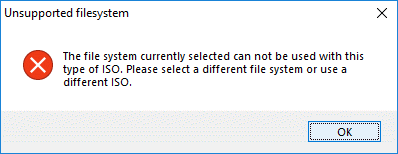
Well, now Rufus is telling me that I can't use Fat32.
Rufus_Fat32_error.gif
??


EDIT: I am going to try again using the Windows USB/DVD Download Tool to which you posted a link.
 

My Computer

Computer type
PC/Desktop
Computer Manufacturer/Model Number
custom
OS
Windows 7 Home Premium 64bit SP 1 (Version 6.1.7601)
CPU
Intel i7-5820K
Motherboard
ASUS X99-A (BIOS 3505)
Memory
16 GB
Graphics Card(s)
NVidia GeForce GTX 970
Sound Card
MB default (Crystal Sound 2)
Monitor(s) Displays
Dell 2408 WFP
Screen Resolution
1920x1280
Hard Drives
C:
Samsung 960 PRO 2 TB SSD
D:
Crucial M4 512GB SSD
PSU
Thermaltake Toughpower 750 W
Hi MrZork,

The ISO that SIW2's tool had created. I guess I was assuming that that would create a bootable USB stick.
SIW2's tool, as far as I am aware of accomodates both Legacy - MBR and UEFI - GPT because of the way oscdimg.exe is setup in the script:

oscdimg.exe -bootdata:2#p0,e,b"%TP%\ISO\BOOT\etfsboot.com"#pEF,e,b"%TP%\ISO\BOOT\Efisys.bin" -m -u1 -udfver102 "%TP%\ISO" "%TP%\somenamex64.iso"

IMPORTANT: Make sure that you backup ALL your essential files before you do anything else. If anything goes wrong there might be a possibility that your Documents, Pictures, Music, Videos, Data Files and any installed software programs might get corrupted or deleted and become irretrievable.

I hope this helps!
 

My Computer

Computer type
Laptop
Computer Manufacturer/Model Number
Fujitsu LIFEBOOK
OS
Win 7 HP SP1 64-bit Vista HB SP2 32-bit Linux Mint 18.3
CPU
Intel(R) Pentium(R) CPU P6200 @ 2.13GHz
Motherboard
FUJITSU FJNBB06
Memory
4.00 GB
Graphics Card(s)
Intel(R) Graphics Media Accelerator HD
Sound Card
[1] Realtek High Definition Audio [2] Intel(R) Display Audio
Screen Resolution
1366 x 768 x 32 bits (4294967296 colors) @ 59 Hz
Hard Drives
TOSHIBA MK5076GSX
Antivirus
AVG FREE
You didn't answer: Is your 960 M.2 disk low formatted as legacy - MBR or UEFI - GPT?

To create a UEFI boot able, you don't need Rufus, just copy the iso created to a FAT32 USB flash disk. Make sure it has \efi\boot.
During post, launch the boot menu (F8?) and choose UEFI USB flash disk.

What you're going to do with the Win 7 installation disk? Repair or reinstall.
Beware: To do a Win 7 repair install you must launch setup from Windows, not from a boot able disk.
 

My Computers

System One System Two

  • Computer type
    PC/Desktop
    Computer Manufacturer/Model Number
    custom build
    OS
    Windows 7 HP 64
    CPU
    i5 6600K - 800MHz to 4200MHz
    Motherboard
    GA-Z170-HD3P
    Memory
    4+4G GSkill DDR4 3000
    Graphics Card(s)
    IG - Intel 530
    Monitor(s) Displays
    Samsung 226BW
    Screen Resolution
    1680x1050
    Hard Drives
    (1) -1 SM951 – 128GB M.2 AHCI PCIe SSD drive for Windows 7 and Lubuntu
    (2) -1 WD SATA 3 - 1T for Data
    (3) -1 WD SATA 3 - 1T for backup
    PSU
    Thermaltake 450W TR2 gold
    Keyboard
    Old and good Chicony mechanical keyboard
    Mouse
    Logitech mX performance - 9 buttons (had to disable some)
    Internet Speed
    500Mb/s
    Browser
    Firefox 64
    Other Info
    TinyWall firewall
  • Computer type
    Laptop
    System Manufacturer/Model Number
    Asus Q550LF
    OS
    Windows 7 Pro
    CPU
    i7-4500U 800MHz to 3.0GHz
    Motherboard
    Asus Q550LF
    Memory
    (4+4)G DDR3 1600
    Graphics Card(s)
    IG intel 4400 + NVIDIA GeForce GT 745M
    Sound Card
    Realtek
    Monitor(s) Displays
    LG Display LP156WF4-SPH1
    Screen Resolution
    1920 x 1080
    Hard Drives
    BX500 120G SSD for Windows and programs +
    1T HDD for data
    Internet Speed
    500 Mb/s
    Browser
    Firefox
    Other Info
    TinyWall firewall
You didn't answer: Is your 960 M.2 disk low formatted as legacy - MBR or UEFI - GPT?

According to Disk Management, my C: drive (the Samsung 960 Pro) is GPT.

To create a UEFI boot able, you don't need Rufus, just copy the iso created to a FAT32 USB flash disk. Make sure it has \efi\boot.
During post, launch the boot menu (F8?) and choose UEFI USB flash disk.
I am assuming that by "copy the ISO" you mean to create a USB stick with the files from the ISO, not the ISO file itself. I am re-creating that USB stick using the Windows 7 USB/DVD Download Tool now. Hopefully, it works this time.


EDIT: This failed. The Windows 7 USB/DVD Download Tool finished with a message that it copied files but was unable to make the device bootable. And, even though I formatted the drive as Fat32 before running the Tool, the USB stick is now NTFS. Perhaps, the ISO that SIW2's tool created is NTFS?


Attempting to reformat as Fat32 and just directly copy over the files that went into the ISO to the USB stick. Those files already have \efi\boot.


What you're going to do with the Win 7 installation disk? Repair or reinstall.
Beware: To do a Win 7 repair install you must launch setup from Windows, not from a boot able disk.

Honestly, I do not know. I was having the problem described in the first post in this thread. Windows seemed to be trying to do some sort of startup repair, but it wasn't working. I got to this point of recreating installation disks 1) hoping that it would clear up whatever issue was preventing my PC from booting and 2) because no one has told me that isn't the fix the problem.

I do not want to do a clean install of Windows. I want all of my data and (especially) software to remain functioning on the drive. I don't want to spend a week reinstalling all of the applications (MS Office, Matlab, Mathematica), utilities, games, and my own programs (many of which would require re-installing python packages and so on).

It may well be that the Repair Install isn't what I need at all. As I said, I would like to fix whatever was causing my PC not to boot at all and feel like I have made a reasonable effort to ensure it doesn't happen again and I don't spend days trying to get it to run again.
 

My Computer

Computer type
PC/Desktop
Computer Manufacturer/Model Number
custom
OS
Windows 7 Home Premium 64bit SP 1 (Version 6.1.7601)
CPU
Intel i7-5820K
Motherboard
ASUS X99-A (BIOS 3505)
Memory
16 GB
Graphics Card(s)
NVidia GeForce GTX 970
Sound Card
MB default (Crystal Sound 2)
Monitor(s) Displays
Dell 2408 WFP
Screen Resolution
1920x1280
Hard Drives
C:
Samsung 960 PRO 2 TB SSD
D:
Crucial M4 512GB SSD
PSU
Thermaltake Toughpower 750 W
Back
Top