Windows 7 not starting at all

Well, I think issue where I was getting dumped to BIOS and then having to hit Save and Exit from BIOS to get Windows to boot is resolved. I am not 100% sure what fixed it.

However, the issue where I cannot connect my external hard drive to the system without Windows getting munged and I have to disconnect the drive and run Repair Install again persists. I almost get the impression that Windows 7 is trying to boot from the external drive. That drive (as far as I know) has never been bootable and has no /boot or /efi folders in its root. It's just an external Western Digital 4 TB MyBook drive that I use for making backups and such.

After I connect the external drive while Windows is up and running, all seems well. I can get to files on that drive and there are no errors or problems with Windows that I can see. But, if I restart, Windows seems to start in repair mode, where it's loading with the progress bar across the bottom. Then it goes to the "Windows failed to start" screen, the one with the options to run Repair Install (recommended) or to start Windows normally. That repair install just pops back to the "Windows failed to start" screen. Starting Windows normally takes me back to BIOS.
 

My Computer My Computer

Computer type
PC/Desktop
Computer Manufacturer/Model Number
custom
OS
Windows 7 Home Premium 64bit SP 1 (Version 6.1.7601)
CPU
Intel i7-5820K
Motherboard
ASUS X99-A (BIOS 3505)
Memory
16 GB
Graphics Card(s)
NVidia GeForce GTX 970
Sound Card
MB default (Crystal Sound 2)
Monitor(s) Displays
Dell 2408 WFP
Screen Resolution
1920x1280
Hard Drives
C:
Samsung 960 PRO 2 TB SSD
D:
Crucial M4 512GB SSD
PSU
Thermaltake Toughpower 750 W
Yes, from your description, it sounds like bios is looking at the external drive as a potential boot device.

What does bios show it as? Leave the external plugged in, retstart, press whatever key takes you into bios settings.. Have a look what is listed as boot devices, or boot order.

I assume your external drive is usb connected. It is possible bios is looking for usb connected hard drive early in the boot order.
 

My Computers My Computers

System One System Two

  • Computer type
    PC/Desktop
    OS
    7 X64
    CPU
    i5 8400
    Motherboard
    gigabyte b365m ds3h
    Memory
    2x8gb 3200mhz
    Hard Drives
    various
    PSU
    pure power 11 400w cm
    Case
    Coolermaster
    Cooling
    cryorig m9i
  • Computer type
    PC/Desktop
    OS
    7x64
    CPU
    g5400
    Motherboard
    ga b365m ds3h
    Memory
    8gb ddr4 2400
    PSU
    xfx pro 450w
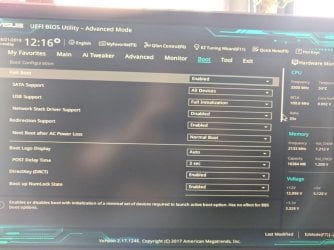
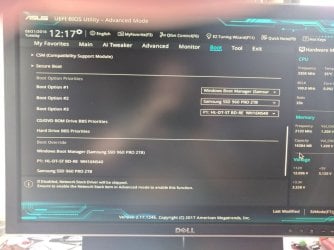
That's the odd thing (or one among them): It's not listed as a drive in the BIOS at all, as far as I can tell. Below are pics of the boot section of the BIOS. I see the Boot Manager on the Samsung Drive, C: on the Samsung Drive, and the optical drive.

BIOS - Boot Menu 1.jpg
BIOS - Boot Menu 2.jpg
The second image is the relevant one, I think. I included the first to show that I have USB BIOS support enabled.


[EDIT]


And, yes, the external drive is connected via USB (3.0).


BTW, I didn't have any USB sticks plugged in when these shots were taken. But, if I had, they would show up in that list.


Also, that external drive is set up in Windows for quick disconnect. So, it doesn't have an "Eject" option when Windows is running.
 

My Computer My Computer

Computer type
PC/Desktop
Computer Manufacturer/Model Number
custom
OS
Windows 7 Home Premium 64bit SP 1 (Version 6.1.7601)
CPU
Intel i7-5820K
Motherboard
ASUS X99-A (BIOS 3505)
Memory
16 GB
Graphics Card(s)
NVidia GeForce GTX 970
Sound Card
MB default (Crystal Sound 2)
Monitor(s) Displays
Dell 2408 WFP
Screen Resolution
1920x1280
Hard Drives
C:
Samsung 960 PRO 2 TB SSD
D:
Crucial M4 512GB SSD
PSU
Thermaltake Toughpower 750 W
I am out of ideas, then.

BTW, I didn't have any USB sticks plugged in when these shots were taken. But, if I had, they would show up in that list.

Likely they are treated as removable drives, but your external mybook is treated as a fixed drive. I don't know why that would cause this issue

Under usb support it says Full Initialization. What are the other options?

I assume you checked the dropdowns for the boot option #1, #2,#3 and the mybook is nowhere to be seen?
 

My Computers My Computers

System One System Two

  • Computer type
    PC/Desktop
    OS
    7 X64
    CPU
    i5 8400
    Motherboard
    gigabyte b365m ds3h
    Memory
    2x8gb 3200mhz
    Hard Drives
    various
    PSU
    pure power 11 400w cm
    Case
    Coolermaster
    Cooling
    cryorig m9i
  • Computer type
    PC/Desktop
    OS
    7x64
    CPU
    g5400
    Motherboard
    ga b365m ds3h
    Memory
    8gb ddr4 2400
    PSU
    xfx pro 450w
Likely they are treated as removable drives, but your external mybook is treated as a fixed drive. I don't know why that would cause this issue
That has been my impression. The external drive shows up next to the C: drive in Windows Explorer. It is not down near any USB sticks I plug in, the optical drive, or the MicroSD card drives.

Under usb support it says Full Initialization. What are the other options?
The three options are Disabled, Partial Initialization, and Full Initialization.

I assume you checked the dropdowns for the boot option #1, #2,#3 and the mybook is nowhere to be seen?

I did and it is not. The three drives shown are the only three available. That is also true if I hit F8 during bootup to get to the boot selection menu.


BTW, this used to work fine. I have had that external drive connected continuously for months and there has been no trouble until now. FWIW, I ran chkdsk on it and no problems showed up.
 

My Computer My Computer

Computer type
PC/Desktop
Computer Manufacturer/Model Number
custom
OS
Windows 7 Home Premium 64bit SP 1 (Version 6.1.7601)
CPU
Intel i7-5820K
Motherboard
ASUS X99-A (BIOS 3505)
Memory
16 GB
Graphics Card(s)
NVidia GeForce GTX 970
Sound Card
MB default (Crystal Sound 2)
Monitor(s) Displays
Dell 2408 WFP
Screen Resolution
1920x1280
Hard Drives
C:
Samsung 960 PRO 2 TB SSD
D:
Crucial M4 512GB SSD
PSU
Thermaltake Toughpower 750 W
:confused:

Any reports of same issue from other owners of that motherboard?
 

My Computers My Computers

System One System Two

  • Computer type
    PC/Desktop
    OS
    7 X64
    CPU
    i5 8400
    Motherboard
    gigabyte b365m ds3h
    Memory
    2x8gb 3200mhz
    Hard Drives
    various
    PSU
    pure power 11 400w cm
    Case
    Coolermaster
    Cooling
    cryorig m9i
  • Computer type
    PC/Desktop
    OS
    7x64
    CPU
    g5400
    Motherboard
    ga b365m ds3h
    Memory
    8gb ddr4 2400
    PSU
    xfx pro 450w
I am seeing some search results of people being unable to boot Windows with an external drive connected. I am going to peruse some of these and I will report back if it looks like they are dealing with the same issue.
 

My Computer My Computer

Computer type
PC/Desktop
Computer Manufacturer/Model Number
custom
OS
Windows 7 Home Premium 64bit SP 1 (Version 6.1.7601)
CPU
Intel i7-5820K
Motherboard
ASUS X99-A (BIOS 3505)
Memory
16 GB
Graphics Card(s)
NVidia GeForce GTX 970
Sound Card
MB default (Crystal Sound 2)
Monitor(s) Displays
Dell 2408 WFP
Screen Resolution
1920x1280
Hard Drives
C:
Samsung 960 PRO 2 TB SSD
D:
Crucial M4 512GB SSD
PSU
Thermaltake Toughpower 750 W
Aha - the plot thickens.
 

My Computers My Computers

System One System Two

  • Computer type
    PC/Desktop
    OS
    7 X64
    CPU
    i5 8400
    Motherboard
    gigabyte b365m ds3h
    Memory
    2x8gb 3200mhz
    Hard Drives
    various
    PSU
    pure power 11 400w cm
    Case
    Coolermaster
    Cooling
    cryorig m9i
  • Computer type
    PC/Desktop
    OS
    7x64
    CPU
    g5400
    Motherboard
    ga b365m ds3h
    Memory
    8gb ddr4 2400
    PSU
    xfx pro 450w
Set:
Fast boot = Disabled
Redirection support = Disabled
Boot option 1 = Windows boot manager (Samsung 960)
Boot option 2 & 3 = disabled.
 

My Computers My Computers

System One System Two

  • Computer type
    PC/Desktop
    Computer Manufacturer/Model Number
    custom build
    OS
    Windows 7 HP 64
    CPU
    i5 6600K - 800MHz to 4200MHz
    Motherboard
    GA-Z170-HD3P
    Memory
    4+4G GSkill DDR4 3000
    Graphics Card(s)
    IG - Intel 530
    Monitor(s) Displays
    Samsung 226BW
    Screen Resolution
    1680x1050
    Hard Drives
    (1) -1 SM951 – 128GB M.2 AHCI PCIe SSD drive for Windows 7 and Lubuntu
    (2) -1 WD SATA 3 - 1T for Data
    (3) -1 WD SATA 3 - 1T for backup
    PSU
    Thermaltake 450W TR2 gold
    Keyboard
    Old and good Chicony mechanical keyboard
    Mouse
    Logitech mX performance - 9 buttons (had to disable some)
    Internet Speed
    500Mb/s
    Browser
    Firefox 64
    Other Info
    TinyWall firewall
  • Computer type
    Laptop
    System Manufacturer/Model Number
    Asus Q550LF
    OS
    Windows 7 Pro
    CPU
    i7-4500U 800MHz to 3.0GHz
    Motherboard
    Asus Q550LF
    Memory
    (4+4)G DDR3 1600
    Graphics Card(s)
    IG intel 4400 + NVIDIA GeForce GT 745M
    Sound Card
    Realtek
    Monitor(s) Displays
    LG Display LP156WF4-SPH1
    Screen Resolution
    1920 x 1080
    Hard Drives
    BX500 120G SSD for Windows and programs +
    1T HDD for data
    Internet Speed
    500 Mb/s
    Browser
    Firefox
    Other Info
    TinyWall firewall
Megahertz07, I tried that and I am getting the same results. Just by disabling Fast Boot, redirection support options go away. I set only the Windows Boot Manager on the 960 as the only boot option, setting the others to disabled. But, the system still seems to be trying to boot from a partial install of Windows somewhere when the external drive is attached before booting.

I know it seems odd, but is it possible that my Windows Boot Manager has gotten a bad entry in it, where it thinks there may be something bootable on the external drive and tries to boot from it when it is attached at boot time? Is there a way to check what the Boot Manager entries are and if they are legit?

SIW2, there are lots of people with a problem similar to mine, it seems. I haven't pinned down any commonality in terms of hardware. It happens with Seagate and WD external drives. People have mentioned ASUS motherboards and HP machines (which I do not think use ASUS MBs). Etc.

One thing that is different is that most people report that they get "not a bootable drive" or "insert bootable media" etc. errors. They don't get a partial Windows boot, then the report that Windows has failed to boot. That's what makes me wonder if my Boot Manager has an entry that is pointing to some other (broken) installation somewhere.
 

My Computer My Computer

Computer type
PC/Desktop
Computer Manufacturer/Model Number
custom
OS
Windows 7 Home Premium 64bit SP 1 (Version 6.1.7601)
CPU
Intel i7-5820K
Motherboard
ASUS X99-A (BIOS 3505)
Memory
16 GB
Graphics Card(s)
NVidia GeForce GTX 970
Sound Card
MB default (Crystal Sound 2)
Monitor(s) Displays
Dell 2408 WFP
Screen Resolution
1920x1280
Hard Drives
C:
Samsung 960 PRO 2 TB SSD
D:
Crucial M4 512GB SSD
PSU
Thermaltake Toughpower 750 W

My Computers My Computers

System One System Two

  • Computer type
    PC/Desktop
    OS
    7 X64
    CPU
    i5 8400
    Motherboard
    gigabyte b365m ds3h
    Memory
    2x8gb 3200mhz
    Hard Drives
    various
    PSU
    pure power 11 400w cm
    Case
    Coolermaster
    Cooling
    cryorig m9i
  • Computer type
    PC/Desktop
    OS
    7x64
    CPU
    g5400
    Motherboard
    ga b365m ds3h
    Memory
    8gb ddr4 2400
    PSU
    xfx pro 450w
Back
Top