

- Local time
- 6:06 PM
- Messages
- 73
I wanted to make a new thread and mark the old one solved with great help from Kaktussoft so that I can continue to fine tune the progress I've made. I will also write up what I did to get this to work so that people can benefit from it...but I want to first get the finishing touches in.
So, in my mad dash to download anything that looked remotely like an AMD AHCI driver, I found the following downloads and really hope to get some clarification...
I've pasted the driver syntax into some pastebins so if someone feels up to the challenge to figure out which one actually did the job.
First, I installed one of the following, 1, 2, 3 and 4...not sure which.
And then, when I rebooted, I checked Device Manager and saw that one of the ATA channels actually called "AMD SATA Controller". I selected it and chose to update drivers and it found something on the internet and upgraded itself again.
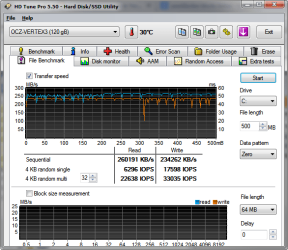
This is great and all, but I expected a nice boost in the performance of my OCZ Vertex 3 (which boasts of 550 MB/s Sequential Read and 520 MB/s Sequential Write). Here's before and after.
Don't get me wrong, I'm glad I managed to get AHCI working post install, but such a small increase tells me something is still wrong. No?
So, in my mad dash to download anything that looked remotely like an AMD AHCI driver, I found the following downloads and really hope to get some clarification...
I've pasted the driver syntax into some pastebins so if someone feels up to the challenge to figure out which one actually did the job.
First, I installed one of the following, 1, 2, 3 and 4...not sure which.
And then, when I rebooted, I checked Device Manager and saw that one of the ATA channels actually called "AMD SATA Controller". I selected it and chose to update drivers and it found something on the internet and upgraded itself again.
This is great and all, but I expected a nice boost in the performance of my OCZ Vertex 3 (which boasts of 550 MB/s Sequential Read and 520 MB/s Sequential Write). Here's before and after.
Don't get me wrong, I'm glad I managed to get AHCI working post install, but such a small increase tells me something is still wrong. No?
Attachments
Last edited:
My Computer
- Computer type
- PC/Desktop
- Computer Manufacturer/Model Number
- Specced Out
- OS
- Win 7 Home Premium x64
- CPU
- AMD Phenom II X4 955 Black Edition Deneb Quad-Core 3.2GHz
- Motherboard
- ASUSTeK Computer INC. M4A77TD
- Memory
- 20GB G.SKILL Ripjaws DDR3 1600 (PC3 12800)
- Graphics Card(s)
- SAPPHIRE Radeon HD 5750 (1GB)
- Sound Card
- Sound Blaster Audigy
- Monitor(s) Displays
- Dual Monitors
- Hard Drives
- 128GB OCZ Vertex 3 SSD
1TB Hitachi HDS721010CLA332
1TB Western Digital WD1001FALS
3TB Toshiba DT01ACA300
3x1TB External Seagate
- PSU
- Corsair TX CMPSU-750TX 750W ATX12V - SLI & Crossfire Ready
- Case
- Cooler Master Elite 310 ATX


