PS3 can no longer obtain IP from my PC

ride1099

New member
Local time
2:11 AM
Messages
14
I'm been running my PS3's internet connection through my PC via my iPhone. Basically my phone (using MyWi) is tethered to my PC, which is connected to my PS3 via an ethernet cable. This has been working great actually, and I've even been playing online for weeks with no issues or lag. But all of a sudden my PS3 can't connect to the internet via the PC anymore. My computer gets internet from my phone just fine, but it's not getting to my PS3 anymore.

I've checked my settings in my Network and Sharing Center (windows 7) and everything looks good, the connection is being shared and all that. I've tried restarting my computer/phone/PS3 several times with no luck. What could it be? It just keeps timing out when searching for an IP address.

Any help would be appreciated.
 

My Computer My Computer

At a glance

Windows 7 64-bitAMD Athion II X2 215 dual core processor4gb DDR2 RAMNVIDIA GeForce G210 512MB
Computer type
PC/Desktop
Computer Manufacturer/Model Number
Acer
OS
Windows 7 64-bit
CPU
AMD Athion II X2 215 dual core processor
Memory
4gb DDR2 RAM
Graphics Card(s)
NVIDIA GeForce G210 512MB
Monitor(s) Displays
Panasonic 50" Plasma HDTV
Screen Resolution
1920 x 1080
Hard Drives
Seagate 2TB (internal)
WD 2TB (external)
Antivirus
NOD32
Browser
Firefox/Chrome
165 views and nobody has any ideas?
 

My Computer My Computer

At a glance

Windows 7 64-bitAMD Athion II X2 215 dual core processor4gb DDR2 RAMNVIDIA GeForce G210 512MB
Computer type
PC/Desktop
Computer Manufacturer/Model Number
Acer
OS
Windows 7 64-bit
CPU
AMD Athion II X2 215 dual core processor
Memory
4gb DDR2 RAM
Graphics Card(s)
NVIDIA GeForce G210 512MB
Monitor(s) Displays
Panasonic 50" Plasma HDTV
Screen Resolution
1920 x 1080
Hard Drives
Seagate 2TB (internal)
WD 2TB (external)
Antivirus
NOD32
Browser
Firefox/Chrome
Have tried statically assigning an IP address to the PS3? What is currently acting as the router? I am not familiar with this kind of setup

Josh
 

My Computer My Computer

At a glance

Windows 7 Professional x64 SP1 ; Windows Serv...Intel Core i5 2400 @ 3.10GHz8.0GB DDR3 @ 665MHz (2GBx4)AMD Radeon HD 6870
Computer type
PC/Desktop
Computer Manufacturer/Model Number
Custom Built
OS
Windows 7 Professional x64 SP1 ; Windows Server 2012 R2 Standard
CPU
Intel Core i5 2400 @ 3.10GHz
Motherboard
Foxconn H67MP-S/-V/H67MP
Memory
8.0GB DDR3 @ 665MHz (2GBx4)
Graphics Card(s)
AMD Radeon HD 6870
Sound Card
Realtek High Definition Audio
Monitor(s) Displays
AOC 2243W & SMB1930NW
Screen Resolution
1440x900 & 1920x1080
Hard Drives
977GB Seagate ST31000524AS ATA Drive (SATA)
250GB WD iSCSI attached Drive
PSU
750W Gaming PSU
Case
Novatech Night
Cooling
Fan
Keyboard
Dell Standard PS/2 Keyboard
Mouse
R.A.T 07 Gaming Mouse
Internet Speed
Download: 10 Mbps Ping: 30ms Upload: 0.81 Mbps
Browser
Google Chrome
Other Info
Optiarc DVD RW AD-5260S ATA Device
There is no router involved currently, here is the path:

iPhone 4S (MyWi app) --> PC (via standard iPhone USB) --> PS3 (via ethernet cable)

As I said before, this was working perfectly for weeks and just stopped. I figured it was because I restarted my computer and maybe an update had changed something behind the scenes. So I restored the system back a few days before the issue started, but no luck with that either. I still can't get the PS3 to obtain an IP. I can however get the PS3 to connect the the phone wirelessly (which is not preferred) so clearly there is a communication breakdown between the PC and the PS3 since the internet is working fine on the PC end.

I have read elsewhere that other people (who are using MyWi for their PS3) have used a router in between their PC and the PS3 for this type of setup. Could that help? I have a Belkan N router sitting around I could try. But I'm at a loss as to why this initial setup worked so well at one time but won't anymore...

EDIT: to answer your question I haven't tried setting a static IP either, but honestly I'm not even sure how. My network knowledge is very limited.
 

My Computer My Computer

At a glance

Windows 7 64-bitAMD Athion II X2 215 dual core processor4gb DDR2 RAMNVIDIA GeForce G210 512MB
Computer type
PC/Desktop
Computer Manufacturer/Model Number
Acer
OS
Windows 7 64-bit
CPU
AMD Athion II X2 215 dual core processor
Memory
4gb DDR2 RAM
Graphics Card(s)
NVIDIA GeForce G210 512MB
Monitor(s) Displays
Panasonic 50" Plasma HDTV
Screen Resolution
1920 x 1080
Hard Drives
Seagate 2TB (internal)
WD 2TB (external)
Antivirus
NOD32
Browser
Firefox/Chrome
With the phone connected to the PC and acting as the 'router' to your setup could you follow this tutorial so I can see your IP configuration. From this I could suggest a possible static ip address to use on the PS3 to see if it works

   Note
Do not worry about the file at the bottom just upload a screenshot of the ipconfig


http://www.sevenforums.com/network-sharing/144365-network-posting-tips.html

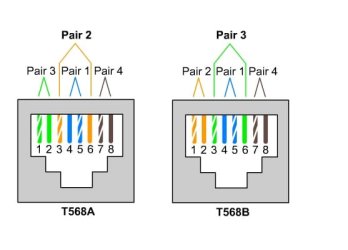
May I also ask, what type of cable are you using to connect your PC to the PS3? This will need to be a crossover cable. If you have changed cable then this would most likely be the cause of your problem

Josh
 

My Computer My Computer

At a glance

Windows 7 Professional x64 SP1 ; Windows Serv...Intel Core i5 2400 @ 3.10GHz8.0GB DDR3 @ 665MHz (2GBx4)AMD Radeon HD 6870
Computer type
PC/Desktop
Computer Manufacturer/Model Number
Custom Built
OS
Windows 7 Professional x64 SP1 ; Windows Server 2012 R2 Standard
CPU
Intel Core i5 2400 @ 3.10GHz
Motherboard
Foxconn H67MP-S/-V/H67MP
Memory
8.0GB DDR3 @ 665MHz (2GBx4)
Graphics Card(s)
AMD Radeon HD 6870
Sound Card
Realtek High Definition Audio
Monitor(s) Displays
AOC 2243W & SMB1930NW
Screen Resolution
1440x900 & 1920x1080
Hard Drives
977GB Seagate ST31000524AS ATA Drive (SATA)
250GB WD iSCSI attached Drive
PSU
750W Gaming PSU
Case
Novatech Night
Cooling
Fan
Keyboard
Dell Standard PS/2 Keyboard
Mouse
R.A.T 07 Gaming Mouse
Internet Speed
Download: 10 Mbps Ping: 30ms Upload: 0.81 Mbps
Browser
Google Chrome
Other Info
Optiarc DVD RW AD-5260S ATA Device
Thanks Josh, I'll get a screenshot of the IP config this afternoon.

I'm not sure specifically what type of ethernet cable I'm using. I've tried three different cables that I had at home. I'm not sure how to visually tell the difference between a regular old ethernet cable and a crossover, is there a way to tell them apart?
 

My Computer My Computer

At a glance

Windows 7 64-bitAMD Athion II X2 215 dual core processor4gb DDR2 RAMNVIDIA GeForce G210 512MB
Computer type
PC/Desktop
Computer Manufacturer/Model Number
Acer
OS
Windows 7 64-bit
CPU
AMD Athion II X2 215 dual core processor
Memory
4gb DDR2 RAM
Graphics Card(s)
NVIDIA GeForce G210 512MB
Monitor(s) Displays
Panasonic 50" Plasma HDTV
Screen Resolution
1920 x 1080
Hard Drives
Seagate 2TB (internal)
WD 2TB (external)
Antivirus
NOD32
Browser
Firefox/Chrome
At the end of the cable you should see 8 small wires each with a colour. A crossover cable with have a different order of colours on each end whereas a straight through (normal) will have the same arrangement on both ends

cable.jpg

Post the screenshot whenever you can and we will do our best to help

Josh! :)
 

My Computer My Computer

At a glance

Windows 7 Professional x64 SP1 ; Windows Serv...Intel Core i5 2400 @ 3.10GHz8.0GB DDR3 @ 665MHz (2GBx4)AMD Radeon HD 6870
Computer type
PC/Desktop
Computer Manufacturer/Model Number
Custom Built
OS
Windows 7 Professional x64 SP1 ; Windows Server 2012 R2 Standard
CPU
Intel Core i5 2400 @ 3.10GHz
Motherboard
Foxconn H67MP-S/-V/H67MP
Memory
8.0GB DDR3 @ 665MHz (2GBx4)
Graphics Card(s)
AMD Radeon HD 6870
Sound Card
Realtek High Definition Audio
Monitor(s) Displays
AOC 2243W & SMB1930NW
Screen Resolution
1440x900 & 1920x1080
Hard Drives
977GB Seagate ST31000524AS ATA Drive (SATA)
250GB WD iSCSI attached Drive
PSU
750W Gaming PSU
Case
Novatech Night
Cooling
Fan
Keyboard
Dell Standard PS/2 Keyboard
Mouse
R.A.T 07 Gaming Mouse
Internet Speed
Download: 10 Mbps Ping: 30ms Upload: 0.81 Mbps
Browser
Google Chrome
Other Info
Optiarc DVD RW AD-5260S ATA Device
You need to tell it to stop trying to look for WiFi and to chose Ethernet connection in the PS3's Network settings before it will actually detect and use the Ethernet connection (consult your user manual, it should tell you exactly how to navigate the PS3 settings to switch it off of WiFi and onto the physical Ethernet mode). If that fails, then it is very likely that the Ethernet port on the PS3 and/or the modem(router) is dead. You might even just need to unplug the power cord to the modem/router itself, wait 30 seconds and plug it back in (to clear its cache and reboot it. They often get jammed; this fixes that).

Now, to use a PS3 on WiFi for either network gaming or also to stream HD Netflix video through it over WiFi, you would actually need a WLAN router capable of this load. One such as a WNDR37AV or better. However, a special WLAN AV router is NOT necessary IF you opt for a physical LAN Cat5e connection directly between the PS3 and the modem/router that supports Gigabit Ethernet (also why you need the Cat5e cord to actually get those full 1,000mbps or Gigabit speeds). LAN is faster and less work on the modem/router than WLAN is, always been that and I don't see that changing anytime soon. This is why you can get away with some AV load on a standard router on LAN but usually not so much on WLAN (just FYI). You should NOT have to mess with any settings on the PC or the modem/router, it should pick it right up and work automatically (after you change your PS3 network settings as already stated).

What you have been forcing a phone to do, it was never meant to do. They're not even meant to serve as a basic LAN-access point like a modem, let alone to try and handle streaming AV content while playing 'router'. Most basic LAN-access only modems and routers cannot handle that (which is why so many people are forced to pay between $100-170 on a special WLAN AV router that actually is capable of handling this load and without burning itself up in the process, if they're dead-set on WiFi despite that added cost to get it).

I speak from plenty of personal experience here. I have been the sole network administrator in my household for twelve years. Once we started all of these AV activities on WiFi about three years ago (PS3, DB-Player, multiple wireless computer systems etc), even our Verizon fiOs M1424WR router couldn't handle it all AND the three STB's it also was feeding (and that's not just a basic one either, to give you an idea. Its actually the best ISP-issued router you can get. But still not enough for heavy AV streaming).
 

My Computer My Computer

At a glance

7 Ultimate SP1 x64AMD FX-8350 4.0GHz8GB Corsair Vengeance LP DDR3 1600EVGA GTX760 SC 2GB GDDR5
Computer type
PC/Desktop
Computer Manufacturer/Model Number
Custom [03/21/2014]
OS
7 Ultimate SP1 x64
CPU
AMD FX-8350 4.0GHz
Motherboard
Asus M5A99FX Pro R2.0
Memory
8GB Corsair Vengeance LP DDR3 1600
Graphics Card(s)
EVGA GTX760 SC 2GB GDDR5
Sound Card
Realtek ALC892
Monitor(s) Displays
23" Syncmaster P2370HD
Screen Resolution
1920 x 1080
Hard Drives
Scorpio Black WD1003FZEX 1TB
PSU
Corsair RM 750W
Case
Gigabyte Sumo Omega
Cooling
Noctua NH-D14 | 6 120mm case.
Keyboard
Tt eSPORTS Poesidon Z - Blue Switch
Mouse
Logitech M510
Internet Speed
FiOS 100/100
Antivirus
MBAM
Browser
WaterFox & Chrome
Other Info
NETWORKING:
FiOS G1100 (v1.03)
Netgear WNDR37AV
Actiontec MI424WR (Rev. I)
PRINTER:
Canon MX340
Thanks for the intel Magnus.

I was able to get a hold of a proper crossover cable but unfortunately it made no difference, the PS3 still can't get an IP before it times out. Anyway here is what I pulled up on the command prompt:

prompt1_zpsa85f7c81.jpg


prompt2_zps0af2900b.jpg
 

My Computer My Computer

At a glance

Windows 7 64-bitAMD Athion II X2 215 dual core processor4gb DDR2 RAMNVIDIA GeForce G210 512MB
Computer type
PC/Desktop
Computer Manufacturer/Model Number
Acer
OS
Windows 7 64-bit
CPU
AMD Athion II X2 215 dual core processor
Memory
4gb DDR2 RAM
Graphics Card(s)
NVIDIA GeForce G210 512MB
Monitor(s) Displays
Panasonic 50" Plasma HDTV
Screen Resolution
1920 x 1080
Hard Drives
Seagate 2TB (internal)
WD 2TB (external)
Antivirus
NOD32
Browser
Firefox/Chrome
Can you please enter the following static IP address into the PS3 by selecting Custom rather than Quick if I remember correctly

IP Address: 192.168.20.30
Subnet Mask: 255.255.255.0
Default Gateway/Router: 192.168.20.1

DNS Server: 8.8.8.8
2nd DNS server (If asked): 8.8.4.4

After entering those ip address settings please test your connection and report back! :)

Hope This Helps,
Josh! :)
 

My Computer My Computer

At a glance

Windows 7 Professional x64 SP1 ; Windows Serv...Intel Core i5 2400 @ 3.10GHz8.0GB DDR3 @ 665MHz (2GBx4)AMD Radeon HD 6870
Computer type
PC/Desktop
Computer Manufacturer/Model Number
Custom Built
OS
Windows 7 Professional x64 SP1 ; Windows Server 2012 R2 Standard
CPU
Intel Core i5 2400 @ 3.10GHz
Motherboard
Foxconn H67MP-S/-V/H67MP
Memory
8.0GB DDR3 @ 665MHz (2GBx4)
Graphics Card(s)
AMD Radeon HD 6870
Sound Card
Realtek High Definition Audio
Monitor(s) Displays
AOC 2243W & SMB1930NW
Screen Resolution
1440x900 & 1920x1080
Hard Drives
977GB Seagate ST31000524AS ATA Drive (SATA)
250GB WD iSCSI attached Drive
PSU
750W Gaming PSU
Case
Novatech Night
Cooling
Fan
Keyboard
Dell Standard PS/2 Keyboard
Mouse
R.A.T 07 Gaming Mouse
Internet Speed
Download: 10 Mbps Ping: 30ms Upload: 0.81 Mbps
Browser
Google Chrome
Other Info
Optiarc DVD RW AD-5260S ATA Device
Alright Josh, we're making progress. I was able to obtain an IP, but it failed to connect to the internet. Here is a picture of my settings:

photo3_zps9779d527.jpg


And here is the result:

photo1_zps7cee6e63.jpg


Apparently a DNS error. I'm not sure if it helps but here are the other options it gives me during setup. My current setting is in bold:

MTU
-auto
-manual

PROXY SERVER
-do not use
-use

UPnP
-enable
-disable
 

My Computer My Computer

At a glance

Windows 7 64-bitAMD Athion II X2 215 dual core processor4gb DDR2 RAMNVIDIA GeForce G210 512MB
Computer type
PC/Desktop
Computer Manufacturer/Model Number
Acer
OS
Windows 7 64-bit
CPU
AMD Athion II X2 215 dual core processor
Memory
4gb DDR2 RAM
Graphics Card(s)
NVIDIA GeForce G210 512MB
Monitor(s) Displays
Panasonic 50" Plasma HDTV
Screen Resolution
1920 x 1080
Hard Drives
Seagate 2TB (internal)
WD 2TB (external)
Antivirus
NOD32
Browser
Firefox/Chrome
https://support.us.playstation.com/...shoot-wired-network-connection-problem-on-ps3

"If you are experiencing problems with a wired (Ethernet) network connection on the PS3, try these troubleshooting options:

[#1]

Turn off (unplug) ALL of your network devices and equipment making sure all lights on the modems has turned off, including any wireless access points, routers, Voice Over IP (VOIP) modems, and broadband modems for two (2) full minutes. Certain VOIP modems (where your telephone is connected to your modem) may have a battery installed. You will need to remove the battery in order for the modem to be completely turned off. Check with your VoiP provider before removing the back-up battery."

Have you attempted this (or any of PlayStation's support suggestions) yet?

Edit; this may also be helpful: http://faq.en.playstation.com/app/answers/detail/a_id/856/~/what-does-ps3-error-80710102-mean?
 

My Computer My Computer

At a glance

7 Ultimate SP1 x64AMD FX-8350 4.0GHz8GB Corsair Vengeance LP DDR3 1600EVGA GTX760 SC 2GB GDDR5
Computer type
PC/Desktop
Computer Manufacturer/Model Number
Custom [03/21/2014]
OS
7 Ultimate SP1 x64
CPU
AMD FX-8350 4.0GHz
Motherboard
Asus M5A99FX Pro R2.0
Memory
8GB Corsair Vengeance LP DDR3 1600
Graphics Card(s)
EVGA GTX760 SC 2GB GDDR5
Sound Card
Realtek ALC892
Monitor(s) Displays
23" Syncmaster P2370HD
Screen Resolution
1920 x 1080
Hard Drives
Scorpio Black WD1003FZEX 1TB
PSU
Corsair RM 750W
Case
Gigabyte Sumo Omega
Cooling
Noctua NH-D14 | 6 120mm case.
Keyboard
Tt eSPORTS Poesidon Z - Blue Switch
Mouse
Logitech M510
Internet Speed
FiOS 100/100
Antivirus
MBAM
Browser
WaterFox & Chrome
Other Info
NETWORKING:
FiOS G1100 (v1.03)
Netgear WNDR37AV
Actiontec MI424WR (Rev. I)
PRINTER:
Canon MX340
Alright Josh, we're making progress. I was able to obtain an IP, but it failed to connect to the internet. Here is a picture of my settings:

photo3_zps9779d527.jpg


And here is the result:

photo1_zps7cee6e63.jpg


Apparently a DNS error. I'm not sure if it helps but here are the other options it gives me during setup. My current setting is in bold:

MTU
-auto
-manual

PROXY SERVER
-do not use
-use

UPnP
-enable
-disable

This looks like a problem with the connection itself rather than a setting on your PS3

Could you go to a command prompt on your Computer and type the following:

Code:
ping www.google.co.uk

Please post back your results

Many thanks,
Josh! :)
 

My Computer My Computer

At a glance

Windows 7 Professional x64 SP1 ; Windows Serv...Intel Core i5 2400 @ 3.10GHz8.0GB DDR3 @ 665MHz (2GBx4)AMD Radeon HD 6870
Computer type
PC/Desktop
Computer Manufacturer/Model Number
Custom Built
OS
Windows 7 Professional x64 SP1 ; Windows Server 2012 R2 Standard
CPU
Intel Core i5 2400 @ 3.10GHz
Motherboard
Foxconn H67MP-S/-V/H67MP
Memory
8.0GB DDR3 @ 665MHz (2GBx4)
Graphics Card(s)
AMD Radeon HD 6870
Sound Card
Realtek High Definition Audio
Monitor(s) Displays
AOC 2243W & SMB1930NW
Screen Resolution
1440x900 & 1920x1080
Hard Drives
977GB Seagate ST31000524AS ATA Drive (SATA)
250GB WD iSCSI attached Drive
PSU
750W Gaming PSU
Case
Novatech Night
Cooling
Fan
Keyboard
Dell Standard PS/2 Keyboard
Mouse
R.A.T 07 Gaming Mouse
Internet Speed
Download: 10 Mbps Ping: 30ms Upload: 0.81 Mbps
Browser
Google Chrome
Other Info
Optiarc DVD RW AD-5260S ATA Device
Here is what I get when pinging google.co.uk

GoogleUKping_zps51b46af1.jpg
 

My Computer My Computer

At a glance

Windows 7 64-bitAMD Athion II X2 215 dual core processor4gb DDR2 RAMNVIDIA GeForce G210 512MB
Computer type
PC/Desktop
Computer Manufacturer/Model Number
Acer
OS
Windows 7 64-bit
CPU
AMD Athion II X2 215 dual core processor
Memory
4gb DDR2 RAM
Graphics Card(s)
NVIDIA GeForce G210 512MB
Monitor(s) Displays
Panasonic 50" Plasma HDTV
Screen Resolution
1920 x 1080
Hard Drives
Seagate 2TB (internal)
WD 2TB (external)
Antivirus
NOD32
Browser
Firefox/Chrome
But Shadowjk... That will put his ps3 on the same network as the iphone and that's wrong.

IPHONE->PC 192.168.20.0 (NETWORK 1)
PC->192.168.137.0 (NETWORK 2)

A correct IP configuration would be:
IP Address: 192.168.137.20
Subnet Mask: 255.255.255.0
Default Gateway/Router: 192.168.137.1

DNS Server: 8.8.8.8
2nd DNS server (If asked): 8.8.4.4

You can also try to reshare the connection.
 

My Computer My Computer

At a glance

Windows 7 Professional 64bitIntel core i7 950 stock6x2GB corsair @ 1600 MhzNvidia GeForce GTX 460 1GB
Computer type
PC/Desktop
Computer Manufacturer/Model Number
Custom build
OS
Windows 7 Professional 64bit
CPU
Intel core i7 950 stock
Motherboard
AsRock x58 Extreme 3
Memory
6x2GB corsair @ 1600 Mhz
Graphics Card(s)
Nvidia GeForce GTX 460 1GB
Sound Card
Integrated VIA chip
Monitor(s) Displays
BenQ G2420HDB
Screen Resolution
1920x1080
Hard Drives
Corsair Force F60 SSD (C:)
WD black 750GB & Segate Baracuda 1TB (Raid 0)
PSU
Corsair VX 550W
Case
Cooler Master Haf X
Cooling
Corsair H100
Keyboard
Microsoft Sidewinder X4
Mouse
Razer Deathadder
Internet Speed
20 Down 2 Up ADSL Telia
Antivirus
Microsoft security essentials
Browser
Firefox
That is true, my apologies for the mistake I was getting mixed up with the topology.

Please try the above IP address configuration and then test the connection

While in theory it should work it may not work since the PC is acting as a router in this setup and I am not sure if Windows is able to complete such task however please try and post back

Josh :)
 

My Computer My Computer

At a glance

Windows 7 Professional x64 SP1 ; Windows Serv...Intel Core i5 2400 @ 3.10GHz8.0GB DDR3 @ 665MHz (2GBx4)AMD Radeon HD 6870
Computer type
PC/Desktop
Computer Manufacturer/Model Number
Custom Built
OS
Windows 7 Professional x64 SP1 ; Windows Server 2012 R2 Standard
CPU
Intel Core i5 2400 @ 3.10GHz
Motherboard
Foxconn H67MP-S/-V/H67MP
Memory
8.0GB DDR3 @ 665MHz (2GBx4)
Graphics Card(s)
AMD Radeon HD 6870
Sound Card
Realtek High Definition Audio
Monitor(s) Displays
AOC 2243W & SMB1930NW
Screen Resolution
1440x900 & 1920x1080
Hard Drives
977GB Seagate ST31000524AS ATA Drive (SATA)
250GB WD iSCSI attached Drive
PSU
750W Gaming PSU
Case
Novatech Night
Cooling
Fan
Keyboard
Dell Standard PS/2 Keyboard
Mouse
R.A.T 07 Gaming Mouse
Internet Speed
Download: 10 Mbps Ping: 30ms Upload: 0.81 Mbps
Browser
Google Chrome
Other Info
Optiarc DVD RW AD-5260S ATA Device
Well I tried switching to tomerello's suggested inputs but I got the same result :/
 

My Computer My Computer

At a glance

Windows 7 64-bitAMD Athion II X2 215 dual core processor4gb DDR2 RAMNVIDIA GeForce G210 512MB
Computer type
PC/Desktop
Computer Manufacturer/Model Number
Acer
OS
Windows 7 64-bit
CPU
AMD Athion II X2 215 dual core processor
Memory
4gb DDR2 RAM
Graphics Card(s)
NVIDIA GeForce G210 512MB
Monitor(s) Displays
Panasonic 50" Plasma HDTV
Screen Resolution
1920 x 1080
Hard Drives
Seagate 2TB (internal)
WD 2TB (external)
Antivirus
NOD32
Browser
Firefox/Chrome
Can you go to a command prompt on your PC with the PS3 connected and the phone and then type the following and post back your results if you can:

Code:
route print

This must be typed exactly including any spaces

You may need additional software to route your two connections to the phone

Many Thanks,
Josh :)
 

My Computer My Computer

At a glance

Windows 7 Professional x64 SP1 ; Windows Serv...Intel Core i5 2400 @ 3.10GHz8.0GB DDR3 @ 665MHz (2GBx4)AMD Radeon HD 6870
Computer type
PC/Desktop
Computer Manufacturer/Model Number
Custom Built
OS
Windows 7 Professional x64 SP1 ; Windows Server 2012 R2 Standard
CPU
Intel Core i5 2400 @ 3.10GHz
Motherboard
Foxconn H67MP-S/-V/H67MP
Memory
8.0GB DDR3 @ 665MHz (2GBx4)
Graphics Card(s)
AMD Radeon HD 6870
Sound Card
Realtek High Definition Audio
Monitor(s) Displays
AOC 2243W & SMB1930NW
Screen Resolution
1440x900 & 1920x1080
Hard Drives
977GB Seagate ST31000524AS ATA Drive (SATA)
250GB WD iSCSI attached Drive
PSU
750W Gaming PSU
Case
Novatech Night
Cooling
Fan
Keyboard
Dell Standard PS/2 Keyboard
Mouse
R.A.T 07 Gaming Mouse
Internet Speed
Download: 10 Mbps Ping: 30ms Upload: 0.81 Mbps
Browser
Google Chrome
Other Info
Optiarc DVD RW AD-5260S ATA Device
Back
Top