Psp images

twilightdelight

New member
Local time
9:28 PM
Messages
19
Location
Luton, England
I have windows 7 / 64 bit

I have psp x paintshop pro x

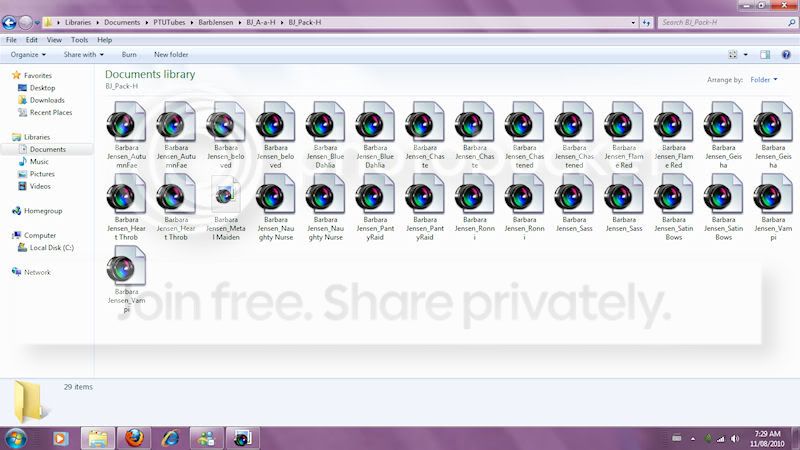
I am having problems with pspimages in my folders they show thumbnails but they don't show a picture

I managed to to view PSD files and PNG files but not PSP IMAGE files

HERE IS A SCREEN SHOT OF WHAT I SEE,
i was able to see them before and now i can't it is doing my head in now as i can only see them when i open them in paint shop.

1eb5gp.jpg
 

My Computer

Computer Manufacturer/Model Number
Hewlett packard/ HP pailion dv6 notebook PC
OS
windows 7 / 64 BIT
CPU
AMD athlon(tm)II Daul Core M320/2.10 GHz
Memory
4.00gb
Monitor(s) Displays
laptop
Keyboard
no keyboard
Mouse
saltek opitcal
Internet Speed
moblie broadband
Post a PSP image here and i will see if I can fix the problem.
BTW Your timezone in your specs shows the US. I thought Luton was in Bedfordshire ;). Well it was when i lived there!
 

My Computer

Computer type
PC/Desktop
OS
Microsoft Windows 7 Home Premium 64-bit 7601 Multiprocessor Free Service Pack 1
CPU
Intel(R) Core(TM) i7-3770 CPU @ 3.40GHz
Motherboard
ASUSTeK COMPUTER INC. P8H77-M
Memory
8.00 GB
Graphics Card(s)
Intel(R) HD Graphics 4000
Sound Card
On Board
Monitor(s) Displays
Dell 24"
Screen Resolution
1920 x 1080
Hard Drives
(1) INTEL SSDSC2CT180A3 ATA Device (2) ST500DM002-1BD142 ATA Device (3) WDC WD3200AAKS-75L9A0 ATA Device (4) Generic- Compact Flash USB Device (5) Generic- MS/MS-Pro USB Device (6) Generic- SD/MMC USB Device (7) Generic- SM/xD-Picture USB
PSU
500w Corsair
Case
Cooler Master
Cooling
3 Fans
Keyboard
Logitech MK300
Mouse
Logitech WOM
Internet Speed
75Mb
Antivirus
Norton 360
Browser
Firefox, Opera, IE
i can't up load them to post one here

didn't look to see what the time was set to i will go change it now
 

My Computer

Computer Manufacturer/Model Number
Hewlett packard/ HP pailion dv6 notebook PC
OS
windows 7 / 64 BIT
CPU
AMD athlon(tm)II Daul Core M320/2.10 GHz
Memory
4.00gb
Monitor(s) Displays
laptop
Keyboard
no keyboard
Mouse
saltek opitcal
Internet Speed
moblie broadband
Right click on one of your photos and open with something else that will give you the picture you want to view.
 

My Computer

Computer Manufacturer/Model Number
HP M9077c
OS
Windows 7 Home Premium 64bit
CPU
Intel(R)Core(TM)2 quad [email protected] 2.39GHz
Motherboard
ASUSeK
Memory
6GB DDR2 6400
Graphics Card(s)
GeForce 8500/512MB
Sound Card
Realtek High Def Audio
Monitor(s) Displays
HP w2408 LCD 24" widescreen
Screen Resolution
1920x1200
Cooling
6 pack of Bud
Keyboard
MS wireless Inteli
Mouse
MS wireless Inteli
Right click on one of your photos and open with something else that will give you the picture you want to view.
I think the OP means he wants to see a thumbnail view like the other files shown in the screenshot. The fefault viewer for a PSP file should be Paint Shop.
 

My Computer

Computer type
PC/Desktop
OS
Microsoft Windows 7 Home Premium 64-bit 7601 Multiprocessor Free Service Pack 1
CPU
Intel(R) Core(TM) i7-3770 CPU @ 3.40GHz
Motherboard
ASUSTeK COMPUTER INC. P8H77-M
Memory
8.00 GB
Graphics Card(s)
Intel(R) HD Graphics 4000
Sound Card
On Board
Monitor(s) Displays
Dell 24"
Screen Resolution
1920 x 1080
Hard Drives
(1) INTEL SSDSC2CT180A3 ATA Device (2) ST500DM002-1BD142 ATA Device (3) WDC WD3200AAKS-75L9A0 ATA Device (4) Generic- Compact Flash USB Device (5) Generic- MS/MS-Pro USB Device (6) Generic- SD/MMC USB Device (7) Generic- SM/xD-Picture USB
PSU
500w Corsair
Case
Cooler Master
Cooling
3 Fans
Keyboard
Logitech MK300
Mouse
Logitech WOM
Internet Speed
75Mb
Antivirus
Norton 360
Browser
Firefox, Opera, IE
If my post above is correct and that is what ou want I have found the foloowing possible solution:
This might be an issue with the icon cache on the computer; I would suggest that you rebuild the icon cache which might fix the issue.
Rebuilding the Icon Cache Database
1. Close all folder windows that are currently open.
2. Launch Task Manager using the CTRL+SHIFT+ESC key sequence, or by running taskmgr.exe.
3. In the Process tab, right-click on the Explorer.exe process and select End Process.
4. Click the End process button when asked for confirmation.
5. From the File menu of Task Manager, select New Task (Run…)
6. Type CMD.EXE, and click OK
7. In the Command Prompt window, type the commands one by one and press ENTER after each command:
CD /d %userprofile%\AppData\Local
DEL IconCache.db /a
EXIT
8. In Task Manager, click File, select New Task (Run…)
9. Type EXPLORER.EXE, and click OK.

Haven't tried it but it makes sens and just might solve your problem!
Let us know how you get on.
 

My Computer

Computer type
PC/Desktop
OS
Microsoft Windows 7 Home Premium 64-bit 7601 Multiprocessor Free Service Pack 1
CPU
Intel(R) Core(TM) i7-3770 CPU @ 3.40GHz
Motherboard
ASUSTeK COMPUTER INC. P8H77-M
Memory
8.00 GB
Graphics Card(s)
Intel(R) HD Graphics 4000
Sound Card
On Board
Monitor(s) Displays
Dell 24"
Screen Resolution
1920 x 1080
Hard Drives
(1) INTEL SSDSC2CT180A3 ATA Device (2) ST500DM002-1BD142 ATA Device (3) WDC WD3200AAKS-75L9A0 ATA Device (4) Generic- Compact Flash USB Device (5) Generic- MS/MS-Pro USB Device (6) Generic- SD/MMC USB Device (7) Generic- SM/xD-Picture USB
PSU
500w Corsair
Case
Cooler Master
Cooling
3 Fans
Keyboard
Logitech MK300
Mouse
Logitech WOM
Internet Speed
75Mb
Antivirus
Norton 360
Browser
Firefox, Opera, IE
Hi ya

I'm sorry not very good with trying to explain what i mean, not very good with doing some things on my laptop, having enough trouble trying to find out all my system specs don't no where to look for everything,,,,,,,,,,,sorry again

I can open with paintshop prox and 9 but i can't view them in my windows floder that i keep them in i can only view them all if i open paintshop,

I get what to do up until i get to this step, what is the command prompt window,

7. In the Command Prompt window, type the commands one by one and press ENTER after each command:
CD /d %userprofile%\AppData\Local
DEL IconCache.db /a
EXIT
 

My Computer

Computer Manufacturer/Model Number
Hewlett packard/ HP pailion dv6 notebook PC
OS
windows 7 / 64 BIT
CPU
AMD athlon(tm)II Daul Core M320/2.10 GHz
Memory
4.00gb
Monitor(s) Displays
laptop
Keyboard
no keyboard
Mouse
saltek opitcal
Internet Speed
moblie broadband
Hi Anita
Nice to have you back in the UK ;)
When you click the File menu of Task Manager, select New Task (Run…)
Type CMD.EXE, and click OK
Then a window with a black screen will open and you type the given line at the flashing curser and press Enter. The do the same with the second line.
Then complete the rest of the guide.
BTW I have just downloaded the Trial version of Corel Photoshop Pro x3. I have created a PSP file and that shows a thumbnail OK.
You might find it easier to re-install the program!
 

My Computer

Computer type
PC/Desktop
OS
Microsoft Windows 7 Home Premium 64-bit 7601 Multiprocessor Free Service Pack 1
CPU
Intel(R) Core(TM) i7-3770 CPU @ 3.40GHz
Motherboard
ASUSTeK COMPUTER INC. P8H77-M
Memory
8.00 GB
Graphics Card(s)
Intel(R) HD Graphics 4000
Sound Card
On Board
Monitor(s) Displays
Dell 24"
Screen Resolution
1920 x 1080
Hard Drives
(1) INTEL SSDSC2CT180A3 ATA Device (2) ST500DM002-1BD142 ATA Device (3) WDC WD3200AAKS-75L9A0 ATA Device (4) Generic- Compact Flash USB Device (5) Generic- MS/MS-Pro USB Device (6) Generic- SD/MMC USB Device (7) Generic- SM/xD-Picture USB
PSU
500w Corsair
Case
Cooler Master
Cooling
3 Fans
Keyboard
Logitech MK300
Mouse
Logitech WOM
Internet Speed
75Mb
Antivirus
Norton 360
Browser
Firefox, Opera, IE
well that command prompt is very confussing as i don't no what i am meant to put in there is it just step 7 that i have to put in, but i'm having problems trying to type in after the cursor where is flashes, it won't let me type anything in

I have uninstalled and reinstalled paintshop pro x loads of times trying to sort this out and it don't make any diffence at all.......

thanks for all your help, yeah it is nice to be back in the uk
 

My Computer

Computer Manufacturer/Model Number
Hewlett packard/ HP pailion dv6 notebook PC
OS
windows 7 / 64 BIT
CPU
AMD athlon(tm)II Daul Core M320/2.10 GHz
Memory
4.00gb
Monitor(s) Displays
laptop
Keyboard
no keyboard
Mouse
saltek opitcal
Internet Speed
moblie broadband
Am shutting down for the evening now, I hear the call of the whisky bottle! Will be back tomorrow later in the morning. Do you use Skype? If so I can help you via that if you wish My Skype Name is Mitchell70 if you wish to contact me.
 

My Computer

Computer type
PC/Desktop
OS
Microsoft Windows 7 Home Premium 64-bit 7601 Multiprocessor Free Service Pack 1
CPU
Intel(R) Core(TM) i7-3770 CPU @ 3.40GHz
Motherboard
ASUSTeK COMPUTER INC. P8H77-M
Memory
8.00 GB
Graphics Card(s)
Intel(R) HD Graphics 4000
Sound Card
On Board
Monitor(s) Displays
Dell 24"
Screen Resolution
1920 x 1080
Hard Drives
(1) INTEL SSDSC2CT180A3 ATA Device (2) ST500DM002-1BD142 ATA Device (3) WDC WD3200AAKS-75L9A0 ATA Device (4) Generic- Compact Flash USB Device (5) Generic- MS/MS-Pro USB Device (6) Generic- SD/MMC USB Device (7) Generic- SM/xD-Picture USB
PSU
500w Corsair
Case
Cooler Master
Cooling
3 Fans
Keyboard
Logitech MK300
Mouse
Logitech WOM
Internet Speed
75Mb
Antivirus
Norton 360
Browser
Firefox, Opera, IE
You will need to start again if you have rebooted since you got stuck last time. When you get to the difficult bit go to the Start Button and in the search box type cmd. That will open a small window at the top of which you will see cmd.exe. Double click that and the following window will open.
View attachment 90340
The mouse will not work in this screen but the keybord will. Just type the following. You can't select copy and paste it doesn't work in this screen, you must type:
CD /d %userprofile%\AppData\Local
make sure you get the spaces in. If you need to go back after a mistake use the arrow keys. When you have typed it press ENTER on your keyboard. Then at the end of the line that apears type:
DEL IconCache.db /a
Then ENTER again. Then at the end of that line type EXIT and then ENTER.
Then carry out the last bit of the guide.
Lets hope that works.
 
Last edited:

My Computer

Computer type
PC/Desktop
OS
Microsoft Windows 7 Home Premium 64-bit 7601 Multiprocessor Free Service Pack 1
CPU
Intel(R) Core(TM) i7-3770 CPU @ 3.40GHz
Motherboard
ASUSTeK COMPUTER INC. P8H77-M
Memory
8.00 GB
Graphics Card(s)
Intel(R) HD Graphics 4000
Sound Card
On Board
Monitor(s) Displays
Dell 24"
Screen Resolution
1920 x 1080
Hard Drives
(1) INTEL SSDSC2CT180A3 ATA Device (2) ST500DM002-1BD142 ATA Device (3) WDC WD3200AAKS-75L9A0 ATA Device (4) Generic- Compact Flash USB Device (5) Generic- MS/MS-Pro USB Device (6) Generic- SD/MMC USB Device (7) Generic- SM/xD-Picture USB
PSU
500w Corsair
Case
Cooler Master
Cooling
3 Fans
Keyboard
Logitech MK300
Mouse
Logitech WOM
Internet Speed
75Mb
Antivirus
Norton 360
Browser
Firefox, Opera, IE
I have windows 7 64 bit as well and i have the exact same problems as twilightdelight....
i can view psd and png images in my folders but NOT psp images from my PSPx2 ( on actual PC ),,,,
I have done as u suggested with cache and still have the same problem....
NEVER EVER had this problem when using windows XP...
any advice would be helpful
Lynda :)
 

My Computer

OS
windows7 64bit
Anita
What I have noticed is that your original screenshot does not open in a full image but i can just make out the text on the thumbnail. It looks as if some of your PSP files show a thumbnail and some show an icon. Is this correct?
But I think I might be getting near the answer to this. The files that do not show the thumnail seem to be older version of PSP.
Try this:
Open one of the files in question in PSP and save it with the same name. You should get the "Shall you over write the old file. Say Yes.
Then reopen the folder containing the file and see if you can see the thumbnail!
 

My Computer

Computer type
PC/Desktop
OS
Microsoft Windows 7 Home Premium 64-bit 7601 Multiprocessor Free Service Pack 1
CPU
Intel(R) Core(TM) i7-3770 CPU @ 3.40GHz
Motherboard
ASUSTeK COMPUTER INC. P8H77-M
Memory
8.00 GB
Graphics Card(s)
Intel(R) HD Graphics 4000
Sound Card
On Board
Monitor(s) Displays
Dell 24"
Screen Resolution
1920 x 1080
Hard Drives
(1) INTEL SSDSC2CT180A3 ATA Device (2) ST500DM002-1BD142 ATA Device (3) WDC WD3200AAKS-75L9A0 ATA Device (4) Generic- Compact Flash USB Device (5) Generic- MS/MS-Pro USB Device (6) Generic- SD/MMC USB Device (7) Generic- SM/xD-Picture USB
PSU
500w Corsair
Case
Cooler Master
Cooling
3 Fans
Keyboard
Logitech MK300
Mouse
Logitech WOM
Internet Speed
75Mb
Antivirus
Norton 360
Browser
Firefox, Opera, IE
I have windows 7 64 bit as well and i have the exact same problems as twilightdelight....
i can view psd and png images in my folders but NOT psp images from my PSPx2 ( on actual PC ),,,,
I have done as u suggested with cache and still have the same problem....
NEVER EVER had this problem when using windows XP...
any advice would be helpful
Lynda :)
Hi froglyn an welcome to the the Forum. Try the renaming idea in the above post.
Please post back hear with result!
 

My Computer

Computer type
PC/Desktop
OS
Microsoft Windows 7 Home Premium 64-bit 7601 Multiprocessor Free Service Pack 1
CPU
Intel(R) Core(TM) i7-3770 CPU @ 3.40GHz
Motherboard
ASUSTeK COMPUTER INC. P8H77-M
Memory
8.00 GB
Graphics Card(s)
Intel(R) HD Graphics 4000
Sound Card
On Board
Monitor(s) Displays
Dell 24"
Screen Resolution
1920 x 1080
Hard Drives
(1) INTEL SSDSC2CT180A3 ATA Device (2) ST500DM002-1BD142 ATA Device (3) WDC WD3200AAKS-75L9A0 ATA Device (4) Generic- Compact Flash USB Device (5) Generic- MS/MS-Pro USB Device (6) Generic- SD/MMC USB Device (7) Generic- SM/xD-Picture USB
PSU
500w Corsair
Case
Cooler Master
Cooling
3 Fans
Keyboard
Logitech MK300
Mouse
Logitech WOM
Internet Speed
75Mb
Antivirus
Norton 360
Browser
Firefox, Opera, IE
Tried resaving and even tried resaving psd into psp but still see same thing...
most confusing to say the least; as i have stated, I only started having this problem since i started using windows 7 ...
I see jpeg and png images but the rest just always show as psp camera lens thingy:huh:
 

My Computer

OS
windows7 64bit
Tried resaving and even tried resaving psd into psp but still see same thing...
most confusing to say the least; as i have stated, I only started having this problem since i started using windows 7 ...
I see jpeg and png images but the rest just always show as psp camera lens thingy:huh:
I would delete the Thumbnails cache through Disk Cleanup, delete the IconCache.db and finally re-start the PC.
 

My Computer

OS
Windows 7 x64
deleting thumbnail and icon cache did nothing...still see same in my folders...
thx for trying to find an answer for me...it's very frustrating as i do not want to have to view my folders thru psp :confused:
 

My Computer

OS
windows7 64bit
Your screenshot is not terribly helpful as it doesn't display any file extensions. Also it is different to the original screenshot that you posted where some files were shown as icons and others as thumbnails. Try going to "Detail" view and if file extensions are not shown go to Tools, Folder Options, View, then scroll down and check the "Show know file extensions" click Apply then OK. When the file extensions appear in WE do another screenshot!
 

My Computer

Computer type
PC/Desktop
OS
Microsoft Windows 7 Home Premium 64-bit 7601 Multiprocessor Free Service Pack 1
CPU
Intel(R) Core(TM) i7-3770 CPU @ 3.40GHz
Motherboard
ASUSTeK COMPUTER INC. P8H77-M
Memory
8.00 GB
Graphics Card(s)
Intel(R) HD Graphics 4000
Sound Card
On Board
Monitor(s) Displays
Dell 24"
Screen Resolution
1920 x 1080
Hard Drives
(1) INTEL SSDSC2CT180A3 ATA Device (2) ST500DM002-1BD142 ATA Device (3) WDC WD3200AAKS-75L9A0 ATA Device (4) Generic- Compact Flash USB Device (5) Generic- MS/MS-Pro USB Device (6) Generic- SD/MMC USB Device (7) Generic- SM/xD-Picture USB
PSU
500w Corsair
Case
Cooler Master
Cooling
3 Fans
Keyboard
Logitech MK300
Mouse
Logitech WOM
Internet Speed
75Mb
Antivirus
Norton 360
Browser
Firefox, Opera, IE
deleting thumbnail and icon cache did nothing...still see same in my folders...
thx for trying to find an answer for me...it's very frustrating as i do not want to have to view my folders thru psp :confused:
You wont have to. If necessary download the excellent free view Irfanview. You will be able to view your files in thumbnails of Full Size. Google it!
 

My Computer

Computer type
PC/Desktop
OS
Microsoft Windows 7 Home Premium 64-bit 7601 Multiprocessor Free Service Pack 1
CPU
Intel(R) Core(TM) i7-3770 CPU @ 3.40GHz
Motherboard
ASUSTeK COMPUTER INC. P8H77-M
Memory
8.00 GB
Graphics Card(s)
Intel(R) HD Graphics 4000
Sound Card
On Board
Monitor(s) Displays
Dell 24"
Screen Resolution
1920 x 1080
Hard Drives
(1) INTEL SSDSC2CT180A3 ATA Device (2) ST500DM002-1BD142 ATA Device (3) WDC WD3200AAKS-75L9A0 ATA Device (4) Generic- Compact Flash USB Device (5) Generic- MS/MS-Pro USB Device (6) Generic- SD/MMC USB Device (7) Generic- SM/xD-Picture USB
PSU
500w Corsair
Case
Cooler Master
Cooling
3 Fans
Keyboard
Logitech MK300
Mouse
Logitech WOM
Internet Speed
75Mb
Antivirus
Norton 360
Browser
Firefox, Opera, IE
Back
Top