
You are using an out of date browser. It may not display this or other websites correctly.
You should upgrade or use an alternative browser.
You should upgrade or use an alternative browser.
Psp images
- Thread starter twilightdelight
- Start date
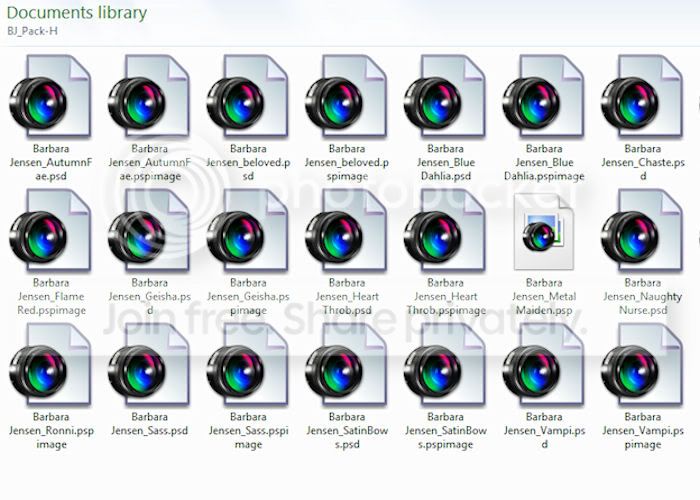

I'm just checking things out here.
GoTo C:\Windows. Make sure you can see the menu bar (if not, GoTo Organise > Layout > tick Menu Bar.
On the Menu Bar GoTo Tools > Folder Options... > View. Make sure "Always show icons, never thumbnails" is un-checked.

GoTo Start > R-click My Computer and select Properties > On the left click Advanced system settings. On the Advanced tab click the Settings... button under Performance and make sure that "Show thumbnails instead of icons" is checked.

If you've changed anything above then do the delete Icon & Thumb Caches & re-boot again.
Sadly, you really need to do this every time you make or expect an icon or image to change.
GoTo C:\Windows. Make sure you can see the menu bar (if not, GoTo Organise > Layout > tick Menu Bar.
On the Menu Bar GoTo Tools > Folder Options... > View. Make sure "Always show icons, never thumbnails" is un-checked.
GoTo Start > R-click My Computer and select Properties > On the left click Advanced system settings. On the Advanced tab click the Settings... button under Performance and make sure that "Show thumbnails instead of icons" is checked.
If you've changed anything above then do the delete Icon & Thumb Caches & re-boot again.
Sadly, you really need to do this every time you make or expect an icon or image to change.
My Computer
- OS
- Windows 7 x64
As an alternative method, have look at / try this offering PSP Thumbnail Viewer.
And I suppose you'll also be needing a PSD thumbnail viewer.PSP Thumbnail Handler displays thumbnails by extracting the embedded thumbnail from the PSP file. If the file does not contain a thumbnail, or the thumbnail is not in the expected format, PSP Thumbnail Handler will fail and the default PSP icon will be displayed instead.
Last edited:
My Computer
- OS
- Windows 7 x64

Looks like they are all in Photobucket.
Download all files from photobucket into C:/your name/libraries/pictures.
Download all files from photobucket into C:/your name/libraries/pictures.
My Computer
- Computer Manufacturer/Model Number
- HP M9077c
- OS
- Windows 7 Home Premium 64bit
- CPU
- Intel(R)Core(TM)2 quad [email protected] 2.39GHz
- Motherboard
- ASUSeK
- Memory
- 6GB DDR2 6400
- Graphics Card(s)
- GeForce 8500/512MB
- Sound Card
- Realtek High Def Audio
- Monitor(s) Displays
- HP w2408 LCD 24" widescreen
- Screen Resolution
- 1920x1200
- Cooling
- 6 pack of Bud
- Keyboard
- MS wireless Inteli
- Mouse
- MS wireless Inteli
Go into your computer and right click on one of those images/open with paint shop pro or anything else other than a psd file.
I have Easy Share from Kodak( my camera) but I can take any photo and open with Windows media center, windows photo viewer, paint and other photo imaging software that I have loaded.
Keep us posted.
Welcome to Windows seven forum!
I have Easy Share from Kodak( my camera) but I can take any photo and open with Windows media center, windows photo viewer, paint and other photo imaging software that I have loaded.
Keep us posted.
Welcome to Windows seven forum!
My Computer
- Computer Manufacturer/Model Number
- HP M9077c
- OS
- Windows 7 Home Premium 64bit
- CPU
- Intel(R)Core(TM)2 quad [email protected] 2.39GHz
- Motherboard
- ASUSeK
- Memory
- 6GB DDR2 6400
- Graphics Card(s)
- GeForce 8500/512MB
- Sound Card
- Realtek High Def Audio
- Monitor(s) Displays
- HP w2408 LCD 24" widescreen
- Screen Resolution
- 1920x1200
- Cooling
- 6 pack of Bud
- Keyboard
- MS wireless Inteli
- Mouse
- MS wireless Inteli
hun, i want to be able to view them in the folder itself and NOT have to use photo shop or anything else to open them and view....like i said when i had windows XP i could view any image in my folders ( png, psp, psd, jpeg )
now with windows 7 i can only see jpeg & png ...everything else is as u see in the above image i posted
now with windows 7 i can only see jpeg & png ...everything else is as u see in the above image i posted
My Computer
- OS
- windows7 64bit
http://www.sevenforums.com/tutorials/11359-folder-view-reset-all-folders.html
Sorry about the mix up!
If this doesn't help do a search(upper right corner) on how to view photos.
There are several different posts and maybe one of them might help you.
Sorry about the mix up!
If this doesn't help do a search(upper right corner) on how to view photos.
There are several different posts and maybe one of them might help you.
My Computer
- Computer Manufacturer/Model Number
- HP M9077c
- OS
- Windows 7 Home Premium 64bit
- CPU
- Intel(R)Core(TM)2 quad [email protected] 2.39GHz
- Motherboard
- ASUSeK
- Memory
- 6GB DDR2 6400
- Graphics Card(s)
- GeForce 8500/512MB
- Sound Card
- Realtek High Def Audio
- Monitor(s) Displays
- HP w2408 LCD 24" widescreen
- Screen Resolution
- 1920x1200
- Cooling
- 6 pack of Bud
- Keyboard
- MS wireless Inteli
- Mouse
- MS wireless Inteli
I didn't doubt they were, just better to be sure.settings on my PC are as you have shown...so that is not the problem...thx for making sure
I can vouch for the PSD Thumbnail Viewer. (A part of my PSD folder):-
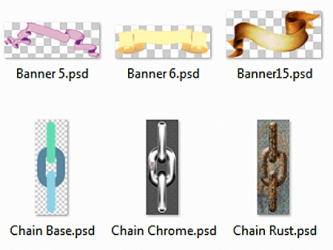
It adds a dll file to the system and a few registry entries. Just open the folder and they almost instantly change to the image (if the image is embedded of course).
Just give 'em a try.
Last edited:
My Computer
- OS
- Windows 7 x64
I can now also vouch for the PSP Thumbnail Viewer as well. Under 600kb installed.
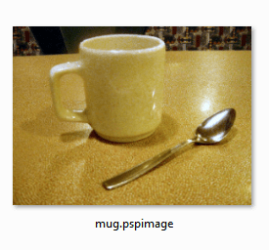
Took me ages to find a PSP file I could download!
Took me ages to find a PSP file I could download!
My Computer
- OS
- Windows 7 x64

And that appears to be a PNG image anyway!I can now also vouch for the PSP Thumbnail Viewer as well. Under 600kb installed.
View attachment 90788
Took me ages to find a PSP file I could download!
View attachment 90837
Note: You can't upload a PSP image to this Forum. It is not a recognised file extension!
Last edited:
My Computer
- Computer type
- PC/Desktop
- OS
- Microsoft Windows 7 Home Premium 64-bit 7601 Multiprocessor Free Service Pack 1
- CPU
- Intel(R) Core(TM) i7-3770 CPU @ 3.40GHz
- Motherboard
- ASUSTeK COMPUTER INC. P8H77-M
- Memory
- 8.00 GB
- Graphics Card(s)
- Intel(R) HD Graphics 4000
- Sound Card
- On Board
- Monitor(s) Displays
- Dell 24"
- Screen Resolution
- 1920 x 1080
- Hard Drives
- (1) INTEL SSDSC2CT180A3 ATA Device (2) ST500DM002-1BD142 ATA Device (3) WDC WD3200AAKS-75L9A0 ATA Device (4) Generic- Compact Flash USB Device (5) Generic- MS/MS-Pro USB Device (6) Generic- SD/MMC USB Device (7) Generic- SM/xD-Picture USB
- PSU
- 500w Corsair
- Case
- Cooler Master
- Cooling
- 3 Fans
- Keyboard
- Logitech MK300
- Mouse
- Logitech WOM
- Internet Speed
- 75Mb
- Antivirus
- Norton 360
- Browser
- Firefox, Opera, IE
Hi froglyn
You do seem to have been offered a number of alternatives here but if you still want to sove the original problem of your PSP files not showing a thumbnail in Windows Explorer then I'm happy to continue. I won't ask why you put a screenshot that was not yours up on this Forum! But it did lead me down a strange path as some of the files in that screenshot were, I think PNG files. The fact that the icon showed PSP image does not define the actual file format, that was part of the title. You could just as well name a file "thisisaJPEGimage" but save it to GIF if you wished.
Anyway I still think that your files are the cause. To test that can you put two of your PSP images up on a host, one an original and one that you resaved as suggested in my earlier post. If you click on this link:
Free file hosting. File sharing. File upload. FileFactory.com
Join up, its very easy and post the two files. You will then see a link to the files. You can post the link here or if you prefer send my a Private Message with the link and I will test out my end and come back to you!
You do seem to have been offered a number of alternatives here but if you still want to sove the original problem of your PSP files not showing a thumbnail in Windows Explorer then I'm happy to continue. I won't ask why you put a screenshot that was not yours up on this Forum! But it did lead me down a strange path as some of the files in that screenshot were, I think PNG files. The fact that the icon showed PSP image does not define the actual file format, that was part of the title. You could just as well name a file "thisisaJPEGimage" but save it to GIF if you wished.
Anyway I still think that your files are the cause. To test that can you put two of your PSP images up on a host, one an original and one that you resaved as suggested in my earlier post. If you click on this link:
Free file hosting. File sharing. File upload. FileFactory.com
Join up, its very easy and post the two files. You will then see a link to the files. You can post the link here or if you prefer send my a Private Message with the link and I will test out my end and come back to you!
My Computer
- Computer type
- PC/Desktop
- OS
- Microsoft Windows 7 Home Premium 64-bit 7601 Multiprocessor Free Service Pack 1
- CPU
- Intel(R) Core(TM) i7-3770 CPU @ 3.40GHz
- Motherboard
- ASUSTeK COMPUTER INC. P8H77-M
- Memory
- 8.00 GB
- Graphics Card(s)
- Intel(R) HD Graphics 4000
- Sound Card
- On Board
- Monitor(s) Displays
- Dell 24"
- Screen Resolution
- 1920 x 1080
- Hard Drives
- (1) INTEL SSDSC2CT180A3 ATA Device (2) ST500DM002-1BD142 ATA Device (3) WDC WD3200AAKS-75L9A0 ATA Device (4) Generic- Compact Flash USB Device (5) Generic- MS/MS-Pro USB Device (6) Generic- SD/MMC USB Device (7) Generic- SM/xD-Picture USB
- PSU
- 500w Corsair
- Case
- Cooler Master
- Cooling
- 3 Fans
- Keyboard
- Logitech MK300
- Mouse
- Logitech WOM
- Internet Speed
- 75Mb
- Antivirus
- Norton 360
- Browser
- Firefox, Opera, IE
And it wouldn't show up if you can't view psp.image files at your end. That's why I took a PNG screenshot of a PSP file in a folder with the snip Tool!!And that appears to be a PNG image anyway!I can now also vouch for the PSP Thumbnail Viewer as well. Under 600kb installed.
View attachment 90788
Took me ages to find a PSP file I could download!
View attachment 90837
Note: You can't upload a PSP image to this Forum. It is not a recognised file extension!

It's actually called Psp image.png and it's of mug.pspimage (I always have show extension showing).
My Computer
- OS
- Windows 7 x64
Sorry see your point but I have no problem viewing the PSP images. It is the OP who has the problem!And it wouldn't show up if you can't view psp.image files at your end. That's why I took a PNG screenshot of a PSP file in a folder with the snip Tool!!And that appears to be a PNG image anyway!I can now also vouch for the PSP Thumbnail Viewer as well. Under 600kb installed.
View attachment 90788
Took me ages to find a PSP file I could download!
View attachment 90837
Note: You can't upload a PSP image to this Forum. It is not a recognised file extension!
It's actually called Psp image.png and it's of mug.pspimage (I always have show extension showing).
My Computer
- Computer type
- PC/Desktop
- OS
- Microsoft Windows 7 Home Premium 64-bit 7601 Multiprocessor Free Service Pack 1
- CPU
- Intel(R) Core(TM) i7-3770 CPU @ 3.40GHz
- Motherboard
- ASUSTeK COMPUTER INC. P8H77-M
- Memory
- 8.00 GB
- Graphics Card(s)
- Intel(R) HD Graphics 4000
- Sound Card
- On Board
- Monitor(s) Displays
- Dell 24"
- Screen Resolution
- 1920 x 1080
- Hard Drives
- (1) INTEL SSDSC2CT180A3 ATA Device (2) ST500DM002-1BD142 ATA Device (3) WDC WD3200AAKS-75L9A0 ATA Device (4) Generic- Compact Flash USB Device (5) Generic- MS/MS-Pro USB Device (6) Generic- SD/MMC USB Device (7) Generic- SM/xD-Picture USB
- PSU
- 500w Corsair
- Case
- Cooler Master
- Cooling
- 3 Fans
- Keyboard
- Logitech MK300
- Mouse
- Logitech WOM
- Internet Speed
- 75Mb
- Antivirus
- Norton 360
- Browser
- Firefox, Opera, IE
No problem!Sorry see your point but I have no problem viewing the PSP images. It is the OP who has the problem!
I once, for fun, took a png image of a bmp image of a jpeg image of a psd file (looked crap!).!My Computer
- OS
- Windows 7 x64
Why am I not surprised?No problem!Sorry see your point but I have no problem viewing the PSP images. It is the OP who has the problem!
My Computer
- Computer type
- PC/Desktop
- OS
- Microsoft Windows 7 Home Premium 64-bit 7601 Multiprocessor Free Service Pack 1
- CPU
- Intel(R) Core(TM) i7-3770 CPU @ 3.40GHz
- Motherboard
- ASUSTeK COMPUTER INC. P8H77-M
- Memory
- 8.00 GB
- Graphics Card(s)
- Intel(R) HD Graphics 4000
- Sound Card
- On Board
- Monitor(s) Displays
- Dell 24"
- Screen Resolution
- 1920 x 1080
- Hard Drives
- (1) INTEL SSDSC2CT180A3 ATA Device (2) ST500DM002-1BD142 ATA Device (3) WDC WD3200AAKS-75L9A0 ATA Device (4) Generic- Compact Flash USB Device (5) Generic- MS/MS-Pro USB Device (6) Generic- SD/MMC USB Device (7) Generic- SM/xD-Picture USB
- PSU
- 500w Corsair
- Case
- Cooler Master
- Cooling
- 3 Fans
- Keyboard
- Logitech MK300
- Mouse
- Logitech WOM
- Internet Speed
- 75Mb
- Antivirus
- Norton 360
- Browser
- Firefox, Opera, IE
Sorry if i have caused you confusion...the very first image posted at the beginning of this thread was not posted by me, it was posted by twilightdelight ...the other 2 images are mine
I will not take up any more of your time on this matter i will try the irfanview & the other thumbnail viewer and see if one of them works...
Much thanks for the suggestions and your time , take care and have a great upcoming week-end
again thank-you
kindest regards ,
Lynda
...the other 2 images are mine I will not take up any more of your time on this matter i will try the irfanview & the other thumbnail viewer and see if one of them works...
Much thanks for the suggestions and your time , take care and have a great upcoming week-end
again thank-you
kindest regards ,
Lynda
My Computer
- OS
- windows7 64bit
Hi LyndaSorry if i have caused you confusion...the very first image posted at the beginning of this thread was not posted by me, it was posted by twilightdelight
I will not take up any more of your time on this matter i will try the irfanview & the other thumbnail viewer and see if one of them works...
Much thanks for the suggestions and your time , take care and have a great upcoming week-end
again thank-you
kindest regards ,
Lynda
Sorry about that but I should have had the two topics split and then yours and Anita's could have been dealt with separately. My fault for the confusion. It seems a shame to stop now though. I'm sure we can solve this problem because on my system the PSP show thumnails perfectly and we both have a similar setup so i feesure we could get there. And you certainly have not wasted my or anybody else's time with this post. This type of question is a challenge and we can all gain knowledge from trying to solve it. Think again about uploading a couple of images.
Just humor me a bit, where did the images come from as I think they are from a website catalogue? Did you just copy and paste them from the sample pictures on the web?
My Computer
- Computer type
- PC/Desktop
- OS
- Microsoft Windows 7 Home Premium 64-bit 7601 Multiprocessor Free Service Pack 1
- CPU
- Intel(R) Core(TM) i7-3770 CPU @ 3.40GHz
- Motherboard
- ASUSTeK COMPUTER INC. P8H77-M
- Memory
- 8.00 GB
- Graphics Card(s)
- Intel(R) HD Graphics 4000
- Sound Card
- On Board
- Monitor(s) Displays
- Dell 24"
- Screen Resolution
- 1920 x 1080
- Hard Drives
- (1) INTEL SSDSC2CT180A3 ATA Device (2) ST500DM002-1BD142 ATA Device (3) WDC WD3200AAKS-75L9A0 ATA Device (4) Generic- Compact Flash USB Device (5) Generic- MS/MS-Pro USB Device (6) Generic- SD/MMC USB Device (7) Generic- SM/xD-Picture USB
- PSU
- 500w Corsair
- Case
- Cooler Master
- Cooling
- 3 Fans
- Keyboard
- Logitech MK300
- Mouse
- Logitech WOM
- Internet Speed
- 75Mb
- Antivirus
- Norton 360
- Browser
- Firefox, Opera, IE

Hi ya anita here
I am still having the same problems with these images of psp, i have to many images to resave them again, I downloaded mine as a zip file and like lydna i could see them before when i had windows xp and windows vista, most of the psp viewers that you can get don't really work, and i am stiil confussed with the prompt thing and what to do with it even though it is written down for me to do it, I sorry but i don't use sypke.....
All i want to do is view my images within my folders with out having any other programs to use to view them.
Sorry not been on for a bit, had other issues to sort out
I am still having the same problems with these images of psp, i have to many images to resave them again, I downloaded mine as a zip file and like lydna i could see them before when i had windows xp and windows vista, most of the psp viewers that you can get don't really work, and i am stiil confussed with the prompt thing and what to do with it even though it is written down for me to do it, I sorry but i don't use sypke.....
All i want to do is view my images within my folders with out having any other programs to use to view them.
Sorry not been on for a bit, had other issues to sort out
My Computer
- Computer Manufacturer/Model Number
- Hewlett packard/ HP pailion dv6 notebook PC
- OS
- windows 7 / 64 BIT
- CPU
- AMD athlon(tm)II Daul Core M320/2.10 GHz
- Memory
- 4.00gb
- Monitor(s) Displays
- laptop
- Keyboard
- no keyboard
- Mouse
- saltek opitcal
- Internet Speed
- moblie broadband
Hiya Anita....
Lynda here, I downloaded the irfanview and it works if you open your folder using it...
every image shows up altho the background is black at least you can see your psp images....I will continue to use that until i can find the solution that we are having...
and just to let you know i have come across many others with the same problem after switching to windows 7...
Lynda here, I downloaded the irfanview and it works if you open your folder using it...
every image shows up altho the background is black at least you can see your psp images....I will continue to use that until i can find the solution that we are having...
and just to let you know i have come across many others with the same problem after switching to windows 7...
My Computer
- OS
- windows7 64bit
Similar threads

- Replies
- 9
- Views
- 3K


- Replies
- 1
- Views
- 2K