PSU - Test DC Output Voltage

How to Test PSU DC Output Voltages to Determine if Faulty


   Information
The Internal ATX Power Supply converts the Alternating Current (AC) from the mains input to a Direct Current (DC) output that is required for the computer to work.The typical voltages supplied are 3.3 volts, 5.0 volts, -5.0 volts, 12.0 volts, -12.0 volts.

The 3,3 and 5 volts are typically used by the digital circuits, whereas the 12-volt is used to power the motors found in Disk Drives and Hard Drives. It is also used to Power the CPU. The following tests involve testing the voltages across the HDD, Motherboard, CPU, CD/DVD ROM Drive Power Connectors.

   Warning
NEVER ATTEMPT MAINTENANCE ON POWER SUPPLIES AS THEY CAN BE DANGEROUS

EVEN WHEN THE POWER REMOVED. If a fault is suspected with the PSU then the first step is to take VOLTAGE readings, then substitute the POWER SUPPLY with a good quality brand, with the same MAINS VOLTAGE and WATTAGE.


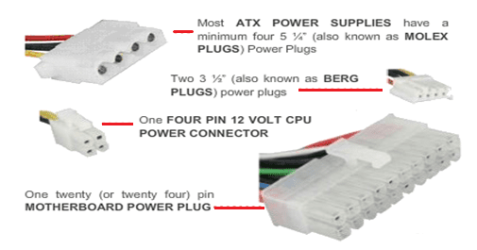
PSU and PSU Connectors Overview.
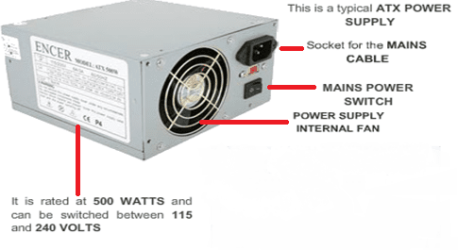
Power Supply.png Power Supply Connectors.png


Here's How:

1. To Check The HDD 4-Pin Molex Power Connector Voltages:
The maximum voltage that will be measured will be no more than 12v/12.6v.

The Multi-meter should be set to DC 20 Volts as shown.
The meter display will show 00.0 (i.e. - 0 Volts).
NOTE: Any number after the decimal point can be ignored
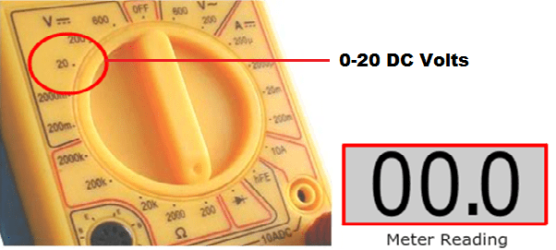
meter reading volt settings.png

The computer is best laid on its side when taking meter readings for ease of access.

Next open the case and power up the computer:

Care should be taken here as the fans will be spinning, certain components will be hot to the touch and observe ESD precautions.

The Anti-static wristband should be worn and attached to the case or an Earthing Point.
(If you do not have one, simply earth yourself on the metal part of the computer case periodically)

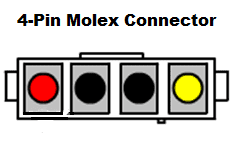
Locate the HDD 4-pin Molex.

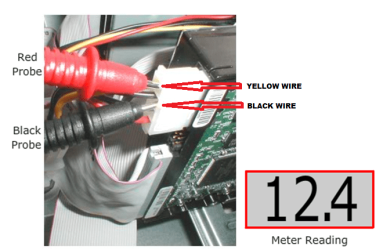
The Red Probe should be inserted into the right-hand side of the connector (Yellow Wire)
The Black Probe should be inserted into one of the two centre holes (Both of which are negative)(Black Wires).

The reading should read 12.4V
Hard drive test.png molex.png

NOTE: You can also take a reading between the connector and the computer case,
the voltage reading will be the same (12.4V), as shown.

Case grounding.png


A reading should also be taken between the RED wire on the back of the HDD Molex
and the computer case, this will show a reading of around 5V.

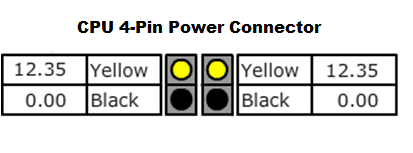
NOTE: This method can be repeated for testing the voltages for Red and Yellow wires
on the CD/DVD Drive Molex Connector and for testing Molex Fan Connectors and CPU Connectors, some examples below.

CD DVD connector.png CPU 4 Pin.png
2. To Check The Motherboard 24-Pin Power Connector Voltages:
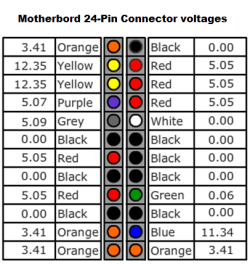
Next we can check the voltages across the 24-Pin Motherboard connector, simply connect the RED probe to each colour in turn, whilst the Black Probe is touching the computer case, the readings will be similar to those shown.

NOTE: The BLACK and WHITE wires are not classed as COLOURS and are rated 0V,
you need not test between the case and these connections.

You can of course test between these and any COLOUR in order to get a reading.
Motherboard connector voltages1.png

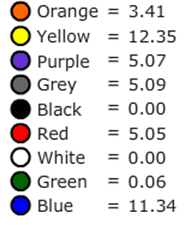
If we look at the relationship between the COLOURS and the VOLTAGE, we will see
that ALL the COLOURS carry exactly the same voltage, as shown.
correlation.png

This is very useful to note, because if a Device has failed then you can check that it is operating at the correct voltage if you measure the same colour Wire on a different Device.

   Note
A few notes to consider when replacing or buying a new PSU:

Most entry level systems are usually supplied with a basic generic, unbranded PSU. If you are building a medium to high spec system, it is highly recommended that you use a branded PSU such as Antec, OCZ, Corsair etc.

Many engineers state that 10-15% of the system budget should be used on a quality PSU.

When replacing Power Supplies Always check the Voltage is set to the correct setting on the rear of the PSU, either 110v/115v or 220v/230v. Setting the Power Supply voltage switch to the incorrect Input Voltage could seriously damage the Power Supply and possibly cause damage to other components of your computer.

The correct voltage is determined by the country where the Power Supply is located.
(I.E.- UK 220v/230v USA 110v/115v.


Final Word!!

*****ALWAYS RECHECK YOUR WORK WHEN WORKING WITH POWER SUPPLIES*****


Cheers Dave :)

Credit and thanks to Brink, Arc and Essenbe for their support.


Last edited by a moderator:
Good Stuff Mannnnnn!. . .Thanks. . .:thumbsup:
 

My Computer

Computer Manufacturer/Model Number
HP Pavilion a4302f
OS
Win 7 Pro x64, VM Win XP, Win7 Pro Sandbox, Kubuntu 11
CPU
AMD Athlon(tm) II X4 640 @ 3.0 Gbz
Memory
12GB 1066MHz DDR3 SDRAM - 2x4GB, 2x2GB
Graphics Card(s)
ATI Radeon HD 4350 HD Graphics/Audio with 512MB
Sound Card
Realtek High Definition Audio
Monitor(s) Displays
1. Dell 23" SP2307, 2. Mitsublishi 40" HDTV, Hannspree 25"
Screen Resolution
1. 2048x1152, 2. 1920-1080, 3. 1920x1200
Hard Drives
Int: 1 120 Gig SSD i
1 - 2.5" 500 USB External HDD
1 -1 Tb USB External HDD
Case
Mid Tower
Cooling
Standard Fans - 5 fans (very quiet)
Keyboard
Microsoft Wireless 2000
Mouse
Microsoft Wireless Mouse 5000
Internet Speed
10 Mbit (realistically 500 Kbit - 1.2 Mbit)
Other Info
Speakers - Bose Desktop (Excellent Sound)
1 external CD|DVD\Blue-ray Recorders/Players (Sony)
Great post Northernsoul55 :thumbsup:
Good timing as i'd overlooked checking my daughters psu when i bought it and just found that it's only showing 10v on the 12v rail. HWinfo shows 10v and HWmonitor 8v.
 
Last edited:

My Computer

Computer type
PC/Desktop
Computer Manufacturer/Model Number
Custom build
OS
Win7 Home Premium x64 SP1
CPU
i7 4770k
Motherboard
Asus maximus VI Hero
Memory
8Gb Kingston HyperX Beast 2400MHz @2133MHz 11-12-11-30
Graphics Card(s)
MSI GTX 780ti Gaming Oc x2
Sound Card
Onboard ROG SupremeFX
Monitor(s) Displays
Asus VG248QE
Screen Resolution
3840X1080 144Hz
Hard Drives
Samung Evo 256Gb, OCZ Agility4 128Gb
1x1TB hitachi storage
PSU
EVGA Supernova 1000w Platinum
Case
Corsair Air 540
Cooling
Corsair H100i
Keyboard
Coolermaster Quickfire Pro
Mouse
Corsair M65 RGB
Internet Speed
74mb dwn/16up
Antivirus
MSE,Malwarebytes
Browser
Chrome
Thank you Northernsoul55 I believe this will be a much used tutorial :cool: :thumbsup:
 

My Computer

Computer type
PC/Desktop
Computer Manufacturer/Model Number
Home Built
OS
Win 7 Pro x64, Win 10 Pro x64, Linux Light x86
CPU
Core i7 3770K
Motherboard
Gigabyte GA-Z77P-D3
Memory
Crucial Ballistix Sport 8GB
Graphics Card(s)
ASUS GeForce GTX 650 Ti
Sound Card
On board
Monitor(s) Displays
ASUS 22 W/S
Screen Resolution
1920 x 1080
Hard Drives
Intel 320 Series SSD, WD Caviar Black 1TB
PSU
Corsair CX 750w
Case
Black Night
Cooling
120mm fans front/back, Coolermaster Hyper 212 Evo
Keyboard
Razer Blackwidow Expert 2013 Mechanical Keyboard
Mouse
Logitech G300 Gaming Mouse
Internet Speed
20mb Unlimited
Antivirus
ZA Antivirus + Firewall
Browser
Cyberfox
Other Info
Powered USB Hub, External Drives 3 x 1TB, Phone Dock.
A beautiful one it is, Dave :) :thumbsup:
 

My Computer

Computer type
PC/Desktop
Computer Manufacturer/Model Number
Self Assembled
OS
Microsoft Windows 10 Pro Insider Preview 64-bit
CPU
Intel(R) Core(TM) i3-4130 CPU @ 3.40GHz
Motherboard
Gigabyte Technology Co., Ltd. B85M-D3H
Memory
Corsair Vengence 4GB x2 (8.00GB Dual-Channel DDR3 @ 798MHz)
Graphics Card(s)
2047MB GeForce GTS 450 (ZOTAC International)
Sound Card
Onboard (Realtek High Definition Audio)
Monitor(s) Displays
LG Flatron E2040T
Screen Resolution
1600x900
Hard Drives
Western Digital 1 TB
Seagate 500 GB
PSU
Corsair VS550
Case
Cooler Master K380
Cooling
Cooler Master Seidon 120V Plus
Keyboard
Logitech MK260r
Mouse
Logitech MK260r
Internet Speed
PMPL Broadband
Antivirus
Windows Defender + MBAM
Browser
Firefox
Other Info
Dell Studio 15" Laptop
Thanks all :) Hopefully it will serve a purpose :D
 

My Computer

Computer type
PC/Desktop
OS
Windows 7 Professional 64bit
CPU
AMD Athlon (tm) X2 5200+ Dual Core 2712 Mhz
Motherboard
Asus
Memory
4GB
Graphics Card(s)
Nividia GeForce 8600 GTS- DIED 25/7/2013 R.I.P
Sound Card
None
Monitor(s) Displays
22" Yuraku LCD (Dont ask)
Screen Resolution
1280x960
Hard Drives
2TB WD Caviar green
PSU
Windy up type
Case
Scout cm Storm
Cooling
Hair dryer on full cool power ;-)
Keyboard
QWERTY
Mouse
Microsoft Special
Internet Speed
BT Infinity 9.38Mb/s Wheeeeeeeeeeeeeeee!!
Antivirus
MSE
Browser
Internet Explore 10 and Chrome
Other Info
Don't shout...I've got a Hangover!
Very well executed ! :)
 

My Computer

Computer type
PC/Desktop
OS
Windows 10
CPU
Intel Core i5 3570K
Motherboard
Asus P8Z77V-PRO
Memory
16GB 1600Mhz G.Skill
Graphics Card(s)
Gigabyte GTX 970 G1-Gaming
PSU
Seasonic 1000W Platinum
Case
Fractal Design Define R4
Cooling
Noctua NH-D14
Dude your the man!!!!!!!!!!!!!!:)
 

My Computer

Computer type
PC/Desktop
Computer Manufacturer/Model Number
Custom Built
OS
Windows 10 Pro
CPU
AMD Ryzen 5 2400G Processor with Radeon RX Vega 11 Graphics
Motherboard
ASRock X470 Master SLI/AC AM4 AMD Promontory X470 SATA 6Gb/s
Memory
G.SKILL Ripjaws V Series 16GB (2 x 8GB) 288-Pin DDR4 SDRAM D
Graphics Card(s)
2047MB NVIDIA GeForce GTX 1060 6GB (EVGA)
Sound Card
Motherboard Built in
Monitor(s) Displays
Acer R240HY bidx 23.8-Inch IPS HDMI DVI VGA (1920 x 1080) Wi
Screen Resolution
1920 x 1080
Hard Drives
1TB Sandisk SSD PLUS (Main drive)
500 GB Seagate 7200 RPM (Games)
500 GB Western Digital 7200 RPM (Virtual Machines)
PSU
CORSAIR TX Series TX650M 650W 80+ Gold Modular Power Supply
Case
CORSAIR CARBIDE SPEC-02 Mid-Tower Gaming Case, Red LED Fan
Cooling
220mm, two 120mm, and four 60mm fans
Keyboard
Wired Dell keyboard
Mouse
Wireless Logitech mouse
Internet Speed
250mb down, 30mb up
Antivirus
Panda Cloud Antivirus
Browser
Chrome-ish x64
Other Info
Your awesome for reading this.
Good one Dave :thumbsup:

A Guy
 

My Computer

Computer type
PC/Desktop
OS
Windows 10 Home x64
CPU
INTEL Core i5-750 Quad-Core 3.37GHz
Motherboard
ASUS P7P55D
Memory
HyperX Fury Black Series 8GB (2 x 4GB) 1866Mhz
Graphics Card(s)
EVGA GeForce GTX 750 Superclocked 1GB 128-Bit GDDR5
Monitor(s) Displays
LG 32MA68HY 32" IPS
Screen Resolution
1920 x 1080
Hard Drives
Samsung 840 Evo 120GB, SEAGATE 500GB Barracuda® 7200.12, SATA 3 Gb/s, 7200 RPM, 16MB cache
PSU
ANTEC TruePower New TP-550, 80 PLUS, 550W
Case
ANTEC Three Hundred Illusion
Cooling
COOLER MASTER Hyper 212 Plus, 4 x 120mm 1 x 140mm Noctua's
Internet Speed
85 + Mbps
Antivirus
Avast
Browser
Vivaldi
Good job Dave, I just discovered your well thought out tut. :D
 

My Computer

Computer type
PC/Desktop
Computer Manufacturer/Model Number
Home Built Desktop By DataTech
OS
Windows 7 Ultimate X64 SP1
CPU
Intel i5-2550K, Differing ~4.4-4.8GHz No built in GPU
Motherboard
ASUS P8Z68-V PRO/GEN3
Memory
16GB G.Skill Sniper 1866MHz @ 2133MHz 2x8GB
Graphics Card(s)
ASUS GTX650TIB-DC2OC-2GD5, (650TI Boost)
Sound Card
Onboard Realtek 5-1
Monitor(s) Displays
Samsung P2570HD
Screen Resolution
1920x1080
Hard Drives
Samsung 840 Pro 256GB SSD for OS, 500GB Seagate Constellation (Enterprise drive) for Data
PSU
Corsair HX650W
Case
Inwin Dragon Rider
Cooling
Hyper 212 EVO w/two Noctua fans, push-pull, @1300 RPM
Keyboard
E-Z Eyes, bright yellow keys with large characters
Mouse
steelseries SENSEI Laser Pro Gaming
Internet Speed
48-51Mbs Mbs down, 11 Mbs up Xfinity Cable
Antivirus
Norton Internet Security 2013
Browser
IE 10, Opera, Pale Moon if needed
Other Info
4 case fans, LG BluRay-RE, ASUS DVD-RW, Mr. Fusion power supply, 1.21 gigawatts.
Really good stuff Dave I have wanted to do something similar but am hopeless with how to put them together.

A couple of things you night like to include is a warning against using an analogue meter as it injects volts for its function and that volts should be +/- 5% of the stated voltage.
A good link to include would be this
Voltage Rails - Power Supply 101: A Reference Of Specifications

John
 

My Computer

Computer type
PC/Desktop
Computer Manufacturer/Model Number
Own build (new) Desk1 / Asus ROG Win 7 / Desk2 1st build
OS
Desk1 7 Home Prem / Desk2 10 Pro / Main lap Asus ROG 10 Pro 2 laptop Toshiba 7 Pro Asus P2520 7 & 10
CPU
Desk1 i5 3750K / Laptop i7 GTX 860M / Desk2 i5 2500
Motherboard
Desk1 Asus P877-V / Desk2 Gigabyte H67 UD3H / Laptop ?
Memory
Desk1 8GB (1866) / Desk2 16GB (1333) / Laptop 8Gb DDR3
Graphics Card(s)
Desk 1& 2NVidia GTX 650 & Laptops on board Intel
Sound Card
Desk 1 & 2 -XONAR DG Realtek High Def audio Laptop
Monitor(s) Displays
Desk 1 Benq HD 2450 / Desk2 Philips 24" / Laptop 17.5"
Screen Resolution
1920x1080 D1 & D2 & Laptop 1
Hard Drives
Desk1 Samsung 120GB 830 SSD
Asus ROG 256GB 850 Pro SSD
Desk2 Samsung 840 256 SSD
Toshiba 120GB EVO
PSU
Desk 1 Corsair HX 1050/ Laptop ? / Desk 2 Corsair HX 650
Case
Desk 1 Cooler HAF XM ? Toshiba laptop / Desk2 Coolermaster
Cooling
Fans on all Desk1 -2 Desk2 - all Coolermasters 5 Laptop ?
Keyboard
Desk 1 MS Sidewinder X6 Desk 2 MS Sidewinder X 4
Mouse
Desk 1&2 - Gigabyte MS 900 gamer - laptop - Logitec wireless
Internet Speed
ADSL2+
Other Info
One other Desktop (tester) and spare Toshba laptop both with SSD's
Running Kaspersky 2016 ISS on all machines config'd identically
Logitec audio stereo systems on each machine (x3)
Canon MG5250MFC
Router/modem TP-Link running WPA2SK
The blue wire on the 24-pin connector should have -12 volt. Not +12 volt, as the figure shows.
 

My Computer

OS
Windows 7 professional 32bit
Back
Top