Solved Put Desktop Back In Navigation Pane

kb6565

New member
Local time
5:09 AM
Messages
3
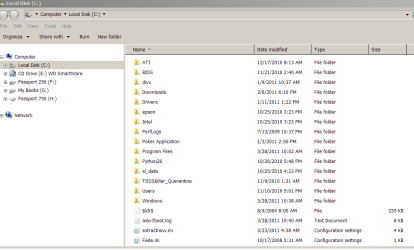
I accidently removed Desktop from the top position in the navigation pane and would like to put it back. I would like to place Desktop above Computer and have Desktop open expanded by default.

Thanks
 

Attachments

  • Explorer.PNG
    Explorer.PNG
    21.4 KB · Views: 143
Last edited:

My Computer My Computer

Computer Manufacturer/Model Number
Lenovo Y450
OS
Windows 7 Home Premium 32bit
CPU
Pentium Dual-Core - T4200 2.00 GHz
Motherboard
3 GB
Memory
3 GB
Hard Drives
250 GB

My Computer My Computer

Computer type
PC/Desktop
Computer Manufacturer/Model Number
Custom Build
OS
Windows 10 Pro x64
CPU
Intel Core i5 4440 @Stock
Motherboard
Gigabyte Z97 D3H
Memory
4 x 4GB HyperX Fury DDR3
Graphics Card(s)
Gigabyte GTX 1050Ti O4G
Sound Card
Integrated
Monitor(s) Displays
Dell P2417H
Screen Resolution
1920 x 1080
Hard Drives
Samsung EVO 850 120GB / Toshiba DT01ACA050 1TB 7200prm 32MB
PSU
Riotoro Onyx 750W
Case
NZXT H500 Black-Red
Cooling
Stock CPU + NZXT 120mm + 2x120mm red fans
Keyboard
Modecom Volcano Lanparty
Mouse
Asus ROG Gladius / DeepCool E-Pad Plus
Internet Speed
DOCSIS 50/3 Mbit
Browser
Google Chrome
Other Info
Asus K55VJ(i5 3210M, GT635M / 2GB, 8GB DDR3, 500GB HDD)
Thanks, Mike. It's a nice little tool that I used to add the recycle bin and control panel, but it was unable to place the Desktop where I wanted it .
 

My Computer My Computer

Computer Manufacturer/Model Number
Lenovo Y450
OS
Windows 7 Home Premium 32bit
CPU
Pentium Dual-Core - T4200 2.00 GHz
Motherboard
3 GB
Memory
3 GB
Hard Drives
250 GB
Thanks, Mike. It's a nice little tool that I used to add the recycle bin and control panel, but it was unable to place the Desktop where I wanted it .

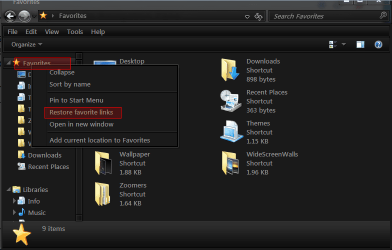
OK Try this, Right-Click in the navigation pane;


check on "Show all Folders"

Regards....Mike Connor
 

My Computer My Computer

OS
Several, including Windows 7 x64 Ultimate

Attachments

  • as.png
    as.png
    23 KB · Views: 58

My Computer My Computer

Computer type
Laptop
Computer Manufacturer/Model Number
Sager NP9170
OS
Win 7 Pro x64 / Win 10 Pro
CPU
Intel(R) Core(TM) i7-3630QM CPU @ 2.40GHz
Motherboard
CLEVO P170EM
Memory
12 GB
Graphics Card(s)
(1) Intel(R) HD Graphics 4000 (2) NVIDIA GeForce GTX 675M
Sound Card
(1) Realtek High Definition Audio (2) Intel(R) Display Aud
Monitor(s) Displays
17.3
Screen Resolution
1920x1080
Hard Drives
(1) Samsung 860 EVO 500GB(OS) (1) Samsung 860 EVO 500GB(Data)
Keyboard
Backlite
Antivirus
MSE, Malwarebytes Pro
Browser
Firefox
Other Info
DESKTOP: Custom-built.
OS: Win 10 Pro x64.
CASE: Rosewill R5.
CPU: Intel I5 4670K CPU @ 3.40GHz.
CPU COOLER: Cool Master Hyper 212 EVO.
MOTHERBOARD: Asus Z87-A.
MEMORY: Kingston HyperX 2x4 GB.
GPU: Nvidia Geforce 650 TI.
PSU: Corsair TX750.
DRIVES: (1) Samsung 840 120 GB SSD (2) Western Digital blue 500 GB 7200 RPM.
Thanks, Mike. It's a nice little tool that I used to add the recycle bin and control panel, but it was unable to place the Desktop where I wanted it .

OK Try this, Right-Click in the navigation pane;


check on "Show all Folders"

Regards....Mike Connor


That was just the ticket. Thanks again
 

My Computer My Computer

Computer Manufacturer/Model Number
Lenovo Y450
OS
Windows 7 Home Premium 32bit
CPU
Pentium Dual-Core - T4200 2.00 GHz
Motherboard
3 GB
Memory
3 GB
Hard Drives
250 GB

My Computer My Computer

OS
Several, including Windows 7 x64 Ultimate
Back
Top