
You are using an out of date browser. It may not display this or other websites correctly.
You should upgrade or use an alternative browser.
You should upgrade or use an alternative browser.
Solved "PXE-E51" error after using DBAN for cleaning HDD while booting
- Thread starter yuioploi
- Start date


- Local time
- 4:02 PM
- Messages
- 151
Your system is unable to find a bootable device (harddrive, cd or usb), so it is attempting to boot from the network adapter. It would appear that the "cleaning" has somehow damaged the boot capability of the HD.
My Computer
- Computer type
- PC/Desktop
- Computer Manufacturer/Model Number
- Dell, HP, Toshiba, Compaq
- OS
- Windows 7 Ultimate x86 and x64

If you have wiped the one hard drive your system has it can't boot.
Their is nothing there.
You will need to install a operating system.
By Brink:
http://www.sevenforums.com/tutorials/1649-clean-install-windows-7-a.html
By Gregrocker:
http://www.sevenforums.com/tutorials/219487-clean-reinstall-factory-oem-windows-7-a.html
-----------------------------
http://www.dban.org/
Their is nothing there.
You will need to install a operating system.
By Brink:
http://www.sevenforums.com/tutorials/1649-clean-install-windows-7-a.html
By Gregrocker:
http://www.sevenforums.com/tutorials/219487-clean-reinstall-factory-oem-windows-7-a.html
-----------------------------
http://www.dban.org/
DBAN is a self-contained boot disk that automatically deletes the contents of any hard disk that it can detect. This method can help prevent identity theft before recycling a computer. It is also a solution commonly used to remove viruses and spyware from Microsoft Windows installations. DBAN prevents all known techniques of hard disk forensic analysis. It does not provide users with a proof of erasure, such as an audit-ready erasure report.
My Computer
- Computer type
- PC/Desktop
- Computer Manufacturer/Model Number
- Home made Desktop
- OS
- Windows 10 Pro. 64/ version 1709 Windows 7 Pro/64
- CPU
- Intel i7-6800K @ 4.3
- Motherboard
- ASUS X-99 Deluxe II
- Memory
- Corsair Platinum 16 gig @2400
- Graphics Card(s)
- EVGA GTX 1070 OC
- Monitor(s) Displays
- Asus 27" LED LCD/VE278Q
- Screen Resolution
- 1920-1080 or 1280-720 HDMI
- Hard Drives
- INTEL SSD 730-240 Gb Sata 3.0/
- PSU
- EVGA Platium 1200W
- Case
- Phanteks Luxe Tempered Glass 8 fans/ one radiator
- Cooling
- XSPC/ Water Cooled CPU
- Keyboard
- Das 4 Professional
- Mouse
- Logitech M705/MX Anywhere 2-S
- Internet Speed
- 100 mbits
- Antivirus
- Microsoft Security Essentials/ Malwarebytes Premium 3.0/ SAS
- Browser
- I.E. 11 default/Firefox/ ISP Time Warner Cable/Spectrum
- Other Info
- LG BluRay Burner/
Sound system-KLipsch-THX/
Icy Dock ssd Hot Swap bays.
If you have wiped the one hard drive your system has it can't boot.
Their is nothing there.
You will need to install a operating system.
By Brink:
http://www.sevenforums.com/tutorials/1649-clean-install-windows-7-a.html
By Gregrocker:
http://www.sevenforums.com/tutorials/219487-clean-reinstall-factory-oem-windows-7-a.html
I have Windows 7 installed...
My Computer
- Computer type
- Laptop
Did you install Windows 7 after you used Dban?
If so how did you install it and from what media did you do the install?
Can you get into the bios and/or Windows 7?
Have you removed all CD/DVD and Flash Drives?
If so how did you install it and from what media did you do the install?
Can you get into the bios and/or Windows 7?
Have you removed all CD/DVD and Flash Drives?
My Computer
- Computer type
- PC/Desktop
- Computer Manufacturer/Model Number
- Home made Desktop
- OS
- Windows 10 Pro. 64/ version 1709 Windows 7 Pro/64
- CPU
- Intel i7-6800K @ 4.3
- Motherboard
- ASUS X-99 Deluxe II
- Memory
- Corsair Platinum 16 gig @2400
- Graphics Card(s)
- EVGA GTX 1070 OC
- Monitor(s) Displays
- Asus 27" LED LCD/VE278Q
- Screen Resolution
- 1920-1080 or 1280-720 HDMI
- Hard Drives
- INTEL SSD 730-240 Gb Sata 3.0/
- PSU
- EVGA Platium 1200W
- Case
- Phanteks Luxe Tempered Glass 8 fans/ one radiator
- Cooling
- XSPC/ Water Cooled CPU
- Keyboard
- Das 4 Professional
- Mouse
- Logitech M705/MX Anywhere 2-S
- Internet Speed
- 100 mbits
- Antivirus
- Microsoft Security Essentials/ Malwarebytes Premium 3.0/ SAS
- Browser
- I.E. 11 default/Firefox/ ISP Time Warner Cable/Spectrum
- Other Info
- LG BluRay Burner/
Sound system-KLipsch-THX/
Icy Dock ssd Hot Swap bays.
Did you install Windows 7 after you used Dban?
If so how did you install it and from what media did you do the install?
Can you get into the bios and/or Windows 7?
Have you removed all CD/DVD and Flash Drives?
1.Yep.
2.USB.
3.Yep.
4.Yes.
My Computer
- Computer type
- Laptop
If you can get into Windows then please tell us how you got the picture in your Post #1.
Some how we are not on the same page.
Some how we are not on the same page.
My Computer
- Computer type
- PC/Desktop
- Computer Manufacturer/Model Number
- Home made Desktop
- OS
- Windows 10 Pro. 64/ version 1709 Windows 7 Pro/64
- CPU
- Intel i7-6800K @ 4.3
- Motherboard
- ASUS X-99 Deluxe II
- Memory
- Corsair Platinum 16 gig @2400
- Graphics Card(s)
- EVGA GTX 1070 OC
- Monitor(s) Displays
- Asus 27" LED LCD/VE278Q
- Screen Resolution
- 1920-1080 or 1280-720 HDMI
- Hard Drives
- INTEL SSD 730-240 Gb Sata 3.0/
- PSU
- EVGA Platium 1200W
- Case
- Phanteks Luxe Tempered Glass 8 fans/ one radiator
- Cooling
- XSPC/ Water Cooled CPU
- Keyboard
- Das 4 Professional
- Mouse
- Logitech M705/MX Anywhere 2-S
- Internet Speed
- 100 mbits
- Antivirus
- Microsoft Security Essentials/ Malwarebytes Premium 3.0/ SAS
- Browser
- I.E. 11 default/Firefox/ ISP Time Warner Cable/Spectrum
- Other Info
- LG BluRay Burner/
Sound system-KLipsch-THX/
Icy Dock ssd Hot Swap bays.
If you can get into Windows then please tell us how you got the picture in your Post #1.
Some how we are not on the same page.
That "thing" appears while booting.
My Computer
- Computer type
- Laptop
Please do this tutorial so we can have a look.
By Golden:
http://www.sevenforums.com/tutorials/274797-disk-management-post-screen-capture-image.html
By Golden:
http://www.sevenforums.com/tutorials/274797-disk-management-post-screen-capture-image.html
My Computer
- Computer type
- PC/Desktop
- Computer Manufacturer/Model Number
- Home made Desktop
- OS
- Windows 10 Pro. 64/ version 1709 Windows 7 Pro/64
- CPU
- Intel i7-6800K @ 4.3
- Motherboard
- ASUS X-99 Deluxe II
- Memory
- Corsair Platinum 16 gig @2400
- Graphics Card(s)
- EVGA GTX 1070 OC
- Monitor(s) Displays
- Asus 27" LED LCD/VE278Q
- Screen Resolution
- 1920-1080 or 1280-720 HDMI
- Hard Drives
- INTEL SSD 730-240 Gb Sata 3.0/
- PSU
- EVGA Platium 1200W
- Case
- Phanteks Luxe Tempered Glass 8 fans/ one radiator
- Cooling
- XSPC/ Water Cooled CPU
- Keyboard
- Das 4 Professional
- Mouse
- Logitech M705/MX Anywhere 2-S
- Internet Speed
- 100 mbits
- Antivirus
- Microsoft Security Essentials/ Malwarebytes Premium 3.0/ SAS
- Browser
- I.E. 11 default/Firefox/ ISP Time Warner Cable/Spectrum
- Other Info
- LG BluRay Burner/
Sound system-KLipsch-THX/
Icy Dock ssd Hot Swap bays.
Please do this tutorial so we can have a look.
By Golden:
http://www.sevenforums.com/tutorials/274797-disk-management-post-screen-capture-image.html

My Computer
- Computer type
- Laptop
Please follow the tutorial exactly.
No where in that tutorial does it say use photobucket.
No where in that tutorial does it say use photobucket.
My Computer
- Computer type
- PC/Desktop
- Computer Manufacturer/Model Number
- Home made Desktop
- OS
- Windows 10 Pro. 64/ version 1709 Windows 7 Pro/64
- CPU
- Intel i7-6800K @ 4.3
- Motherboard
- ASUS X-99 Deluxe II
- Memory
- Corsair Platinum 16 gig @2400
- Graphics Card(s)
- EVGA GTX 1070 OC
- Monitor(s) Displays
- Asus 27" LED LCD/VE278Q
- Screen Resolution
- 1920-1080 or 1280-720 HDMI
- Hard Drives
- INTEL SSD 730-240 Gb Sata 3.0/
- PSU
- EVGA Platium 1200W
- Case
- Phanteks Luxe Tempered Glass 8 fans/ one radiator
- Cooling
- XSPC/ Water Cooled CPU
- Keyboard
- Das 4 Professional
- Mouse
- Logitech M705/MX Anywhere 2-S
- Internet Speed
- 100 mbits
- Antivirus
- Microsoft Security Essentials/ Malwarebytes Premium 3.0/ SAS
- Browser
- I.E. 11 default/Firefox/ ISP Time Warner Cable/Spectrum
- Other Info
- LG BluRay Burner/
Sound system-KLipsch-THX/
Icy Dock ssd Hot Swap bays.
Please follow the tutorial exactly.
No where in that tutorial does it say use photobucket.
I'm sorry.
Attachments
My Computer
- Computer type
- Laptop
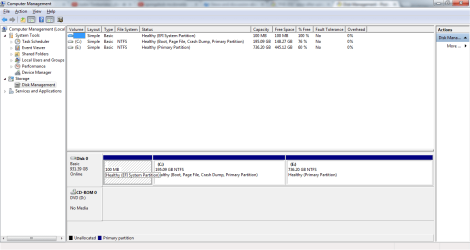
I do not see a active flag.
The top line in your post with the blue blob doesn't look familiar.
The top line in your post with the blue blob doesn't look familiar.
My Computer
- Computer type
- PC/Desktop
- Computer Manufacturer/Model Number
- Home made Desktop
- OS
- Windows 10 Pro. 64/ version 1709 Windows 7 Pro/64
- CPU
- Intel i7-6800K @ 4.3
- Motherboard
- ASUS X-99 Deluxe II
- Memory
- Corsair Platinum 16 gig @2400
- Graphics Card(s)
- EVGA GTX 1070 OC
- Monitor(s) Displays
- Asus 27" LED LCD/VE278Q
- Screen Resolution
- 1920-1080 or 1280-720 HDMI
- Hard Drives
- INTEL SSD 730-240 Gb Sata 3.0/
- PSU
- EVGA Platium 1200W
- Case
- Phanteks Luxe Tempered Glass 8 fans/ one radiator
- Cooling
- XSPC/ Water Cooled CPU
- Keyboard
- Das 4 Professional
- Mouse
- Logitech M705/MX Anywhere 2-S
- Internet Speed
- 100 mbits
- Antivirus
- Microsoft Security Essentials/ Malwarebytes Premium 3.0/ SAS
- Browser
- I.E. 11 default/Firefox/ ISP Time Warner Cable/Spectrum
- Other Info
- LG BluRay Burner/
Sound system-KLipsch-THX/
Icy Dock ssd Hot Swap bays.
I do not see a active flag.
The top line in your post with the blue blob doesn't look familiar.
Memory allocated by the system.
What active flag?
My Computer
- Computer type
- Laptop

If I understand this correctly, to get rid of the message shown in Post #1,
In BIOS:
Remove the Network adapter from the list of bootable devices
Or, re-prioritize the list so the adapter is after the HD, Optical Drive, etc.
In BIOS:
Remove the Network adapter from the list of bootable devices
Or, re-prioritize the list so the adapter is after the HD, Optical Drive, etc.
My Computer
- Computer type
- PC/Desktop
- Computer Manufacturer/Model Number
- home built
- OS
- Multi-Boot W7_Pro_x64 W8.1_Pro_x64 W10_Pro_x64 +Linux_VMs +Chromium_VM
- CPU
- AMD Athlon II x4 620
- Motherboard
- Gigabyte GA-MA785G-UD3H
- Memory
- 6GB GSkill DDR2 800
- Graphics Card(s)
- AMD 4670 GPU + AMD 4200 IGP
- Sound Card
- on board Realtek ALC889A
- Monitor(s) Displays
- RCA 40" LCD TV, Insignia 32" LCD TV, HP 15" LCD monitor
- Screen Resolution
- 1680 x 1050
- Hard Drives
- OCZ Vertex 3 120GB,
Samsung F3 1TB (3),
Several others - WD, Seagate, Hitachi, ...
- PSU
- Corsair 500 W
- Case
- Rosewill mid tower
- Cooling
- CM 90mm rifle
- Keyboard
- Gyration wireless, Logitech wireless, Dell USB wired
- Mouse
- Gyration wireless, Logitech wireless, V7 USB wired
- Internet Speed
- Spectrum - 100Mbps D / 10Mbps U
- Antivirus
- Avast, MBAM3, EMET, WinPatrol
- Browser
- Pale Moon, Firefox, IE
- Other Info
- 2 multi-boot PC's
Mainly HTPC/Office/Gen purpose (no gaming).
Trendnet USB KVM.
LG DVD burner/Blue Ray Player.
Tray system for removable SATA backup drives.
Not currently OCd, under-volted.
I use Hybrid sleep, rarely re-boot or shutdown.
Hauppauge HD-PVR, Avermedia PCIe TV Tuner, Hauppauge PCI TV Tuner.
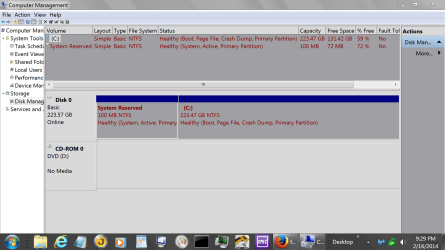
Notice my System Reserve. (Active)
I'm trying to see where the (Active) is located on your system.
Thank you David for coming to help.
My Computer
- Computer type
- PC/Desktop
- Computer Manufacturer/Model Number
- Home made Desktop
- OS
- Windows 10 Pro. 64/ version 1709 Windows 7 Pro/64
- CPU
- Intel i7-6800K @ 4.3
- Motherboard
- ASUS X-99 Deluxe II
- Memory
- Corsair Platinum 16 gig @2400
- Graphics Card(s)
- EVGA GTX 1070 OC
- Monitor(s) Displays
- Asus 27" LED LCD/VE278Q
- Screen Resolution
- 1920-1080 or 1280-720 HDMI
- Hard Drives
- INTEL SSD 730-240 Gb Sata 3.0/
- PSU
- EVGA Platium 1200W
- Case
- Phanteks Luxe Tempered Glass 8 fans/ one radiator
- Cooling
- XSPC/ Water Cooled CPU
- Keyboard
- Das 4 Professional
- Mouse
- Logitech M705/MX Anywhere 2-S
- Internet Speed
- 100 mbits
- Antivirus
- Microsoft Security Essentials/ Malwarebytes Premium 3.0/ SAS
- Browser
- I.E. 11 default/Firefox/ ISP Time Warner Cable/Spectrum
- Other Info
- LG BluRay Burner/
Sound system-KLipsch-THX/
Icy Dock ssd Hot Swap bays.

- Local time
- 4:02 PM
- Messages
- 50,634
He has UEFI install to a GPT partition which doesn't use Active flag or MBR to boot.
It does look a little strange but no doubt since it's labeled EFI.
I believe David has the correct answer as to how to have it stop prompting for network boot. Remove it from BIOS boot order. I'd set HD as first to boot.
It does look a little strange but no doubt since it's labeled EFI.
I believe David has the correct answer as to how to have it stop prompting for network boot. Remove it from BIOS boot order. I'd set HD as first to boot.
Thanks Greg for the help and information.
My concern was removing something when not knowing what the system was booting from.
From my sig. Thanks to all.
Feel free to help me help other members
My concern was removing something when not knowing what the system was booting from.
From my sig. Thanks to all.
Feel free to help me help other members
My Computer
- Computer type
- PC/Desktop
- Computer Manufacturer/Model Number
- Home made Desktop
- OS
- Windows 10 Pro. 64/ version 1709 Windows 7 Pro/64
- CPU
- Intel i7-6800K @ 4.3
- Motherboard
- ASUS X-99 Deluxe II
- Memory
- Corsair Platinum 16 gig @2400
- Graphics Card(s)
- EVGA GTX 1070 OC
- Monitor(s) Displays
- Asus 27" LED LCD/VE278Q
- Screen Resolution
- 1920-1080 or 1280-720 HDMI
- Hard Drives
- INTEL SSD 730-240 Gb Sata 3.0/
- PSU
- EVGA Platium 1200W
- Case
- Phanteks Luxe Tempered Glass 8 fans/ one radiator
- Cooling
- XSPC/ Water Cooled CPU
- Keyboard
- Das 4 Professional
- Mouse
- Logitech M705/MX Anywhere 2-S
- Internet Speed
- 100 mbits
- Antivirus
- Microsoft Security Essentials/ Malwarebytes Premium 3.0/ SAS
- Browser
- I.E. 11 default/Firefox/ ISP Time Warner Cable/Spectrum
- Other Info
- LG BluRay Burner/
Sound system-KLipsch-THX/
Icy Dock ssd Hot Swap bays.
If I understand this correctly, to get rid of the message shown in Post #1,
In BIOS:
Remove the Network adapter from the list of bootable devices
Or, re-prioritize the list so the adapter is after the HD, Optical Drive, etc.
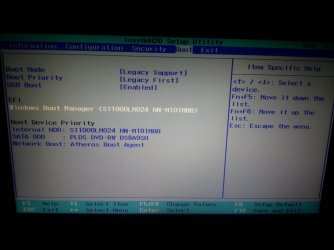
I get the same thing...
Attachments
My Computer
- Computer type
- Laptop
- Local time
- 4:02 PM
- Messages
- 50,634
Since you have a EFI Boot partition the Boot Priority setting should be set to UEFI First, not Legacy First as it would be only if you have a normal MBR disk install.
We have to assume you have a UEFI install since it has the EFI partition, even though there is no second MSR partition as per normal. But we are seeing more that don't have one so it's possible you also have an install that didn't issue the MSR partition supposedly required on Win7 UEFI installs.
If this doesn't help you can also try changing Boot Mode although that should not affect this, but is meant to provide access to normal media boot without UEFI, and MBR System Disks.
We have to assume you have a UEFI install since it has the EFI partition, even though there is no second MSR partition as per normal. But we are seeing more that don't have one so it's possible you also have an install that didn't issue the MSR partition supposedly required on Win7 UEFI installs.
If this doesn't help you can also try changing Boot Mode although that should not affect this, but is meant to provide access to normal media boot without UEFI, and MBR System Disks.
Similar threads
- Replies
- 5
- Views
- 5K
- Replies
- 22
- Views
- 12K

- Replies
- 1
- Views
- 5K

