Question about my WD external HDD and W7 backup

ThumperSD

New member
Local time
9:12 AM
Messages
128
I used W7's backup utility to back up my files onto my WD external HDD and canceled in the middle of it. After I canceled the backup I manually deleted the shadow copies of my backup on my WD HDD so that I can restart. I noticed however that my external HDD has less free space than it did before I even started the backup. I made sure I deleted my backups and I also cleared the recycle bin in the WD HDD.

I went even further to add up all of my files on the HDD and it only added up to 571GB and when I look at the properties of the drive, it tell me that I have used up 571GB for "other files" yet I still have 178GB of "system image."
Where is this system image restored and how do I delete it to make up more space on my drive? I set up my computer to show hidden folders but I do not see this system image anywhere.
 

My Computer My Computer

At a glance

Windows 7i7 920 @ 3.8ghz6GB Corsair DominatorATI Radeon HD5850
Computer Manufacturer/Model Number
Self-built
OS
Windows 7
CPU
i7 920 @ 3.8ghz
Motherboard
MSI X58 Pro-E
Memory
6GB Corsair Dominator
Graphics Card(s)
ATI Radeon HD5850
Sound Card
Musiland Monitor 02 US
Monitor(s) Displays
Dell 24"
Screen Resolution
1920x1200
Hard Drives
Intel X25-M 80GB SSD & Samsung Spinpoint F3 1TB
PSU
Antec EA650
Case
Antec 900
Cooling
Corsair H50
Keyboard
Logitech G11
Mouse
Logitech G9x
Internet Speed
23 mb/s
make sure you have hidden files shown inside you external drive, that could be the problem
 

My Computer My Computer

At a glance

Windows 7 Ultimate Signature EditionIntel Core i7 Extreme 3.33GHz12GB DDR32x EVGA 285 2GB in SLI
Computer Manufacturer/Model Number
Custom
OS
Windows 7 Ultimate Signature Edition
CPU
Intel Core i7 Extreme 3.33GHz
Motherboard
EVGA X-58 SLI Classified
Memory
12GB DDR3
Graphics Card(s)
2x EVGA 285 2GB in SLI
Sound Card
Creative Labs X-Fi ExtremeGamer
Monitor(s) Displays
30" Viewsonic
Hard Drives
2x1TB Western Digital 7200RPM in RAID 0/1TB WD My Book External HDD
PSU
Thermaltake 1000w supporting quad SLI
Case
Thermaltake Armor Full Tower
Cooling
Thermaltake V1 CPU+DIY Liquid cooling
I already set the folder options to show hidden files/folders
 

My Computer My Computer

At a glance

Windows 7i7 920 @ 3.8ghz6GB Corsair DominatorATI Radeon HD5850
Computer Manufacturer/Model Number
Self-built
OS
Windows 7
CPU
i7 920 @ 3.8ghz
Motherboard
MSI X58 Pro-E
Memory
6GB Corsair Dominator
Graphics Card(s)
ATI Radeon HD5850
Sound Card
Musiland Monitor 02 US
Monitor(s) Displays
Dell 24"
Screen Resolution
1920x1200
Hard Drives
Intel X25-M 80GB SSD & Samsung Spinpoint F3 1TB
PSU
Antec EA650
Case
Antec 900
Cooling
Corsair H50
Keyboard
Logitech G11
Mouse
Logitech G9x
Internet Speed
23 mb/s
Please help me out somebody
 

My Computer My Computer

At a glance

Windows 7i7 920 @ 3.8ghz6GB Corsair DominatorATI Radeon HD5850
Computer Manufacturer/Model Number
Self-built
OS
Windows 7
CPU
i7 920 @ 3.8ghz
Motherboard
MSI X58 Pro-E
Memory
6GB Corsair Dominator
Graphics Card(s)
ATI Radeon HD5850
Sound Card
Musiland Monitor 02 US
Monitor(s) Displays
Dell 24"
Screen Resolution
1920x1200
Hard Drives
Intel X25-M 80GB SSD & Samsung Spinpoint F3 1TB
PSU
Antec EA650
Case
Antec 900
Cooling
Corsair H50
Keyboard
Logitech G11
Mouse
Logitech G9x
Internet Speed
23 mb/s
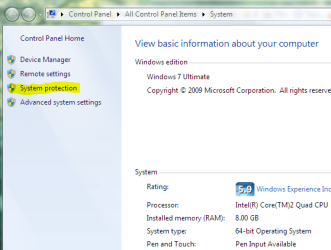
On my external the folder is called 'WindowsImageBackup' and it is not hidden. Do you have system restore/shadow copy enabled for that drive? To check-Control Panel\All Control Panel Items\System. Click on system protection in the navigation pane.

syspro.PNG
 

My Computer My Computer

At a glance

Vista Ult 64 bit Seven Ult RTM x64Intel Core2 Quad Q6600 2.40 gigahertzCrucial Ballistix 4x2GB PC2 6400NVIDIA GeForce 8600 GTS 256 MB
Computer Manufacturer/Model Number
Dell XPS420
OS
Vista Ult 64 bit Seven Ult RTM x64
CPU
Intel Core2 Quad Q6600 2.40 gigahertz
Memory
Crucial Ballistix 4x2GB PC2 6400
Graphics Card(s)
NVIDIA GeForce 8600 GTS 256 MB
Sound Card
Creative SB X-Fi audio
Monitor(s) Displays
HP w2207 + HPvs15
Screen Resolution
1680x1050 + 1024x768
Hard Drives
2-WD5000AAKS-500 GB
WD5000AAV-500 GB external
Keyboard
Microsoft Comfort Curve
Mouse
MX Revolution
Other Info
Wacom Intuos 2 Graphics Tablet
Experience Index=5.5
Yes I select the shadow option when I backed up my files.

The thing is, I manually deleted WindowsImageBackup already. I right clicked on ALL of my files on my external HDD and it only adds up to 571GB, yet when I right click on the HDD and click properties, it says that I've used 749GB.
 

My Computer My Computer

At a glance

Windows 7i7 920 @ 3.8ghz6GB Corsair DominatorATI Radeon HD5850
Computer Manufacturer/Model Number
Self-built
OS
Windows 7
CPU
i7 920 @ 3.8ghz
Motherboard
MSI X58 Pro-E
Memory
6GB Corsair Dominator
Graphics Card(s)
ATI Radeon HD5850
Sound Card
Musiland Monitor 02 US
Monitor(s) Displays
Dell 24"
Screen Resolution
1920x1200
Hard Drives
Intel X25-M 80GB SSD & Samsung Spinpoint F3 1TB
PSU
Antec EA650
Case
Antec 900
Cooling
Corsair H50
Keyboard
Logitech G11
Mouse
Logitech G9x
Internet Speed
23 mb/s
That is a bug I'm sure not only you recognized :cry:. I know many people who expereinced this, including myself. If you use windows 7 to backup using image backup to an external hard drive, you must take care not to delete that file manually. This is because somehow, doing so would delete the folder but a portion of the backup data is still on the harddrive, data that isn't accessible because it has no folder structure. Do garysgold's suggestion and go to system protection and disable protection on your external hard drive. Also you can click on taht external hard drive and click on configure. There is an option there to remove all restore points.
If you follow the procedure correctly, the extra space should be back in your hdd in no time~!
 

My Computer My Computer

At a glance

Windows 7 64 bit build 7600Intel Core i5 750/Intel Pentium Duo T4200 2.0...6 gig/4 gigATI Radeon HD 4350/Intel Graphics Media Accel...
Computer Manufacturer/Model Number
Dell XPS 8000/HP G70 258US
OS
Windows 7 64 bit build 7600
CPU
Intel Core i5 750/Intel Pentium Duo T4200 2.00 ghz
Memory
6 gig/4 gig
Graphics Card(s)
ATI Radeon HD 4350/Intel Graphics Media Accelerator 4500MHD
Sound Card
Realtek/Conexant Smartaudio High Definition Device
Monitor(s) Displays
Two
Screen Resolution
1920x1080/1440x900
Hard Drives
750/250 gig
Internet Speed
24 mb
^ Im not sure what garygold is suggesting me to do exactly...

I deleted it manually because Windows7 told me that I can delete the files manually if I wished, after I canceled the backup in the middle of it.
 

My Computer My Computer

At a glance

Windows 7i7 920 @ 3.8ghz6GB Corsair DominatorATI Radeon HD5850
Computer Manufacturer/Model Number
Self-built
OS
Windows 7
CPU
i7 920 @ 3.8ghz
Motherboard
MSI X58 Pro-E
Memory
6GB Corsair Dominator
Graphics Card(s)
ATI Radeon HD5850
Sound Card
Musiland Monitor 02 US
Monitor(s) Displays
Dell 24"
Screen Resolution
1920x1200
Hard Drives
Intel X25-M 80GB SSD & Samsung Spinpoint F3 1TB
PSU
Antec EA650
Case
Antec 900
Cooling
Corsair H50
Keyboard
Logitech G11
Mouse
Logitech G9x
Internet Speed
23 mb/s
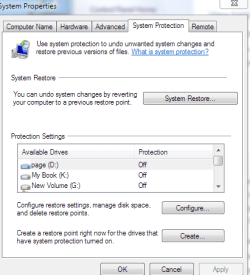
Shadow copy is different from an image backup. Shadow copies are made whenever a restore point is created. If you go to the tab in the pic, you can select your external drive from the list, click configure and turn off restore points for that disk. When you do it will delete that info from the drive/partition. That is an awful lot of space for restore points though. If restore points are not turned on for that drive, then that may not be the problem.

sys1.PNG
 

My Computer My Computer

At a glance

Vista Ult 64 bit Seven Ult RTM x64Intel Core2 Quad Q6600 2.40 gigahertzCrucial Ballistix 4x2GB PC2 6400NVIDIA GeForce 8600 GTS 256 MB
Computer Manufacturer/Model Number
Dell XPS420
OS
Vista Ult 64 bit Seven Ult RTM x64
CPU
Intel Core2 Quad Q6600 2.40 gigahertz
Memory
Crucial Ballistix 4x2GB PC2 6400
Graphics Card(s)
NVIDIA GeForce 8600 GTS 256 MB
Sound Card
Creative SB X-Fi audio
Monitor(s) Displays
HP w2207 + HPvs15
Screen Resolution
1680x1050 + 1024x768
Hard Drives
2-WD5000AAKS-500 GB
WD5000AAV-500 GB external
Keyboard
Microsoft Comfort Curve
Mouse
MX Revolution
Other Info
Wacom Intuos 2 Graphics Tablet
Experience Index=5.5
^ thanks for clearing that up. Got it!!
 

My Computer My Computer

At a glance

Windows 7i7 920 @ 3.8ghz6GB Corsair DominatorATI Radeon HD5850
Computer Manufacturer/Model Number
Self-built
OS
Windows 7
CPU
i7 920 @ 3.8ghz
Motherboard
MSI X58 Pro-E
Memory
6GB Corsair Dominator
Graphics Card(s)
ATI Radeon HD5850
Sound Card
Musiland Monitor 02 US
Monitor(s) Displays
Dell 24"
Screen Resolution
1920x1200
Hard Drives
Intel X25-M 80GB SSD & Samsung Spinpoint F3 1TB
PSU
Antec EA650
Case
Antec 900
Cooling
Corsair H50
Keyboard
Logitech G11
Mouse
Logitech G9x
Internet Speed
23 mb/s
No problem. :D
 

My Computer My Computer

At a glance

Vista Ult 64 bit Seven Ult RTM x64Intel Core2 Quad Q6600 2.40 gigahertzCrucial Ballistix 4x2GB PC2 6400NVIDIA GeForce 8600 GTS 256 MB
Computer Manufacturer/Model Number
Dell XPS420
OS
Vista Ult 64 bit Seven Ult RTM x64
CPU
Intel Core2 Quad Q6600 2.40 gigahertz
Memory
Crucial Ballistix 4x2GB PC2 6400
Graphics Card(s)
NVIDIA GeForce 8600 GTS 256 MB
Sound Card
Creative SB X-Fi audio
Monitor(s) Displays
HP w2207 + HPvs15
Screen Resolution
1680x1050 + 1024x768
Hard Drives
2-WD5000AAKS-500 GB
WD5000AAV-500 GB external
Keyboard
Microsoft Comfort Curve
Mouse
MX Revolution
Other Info
Wacom Intuos 2 Graphics Tablet
Experience Index=5.5
After getting all of my 170 something GB back, the system image ate up my HDD again. This time I have 153GB worth of the system image. I am unable to figure out how to delete it this time, as the steps I used before no longer works. Basically I go Control Panel/System/select the HDD, then configure, then delete. It then tells me that the delete is successful, yet the 153gb system image is STILL on my HDD.

I'm hating W7's backup utility. Thinking about looking for a third party software for backing up my data. Seagate's backup utility was great but too bad WD doesn't offer one.
 

My Computer My Computer

At a glance

Windows 7i7 920 @ 3.8ghz6GB Corsair DominatorATI Radeon HD5850
Computer Manufacturer/Model Number
Self-built
OS
Windows 7
CPU
i7 920 @ 3.8ghz
Motherboard
MSI X58 Pro-E
Memory
6GB Corsair Dominator
Graphics Card(s)
ATI Radeon HD5850
Sound Card
Musiland Monitor 02 US
Monitor(s) Displays
Dell 24"
Screen Resolution
1920x1200
Hard Drives
Intel X25-M 80GB SSD & Samsung Spinpoint F3 1TB
PSU
Antec EA650
Case
Antec 900
Cooling
Corsair H50
Keyboard
Logitech G11
Mouse
Logitech G9x
Internet Speed
23 mb/s
Anybody? I'm still having this problem. I just bought this new HDD and I just want it to do what I bought it for!!
 

My Computer My Computer

At a glance

Windows 7i7 920 @ 3.8ghz6GB Corsair DominatorATI Radeon HD5850
Computer Manufacturer/Model Number
Self-built
OS
Windows 7
CPU
i7 920 @ 3.8ghz
Motherboard
MSI X58 Pro-E
Memory
6GB Corsair Dominator
Graphics Card(s)
ATI Radeon HD5850
Sound Card
Musiland Monitor 02 US
Monitor(s) Displays
Dell 24"
Screen Resolution
1920x1200
Hard Drives
Intel X25-M 80GB SSD & Samsung Spinpoint F3 1TB
PSU
Antec EA650
Case
Antec 900
Cooling
Corsair H50
Keyboard
Logitech G11
Mouse
Logitech G9x
Internet Speed
23 mb/s

My Computer My Computer

At a glance

Vista Ult 64 bit Seven Ult RTM x64Intel Core2 Quad Q6600 2.40 gigahertzCrucial Ballistix 4x2GB PC2 6400NVIDIA GeForce 8600 GTS 256 MB
Computer Manufacturer/Model Number
Dell XPS420
OS
Vista Ult 64 bit Seven Ult RTM x64
CPU
Intel Core2 Quad Q6600 2.40 gigahertz
Memory
Crucial Ballistix 4x2GB PC2 6400
Graphics Card(s)
NVIDIA GeForce 8600 GTS 256 MB
Sound Card
Creative SB X-Fi audio
Monitor(s) Displays
HP w2207 + HPvs15
Screen Resolution
1680x1050 + 1024x768
Hard Drives
2-WD5000AAKS-500 GB
WD5000AAV-500 GB external
Keyboard
Microsoft Comfort Curve
Mouse
MX Revolution
Other Info
Wacom Intuos 2 Graphics Tablet
Experience Index=5.5
Windows 7 backup utility sucks

What is the purpose of the imaging anyway? I just want a basic backup of my files, preferably accessible on the external HDD, instead of zipped up in a single file.
 

My Computer My Computer

At a glance

Windows 7i7 920 @ 3.8ghz6GB Corsair DominatorATI Radeon HD5850
Computer Manufacturer/Model Number
Self-built
OS
Windows 7
CPU
i7 920 @ 3.8ghz
Motherboard
MSI X58 Pro-E
Memory
6GB Corsair Dominator
Graphics Card(s)
ATI Radeon HD5850
Sound Card
Musiland Monitor 02 US
Monitor(s) Displays
Dell 24"
Screen Resolution
1920x1200
Hard Drives
Intel X25-M 80GB SSD & Samsung Spinpoint F3 1TB
PSU
Antec EA650
Case
Antec 900
Cooling
Corsair H50
Keyboard
Logitech G11
Mouse
Logitech G9x
Internet Speed
23 mb/s
I don't know of any program that does a backup as just a copy of the files. They all have their own file format. Windows uses .zip files to compress the data.
I haven't had any problems with 7's backup, knock on wood. I've also used Acronis and Paragon products and they have both done the job. Haven't used Macrium, but a lot of people here recommend it.

The purpose of a system image is that if your OS gets tanked, you can reinstall the image and all the programs etc. will be restored also. No need to install the OS and then install and set up everything else. Whenever I make a clean install and get things set up as I want with programs installed etc, I make an image. I can now go back to that setup with a few clicks. Similar to the restore to factory settings option on a prebuilt machine. If I make major changes, and everything is working fine, I make another image.
 

My Computer My Computer

At a glance

Vista Ult 64 bit Seven Ult RTM x64Intel Core2 Quad Q6600 2.40 gigahertzCrucial Ballistix 4x2GB PC2 6400NVIDIA GeForce 8600 GTS 256 MB
Computer Manufacturer/Model Number
Dell XPS420
OS
Vista Ult 64 bit Seven Ult RTM x64
CPU
Intel Core2 Quad Q6600 2.40 gigahertz
Memory
Crucial Ballistix 4x2GB PC2 6400
Graphics Card(s)
NVIDIA GeForce 8600 GTS 256 MB
Sound Card
Creative SB X-Fi audio
Monitor(s) Displays
HP w2207 + HPvs15
Screen Resolution
1680x1050 + 1024x768
Hard Drives
2-WD5000AAKS-500 GB
WD5000AAV-500 GB external
Keyboard
Microsoft Comfort Curve
Mouse
MX Revolution
Other Info
Wacom Intuos 2 Graphics Tablet
Experience Index=5.5
Instead of formatting the HDD, I did a backup last night without canceling it.

This is the result:
Data file backup: 104.92 GB
System image: 152.86 GB
Other Files: 571.45 GB
Free space: 568.03 GB
Total size: 1.36 TB

Does that sound about right? When I look at my C drive properties, it shows that I have used 169 GB, but the data backup file is only about 105 GB.

Would I be able to delete my system image later if I did not want it (even though I wasnt able to do so before I did a complete backup)?

I chose the Windows recommended settings when backing up, which includes: default Windows folders and local files in libraries and system image. Does this include everything in C:\Users\David\Music\iTunes\iTunes Music? I am most concerned about my music library and it is the LAST thing I want to lose.
 

My Computer My Computer

At a glance

Windows 7i7 920 @ 3.8ghz6GB Corsair DominatorATI Radeon HD5850
Computer Manufacturer/Model Number
Self-built
OS
Windows 7
CPU
i7 920 @ 3.8ghz
Motherboard
MSI X58 Pro-E
Memory
6GB Corsair Dominator
Graphics Card(s)
ATI Radeon HD5850
Sound Card
Musiland Monitor 02 US
Monitor(s) Displays
Dell 24"
Screen Resolution
1920x1200
Hard Drives
Intel X25-M 80GB SSD & Samsung Spinpoint F3 1TB
PSU
Antec EA650
Case
Antec 900
Cooling
Corsair H50
Keyboard
Logitech G11
Mouse
Logitech G9x
Internet Speed
23 mb/s
Anybody?
 

My Computer My Computer

At a glance

Windows 7i7 920 @ 3.8ghz6GB Corsair DominatorATI Radeon HD5850
Computer Manufacturer/Model Number
Self-built
OS
Windows 7
CPU
i7 920 @ 3.8ghz
Motherboard
MSI X58 Pro-E
Memory
6GB Corsair Dominator
Graphics Card(s)
ATI Radeon HD5850
Sound Card
Musiland Monitor 02 US
Monitor(s) Displays
Dell 24"
Screen Resolution
1920x1200
Hard Drives
Intel X25-M 80GB SSD & Samsung Spinpoint F3 1TB
PSU
Antec EA650
Case
Antec 900
Cooling
Corsair H50
Keyboard
Logitech G11
Mouse
Logitech G9x
Internet Speed
23 mb/s
Personally I would recommend getting your personal data files (Music, Pictures, Docs etc.) off of the C partition. That way if windows tanks and you have to format the C drive and reinstall, you won't be erasing all your data files. This may require some effort but worth it in my opinion. As far as you back up goes, I don't know if you will have a problem deleting the sys img. As I said above I do them separately. Just my way. If you are interested in moving your data files, then post a snip of disk manager. Rt. click Computer/Manage/Disk management. If you need info on posting a pic or snipping tool. http://www.sevenforums.com/general-...ed-method-uploading-posting-screen-shots.html
 

My Computer My Computer

At a glance

Vista Ult 64 bit Seven Ult RTM x64Intel Core2 Quad Q6600 2.40 gigahertzCrucial Ballistix 4x2GB PC2 6400NVIDIA GeForce 8600 GTS 256 MB
Computer Manufacturer/Model Number
Dell XPS420
OS
Vista Ult 64 bit Seven Ult RTM x64
CPU
Intel Core2 Quad Q6600 2.40 gigahertz
Memory
Crucial Ballistix 4x2GB PC2 6400
Graphics Card(s)
NVIDIA GeForce 8600 GTS 256 MB
Sound Card
Creative SB X-Fi audio
Monitor(s) Displays
HP w2207 + HPvs15
Screen Resolution
1680x1050 + 1024x768
Hard Drives
2-WD5000AAKS-500 GB
WD5000AAV-500 GB external
Keyboard
Microsoft Comfort Curve
Mouse
MX Revolution
Other Info
Wacom Intuos 2 Graphics Tablet
Experience Index=5.5
Perhaps I am not understanding you correctly but you recommend me to get my data files off the C drive so that in the event of a crash, I would not lose the files when I format the drive. But isn't that the whole purpose of the backup? To backup all of my data files so that I can restore them after I format my drive? I think there is something I am not understanding fully.
 

Attachments

  • Capture.JPG
    Capture.JPG
    81.9 KB · Views: 15

My Computer My Computer

At a glance

Windows 7i7 920 @ 3.8ghz6GB Corsair DominatorATI Radeon HD5850
Computer Manufacturer/Model Number
Self-built
OS
Windows 7
CPU
i7 920 @ 3.8ghz
Motherboard
MSI X58 Pro-E
Memory
6GB Corsair Dominator
Graphics Card(s)
ATI Radeon HD5850
Sound Card
Musiland Monitor 02 US
Monitor(s) Displays
Dell 24"
Screen Resolution
1920x1200
Hard Drives
Intel X25-M 80GB SSD & Samsung Spinpoint F3 1TB
PSU
Antec EA650
Case
Antec 900
Cooling
Corsair H50
Keyboard
Logitech G11
Mouse
Logitech G9x
Internet Speed
23 mb/s
Back
Top