Question about system images

jonnyhillow

Banned
Local time
12:56 AM
Messages
637
Location
NJ native & NC
Hi , I usually burn a system image using Windows and use it if If I get into trouble with malware since I don't keep many files at all and nothing important.

I found that after using the system image a few times I ran into a "Cyclic redundancy check " error and my system image no longer worked .

Is this normal and how often should you make a system image ? I don't have any backups because I would rather just use something to restore the whole thing where I can format .

Backups have always confused me because if I restored from a backup I would have double the amount of files if I wasn't able to format.


Thank you
 

My Computer

Computer type
Laptop
Computer Manufacturer/Model Number
Asus laptop U56E
OS
Microsoft Windows 7 Home Premium 64-bit 7601 Multiprocessor Free Service Pack 1
CPU
Intel(R) Core(TM) i5-2430M CPU @ 2.40GHz
Motherboard
ASUSTeK Computer Inc. U56E
Memory
6.00 GB
Graphics Card(s)
Intel(R) HD Graphics 3000
Sound Card
(1) High Definition Audio Device (2) High Definition Audio
Screen Resolution
1366 x 768 x 32 bits (4294967296 colors) @ 60 Hz
Hard Drives
WDC WD6400BPVT-80HXZT3
Hi , I usually burn a system image using Windows and use it if If I get into trouble with malware since I don't keep many files at all and nothing important.

I found that after using the system image a few times I ran into a "Cyclic redundancy check " error and my system image no longer worked .

Is this normal and how often should you make a system image ? I don't have any backups because I would rather just use something to restore the whole thing where I can format .

Backups have always confused me because if I restored from a backup I would have double the amount of files if I wasn't able to format.


Thank you

Not sure I'm following your last point about double the amount of files. If you restore, your original files would get over-written and you wouldn't have double the amount. The old file X would get over-written by the restored File X. The old file X is gone.

How often you should make a system image varies according to your habits. If you install and uninstall many programs every day, maybe you make an image daily. If you have an average usage pattern where you make system changes less often, maybe you make an image weekly or monthly. If you very rarely make changes, maybe quarterly would be enough.

I don't know a thing about the cyclic redundancy check. I do know that Windows built-in imaging has its own peculiarities and isn't easily understood. Not well designed or explained.

So most of us on these forums use other products: Macrium, Acronis, Paragon, EaseUS, etc.
 

My Computer

Computer type
PC/Desktop
Computer Manufacturer/Model Number
Ignatz Special; 4 speed manual gearbox; factory air conditioning; one of one
OS
Windows 7 Home Premium SP1, 64-bit
CPU
Intel Skylake i5-6600K, not overclocked
Motherboard
AsRock Z170M Extreme 4, micro ATX
Memory
8 GB HyperX DDR4-2666 (2 x 4 GB)
Graphics Card(s)
none; graphics are integrated on CPU
Sound Card
onboard: Realtek ALC1150; external: USB Behringer UF0-202
Monitor(s) Displays
Dell S2340M 23 inch IPS
Screen Resolution
1600 x 900
Hard Drives
System: Crucial MX100 series SSD, 128 GB;
Data: Samsung Spinpoint 103SJ, 1 TB;
Backup: WD Caviar Green WD30EZRX-00D8PB0, 3 TB
PSU
Rosewill SilentNight 500 watt fanless, semi-modular
Case
Antec Solo II
Cooling
Noctua NH-U12S; Noctua F12 intake, Noctua S12A exhaust
Keyboard
Microsoft 200 6JH-00001 USB
Mouse
Dell or Microsoft optical wired; USB
Antivirus
Microsoft Security Essentials and Malwarebytes Premium
Browser
Pale Moon
Other Info
All fans PWM; speeds at idle: CPU circa 500 rpm; intake circa 600 rpm; exhaust circa 600 rpm; CPU temps 27 idle and 47 C load in a warm room (27 C/81 F) when running Intel Extreme Tuning Utility stress test.
Thank you very much for the info , answered all my questions actually, but one. Which of the programs that you list is the most user friendly .

Thanks again
 

My Computer

Computer type
Laptop
Computer Manufacturer/Model Number
Asus laptop U56E
OS
Microsoft Windows 7 Home Premium 64-bit 7601 Multiprocessor Free Service Pack 1
CPU
Intel(R) Core(TM) i5-2430M CPU @ 2.40GHz
Motherboard
ASUSTeK Computer Inc. U56E
Memory
6.00 GB
Graphics Card(s)
Intel(R) HD Graphics 3000
Sound Card
(1) High Definition Audio Device (2) High Definition Audio
Screen Resolution
1366 x 768 x 32 bits (4294967296 colors) @ 60 Hz
Hard Drives
WDC WD6400BPVT-80HXZT3

My Computer

Computer type
PC/Desktop
Computer Manufacturer/Model Number
Ignatz Special; 4 speed manual gearbox; factory air conditioning; one of one
OS
Windows 7 Home Premium SP1, 64-bit
CPU
Intel Skylake i5-6600K, not overclocked
Motherboard
AsRock Z170M Extreme 4, micro ATX
Memory
8 GB HyperX DDR4-2666 (2 x 4 GB)
Graphics Card(s)
none; graphics are integrated on CPU
Sound Card
onboard: Realtek ALC1150; external: USB Behringer UF0-202
Monitor(s) Displays
Dell S2340M 23 inch IPS
Screen Resolution
1600 x 900
Hard Drives
System: Crucial MX100 series SSD, 128 GB;
Data: Samsung Spinpoint 103SJ, 1 TB;
Backup: WD Caviar Green WD30EZRX-00D8PB0, 3 TB
PSU
Rosewill SilentNight 500 watt fanless, semi-modular
Case
Antec Solo II
Cooling
Noctua NH-U12S; Noctua F12 intake, Noctua S12A exhaust
Keyboard
Microsoft 200 6JH-00001 USB
Mouse
Dell or Microsoft optical wired; USB
Antivirus
Microsoft Security Essentials and Malwarebytes Premium
Browser
Pale Moon
Other Info
All fans PWM; speeds at idle: CPU circa 500 rpm; intake circa 600 rpm; exhaust circa 600 rpm; CPU temps 27 idle and 47 C load in a warm room (27 C/81 F) when running Intel Extreme Tuning Utility stress test.
Whenever you get a "Cyclic redundancy check " error - do a chkdsk /f /r from the elevated command prompt - this error is caused by a error on the harddrive .
 

My Computer

Computer type
PC/Desktop
Computer Manufacturer/Model Number
Custom Build
OS
Windows 10 Pro - 64 bit
CPU
Intel i7 2600K
Motherboard
Asus P8P67
Memory
8 Gig ddr3 1600 mhz - viper extreme (Patriot)
Graphics Card(s)
EVGA 980 TI
Monitor(s) Displays
2 - Lg 21" LED , sony 48 " bravia LED
Hard Drives
one - samsung 840 series 465.76 GB SSD
two - wd 2 tB black
one - wd 1.5 tb black
one - wb 1 tb black
PSU
1000 Watt Coolmaster : Silent Pro Gold
Case
antec 1200
Cooling
watercooled
Mouse
logitech wireless
Antivirus
Norton Security 2015
Other Info
powerware 3.1 KVA FERRUPS with 4 - 1000 Amp Deep cycle batteries ...
I apologize for responding late , I was away and I don't have a smartphone so no access to the web.

Thank you for the info guys, regarding the" cyclic redundancy check" I routinely run checkdsk and once a week at least I do run the chkdsk/f/r in admin and I noticed a lot of the time I get an error message saying "system repair pending " which goes way back but I have been unable to correct it .


Anyways , sometimes I get no issues found and everythings fine and sometimes I get the system repair pending message which I think is set deep in the system because I believe there was a hard shutdown before the system repair was able to do anything and I have had it forever.

I would love to get rid of it though but nothing has worked.

Thanks again
 
Last edited:

My Computer

Computer type
Laptop
Computer Manufacturer/Model Number
Asus laptop U56E
OS
Microsoft Windows 7 Home Premium 64-bit 7601 Multiprocessor Free Service Pack 1
CPU
Intel(R) Core(TM) i5-2430M CPU @ 2.40GHz
Motherboard
ASUSTeK Computer Inc. U56E
Memory
6.00 GB
Graphics Card(s)
Intel(R) HD Graphics 3000
Sound Card
(1) High Definition Audio Device (2) High Definition Audio
Screen Resolution
1366 x 768 x 32 bits (4294967296 colors) @ 60 Hz
Hard Drives
WDC WD6400BPVT-80HXZT3
High light the text that is underlined and right tick on it. Go to the Big (U) at the top of the page and tick on it and the underline should go away.
 

My Computer

Computer type
PC/Desktop
Computer Manufacturer/Model Number
Home made Desktop
OS
Windows 10 Pro. 64/ version 1709 Windows 7 Pro/64
CPU
Intel i7-6800K @ 4.3
Motherboard
ASUS X-99 Deluxe II
Memory
Corsair Platinum 16 gig @2400
Graphics Card(s)
EVGA GTX 1070 OC
Monitor(s) Displays
Asus 27" LED LCD/VE278Q
Screen Resolution
1920-1080 or 1280-720 HDMI
Hard Drives
INTEL SSD 730-240 Gb Sata 3.0/
PSU
EVGA Platium 1200W
Case
Phanteks Luxe Tempered Glass 8 fans/ one radiator
Cooling
XSPC/ Water Cooled CPU
Keyboard
Das 4 Professional
Mouse
Logitech M705/MX Anywhere 2-S
Internet Speed
100 mbits
Antivirus
Microsoft Security Essentials/ Malwarebytes Premium 3.0/ SAS
Browser
I.E. 11 default/Firefox/ ISP Time Warner Cable/Spectrum
Other Info
LG BluRay Burner/
Sound system-KLipsch-THX/
Icy Dock ssd Hot Swap bays.
High light the text that is underlined and right tick on it. Go to the Big (U) at the top of the page and tick on it and the underline should go away.


Thank you Layback Bear

Now that I fixed that does anyone have any info on my "system repair pending " trouble or just don't worry about it.

Thanks
 

My Computer

Computer type
Laptop
Computer Manufacturer/Model Number
Asus laptop U56E
OS
Microsoft Windows 7 Home Premium 64-bit 7601 Multiprocessor Free Service Pack 1
CPU
Intel(R) Core(TM) i5-2430M CPU @ 2.40GHz
Motherboard
ASUSTeK Computer Inc. U56E
Memory
6.00 GB
Graphics Card(s)
Intel(R) HD Graphics 3000
Sound Card
(1) High Definition Audio Device (2) High Definition Audio
Screen Resolution
1366 x 768 x 32 bits (4294967296 colors) @ 60 Hz
Hard Drives
WDC WD6400BPVT-80HXZT3
There are 2 things I would never do:

1. write images to DVDs
2. make images with Windows imaging

I make an image each week on all my 6 systems and and I place the images on external and internal disks. I have a total of 2TB reserved for images - that would be the equivalent of more than 400 DVDs - no way.

And with Windows imaging it's like on the high seas - you never know what is going to happen. An easy to use and very reliable imaging program is free Macrium. That has served me well since 4 years and has never failed in hundreds of recoveries on my systems and on friends systems.
 

My Computer

Computer Manufacturer/Model Number
HP, Dell, Gateway, Toshiba - 4 laptops and 2 desktops
OS
Vista, Windows7, Mint Mate, Zorin, Windows 8
CPU
from 1.6GHz Duo to i7
Monitor(s) Displays
2x HP w2207
Hard Drives
5x HDD, 7x SSD, 12x Externals
Keyboard
with trackball - no mices
Mouse
Trackball mice
Internet Speed
DSL 6000
Things I wouldn't do (when making images):
1) write images to DVDs
2) rely on one imaging program (Windows imaging has served me well along with Macrium)
3) rely on just one external HDD to store images
 

My Computer

Computer type
PC/Desktop
Computer Manufacturer/Model Number
Own build
OS
Windows 7x64 Home Premium SP1
CPU
Intel i7 2600k
Motherboard
ASUS P8Z68 Deluxe
Memory
G.Skill Ripjaws (DDR3-1600) 2x4GB
Graphics Card(s)
Nvidia GeForce GTS 450; Intel HD Graphics 3000(GT2+)
Monitor(s) Displays
Dell Ultrasharp IPS panel U2311H, Samsung SyncMaster P2350
Screen Resolution
1920x1080
Hard Drives
Samsung 850 Pro SSD 256GB, Samsung SSD 840 120GB, Seagates 1TB Barracuda ST31000528AS x2
PSU
Seasonic M12II 520W
Case
Lian Li Lancool PC-K60
Cooling
Case: 1x120mm, 3x140mm CPU: Hyper 212+
Keyboard
Logitech MK520 (wireless)
Mouse
Logitech MK520
Internet Speed
6-7 Mbps
Antivirus
Norton Security Premium, Malwarebytes on 2 (MSE on 3rd PC)
Browser
FireFox
Other Info
Audio: Logitech Z523 2.1
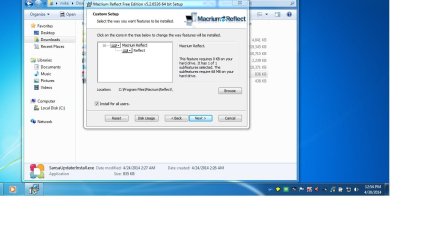
Ok, some more questions, in the first screenshot it shows two options to download, first is Macrium reflect , second says reflect , any differences?


What I want to do is make a full system image of my entire computer to restore from if I ever get things really messed up , what is the difference between cloning and making a system image ?

Is cloning a hard drive the same as making a full system image? When I chose to make a system image the other day using this program I checked (burn it to a DVD ) when it was successfully completed the DVD was almost empty , why is this , I know when I have used Windows disk image burning it requires two DVDS.
 

Attachments

  • Untitled.jpg
    Untitled.jpg
    72.1 KB · Views: 6
  • Untitled.png
    Untitled.png
    52.7 KB · Views: 6

My Computer

Computer type
Laptop
Computer Manufacturer/Model Number
Asus laptop U56E
OS
Microsoft Windows 7 Home Premium 64-bit 7601 Multiprocessor Free Service Pack 1
CPU
Intel(R) Core(TM) i5-2430M CPU @ 2.40GHz
Motherboard
ASUSTeK Computer Inc. U56E
Memory
6.00 GB
Graphics Card(s)
Intel(R) HD Graphics 3000
Sound Card
(1) High Definition Audio Device (2) High Definition Audio
Screen Resolution
1366 x 768 x 32 bits (4294967296 colors) @ 60 Hz
Hard Drives
WDC WD6400BPVT-80HXZT3
see comments in bold

What I want to do is make a full system image of my entire computer to restore from if I ever get things really messed up , what is the difference between cloning and making a system image ?

You should use imaging. That makes an image file, which you later "restore" if you get in a jam. Cloning is a different procedure that does not use an image file and isn't as suitable for a "backup". Cloning is most often used when things are going well and you just want to move your system to a new hard drive. But you can use imaging for that purpose also.

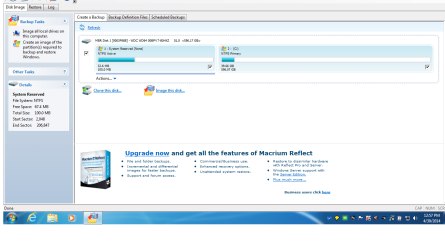
You have a "system reserved" partition, so you must make an image of it as well as C if you want to restore your system. In your second picture, you'd choose "image this disk".


When I chose to make a system image the other day using this program I checked (burn it to a DVD ) when it was successfully completed the DVD was almost empty , why is this , I know when I have used Windows disk image burning it requires two DVDS.

I don't know exactly what you did regarding DVDs, but I'd advise you to give up on the idea of using DVDs for imaging. They are prone to problems. If you insist on using DVDs, I'd guess that your system would require 3 or 4 DVDs for the image.

Instead, store the image file on a hard drive. It's best to use an entirely separate hard drive than C, either internal or external. You could store the image on a separate partition on the same drive as C, but that's not recommended because if that drive drops dead, you would lose your image file and could not restore.

You MUST make a "recovery disc" in Macrium in order to be able to restore. You burn it to a DVD. Look for the menu for that in Macrium. You can make a recovery disk in two ways: Linux-based method or WinPE method. WinPE is by far the better choice.

Be SURE to test your recovery disk to make sure it will in fact boot your PC. If it won't, you cannot restore when you get in trouble.
 

My Computer

Computer type
PC/Desktop
Computer Manufacturer/Model Number
Ignatz Special; 4 speed manual gearbox; factory air conditioning; one of one
OS
Windows 7 Home Premium SP1, 64-bit
CPU
Intel Skylake i5-6600K, not overclocked
Motherboard
AsRock Z170M Extreme 4, micro ATX
Memory
8 GB HyperX DDR4-2666 (2 x 4 GB)
Graphics Card(s)
none; graphics are integrated on CPU
Sound Card
onboard: Realtek ALC1150; external: USB Behringer UF0-202
Monitor(s) Displays
Dell S2340M 23 inch IPS
Screen Resolution
1600 x 900
Hard Drives
System: Crucial MX100 series SSD, 128 GB;
Data: Samsung Spinpoint 103SJ, 1 TB;
Backup: WD Caviar Green WD30EZRX-00D8PB0, 3 TB
PSU
Rosewill SilentNight 500 watt fanless, semi-modular
Case
Antec Solo II
Cooling
Noctua NH-U12S; Noctua F12 intake, Noctua S12A exhaust
Keyboard
Microsoft 200 6JH-00001 USB
Mouse
Dell or Microsoft optical wired; USB
Antivirus
Microsoft Security Essentials and Malwarebytes Premium
Browser
Pale Moon
Other Info
All fans PWM; speeds at idle: CPU circa 500 rpm; intake circa 600 rpm; exhaust circa 600 rpm; CPU temps 27 idle and 47 C load in a warm room (27 C/81 F) when running Intel Extreme Tuning Utility stress test.
Thank you

Unfortunately after using Macrium to backup my computer I noticed upon shutdown my screen would get stuck permanently on the Asus login screen .

It happened every time so I removed the program and it went back to normal , too bad I liked it , any reason for this ?

Thanks
 

My Computer

Computer type
Laptop
Computer Manufacturer/Model Number
Asus laptop U56E
OS
Microsoft Windows 7 Home Premium 64-bit 7601 Multiprocessor Free Service Pack 1
CPU
Intel(R) Core(TM) i5-2430M CPU @ 2.40GHz
Motherboard
ASUSTeK Computer Inc. U56E
Memory
6.00 GB
Graphics Card(s)
Intel(R) HD Graphics 3000
Sound Card
(1) High Definition Audio Device (2) High Definition Audio
Screen Resolution
1366 x 768 x 32 bits (4294967296 colors) @ 60 Hz
Hard Drives
WDC WD6400BPVT-80HXZT3
You didn't give nearly enough detail to be able to evaluate what you did or the exact sequence of events, but I've never heard of such a thing.
 

My Computer

Computer type
PC/Desktop
Computer Manufacturer/Model Number
Ignatz Special; 4 speed manual gearbox; factory air conditioning; one of one
OS
Windows 7 Home Premium SP1, 64-bit
CPU
Intel Skylake i5-6600K, not overclocked
Motherboard
AsRock Z170M Extreme 4, micro ATX
Memory
8 GB HyperX DDR4-2666 (2 x 4 GB)
Graphics Card(s)
none; graphics are integrated on CPU
Sound Card
onboard: Realtek ALC1150; external: USB Behringer UF0-202
Monitor(s) Displays
Dell S2340M 23 inch IPS
Screen Resolution
1600 x 900
Hard Drives
System: Crucial MX100 series SSD, 128 GB;
Data: Samsung Spinpoint 103SJ, 1 TB;
Backup: WD Caviar Green WD30EZRX-00D8PB0, 3 TB
PSU
Rosewill SilentNight 500 watt fanless, semi-modular
Case
Antec Solo II
Cooling
Noctua NH-U12S; Noctua F12 intake, Noctua S12A exhaust
Keyboard
Microsoft 200 6JH-00001 USB
Mouse
Dell or Microsoft optical wired; USB
Antivirus
Microsoft Security Essentials and Malwarebytes Premium
Browser
Pale Moon
Other Info
All fans PWM; speeds at idle: CPU circa 500 rpm; intake circa 600 rpm; exhaust circa 600 rpm; CPU temps 27 idle and 47 C load in a warm room (27 C/81 F) when running Intel Extreme Tuning Utility stress test.
You didn't give nearly enough detail to be able to evaluate what you did or the exact sequence of events, but I've never heard of such a thing.


I am going to download it again and start over following your advice to see if I can figure out the issue, will keep you posted.

Thank you


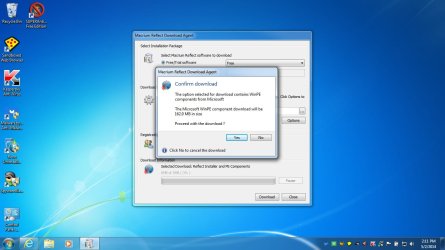
Ok, I got this screen which is odd since the last Macrium download said it was just over a 40 mb file.
 

Attachments

  • Untitled.jpg
    Untitled.jpg
    84 KB · Views: 12

My Computer

Computer type
Laptop
Computer Manufacturer/Model Number
Asus laptop U56E
OS
Microsoft Windows 7 Home Premium 64-bit 7601 Multiprocessor Free Service Pack 1
CPU
Intel(R) Core(TM) i5-2430M CPU @ 2.40GHz
Motherboard
ASUSTeK Computer Inc. U56E
Memory
6.00 GB
Graphics Card(s)
Intel(R) HD Graphics 3000
Sound Card
(1) High Definition Audio Device (2) High Definition Audio
Screen Resolution
1366 x 768 x 32 bits (4294967296 colors) @ 60 Hz
Hard Drives
WDC WD6400BPVT-80HXZT3
That looks like the right size. 40MB does not sound right.
 

My Computer

Computer Manufacturer/Model Number
HP, Dell, Gateway, Toshiba - 4 laptops and 2 desktops
OS
Vista, Windows7, Mint Mate, Zorin, Windows 8
CPU
from 1.6GHz Duo to i7
Monitor(s) Displays
2x HP w2207
Hard Drives
5x HDD, 7x SSD, 12x Externals
Keyboard
with trackball - no mices
Mouse
Trackball mice
Internet Speed
DSL 6000
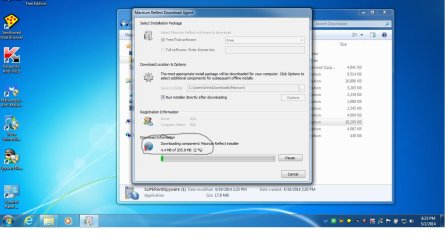
This screenshot is now showing 204 mb, very confusing.
 

Attachments

  • Untitled.jpg
    Untitled.jpg
    99.1 KB · Views: 7

My Computer

Computer type
Laptop
Computer Manufacturer/Model Number
Asus laptop U56E
OS
Microsoft Windows 7 Home Premium 64-bit 7601 Multiprocessor Free Service Pack 1
CPU
Intel(R) Core(TM) i5-2430M CPU @ 2.40GHz
Motherboard
ASUSTeK Computer Inc. U56E
Memory
6.00 GB
Graphics Card(s)
Intel(R) HD Graphics 3000
Sound Card
(1) High Definition Audio Device (2) High Definition Audio
Screen Resolution
1366 x 768 x 32 bits (4294967296 colors) @ 60 Hz
Hard Drives
WDC WD6400BPVT-80HXZT3
Are you just trying to download Macrium itself at this point?

You don't need a "download agent" or any extraneous stuff.

All you need is the exe file. Get it here:

Download Macrium Reflect 5.2.6526 - FileHippo.com

From the green "download latest version" on the right side. It is 41.8 mb in size.

Or are you trying to download something other than the application itself?
 

My Computer

Computer type
PC/Desktop
Computer Manufacturer/Model Number
Ignatz Special; 4 speed manual gearbox; factory air conditioning; one of one
OS
Windows 7 Home Premium SP1, 64-bit
CPU
Intel Skylake i5-6600K, not overclocked
Motherboard
AsRock Z170M Extreme 4, micro ATX
Memory
8 GB HyperX DDR4-2666 (2 x 4 GB)
Graphics Card(s)
none; graphics are integrated on CPU
Sound Card
onboard: Realtek ALC1150; external: USB Behringer UF0-202
Monitor(s) Displays
Dell S2340M 23 inch IPS
Screen Resolution
1600 x 900
Hard Drives
System: Crucial MX100 series SSD, 128 GB;
Data: Samsung Spinpoint 103SJ, 1 TB;
Backup: WD Caviar Green WD30EZRX-00D8PB0, 3 TB
PSU
Rosewill SilentNight 500 watt fanless, semi-modular
Case
Antec Solo II
Cooling
Noctua NH-U12S; Noctua F12 intake, Noctua S12A exhaust
Keyboard
Microsoft 200 6JH-00001 USB
Mouse
Dell or Microsoft optical wired; USB
Antivirus
Microsoft Security Essentials and Malwarebytes Premium
Browser
Pale Moon
Other Info
All fans PWM; speeds at idle: CPU circa 500 rpm; intake circa 600 rpm; exhaust circa 600 rpm; CPU temps 27 idle and 47 C load in a warm room (27 C/81 F) when running Intel Extreme Tuning Utility stress test.
I am confused now - what are you trying to download. The WinPE or the Macrium program.
 

My Computer

Computer Manufacturer/Model Number
HP, Dell, Gateway, Toshiba - 4 laptops and 2 desktops
OS
Vista, Windows7, Mint Mate, Zorin, Windows 8
CPU
from 1.6GHz Duo to i7
Monitor(s) Displays
2x HP w2207
Hard Drives
5x HDD, 7x SSD, 12x Externals
Keyboard
with trackball - no mices
Mouse
Trackball mice
Internet Speed
DSL 6000
Thanks for the new link but after downloading it said this is the 32 bit edition, I have a 64 bit machine.
 

My Computer

Computer type
Laptop
Computer Manufacturer/Model Number
Asus laptop U56E
OS
Microsoft Windows 7 Home Premium 64-bit 7601 Multiprocessor Free Service Pack 1
CPU
Intel(R) Core(TM) i5-2430M CPU @ 2.40GHz
Motherboard
ASUSTeK Computer Inc. U56E
Memory
6.00 GB
Graphics Card(s)
Intel(R) HD Graphics 3000
Sound Card
(1) High Definition Audio Device (2) High Definition Audio
Screen Resolution
1366 x 768 x 32 bits (4294967296 colors) @ 60 Hz
Hard Drives
WDC WD6400BPVT-80HXZT3
Back
Top