questions about system optimization

cheesum

New member
Member
Local time
11:21 PM
Messages
61
Hi.

My concerns are:
(1): My boot up time (from cold boot) takes about 20 seconds. I thought with UEFI + SSD, then boot time is supposed to be faster. Is it due to the GPT partition? Or having too many programs running on the background? Do you know how to reduce this boot up time?

(2): Whether secure erase is necessary?
I read somewhere that performing a secure erase on the Intel SSD would help to improve SSD performance. Unfortunately, I totally missed this step when doing the clean installation of Win7. Can i just use Paragon Free Back Up and Recovery 2013 and create a back up of the entire C Drive (of my Intel SSD) onto another hard disk? Then, just pluck in the hard disk on my laptop and perform secure erase on the SSD? Then, move the entire image from the hard disk back to the SSD?
Do you see any complications when performing this step?

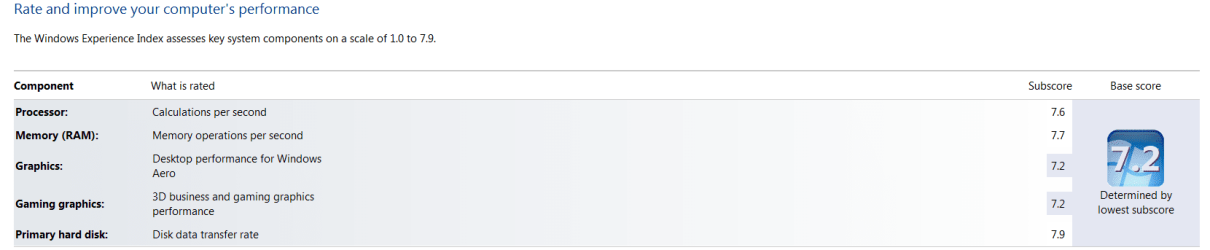
This is the screenshot of my Windows Experience Index.
Windows experience index.png
 
Last edited by a moderator:

My Computer

Computer type
Laptop
Computer Manufacturer/Model Number
Lenovo Ideapad Y580
OS
Windows 7 Home Premium 64Bit
Hello Shawn and thanks,
System Reserved in a standard MBR boot doesn't usually (and shouldn't) have a partition ID yet appears in Disk Management. I think it must be just one of those Disk Management quirks that the MSR partition is not shown. After a bit of checking I believe the MSR will show up in Diskpart and other third party tools.
I must admit I can't see any reason why the Disk Management software should hide its existence. Of course that's an MS issue/decision.
 

My Computer

Computer type
PC/Desktop
Computer Manufacturer/Model Number
Own build
OS
Windows 7x64 Home Premium SP1
CPU
Intel i7 2600k
Motherboard
ASUS P8Z68 Deluxe
Memory
G.Skill Ripjaws (DDR3-1600) 2x4GB
Graphics Card(s)
Nvidia GeForce GTS 450; Intel HD Graphics 3000(GT2+)
Monitor(s) Displays
Dell Ultrasharp IPS panel U2311H, Samsung SyncMaster P2350
Screen Resolution
1920x1080
Hard Drives
Samsung 850 Pro SSD 256GB, Samsung SSD 840 120GB, Seagates 1TB Barracuda ST31000528AS x2
PSU
Seasonic M12II 520W
Case
Lian Li Lancool PC-K60
Cooling
Case: 1x120mm, 3x140mm CPU: Hyper 212+
Keyboard
Logitech MK520 (wireless)
Mouse
Logitech MK520
Internet Speed
6-7 Mbps
Antivirus
Norton Security Premium, Malwarebytes on 2 (MSE on 3rd PC)
Browser
FireFox
Other Info
Audio: Logitech Z523 2.1
>>> your "disk transfer rate" is 7.9.... that is excellent and boot time is 20 seconds... that is very fast.... are you saying that you want to reduce your time?.....
 

My Computer

Computer type
Laptop
Computer Manufacturer/Model Number
Toshiba Satellite P845-S4200
OS
Wins 7 x64 SP1 Home Premium
CPU
intel core i5 3rd Generation
Motherboard
Toshiba
Memory
6 GB DDR3-1600
Graphics Card(s)
Intel 4000
Hard Drives
750 GB
Antivirus
Norton 2014 Antivirus
Browser
Firefox
>>> your "disk transfer rate" is 7.9.... that is excellent and boot time is 20 seconds... that is very fast.... are you saying that you want to reduce your time?.....

I agree. 20 second boot time is really fast for a normal "working system". You can make it boot quicker but you have to eliminate most of your start up devises and programs.

You have some great WEI scores.

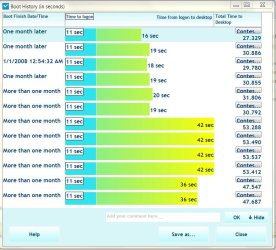
Here's mine.

You can see after a fresh install the boot time was 30 seconds plus. With a little tweaking I was able to get it down to a reasonable time.
 

Attachments

  • boottime.jpg
    boottime.jpg
    88.6 KB · Views: 5
  • wei8350.JPG
    wei8350.JPG
    48.5 KB · Views: 5

My Computer

Computer type
PC/Desktop
Computer Manufacturer/Model Number
Custom, Dell and Lenono LT's
OS
Win8/8.1,Win7-U64, Vista U64, uncounted Linux distor's
CPU
AMD and Intell, 9590, 8350, i5 3570k
Motherboard
CFVFZ, GA990FXA, Z77e-itx
Memory
Corsair G Skill
Graphics Card(s)
Crossfired Sapphire HD 7950 Vapor-X, ASUS R9 280X TOP
Sound Card
Realtek ALC889
Monitor(s) Displays
ViewSonic VX2770SMH 27" / ViewSonic VX2433 LCD 24"
Screen Resolution
1080i HD
Hard Drives
Samsung SSD 840 Pro
OCZ Agility 3's
OCZ Vector's
WD's Blue, red, green, Velociraptors
Seagate USB3 & Hybrid's
ASUS Blu-Ray
ASUS DVD
PSU
Corsair AX1200i, Seasonice 850 Gold
Case
Cooler Master HAF 922 & HAF 932, Lian Li Train case.
Cooling
Air, Glacer 240L expanded, custom EK loop with duel D5's
Keyboard
Microsoft SideWinder X4 USB Keyboard / Logitech 250 PS2
Mouse
Logitech G500 / MS wireless 5000
Internet Speed
Best of 5ms / 75+ dn / 12+ up More or less.
Antivirus
MS esentials-MalwareBytes
Browser
Firefox Chromebook
I would not defrag or secure erase an SSD. The only purpose of Secure Erase is to overwrite data so that it is made unrecoverable by most methods. A Quick Erase (Clean) provides any necessary troubleshooting benefit by clearing the boot sector of possibly conflicting code. I doubt it applies here.

You can go over your install thoroughly using these Troubleshooting Steps for Windows 7
 
As far as I know I agree with Greg that you don't defrag an SSD. Secure erase depends on the sensitivity of the data and who has access to your PC. For example I would definitely do a secure erase if I was selling the SSD or PC.
 

My Computer

Computer type
PC/Desktop
Computer Manufacturer/Model Number
Own build
OS
Windows 7x64 Home Premium SP1
CPU
Intel i7 2600k
Motherboard
ASUS P8Z68 Deluxe
Memory
G.Skill Ripjaws (DDR3-1600) 2x4GB
Graphics Card(s)
Nvidia GeForce GTS 450; Intel HD Graphics 3000(GT2+)
Monitor(s) Displays
Dell Ultrasharp IPS panel U2311H, Samsung SyncMaster P2350
Screen Resolution
1920x1080
Hard Drives
Samsung 850 Pro SSD 256GB, Samsung SSD 840 120GB, Seagates 1TB Barracuda ST31000528AS x2
PSU
Seasonic M12II 520W
Case
Lian Li Lancool PC-K60
Cooling
Case: 1x120mm, 3x140mm CPU: Hyper 212+
Keyboard
Logitech MK520 (wireless)
Mouse
Logitech MK520
Internet Speed
6-7 Mbps
Antivirus
Norton Security Premium, Malwarebytes on 2 (MSE on 3rd PC)
Browser
FireFox
Other Info
Audio: Logitech Z523 2.1
Back
Top