Solved questions about system patchers &theme building in general

ajfudge

New member
Member
Local time
10:17 AM
Messages
80
Location
Quezon, Philippines
Hi. Here's another set of bulleted inquiries. I do have lots of questions regarding customizing just about everything in my desktop. I posted this on other forum sites but I didn't receive a response. :( I am hoping that any experienced user can help me out, coz right now I can't start anything with custom themes until I am very sure what I am about to do.:confused:

I'm really not that new to patching system files. I've done this last year when I used a custom theme. It didn't go successfully as I expected though. Sadly, I wasn't able to detect what went wrong back then because I changed my failing hard drive that prompted me to reinstall Windows. Now I am back to square one. And I did my homework by researching large amount of information and collecting various tools regarding modifying desktop & explorer and custom themes in general. With the many tools I downloaded, I am comparing one to see what will fit to what I want to accomplish. Most articles I found online simply described the tools and don't say much information that's benefecial to users who are new to dealing with custom themes. With that said, I have these inquiries:


1) Between Universal Theme Patcher and UxStyle Core, which one is safer to use? I know that these two programs use different approach to patching. But on the event that I want to restore my system to the original unpatched version, which one will give me a good allowance? Does either of these automatically backup the original files and allow me to restore them later? Or do I have to backup those files manually? Maybe it's okay to just leave them patched? Also, how these patched files are going to be affected by Windows Updates? I know there are themes that don't work with Windows 7 SP1, so do I have to patch my files every time I installed a Windows Update?

2) Also there's this tool called "Theme Resource Changer" which eliminates the need to edit .dll files. Is this used for building themes or installing themes? The software description doesn't give me much clarity. Should I use this with the normal system patchers like UxStyle Core or Universal Theme Patcher? Or is it a good replacement?


3) What are the risk of double patching system files? To explain further, if I already patched my computer using any of the mentioned tools above, should there be any precaution when using/installing themes that already include patched files? In this case, I would be double-patching my system files, but is it okay to do that?


4) If I may go a bit off-topic, some themes include icons that I do not want to use. I think I can disable it from installing, but I want to use a different set of icons instead (Faenza or iRob for Mac which I converted to .ico, I haven't decided yet). Is there a tool that would allow me to accomplish this? (I'm talking about changing every Windows 7 icons). I have read from some posts here that icon changers should be avoided. Is that advice still ring today? Or has there been a stable, reliable tool that can change icons safely since those posts?


5) Since I haven't decided yet which theme I'll be using, I am fancying the thought of making my own (or at least modifying custom themes I downloaded from reliable sites). Do I have to use UxStyle Core or Universal Theme Patcher or Theme Resource Editor before I proceed making my own themes if I am going to modify, let's say, my explorer frame?
Also from my research, the most popular tools to dealing with custom themes are Windows Style Builder and Restorator. But those are not free. I am thinking of using Resource Hacker. Is it good enough? Does it accomplish the same tasks that WSB & Restorator do? Or are they different tools to be used side by side?

I am running Windows 7 Pro, 64-bit / Admin account / UAC disabled

Thank you to anyone who will give me a very good insight.
Here's hoping that I will lessen my confusion soon.
:confused::(:rolleyes::o:huh::eek::zip:
I'm rolling with so much thoughts right now, help me stop the confusion please.:):D:p

-AJ
 

My Computer My Computer

At a glance

Windows 7 Professional x64 | Windows ME | Win...Intel Mobile Core 2 Duo SU7300 @ 1.30GHz3 GB HDDR3 411MHzMobile Intel 4 Series Express Chipset Family
Computer Manufacturer/Model Number
ASUS UL80A
OS
Windows 7 Professional x64 | Windows ME | Windows 8 Dev Preview
CPU
Intel Mobile Core 2 Duo SU7300 @ 1.30GHz
Motherboard
ASUSTeK Computer Inc. UL80A (Socket 478)
Memory
3 GB HDDR3 411MHz
Graphics Card(s)
Mobile Intel 4 Series Express Chipset Family
Sound Card
Realtek High Definition Audio
Monitor(s) Displays
AU Optronics B140XW02 V1
Screen Resolution
1366x768
Hard Drives
500GB internal
320GB external
Keyboard
cheap keyboard
Mouse
cheap mouse
#1
Both are safe to use, I preferred to use UxStyle Core because it is a service that runs in the background and does not need any system files patched, and if there is any updates from Windows you do not have to rerun it.
With Universal Theme Patcher sometimes you get a Windows update and you have to re-patch. If you want to go back to the unpatched environment with Universal Theme Patcher in the program it has a feature to unpatched the files, with UxStyle Core there is nothing to do because it did not patch anything.

#2
I have never used Theme Resource Changer but your description is accurate, you are using a custom theme with Theme Resource Changer than you already are using either UxStyle Core or Universal Theme Patcher.

#3
You do not want to double patch once you have run UxStyle Core or Universal Theme Patcher that is it.

#4
Most themes you should have the option of not using their icons simply by just installing the theme only. Do not use any icon Packers that do it for you the best way to change an icon is manually in the .dll.

#5
If you are going to make or customize a theme you will definitely need to use one of these UxStyle Core or Universal Theme Patcher.
Most resource hacker's can be used to extract and replace the images in the .msstyles but if you want to change any text colors or change fonts you will need to purchase Windows Style Builder (about $23.50 US) it's the only way I know how to do that.

If you need any more information let me know.
Jerry
 

My Computer My Computer

At a glance

Win 7 Pro x64 / Win 10 ProIntel(R) Core(TM) i7-3630QM CPU @ 2.40GHz12 GB(1) Intel(R) HD Graphics 4000 (2) NVIDIA GeFo...
Computer type
Laptop
Computer Manufacturer/Model Number
Sager NP9170
OS
Win 7 Pro x64 / Win 10 Pro
CPU
Intel(R) Core(TM) i7-3630QM CPU @ 2.40GHz
Motherboard
CLEVO P170EM
Memory
12 GB
Graphics Card(s)
(1) Intel(R) HD Graphics 4000 (2) NVIDIA GeForce GTX 675M
Sound Card
(1) Realtek High Definition Audio (2) Intel(R) Display Aud
Monitor(s) Displays
17.3
Screen Resolution
1920x1080
Hard Drives
(1) Samsung 860 EVO 500GB(OS) (1) Samsung 860 EVO 500GB(Data)
Keyboard
Backlite
Antivirus
MSE, Malwarebytes Pro
Browser
Firefox
Other Info
DESKTOP: Custom-built.
OS: Win 10 Pro x64.
CASE: Rosewill R5.
CPU: Intel I5 4670K CPU @ 3.40GHz.
CPU COOLER: Cool Master Hyper 212 EVO.
MOTHERBOARD: Asus Z87-A.
MEMORY: Kingston HyperX 2x4 GB.
GPU: Nvidia Geforce 650 TI.
PSU: Corsair TX750.
DRIVES: (1) Samsung 840 120 GB SSD (2) Western Digital blue 500 GB 7200 RPM.
Hi Jerry. My post was rather lengthy, so thank you for taking the time to go through each item.


#1
This one's now solved. I'll use UxStyle Core (coz it has few buttons and requires less effort :p).


#2
You lost me here. But I won't trouble you with further questions coz you never used it. I figured that since most customizers survived without using it, then I guess I can leave it alone (for now, at least). But for anyone else else who might be reading this, please give me an idea if this is used for building custom themes or simply for installing custom themes.


#3
Another item solved. Now that I decided to use UxStyle Core that involves zero patching, then I don't have to worry about double patching.


#4
Does Resource Hacker allow me to modify the .dll file? How many icons are we talking about here? Can you give me an estimate? :)


#5a
Here's the part where it got tricky: I was under the impression that I may be able to modify an existing visual style without the need to install it first. What I did I did so far was to copy my default Aero folder to a different location and use it as a template. I haven't modified it yet. I figured it's easier to just modify a visual style I have downloaded from deviantArt. I haven't installed it yet, so I stored it in a safe location and is ready to be modified.
So If you say that I need to run a patcher first before I could create/modify a visual style/custom theme, then it means that I have to install the VS first before I could access its resource?


#5b
I think I'd like to try out Resource Hacker first (until I got fed up by its limited features at least) coz the idea of using Windows Style Builder is still overwhelming to me. I found a rich amount of WSB tutorial from various sites. Will those tutorials be useful/applicable with Resource Hacker (because they talk about image numbers, location, etc.)? I'd like to know if those same places/locations, image numbers are accessible via Resource Hacker. For example: A WSB tutorial says that context menu is IMAGE_842 and it can be accessed in "Lists, Menus & Tabs > Menu > PopUpItem". Will there be a "Lists, Menus & Tabs > Menu > PopUpItem > IMAGE_842" in Resource Hacker too, or is does it use a different tree structure, names, etc? (that seems to be a dumb question but I just want to be sure)

Thanks again, Jerry.

-AJ
 

My Computer My Computer

At a glance

Windows 7 Professional x64 | Windows ME | Win...Intel Mobile Core 2 Duo SU7300 @ 1.30GHz3 GB HDDR3 411MHzMobile Intel 4 Series Express Chipset Family
Computer Manufacturer/Model Number
ASUS UL80A
OS
Windows 7 Professional x64 | Windows ME | Windows 8 Dev Preview
CPU
Intel Mobile Core 2 Duo SU7300 @ 1.30GHz
Motherboard
ASUSTeK Computer Inc. UL80A (Socket 478)
Memory
3 GB HDDR3 411MHz
Graphics Card(s)
Mobile Intel 4 Series Express Chipset Family
Sound Card
Realtek High Definition Audio
Monitor(s) Displays
AU Optronics B140XW02 V1
Screen Resolution
1366x768
Hard Drives
500GB internal
320GB external
Keyboard
cheap keyboard
Mouse
cheap mouse
Hi AJ and yes your posts are quite lengthy:D
#2
I can tell you that it is not used for building themes or installing themes at all. Here are two links that will explain how to use Theme Resource Changer you will need to join up at these two forums and it is free How to use theme resource changer
and
How-To Themes How to use Theme Resource Changer

#4
Yes Resource Hacker will work to edit .dll as far as how many icons that would be up to you in some .dll there can be hundreds of icons but you wouldn't need to change them all just the ones that you wanted to change.

#5a
No you do not have to "patched" to customize or create any theme but if you want to test the theme while customizing or creating it you will need to have it either "patched" or using the UxStyle Core that you now have installed your already set up to test the themes already. And it's a very good idea that you work on copies then working on the original that when they are not corrupt.

#5b
I have had difficulties with Resource Hacker when editing the .mstyles some people don't but I do, I have had some success with Anolis recourcer Anolis but I find the best tool to be Windows Style Builder Ave's Windows7 Style Builder
As far as the image numbers and the locations with WSB you go by the location not the image number because once a theme has been built with WSB all the numbers change on the images, the default aero.msstyles image numbers will be different in a custom theme. Yes to tutorials on some of them sites would be very helpful when using WSB, If you purchase WSB I can help you get started but I will make you prove that you purchased it by joining their forum which can only be done after purchasing it by using your e-mail address and the key that came with it, to prove that you would have to p.m. me there.
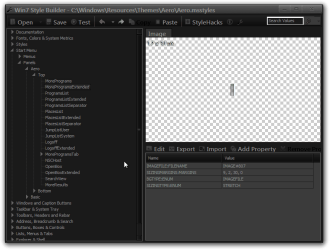
here are two screenshots one showing a resource hacker trees structure and WSB tree structure.
aero.msstyles - Anolis Resourcer.pngWin7 Style Builder - CWindowsResourcesThemesAeroAero.msstyles.png


Hint: Looked at post #38 in this thread and it will show you how to start a new theme from scratch http://www.sevenforums.com/customization/135985-start-menu-color-change-4.html#post1358071
Hint #2: you cannot be using the theme you are trying to edit at the same time, what I'm saying is you need to be using a different theme than the one you are trying to edit.

Let me know if you need more help
Jerry
 

My Computer My Computer

At a glance

Win 7 Pro x64 / Win 10 ProIntel(R) Core(TM) i7-3630QM CPU @ 2.40GHz12 GB(1) Intel(R) HD Graphics 4000 (2) NVIDIA GeFo...
Computer type
Laptop
Computer Manufacturer/Model Number
Sager NP9170
OS
Win 7 Pro x64 / Win 10 Pro
CPU
Intel(R) Core(TM) i7-3630QM CPU @ 2.40GHz
Motherboard
CLEVO P170EM
Memory
12 GB
Graphics Card(s)
(1) Intel(R) HD Graphics 4000 (2) NVIDIA GeForce GTX 675M
Sound Card
(1) Realtek High Definition Audio (2) Intel(R) Display Aud
Monitor(s) Displays
17.3
Screen Resolution
1920x1080
Hard Drives
(1) Samsung 860 EVO 500GB(OS) (1) Samsung 860 EVO 500GB(Data)
Keyboard
Backlite
Antivirus
MSE, Malwarebytes Pro
Browser
Firefox
Other Info
DESKTOP: Custom-built.
OS: Win 10 Pro x64.
CASE: Rosewill R5.
CPU: Intel I5 4670K CPU @ 3.40GHz.
CPU COOLER: Cool Master Hyper 212 EVO.
MOTHERBOARD: Asus Z87-A.
MEMORY: Kingston HyperX 2x4 GB.
GPU: Nvidia Geforce 650 TI.
PSU: Corsair TX750.
DRIVES: (1) Samsung 840 120 GB SSD (2) Western Digital blue 500 GB 7200 RPM.
Jerry,
LOL. I just want to be as detailed as I can to make sure that what I'm saying is clear.

#2
I actually downloaded Theme Resource Changer from one of those sites. :D I'll just read through the description once more to see if it can be useful to me. Let's mark this as solved.


#4
I see. And if I backup the .dll, I can restore icons to default, right? What's the name of the .dll?


#4b
Just a quick follow up question. Which files do I have to backup aside from the icon .dll? Some themes have explorer.exe, would that mean I have to backup my explorer.exe too?


#5a
Alright, I agree that it's best to test themes to avoid any weirdness that might ensue. So in my case, now that I have copied my Aero folder in a safe place, that copy is what I need to modify and only install it to test it. Is that correct? And that I must avoid touching the Aero folder inside C:\Windows\Resources\Themes while it is still installed. Right?


#5b
Here's a question you'll probably laugh at: what is .msstyle? :) Is that the one I have to open and modify in Resource Hacker? What is the difference of .msstyle and .theme? (Now you have an idea how new I am to this. :D)

The Anolis Reaourcer seems to be abandoned. They didn't release a version .095 which was supposed to come out on Jan. 2011. I want to be cheap as much as possible so my only choice is Resource Hacker. Besides, I am very new to this, so until I have learned enough knowledge then that's when I'll probably move on to WSB. I will message you there with probably a new sets of questions so you better be ready if ever. :p

I will check out post #38 on the link you provided now.
 

My Computer My Computer

At a glance

Windows 7 Professional x64 | Windows ME | Win...Intel Mobile Core 2 Duo SU7300 @ 1.30GHz3 GB HDDR3 411MHzMobile Intel 4 Series Express Chipset Family
Computer Manufacturer/Model Number
ASUS UL80A
OS
Windows 7 Professional x64 | Windows ME | Windows 8 Dev Preview
CPU
Intel Mobile Core 2 Duo SU7300 @ 1.30GHz
Motherboard
ASUSTeK Computer Inc. UL80A (Socket 478)
Memory
3 GB HDDR3 411MHz
Graphics Card(s)
Mobile Intel 4 Series Express Chipset Family
Sound Card
Realtek High Definition Audio
Monitor(s) Displays
AU Optronics B140XW02 V1
Screen Resolution
1366x768
Hard Drives
500GB internal
320GB external
Keyboard
cheap keyboard
Mouse
cheap mouse
  • Like
Reactions: JMH
Hey AJ
#4 and 4b
Always backup any system file you modified or want to change. That way you could always go back to the default easier. You'll find a lot of the icons are in imageres.dll but they also could be in a lot of other .dll depending on where the icon is.

#5
You are correct, but you must rename it before putting it in C:\Windows\Resources\Themes so you do not have 2 themes named aero which Windows would not allow any way, so follow post #38 to start a new theme http://www.sevenforums.com/customization/135985-start-menu-color-change-4.html#post1358071

#5b
The .msstyle is what holds the images, and the .theme is used to control the name of the theme when it is in personalization and information on cursors, wallpaper, sound, screensaver etc., when making a theme you only need to edit it for the name which is shown in post #38 from the above link.

Anolis Reaourcer can still be downloaded from the link I provided it's free if you can't get resource hacker to work then try it.

If you are going to start making themes I would strongly suggest getting Windows Style Builder as soon as you can it will be a different learning curve than a resource hacker.

Jerry
 

My Computer My Computer

At a glance

Win 7 Pro x64 / Win 10 ProIntel(R) Core(TM) i7-3630QM CPU @ 2.40GHz12 GB(1) Intel(R) HD Graphics 4000 (2) NVIDIA GeFo...
Computer type
Laptop
Computer Manufacturer/Model Number
Sager NP9170
OS
Win 7 Pro x64 / Win 10 Pro
CPU
Intel(R) Core(TM) i7-3630QM CPU @ 2.40GHz
Motherboard
CLEVO P170EM
Memory
12 GB
Graphics Card(s)
(1) Intel(R) HD Graphics 4000 (2) NVIDIA GeForce GTX 675M
Sound Card
(1) Realtek High Definition Audio (2) Intel(R) Display Aud
Monitor(s) Displays
17.3
Screen Resolution
1920x1080
Hard Drives
(1) Samsung 860 EVO 500GB(OS) (1) Samsung 860 EVO 500GB(Data)
Keyboard
Backlite
Antivirus
MSE, Malwarebytes Pro
Browser
Firefox
Other Info
DESKTOP: Custom-built.
OS: Win 10 Pro x64.
CASE: Rosewill R5.
CPU: Intel I5 4670K CPU @ 3.40GHz.
CPU COOLER: Cool Master Hyper 212 EVO.
MOTHERBOARD: Asus Z87-A.
MEMORY: Kingston HyperX 2x4 GB.
GPU: Nvidia Geforce 650 TI.
PSU: Corsair TX750.
DRIVES: (1) Samsung 840 120 GB SSD (2) Western Digital blue 500 GB 7200 RPM.
Jerry,

Thank you so much for your insight. I'll follow your tutorial (post #38 on the link you have given) as a starting point. We can now mark items #4 & #5 as answered/solved.

As for using WSB, I just don't want to spend money on a one-time thing as I probably just skin my Windows once or twice a year. So I'm sticking with Resource Hacker. :) It's not just the pricetag though. Until I become totally passionate about skinning, and if I sense a great improvement of my understanding on skinning stuffs, then that will be the time to commit to a big-boy tool like WSB and learning it won't be an issue if I am dedicated (like using an entry-level Paint.NET before accelerating to the more advanced Photoshop. Something like that).

Thanks again for your help. I'll now prepare all the necessary things and do what I must (like backing up, slimming down my disk, etc) and by weekend I'll start theming. I hope I get it right the first time. Here's hoping. :D

-AJ
 

My Computer My Computer

At a glance

Windows 7 Professional x64 | Windows ME | Win...Intel Mobile Core 2 Duo SU7300 @ 1.30GHz3 GB HDDR3 411MHzMobile Intel 4 Series Express Chipset Family
Computer Manufacturer/Model Number
ASUS UL80A
OS
Windows 7 Professional x64 | Windows ME | Windows 8 Dev Preview
CPU
Intel Mobile Core 2 Duo SU7300 @ 1.30GHz
Motherboard
ASUSTeK Computer Inc. UL80A (Socket 478)
Memory
3 GB HDDR3 411MHz
Graphics Card(s)
Mobile Intel 4 Series Express Chipset Family
Sound Card
Realtek High Definition Audio
Monitor(s) Displays
AU Optronics B140XW02 V1
Screen Resolution
1366x768
Hard Drives
500GB internal
320GB external
Keyboard
cheap keyboard
Mouse
cheap mouse
You're welcome, if you need to know a image number let me know I can help you. Remember image number change after it has been made with WSB so if you are editing a custom theme from lets say DA them will be different then the default aero.
Jerry
 

My Computer My Computer

At a glance

Win 7 Pro x64 / Win 10 ProIntel(R) Core(TM) i7-3630QM CPU @ 2.40GHz12 GB(1) Intel(R) HD Graphics 4000 (2) NVIDIA GeFo...
Computer type
Laptop
Computer Manufacturer/Model Number
Sager NP9170
OS
Win 7 Pro x64 / Win 10 Pro
CPU
Intel(R) Core(TM) i7-3630QM CPU @ 2.40GHz
Motherboard
CLEVO P170EM
Memory
12 GB
Graphics Card(s)
(1) Intel(R) HD Graphics 4000 (2) NVIDIA GeForce GTX 675M
Sound Card
(1) Realtek High Definition Audio (2) Intel(R) Display Aud
Monitor(s) Displays
17.3
Screen Resolution
1920x1080
Hard Drives
(1) Samsung 860 EVO 500GB(OS) (1) Samsung 860 EVO 500GB(Data)
Keyboard
Backlite
Antivirus
MSE, Malwarebytes Pro
Browser
Firefox
Other Info
DESKTOP: Custom-built.
OS: Win 10 Pro x64.
CASE: Rosewill R5.
CPU: Intel I5 4670K CPU @ 3.40GHz.
CPU COOLER: Cool Master Hyper 212 EVO.
MOTHERBOARD: Asus Z87-A.
MEMORY: Kingston HyperX 2x4 GB.
GPU: Nvidia Geforce 650 TI.
PSU: Corsair TX750.
DRIVES: (1) Samsung 840 120 GB SSD (2) Western Digital blue 500 GB 7200 RPM.
Jerry,
Thanks again, especially for your initiative to be available for my aid.
I forgot to ask you about Stardock products named WindowBlinds and SkinStudio. There are free versions available, but they confuse me so much as to what they do. Not many people recommend them and I don't know why. What are your thoughts on these softwares? Do they accomplish the same things that Resource Hacker or WSB?

-AJ
 

My Computer My Computer

At a glance

Windows 7 Professional x64 | Windows ME | Win...Intel Mobile Core 2 Duo SU7300 @ 1.30GHz3 GB HDDR3 411MHzMobile Intel 4 Series Express Chipset Family
Computer Manufacturer/Model Number
ASUS UL80A
OS
Windows 7 Professional x64 | Windows ME | Windows 8 Dev Preview
CPU
Intel Mobile Core 2 Duo SU7300 @ 1.30GHz
Motherboard
ASUSTeK Computer Inc. UL80A (Socket 478)
Memory
3 GB HDDR3 411MHz
Graphics Card(s)
Mobile Intel 4 Series Express Chipset Family
Sound Card
Realtek High Definition Audio
Monitor(s) Displays
AU Optronics B140XW02 V1
Screen Resolution
1366x768
Hard Drives
500GB internal
320GB external
Keyboard
cheap keyboard
Mouse
cheap mouse
I have tried the free version of WindowBlinds and it is very limited, personally I would say using a resource editor or WSB is going to give you better results.
Jerry
 

My Computer My Computer

At a glance

Win 7 Pro x64 / Win 10 ProIntel(R) Core(TM) i7-3630QM CPU @ 2.40GHz12 GB(1) Intel(R) HD Graphics 4000 (2) NVIDIA GeFo...
Computer type
Laptop
Computer Manufacturer/Model Number
Sager NP9170
OS
Win 7 Pro x64 / Win 10 Pro
CPU
Intel(R) Core(TM) i7-3630QM CPU @ 2.40GHz
Motherboard
CLEVO P170EM
Memory
12 GB
Graphics Card(s)
(1) Intel(R) HD Graphics 4000 (2) NVIDIA GeForce GTX 675M
Sound Card
(1) Realtek High Definition Audio (2) Intel(R) Display Aud
Monitor(s) Displays
17.3
Screen Resolution
1920x1080
Hard Drives
(1) Samsung 860 EVO 500GB(OS) (1) Samsung 860 EVO 500GB(Data)
Keyboard
Backlite
Antivirus
MSE, Malwarebytes Pro
Browser
Firefox
Other Info
DESKTOP: Custom-built.
OS: Win 10 Pro x64.
CASE: Rosewill R5.
CPU: Intel I5 4670K CPU @ 3.40GHz.
CPU COOLER: Cool Master Hyper 212 EVO.
MOTHERBOARD: Asus Z87-A.
MEMORY: Kingston HyperX 2x4 GB.
GPU: Nvidia Geforce 650 TI.
PSU: Corsair TX750.
DRIVES: (1) Samsung 840 120 GB SSD (2) Western Digital blue 500 GB 7200 RPM.
Alright. No further questions. I think I have asked what I needed to know. I will post back if I ran into trouble. Thanks again Jerry for your time. :)
 

My Computer My Computer

At a glance

Windows 7 Professional x64 | Windows ME | Win...Intel Mobile Core 2 Duo SU7300 @ 1.30GHz3 GB HDDR3 411MHzMobile Intel 4 Series Express Chipset Family
Computer Manufacturer/Model Number
ASUS UL80A
OS
Windows 7 Professional x64 | Windows ME | Windows 8 Dev Preview
CPU
Intel Mobile Core 2 Duo SU7300 @ 1.30GHz
Motherboard
ASUSTeK Computer Inc. UL80A (Socket 478)
Memory
3 GB HDDR3 411MHz
Graphics Card(s)
Mobile Intel 4 Series Express Chipset Family
Sound Card
Realtek High Definition Audio
Monitor(s) Displays
AU Optronics B140XW02 V1
Screen Resolution
1366x768
Hard Drives
500GB internal
320GB external
Keyboard
cheap keyboard
Mouse
cheap mouse
You're welcome AJ
 

My Computer My Computer

At a glance

Win 7 Pro x64 / Win 10 ProIntel(R) Core(TM) i7-3630QM CPU @ 2.40GHz12 GB(1) Intel(R) HD Graphics 4000 (2) NVIDIA GeFo...
Computer type
Laptop
Computer Manufacturer/Model Number
Sager NP9170
OS
Win 7 Pro x64 / Win 10 Pro
CPU
Intel(R) Core(TM) i7-3630QM CPU @ 2.40GHz
Motherboard
CLEVO P170EM
Memory
12 GB
Graphics Card(s)
(1) Intel(R) HD Graphics 4000 (2) NVIDIA GeForce GTX 675M
Sound Card
(1) Realtek High Definition Audio (2) Intel(R) Display Aud
Monitor(s) Displays
17.3
Screen Resolution
1920x1080
Hard Drives
(1) Samsung 860 EVO 500GB(OS) (1) Samsung 860 EVO 500GB(Data)
Keyboard
Backlite
Antivirus
MSE, Malwarebytes Pro
Browser
Firefox
Other Info
DESKTOP: Custom-built.
OS: Win 10 Pro x64.
CASE: Rosewill R5.
CPU: Intel I5 4670K CPU @ 3.40GHz.
CPU COOLER: Cool Master Hyper 212 EVO.
MOTHERBOARD: Asus Z87-A.
MEMORY: Kingston HyperX 2x4 GB.
GPU: Nvidia Geforce 650 TI.
PSU: Corsair TX750.
DRIVES: (1) Samsung 840 120 GB SSD (2) Western Digital blue 500 GB 7200 RPM.
Hi Jerry,

I'm back with questions.
I have found a good theme building tutorial using Resource Hacker. In it, there was an instruction that mentions shellstyle.dll and it confused me. Any idea what is it? Should I leave it alone or does it need to be hacked/edited too?

I have no idea that building themes takes a lot of time. How long does it take you to create themes?

-AJ
 

My Computer My Computer

At a glance

Windows 7 Professional x64 | Windows ME | Win...Intel Mobile Core 2 Duo SU7300 @ 1.30GHz3 GB HDDR3 411MHzMobile Intel 4 Series Express Chipset Family
Computer Manufacturer/Model Number
ASUS UL80A
OS
Windows 7 Professional x64 | Windows ME | Windows 8 Dev Preview
CPU
Intel Mobile Core 2 Duo SU7300 @ 1.30GHz
Motherboard
ASUSTeK Computer Inc. UL80A (Socket 478)
Memory
3 GB HDDR3 411MHz
Graphics Card(s)
Mobile Intel 4 Series Express Chipset Family
Sound Card
Realtek High Definition Audio
Monitor(s) Displays
AU Optronics B140XW02 V1
Screen Resolution
1366x768
Hard Drives
500GB internal
320GB external
Keyboard
cheap keyboard
Mouse
cheap mouse
Hi Jerry,

I'm back with questions.
I have found a good theme building tutorial using Resource Hacker. In it, there was an instruction that mentions shellstyle.dll and it confused me. Any idea what is it? Should I leave it alone or does it need to be hacked/edited too?

I have no idea that building themes takes a lot of time. How long does it take you to create themes?

-AJ

Hello AJ
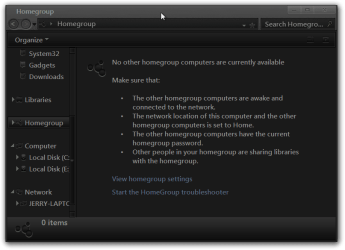
The shellstyle.dll is inside the theme folder in a shell folder there is a few things you can do with that but my knowledge on that is very limited, All I know how to do is change the background color of the home group window.
Homegroup.png
It is your choice to edit it or not depending on what you are trying to do.

Yes making themes is very time-consuming, to do a complete theme can take days, weeks or even months depending on how creative you are
Jerry
 

My Computer My Computer

At a glance

Win 7 Pro x64 / Win 10 ProIntel(R) Core(TM) i7-3630QM CPU @ 2.40GHz12 GB(1) Intel(R) HD Graphics 4000 (2) NVIDIA GeFo...
Computer type
Laptop
Computer Manufacturer/Model Number
Sager NP9170
OS
Win 7 Pro x64 / Win 10 Pro
CPU
Intel(R) Core(TM) i7-3630QM CPU @ 2.40GHz
Motherboard
CLEVO P170EM
Memory
12 GB
Graphics Card(s)
(1) Intel(R) HD Graphics 4000 (2) NVIDIA GeForce GTX 675M
Sound Card
(1) Realtek High Definition Audio (2) Intel(R) Display Aud
Monitor(s) Displays
17.3
Screen Resolution
1920x1080
Hard Drives
(1) Samsung 860 EVO 500GB(OS) (1) Samsung 860 EVO 500GB(Data)
Keyboard
Backlite
Antivirus
MSE, Malwarebytes Pro
Browser
Firefox
Other Info
DESKTOP: Custom-built.
OS: Win 10 Pro x64.
CASE: Rosewill R5.
CPU: Intel I5 4670K CPU @ 3.40GHz.
CPU COOLER: Cool Master Hyper 212 EVO.
MOTHERBOARD: Asus Z87-A.
MEMORY: Kingston HyperX 2x4 GB.
GPU: Nvidia Geforce 650 TI.
PSU: Corsair TX750.
DRIVES: (1) Samsung 840 120 GB SSD (2) Western Digital blue 500 GB 7200 RPM.
where can i download Uxstyle core?
 

My Computer My Computer

At a glance

win7 home premium 64bit4gm ramintel core i3
Computer Manufacturer/Model Number
hp g62
OS
win7 home premium 64bit
Memory
4gm ram
Graphics Card(s)
intel core i3

My Computer My Computer

At a glance

Win 7 Pro x64 / Win 10 ProIntel(R) Core(TM) i7-3630QM CPU @ 2.40GHz12 GB(1) Intel(R) HD Graphics 4000 (2) NVIDIA GeFo...
Computer type
Laptop
Computer Manufacturer/Model Number
Sager NP9170
OS
Win 7 Pro x64 / Win 10 Pro
CPU
Intel(R) Core(TM) i7-3630QM CPU @ 2.40GHz
Motherboard
CLEVO P170EM
Memory
12 GB
Graphics Card(s)
(1) Intel(R) HD Graphics 4000 (2) NVIDIA GeForce GTX 675M
Sound Card
(1) Realtek High Definition Audio (2) Intel(R) Display Aud
Monitor(s) Displays
17.3
Screen Resolution
1920x1080
Hard Drives
(1) Samsung 860 EVO 500GB(OS) (1) Samsung 860 EVO 500GB(Data)
Keyboard
Backlite
Antivirus
MSE, Malwarebytes Pro
Browser
Firefox
Other Info
DESKTOP: Custom-built.
OS: Win 10 Pro x64.
CASE: Rosewill R5.
CPU: Intel I5 4670K CPU @ 3.40GHz.
CPU COOLER: Cool Master Hyper 212 EVO.
MOTHERBOARD: Asus Z87-A.
MEMORY: Kingston HyperX 2x4 GB.
GPU: Nvidia Geforce 650 TI.
PSU: Corsair TX750.
DRIVES: (1) Samsung 840 120 GB SSD (2) Western Digital blue 500 GB 7200 RPM.
Jerry,
I've looked around some custom themes sites and I am starting to see the limitation of using Resource Hacker to build custom themes. Most tutorials that I was able to dig are dedicated to WSB. I only got one good tutorial by UkIntel that deals with using Restorator (which, luckily, is essentially similar to Resource Hacker, but the tutorial seems to apply only for Vista as the image numbers are different from what I can find in my msstyle). If you happen to stumble upon an updated ResHacker tutorial, please lead me to it :)
By April, I think it's time that to save up money so I could process my first credit card (which is prepaid btw, and I will it use to buy WSB depending on how much frustrated I become with Resource Hacker). But I need to know if it's up to date or if it's buggy. And since Windows 8 is going to come out any time this year (?), I think it's probably wise to wait for a newer version of WSB, unless of course AveSoft provides free upgrades. So now that I'm entertaining the thought of finally joining the impressive crowd of WSB users, I want your advice based on user experience.

@cehjeel518,
The download link on UxStyle core website seems to be broken when I tried to access it two months ago. If you can't download the file, I'd be happy to upload it here (can we post files here? If not, I'll upload it somewhere and post the link here).

-AJ
 

My Computer My Computer

At a glance

Windows 7 Professional x64 | Windows ME | Win...Intel Mobile Core 2 Duo SU7300 @ 1.30GHz3 GB HDDR3 411MHzMobile Intel 4 Series Express Chipset Family
Computer Manufacturer/Model Number
ASUS UL80A
OS
Windows 7 Professional x64 | Windows ME | Windows 8 Dev Preview
CPU
Intel Mobile Core 2 Duo SU7300 @ 1.30GHz
Motherboard
ASUSTeK Computer Inc. UL80A (Socket 478)
Memory
3 GB HDDR3 411MHz
Graphics Card(s)
Mobile Intel 4 Series Express Chipset Family
Sound Card
Realtek High Definition Audio
Monitor(s) Displays
AU Optronics B140XW02 V1
Screen Resolution
1366x768
Hard Drives
500GB internal
320GB external
Keyboard
cheap keyboard
Mouse
cheap mouse
Hi AJ
If you happen to stumble upon an updated ResHacker tutorial, please lead me to it
I can get you the image #s as need for default aero
For a custom theme I need a link to it( the #s change after being saved in WSB).

But I need to know if it's up to date or if it's buggy.
It's updated, and there can be a small bug in it but not to bad.

And since Windows 8 is going to come out any time this year (?), I think it's probably wise to wait for a newer version of WSB, unless of course AveSoft provides free upgrades.
At WSB forum there is hope for a update for Windows 8 but Ave has not said one way or the other.
Most likely it will not be free.
Jerry
 

My Computer My Computer

At a glance

Win 7 Pro x64 / Win 10 ProIntel(R) Core(TM) i7-3630QM CPU @ 2.40GHz12 GB(1) Intel(R) HD Graphics 4000 (2) NVIDIA GeFo...
Computer type
Laptop
Computer Manufacturer/Model Number
Sager NP9170
OS
Win 7 Pro x64 / Win 10 Pro
CPU
Intel(R) Core(TM) i7-3630QM CPU @ 2.40GHz
Motherboard
CLEVO P170EM
Memory
12 GB
Graphics Card(s)
(1) Intel(R) HD Graphics 4000 (2) NVIDIA GeForce GTX 675M
Sound Card
(1) Realtek High Definition Audio (2) Intel(R) Display Aud
Monitor(s) Displays
17.3
Screen Resolution
1920x1080
Hard Drives
(1) Samsung 860 EVO 500GB(OS) (1) Samsung 860 EVO 500GB(Data)
Keyboard
Backlite
Antivirus
MSE, Malwarebytes Pro
Browser
Firefox
Other Info
DESKTOP: Custom-built.
OS: Win 10 Pro x64.
CASE: Rosewill R5.
CPU: Intel I5 4670K CPU @ 3.40GHz.
CPU COOLER: Cool Master Hyper 212 EVO.
MOTHERBOARD: Asus Z87-A.
MEMORY: Kingston HyperX 2x4 GB.
GPU: Nvidia Geforce 650 TI.
PSU: Corsair TX750.
DRIVES: (1) Samsung 840 120 GB SSD (2) Western Digital blue 500 GB 7200 RPM.
Jerry,

Could you give me all the image numbers for the defaut Aero please?
Also, your screenshot looks good. What VS are you using?

-AJ
 

My Computer My Computer

At a glance

Windows 7 Professional x64 | Windows ME | Win...Intel Mobile Core 2 Duo SU7300 @ 1.30GHz3 GB HDDR3 411MHzMobile Intel 4 Series Express Chipset Family
Computer Manufacturer/Model Number
ASUS UL80A
OS
Windows 7 Professional x64 | Windows ME | Windows 8 Dev Preview
CPU
Intel Mobile Core 2 Duo SU7300 @ 1.30GHz
Motherboard
ASUSTeK Computer Inc. UL80A (Socket 478)
Memory
3 GB HDDR3 411MHz
Graphics Card(s)
Mobile Intel 4 Series Express Chipset Family
Sound Card
Realtek High Definition Audio
Monitor(s) Displays
AU Optronics B140XW02 V1
Screen Resolution
1366x768
Hard Drives
500GB internal
320GB external
Keyboard
cheap keyboard
Mouse
cheap mouse

My Computer My Computer

At a glance

Win 7 Pro x64 / Win 10 ProIntel(R) Core(TM) i7-3630QM CPU @ 2.40GHz12 GB(1) Intel(R) HD Graphics 4000 (2) NVIDIA GeFo...
Computer type
Laptop
Computer Manufacturer/Model Number
Sager NP9170
OS
Win 7 Pro x64 / Win 10 Pro
CPU
Intel(R) Core(TM) i7-3630QM CPU @ 2.40GHz
Motherboard
CLEVO P170EM
Memory
12 GB
Graphics Card(s)
(1) Intel(R) HD Graphics 4000 (2) NVIDIA GeForce GTX 675M
Sound Card
(1) Realtek High Definition Audio (2) Intel(R) Display Aud
Monitor(s) Displays
17.3
Screen Resolution
1920x1080
Hard Drives
(1) Samsung 860 EVO 500GB(OS) (1) Samsung 860 EVO 500GB(Data)
Keyboard
Backlite
Antivirus
MSE, Malwarebytes Pro
Browser
Firefox
Other Info
DESKTOP: Custom-built.
OS: Win 10 Pro x64.
CASE: Rosewill R5.
CPU: Intel I5 4670K CPU @ 3.40GHz.
CPU COOLER: Cool Master Hyper 212 EVO.
MOTHERBOARD: Asus Z87-A.
MEMORY: Kingston HyperX 2x4 GB.
GPU: Nvidia Geforce 650 TI.
PSU: Corsair TX750.
DRIVES: (1) Samsung 840 120 GB SSD (2) Western Digital blue 500 GB 7200 RPM.
Back
Top