Solved questions about system patchers &theme building in general

Jerry,
Thank you! I'll look forward to that. The Tavaris theme looks awesome. If it won't be too much trouble, could you also include the image #s of that one? I basically just need to change some text colors, caption & scroll buttons & explorerframe. It looks so good to play around with. Please? :D

-AJ
 

My Computer My Computer

At a glance

Windows 7 Professional x64 | Windows ME | Win...Intel Mobile Core 2 Duo SU7300 @ 1.30GHz3 GB HDDR3 411MHzMobile Intel 4 Series Express Chipset Family
Computer Manufacturer/Model Number
ASUS UL80A
OS
Windows 7 Professional x64 | Windows ME | Windows 8 Dev Preview
CPU
Intel Mobile Core 2 Duo SU7300 @ 1.30GHz
Motherboard
ASUSTeK Computer Inc. UL80A (Socket 478)
Memory
3 GB HDDR3 411MHz
Graphics Card(s)
Mobile Intel 4 Series Express Chipset Family
Sound Card
Realtek High Definition Audio
Monitor(s) Displays
AU Optronics B140XW02 V1
Screen Resolution
1366x768
Hard Drives
500GB internal
320GB external
Keyboard
cheap keyboard
Mouse
cheap mouse
i tried using it sir,
but it seems to be slowing down my computer(boot & shutting down).
is that normaL?
 

My Computer My Computer

At a glance

win7 home premium 64bit4gm ramintel core i3
Computer Manufacturer/Model Number
hp g62
OS
win7 home premium 64bit
Memory
4gm ram
Graphics Card(s)
intel core i3

My Computer My Computer

At a glance

Win 7 Pro x64 / Win 10 ProIntel(R) Core(TM) i7-3630QM CPU @ 2.40GHz12 GB(1) Intel(R) HD Graphics 4000 (2) NVIDIA GeFo...
Computer type
Laptop
Computer Manufacturer/Model Number
Sager NP9170
OS
Win 7 Pro x64 / Win 10 Pro
CPU
Intel(R) Core(TM) i7-3630QM CPU @ 2.40GHz
Motherboard
CLEVO P170EM
Memory
12 GB
Graphics Card(s)
(1) Intel(R) HD Graphics 4000 (2) NVIDIA GeForce GTX 675M
Sound Card
(1) Realtek High Definition Audio (2) Intel(R) Display Aud
Monitor(s) Displays
17.3
Screen Resolution
1920x1080
Hard Drives
(1) Samsung 860 EVO 500GB(OS) (1) Samsung 860 EVO 500GB(Data)
Keyboard
Backlite
Antivirus
MSE, Malwarebytes Pro
Browser
Firefox
Other Info
DESKTOP: Custom-built.
OS: Win 10 Pro x64.
CASE: Rosewill R5.
CPU: Intel I5 4670K CPU @ 3.40GHz.
CPU COOLER: Cool Master Hyper 212 EVO.
MOTHERBOARD: Asus Z87-A.
MEMORY: Kingston HyperX 2x4 GB.
GPU: Nvidia Geforce 650 TI.
PSU: Corsair TX750.
DRIVES: (1) Samsung 840 120 GB SSD (2) Western Digital blue 500 GB 7200 RPM.
i tried using it sir,
but it seems to be slowing down my computer(boot & shutting down).
is that normaL?

Not for me also. A slow startup and slow shutdown are mostly caused by programs running in the background. In my experience, those programs are the kind whose function relies on Windows explorer (like a folder switcher, clipboard manager or context menu items). If you have a startup manager, you can monitor those changes.

UxStyle Core, on the other hand, is a service whose basic function is to "switch on" permissions for non-Microsoft theme, so Windows Explorer relies to it as opposed to the other way around. So with that logic, I don't think it should slow down your startup/shutdown. :)
 

My Computer My Computer

At a glance

Windows 7 Professional x64 | Windows ME | Win...Intel Mobile Core 2 Duo SU7300 @ 1.30GHz3 GB HDDR3 411MHzMobile Intel 4 Series Express Chipset Family
Computer Manufacturer/Model Number
ASUS UL80A
OS
Windows 7 Professional x64 | Windows ME | Windows 8 Dev Preview
CPU
Intel Mobile Core 2 Duo SU7300 @ 1.30GHz
Motherboard
ASUSTeK Computer Inc. UL80A (Socket 478)
Memory
3 GB HDDR3 411MHz
Graphics Card(s)
Mobile Intel 4 Series Express Chipset Family
Sound Card
Realtek High Definition Audio
Monitor(s) Displays
AU Optronics B140XW02 V1
Screen Resolution
1366x768
Hard Drives
500GB internal
320GB external
Keyboard
cheap keyboard
Mouse
cheap mouse
ok.thanks for wasting ur time on my lame question sir.^^:D
pilipino ka?
 

My Computer My Computer

At a glance

win7 home premium 64bit4gm ramintel core i3
Computer Manufacturer/Model Number
hp g62
OS
win7 home premium 64bit
Memory
4gm ram
Graphics Card(s)
intel core i3
no problem.
walang anuman. :D
opo, pinoy to. :D
 

My Computer My Computer

At a glance

Windows 7 Professional x64 | Windows ME | Win...Intel Mobile Core 2 Duo SU7300 @ 1.30GHz3 GB HDDR3 411MHzMobile Intel 4 Series Express Chipset Family
Computer Manufacturer/Model Number
ASUS UL80A
OS
Windows 7 Professional x64 | Windows ME | Windows 8 Dev Preview
CPU
Intel Mobile Core 2 Duo SU7300 @ 1.30GHz
Motherboard
ASUSTeK Computer Inc. UL80A (Socket 478)
Memory
3 GB HDDR3 411MHz
Graphics Card(s)
Mobile Intel 4 Series Express Chipset Family
Sound Card
Realtek High Definition Audio
Monitor(s) Displays
AU Optronics B140XW02 V1
Screen Resolution
1366x768
Hard Drives
500GB internal
320GB external
Keyboard
cheap keyboard
Mouse
cheap mouse
Kewl^^
 

My Computer My Computer

At a glance

win7 home premium 64bit4gm ramintel core i3
Computer Manufacturer/Model Number
hp g62
OS
win7 home premium 64bit
Memory
4gm ram
Graphics Card(s)
intel core i3
i have an new prob.:(
i have installed UxCore and works fine already.
now for the new prob.
i noticed recently that my rocketdock is not loading at start up.:(
it says at the task bar manager that it's running but it's not showing.
i have to end the process and manually run/open rocketdock again.
i tried using my old theme(microsoft theme),
shut and re-open the computer then after that rocketdock worked.
please help.
 

My Computer My Computer

At a glance

win7 home premium 64bit4gm ramintel core i3
Computer Manufacturer/Model Number
hp g62
OS
win7 home premium 64bit
Memory
4gm ram
Graphics Card(s)
intel core i3
Hi cehjeel518,

I think you need to create a new thread for your inquiry as it concerns Rocketdock. (Just to keep this thread strictly about custom theme).;)
But my diagnosis would be this: Rocketdock is really slow when starting up. Mine takes about 5-10 mins. before it appears. This has something to do with the no. of docklets and what type of docklets you put in Rocketdock.

-AJ
 

My Computer My Computer

At a glance

Windows 7 Professional x64 | Windows ME | Win...Intel Mobile Core 2 Duo SU7300 @ 1.30GHz3 GB HDDR3 411MHzMobile Intel 4 Series Express Chipset Family
Computer Manufacturer/Model Number
ASUS UL80A
OS
Windows 7 Professional x64 | Windows ME | Windows 8 Dev Preview
CPU
Intel Mobile Core 2 Duo SU7300 @ 1.30GHz
Motherboard
ASUSTeK Computer Inc. UL80A (Socket 478)
Memory
3 GB HDDR3 411MHz
Graphics Card(s)
Mobile Intel 4 Series Express Chipset Family
Sound Card
Realtek High Definition Audio
Monitor(s) Displays
AU Optronics B140XW02 V1
Screen Resolution
1366x768
Hard Drives
500GB internal
320GB external
Keyboard
cheap keyboard
Mouse
cheap mouse
roger that sir^^.
 

My Computer My Computer

At a glance

win7 home premium 64bit4gm ramintel core i3
Computer Manufacturer/Model Number
hp g62
OS
win7 home premium 64bit
Memory
4gm ram
Graphics Card(s)
intel core i3
Jerry,
Thank you! I'll look forward to that. The Tavaris theme looks awesome. If it won't be too much trouble, could you also include the image #s of that one? I basically just need to change some text colors, caption & scroll buttons & explorerframe. It looks so good to play around with. Please? :D

-AJ
Hi AJ getting the numbers for Tavaris would be even more time-consuming beings the numbers have all changed, the text colors are not images and I do not know how to change them without Windows Style Builder the caption buttons and the Explorer frame are in the Steam image #971 which is very hard to edit, that's another reason to get Windows style builder it breaks that image down into individual images.

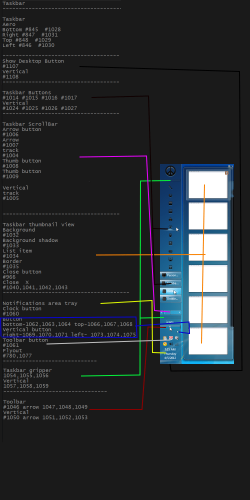
Here is a breakdown of the task bar, I will work on the start menu next and try to get it to you sometime next week.
Jerry
taskbar.png
 

My Computer My Computer

At a glance

Win 7 Pro x64 / Win 10 ProIntel(R) Core(TM) i7-3630QM CPU @ 2.40GHz12 GB(1) Intel(R) HD Graphics 4000 (2) NVIDIA GeFo...
Computer type
Laptop
Computer Manufacturer/Model Number
Sager NP9170
OS
Win 7 Pro x64 / Win 10 Pro
CPU
Intel(R) Core(TM) i7-3630QM CPU @ 2.40GHz
Motherboard
CLEVO P170EM
Memory
12 GB
Graphics Card(s)
(1) Intel(R) HD Graphics 4000 (2) NVIDIA GeForce GTX 675M
Sound Card
(1) Realtek High Definition Audio (2) Intel(R) Display Aud
Monitor(s) Displays
17.3
Screen Resolution
1920x1080
Hard Drives
(1) Samsung 860 EVO 500GB(OS) (1) Samsung 860 EVO 500GB(Data)
Keyboard
Backlite
Antivirus
MSE, Malwarebytes Pro
Browser
Firefox
Other Info
DESKTOP: Custom-built.
OS: Win 10 Pro x64.
CASE: Rosewill R5.
CPU: Intel I5 4670K CPU @ 3.40GHz.
CPU COOLER: Cool Master Hyper 212 EVO.
MOTHERBOARD: Asus Z87-A.
MEMORY: Kingston HyperX 2x4 GB.
GPU: Nvidia Geforce 650 TI.
PSU: Corsair TX750.
DRIVES: (1) Samsung 840 120 GB SSD (2) Western Digital blue 500 GB 7200 RPM.
Jerry,
Thank you for investing your time to help me with this. Theme building newbies everywhere will be very pleased. It's alright if you can't locate the image numbers of Tavaris. Anyway, here comes another numbered inquiries.


1.
I just finished modifying explorerframe.dll. I seem to be having problems with creating .bmp with alpha channels. Any tips?


2.
I seem to be having trouble replacing my explorerframe.dll
I did the necessary steps like taking ownership and renaming the original file before I place my modified file inside system32 and syswow64 folders. But take a look at the screenshot below.
sshot-18.jpg

There seem to be an invisible explorerframe.dll which I must overwrite. The red overlay icon indicates that this file was hardlinked, so when I looked into its Properties, it points me to Windows\winsxs and I understand that it's a shadow copy. How were you able to successfully place a modified explorerframe.dll with all these hassles that I experienced?
The only way for me to successfully place a modified explorerframe or shell32 files inside system32 and syswow64 was to zip my modified files, place it in any folder, open it and then extract it directly to system32 and syswow64. That method works for me. But...


3.
When I tried to test modified my explorerframe.dll and shell32.dll but after restarting my pc, explorer.exe can't start and gives me an error 0x000007b and it leaves me with a blank white screen, indicating that explorer is not really running. I have to revert back to a restore point to make my pc workable. :shock: I don't know what to do. Help.
 
Last edited:

My Computer My Computer

At a glance

Windows 7 Professional x64 | Windows ME | Win...Intel Mobile Core 2 Duo SU7300 @ 1.30GHz3 GB HDDR3 411MHzMobile Intel 4 Series Express Chipset Family
Computer Manufacturer/Model Number
ASUS UL80A
OS
Windows 7 Professional x64 | Windows ME | Windows 8 Dev Preview
CPU
Intel Mobile Core 2 Duo SU7300 @ 1.30GHz
Motherboard
ASUSTeK Computer Inc. UL80A (Socket 478)
Memory
3 GB HDDR3 411MHz
Graphics Card(s)
Mobile Intel 4 Series Express Chipset Family
Sound Card
Realtek High Definition Audio
Monitor(s) Displays
AU Optronics B140XW02 V1
Screen Resolution
1366x768
Hard Drives
500GB internal
320GB external
Keyboard
cheap keyboard
Mouse
cheap mouse

My Computer My Computer

At a glance

Win 7 Pro x64 / Win 10 ProIntel(R) Core(TM) i7-3630QM CPU @ 2.40GHz12 GB(1) Intel(R) HD Graphics 4000 (2) NVIDIA GeFo...
Computer type
Laptop
Computer Manufacturer/Model Number
Sager NP9170
OS
Win 7 Pro x64 / Win 10 Pro
CPU
Intel(R) Core(TM) i7-3630QM CPU @ 2.40GHz
Motherboard
CLEVO P170EM
Memory
12 GB
Graphics Card(s)
(1) Intel(R) HD Graphics 4000 (2) NVIDIA GeForce GTX 675M
Sound Card
(1) Realtek High Definition Audio (2) Intel(R) Display Aud
Monitor(s) Displays
17.3
Screen Resolution
1920x1080
Hard Drives
(1) Samsung 860 EVO 500GB(OS) (1) Samsung 860 EVO 500GB(Data)
Keyboard
Backlite
Antivirus
MSE, Malwarebytes Pro
Browser
Firefox
Other Info
DESKTOP: Custom-built.
OS: Win 10 Pro x64.
CASE: Rosewill R5.
CPU: Intel I5 4670K CPU @ 3.40GHz.
CPU COOLER: Cool Master Hyper 212 EVO.
MOTHERBOARD: Asus Z87-A.
MEMORY: Kingston HyperX 2x4 GB.
GPU: Nvidia Geforce 650 TI.
PSU: Corsair TX750.
DRIVES: (1) Samsung 840 120 GB SSD (2) Western Digital blue 500 GB 7200 RPM.
I access it directly inside the folders.

I successfully renamed those files but I can't place my modified files inside the folders without the "file already exists" dialog prompt.

The zip method to place my modified files works, but explorer.exe doesn't work properly when I use my modified files.
 

My Computer My Computer

At a glance

Windows 7 Professional x64 | Windows ME | Win...Intel Mobile Core 2 Duo SU7300 @ 1.30GHz3 GB HDDR3 411MHzMobile Intel 4 Series Express Chipset Family
Computer Manufacturer/Model Number
ASUS UL80A
OS
Windows 7 Professional x64 | Windows ME | Windows 8 Dev Preview
CPU
Intel Mobile Core 2 Duo SU7300 @ 1.30GHz
Motherboard
ASUSTeK Computer Inc. UL80A (Socket 478)
Memory
3 GB HDDR3 411MHz
Graphics Card(s)
Mobile Intel 4 Series Express Chipset Family
Sound Card
Realtek High Definition Audio
Monitor(s) Displays
AU Optronics B140XW02 V1
Screen Resolution
1366x768
Hard Drives
500GB internal
320GB external
Keyboard
cheap keyboard
Mouse
cheap mouse
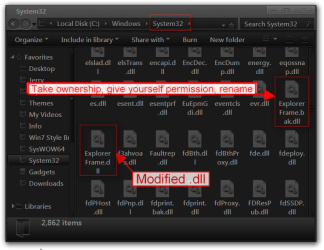
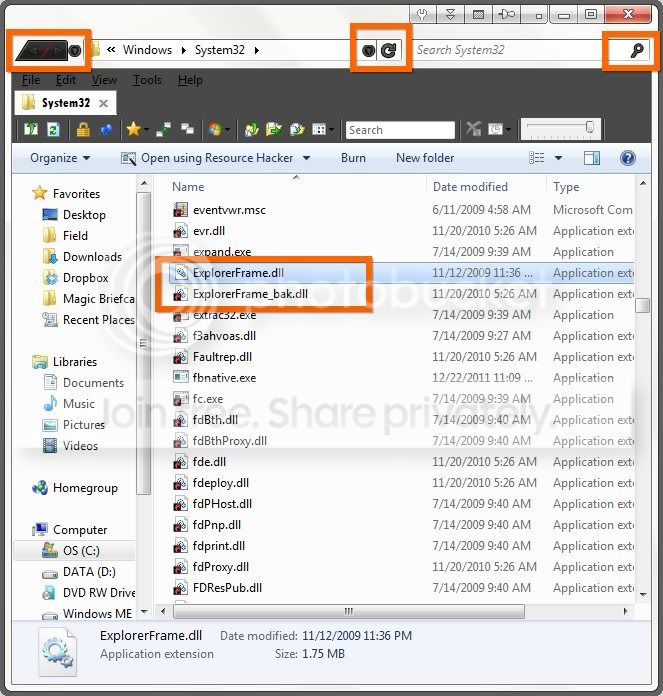
I do not understand why you are having so much trouble changing them, take a screenshot of your system32 folder showing your Explorerframe.dll as shown in my example below yours will not have the modified in there yet.
System32.png

I believe you said you were using Resource Hacker I personally have never had success using it for .bmp images, it works okay for icons and a few other things. I use Restorator - Bome Software - Restorator - the resource editor for customization, localization, and translation. it's not free but they do have a 30 day free trial, just a side note if you would decide to purchase this send them a e-mail requesting a discount I did that and got 40% off.

When it comes to .bmp images I use this site to convert them it works much better Online Image Converter
Jerry
 

My Computer My Computer

At a glance

Win 7 Pro x64 / Win 10 ProIntel(R) Core(TM) i7-3630QM CPU @ 2.40GHz12 GB(1) Intel(R) HD Graphics 4000 (2) NVIDIA GeFo...
Computer type
Laptop
Computer Manufacturer/Model Number
Sager NP9170
OS
Win 7 Pro x64 / Win 10 Pro
CPU
Intel(R) Core(TM) i7-3630QM CPU @ 2.40GHz
Motherboard
CLEVO P170EM
Memory
12 GB
Graphics Card(s)
(1) Intel(R) HD Graphics 4000 (2) NVIDIA GeForce GTX 675M
Sound Card
(1) Realtek High Definition Audio (2) Intel(R) Display Aud
Monitor(s) Displays
17.3
Screen Resolution
1920x1080
Hard Drives
(1) Samsung 860 EVO 500GB(OS) (1) Samsung 860 EVO 500GB(Data)
Keyboard
Backlite
Antivirus
MSE, Malwarebytes Pro
Browser
Firefox
Other Info
DESKTOP: Custom-built.
OS: Win 10 Pro x64.
CASE: Rosewill R5.
CPU: Intel I5 4670K CPU @ 3.40GHz.
CPU COOLER: Cool Master Hyper 212 EVO.
MOTHERBOARD: Asus Z87-A.
MEMORY: Kingston HyperX 2x4 GB.
GPU: Nvidia Geforce 650 TI.
PSU: Corsair TX750.
DRIVES: (1) Samsung 840 120 GB SSD (2) Western Digital blue 500 GB 7200 RPM.
Thanks for the tip about asking for a discount. :D Is there a way to get a discount for WSB?
Thanks also for the image converter link. Will try that later.

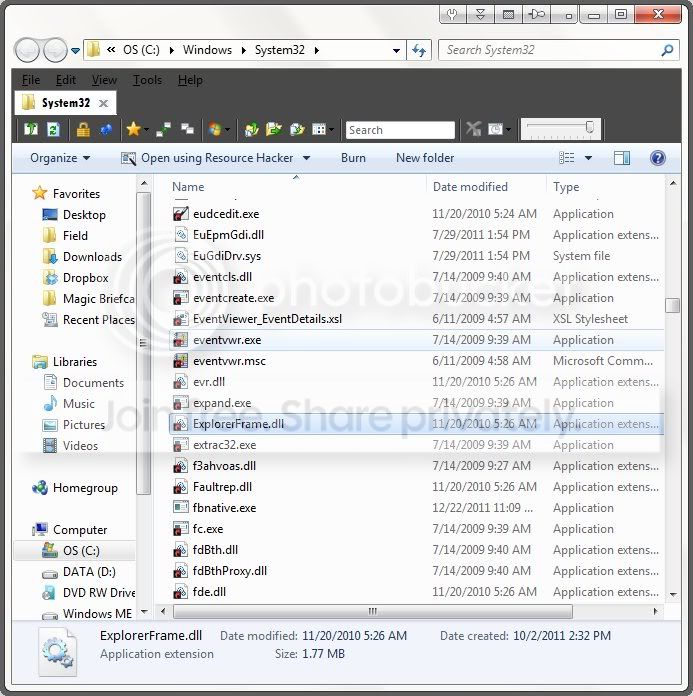
Anyway, here's a screenshot of my system32 folder with the original file:
sshot-20.jpg


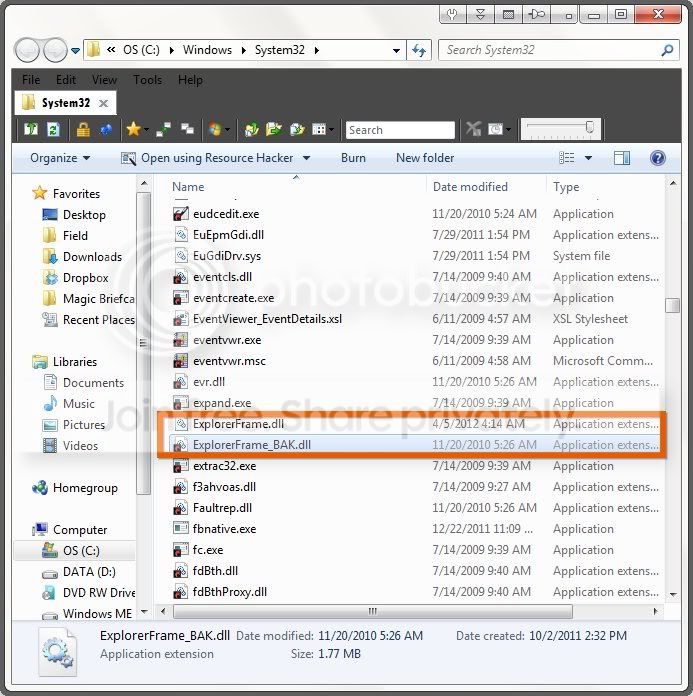
And here's my system32 folder after I renamed the original file and placed my modified file inside it. When I restart, explore won't work properly and gives me an error (0x000007b) and my desktop will be a blank white:
sshot-21.jpg
 

My Computer My Computer

At a glance

Windows 7 Professional x64 | Windows ME | Win...Intel Mobile Core 2 Duo SU7300 @ 1.30GHz3 GB HDDR3 411MHzMobile Intel 4 Series Express Chipset Family
Computer Manufacturer/Model Number
ASUS UL80A
OS
Windows 7 Professional x64 | Windows ME | Windows 8 Dev Preview
CPU
Intel Mobile Core 2 Duo SU7300 @ 1.30GHz
Motherboard
ASUSTeK Computer Inc. UL80A (Socket 478)
Memory
3 GB HDDR3 411MHz
Graphics Card(s)
Mobile Intel 4 Series Express Chipset Family
Sound Card
Realtek High Definition Audio
Monitor(s) Displays
AU Optronics B140XW02 V1
Screen Resolution
1366x768
Hard Drives
500GB internal
320GB external
Keyboard
cheap keyboard
Mouse
cheap mouse
Here's an update:
I tried using a different explorerframe.dll I downloaded from DA. And it worked (see screenshot below)
So the problem was my modified explorerframe.dll. I really need to figure out how to save .bmp with alpha channels.

sshot-22.jpg
 

My Computer My Computer

At a glance

Windows 7 Professional x64 | Windows ME | Win...Intel Mobile Core 2 Duo SU7300 @ 1.30GHz3 GB HDDR3 411MHzMobile Intel 4 Series Express Chipset Family
Computer Manufacturer/Model Number
ASUS UL80A
OS
Windows 7 Professional x64 | Windows ME | Windows 8 Dev Preview
CPU
Intel Mobile Core 2 Duo SU7300 @ 1.30GHz
Motherboard
ASUSTeK Computer Inc. UL80A (Socket 478)
Memory
3 GB HDDR3 411MHz
Graphics Card(s)
Mobile Intel 4 Series Express Chipset Family
Sound Card
Realtek High Definition Audio
Monitor(s) Displays
AU Optronics B140XW02 V1
Screen Resolution
1366x768
Hard Drives
500GB internal
320GB external
Keyboard
cheap keyboard
Mouse
cheap mouse
ANOTHER UPDATE:
I managed to re-create my bitmaps this time with alpha channels.
Now I cornered my problem with the images themselves. I'm wondering if using different colors for 577, 578, 579, 581 (normal, hovered, disabled, pressed) is not accepted by Windows Explorer? Each one has different colors but they are of same shape and size.

I tried Kishan Bagaria's Windows 7 Navigation Button Changer and it somehow changed my buttons successfully. See screenshot below:
sshot-23.jpg
 
Last edited:

My Computer My Computer

At a glance

Windows 7 Professional x64 | Windows ME | Win...Intel Mobile Core 2 Duo SU7300 @ 1.30GHz3 GB HDDR3 411MHzMobile Intel 4 Series Express Chipset Family
Computer Manufacturer/Model Number
ASUS UL80A
OS
Windows 7 Professional x64 | Windows ME | Windows 8 Dev Preview
CPU
Intel Mobile Core 2 Duo SU7300 @ 1.30GHz
Motherboard
ASUSTeK Computer Inc. UL80A (Socket 478)
Memory
3 GB HDDR3 411MHz
Graphics Card(s)
Mobile Intel 4 Series Express Chipset Family
Sound Card
Realtek High Definition Audio
Monitor(s) Displays
AU Optronics B140XW02 V1
Screen Resolution
1366x768
Hard Drives
500GB internal
320GB external
Keyboard
cheap keyboard
Mouse
cheap mouse
Good to hear you got the buttons changed.
No there is not a discount for WSB it's already one of the cheapest software you can buy.
Them red overlay on your files in system32 folder are troubling what does hardlinked mean? I notice I don't see them in your SysWOW64 folder.
Jerry
 

My Computer My Computer

At a glance

Win 7 Pro x64 / Win 10 ProIntel(R) Core(TM) i7-3630QM CPU @ 2.40GHz12 GB(1) Intel(R) HD Graphics 4000 (2) NVIDIA GeFo...
Computer type
Laptop
Computer Manufacturer/Model Number
Sager NP9170
OS
Win 7 Pro x64 / Win 10 Pro
CPU
Intel(R) Core(TM) i7-3630QM CPU @ 2.40GHz
Motherboard
CLEVO P170EM
Memory
12 GB
Graphics Card(s)
(1) Intel(R) HD Graphics 4000 (2) NVIDIA GeForce GTX 675M
Sound Card
(1) Realtek High Definition Audio (2) Intel(R) Display Aud
Monitor(s) Displays
17.3
Screen Resolution
1920x1080
Hard Drives
(1) Samsung 860 EVO 500GB(OS) (1) Samsung 860 EVO 500GB(Data)
Keyboard
Backlite
Antivirus
MSE, Malwarebytes Pro
Browser
Firefox
Other Info
DESKTOP: Custom-built.
OS: Win 10 Pro x64.
CASE: Rosewill R5.
CPU: Intel I5 4670K CPU @ 3.40GHz.
CPU COOLER: Cool Master Hyper 212 EVO.
MOTHERBOARD: Asus Z87-A.
MEMORY: Kingston HyperX 2x4 GB.
GPU: Nvidia Geforce 650 TI.
PSU: Corsair TX750.
DRIVES: (1) Samsung 840 120 GB SSD (2) Western Digital blue 500 GB 7200 RPM.
Back
Top