
Solved Questions about System Images

huffman

New member
Pro User
Local time
3:07 PM
Messages
715
I have recently installed Win 7 Pro. I have Acronis 2011 installed. When I try to backup my C-Drive, Acronis sees my C-Drive as "Empty" and will not create an image. Here is what I see:
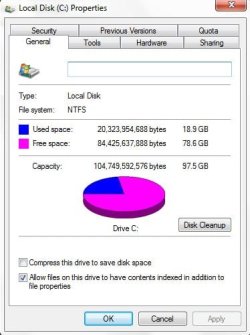
image001.jpg

image001a.jpg

Definitely NOT Empty.

Any help would be greatly appreciated.

Next Question:

I have never used the built-in backup in Win 7, but I have heard good things about it. My question is "How reliable are backup images using the built-in when saved to DVD(s)"?

I know it is best to backup to another partition, but I am just curious using DVD(s).

Any feedback would be appreciated.

Thank you
 

My Computer

OS
Windows 7 Pro
CPU
Intel(R) Pentium(R) Duel CPU E2200 2.20 Ghz
Motherboard
GA-G41M-ES2L
Memory
4 gb 2.96 Usable
Graphics Card(s)
Onboard
Sound Card
Onboard
Hard Drives
2 - 1TB WD Sata Drives
Hi huffman, Acronis 2011 has known bugs. If you still have the 2010 version build 7046 I would use it. Re the other questions in your post, never used it.
 

My Computer

Computer Manufacturer/Model Number
Look in my Signature.
OS
Win7 H.Prem. 32bit+SP1
I have never used the built-in backup in Win 7, but I have heard good things about it. My question is "How reliable are backup images using the built-in when saved to DVD(s)"?

Hi Huffman,

Indeed those good things you have heard are true. If it wasn't for the terrible compression ratio of the images I would use it, but Acronis suits my needs better.

To answer your question about the DVD's, although I haven't tried it myself, I know that people have been successful in restoring from DVD's. Although I imagine it's a bit slow, here is a link to someone who tried it just yesterday:
http://www.sevenforums.com/backup-restore/151293-restoring-image.html#post1301658
 

My Computer

Computer type
PC/Desktop
Computer Manufacturer/Model Number
Medion Erazer (note to self: insert model number) - with custom additions
OS
Windows 10 Pro x64
CPU
Intel Core i5 7400 @ 3.00GHz
Motherboard
OEM supllied with PC
Memory
8GB 2133Mhz DDR4 (OEM supplied)
Graphics Card(s)
Gygabyte Windforce GTX 1050Ti (Factory Overclocked)
Sound Card
Realtek
Monitor(s) Displays
Acer Al1980 + HKC
Screen Resolution
1360*768(HKC) / 1280*1024(Acer)
Hard Drives
1TB Toshiba
1TB WD Caviar Green
120GB Samsung Evo 840
PSU
OEM supplied (no power rating on case)
Case
OEM Supplied
Cooling
Stock
Keyboard
Logitech Wireless
Mouse
Logitect Wireless
Internet Speed
40Mb/s Down 10Mb/s Up
Antivirus
Defender
Browser
Firefox

My Computer

Computer Manufacturer/Model Number
* BFK Customs *
OS
W 7 64-bit Ultimate
CPU
Intel Q9550 Yorkfield
Motherboard
ASUS P5Q Pro
Memory
8GB Dominator 8500C5D
Graphics Card(s)
ATI : XFX 5870
Sound Card
Realtek HD Audio 7-1
Monitor(s) Displays
1x 47" LCD HDMI & 3x 26" LCD HDMI
Screen Resolution
1920x1080P & 1920x1200
Hard Drives
1x 80GB Intel X25-M G2 SSD : 1x 500GB & 1x 640GB WD Caviar Black(s)
PSU
Corsair 620HX
Case
Cooler Master RC-690
Cooling
Tuniq Tower 120, 2x 140mm and 3x 120mm case fans
Keyboard
Microsoft 500
Mouse
Razer Diamondback 3G
Internet Speed
14 Mb/s
Other Info
1x Koutech 3Gb/s SATA HDD Hot Swap Rack
I just reinstalled Win 7 this morning and used my Acronis Rescue disc to image my C-Drive and it worked fine. Why it did not work before I have no clue as it saw my C-drive as empty.

I have both Acronis 2010 and 2011, but I hate the interface on 2010 ;).

If rescue disc continues to work I don't have to install either.

I do intend to try to use the built-in imager and save to DVD(s) for no other reason than one more way to back up my system.

I believe I tried Macruim a while back and never understand how it was supposed to work. I may not have given it a fair try, so I may it again

Thanks for all the info
 

My Computer

OS
Windows 7 Pro
CPU
Intel(R) Pentium(R) Duel CPU E2200 2.20 Ghz
Motherboard
GA-G41M-ES2L
Memory
4 gb 2.96 Usable
Graphics Card(s)
Onboard
Sound Card
Onboard
Hard Drives
2 - 1TB WD Sata Drives
It would be a much more practical and stable method to store your Win7 or Acronis backup image on your second HD.

You also need to use Diskpart or free Partition Wizard bootable CD to mark F Inactive as only the System partition should be marked Active: Partition - Mark as Active - Windows 7 Forums
 
Last edited:

My Computer

Computer Manufacturer/Model Number
* BFK Customs *
OS
W 7 64-bit Ultimate
CPU
Intel Q9550 Yorkfield
Motherboard
ASUS P5Q Pro
Memory
8GB Dominator 8500C5D
Graphics Card(s)
ATI : XFX 5870
Sound Card
Realtek HD Audio 7-1
Monitor(s) Displays
1x 47" LCD HDMI & 3x 26" LCD HDMI
Screen Resolution
1920x1080P & 1920x1200
Hard Drives
1x 80GB Intel X25-M G2 SSD : 1x 500GB & 1x 640GB WD Caviar Black(s)
PSU
Corsair 620HX
Case
Cooler Master RC-690
Cooling
Tuniq Tower 120, 2x 140mm and 3x 120mm case fans
Keyboard
Microsoft 500
Mouse
Razer Diamondback 3G
Internet Speed
14 Mb/s
Other Info
1x Koutech 3Gb/s SATA HDD Hot Swap Rack
I have never used the built-in backup in Win 7, but I have heard good things about it. My question is "How reliable are backup images using the built-in when saved to DVD(s)"?

I know it is best to backup to another partition, but I am just curious using DVD(s).

Any feedback would be appreciated.

Thank you
I use Windows 7 imaging as my primary imaging software and Macrium Reflect as a safeguard and to do the occassional more flexible task. Neither has failed me.
I have reimaged with Windows 7 imaging > 10 times without a single problem even to a couple of brand new HDDs.

I would never rely on DVDs for an image backup. Ideally you should have several images and I think using 2 different imaging apps. An external or separate internal HDD is the only way to go. A 500GB external HDD cost around ~$60!
 

My Computer

Computer type
PC/Desktop
Computer Manufacturer/Model Number
Own build
OS
Windows 7x64 Home Premium SP1
CPU
Intel i7 2600k
Motherboard
ASUS P8Z68 Deluxe
Memory
G.Skill Ripjaws (DDR3-1600) 2x4GB
Graphics Card(s)
Nvidia GeForce GTS 450; Intel HD Graphics 3000(GT2+)
Monitor(s) Displays
Dell Ultrasharp IPS panel U2311H, Samsung SyncMaster P2350
Screen Resolution
1920x1080
Hard Drives
Samsung 850 Pro SSD 256GB, Samsung SSD 840 120GB, Seagates 1TB Barracuda ST31000528AS x2
PSU
Seasonic M12II 520W
Case
Lian Li Lancool PC-K60
Cooling
Case: 1x120mm, 3x140mm CPU: Hyper 212+
Keyboard
Logitech MK520 (wireless)
Mouse
Logitech MK520
Internet Speed
6-7 Mbps
Antivirus
Norton Security Premium, Malwarebytes on 2 (MSE on 3rd PC)
Browser
FireFox
Other Info
Audio: Logitech Z523 2.1
Thanks guys, this is exactly what I wanted to know.

I have everything I need now.
 

My Computer

OS
Windows 7 Pro
CPU
Intel(R) Pentium(R) Duel CPU E2200 2.20 Ghz
Motherboard
GA-G41M-ES2L
Memory
4 gb 2.96 Usable
Graphics Card(s)
Onboard
Sound Card
Onboard
Hard Drives
2 - 1TB WD Sata Drives
Good to see you found a solution and thanks for the update.
 

My Computer

Computer Manufacturer/Model Number
* BFK Customs *
OS
W 7 64-bit Ultimate
CPU
Intel Q9550 Yorkfield
Motherboard
ASUS P5Q Pro
Memory
8GB Dominator 8500C5D
Graphics Card(s)
ATI : XFX 5870
Sound Card
Realtek HD Audio 7-1
Monitor(s) Displays
1x 47" LCD HDMI & 3x 26" LCD HDMI
Screen Resolution
1920x1080P & 1920x1200
Hard Drives
1x 80GB Intel X25-M G2 SSD : 1x 500GB & 1x 640GB WD Caviar Black(s)
PSU
Corsair 620HX
Case
Cooler Master RC-690
Cooling
Tuniq Tower 120, 2x 140mm and 3x 120mm case fans
Keyboard
Microsoft 500
Mouse
Razer Diamondback 3G
Internet Speed
14 Mb/s
Other Info
1x Koutech 3Gb/s SATA HDD Hot Swap Rack
Back
Top