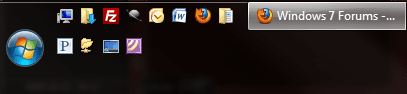
Quick Launch Bar

DwightStegall

New member
Member
Local time
10:24 PM
Messages
24
I heard that the Quick Launch Bar has been removed in Windows 7. I sure hope that isn't true. Maybe someone will write a third party app to replace it. I use it over a hundred times a day. I would miss it greatly.
 

My Computer

OS
Windows Vista
Last edited by a moderator:

My Computer

Computer Manufacturer/Model Number
Compaq Desktop
OS
Windows 7 Ultimate x64
CPU
AMD Sempron Dual Core
Memory
3GB
Graphics Card(s)
NVIDIA GeForce 6150SE nForce 430
Screen Resolution
1024x768
Hard Drives
150GB Sata
Dwight, it still exist, it's just changed a little. I actually prefer the way it works now and I'm a QL junkie as well. Most of us are and as you can see below, I use QL as I always have. ;)
 

Attachments

  • SS.jpg
    SS.jpg
    178.4 KB · Views: 586

My Computer

Computer type
PC/Desktop
Computer Manufacturer/Model Number
Custom Build/Mod
OS
Windows 7 Home Premium x64
CPU
Intel QX9650 Extreme 4.0 GHz
Motherboard
ASUS Rampage Extreme Rev2
Memory
8GB (4x2) Corsair Dominator DDR3
Graphics Card(s)
2x Radeon R390X [8GB]
Sound Card
SupremeFX X-Fi
Monitor(s) Displays
Dell 2408WFP 26" Panel
Screen Resolution
1920x1200
Hard Drives
4x WD 2TB (8TB+ Total)
2x Crucial SSD 128GB (RAID-0)
1x LG Blu-ray read/write
1x Phillips LightScribe DVD read/write
PSU
Corsair HX1000
Case
CoolerMaster - Cosmos S
Cooling
Custom Liquid - 320mm rad w/ 3x 80mm fans, CPU/NB/SB Blocks
Keyboard
Logitech Illuminater Pro
Mouse
Logitech
Internet Speed
Fractional T1 - 125Mbps
Antivirus
ESET Security Suite / Microsoft Security Essentials
Browser
Cyberfox Intel x64
Other Info
OC'd to 5.0GHz @ 44c under full load
Thanks I was hoping you could still use it. I guess I can go ahead and upgrade now. I swore I wouldn't if they had eliminated it.
:DHave a gr8 day!
 

My Computer

OS
Windows Vista
You're welcome mate :D
 

My Computer

Computer Manufacturer/Model Number
Compaq Desktop
OS
Windows 7 Ultimate x64
CPU
AMD Sempron Dual Core
Memory
3GB
Graphics Card(s)
NVIDIA GeForce 6150SE nForce 430
Screen Resolution
1024x768
Hard Drives
150GB Sata
I mainly used the Show Desktop XP (never bothered with vista !!) im glad to see this has heen included on the taskbar by default, as im a devil for saving stuff on the desktop...!:huh:

Like you without this I would be really uninpressed.

As for other icons could you not just use Pin to Taskbar..?

Becoming a big 7 fan just wish my crappy old laptop would support all the Aero stuff..
 

My Computer

OS
XP sp3
In my view the new win7 taskbar has negated the need for quicklaunch since you can pin anything to it and itl run. Look at it as an updated quick launch.

@captain zero: nice wallpaper! Mind sharing the link for it?
 

My Computer

Computer Manufacturer/Model Number
self built
OS
Windows 7 Professional 64-bit
CPU
Intel E8400 3GHz
Motherboard
Intel DX48BT2
Memory
Kingston PC3-10700H 4Gb
Graphics Card(s)
XFX Radeon HD 5850 BlackEd.
Sound Card
Asus Xonar DG
Monitor(s) Displays
2x Samsung SM-T220HD 22"
Screen Resolution
1680x1050 on two monitors
Hard Drives
OCZ Vertex 2 120gb 3.5" (OS)
Seagate Momentus XT 500gb
Samsung F3 1Tb (games)
2x Samsung F1 1Tb
PSU
Thermaltake ToughPower 850w
Case
Thermaltake Armor
Cooling
Scythe Mugen II
Keyboard
Microsoft Comfort Curve USB
Mouse
Razer Diamondback 3G
Internet Speed
8128/443
I don't like the new task bar at all, but I suppose I can be grateful, since it led me to discover RocketDock which is perfect!

Task Bar Problems:
1. The horizontal spacing between application shortcut icons is too big.
2. Application shortcuts get mixed in with running applications, rather than having their own dedicated quicklaunch section to the left, with running apps being to the right of quicklaunch.
3. If you set task bar icons to small, the clock is small (I like having the weekday displayed on the clock); if you set them to big, they're too big. :p (I know you can keep small icons and make the task bar big so it displays the expanded clock, but then the task bar is too big)

Perhaps some of these problems can be solved, but I'm very pleased with my new setup:
1. Auto-hide task bar (I barely even use it anymore, which is a big change for me! In XP I couldn't imagine life without it)
2. Use RocketDock for all my app launch shortcuts (the magnify effect looks great, but I don't find it to be very functional, so I turned it off)
3. Put the Presto's Clock gadget in the top-right of my screen.

 

My Computer

OS
Windows 7 7100 x64
CPU
Athlon 64 X2 3000+
Motherboard
Asus M2N-SLI Deluxe
Memory
2 x 1GB OCZ DDR2 800; 2 x 1GB Crucial DDR2 800
Graphics Card(s)
MSI GeForce 8600GTS
Sound Card
HT Omega Striker
Monitor(s) Displays
BenQ 24" FP241W
Screen Resolution
1920x1200
Hard Drives
2 x 500GB Samsung Spinpoint
PSU
330W SeaSonic
Case
Coolermaster 960
Cooling
7 120-140mm fans
2. Application shortcuts get mixed in with running applications, rather than having their own dedicated quicklaunch section to the left, with running apps being to the right of quicklaunch.

Not if you switch to 'Never Combine' in the taskbar preferences
Untitled.png
 

My Computer

Computer Manufacturer/Model Number
Compaq Desktop
OS
Windows 7 Ultimate x64
CPU
AMD Sempron Dual Core
Memory
3GB
Graphics Card(s)
NVIDIA GeForce 6150SE nForce 430
Screen Resolution
1024x768
Hard Drives
150GB Sata
@captain zero: nice wallpaper! Mind sharing the link for it?

Seems a lot of people are asking for it, I'll post it in the desktop thread. Cheers. ;)
 

My Computer

Computer type
PC/Desktop
Computer Manufacturer/Model Number
Custom Build/Mod
OS
Windows 7 Home Premium x64
CPU
Intel QX9650 Extreme 4.0 GHz
Motherboard
ASUS Rampage Extreme Rev2
Memory
8GB (4x2) Corsair Dominator DDR3
Graphics Card(s)
2x Radeon R390X [8GB]
Sound Card
SupremeFX X-Fi
Monitor(s) Displays
Dell 2408WFP 26" Panel
Screen Resolution
1920x1200
Hard Drives
4x WD 2TB (8TB+ Total)
2x Crucial SSD 128GB (RAID-0)
1x LG Blu-ray read/write
1x Phillips LightScribe DVD read/write
PSU
Corsair HX1000
Case
CoolerMaster - Cosmos S
Cooling
Custom Liquid - 320mm rad w/ 3x 80mm fans, CPU/NB/SB Blocks
Keyboard
Logitech Illuminater Pro
Mouse
Logitech
Internet Speed
Fractional T1 - 125Mbps
Antivirus
ESET Security Suite / Microsoft Security Essentials
Browser
Cyberfox Intel x64
Other Info
OC'd to 5.0GHz @ 44c under full load
Hey guys, you know you can move QL bar back to the left right?

picture.php


~Lordbob
 

My Computer

Computer Manufacturer/Model Number
Hera
OS
Windows 7 Ultimate x64, Mint 9
CPU
Intel i5-2500k
Motherboard
ASUS P8P67 Pro
Memory
2x 4Gb Corsair VENGEANCE DDR3-1600
Graphics Card(s)
NVidia GeForce N260GTX Twin Frozr
Sound Card
Realtek HD OnBoard Audio
Monitor(s) Displays
ASUS 24" Monitor
Screen Resolution
1920x1080
Hard Drives
G.SKILL Phoenix Series 60GB SATA II MLC Internal Solid State Drive (SSD)
SAMSUNG Spinpoint F3R 1TB 7200 RPM 32MB Cache SATA II
PSU
Cooler Master Real Power Pro 750W
Case
Cooler Master Haf 932
Cooling
Fans
Keyboard
Razer Tarantula
Mouse
Razer Lachesis
Internet Speed
not fast enough
I don't like the new task bar at all, but I suppose I can be grateful, since it led me to discover RocketDock which is perfect!

Task Bar Problems:...

I totally agree, and what is the point of reiterating "recent items" when what we need to do is open a NEW app; "frequent" might have one or two among the list which would be OK if one used only two or three apps/files regularly -- I sure don't.

So I was very interested in Rocketbar until I came to "64-bit not yet supported..."

So, my question: are you running 32 or 64 bit? If 64, did you have to do anything special to install Rocketbar?

It would be totally fine with me if some genius would reinstate the old, so simple shortcut bar -- make folder, fill with shortcuts, drag to edge. What could be simpler or more functional. One-click access and taskbar is uncluttered except by programs/files in use and whatever program(s) I choose to pin to it.

m
 

My Computer

Computer Manufacturer/Model Number
Cyberpower
OS
Windows 7 Ultimate 64 bit
CPU
Intel Core2 Quad
Motherboard
Nvidia
Memory
4 gigs
Graphics Card(s)
NVidia GeForce 8800
Sound Card
onboard
Monitor(s) Displays
NEC LCD 2490WUXi
Hard Drives
4 Internal RAIDed 2x2 (C system & programs, D data); various externals as needed
PSU
750 watts
Case
Cyberpower Stacker
Cooling
Numerous fans, ditched fluid cooling when it failed
It would be totally fine with me if some genius would reinstate the old, so simple shortcut bar -- make folder, fill with shortcuts, drag to edge. What could be simpler or more functional. One-click access and taskbar is uncluttered except by programs/files in use and whatever program(s) I choose to pin to it.

m
I guess you don't like to read a thread. That bar you are talking about? It is called Quick Launch. It does EXACTLY what you asked for.
So I guess that makes MS a genius, because it is still there.
If you had READ the thread, you would have thought it would take a genius.

Hi DwightStegall, welcome to the forums.

If you create a new toolbar (right-click taskbar, toolbars, new toolbar) and in the text field at the bottom, type %AppData%\Microsoft\Internet Explorer\Quick Launch this will restore the quick launch toolbar.


http://www.sevenforums.com/tutorials/888-quick-launch-enable-disable.html


Jeff

~Lordbob
 

My Computer

Computer Manufacturer/Model Number
Hera
OS
Windows 7 Ultimate x64, Mint 9
CPU
Intel i5-2500k
Motherboard
ASUS P8P67 Pro
Memory
2x 4Gb Corsair VENGEANCE DDR3-1600
Graphics Card(s)
NVidia GeForce N260GTX Twin Frozr
Sound Card
Realtek HD OnBoard Audio
Monitor(s) Displays
ASUS 24" Monitor
Screen Resolution
1920x1080
Hard Drives
G.SKILL Phoenix Series 60GB SATA II MLC Internal Solid State Drive (SSD)
SAMSUNG Spinpoint F3R 1TB 7200 RPM 32MB Cache SATA II
PSU
Cooler Master Real Power Pro 750W
Case
Cooler Master Haf 932
Cooling
Fans
Keyboard
Razer Tarantula
Mouse
Razer Lachesis
Internet Speed
not fast enough
I guess you don't like to read a thread. That bar you are talking about? It is called Quick Launch. It does EXACTLY what you asked for.
So I guess that makes MS a genius, because it is still there.
If you had READ the thread, you would have thought it would take a genius.
You may note that I referred to the oh so simple and efficient SHORTCUT bar as implemented in XP and Vista, not a cumbersome "quick launch" area on the already cluttered (if one is running a program or six) taskbar.

And isn't this rather rude for what purports to be a moderated forum?

m
 

My Computer

Computer Manufacturer/Model Number
Cyberpower
OS
Windows 7 Ultimate 64 bit
CPU
Intel Core2 Quad
Motherboard
Nvidia
Memory
4 gigs
Graphics Card(s)
NVidia GeForce 8800
Sound Card
onboard
Monitor(s) Displays
NEC LCD 2490WUXi
Hard Drives
4 Internal RAIDed 2x2 (C system & programs, D data); various externals as needed
PSU
750 watts
Case
Cyberpower Stacker
Cooling
Numerous fans, ditched fluid cooling when it failed
I would have been completely lost without the xp "quicklaunch", however after installing win7 x64 I figured I would give the new taskbar a chance. I figured I could always revert to the old quicklaunch if the windows7 version did not work out.
With a few little tweaks (see the tweaking/how to section of these forums), and after learning how the thing is ment to work...I am a convert.
The new Taskbar is the best!!
Learn how to use it and then tweak it a little bit to match your needs and you will love it too.:sarc:
 

My Computer

Computer Manufacturer/Model Number
Custom Built and Maintained...by Me
OS
Windows 7 Ultimate x64
CPU
AMD Phenome x4 965 Black Ed (Lovingly OverClocked.a tad)
Motherboard
Gigabyte GA 890GPA-UD3H
Memory
6 Gb (3 x 2 Gb GSKILL 16000CL9 )
Graphics Card(s)
ASUS EAH5850/2DIS/1GD5 Radeon HD 5850 1GB
Sound Card
Creative SB X-Fi
Monitor(s) Displays
Dual 24" Samsung Wide-Sceens
Screen Resolution
Good Enough.
Hard Drives
5x SATA Seagates (in assorted sizes, shapes, and colors--Variety is the spice of Life)
PSU
790 Watt Enermax Modular
Case
Lian-Li Black Mesh (Love that Mesh !!)
Cooling
Pure Air Baby..Flowin Freely
Keyboard
Microsoft 4000 Natural Ergonomic
Mouse
Multiple Logitech Laser mice....each has its specific use
Internet Speed
Not Fast Enough, it's probably never going to be fast enough
Other Info
This Computer building crap started out years ago as a simple hobby..that has now gotten completely out of hand !!
(It does come in handy though, when everyone in the family wants their own computer)

My Computer

Computer Manufacturer/Model Number
Custom Built and Maintained...by Me
OS
Windows 7 Ultimate x64
CPU
AMD Phenome x4 965 Black Ed (Lovingly OverClocked.a tad)
Motherboard
Gigabyte GA 890GPA-UD3H
Memory
6 Gb (3 x 2 Gb GSKILL 16000CL9 )
Graphics Card(s)
ASUS EAH5850/2DIS/1GD5 Radeon HD 5850 1GB
Sound Card
Creative SB X-Fi
Monitor(s) Displays
Dual 24" Samsung Wide-Sceens
Screen Resolution
Good Enough.
Hard Drives
5x SATA Seagates (in assorted sizes, shapes, and colors--Variety is the spice of Life)
PSU
790 Watt Enermax Modular
Case
Lian-Li Black Mesh (Love that Mesh !!)
Cooling
Pure Air Baby..Flowin Freely
Keyboard
Microsoft 4000 Natural Ergonomic
Mouse
Multiple Logitech Laser mice....each has its specific use
Internet Speed
Not Fast Enough, it's probably never going to be fast enough
Other Info
This Computer building crap started out years ago as a simple hobby..that has now gotten completely out of hand !!
(It does come in handy though, when everyone in the family wants their own computer)
I would have been completely lost without the xp "quicklaunch", however after installing win7 x64 I figured I would give the new taskbar a chance. I figured I could always revert to the old quicklaunch if the windows7 version did not work out.
With a few little tweaks (see the tweaking/how to section of these forums), and after learning how the thing is ment to work...I am a convert.
The new Taskbar is the best!!
Learn how to use it and then tweak it a little bit to match your needs and you will love it too.:sarc:
which tweaks did you do
 

My Computer

OS
Windows 7 Home Premium x64
Here is a Complete listing of Window7 "how to" (very nice)
http://www.sevenforums.com/tutorials/257-windows-7-tutorial-index.html

There is a whole section under T for Taskbar.

and Don't forget this especially useful one (this keeps the My Computer from disappearing into the 'taskbar folder'...although once you learn to right click on the taskbar folder it is pretty useful);

(Much to my Chagrin--I cannot locate the "Add My Computer to the Taskbar" trick at this time..but it is there..somewhere...Honest...I am at work now, when I get home I will try to find it and stick it here :o)

Ahhhhh..YES!!! Here it is:

http://www.sevenforums.com/tutorials/6916-computer-pin-taskbar.html

Here is the "show Desktop" on taskbar, should you really need it :

http://www.sevenforums.com/tutorials/26379-show-desktop-icon-taskbar.html

Basically, take the time to learn how the taskbar works first. (it really is improved over the older quicklaunch). Learn to use Jumplists and how to tweak them (turn recent items on/off, etc). Then determine what would work for you and "Make it Yours".

Jumplist Tutorials:

http://www.sevenforums.com/tutorials/3227-jump-lists.html

http://www.sevenforums.com/tutorials/4820-jump-lists-change-number-recent-items-display.html

http://www.sevenforums.com/tutorials/14067-jumplist-launcher-create-custom-jump-lists.html


WARNING: Go Luck going back to XP after getting used to this nifty new Win7 taskbar.

Browse through all the Tutorials..there are lots of useful items there..and a big THANKS to everyone who Contributed to those.:)
 

My Computer

Computer Manufacturer/Model Number
Custom Built and Maintained...by Me
OS
Windows 7 Ultimate x64
CPU
AMD Phenome x4 965 Black Ed (Lovingly OverClocked.a tad)
Motherboard
Gigabyte GA 890GPA-UD3H
Memory
6 Gb (3 x 2 Gb GSKILL 16000CL9 )
Graphics Card(s)
ASUS EAH5850/2DIS/1GD5 Radeon HD 5850 1GB
Sound Card
Creative SB X-Fi
Monitor(s) Displays
Dual 24" Samsung Wide-Sceens
Screen Resolution
Good Enough.
Hard Drives
5x SATA Seagates (in assorted sizes, shapes, and colors--Variety is the spice of Life)
PSU
790 Watt Enermax Modular
Case
Lian-Li Black Mesh (Love that Mesh !!)
Cooling
Pure Air Baby..Flowin Freely
Keyboard
Microsoft 4000 Natural Ergonomic
Mouse
Multiple Logitech Laser mice....each has its specific use
Internet Speed
Not Fast Enough, it's probably never going to be fast enough
Other Info
This Computer building crap started out years ago as a simple hobby..that has now gotten completely out of hand !!
(It does come in handy though, when everyone in the family wants their own computer)
I guess you don't like to read a thread. That bar you are talking about? It is called Quick Launch. It does EXACTLY what you asked for.
So I guess that makes MS a genius, because it is still there.
If you had READ the thread, you would have thought it would take a genius.
You may note that I referred to the oh so simple and efficient SHORTCUT bar as implemented in XP and Vista, not a cumbersome "quick launch" area on the already cluttered (if one is running a program or six) taskbar.

And isn't this rather rude for what purports to be a moderated forum?

m
Let me post some screnies since you seem to not understand what I meant (HOWEVER, I may have misinterpreted your meaning of a shortcut bar. If that is so, please EXPLAIN or post screenshots of what you DO mean).

QuickLaunch Bar on my Computer (seven ult):
attachment.php


And isn't this rather rude for what purports to be a moderated forum?

m
LOL... I would be careful. He has LOTS of Ribbons under his name....and quite a few posts too.:geek:
Indeed, lol.

I think I may have perhaps misinterpreted what he meant by a shortcut bar. Since he thinks it is so obvious, I have posted screenshots to show him what the QuickLaunch bar is.

~Lordbob
 

Attachments

  • Capture.PNG
    Capture.PNG
    7.7 KB · Views: 489

My Computer

Computer Manufacturer/Model Number
Hera
OS
Windows 7 Ultimate x64, Mint 9
CPU
Intel i5-2500k
Motherboard
ASUS P8P67 Pro
Memory
2x 4Gb Corsair VENGEANCE DDR3-1600
Graphics Card(s)
NVidia GeForce N260GTX Twin Frozr
Sound Card
Realtek HD OnBoard Audio
Monitor(s) Displays
ASUS 24" Monitor
Screen Resolution
1920x1080
Hard Drives
G.SKILL Phoenix Series 60GB SATA II MLC Internal Solid State Drive (SSD)
SAMSUNG Spinpoint F3R 1TB 7200 RPM 32MB Cache SATA II
PSU
Cooler Master Real Power Pro 750W
Case
Cooler Master Haf 932
Cooling
Fans
Keyboard
Razer Tarantula
Mouse
Razer Lachesis
Internet Speed
not fast enough
Quick Launch was just a name for the default/prefabricated/predfined toolbar. This could be pulled out of the default location in the task bar and put wherever.

'Quick Launch' for the toolbar is analogous to the default/prefabricated/predifined 'Links' folder in the old Internet Explorer Bookmarks.

What is missing is toolbar from XP which could be put on any side of the monitor.

THEN

You could create a new toolbar and name it Quicker Launch, and then put THAT on another side of the monitor.

THEN

You could do this 2 more times and have 4 totally different toolbars (only one of which was the 'quick launch', each defined by unique system folders) on each side of your monitor. (These toolbars could also be 'copies' of each other instead as they really just pointed to a system folder; you could have multiple copies of the quick launch at need.)

THAT is no longer possible in windows 7. Its a loss especially for people who use multiple monitors. I mean come on -- motherboards nowdays can easily give you PCIe space for 3 sli/cf graphics cards allowing you to setup an array of six monitors (and that's just with normal GPUs not using DVI links) -- you do NOT want just one toolbar for that, you want toolbars accessible on those other monitors or you have a mouse traversal nightmare.

This aspect of the windows xp toolbar is gone entirely.

---

A lot of people don't seem to realize the "Quick Launch" was just a folder name on the Hard Disk where the default Tool Bar contents was defined. Most people didn't realize apparently that you could have multiple totally different 'quick launch' bars defined and put all over the desktop.
 
Last edited:

My Computer

Computer Manufacturer/Model Number
Homebuilt
OS
Windows 7 x64 Professional
CPU
Intel Core i7 3960X
Motherboard
ASUS Rampage IV Extreme
Memory
64 GB g.Skill
Graphics Card(s)
ATI Radeon HD 6970 x 2 (Crossfire)
Monitor(s) Displays
HP 2711x (x2), 1 Panasonic 60 inch flat panel
Hard Drives
Intel 510 SSD (x2)
600 GB Western Digital VelociRaptor
2 TB Western Digital Caviar Black
PSU
Seasonic 1000W Platinum
Case
Cooler Master Storm Trooper
Cooling
Noctua NH-D14 (cpu), Blade Scythe (case)
Keyboard
S 510
Mouse
Logitech G9x
Internet Speed
10 Mbps D/S (official), 25 Mbps D/S (tested)
Back
Top