QuickCam Pro 9000

Good news. As of 06-16-09 Logitech has updated software for Vista x64. I installed it on win 7 build 7232 x64 and it workd like a charm.

Finally....

Link?

Never mind, it is the Vista x64 that is updated..... duhhhh

I will give it a go.....
 

My Computer

OS
XP Pro & Vista Home Premium (x86); Windows Ultimate 7600 x64 Retail
New Quickcam SW from Logitech

I also installed the new Quickcam SW (Logitech Webcam Software with Vid dated 160609) on Win7 x64 RC.
Still there are some side-effects: The process in Win7 providing support for the desktop gadget crashes permanently.
Recent Avast! free edition antivirus software doesn't run anymore since MFC71.dll is missing on the computer

Both problems can be solved:

Repair Avast! installation

Stop and Disable the Process Monitor Service from Logitech (used for the Avatars when using the Webcam) and the desktop gadgets are back again.

Hope someone from Logitech will read that.

Cheers, Oblomow
 

My Computer

Computer Manufacturer/Model Number
ASUSTEK COMPUTER INC
OS
Win7 x64 SP1, Virtual Hackintosh
CPU
Intel(R) i7-2600K
Motherboard
ASUS P8Z68V PRO
Memory
16 GB
Graphics Card(s)
Gigabyte GeForce GTX 560 Ti
Monitor(s) Displays
Syncmaster 225 BW & Asus MW 2225
Screen Resolution
2x1680x1050
Hard Drives
Many
PSU
660 Watt 230Volt 80Plus Gold
Case
Corsair Obsidian
Cooling
6 Fans if I count well
Keyboard
Logitech not supported in Vista
Mouse
Logitech G7
Internet Speed
15000/1000 DSL practically just 90% of that value
where do you get this new drivers? it doesnt show any drivers for me on logitech page...
 

My Computer

Computer Manufacturer/Model Number
Custom
OS
Windows 7 SP1 x64 build 7601.21701
CPU
Intel Q9450 @3608mhz (8x451)
Motherboard
Asus Rampage Formula
Memory
6GB - 2x Corsair CM2X1024-8500C5D and 2x CM2X2048-8500C5D
Graphics Card(s)
Zotac nVidia GTX295
Sound Card
SoundMAX ADI1988B (X-FI MB)
Monitor(s) Displays
LG L227WTP & Samsung LE26R71B LCD TV
Screen Resolution
1680x1050 & 1360x768
Hard Drives
2x Seagate ST3500630NS in RAID0
PSU
Thermaltake Toughpower 750W
Case
Thermaltake
Cooling
Thermalright Ultra-120 Extreme and couple of fans
Keyboard
Logitech G15 v2
Mouse
Razer DeathAdder
Internet Speed
FTTH 50/50 (dualstack IPv4 & native IPv6)
Logitech Driver Download

I visited the US-Webside of Logitech selected my Webcam (Logitech Spere or something) and downloaded the new Logitech Webcam Software with VID (A video new conferencing system).
On Win7 x64 RC I started the archive by double clicking on it and do a normal install.
During the install the Windows Service for Desktop applications crashes and needs to be closed. Since in the last version (quick cam 11.91 the whole windows explorer crashes), I know the workaround: Search for Services in the Win Search Box, start the applet as Admin.
Look for the Process Monitor / Injector Service LVPrcS64 from Logitech - It has something to do that you can have video conferences where you got different avatars aplied to your face. Stop that service and disable it and reboot - After next startup the desktop applets should work again.
An if you also run Avast! free antivirus sw - Start the uninstaller for Avast in Programs and Features Control Panel and select Repair - Next Reboot necessary.
After that everything seems okay with the webcam and Win7.

Best Regards,

Sincerely yours Oblomow
 

My Computer

Computer Manufacturer/Model Number
ASUSTEK COMPUTER INC
OS
Win7 x64 SP1, Virtual Hackintosh
CPU
Intel(R) i7-2600K
Motherboard
ASUS P8Z68V PRO
Memory
16 GB
Graphics Card(s)
Gigabyte GeForce GTX 560 Ti
Monitor(s) Displays
Syncmaster 225 BW & Asus MW 2225
Screen Resolution
2x1680x1050
Hard Drives
Many
PSU
660 Watt 230Volt 80Plus Gold
Case
Corsair Obsidian
Cooling
6 Fans if I count well
Keyboard
Logitech not supported in Vista
Mouse
Logitech G7
Internet Speed
15000/1000 DSL practically just 90% of that value
I visited the US-Webside of Logitech selected my Webcam (Logitech Spere or something) and downloaded the new Logitech Webcam Software with VID (A video new conferencing system).

thing is i have all links to drivers in favorites. And i get message that there is no software avilable for quickcam 9000, tryed like half of other cameras, eather i get "no software", choice for ONLY windows2000 or where i get links for other oses as well i get offered version 11.5 :P what is latest version avilable btw? i do have 11.9 but thats few months old already...
 

My Computer

Computer Manufacturer/Model Number
Custom
OS
Windows 7 SP1 x64 build 7601.21701
CPU
Intel Q9450 @3608mhz (8x451)
Motherboard
Asus Rampage Formula
Memory
6GB - 2x Corsair CM2X1024-8500C5D and 2x CM2X2048-8500C5D
Graphics Card(s)
Zotac nVidia GTX295
Sound Card
SoundMAX ADI1988B (X-FI MB)
Monitor(s) Displays
LG L227WTP & Samsung LE26R71B LCD TV
Screen Resolution
1680x1050 & 1360x768
Hard Drives
2x Seagate ST3500630NS in RAID0
PSU
Thermaltake Toughpower 750W
Case
Thermaltake
Cooling
Thermalright Ultra-120 Extreme and couple of fans
Keyboard
Logitech G15 v2
Mouse
Razer DeathAdder
Internet Speed
FTTH 50/50 (dualstack IPv4 & native IPv6)
..... On Win7 x64 RC I started the archive by double clicking on it and do a normal install.
During the install the Windows Service for Desktop applications crashes and needs to be closed. Since in the last version (quick cam 11.91 the whole windows explorer crashes), I know the workaround: Search for Services in the Win Search Box, start the applet as Admin. ....

Right click on the install kit and select "Run as Administrator".

The install works fine this way on v7127 64 bit. Be sure to disable the Process Monitor service after install.

Still does not fix my audio "hang" problem.....:cry:

This weekend I WILL figure out why my setup has this problem and nobody else does..... yeah that's the ticket.... be overconfident....:roflmao:
 

My Computer

OS
XP Pro & Vista Home Premium (x86); Windows Ultimate 7600 x64 Retail
Here's what I did.

-First unplug your camera.

-Uninstall all logitech drivers and software related to your camera.

-Reboot

-Go to the US Logitech website:
http://www.logitech.com/index.cfm/435/3056&cl=us,en?osid=13

- Download the software, "Logitech Webcam Software with Vid" ver. 1.0
for Vista x 64.

-Right click the program you downloaded: "lws100_x64.exe", click "properties", go to "compatibility" tab, check "run this program in compatibility mode for: Windows Vista (Service Pak 2), check "run as administrator", ckick OK.

-Right click the program, select "Run as Administrator" and let the program run. Plug in your camera when it ask's you to, let the program finish.

-I was good to go at that point, you may want to re-boot after the program finishes.

Hope this helps.
 

My Computer

Computer Manufacturer/Model Number
Custom Built
OS
win 7 build 7232 x64
CPU
AMD FX 60 (2X 2.6 GHz)
Motherboard
MSI K8N Neo4 Platinum (MS-7125)
Memory
3 Gig
Graphics Card(s)
ATI X1950 XTX
Sound Card
Creative X-Fi Elite Pro
Monitor(s) Displays
LG-227WTG 22" LCD
Screen Resolution
1680 x 1050
Hard Drives
2 500 GB Seagate Barracuda 7200.11
PSU
PC Power and Cooling 750 Watt
Case
Antec Solo
Cooling
Scythe Ninja
Keyboard
Of course
Mouse
Logitech Cordless Trackball
logitech web cam

I visited the US-Webside of Logitech selected my Webcam (Logitech Spere or something) and downloaded the new Logitech Webcam Software with VID (A video new conferencing system).
On Win7 x64 RC I started the archive by double clicking on it and do a normal install.
During the install the Windows Service for Desktop applications crashes and needs to be closed. Since in the last version (quick cam 11.91 the whole windows explorer crashes), I know the workaround: Search for Services in the Win Search Box, start the applet as Admin.
Look for the Process Monitor / Injector Service LVPrcS64 from Logitech - It has something to do that you can have video conferences where you got different avatars aplied to your face. Stop that service and disable it and reboot - After next startup the desktop applets should work again.
An if you also run Avast! free antivirus sw - Start the uninstaller for Avast in Programs and Features Control Panel and select Repair - Next Reboot necessary.
After that everything seems okay with the webcam and Win7.

Best Regards,

Sincerely yours Oblomow
Really nice diagnostics, and thanks for filling out you system specs.

Ken
 

My Computer

Computer Manufacturer/Model Number
HP Pavillion dv-7 1005 Tx
OS
Win 8 Release candidate 8400
CPU
[email protected]
Memory
4 gigs
Graphics Card(s)
Nvidia 9600M
Sound Card
HD built-in
Monitor(s) Displays
17" Wxga
Screen Resolution
1440x900
Cooling
none
Internet Speed
45Mb down 5Mb up
Another Update: I can boot up with no camera plugged in, all audio functions fine. I plug the camera in and after a brief time all audio functions "hang" as described.

NOW..... If I click on Control Panel>Sound, nothing happens. I then start Sound Forge. The executable appears in the process list but does not "open". I then wait and let the computer go into "sleep" mode. When I "wake" the computer, voilà - immediately - the Control Panel>Sound window opens AND the Sound Forge window opens. All audio functions are working.... for a while... then the audio function "hang" again.

I hope some Logitech person is reading this thread.... ;)

P.S. This happens even if I use MSCONFIG to disable all startups and non-MS services.

Right click on the install kit and select "Run as Administrator".

The install works fine this way on v7127 64 bit. Be sure to disable the Process Monitor service after install.

Still does not fix my audio "hang" problem.....:cry:

This weekend I WILL figure out why my setup has this problem and nobody else does..... yeah that's the ticket.... be overconfident....:roflmao:

Update:

Update: Houston, the Eagle has landed.

Windows 7 v7127 64 bit
Quickcam Pro 9000

I installed the newest driver from Logitech, lws100_x64. This version includes the new Logitech "Vid" software. The installation went without a hitch. It is a FULL installation and thus far all camera options/functions appear to be working fine with just the Logitech software loaded. I have not tested the Vid option as I do not know anyone who has it installed.

Kudos to the Logitech team! :-)

However, when I install Skype 4.0 I am back to the same problem of the audio functions "hanging" as described. I have not been able to determine WHICH process that gets loaded/started with Skype causes the conflict. It is the same symptom: Audio works briefly; Audio functions (Sound Panel, etc) lock or hang; Put system into Sleep mode; Wake System; Audio functions work briefly.

After I Uninstall Skype the problem stops, so it is definitely Skype related.

One more piece in the puzzle..... :)
 

My Computer

OS
XP Pro & Vista Home Premium (x86); Windows Ultimate 7600 x64 Retail
Update to the Update:

Everything seems to be working fine now. To resolve the problem I was having with my audio I did the following:

1) Uninstalled Skype, Logitech Vid, Logitech WebCam Software. Logitech Drivers, Realtek HD Audio Driver, ATI Radeon CCC and Drivers.
2) Ran CCleaner registry cleaner and file cleaner
3) Manually deleted Logitech Vid entries in registry.
4) Upgraded from Windows 7 v7127 x64 to v7232 x64
2) Re-installed ATI Radeon CCC and Drivers, Realtek Audio Driver, Logitech Webcam Sofware, Drivers and Vid, Skype

So I still don't know exactly what caused the problem I was having, only that it appears to be gone. Such is the nature of dealing with pre-release, v1.0 and beta software. 'Nuff said.

FYI: I did have to uninstall and re-install the Logitech Gaming Software after the above steps to get a wired Rumblepad 2 controller working again.

Again, thanks to Logitech for the new driver and to SevenForums for a great information source!
 

My Computer

OS
XP Pro & Vista Home Premium (x86); Windows Ultimate 7600 x64 Retail
As I posted in another thread...

I just bought a Quickcam Pro 9000 today (I like my toys) and downloaded the latest 64 bit vista software from Logitech's website. I installed it in 7264 (x64) as administrator and all the webcam features are running with no problems.
 

My Computer

Computer Manufacturer/Model Number
Home built all the way!
OS
Windows 7 x64
CPU
i7 920 Processor (revision D0) running at 3.925 mhz
Motherboard
ASUS P6T Deluxe V2
Memory
12 Gigs OCZ XMP Ready Series DDR3 1600
Graphics Card(s)
HIS Hightech Radeon HD 4890 Turbo Edition
Sound Card
Audigy 2 external
Monitor(s) Displays
24" Dell 2407WFP
Screen Resolution
1920x1200
Hard Drives
2 seagate Barracuda 7200.12 SATA 1TB Drives (RAID 0)
Seagate Barracuda 7200.11 1.5TB SATA (eSATA for backup)
PSU
ZALMAN ZM1000-HP 1000W
Case
COOLER MASTER HAF 932 full tower
Cooling
ULTRA ChillTec Thermal Electric CPU Cooler
Keyboard
Microsoft Natural
Mouse
some old logitech
Internet Speed
7meg cable
Windows 7 64-bit RTM Build (7600) and Logitech QC 9000

Logitech QuichCam 9000 webcams not working on Windows 7 64-bit since latest Windows Update patches were installed.
trans.gif
..


Running Windows 7 64 bit RTM (7600) - clean install. Logitech QuickCam Pro 9000 was initially working using the default drivers from windows update / driver search. A recent Windows update some time between 18th October and 26th October has caused a malfunction.

The webcam no longer gives an image. Applications trying to use the webcam think that its already in use. The problem occures on two very different machines both running the same OS as above.

Installed the latest drivers from Logitech - several times, using varoius compatability options, tried disabling Kaspersky Internet Security 2010 - make no difference. Tried to roll back to onder drivers - they no longer install as they are marked as incompatible.

I have three of these cameras and the only one left working is the one attached to my Mac Mini that I use for iPhone dev work.

I logged a support case with logitech and I figured I should ask some questions here too.

Any ideas anyone as I'm all out of ideas...

 

My Computer

OS
Windows 7 (7600) RTM
FYI - Mine is working fine but there is a "Streaming Media" update from MS dated 10/23 that I have not applied as of yet. It is listed below.

Can you do a System Restore?

Edit: Do you have a copy of the olde driver that did work?

--------------------------------
Logitech - Communication Device, Streaming Media and Broadcast - Logitech QuickCam Pro 9000
Download size: 4.2 MB
You may need to restart your computer for this update to take effect.
Update type: Optional
Logitech Communication Device, Streaming Media and Broadcast software update released in October, 2009
More information:
Winqual Help
Help and Support:
Select a Product Solution Center
 

My Computer

OS
XP Pro & Vista Home Premium (x86); Windows Ultimate 7600 x64 Retail
I just tried my QuickCam Pro 9000 after the update, and it works just fine.
 

My Computer

Computer Manufacturer/Model Number
Custom
OS
Windows 7 Home Premium 64
CPU
Core i7 870 2.93 GHz
Motherboard
Gigabyte P55A-UD3
Memory
16 GB G-Skills DDR3 1333
Graphics Card(s)
ASUS GTX 680 DirectCu-II Top
Sound Card
Realtek 5.1 audio
Monitor(s) Displays
Samsung 23" widescreen
Screen Resolution
2048x1152
Hard Drives
OCZ Vertex III 128 GB (primary)
OCZ Vertex II 128 GB (data)
PSU
Corsair 650W
Case
CoolerMaster HAF 920
Cooling
Arctic Cooling Freezer 7 Pro
Keyboard
DAS Model S Ultimate keyboard
Mouse
Logitech G5 gaming mouse
Internet Speed
Cable
Browser
Chrome
Other Info
Built in December 2010
Good to know. I will be applying mine later...
 

My Computer

OS
XP Pro & Vista Home Premium (x86); Windows Ultimate 7600 x64 Retail
New update from Microsoft, Installed today and all working well
 
Last edited:

My Computer

Computer type
PC/Desktop
Computer Manufacturer/Model Number
Self Built Custom Computer.
OS
Windows 10 Pro x64
CPU
i7-4770K
Motherboard
Asus Z87 Sabertooth
Memory
16Gig DDR3-2400
Graphics Card(s)
Gigabyte GT740
Sound Card
Onboard
Monitor(s) Displays
Benq 27" - Dell 23' - Benq 22"
Screen Resolution
1680x1050
Hard Drives
Samsung 840 Pro 128g SSD
1xWestern Digital Caviar Green 1tb
2xWestern Digital Caviar Green 2 tb
PSU
Seasonic 760 watt Platinum
Case
Coolermaster Haf - X
Cooling
Noctua NH-C12P CPU Cooler
Keyboard
Logitech illuminated keyboard
Mouse
Logitech Perfomance MX
Internet Speed
Cable = speeds to 20Mbps downsteam and 512kbps upsteam
Antivirus
Avast Internet Security
Browser
Firefox
Logitech Webcam Pro 9000

Hi everybody

I've got the same problem as mentioned below. I've installt the latest version of the software form Logitech Homepage. Installation runs smoothly, but shortly before finishing everything I just could see that the mic is on but no picture. So I desinstallt everything and called Logiech Support Team, without success. I got different answers but no solution :mad:
I did the different steps which they told me but nothing works.
So then I was checking the SevenForums and I found out that others have the same problem.
May anyone could help me with this issue?

Thanks.
Nina


Logitech QuichCam 9000 webcams not working on Windows 7 64-bit since latest Windows Update patches were installed.
trans.gif
..


Running Windows 7 64 bit RTM (7600) - clean install. Logitech QuickCam Pro 9000 was initially working using the default drivers from windows update / driver search. A recent Windows update some time between 18th October and 26th October has caused a malfunction.

The webcam no longer gives an image. Applications trying to use the webcam think that its already in use. The problem occures on two very different machines both running the same OS as above.

Installed the latest drivers from Logitech - several times, using varoius compatability options, tried disabling Kaspersky Internet Security 2010 - make no difference. Tried to roll back to onder drivers - they no longer install as they are marked as incompatible.

I have three of these cameras and the only one left working is the one attached to my Mac Mini that I use for iPhone dev work.

I logged a support case with logitech and I figured I should ask some questions here too.

Any ideas anyone as I'm all out of ideas...
 

My Computer

OS
Windows 7bit
I have a Dell XPS8000 running Windows 7. I also have the Soundblaster PCI Express X-Fi Extreme audio Sound Card. While installing a Logitech QuickCam Pro 9000 Webcam I receive a microphone driver error (The extended attributes are inconsistent). I previously tried to install a Microsoft Lifecam VX-5000 & received the same results. What is meant by "extended attributes are inconsistent"? When I go to Device Manager & try to Update Driver, the system finds the correct driver Logitech Mic (Pro 9000) but the same error message appears.
 

My Computer

Computer Manufacturer/Model Number
Dell XPS 8000
OS
windows 7
CPU
Intel Core i7 [email protected] Ghz
Memory
4 GB DDR3 SDRAM
Graphics Card(s)
ATI Radeon HD 4350
Sound Card
Soundblaster PC Express X-Fi Extreme Audio
Monitor(s) Displays
Acer 17" LCD
Hard Drives
640 GB Serial ATA II HD 7200 RPM
Update:

The Logitech "VID" software was locking up on my system and causing sporadic problems. I uninstalled the VID component and now just use Skype.
 

My Computer

OS
XP Pro & Vista Home Premium (x86); Windows Ultimate 7600 x64 Retail
Picture2.jpg

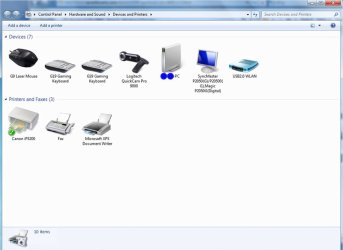
mine's working fine in 64-bit mode..
cam, mic and USB all running driver version 12.10.1110.0
 

My Computer

Computer type
PC/Desktop
Computer Manufacturer/Model Number
benchtec, built to personal specs
OS
Windows10 Pro - 64Bit vs.10547
CPU
i7-965 Extreme Edition (8 Cores) at 3.3GHz (no OC)
Motherboard
BloodRageX58 (Socket1366)
Memory
12G Corsair Dominator DDR3 - tripled
Graphics Card(s)
2xAMD SapphireNITRO R9 380(4G) crossfire
Sound Card
Sonar(SB)X-Fi onboard
Monitor(s) Displays
SyncMaster P2050 20"
Screen Resolution
1600x900 (widescreen)
Hard Drives
480G\OCZSolid3SSD, 64G\OCZVertex3SSD,60G\OCZVertex2SSD, 1TB\spinpointF1SATAHDD
PSU
1200w Power Station Gold
Case
ANTEC 900/2 all blue lights, etc..
Cooling
Noctua SE1366 NH-U12P - a tight fit, but a monster cooler!!
Keyboard
Logitech G19 (wired)
Mouse
Logitech G9 Laser (wired)
Internet Speed
150mb unlimited
Browser
IE11(RP)
Other Info
Xbox One, Nokia735 Windows10 mobile, LG HD/DVD/Blu-Ray r/w, CyberlinkPowerDVD15, LogitechZ5500-SS(5.1), LogitechG35Phones-SS(7.1),MSOffice 2007,CorelDrawX7,Painter2016, Wacom Intuos Pro-SE
Back
Top