RAID 1 install Win 7

eatdrinkadam

New member
Hello. I just had a turn-key system sent to me:

Win 7 Prof
ASUS Sabertoth x79 Mobo
Intel i7 6 core 3.2
1 SS drive @ 250 gb
2 Seagate drives @ 3 TB each


However the company forgot to set up my RAID 1.

I have 2 Seagate 3 TB drives in the box set up currently as AHCI that the system currently reads as separate drives.

When go back into the BIOS and set up the RAID 1, I get BSOD, ofcourse, which is a known issue.

So I decided to do clean re install after setting up the RAID 1 in the bios. Windows loads the install disk but gives me the "A required CD/DVD drive device driver is missing...." song and dance.

Does this mean I need to install the Intel RAID drivers prior to Win 7 reinstall?? (I thought this wasn't necessary with Win 7)

I went ahead and downloaded the drivers form the Intel site:

http://downloadcenter.intel.com/Sea...t=Intel®+Rapid+Storage+Technology+(Intel®+RST)

i put them on USB stick, (I don't own a floppy because I am from 2012) but the USB disk is not present during installation.

Any input would be appreciated!!!
 

My Computer

OS
Win 7 Prof
Hi,

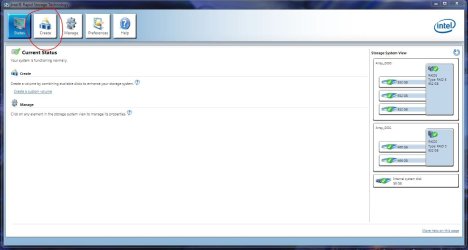
You can build the RAID1 from within Windows using Intel Rapid Storage Technology as shown below. Do you have that installed on your system? In your BIOS, have you nominated the drives to be controlled by the RAID controller, as opposed to to AHCI?

Regards,
Golden
 

Attachments

  • Capture.JPG
    Capture.JPG
    102.8 KB · Views: 45

My Computer

Computer type
PC/Desktop
Computer Manufacturer/Model Number
Golden Mk. I.4
OS
Windows 10 Pro x64 ; Xubuntu x64
CPU
Intel i7 860 @ 2.80 GHz O/C'ed to 4.0GHz
Motherboard
Gigabyte P55A-UD3R Rev.1. Award BIOS F13
Memory
16GB Corsair Vengance DDR3 @ 661 MHz Dual Channel (9-9-9-24)
Graphics Card(s)
EVGA NVidia GTX 560 1024MB
Sound Card
Realtek Integrated
Monitor(s) Displays
Dual Samsung SyncMaster 2494HS
Screen Resolution
1920*1080 and 1920*1080
Hard Drives
1*Samsung 840 EVO 120GB SSD;
1*OCZ Vertex 2 60GB SSD;
2*Samsung F3 SpinPoint 1TB in RAID0;
1*Samsung F1 SpinPoint 1TB;
2*Western Digital 1TB External USB 3.0
1*Western Digital 500GB External USB 3.0
1*Seagate 500GB External USB 2.0
PSU
Thermaltake ToughPower QFan 750W
Case
Thermaltake Element S VK60001W2Z
Cooling
Corsair H60 Water Cooling, 2*230mm and 2*80mm case fans
Keyboard
Logitech G110
Mouse
Logitech MX518
Thanks for your response.

I have Intel RST Enterpise installed, and the interface looks quite different:

2012-07-28_1459 - eatdrinkadam's library

There is an regular RST version, which I downloaded but could not install. "This computer does not meet the minimum requirments...."

I have tried to set the drives to RAID in the BIOS, however I get BSOD on boot up.
 

My Computer

OS
Win 7 Prof
Hi,

What options are presented when you click on 'Create' in the image you referenced?

Regards,
Golden
 

My Computer

Computer type
PC/Desktop
Computer Manufacturer/Model Number
Golden Mk. I.4
OS
Windows 10 Pro x64 ; Xubuntu x64
CPU
Intel i7 860 @ 2.80 GHz O/C'ed to 4.0GHz
Motherboard
Gigabyte P55A-UD3R Rev.1. Award BIOS F13
Memory
16GB Corsair Vengance DDR3 @ 661 MHz Dual Channel (9-9-9-24)
Graphics Card(s)
EVGA NVidia GTX 560 1024MB
Sound Card
Realtek Integrated
Monitor(s) Displays
Dual Samsung SyncMaster 2494HS
Screen Resolution
1920*1080 and 1920*1080
Hard Drives
1*Samsung 840 EVO 120GB SSD;
1*OCZ Vertex 2 60GB SSD;
2*Samsung F3 SpinPoint 1TB in RAID0;
1*Samsung F1 SpinPoint 1TB;
2*Western Digital 1TB External USB 3.0
1*Western Digital 500GB External USB 3.0
1*Seagate 500GB External USB 2.0
PSU
Thermaltake ToughPower QFan 750W
Case
Thermaltake Element S VK60001W2Z
Cooling
Corsair H60 Water Cooling, 2*230mm and 2*80mm case fans
Keyboard
Logitech G110
Mouse
Logitech MX518
Hi,

Are your motherboard drivers up to date? Look under the SATA tab here to download the latest chipset drivers. You should be able to install the driver within Windows, then in the BIOS enable RAID.

ASUS - Motherboards- ASUS SABERTOOTH X79

From the manual, it appears you can load the RAID driver from a USB stick.

Regards,
Golden
 

Attachments

My Computer

Computer type
PC/Desktop
Computer Manufacturer/Model Number
Golden Mk. I.4
OS
Windows 10 Pro x64 ; Xubuntu x64
CPU
Intel i7 860 @ 2.80 GHz O/C'ed to 4.0GHz
Motherboard
Gigabyte P55A-UD3R Rev.1. Award BIOS F13
Memory
16GB Corsair Vengance DDR3 @ 661 MHz Dual Channel (9-9-9-24)
Graphics Card(s)
EVGA NVidia GTX 560 1024MB
Sound Card
Realtek Integrated
Monitor(s) Displays
Dual Samsung SyncMaster 2494HS
Screen Resolution
1920*1080 and 1920*1080
Hard Drives
1*Samsung 840 EVO 120GB SSD;
1*OCZ Vertex 2 60GB SSD;
2*Samsung F3 SpinPoint 1TB in RAID0;
1*Samsung F1 SpinPoint 1TB;
2*Western Digital 1TB External USB 3.0
1*Western Digital 500GB External USB 3.0
1*Seagate 500GB External USB 2.0
PSU
Thermaltake ToughPower QFan 750W
Case
Thermaltake Element S VK60001W2Z
Cooling
Corsair H60 Water Cooling, 2*230mm and 2*80mm case fans
Keyboard
Logitech G110
Mouse
Logitech MX518
Thanks for the input. I will give that a shot and repost with results.

BTW, I believe my chip is overclocked, should this be a problem?

A
 

My Computer

OS
Win 7 Prof
Hi,

No, the overclock is not necessarily a problem.

Regards,
Golden
 

My Computer

Computer type
PC/Desktop
Computer Manufacturer/Model Number
Golden Mk. I.4
OS
Windows 10 Pro x64 ; Xubuntu x64
CPU
Intel i7 860 @ 2.80 GHz O/C'ed to 4.0GHz
Motherboard
Gigabyte P55A-UD3R Rev.1. Award BIOS F13
Memory
16GB Corsair Vengance DDR3 @ 661 MHz Dual Channel (9-9-9-24)
Graphics Card(s)
EVGA NVidia GTX 560 1024MB
Sound Card
Realtek Integrated
Monitor(s) Displays
Dual Samsung SyncMaster 2494HS
Screen Resolution
1920*1080 and 1920*1080
Hard Drives
1*Samsung 840 EVO 120GB SSD;
1*OCZ Vertex 2 60GB SSD;
2*Samsung F3 SpinPoint 1TB in RAID0;
1*Samsung F1 SpinPoint 1TB;
2*Western Digital 1TB External USB 3.0
1*Western Digital 500GB External USB 3.0
1*Seagate 500GB External USB 2.0
PSU
Thermaltake ToughPower QFan 750W
Case
Thermaltake Element S VK60001W2Z
Cooling
Corsair H60 Water Cooling, 2*230mm and 2*80mm case fans
Keyboard
Logitech G110
Mouse
Logitech MX518
Go to the Asus website and see if there are F6 SATA/RAID drivers available for your motherboard. You may have to provide them during the install process. The drivers you downloaded might not include your motherboard, which is very obvious if Windows is unable to find the RAID after you give it the drivers.
 

My Computer

Computer Manufacturer/Model Number
Dell XPS 15 L502x
OS
Windows 7 Ultimate x64 SP1
CPU
Core i7-2670QM
Memory
8GB DDR3 PC3-10600
Graphics Card(s)
Intel HD Graphics 3000 + GeForce GT 540M
Screen Resolution
1920x1080
Hard Drives
1TB 5400RPM Seagate
Also, review your motherboard manual - there are detailed instructions on how to create the RAID 1 array in section 4.4, and how to create the driver disk in 4.5. Beware - you need a floppy USB drive, according to those instructions.
 

My Computer

Computer Manufacturer/Model Number
Dell XPS 15 L502x
OS
Windows 7 Ultimate x64 SP1
CPU
Core i7-2670QM
Memory
8GB DDR3 PC3-10600
Graphics Card(s)
Intel HD Graphics 3000 + GeForce GT 540M
Screen Resolution
1920x1080
Hard Drives
1TB 5400RPM Seagate
Solved.

Heres the deal.

The box came with all 3 drives connected to the Intel SATA controllers. I took the OS C: drive OFF the Intel controller and onto the secondary Marvel controller by itself. Then I was able to load the RAID drivers from the C: drive during installation. So the Intel RAID exists separately from the OS drive. Now its all better.

Thanks for all the input!
 

My Computer

OS
Win 7 Prof
Hi,

Thats good - well done. Although I'm a bit puzzled as to why it was necessary. Anyway, as long as it works :D

Regards,
Golden
 

My Computer

Computer type
PC/Desktop
Computer Manufacturer/Model Number
Golden Mk. I.4
OS
Windows 10 Pro x64 ; Xubuntu x64
CPU
Intel i7 860 @ 2.80 GHz O/C'ed to 4.0GHz
Motherboard
Gigabyte P55A-UD3R Rev.1. Award BIOS F13
Memory
16GB Corsair Vengance DDR3 @ 661 MHz Dual Channel (9-9-9-24)
Graphics Card(s)
EVGA NVidia GTX 560 1024MB
Sound Card
Realtek Integrated
Monitor(s) Displays
Dual Samsung SyncMaster 2494HS
Screen Resolution
1920*1080 and 1920*1080
Hard Drives
1*Samsung 840 EVO 120GB SSD;
1*OCZ Vertex 2 60GB SSD;
2*Samsung F3 SpinPoint 1TB in RAID0;
1*Samsung F1 SpinPoint 1TB;
2*Western Digital 1TB External USB 3.0
1*Western Digital 500GB External USB 3.0
1*Seagate 500GB External USB 2.0
PSU
Thermaltake ToughPower QFan 750W
Case
Thermaltake Element S VK60001W2Z
Cooling
Corsair H60 Water Cooling, 2*230mm and 2*80mm case fans
Keyboard
Logitech G110
Mouse
Logitech MX518
Back
Top