Ram in too High...Invisible Process using up all my Ram

gfortner21

New member
Local time
8:50 PM
Messages
1
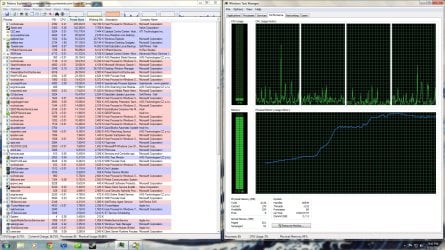
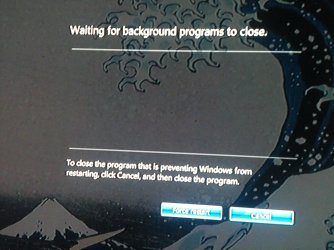
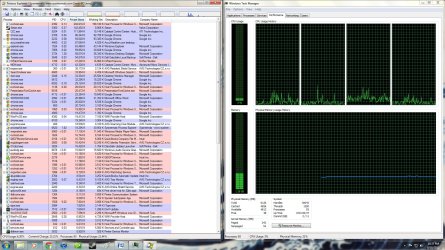
Help Me I WANT TO USE MY COMPUTER!!! I've had my computer for a while now and am almost OCD with watching my CPU usage, as well as RAM usage. I have 6gigs of RAM. So yesterday out of nowhere my Ram spikes up to 95% from its usual 20% and causes EVERYTHING to slow down to a crawl. It stays there anywhere from 5min-30min before it drops back down. It starts at boot up, then drops down to normal, Then for no reason it will jump back up again. I don't have to start a program it will just go up on its own. None of the processes are that high (nothing over 250,000k) and none of them are changing. The Processes keep the same value whether the Ram is high or not. I've used process explorer and nothing is unusual. When I restart the computer it goes to the screen where it lists all the programs waiting to close before you can log off, but there are no programs listed it's like there is an invisible process eating my RAM and I can't stop it. I've read tons of forum posts but still have found no answer. Help me obi-wan, your my only hope.
 

Attachments
  • normal.jpg
    normal.jpg
    422.7 KB · Views: 40
  • WTF.jpg
    WTF.jpg
    431.2 KB · Views: 26
  • shutdown.jpg
    shutdown.jpg
    344.8 KB · Views: 8

My Computer My Computer

At a glance

Windows 7 Home Premium x64
OS
Windows 7 Home Premium x64
Hello gfortner21 and welcome to Seven Forums.

I know you've already used Process Explorer but I'd recommend another tool from Sysinternals called Process Monitor. I've had better luck using it when trying to track down process details. And like procexp, procmon can also be run live rather than downloading (link at bottom of page.)

Process Monitor

Another thing to try is running a clean boot. It may point to an application conflict that's causing issues.

http://www.sevenforums.com/tutorial...ation-conflicts-performing-clean-startup.html

Finally, you could go throught this troubleshooting tutorial prepared by one of the Forum experts. It's time consuming but has helped many people isolate thier computer problems.

http://www.sevenforums.com/tutorials/220165-troubleshooting-steps-windows-7-a.html
 

My Computer My Computer

At a glance

Win 7 Pro 64-bitIntel i5 2.4 Ghz8GB DDR3Intel HD 3000
Computer type
Laptop
Computer Manufacturer/Model Number
Sony Vaio VPCEB47GM Laptop
OS
Win 7 Pro 64-bit
CPU
Intel i5 2.4 Ghz
Memory
8GB DDR3
Graphics Card(s)
Intel HD 3000
Sound Card
IDT High Definition
Monitor(s) Displays
15.6 WGXA Anti-Glare LED
Screen Resolution
1280x800
Hard Drives
640Gb 7200rpm
Antivirus
MSE
Browser
Opera (primary) with IE9 backup
Gfort
This is probably a load of old tosh, but you've got the dreaded AVG!
It works for loads of people but personally, l hate it with a vengeance.
I'm not up with your specs, just having a 2 core processor myself, but AVG caused me exactly what seems to be happening with you. I've changed to Avast Free, a bit more hungry than MSE but has more options.
Since then, no more hanging tasks.
Just a thought?
 

My Computer My Computer

At a glance

32bit Windows 7 UltimateAMD Athlon II X2 250 dual core4 x 1GB dual channel DDR3 @587MHz (7-7-7-20) ...Built in ATI graphics
Computer Manufacturer/Model Number
Home Built System
OS
32bit Windows 7 Ultimate
CPU
AMD Athlon II X2 250 dual core
Motherboard
MSI 760GM-E51
Memory
4 x 1GB dual channel DDR3 @587MHz (7-7-7-20) Crucial Ram
Graphics Card(s)
Built in ATI graphics
Sound Card
Sound Maker Value 5.1
Monitor(s) Displays
Acer P224W
Screen Resolution
1680 x 1050
Hard Drives
2 x 500gb Samsung HD502HJ Sata
PSU
Heden 480W ATX V2.2
Case
ATX Tower
Cooling
n/a
Keyboard
Logitech hard wired Qwerty Keyboard
Mouse
Microsoft Basic Optical hard wired
Internet Speed
ADSL Av.download - 2.10Mb/s Av.upload - 0.14Mb/s
Other Info
Matshita DVD-ROM SR-8584A
TSSTcorp CDDVDW SH-S202N
Back
Top