Solved RAM issue on 7 Professional 64 bit

My Computer My Computer

At a glance

Windows 10 Pro. 64/ version 1709 Windows 7 Pr...Intel i7-6800K @ 4.3Corsair Platinum 16 gig @2400EVGA GTX 1070 OC
Computer type
PC/Desktop
Computer Manufacturer/Model Number
Home made Desktop
OS
Windows 10 Pro. 64/ version 1709 Windows 7 Pro/64
CPU
Intel i7-6800K @ 4.3
Motherboard
ASUS X-99 Deluxe II
Memory
Corsair Platinum 16 gig @2400
Graphics Card(s)
EVGA GTX 1070 OC
Monitor(s) Displays
Asus 27" LED LCD/VE278Q
Screen Resolution
1920-1080 or 1280-720 HDMI
Hard Drives
INTEL SSD 730-240 Gb Sata 3.0/
PSU
EVGA Platium 1200W
Case
Phanteks Luxe Tempered Glass 8 fans/ one radiator
Cooling
XSPC/ Water Cooled CPU
Keyboard
Das 4 Professional
Mouse
Logitech M705/MX Anywhere 2-S
Internet Speed
100 mbits
Antivirus
Microsoft Security Essentials/ Malwarebytes Premium 3.0/ SAS
Browser
I.E. 11 default/Firefox/ ISP Time Warner Cable/Spectrum
Other Info
LG BluRay Burner/
Sound system-KLipsch-THX/
Icy Dock ssd Hot Swap bays.
THANKS GUYS!!! it's back to the way it was, but before i mark this as solved im curious....can i make it even better???
 

Attachments

  • new_00025.jpg
    new_00025.jpg
    202.8 KB · Views: 9
  • Untitled.png
    Untitled.png
    86.4 KB · Views: 13
  • old.png
    old.png
    421.9 KB · Views: 8

My Computer My Computer

At a glance

Microsoft Windows 7 Professional 64-bit 7601 ...Intel(R) Core(TM) i7-3970x CPU @ 3.50GHz 4.00GhzTotal: 12.00 GBNVIDIA/EVGA GeForce GTX 690
Computer type
PC/Desktop
Computer Manufacturer/Model Number
Custom PC
OS
Microsoft Windows 7 Professional 64-bit 7601 Multiprocessor Free Service Pack 1
CPU
Intel(R) Core(TM) i7-3970x CPU @ 3.50GHz 4.00Ghz
Motherboard
Gigabyte Technology X79-UP4
Memory
Total: 12.00 GB
Graphics Card(s)
NVIDIA/EVGA GeForce GTX 690
Sound Card
motherboard
Monitor(s) Displays
Acer HN274Hbmiiid Black
Screen Resolution
1920 x 1080 x 32 bits (4294967296 colors) @ 120 Hz
Hard Drives
X2 Western Digital WD Black WD4001FAEX 4TB
PSU
Corsair AX1200
Case
coolermaster HAFX
Cooling
Intel Thermal Solution RTS2011LC
Keyboard
RAZER DeathStalker
Mouse
Wacom Tablet Intuos 4
Internet Speed
DSL 256k
Antivirus
Kaspersky
Browser
Firefox
I get it now....didn't know there was such a thing as double sided ram

there is one thing im not clear on though....what's the difference between dual and 3 channel

It's the way the motherboard and processor (i7-900 series chips) use the memory. In the most simplified terms the RAM is ran in 3 lanes (triple channel) instead of 2 lanes (duel channel). The theory that 3 lanes is faster than 2.

Be aware that this has nothing to do with the memory itself, it's just the way the motherboard and processor runs it. X58 motherboards (1366 chipsets) can run their memory in triple channel mode - thus the typical 3 or 6 memory stick setup.

Hope this helps.
 

My Computer My Computer

At a glance

Windows 10 ProIntel Core i7-4770K (3.5Ghz)32 gig Corsair Dominator Platinum (4x8Gig)Sapphire Tri-X R9 Fury
Computer type
PC/Desktop
Computer Manufacturer/Model Number
Custom built by me.
OS
Windows 10 Pro
CPU
Intel Core i7-4770K (3.5Ghz)
Motherboard
Gigabyte G1 Sniper 5 (F10 Bios)
Memory
32 gig Corsair Dominator Platinum (4x8Gig)
Graphics Card(s)
Sapphire Tri-X R9 Fury
Sound Card
Soundblaster ZXR
Monitor(s) Displays
NEC PA242W 24" LCD Monitor
Screen Resolution
1920 x 1200
Hard Drives
Primary - Samsung 850 Pro (512gig), Samsung 840 Pro (256gig), 2TB WD Caviar Black.
PSU
EVGA Supernova 1000 G2
Case
Cooler Master HAF X
Cooling
Corsair H100i with Corsair Air Series SP120 Quiet Fans
Keyboard
Logitech Wireless Wave
Mouse
Logitech Performance MX
Internet Speed
High Speed Cable
Antivirus
Norton Security
Browser
IE11
Other Info
Memory Timings - 1866MHz @ 9-9-9-27-1T @ 1.5 volts
yea that makes sense and thanks again...
 

My Computer My Computer

At a glance

Microsoft Windows 7 Professional 64-bit 7601 ...Intel(R) Core(TM) i7-3970x CPU @ 3.50GHz 4.00GhzTotal: 12.00 GBNVIDIA/EVGA GeForce GTX 690
Computer type
PC/Desktop
Computer Manufacturer/Model Number
Custom PC
OS
Microsoft Windows 7 Professional 64-bit 7601 Multiprocessor Free Service Pack 1
CPU
Intel(R) Core(TM) i7-3970x CPU @ 3.50GHz 4.00Ghz
Motherboard
Gigabyte Technology X79-UP4
Memory
Total: 12.00 GB
Graphics Card(s)
NVIDIA/EVGA GeForce GTX 690
Sound Card
motherboard
Monitor(s) Displays
Acer HN274Hbmiiid Black
Screen Resolution
1920 x 1080 x 32 bits (4294967296 colors) @ 120 Hz
Hard Drives
X2 Western Digital WD Black WD4001FAEX 4TB
PSU
Corsair AX1200
Case
coolermaster HAFX
Cooling
Intel Thermal Solution RTS2011LC
Keyboard
RAZER DeathStalker
Mouse
Wacom Tablet Intuos 4
Internet Speed
DSL 256k
Antivirus
Kaspersky
Browser
Firefox
Well Shadow Falls if you are happy I'm happy.
Happy computing.
 

My Computer My Computer

At a glance

Windows 10 Pro. 64/ version 1709 Windows 7 Pr...Intel i7-6800K @ 4.3Corsair Platinum 16 gig @2400EVGA GTX 1070 OC
Computer type
PC/Desktop
Computer Manufacturer/Model Number
Home made Desktop
OS
Windows 10 Pro. 64/ version 1709 Windows 7 Pro/64
CPU
Intel i7-6800K @ 4.3
Motherboard
ASUS X-99 Deluxe II
Memory
Corsair Platinum 16 gig @2400
Graphics Card(s)
EVGA GTX 1070 OC
Monitor(s) Displays
Asus 27" LED LCD/VE278Q
Screen Resolution
1920-1080 or 1280-720 HDMI
Hard Drives
INTEL SSD 730-240 Gb Sata 3.0/
PSU
EVGA Platium 1200W
Case
Phanteks Luxe Tempered Glass 8 fans/ one radiator
Cooling
XSPC/ Water Cooled CPU
Keyboard
Das 4 Professional
Mouse
Logitech M705/MX Anywhere 2-S
Internet Speed
100 mbits
Antivirus
Microsoft Security Essentials/ Malwarebytes Premium 3.0/ SAS
Browser
I.E. 11 default/Firefox/ ISP Time Warner Cable/Spectrum
Other Info
LG BluRay Burner/
Sound system-KLipsch-THX/
Icy Dock ssd Hot Swap bays.
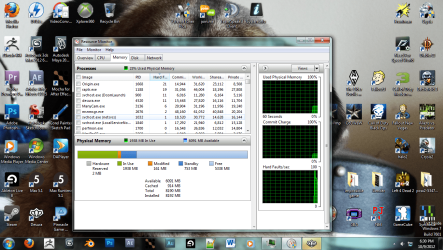
THANKS GUYS!!! it's back to the way it was, but before i mark this as solved im curious....can i make it even better???

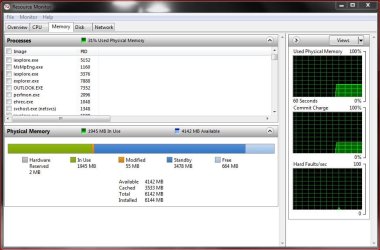
You still have an issue as you've still got 4gig of memory hardware reserved! On a 64bit OS it should be nowhere near that!

This is my system with 6gig of memory installed. Note that I've got just 2mb (megabyte) of memory hardware reserved.

Capture.JPG

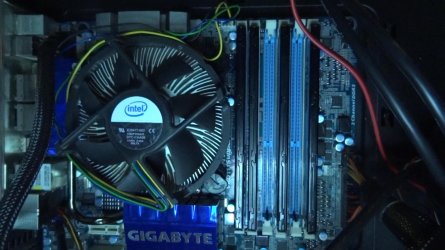
Suggest you remove one stick of memory and run just the 3 in the black slots and see how it goes. Then move from there.
 

My Computer My Computer

At a glance

Windows 10 ProIntel Core i7-4770K (3.5Ghz)32 gig Corsair Dominator Platinum (4x8Gig)Sapphire Tri-X R9 Fury
Computer type
PC/Desktop
Computer Manufacturer/Model Number
Custom built by me.
OS
Windows 10 Pro
CPU
Intel Core i7-4770K (3.5Ghz)
Motherboard
Gigabyte G1 Sniper 5 (F10 Bios)
Memory
32 gig Corsair Dominator Platinum (4x8Gig)
Graphics Card(s)
Sapphire Tri-X R9 Fury
Sound Card
Soundblaster ZXR
Monitor(s) Displays
NEC PA242W 24" LCD Monitor
Screen Resolution
1920 x 1200
Hard Drives
Primary - Samsung 850 Pro (512gig), Samsung 840 Pro (256gig), 2TB WD Caviar Black.
PSU
EVGA Supernova 1000 G2
Case
Cooler Master HAF X
Cooling
Corsair H100i with Corsair Air Series SP120 Quiet Fans
Keyboard
Logitech Wireless Wave
Mouse
Logitech Performance MX
Internet Speed
High Speed Cable
Antivirus
Norton Security
Browser
IE11
Other Info
Memory Timings - 1866MHz @ 9-9-9-27-1T @ 1.5 volts
I'll try it, thanks. my system doesn't detect that stick anyway
 

My Computer My Computer

At a glance

Microsoft Windows 7 Professional 64-bit 7601 ...Intel(R) Core(TM) i7-3970x CPU @ 3.50GHz 4.00GhzTotal: 12.00 GBNVIDIA/EVGA GeForce GTX 690
Computer type
PC/Desktop
Computer Manufacturer/Model Number
Custom PC
OS
Microsoft Windows 7 Professional 64-bit 7601 Multiprocessor Free Service Pack 1
CPU
Intel(R) Core(TM) i7-3970x CPU @ 3.50GHz 4.00Ghz
Motherboard
Gigabyte Technology X79-UP4
Memory
Total: 12.00 GB
Graphics Card(s)
NVIDIA/EVGA GeForce GTX 690
Sound Card
motherboard
Monitor(s) Displays
Acer HN274Hbmiiid Black
Screen Resolution
1920 x 1080 x 32 bits (4294967296 colors) @ 120 Hz
Hard Drives
X2 Western Digital WD Black WD4001FAEX 4TB
PSU
Corsair AX1200
Case
coolermaster HAFX
Cooling
Intel Thermal Solution RTS2011LC
Keyboard
RAZER DeathStalker
Mouse
Wacom Tablet Intuos 4
Internet Speed
DSL 256k
Antivirus
Kaspersky
Browser
Firefox
Yep....
 

Attachments

  • Untitled.png
    Untitled.png
    303.4 KB · Views: 14

My Computer My Computer

At a glance

Microsoft Windows 7 Professional 64-bit 7601 ...Intel(R) Core(TM) i7-3970x CPU @ 3.50GHz 4.00GhzTotal: 12.00 GBNVIDIA/EVGA GeForce GTX 690
Computer type
PC/Desktop
Computer Manufacturer/Model Number
Custom PC
OS
Microsoft Windows 7 Professional 64-bit 7601 Multiprocessor Free Service Pack 1
CPU
Intel(R) Core(TM) i7-3970x CPU @ 3.50GHz 4.00Ghz
Motherboard
Gigabyte Technology X79-UP4
Memory
Total: 12.00 GB
Graphics Card(s)
NVIDIA/EVGA GeForce GTX 690
Sound Card
motherboard
Monitor(s) Displays
Acer HN274Hbmiiid Black
Screen Resolution
1920 x 1080 x 32 bits (4294967296 colors) @ 120 Hz
Hard Drives
X2 Western Digital WD Black WD4001FAEX 4TB
PSU
Corsair AX1200
Case
coolermaster HAFX
Cooling
Intel Thermal Solution RTS2011LC
Keyboard
RAZER DeathStalker
Mouse
Wacom Tablet Intuos 4
Internet Speed
DSL 256k
Antivirus
Kaspersky
Browser
Firefox
As I said earlier, if that stick isn't detected....there is a problem!!! If the stick isn't working/being detected.... why use it???

Also, are all the dimms (memory sticks) the same? Same brand? Same company? Same specs? If not, that too can be a problem.

We're posting to help you; please read what we post.

Thanks.
 

My Computer My Computer

At a glance

Windows 10 ProIntel Core i7-4770K (3.5Ghz)32 gig Corsair Dominator Platinum (4x8Gig)Sapphire Tri-X R9 Fury
Computer type
PC/Desktop
Computer Manufacturer/Model Number
Custom built by me.
OS
Windows 10 Pro
CPU
Intel Core i7-4770K (3.5Ghz)
Motherboard
Gigabyte G1 Sniper 5 (F10 Bios)
Memory
32 gig Corsair Dominator Platinum (4x8Gig)
Graphics Card(s)
Sapphire Tri-X R9 Fury
Sound Card
Soundblaster ZXR
Monitor(s) Displays
NEC PA242W 24" LCD Monitor
Screen Resolution
1920 x 1200
Hard Drives
Primary - Samsung 850 Pro (512gig), Samsung 840 Pro (256gig), 2TB WD Caviar Black.
PSU
EVGA Supernova 1000 G2
Case
Cooler Master HAF X
Cooling
Corsair H100i with Corsair Air Series SP120 Quiet Fans
Keyboard
Logitech Wireless Wave
Mouse
Logitech Performance MX
Internet Speed
High Speed Cable
Antivirus
Norton Security
Browser
IE11
Other Info
Memory Timings - 1866MHz @ 9-9-9-27-1T @ 1.5 volts
yea they're all the same...capacity, brand, model, etc
 

My Computer My Computer

At a glance

Microsoft Windows 7 Professional 64-bit 7601 ...Intel(R) Core(TM) i7-3970x CPU @ 3.50GHz 4.00GhzTotal: 12.00 GBNVIDIA/EVGA GeForce GTX 690
Computer type
PC/Desktop
Computer Manufacturer/Model Number
Custom PC
OS
Microsoft Windows 7 Professional 64-bit 7601 Multiprocessor Free Service Pack 1
CPU
Intel(R) Core(TM) i7-3970x CPU @ 3.50GHz 4.00Ghz
Motherboard
Gigabyte Technology X79-UP4
Memory
Total: 12.00 GB
Graphics Card(s)
NVIDIA/EVGA GeForce GTX 690
Sound Card
motherboard
Monitor(s) Displays
Acer HN274Hbmiiid Black
Screen Resolution
1920 x 1080 x 32 bits (4294967296 colors) @ 120 Hz
Hard Drives
X2 Western Digital WD Black WD4001FAEX 4TB
PSU
Corsair AX1200
Case
coolermaster HAFX
Cooling
Intel Thermal Solution RTS2011LC
Keyboard
RAZER DeathStalker
Mouse
Wacom Tablet Intuos 4
Internet Speed
DSL 256k
Antivirus
Kaspersky
Browser
Firefox
THANKS GUYS!!! it's back to the way it was, but before i mark this as solved im curious....can i make it even better???

You still have an issue as you've still got 4gig of memory hardware reserved! On a 64bit OS it should be nowhere near that!

This is my system with 6gig of memory installed. Note that I've got just 2mb (megabyte) of memory hardware reserved.

View attachment 235842

Suggest you remove one stick of memory and run just the 3 in the black slots and see how it goes. Then move from there.


So now we've narrowed the issue.... either a bam memory stick, or a bad motherboard slot. I'm thinking it's the stick, but you tell us?
 

My Computer My Computer

At a glance

Windows 10 ProIntel Core i7-4770K (3.5Ghz)32 gig Corsair Dominator Platinum (4x8Gig)Sapphire Tri-X R9 Fury
Computer type
PC/Desktop
Computer Manufacturer/Model Number
Custom built by me.
OS
Windows 10 Pro
CPU
Intel Core i7-4770K (3.5Ghz)
Motherboard
Gigabyte G1 Sniper 5 (F10 Bios)
Memory
32 gig Corsair Dominator Platinum (4x8Gig)
Graphics Card(s)
Sapphire Tri-X R9 Fury
Sound Card
Soundblaster ZXR
Monitor(s) Displays
NEC PA242W 24" LCD Monitor
Screen Resolution
1920 x 1200
Hard Drives
Primary - Samsung 850 Pro (512gig), Samsung 840 Pro (256gig), 2TB WD Caviar Black.
PSU
EVGA Supernova 1000 G2
Case
Cooler Master HAF X
Cooling
Corsair H100i with Corsair Air Series SP120 Quiet Fans
Keyboard
Logitech Wireless Wave
Mouse
Logitech Performance MX
Internet Speed
High Speed Cable
Antivirus
Norton Security
Browser
IE11
Other Info
Memory Timings - 1866MHz @ 9-9-9-27-1T @ 1.5 volts
I don't think the slot or the stick are bad...i just think that computers are extremely complex and nothing's perfect so it just so happens that this particular motherboard doesn't like that config....It did for a while I was getting the same performance i am now with the wrong !config!


...well now.......it seams with this new config it only detects 8gb while i have 12 installed....
it seams no matter what arrangement i use it wants to knock off 4gb from what is actually installed

I don't mind this so much though.....as long as I have decent performance for rendering.
 

My Computer My Computer

At a glance

Microsoft Windows 7 Professional 64-bit 7601 ...Intel(R) Core(TM) i7-3970x CPU @ 3.50GHz 4.00GhzTotal: 12.00 GBNVIDIA/EVGA GeForce GTX 690
Computer type
PC/Desktop
Computer Manufacturer/Model Number
Custom PC
OS
Microsoft Windows 7 Professional 64-bit 7601 Multiprocessor Free Service Pack 1
CPU
Intel(R) Core(TM) i7-3970x CPU @ 3.50GHz 4.00Ghz
Motherboard
Gigabyte Technology X79-UP4
Memory
Total: 12.00 GB
Graphics Card(s)
NVIDIA/EVGA GeForce GTX 690
Sound Card
motherboard
Monitor(s) Displays
Acer HN274Hbmiiid Black
Screen Resolution
1920 x 1080 x 32 bits (4294967296 colors) @ 120 Hz
Hard Drives
X2 Western Digital WD Black WD4001FAEX 4TB
PSU
Corsair AX1200
Case
coolermaster HAFX
Cooling
Intel Thermal Solution RTS2011LC
Keyboard
RAZER DeathStalker
Mouse
Wacom Tablet Intuos 4
Internet Speed
DSL 256k
Antivirus
Kaspersky
Browser
Firefox
Well I'm going to disagree a little as I'm 99.9 percent sure that either the memory moduel is bad, or the dimm slot is bad... especially since you've stated (twice) that your motherboard wasn't detecting it.

But... you have the system in front of you, I don't.

At any rate all appears to be good now :)

Peace :cool:
 

My Computer My Computer

At a glance

Windows 10 ProIntel Core i7-4770K (3.5Ghz)32 gig Corsair Dominator Platinum (4x8Gig)Sapphire Tri-X R9 Fury
Computer type
PC/Desktop
Computer Manufacturer/Model Number
Custom built by me.
OS
Windows 10 Pro
CPU
Intel Core i7-4770K (3.5Ghz)
Motherboard
Gigabyte G1 Sniper 5 (F10 Bios)
Memory
32 gig Corsair Dominator Platinum (4x8Gig)
Graphics Card(s)
Sapphire Tri-X R9 Fury
Sound Card
Soundblaster ZXR
Monitor(s) Displays
NEC PA242W 24" LCD Monitor
Screen Resolution
1920 x 1200
Hard Drives
Primary - Samsung 850 Pro (512gig), Samsung 840 Pro (256gig), 2TB WD Caviar Black.
PSU
EVGA Supernova 1000 G2
Case
Cooler Master HAF X
Cooling
Corsair H100i with Corsair Air Series SP120 Quiet Fans
Keyboard
Logitech Wireless Wave
Mouse
Logitech Performance MX
Internet Speed
High Speed Cable
Antivirus
Norton Security
Browser
IE11
Other Info
Memory Timings - 1866MHz @ 9-9-9-27-1T @ 1.5 volts
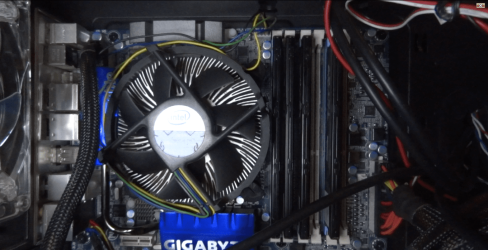
well i would think the slot is bad, but..... it seems that even with this arrangement it still doesn't detect 1 of the sticks.
(3 sticks installed [4gb each] but only 8gb detected)
 

My Computer My Computer

At a glance

Microsoft Windows 7 Professional 64-bit 7601 ...Intel(R) Core(TM) i7-3970x CPU @ 3.50GHz 4.00GhzTotal: 12.00 GBNVIDIA/EVGA GeForce GTX 690
Computer type
PC/Desktop
Computer Manufacturer/Model Number
Custom PC
OS
Microsoft Windows 7 Professional 64-bit 7601 Multiprocessor Free Service Pack 1
CPU
Intel(R) Core(TM) i7-3970x CPU @ 3.50GHz 4.00Ghz
Motherboard
Gigabyte Technology X79-UP4
Memory
Total: 12.00 GB
Graphics Card(s)
NVIDIA/EVGA GeForce GTX 690
Sound Card
motherboard
Monitor(s) Displays
Acer HN274Hbmiiid Black
Screen Resolution
1920 x 1080 x 32 bits (4294967296 colors) @ 120 Hz
Hard Drives
X2 Western Digital WD Black WD4001FAEX 4TB
PSU
Corsair AX1200
Case
coolermaster HAFX
Cooling
Intel Thermal Solution RTS2011LC
Keyboard
RAZER DeathStalker
Mouse
Wacom Tablet Intuos 4
Internet Speed
DSL 256k
Antivirus
Kaspersky
Browser
Firefox
I agree with Sygnus you still have a problem. Take a look at the Gigabyte Forum and see if anybody else is having the same problem. X58 motherboards of many brands have had memory problems. I fought mine for months. But I say again if you are happy I'm happy.
 

My Computer My Computer

At a glance

Windows 10 Pro. 64/ version 1709 Windows 7 Pr...Intel i7-6800K @ 4.3Corsair Platinum 16 gig @2400EVGA GTX 1070 OC
Computer type
PC/Desktop
Computer Manufacturer/Model Number
Home made Desktop
OS
Windows 10 Pro. 64/ version 1709 Windows 7 Pro/64
CPU
Intel i7-6800K @ 4.3
Motherboard
ASUS X-99 Deluxe II
Memory
Corsair Platinum 16 gig @2400
Graphics Card(s)
EVGA GTX 1070 OC
Monitor(s) Displays
Asus 27" LED LCD/VE278Q
Screen Resolution
1920-1080 or 1280-720 HDMI
Hard Drives
INTEL SSD 730-240 Gb Sata 3.0/
PSU
EVGA Platium 1200W
Case
Phanteks Luxe Tempered Glass 8 fans/ one radiator
Cooling
XSPC/ Water Cooled CPU
Keyboard
Das 4 Professional
Mouse
Logitech M705/MX Anywhere 2-S
Internet Speed
100 mbits
Antivirus
Microsoft Security Essentials/ Malwarebytes Premium 3.0/ SAS
Browser
I.E. 11 default/Firefox/ ISP Time Warner Cable/Spectrum
Other Info
LG BluRay Burner/
Sound system-KLipsch-THX/
Icy Dock ssd Hot Swap bays.
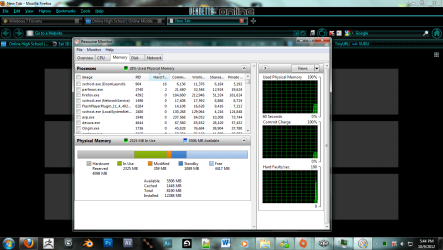
well i would think the slot is bad, but..... it seems that even with this arrangement it still doesn't detect 1 of the sticks.
(3 sticks installed [4gb each] but only 8gb detected)

Well I then suggest you check those slots and run memtest.

Check your owner's manual and install just two sticks fist and then install more as you try to find which slot isn't working.

If you know which slot isn't working, install a known good stick in that slot to see if it's working. If the stick it detected, well you know the slot is good.

After that run memtest per the tutorial here: http://www.sevenforums.com/tutorials/105647-ram-test-memtest86.html on all the modules.


X58 motherboards of many brands have had memory problems. I fought mine for months. But I say again if you are happy I'm happy.

Hmmm.... haven't heard that one or seen any of those posted at the gigibyte site: http://forums.tweaktown.com/gigabyte/

Anyway I've got an X58 Gigabyte motherboard and I've had no issues whatsoever, and I've had my board since June of 2010. Not to say they can't have problems though... as suggested here.
 

My Computer My Computer

At a glance

Windows 10 ProIntel Core i7-4770K (3.5Ghz)32 gig Corsair Dominator Platinum (4x8Gig)Sapphire Tri-X R9 Fury
Computer type
PC/Desktop
Computer Manufacturer/Model Number
Custom built by me.
OS
Windows 10 Pro
CPU
Intel Core i7-4770K (3.5Ghz)
Motherboard
Gigabyte G1 Sniper 5 (F10 Bios)
Memory
32 gig Corsair Dominator Platinum (4x8Gig)
Graphics Card(s)
Sapphire Tri-X R9 Fury
Sound Card
Soundblaster ZXR
Monitor(s) Displays
NEC PA242W 24" LCD Monitor
Screen Resolution
1920 x 1200
Hard Drives
Primary - Samsung 850 Pro (512gig), Samsung 840 Pro (256gig), 2TB WD Caviar Black.
PSU
EVGA Supernova 1000 G2
Case
Cooler Master HAF X
Cooling
Corsair H100i with Corsair Air Series SP120 Quiet Fans
Keyboard
Logitech Wireless Wave
Mouse
Logitech Performance MX
Internet Speed
High Speed Cable
Antivirus
Norton Security
Browser
IE11
Other Info
Memory Timings - 1866MHz @ 9-9-9-27-1T @ 1.5 volts
I was not knocking Gigabyte motherboard but it was to suggest that the OP do a little Google homework on his/her behalf and see if their/there is or might be a problem that others are having.
 

My Computer My Computer

At a glance

Windows 10 Pro. 64/ version 1709 Windows 7 Pr...Intel i7-6800K @ 4.3Corsair Platinum 16 gig @2400EVGA GTX 1070 OC
Computer type
PC/Desktop
Computer Manufacturer/Model Number
Home made Desktop
OS
Windows 10 Pro. 64/ version 1709 Windows 7 Pro/64
CPU
Intel i7-6800K @ 4.3
Motherboard
ASUS X-99 Deluxe II
Memory
Corsair Platinum 16 gig @2400
Graphics Card(s)
EVGA GTX 1070 OC
Monitor(s) Displays
Asus 27" LED LCD/VE278Q
Screen Resolution
1920-1080 or 1280-720 HDMI
Hard Drives
INTEL SSD 730-240 Gb Sata 3.0/
PSU
EVGA Platium 1200W
Case
Phanteks Luxe Tempered Glass 8 fans/ one radiator
Cooling
XSPC/ Water Cooled CPU
Keyboard
Das 4 Professional
Mouse
Logitech M705/MX Anywhere 2-S
Internet Speed
100 mbits
Antivirus
Microsoft Security Essentials/ Malwarebytes Premium 3.0/ SAS
Browser
I.E. 11 default/Firefox/ ISP Time Warner Cable/Spectrum
Other Info
LG BluRay Burner/
Sound system-KLipsch-THX/
Icy Dock ssd Hot Swap bays.
I was not knocking Gigabyte motherboard but it was to suggest that the OP do a little Google homework on his/her behalf and see if their/there is or might be a problem that others are having.

I didn't think you were nor did I take it that way. It's just that I have that board (X58 Gigabyte board) so I'm going by experience with it, and the BIOS. I've also been a participatiing member of the gigabyte forums.

And yeah I agree about doing some homework. You learn, and as you say, see if anywone else has the same issue.

Its all good :cool:
 

My Computer My Computer

At a glance

Windows 10 ProIntel Core i7-4770K (3.5Ghz)32 gig Corsair Dominator Platinum (4x8Gig)Sapphire Tri-X R9 Fury
Computer type
PC/Desktop
Computer Manufacturer/Model Number
Custom built by me.
OS
Windows 10 Pro
CPU
Intel Core i7-4770K (3.5Ghz)
Motherboard
Gigabyte G1 Sniper 5 (F10 Bios)
Memory
32 gig Corsair Dominator Platinum (4x8Gig)
Graphics Card(s)
Sapphire Tri-X R9 Fury
Sound Card
Soundblaster ZXR
Monitor(s) Displays
NEC PA242W 24" LCD Monitor
Screen Resolution
1920 x 1200
Hard Drives
Primary - Samsung 850 Pro (512gig), Samsung 840 Pro (256gig), 2TB WD Caviar Black.
PSU
EVGA Supernova 1000 G2
Case
Cooler Master HAF X
Cooling
Corsair H100i with Corsair Air Series SP120 Quiet Fans
Keyboard
Logitech Wireless Wave
Mouse
Logitech Performance MX
Internet Speed
High Speed Cable
Antivirus
Norton Security
Browser
IE11
Other Info
Memory Timings - 1866MHz @ 9-9-9-27-1T @ 1.5 volts
Back
Top