RAM issue

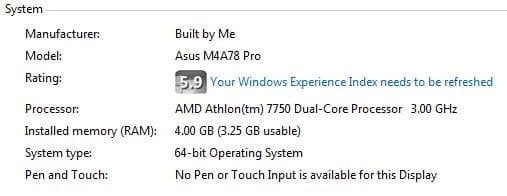
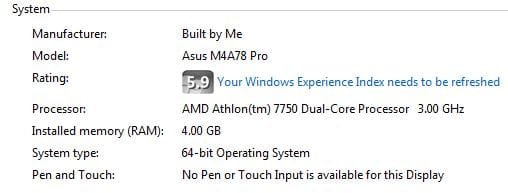
Compare this image from my system to that from the first post in this thread. As you can see, they are both 64-bit systems with 4GB of RAM. Mine, however, is showing the full amount as being usable (it only says xGB usable if less than the installed amount).
View attachment 52299
Since you have already checked the settings I mentioned in my earlier post about Maximum memory: (you might like to double check),I can only think that it might be a BIOS setting.

Alright, i double-checked, the settings are cool. So, i'll check out the BIOS settings. brb.
 

My Computer

Computer Manufacturer/Model Number
Acer Veriton m261 (modded)
OS
Win 7 pro 64-bit, Ubuntu 9.10 64-bit
CPU
Intel Core 2 Duo 2.60 Ghz
Motherboard
Whatever came with the system
Memory
4 gb ddr2 667 Mhz
Graphics Card(s)
NVidia Geforce 9400 GS 1 gb ddr2 550 mhz GPU
Sound Card
Intergrated
Monitor(s) Displays
samsung SyncMaster 2494 24"
Screen Resolution
1080p
Hard Drives
80gb - IDE
750gb - SATA II
PSU
whatever came with the system
Case
whatever came with the system
Cooling
whatever came with the system
Keyboard
Apple Aluminium (Awesome)
Mouse
Some awesome Dell mouse, really good.
Internet Speed
100mbps
One thing I haven't seen asked or mentioned seeing as you have 64 bit Ubuntu listed in your specs as well, what is it showing?

If it is showing the same sort of thing as in Windows, then it is definitely a bios setting. Fun thing will be that with the computer being an Acer, there is a very good possibility that the setting in question (memory hole re-mapping, or similar) probably won't be there.
 

My Computer

Computer type
PC/Desktop
Computer Manufacturer/Model Number
Me
OS
Win 7 Ultimate x64
CPU
FX-8350 @ 4.6 GHz so far
Motherboard
Asus M5A97 EVO
Memory
ADATA XPG V1 Series Black 8GB DDR3 1600
Graphics Card(s)
Sapphire R9 270x Dual-X
Sound Card
Xonar DGX w/ Corsair Vengence 1300
Monitor(s) Displays
Acer S232HL Abid
Screen Resolution
1920x1080
Hard Drives
120 GB OCZ Vertex 3
500 GB Seagate 7200.12
PSU
Antec Earthwatts 650W Green
Case
Antec Three Hundred
Cooling
Cooler Master 212 EVO
Keyboard
Logitech G510
Mouse
Logitech G500s
Internet Speed
35000/3000
NO, LOL I'M SUCH A FAILURE! GOD DAMMIT. I just checked the BIOS, it said i have 3gb of total memory. Thats not possible, i have 2x2gb sticks inside the system. I know, Stormy already told me to check that... Im such an idiot.

Will check Ubuntu. Hold on.
 

My Computer

Computer Manufacturer/Model Number
Acer Veriton m261 (modded)
OS
Win 7 pro 64-bit, Ubuntu 9.10 64-bit
CPU
Intel Core 2 Duo 2.60 Ghz
Motherboard
Whatever came with the system
Memory
4 gb ddr2 667 Mhz
Graphics Card(s)
NVidia Geforce 9400 GS 1 gb ddr2 550 mhz GPU
Sound Card
Intergrated
Monitor(s) Displays
samsung SyncMaster 2494 24"
Screen Resolution
1080p
Hard Drives
80gb - IDE
750gb - SATA II
PSU
whatever came with the system
Case
whatever came with the system
Cooling
whatever came with the system
Keyboard
Apple Aluminium (Awesome)
Mouse
Some awesome Dell mouse, really good.
Internet Speed
100mbps
Hey ppl. Just rebooted and went to Ubuntu, and no network access! Ubuntu doesnt have a native tool to check system specs i think, so i cant give you those. Went back to windows, and the same thing! No network access! Posting from my laptop now, with another wireless network. Whats going on? Anyways, why does BIOS only show 3gigs?
 

My Computer

Computer Manufacturer/Model Number
Acer Veriton m261 (modded)
OS
Win 7 pro 64-bit, Ubuntu 9.10 64-bit
CPU
Intel Core 2 Duo 2.60 Ghz
Motherboard
Whatever came with the system
Memory
4 gb ddr2 667 Mhz
Graphics Card(s)
NVidia Geforce 9400 GS 1 gb ddr2 550 mhz GPU
Sound Card
Intergrated
Monitor(s) Displays
samsung SyncMaster 2494 24"
Screen Resolution
1080p
Hard Drives
80gb - IDE
750gb - SATA II
PSU
whatever came with the system
Case
whatever came with the system
Cooling
whatever came with the system
Keyboard
Apple Aluminium (Awesome)
Mouse
Some awesome Dell mouse, really good.
Internet Speed
100mbps
No idea what's going on with the wireless, but for the memory have a real god look through all the sections in the bios for anything to do with "memory hole remapping" or something with a similar name and if found set it to enabled.
 

My Computer

Computer type
PC/Desktop
Computer Manufacturer/Model Number
Me
OS
Win 7 Ultimate x64
CPU
FX-8350 @ 4.6 GHz so far
Motherboard
Asus M5A97 EVO
Memory
ADATA XPG V1 Series Black 8GB DDR3 1600
Graphics Card(s)
Sapphire R9 270x Dual-X
Sound Card
Xonar DGX w/ Corsair Vengence 1300
Monitor(s) Displays
Acer S232HL Abid
Screen Resolution
1920x1080
Hard Drives
120 GB OCZ Vertex 3
500 GB Seagate 7200.12
PSU
Antec Earthwatts 650W Green
Case
Antec Three Hundred
Cooling
Cooler Master 212 EVO
Keyboard
Logitech G510
Mouse
Logitech G500s
Internet Speed
35000/3000
As I tried to explain earlier, you have to distinguish between address space and real RAM. What you see discussed in most of these articles dealing with 32bit (like this one) is a mixture of both. And that's where the confusion comes in.

In 32bit, the system definitely needs address space for the various functions described - even for a graphics card with it's own dedicated memory. But if it is an on-board graphics, it also needs real RAM because the graphics chip has no own memory. Thus the available RAM for the OS gets reduced (but it is mainly a matter of address space - where real RAM usage or address space usage have the same effect in 32bit).

In 64 bit, address space is not an issue because the system may have up to 128GB (max. for Win7 Ultimate). However, if the system has an on-board graphics chip that needs real RAM, it will have to "steal" that from the e.g. 4GBs that are installed on the system. Thus even in 64bit you may have only 3.5GBs "usable" - meaning usable by the OS, the rest is used by the graphics chip.

That, of course, is not so if you have a graphics card that has it's own memory - it only needs address space which it gets from high up (e.g. counting down from 128GB) and will not effect the 4GBs of real RAM. And the same goes for all the other system functions that need address space.
 

My Computer

Computer Manufacturer/Model Number
HP, Dell, Gateway, Toshiba - 4 laptops and 2 desktops
OS
Vista, Windows7, Mint Mate, Zorin, Windows 8
CPU
from 1.6GHz Duo to i7
Monitor(s) Displays
2x HP w2207
Hard Drives
5x HDD, 7x SSD, 12x Externals
Keyboard
with trackball - no mices
Mouse
Trackball mice
Internet Speed
DSL 6000
whs all of that is a moot point if the bios doesn't support memory hole remapping, either by default (hidden but on), or by option in the bios. Here is mine with it turned off,

memholeoff.JPG

and with it on (which on mine is the default setting, and configurable in the bios),

memholeon.JPG

Edit: Looking further into the specs on that Acer,

http://support.acer.com/acerpanam/desktop/0000/Acer/VeritonM261/VeritonM261sp2.shtml

there is a very good possibility that that option isn't going to be in the bios or supported, as from the looks of it that model shipped primarily with 32 bit only CPU's, making it mostly redundant to have/support it.
 

My Computer

Computer type
PC/Desktop
Computer Manufacturer/Model Number
Me
OS
Win 7 Ultimate x64
CPU
FX-8350 @ 4.6 GHz so far
Motherboard
Asus M5A97 EVO
Memory
ADATA XPG V1 Series Black 8GB DDR3 1600
Graphics Card(s)
Sapphire R9 270x Dual-X
Sound Card
Xonar DGX w/ Corsair Vengence 1300
Monitor(s) Displays
Acer S232HL Abid
Screen Resolution
1920x1080
Hard Drives
120 GB OCZ Vertex 3
500 GB Seagate 7200.12
PSU
Antec Earthwatts 650W Green
Case
Antec Three Hundred
Cooling
Cooler Master 212 EVO
Keyboard
Logitech G510
Mouse
Logitech G500s
Internet Speed
35000/3000
whs all of that is a moot point if the bios doesn't support memory hole remapping, either by default (hidden but on), or by option in the bios. Here is mine with it turned off,

View attachment 52320

and with it on (which on mine is the default setting, and configurable in the bios),

View attachment 52321

Edit: Looking further into the specs on that Acer,

Acer Support - Veriton M261 Series Specifications

there is a very good possibility that that option isn't going to be in the bios or supported, as from the looks of it that model shipped primarily with 32 bit only CPU's, making it mostly redundant to have/support it.
Yeah, it had some crap processor, i added this one. The model was cheap and supported dual-core so i took it. Anyways, I'll have a look at the BIOS tomorrow, and check out if it has that memory hole mapping thinggy. The internet thinggy is probably just a ISP failure. Thanks for all your help guys!
 

My Computer

Computer Manufacturer/Model Number
Acer Veriton m261 (modded)
OS
Win 7 pro 64-bit, Ubuntu 9.10 64-bit
CPU
Intel Core 2 Duo 2.60 Ghz
Motherboard
Whatever came with the system
Memory
4 gb ddr2 667 Mhz
Graphics Card(s)
NVidia Geforce 9400 GS 1 gb ddr2 550 mhz GPU
Sound Card
Intergrated
Monitor(s) Displays
samsung SyncMaster 2494 24"
Screen Resolution
1080p
Hard Drives
80gb - IDE
750gb - SATA II
PSU
whatever came with the system
Case
whatever came with the system
Cooling
whatever came with the system
Keyboard
Apple Aluminium (Awesome)
Mouse
Some awesome Dell mouse, really good.
Internet Speed
100mbps
Yeah, no such function in BIOS. So, no dice? 4gb is useless on this system?
 

My Computer

Computer Manufacturer/Model Number
Acer Veriton m261 (modded)
OS
Win 7 pro 64-bit, Ubuntu 9.10 64-bit
CPU
Intel Core 2 Duo 2.60 Ghz
Motherboard
Whatever came with the system
Memory
4 gb ddr2 667 Mhz
Graphics Card(s)
NVidia Geforce 9400 GS 1 gb ddr2 550 mhz GPU
Sound Card
Intergrated
Monitor(s) Displays
samsung SyncMaster 2494 24"
Screen Resolution
1080p
Hard Drives
80gb - IDE
750gb - SATA II
PSU
whatever came with the system
Case
whatever came with the system
Cooling
whatever came with the system
Keyboard
Apple Aluminium (Awesome)
Mouse
Some awesome Dell mouse, really good.
Internet Speed
100mbps
whs all of that is a moot point if the bios doesn't support memory hole remapping, either by default (hidden but on), or by option in the bios. Here is mine with it turned off,

View attachment 52320

and with it on (which on mine is the default setting, and configurable in the bios),

View attachment 52321

Edit: Looking further into the specs on that Acer,

Acer Support - Veriton M261 Series Specifications

there is a very good possibility that that option isn't going to be in the bios or supported, as from the looks of it that model shipped primarily with 32 bit only CPU's, making it mostly redundant to have/support it.


Good point Stormy. My explanations did assume that you have a proper BIOS. Of course, if you have some old box from a rummage sale, anything can happen - LOL.
 

My Computer

Computer Manufacturer/Model Number
HP, Dell, Gateway, Toshiba - 4 laptops and 2 desktops
OS
Vista, Windows7, Mint Mate, Zorin, Windows 8
CPU
from 1.6GHz Duo to i7
Monitor(s) Displays
2x HP w2207
Hard Drives
5x HDD, 7x SSD, 12x Externals
Keyboard
with trackball - no mices
Mouse
Trackball mice
Internet Speed
DSL 6000
Good point Stormy. My explanations did assume that you have a proper BIOS. Of course, if you have some old box from a rummage sale Dell/HP/Acer/etc, anything can happen - LOL.

Fixed it for you. :p

Yeah, no such function in BIOS. So, no dice? 4gb is useless on this system?

Didn't think there would be. I don't know that I would say 4 GB is useless, just that you can only use 3 of the 4 GB installed. It could be worse, if you go by the service manual for that model,

Aspire M1610/Veriton M261 Service Guide

it is only supposed to support up to 2 GB total (2x1). Guess they uppped it in a bios update for those that got one with those specs.
 

My Computer

Computer type
PC/Desktop
Computer Manufacturer/Model Number
Me
OS
Win 7 Ultimate x64
CPU
FX-8350 @ 4.6 GHz so far
Motherboard
Asus M5A97 EVO
Memory
ADATA XPG V1 Series Black 8GB DDR3 1600
Graphics Card(s)
Sapphire R9 270x Dual-X
Sound Card
Xonar DGX w/ Corsair Vengence 1300
Monitor(s) Displays
Acer S232HL Abid
Screen Resolution
1920x1080
Hard Drives
120 GB OCZ Vertex 3
500 GB Seagate 7200.12
PSU
Antec Earthwatts 650W Green
Case
Antec Three Hundred
Cooling
Cooler Master 212 EVO
Keyboard
Logitech G510
Mouse
Logitech G500s
Internet Speed
35000/3000
Good point Stormy. My explanations did assume that you have a proper BIOS. Of course, if you have some old box from a rummage sale Dell/HP/Acer/etc, anything can happen - LOL.

Fixed it for you. :p

Hmm, are you sure. I have both Dell and HP and a Gateway (kind of Acer), and none of them have this problem. The Gateway is a 64bit Win7, the Dell is a 32bit Vista and the HP has both Vista and Win7 in 32bit.
 

My Computer

Computer Manufacturer/Model Number
HP, Dell, Gateway, Toshiba - 4 laptops and 2 desktops
OS
Vista, Windows7, Mint Mate, Zorin, Windows 8
CPU
from 1.6GHz Duo to i7
Monitor(s) Displays
2x HP w2207
Hard Drives
5x HDD, 7x SSD, 12x Externals
Keyboard
with trackball - no mices
Mouse
Trackball mice
Internet Speed
DSL 6000
Easy answer, do you have that setting in the bios of any of those? And on any of them running with 4 GB of ram (64 bit OS only), what does it show as installed/usable?
 

My Computer

Computer type
PC/Desktop
Computer Manufacturer/Model Number
Me
OS
Win 7 Ultimate x64
CPU
FX-8350 @ 4.6 GHz so far
Motherboard
Asus M5A97 EVO
Memory
ADATA XPG V1 Series Black 8GB DDR3 1600
Graphics Card(s)
Sapphire R9 270x Dual-X
Sound Card
Xonar DGX w/ Corsair Vengence 1300
Monitor(s) Displays
Acer S232HL Abid
Screen Resolution
1920x1080
Hard Drives
120 GB OCZ Vertex 3
500 GB Seagate 7200.12
PSU
Antec Earthwatts 650W Green
Case
Antec Three Hundred
Cooling
Cooler Master 212 EVO
Keyboard
Logitech G510
Mouse
Logitech G500s
Internet Speed
35000/3000
What is your chipset? It could be it only supports 3GB max.
 

My Computer

Computer Manufacturer/Model Number
Sony Vaio Z46GDU
OS
Windows 7 Ultimate x86-64
CPU
[email protected] 1066MHz FSB
Motherboard
Sony branded
Memory
6GB DDR3 1066MHz
Graphics Card(s)
9300M GS 256MB Dedicated (Speed) + Intel4500MHD (Stamina)
Sound Card
Realtek HD Audio
Monitor(s) Displays
13.1' WXGA
Screen Resolution
1600x900
Hard Drives
320GB 7200RPM w/ 16MB cache
Internet Speed
1MB/s
What is your chipset? It could be it only supports 3GB max.
Dude, my Ubuntu recognizes the 4gb, and uses all of it. Ubuntu FTW. I think Vista SP2 would say i have 4gb,but i'd use 3. Maby i get Vista,to put my mind at ease :D
 

My Computer

Computer Manufacturer/Model Number
Acer Veriton m261 (modded)
OS
Win 7 pro 64-bit, Ubuntu 9.10 64-bit
CPU
Intel Core 2 Duo 2.60 Ghz
Motherboard
Whatever came with the system
Memory
4 gb ddr2 667 Mhz
Graphics Card(s)
NVidia Geforce 9400 GS 1 gb ddr2 550 mhz GPU
Sound Card
Intergrated
Monitor(s) Displays
samsung SyncMaster 2494 24"
Screen Resolution
1080p
Hard Drives
80gb - IDE
750gb - SATA II
PSU
whatever came with the system
Case
whatever came with the system
Cooling
whatever came with the system
Keyboard
Apple Aluminium (Awesome)
Mouse
Some awesome Dell mouse, really good.
Internet Speed
100mbps
Back
Top