RAM - Test with Memtest86+

How to Test and Diagnose RAM Issues with Memtest86+

Contents


Part 1: Preparing the Media
Method 1: With a USB Memory Stick


1. Download the latest version of the "Auto-installer for USB Key (Win 9x/2k/xp/7)" from this link: Memtest86+ - Advanced Memory Diagnostic Tool


2. Plug in an empty USB key drive. Size is no concern, as the actual files take up 180 KB of space.​

3. Go into the .zip folder you downloaded, and double-click on the .exe file inside.​

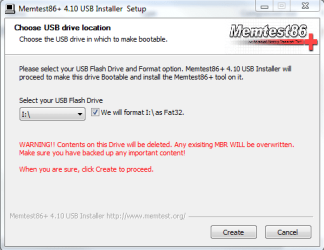
4. Follow the setup utility. To reduce the risk of problems, it is advised to format the drive.​

installer.PNG


Method 2: With a CD

1. Download the latest version of the "Precompiled Boot ISO (.zip) from this link: Memtest86+ - Advanced Memory Diagnostic Tool

You want the "Precompiled Boot ISO (.zip)".​

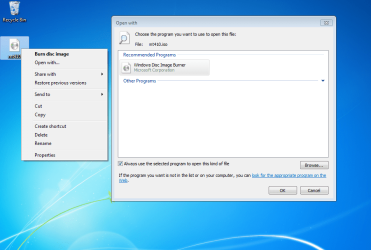
2. Open the .zip file you downloaded, and then drag the .ISO file inside onto the Desktop.​


3. Right-click on the ISO, and select Open with>Windows Disc Image Burner.open with.PNG
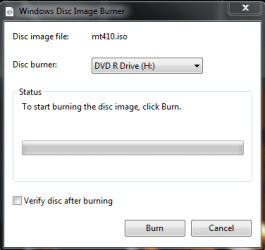
4. Insert a blank CD into the CD drive, and make sure the correct Disc burner is selected.abt2burn.PNG
5. Click on "Burn".

Now the CD is ready to use.


Part 2: Testing

1. With the CD in the drive, or the USB key inserted, reboot your computer. If Memtest does not automatically boot, go into the BIOS and change the CD drive or USB drive to be the first to boot.​

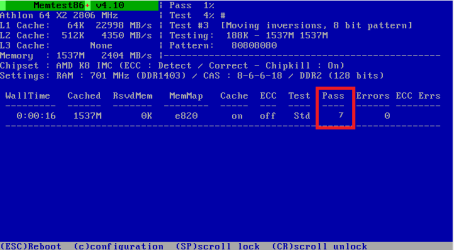
2. Memtest will immediately start testing as soon as it boots. No attendance is needed.​


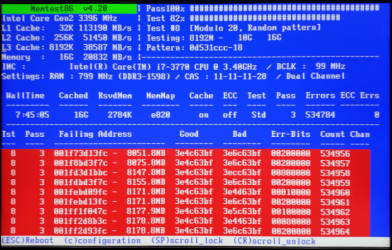
3. Let it run until at least 8 passes are completed, or errors are found (whichever comes first). The longer you run it, the better.Capture.PNG
Seven passes will take several hours, depending on your amount of RAM. It is advised to leave it running overnight.


Part 3: If You Have Errors:


The goal is to test all the RAM sticks and all the motherboard slots.​


Check your motherboard manual to ensure the RAM sticks are in the recommended motherboard slots. Some motherboards have very specific slots required for the number of RAM sticks installed.​


If you get errors, stop the test and continue with the next step.​


user108345_pic7120_1390783159.png


1. Remove all but one stick of RAM from your computer (this will be RAM stick #1), and run Memtest86 again, for 7 passes.​
Be sure to note the RAM stick, use a piece of tape with a number, and note the motherboard slot.
If this stick passes the test then go to step #3.


2. If RAM stick #1 has errors, repeat the test with RAM stick #2 in the same motherboard slot.​
If RAM stick #2 passes, this indicates that RAM stick #1 may be bad. If you want to be absolutely sure, re-test RAM stick #1 in another known good slot.
If RAM stick #2 has errors, this indicates another possible bad RAM stick, a possible motherboard slot failure or inadequate settings.
3. Test the next stick of RAM (stick #2) in the next motherboard slot.If this RAM stick has errors repeat step #2 using a known good stick if possible, or another stick.
If this RAM stick has no errors and both sticks failed in slot#1, test RAM stick #1 in this slot.
4. If you find a stick that passes the test, test it in all the other motherboard slots.


If Part 2 testing shows errors, and all tests in Part 3 show errors, you will need to test the RAM sticks in another computer and/or test other RAM in your computer to identify the problem.​


In this way, you can identify whether it is a bad stick of RAM, a bad motherboard, or incompatibility between the sticks.​


Thanks to Dave76 for his assistance in this part.​


   Note
While the same concept is completely valid for other operating systems, a different image burner will be needed. A good free program is ImgBurn.


Last edited by a moderator:
Thank you Neeaj. :)
 

My Computer

Computer Manufacturer/Model Number
Custom
OS
Windows 7 Professional x64
CPU
Intel i7 2600K OC'd @ 4620 MHz
Motherboard
Asus P8Z68-V Pro
Memory
16GB GSkill Sniper 2133 Mhz (4x4GB)
Graphics Card(s)
EVGA GeForce GTX 480 SuperClocked+
Sound Card
Realtek High Definition Audio
Monitor(s) Displays
2x Acer S273HLbmii 27"
Screen Resolution
2 x 1920x1080
Hard Drives
64GB Crucial M4 SSD

Storage: Hitachi 1TB 5400RPM, Samsung 1.5TB 5400RPM
PSU
Corsair HW Series 750w (modular)
Case
Cooler Master HAF 932 Advanced Blue Edition
Cooling
CM Hyper 212+ CPU cooler, 3x 230mm + 1x 140mm case fans
Keyboard
Logitech MK320 (wireless)
Mouse
Logitech MK320 (wireless)
Internet Speed
30 Mb/s : 2 Mb/s
USB flash drive doesn't boot for me.
I changed the BIOS to start first 'remove' drive but windows start normally.
any idea what's wrong?
 

My Computer

OS
windows 7 64bit
Try using the popup boot menu. It is accessed by pressing a key, often F12, during the BIOS POST screen. Also, this menu may be disabled by default, so if you don't see the option, try enabling it in the BIOS.
 

My Computer

Computer Manufacturer/Model Number
Custom
OS
Windows 7 Professional x64
CPU
Intel i7 2600K OC'd @ 4620 MHz
Motherboard
Asus P8Z68-V Pro
Memory
16GB GSkill Sniper 2133 Mhz (4x4GB)
Graphics Card(s)
EVGA GeForce GTX 480 SuperClocked+
Sound Card
Realtek High Definition Audio
Monitor(s) Displays
2x Acer S273HLbmii 27"
Screen Resolution
2 x 1920x1080
Hard Drives
64GB Crucial M4 SSD

Storage: Hitachi 1TB 5400RPM, Samsung 1.5TB 5400RPM
PSU
Corsair HW Series 750w (modular)
Case
Cooler Master HAF 932 Advanced Blue Edition
Cooling
CM Hyper 212+ CPU cooler, 3x 230mm + 1x 140mm case fans
Keyboard
Logitech MK320 (wireless)
Mouse
Logitech MK320 (wireless)
Internet Speed
30 Mb/s : 2 Mb/s
Try using the popup boot menu. It is accessed by pressing a key, often F12, during the BIOS POST screen. Also, this menu may be disabled by default, so if you don't see the option, try enabling it in the BIOS.
I got to the popup boot, when i select boot from "removable" it says 'no bootable drive'
 

My Computer

OS
windows 7 64bit
Did you allow the Memtest USB installer to format your drive first? If not, try doing so.
 

My Computer

Computer Manufacturer/Model Number
Custom
OS
Windows 7 Professional x64
CPU
Intel i7 2600K OC'd @ 4620 MHz
Motherboard
Asus P8Z68-V Pro
Memory
16GB GSkill Sniper 2133 Mhz (4x4GB)
Graphics Card(s)
EVGA GeForce GTX 480 SuperClocked+
Sound Card
Realtek High Definition Audio
Monitor(s) Displays
2x Acer S273HLbmii 27"
Screen Resolution
2 x 1920x1080
Hard Drives
64GB Crucial M4 SSD

Storage: Hitachi 1TB 5400RPM, Samsung 1.5TB 5400RPM
PSU
Corsair HW Series 750w (modular)
Case
Cooler Master HAF 932 Advanced Blue Edition
Cooling
CM Hyper 212+ CPU cooler, 3x 230mm + 1x 140mm case fans
Keyboard
Logitech MK320 (wireless)
Mouse
Logitech MK320 (wireless)
Internet Speed
30 Mb/s : 2 Mb/s
Hi Jonathan! Could you tell me please how did you get those screen captures from Memtest86+?
I know that are some dos tools that can take screenshots (ie. grabber, screen thief) but i cant get them work after run memtest86+.. Do you know a away to do that?

Best regards,
Chester
 

My Computer

OS
Windows Seven
Hi Jonathan! Could you tell me please how did you get those screen captures from Memtest86+?
I know that are some dos tools that can take screenshots (ie. grabber, screen thief) but i cant get them work after run memtest86+.. Do you know a away to do that?

Best regards,
Chester
Hello, and welcome!

I loaded up Memtest86 on a virtual machine (VirtualBox), and then took a screenshot with my host OS, using the built-in Snipping Tool.

The only method I am aware of to take a screenshot of a DOS tool, that does not provide its own utility, is to take a picture with a camera.
 

My Computer

Computer Manufacturer/Model Number
Custom
OS
Windows 7 Professional x64
CPU
Intel i7 2600K OC'd @ 4620 MHz
Motherboard
Asus P8Z68-V Pro
Memory
16GB GSkill Sniper 2133 Mhz (4x4GB)
Graphics Card(s)
EVGA GeForce GTX 480 SuperClocked+
Sound Card
Realtek High Definition Audio
Monitor(s) Displays
2x Acer S273HLbmii 27"
Screen Resolution
2 x 1920x1080
Hard Drives
64GB Crucial M4 SSD

Storage: Hitachi 1TB 5400RPM, Samsung 1.5TB 5400RPM
PSU
Corsair HW Series 750w (modular)
Case
Cooler Master HAF 932 Advanced Blue Edition
Cooling
CM Hyper 212+ CPU cooler, 3x 230mm + 1x 140mm case fans
Keyboard
Logitech MK320 (wireless)
Mouse
Logitech MK320 (wireless)
Internet Speed
30 Mb/s : 2 Mb/s
Hi again Jonathan, and thank you for the help!
I made a test and it works fine, but the issue is that, as thought, i can't allocate the real memory size to the virtual machine. I have 4GB ram (for example) and i just can allocate 1500 MB.
I wanted this working for testing the HDD's and RAM's of notebooks in an Acer TPM Repair Center and save a proof that they are OK. For HDD's I have a licensed HDD Regenerator usb boot disk for DOS and taking screen captures with Screen Thief running at the same time and hiting a hot key (Alt+Ctrl+T) for the shots. I tried to do the same with Memtest86+, run ST then Memtest but it doesn't work and i don't know why.. maybe because the memory management, well don't really know..
If you remember or find anything just tell me if you don't mind!

Best regards and thank you again,
Chester
 

My Computer

OS
Windows Seven
I wouldn't know how to do that, I'm sorry. I seriously doubt there is a way to test the physical memory from a virtual machine, honestly. It's all run from a process and a virtual hard drive file.

Your best bet is to take a snapshot of your screen using a camera.
 

My Computer

Computer Manufacturer/Model Number
Custom
OS
Windows 7 Professional x64
CPU
Intel i7 2600K OC'd @ 4620 MHz
Motherboard
Asus P8Z68-V Pro
Memory
16GB GSkill Sniper 2133 Mhz (4x4GB)
Graphics Card(s)
EVGA GeForce GTX 480 SuperClocked+
Sound Card
Realtek High Definition Audio
Monitor(s) Displays
2x Acer S273HLbmii 27"
Screen Resolution
2 x 1920x1080
Hard Drives
64GB Crucial M4 SSD

Storage: Hitachi 1TB 5400RPM, Samsung 1.5TB 5400RPM
PSU
Corsair HW Series 750w (modular)
Case
Cooler Master HAF 932 Advanced Blue Edition
Cooling
CM Hyper 212+ CPU cooler, 3x 230mm + 1x 140mm case fans
Keyboard
Logitech MK320 (wireless)
Mouse
Logitech MK320 (wireless)
Internet Speed
30 Mb/s : 2 Mb/s
USB flash drive doesn't boot for me.
I changed the BIOS to start first 'remove' drive but windows start normally.
any idea what's wrong?

just throwing my 2 cents in, i got same problem what i did was under boot select hard disk drives and using the (+) move usb to 1st. This should make it boot from your usb drive. your 'remove' drive is if i'm not mistaken your floppy drive. i could be wrong.
 
Last edited:

My Computer

Computer type
PC/Desktop
Computer Manufacturer/Model Number
Custom Build
OS
Microsoft Windows 7 Ultimate 64-bit 7601 Multiprocessor Free Service Pack 1
CPU
Intel(R) Core(TM) i5-3570K CPU @ 3.40GHz
Motherboard
ASUSTeK COMPUTER INC. P8Z77-V
Memory
8.00 GB
Graphics Card(s)
NVIDIA GeForce GTX 660
Sound Card
(1) USB Audio Device (2) High Definition Audio Device (3
Screen Resolution
1360 x 768 x 32 bits (4294967296 colors) @ 60 Hz
Hard Drives
(1) M4-CT128M4SSD2 ATA Device (2) WDC WD1002FAEX-00Z3A0 ATA Device (3) WDC WD10EZEX-22BN5A0 ATA Device
PSU
Corsair Enthusiast Series TX650M
Case
NZXT Phantom 410
Cooling
Cooler Master Hyper 212 EVO
Keyboard
Logitech HID-Compliant Keyboard
Mouse
Logitech HID-compliant MX320 Laser Mouse
Tweaking RAM

One thing that could be mentioned is that if you repeatedly fail a particular test ie Test 5 / Test 8 - it's not always a sign of bad RAM/mobo, but could actually be indicative of too high a mhz, incorrect timings / voltage settings etc.


And when 'tweaking RAM' - ie dialling in Northbridge voltage (775> socket), QPI/DRAM(VTT) (1156/1366) voltages and DRAM voltages and memory timings.

You can shortcut the process by running an individual Test until it passes continually.

Then you can run the full suite of tests to double check all your timings/settings are dialled in. This can significantly cut down the time involved with tweaking.


Another thing worth mentioning is that memtest is not a 100% guarantee as it only stress the RAM, QPI(VTT)/NB and does not stress the CPU.


Also worth mentioning is that the error codes are virtually meaningless - all that counts is Error or No error.

My machine is running dual channel 8gb at 1333 (reported by the BIOS). Memtest is giving me errors, I have not yet run the whole troubleshooting gamut, but is it possible that changing the mhz to 1066 would solve the problem? I'm just asking for now, I want to see how many bad sticks/slots are reported by memtest first. I have not touched any of the mobo tuning features, it's all bone stock.
 

My Computer

Computer type
PC/Desktop
Computer Manufacturer/Model Number
Scratch Built
OS
Windows 7 Ultimate x64 Full Retail SP1
CPU
Intel i5 ivy bridge 3550 @ 3.10GHZ
Motherboard
Asus Z77-A
Memory
Corsair Vengance Pro 1866 2X8GB
Graphics Card(s)
EVGA GeForce GTX 650 Ti 2GB PCIE 3.0
Sound Card
Sound Blaster X-Fi Fatality
Monitor(s) Displays
Acer X203Wbd 20" Widescreen LCD, ASUS VG89 24" 144hz monitor
Screen Resolution
1680X1050
Hard Drives
Western Digital Caviar WD5000 500GB 7200RPM SATA
Seagate Constellation ES ST3500514NS 500GB 7200RPM SATA
Samsung 830 128 GB SSD (C: with OS etc)
Samsung 840 120 GB SSD
PSU
Cooler Master 650w
Case
Antec Three Hundred Illusion Mid Tower
Cooling
4 120mm fans
Keyboard
Razer Deathadder
Mouse
Logitech G502 Proteus core Gaming Mouse
Internet Speed
Cable modem (fast)
Antivirus
MSIE
Browser
IE-11 and Chrome
Other Info
software and stuff
I notice you are using two different brands of RAM; that may be the problem.

Try moving the PNY DIMMs to slots 1 and 3; move the Crucial DIMMs to slots 2 and 4. That would offer the best chance of success.

If that doesn't help pass the test, go ahead and try running the RAM at that slower speed. It won't hurt anything, except your performance, and there is a chance it will work.

If decreasing the speed doesn't work, change it back to 1333, and then run tests on the pairs of sticks. Test the PNY sticks in slots 1 and 3, and then the Crucial ones in the same slots. If no errors are shown for either test, we can rule out the possibility of a bad stick, as far as Memtest will tell us.
 

My Computer

Computer Manufacturer/Model Number
Custom
OS
Windows 7 Professional x64
CPU
Intel i7 2600K OC'd @ 4620 MHz
Motherboard
Asus P8Z68-V Pro
Memory
16GB GSkill Sniper 2133 Mhz (4x4GB)
Graphics Card(s)
EVGA GeForce GTX 480 SuperClocked+
Sound Card
Realtek High Definition Audio
Monitor(s) Displays
2x Acer S273HLbmii 27"
Screen Resolution
2 x 1920x1080
Hard Drives
64GB Crucial M4 SSD

Storage: Hitachi 1TB 5400RPM, Samsung 1.5TB 5400RPM
PSU
Corsair HW Series 750w (modular)
Case
Cooler Master HAF 932 Advanced Blue Edition
Cooling
CM Hyper 212+ CPU cooler, 3x 230mm + 1x 140mm case fans
Keyboard
Logitech MK320 (wireless)
Mouse
Logitech MK320 (wireless)
Internet Speed
30 Mb/s : 2 Mb/s
There's a loooong story about having 2 brands of RAM. I bought the crucial ram for an new intel mobo, mobo was not compatible with single sided sticks (even tho intel claimed it was). Ran out to Staples, got double sided PNY sticks, mobo recognized them but never worked right (froze up all of the time). Got an MSI mobo, put ALL the RAM in it and got a running system. Had a couple of driver related BSOD issues, solved them and had a stable system for about a week. Last night, BSOD land again, dump says check your memory. They are in a 1-3, 2-4 matched pair setup, but I forget which is in where. I'll check when I get home.

I will do as you say and report back. Thanks for the reply!
 
Last edited:

My Computer

Computer type
PC/Desktop
Computer Manufacturer/Model Number
Scratch Built
OS
Windows 7 Ultimate x64 Full Retail SP1
CPU
Intel i5 ivy bridge 3550 @ 3.10GHZ
Motherboard
Asus Z77-A
Memory
Corsair Vengance Pro 1866 2X8GB
Graphics Card(s)
EVGA GeForce GTX 650 Ti 2GB PCIE 3.0
Sound Card
Sound Blaster X-Fi Fatality
Monitor(s) Displays
Acer X203Wbd 20" Widescreen LCD, ASUS VG89 24" 144hz monitor
Screen Resolution
1680X1050
Hard Drives
Western Digital Caviar WD5000 500GB 7200RPM SATA
Seagate Constellation ES ST3500514NS 500GB 7200RPM SATA
Samsung 830 128 GB SSD (C: with OS etc)
Samsung 840 120 GB SSD
PSU
Cooler Master 650w
Case
Antec Three Hundred Illusion Mid Tower
Cooling
4 120mm fans
Keyboard
Razer Deathadder
Mouse
Logitech G502 Proteus core Gaming Mouse
Internet Speed
Cable modem (fast)
Antivirus
MSIE
Browser
IE-11 and Chrome
Other Info
software and stuff
I notice you are using two different brands of RAM; that may be the problem.

Try moving the PNY DIMMs to slots 1 and 3; move the Crucial DIMMs to slots 2 and 4. That would offer the best chance of success.

If that doesn't help pass the test, go ahead and try running the RAM at that slower speed. It won't hurt anything, except your performance, and there is a chance it will work.

If decreasing the speed doesn't work, change it back to 1333, and then run tests on the pairs of sticks. Test the PNY sticks in slots 1 and 3, and then the Crucial ones in the same slots. If no errors are shown for either test, we can rule out the possibility of a bad stick, as far as Memtest will tell us.

Good advice, mixing RAM card manufacturors is alway risky, sometimes you can adjust the settings and get them stable.
It takes time and a lot of testing, loosening the timings and lowering the frequency is the next step.
Make sure the pairs are in the same channel, PNY in one channel and Crucial in the other channel.
 

My Computer

Computer type
PC/Desktop
Computer Manufacturer/Model Number
76~2.0
OS
Windows 7 Ult x64 - SP1/ Windows 8 Pro x64
CPU
Intel Core i5-3570K 4.6GHz
Motherboard
Gigabyte GA-Z77X UD3H, f18
Memory
8GB (2X4GB) DDR3 1600 Corsair Vengeance CL8 1.5v
Graphics Card(s)
Sapphire HD 7770 Vapor-X OC 1GB DDR5
Sound Card
Onboard VIA VT2021
Monitor(s) Displays
22" LCD Dell
Screen Resolution
1680x1050
Hard Drives
Samsung 840Pro 128GB SSD,
Seagate Barracuda 500GB SATA2 7200rpm 32MB cache, Seagate Barracuda 1TB SATA2 7200rpm 32MB cache,
PSU
Corsair HX650W
Case
Cooler Master Storm Scout
Cooling
Corsair H80 2x12cm Noctua NF P12 , 2x14cm case fans
Keyboard
Logitech Wave
Mouse
CM Sentinel
Internet Speed
Dismal
Antivirus
Avast
Browser
Opera Next
Other Info
Haswell laptop: HP Envy 17t-j, i7-4700MQ, GeForce 740M 2GB DDR3, 17.3" Full HD 1920x1080, 16GB RAM, Samsung 840 Pro 128GB, 1TB Hitachi 7200 HDD,
Desktop: eSATA ports,
External eSATA Seagate 500GB SATA2 7200rpm,
External WD USB 500GB
Hello, I have the same problem as few others before me.
I install the program on an USB drive. I let the program to format the drive. I set up the BIOS so removable drivers will be the first location to boot on. Still, Windows starts. I checked the BIOS, it indicaes that the stick is in the USB slot. I even tried to turn off any other boot device, and let the machine to boot only from the USB, but then it gives me an error message that it didn't find any bootable device...
 

My Computer

Computer Manufacturer/Model Number
Custom system
OS
Windows 7 Ulitmate 64 bit
CPU
AMD Phenom II X6 1055T
Motherboard
AMD AM3 ASUS M4A78LT-M mATX
Memory
2x 2GB
Graphics Card(s)
nVidia GeForce GTS 450 1GB
Sound Card
integrated into the motherboard
Monitor(s) Displays
Samsung SyncMaster 931BF
Screen Resolution
1280x1024
Hard Drives
SAMSUNG HD103SI ATA
SAMSUNG HD322HJ ATA
SAMSUNG HD753LJ ATA
PSU
Gigabyte Superb 550W GE-P450P-C2
Case
Dunno. Some standard ATX
Hello, I have the same problem as few others before me.
I install the program on an USB drive. I let the program to format the drive. I set up the BIOS so removable drivers will be the first location to boot on. Still, Windows starts. I checked the BIOS, it indicaes that the stick is in the USB slot. I even tried to turn off any other boot device, and let the machine to boot only from the USB, but then it gives me an error message that it didn't find any bootable device...
Hello,

Do you have a blank CD? If so, you may try Method 2.
 

My Computer

Computer Manufacturer/Model Number
Custom
OS
Windows 7 Professional x64
CPU
Intel i7 2600K OC'd @ 4620 MHz
Motherboard
Asus P8Z68-V Pro
Memory
16GB GSkill Sniper 2133 Mhz (4x4GB)
Graphics Card(s)
EVGA GeForce GTX 480 SuperClocked+
Sound Card
Realtek High Definition Audio
Monitor(s) Displays
2x Acer S273HLbmii 27"
Screen Resolution
2 x 1920x1080
Hard Drives
64GB Crucial M4 SSD

Storage: Hitachi 1TB 5400RPM, Samsung 1.5TB 5400RPM
PSU
Corsair HW Series 750w (modular)
Case
Cooler Master HAF 932 Advanced Blue Edition
Cooling
CM Hyper 212+ CPU cooler, 3x 230mm + 1x 140mm case fans
Keyboard
Logitech MK320 (wireless)
Mouse
Logitech MK320 (wireless)
Internet Speed
30 Mb/s : 2 Mb/s
the method you suggested is not working . I m not able to boot from usb drive
 

My Computer

OS
Windows 7 Ultimate x64
Looks good Jon, I tried the USB installer method and was impressed with the ease of the process.
This can easily be put on a USB and removed when no longer needed.

This led to making a USB rescue drive, which quickly led to approximately 400 apps on 1.44GB.
Including the Windows 7 System Repair Disc and MS Sysinternals Suite.
Most of these will never get used but, it's better to have something when needed than have to look for it.

Hi Dave

Im interested in what you have done here.I have about 7-8 1 gig usb sticks with various boot programs on like partition wizard, killdisk, now memtest but its always bothered me that especially in the memest case that it uses only 200kb of space on a 1 gig flash drive.
How do you install more than 1 boot program on 1 flash drive and how does the pc recognise which program you want to use at boot.
I would be very interested in making something along the lines of what you have done.

Danny
 

My Computer

Computer Manufacturer/Model Number
acer aspire 5935g
OS
Windows 7 Home Premium x64 SP1
CPU
intel(R)core(TM)2 duo CPU T6600 @ 2.20GHz
Motherboard
intel gm45/gm47 revision 07
Memory
3 gb ddr3
Graphics Card(s)
ati radeon hd4570/512mb
Monitor(s) Displays
lop156wh2-tle1 15.3 flat
Screen Resolution
1366x768
Hard Drives
OCZ-Agility3 60gig ssd
320gig external hdd
500gig external hdd
Mouse
Optical
Internet Speed
30Mbps Down/30Mbps Up
USB doesn'n worked for me either. However, with a rewritable CD the program works. Maybe there is a bug in the latest version of the program or there is some kind of security proram which doesn't allows our machines to boot from an USB. I'm only guessing... :)
 

My Computer

Computer Manufacturer/Model Number
Custom system
OS
Windows 7 Ulitmate 64 bit
CPU
AMD Phenom II X6 1055T
Motherboard
AMD AM3 ASUS M4A78LT-M mATX
Memory
2x 2GB
Graphics Card(s)
nVidia GeForce GTS 450 1GB
Sound Card
integrated into the motherboard
Monitor(s) Displays
Samsung SyncMaster 931BF
Screen Resolution
1280x1024
Hard Drives
SAMSUNG HD103SI ATA
SAMSUNG HD322HJ ATA
SAMSUNG HD753LJ ATA
PSU
Gigabyte Superb 550W GE-P450P-C2
Case
Dunno. Some standard ATX
Looks good Jon, I tried the USB installer method and was impressed with the ease of the process.
This can easily be put on a USB and removed when no longer needed.

This led to making a USB rescue drive, which quickly led to approximately 400 apps on 1.44GB.
Including the Windows 7 System Repair Disc and MS Sysinternals Suite.
Most of these will never get used but, it's better to have something when needed than have to look for it.

Hi Dave

Im interested in what you have done here.I have about 7-8 1 gig usb sticks with various boot programs on like partition wizard, killdisk, now memtest but its always bothered me that especially in the memest case that it uses only 200kb of space on a 1 gig flash drive.
How do you install more than 1 boot program on 1 flash drive and how does the pc recognise which program you want to use at boot.
I would be very interested in making something along the lines of what you have done.

Danny


Hi Danny,
I am using this:
How to Create the Ultimate Bootable USB Flash Drive
You can add as many ISO programs as you have room for, then edit the loader file to add it to the start list. Works great.

The other one is Liberkey, has a lot of useful apps that come with it, as far as I remember you can't add apps to it, but you can use the free space to store any files you want. I just made a folder for the misc files.


USB doesn'n worked for me either. However, with a rewritable CD the program works. Maybe there is a bug in the latest version of the program or there is some kind of security proram which doesn't allows our machines to boot from an USB. I'm only guessing... :)

Make sure you have your BIOS set to boot from a USB device, there are usually a couple of choices, try them until you find the right one.
Try USB-HDD
 

My Computer

Computer type
PC/Desktop
Computer Manufacturer/Model Number
76~2.0
OS
Windows 7 Ult x64 - SP1/ Windows 8 Pro x64
CPU
Intel Core i5-3570K 4.6GHz
Motherboard
Gigabyte GA-Z77X UD3H, f18
Memory
8GB (2X4GB) DDR3 1600 Corsair Vengeance CL8 1.5v
Graphics Card(s)
Sapphire HD 7770 Vapor-X OC 1GB DDR5
Sound Card
Onboard VIA VT2021
Monitor(s) Displays
22" LCD Dell
Screen Resolution
1680x1050
Hard Drives
Samsung 840Pro 128GB SSD,
Seagate Barracuda 500GB SATA2 7200rpm 32MB cache, Seagate Barracuda 1TB SATA2 7200rpm 32MB cache,
PSU
Corsair HX650W
Case
Cooler Master Storm Scout
Cooling
Corsair H80 2x12cm Noctua NF P12 , 2x14cm case fans
Keyboard
Logitech Wave
Mouse
CM Sentinel
Internet Speed
Dismal
Antivirus
Avast
Browser
Opera Next
Other Info
Haswell laptop: HP Envy 17t-j, i7-4700MQ, GeForce 740M 2GB DDR3, 17.3" Full HD 1920x1080, 16GB RAM, Samsung 840 Pro 128GB, 1TB Hitachi 7200 HDD,
Desktop: eSATA ports,
External eSATA Seagate 500GB SATA2 7200rpm,
External WD USB 500GB
Back
Top