RAM - Test with Memtest86+

How to Test and Diagnose RAM Issues with Memtest86+

Contents


Part 1: Preparing the Media
Method 1: With a USB Memory Stick


1. Download the latest version of the "Auto-installer for USB Key (Win 9x/2k/xp/7)" from this link: Memtest86+ - Advanced Memory Diagnostic Tool


2. Plug in an empty USB key drive. Size is no concern, as the actual files take up 180 KB of space.​

3. Go into the .zip folder you downloaded, and double-click on the .exe file inside.​

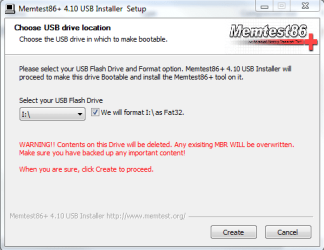
4. Follow the setup utility. To reduce the risk of problems, it is advised to format the drive.​

installer.PNG


Method 2: With a CD

1. Download the latest version of the "Precompiled Boot ISO (.zip) from this link: Memtest86+ - Advanced Memory Diagnostic Tool

You want the "Precompiled Boot ISO (.zip)".​

2. Open the .zip file you downloaded, and then drag the .ISO file inside onto the Desktop.​


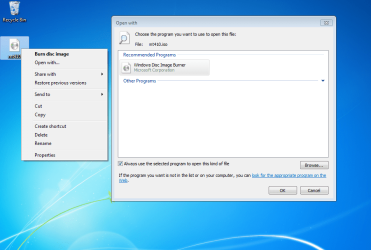
3. Right-click on the ISO, and select Open with>Windows Disc Image Burner.open with.PNG
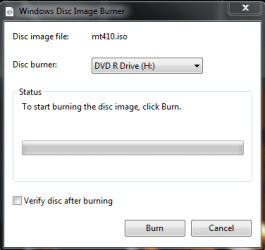
4. Insert a blank CD into the CD drive, and make sure the correct Disc burner is selected.abt2burn.PNG
5. Click on "Burn".

Now the CD is ready to use.


Part 2: Testing

1. With the CD in the drive, or the USB key inserted, reboot your computer. If Memtest does not automatically boot, go into the BIOS and change the CD drive or USB drive to be the first to boot.​

2. Memtest will immediately start testing as soon as it boots. No attendance is needed.​


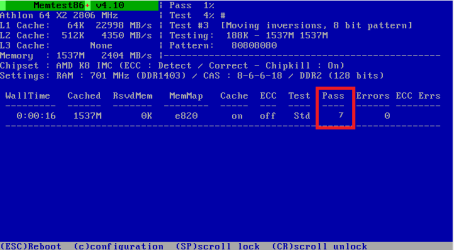
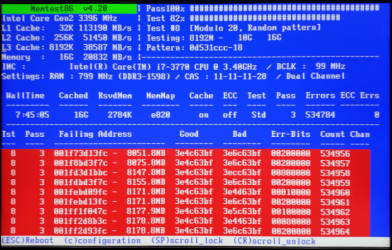
3. Let it run until at least 8 passes are completed, or errors are found (whichever comes first). The longer you run it, the better.Capture.PNG
Seven passes will take several hours, depending on your amount of RAM. It is advised to leave it running overnight.


Part 3: If You Have Errors:


The goal is to test all the RAM sticks and all the motherboard slots.​


Check your motherboard manual to ensure the RAM sticks are in the recommended motherboard slots. Some motherboards have very specific slots required for the number of RAM sticks installed.​


If you get errors, stop the test and continue with the next step.​


user108345_pic7120_1390783159.png


1. Remove all but one stick of RAM from your computer (this will be RAM stick #1), and run Memtest86 again, for 7 passes.​
Be sure to note the RAM stick, use a piece of tape with a number, and note the motherboard slot.
If this stick passes the test then go to step #3.


2. If RAM stick #1 has errors, repeat the test with RAM stick #2 in the same motherboard slot.​
If RAM stick #2 passes, this indicates that RAM stick #1 may be bad. If you want to be absolutely sure, re-test RAM stick #1 in another known good slot.
If RAM stick #2 has errors, this indicates another possible bad RAM stick, a possible motherboard slot failure or inadequate settings.
3. Test the next stick of RAM (stick #2) in the next motherboard slot.If this RAM stick has errors repeat step #2 using a known good stick if possible, or another stick.
If this RAM stick has no errors and both sticks failed in slot#1, test RAM stick #1 in this slot.
4. If you find a stick that passes the test, test it in all the other motherboard slots.


If Part 2 testing shows errors, and all tests in Part 3 show errors, you will need to test the RAM sticks in another computer and/or test other RAM in your computer to identify the problem.​


In this way, you can identify whether it is a bad stick of RAM, a bad motherboard, or incompatibility between the sticks.​


Thanks to Dave76 for his assistance in this part.​


   Note
While the same concept is completely valid for other operating systems, a different image burner will be needed. A good free program is ImgBurn.


Last edited by a moderator:
@Britton30

The graphic capture that you have posted is quite revealing. This is the first time I have seen such detailed info on the ram. I have a Zotac Mini-ITX motherboard with dual core Atom cpu and nVidia chipset. My display is nowhere close to this. May be it is the chipset that is the passing on the fardware information.
 

My Computer

OS
windows 7
That's right, AMD and Intel will have different memtest data shown. The chipset will also have some different ones too.
 

My Computer

Computer type
PC/Desktop
Computer Manufacturer/Model Number
Home Built Desktop By DataTech
OS
Windows 7 Ultimate X64 SP1
CPU
Intel i5-2550K, Differing ~4.4-4.8GHz No built in GPU
Motherboard
ASUS P8Z68-V PRO/GEN3
Memory
16GB G.Skill Sniper 1866MHz @ 2133MHz 2x8GB
Graphics Card(s)
ASUS GTX650TIB-DC2OC-2GD5, (650TI Boost)
Sound Card
Onboard Realtek 5-1
Monitor(s) Displays
Samsung P2570HD
Screen Resolution
1920x1080
Hard Drives
Samsung 840 Pro 256GB SSD for OS, 500GB Seagate Constellation (Enterprise drive) for Data
PSU
Corsair HX650W
Case
Inwin Dragon Rider
Cooling
Hyper 212 EVO w/two Noctua fans, push-pull, @1300 RPM
Keyboard
E-Z Eyes, bright yellow keys with large characters
Mouse
steelseries SENSEI Laser Pro Gaming
Internet Speed
48-51Mbs Mbs down, 11 Mbs up Xfinity Cable
Antivirus
Norton Internet Security 2013
Browser
IE 10, Opera, Pale Moon if needed
Other Info
4 case fans, LG BluRay-RE, ASUS DVD-RW, Mr. Fusion power supply, 1.21 gigawatts.
Question - does the memtest program write a log result to the USB stick once it's done so I can send it to tech support?
 

My Computer

OS
Microsoft Windows 7 Home Premium 64-bit 7601 Multiprocessor Free Service Pack 1
CPU
Intel(R) Core(TM) i7-3770K CPU @ 3.50GHz
Motherboard
ASUSTeK COMPUTER INC. P8Z77-M PRO
Memory
16.00 GB
Graphics Card(s)
(1) Intel(R) HD Graphics 4000 (2) NVIDIA GeForce GTX 660
Sound Card
(1) Realtek High Definition Audio (2) Intel(R) Display Aud
Screen Resolution
1920 x 1200 x 32 bits (4294967296 colors) @ 59 Hz
Hard Drives
(1) eSATA-2 HDS723020BLA642 ATA Device (2) LaCie d2Next-Quadra ATA Device (3) WDC WD1002FAEX-00Y9A0 (4) PRO-35U CF PRO Reader USB Device (5) PRO-35U mSD PRO Reader USB Device (6) PRO-35U MS PRO Reader USB Device (7) PRO-35U SD PRO Re
I don't believe it does. At least, I have always taken screen shots of the results for communicating errors to Mfr's tech support...
 

My Computer

Computer type
Laptop
Computer Manufacturer/Model Number
Dell Latitude E6540 Laptop
OS
Windows 7 Professional 64bit
CPU
Intel Core i7 4600M @ 2.90GHz
Motherboard
Dell Inc. 0CYT5F (SOCKET 0)
Memory
16.0GB Dual-Channel DDR3 @ 797MHz (11-11-11-28)
Graphics Card(s)
Intel HD Graphics 4600 (Dell) 2048MB ATI AMD Radeon HD 8790M
Sound Card
Realtek High Definition Audio
Monitor(s) Displays
HP ZR30w (2560x1600@60Hz)
Hard Drives
256GB LITEONIT LMT-256M6M-41 mm SATA (SSD)
1TB Samsung SSD 860 EVO mSATA SATA (SSD)
2TB USB 3.0 USB Device
115GB SanDisk Ultra Fit USB
Other Info
Multiple Dell E-Port Plus II Port Replicator/Docking Stations 0Y72NH USB 3.0 + 130W AC Adapters
This was so easy to understand and follow, even for people like me who know basically nothing about how computers actually work. Thank you so much!!
 

My Computer

Computer type
Laptop
Computer Manufacturer/Model Number
HP
OS
Windows 7 Home Premium x64
Browser
Google Chrome
Have a question for Memtest, is the program just for diagnosing the RAM and show us the errors or it diagnoses the RAM, tells us the results and fixes it?
 

My Computer

Computer type
PC/Desktop
Computer Manufacturer/Model Number
Built
OS
Windows 7 Professional 64-bit (6.1, Build 7601)
CPU
Intel Pentium G3258 @ 3.80 GHz (OC'd)
Motherboard
Gigabyte Z97-HD3
Memory
Team Elite 4 GB DDR3 1600 MHz
Graphics Card(s)
Palit GTX 1060 6 GB Super JetStream
Monitor(s) Displays
HP x20 LED Series Wide LCD Monitor
Screen Resolution
1600x900 pixels
Hard Drives
Western Digital Caviar Blue WD10EZRZ 1TB @ 7200 RPM,
Western Digital 3200BEV External HDD 298.09 GB, WD Elements WDBUZG0010BBK-05 External HDD 1TB
PSU
Seasonic G-550 550W 80+ Gold
Keyboard
Corsair K70 Rapidfire RGB
Mouse
Logitech G300S and G502
Internet Speed
2.00 Mbps
Antivirus
MSE, MBAM, MBAE
Browser
IE, Google Chrome, FF, Safari.
Other Info
Old PC:
HP Pavilion P6640D, Windows 7 Ultimate 32-bit (6.1, Build 7601), Intel Pentium Dual Core CPU E6700 @ 3.20 GHz, Foxconn 2A8C, Kingmax 2 GB DDR3 1066 MHz, Palit NVIDIA GeForce GT 610 2048 MB, Western Digital WD Blue WD5000AAKX 500 GB @ 7200 RPM, Seagate Barracuda ST3320418AS 320 GB @ 7200 RPM (former drive), Bestec ATX-250-12Z 250 Watts
It only diagnosing the RAM . To fix Ram issues is replacing the ram that is giving the errors . If you have more than one ram installed you test each ram until you find the problematic RAM stick . If you have a kit then you replace both of the sticks .
 

My Computer

Computer Manufacturer/Model Number
Custom Built
OS
Windows 7 Ultimate 32-Bit & Windows 7 Ultimate 64-Bit
CPU
Intel Core i7 CPU 950 @ 3.07GHz
Motherboard
ASUS P6T DELUXE V2
Memory
OCZ 6GB (3 x 2GB) 240-Pin DDR3 SDRAM DDR3 1600 OCZ3X1600R2
Graphics Card(s)
ATI Radeon HD 5700 Series
Sound Card
OnBoard
Hard Drives
WD6400AACS-00M3B0 (640GB SATA )
PSU
CORSAIR 850w
Case
NZXT LEXA
Cooling
Intel Stock Heatsink Fan
Keyboard
Microsoft Wireless Laser Keyboard 7000
Mouse
Microsoft Wireless Laser Mouse 7000
thanks jk :-)
 

My Computer

Computer type
Laptop
Computer Manufacturer/Model Number
sony
OS
window 7 ultimate 64bit
CPU
intel core i3 370m @2.4 ghz
Motherboard
intel chipset
Memory
3 GB DDR3
Graphics Card(s)
ATI Mobility Radeon HD 5470
Hard Drives
Around 500gb
Antivirus
Norton Internet security
Browser
chrome
Hi to everyone in the forum, and thanks for the tutorial Jonathan_King, it was extremely useful to me.

Well, there´s another reason for me posting right now, and that is that I experienced some problems when trying to boot from an usb pendrive, but I managed to boot from it and I´d like to share what I did for that to happen.
Like many at first I couldn´t get it to boot, even after putting the usb device as 1st boot unit. But I realize my Bios, in advance mode, has an option called "boot override", there I just selected the usb with the bootable memetest+86 and it started running inmediatly.
I hope this can help some people out there.

So, thanks again for the great guide. Good bye.

Arsene.
http://www.sevenforums.com/members/jonathan_king.html
 

My Computer

Computer type
PC/Desktop
OS
Microsoft Windows 7 Ultimate 64 bits 7601 Multiprocessor Free Service Pack 1
CPU
Intel(R) Core(TM) i5-2500K CPU @ 3.30GHz
Motherboard
ASUSTeK COMPUTER INC. P8P67-M PRO
Memory
8,00 GB
Graphics Card(s)
AMD Radeon HD 6800 Series
Sound Card
(1) Dispositivo de audio USB (2) AMD High Definition Audio
Monitor(s) Displays
Samsung T260HD
Screen Resolution
1920 x 1200 x 32 bits (4294967296 colors) @ 60 Hz
Hard Drives
(1) ST31000524AS (2) WD My Passport 0748 USB Device
PSU
Sentey SDP750-SS 750W
Case
Thermaltake V6 BlacX Edition VM100M1W2Z
Keyboard
Microsoft Wireless Desktop 800 2LF-00004
Mouse
Microsoft Wireless Desktop 800 2LF-00004
Internet Speed
13 Mbps/1Mbps
Antivirus
AVG Antivirus Free Edition 2014
Browser
Firefox
I don't know if anyone noticed, but in the latest Memtest86+ - Advanced Memory Diagnostic Tool, there's no boot file.

In the Download - Auto-installer for USB Key (Win 9x/2k/xp/7)
 

My Computer

Computer type
PC/Desktop
Computer Manufacturer/Model Number
Custom Build PC
OS
Windows 7 Pro 64bit
CPU
AMD Phemon II X4 850 Socket AM3
Motherboard
Gigabyte GA-MA78GM-S2H (rev.1.0)
Memory
Patriot Viper Series DDR2 PC8500 1066Mzh
Graphics Card(s)
EVGA Nvidia GeForce GTX550 Ti
Hard Drives
Western Digital Green SATA 6 Gb 1TB - OS/Programs
Western Digital Caviar SE SATA 300GB - Storage
Antivirus
Microsoft Security Essentials
Browser
Microsoft I.E. 11.0.2 and Google Chrome Version 32.0.1700.10
I don't know if anyone noticed, but in the latest Memtest86+ - Advanced Memory Diagnostic Tool, there's no boot file.

In the Download - Auto-installer for USB Key (Win 9x/2k/xp/7)
Did you try it? It uses Syslinux for booting and it work, I just tried it.

Here's the Read Me file from the installer package.

View attachment Readme.txt
 

My Computer

Computer type
PC/Desktop
Computer Manufacturer/Model Number
Home Built Desktop By DataTech
OS
Windows 7 Ultimate X64 SP1
CPU
Intel i5-2550K, Differing ~4.4-4.8GHz No built in GPU
Motherboard
ASUS P8Z68-V PRO/GEN3
Memory
16GB G.Skill Sniper 1866MHz @ 2133MHz 2x8GB
Graphics Card(s)
ASUS GTX650TIB-DC2OC-2GD5, (650TI Boost)
Sound Card
Onboard Realtek 5-1
Monitor(s) Displays
Samsung P2570HD
Screen Resolution
1920x1080
Hard Drives
Samsung 840 Pro 256GB SSD for OS, 500GB Seagate Constellation (Enterprise drive) for Data
PSU
Corsair HX650W
Case
Inwin Dragon Rider
Cooling
Hyper 212 EVO w/two Noctua fans, push-pull, @1300 RPM
Keyboard
E-Z Eyes, bright yellow keys with large characters
Mouse
steelseries SENSEI Laser Pro Gaming
Internet Speed
48-51Mbs Mbs down, 11 Mbs up Xfinity Cable
Antivirus
Norton Internet Security 2013
Browser
IE 10, Opera, Pale Moon if needed
Other Info
4 case fans, LG BluRay-RE, ASUS DVD-RW, Mr. Fusion power supply, 1.21 gigawatts.
I boot from the USB drive abd I get a message that says Missing Operating System. What am I missing?
 

My Computer

Computer type
PC/Desktop
Computer Manufacturer/Model Number
Custom Build PC
OS
Windows 7 Pro 64bit
CPU
AMD Phemon II X4 850 Socket AM3
Motherboard
Gigabyte GA-MA78GM-S2H (rev.1.0)
Memory
Patriot Viper Series DDR2 PC8500 1066Mzh
Graphics Card(s)
EVGA Nvidia GeForce GTX550 Ti
Hard Drives
Western Digital Green SATA 6 Gb 1TB - OS/Programs
Western Digital Caviar SE SATA 300GB - Storage
Antivirus
Microsoft Security Essentials
Browser
Microsoft I.E. 11.0.2 and Google Chrome Version 32.0.1700.10
Did you let the installer format the USB pendrive?
 

My Computer

Computer type
PC/Desktop
Computer Manufacturer/Model Number
Home Built Desktop By DataTech
OS
Windows 7 Ultimate X64 SP1
CPU
Intel i5-2550K, Differing ~4.4-4.8GHz No built in GPU
Motherboard
ASUS P8Z68-V PRO/GEN3
Memory
16GB G.Skill Sniper 1866MHz @ 2133MHz 2x8GB
Graphics Card(s)
ASUS GTX650TIB-DC2OC-2GD5, (650TI Boost)
Sound Card
Onboard Realtek 5-1
Monitor(s) Displays
Samsung P2570HD
Screen Resolution
1920x1080
Hard Drives
Samsung 840 Pro 256GB SSD for OS, 500GB Seagate Constellation (Enterprise drive) for Data
PSU
Corsair HX650W
Case
Inwin Dragon Rider
Cooling
Hyper 212 EVO w/two Noctua fans, push-pull, @1300 RPM
Keyboard
E-Z Eyes, bright yellow keys with large characters
Mouse
steelseries SENSEI Laser Pro Gaming
Internet Speed
48-51Mbs Mbs down, 11 Mbs up Xfinity Cable
Antivirus
Norton Internet Security 2013
Browser
IE 10, Opera, Pale Moon if needed
Other Info
4 case fans, LG BluRay-RE, ASUS DVD-RW, Mr. Fusion power supply, 1.21 gigawatts.
yes
 

My Computer

Computer type
PC/Desktop
Computer Manufacturer/Model Number
Custom Build PC
OS
Windows 7 Pro 64bit
CPU
AMD Phemon II X4 850 Socket AM3
Motherboard
Gigabyte GA-MA78GM-S2H (rev.1.0)
Memory
Patriot Viper Series DDR2 PC8500 1066Mzh
Graphics Card(s)
EVGA Nvidia GeForce GTX550 Ti
Hard Drives
Western Digital Green SATA 6 Gb 1TB - OS/Programs
Western Digital Caviar SE SATA 300GB - Storage
Antivirus
Microsoft Security Essentials
Browser
Microsoft I.E. 11.0.2 and Google Chrome Version 32.0.1700.10
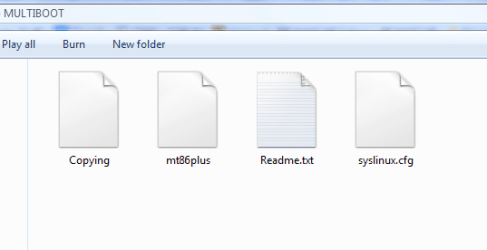
Very odd, open the USB stick, it should have the same files as in the snip.

MT boot.PNG
 

My Computer

Computer type
PC/Desktop
Computer Manufacturer/Model Number
Home Built Desktop By DataTech
OS
Windows 7 Ultimate X64 SP1
CPU
Intel i5-2550K, Differing ~4.4-4.8GHz No built in GPU
Motherboard
ASUS P8Z68-V PRO/GEN3
Memory
16GB G.Skill Sniper 1866MHz @ 2133MHz 2x8GB
Graphics Card(s)
ASUS GTX650TIB-DC2OC-2GD5, (650TI Boost)
Sound Card
Onboard Realtek 5-1
Monitor(s) Displays
Samsung P2570HD
Screen Resolution
1920x1080
Hard Drives
Samsung 840 Pro 256GB SSD for OS, 500GB Seagate Constellation (Enterprise drive) for Data
PSU
Corsair HX650W
Case
Inwin Dragon Rider
Cooling
Hyper 212 EVO w/two Noctua fans, push-pull, @1300 RPM
Keyboard
E-Z Eyes, bright yellow keys with large characters
Mouse
steelseries SENSEI Laser Pro Gaming
Internet Speed
48-51Mbs Mbs down, 11 Mbs up Xfinity Cable
Antivirus
Norton Internet Security 2013
Browser
IE 10, Opera, Pale Moon if needed
Other Info
4 case fans, LG BluRay-RE, ASUS DVD-RW, Mr. Fusion power supply, 1.21 gigawatts.
I used another USB stick and it worked! I don't know why, but it did. Thanks
 

My Computer

Computer type
PC/Desktop
Computer Manufacturer/Model Number
Custom Build PC
OS
Windows 7 Pro 64bit
CPU
AMD Phemon II X4 850 Socket AM3
Motherboard
Gigabyte GA-MA78GM-S2H (rev.1.0)
Memory
Patriot Viper Series DDR2 PC8500 1066Mzh
Graphics Card(s)
EVGA Nvidia GeForce GTX550 Ti
Hard Drives
Western Digital Green SATA 6 Gb 1TB - OS/Programs
Western Digital Caviar SE SATA 300GB - Storage
Antivirus
Microsoft Security Essentials
Browser
Microsoft I.E. 11.0.2 and Google Chrome Version 32.0.1700.10
Great, I'm happy you got it to work. The 1st USB stick has some sort of issue it seems.
 

My Computer

Computer type
PC/Desktop
Computer Manufacturer/Model Number
Home Built Desktop By DataTech
OS
Windows 7 Ultimate X64 SP1
CPU
Intel i5-2550K, Differing ~4.4-4.8GHz No built in GPU
Motherboard
ASUS P8Z68-V PRO/GEN3
Memory
16GB G.Skill Sniper 1866MHz @ 2133MHz 2x8GB
Graphics Card(s)
ASUS GTX650TIB-DC2OC-2GD5, (650TI Boost)
Sound Card
Onboard Realtek 5-1
Monitor(s) Displays
Samsung P2570HD
Screen Resolution
1920x1080
Hard Drives
Samsung 840 Pro 256GB SSD for OS, 500GB Seagate Constellation (Enterprise drive) for Data
PSU
Corsair HX650W
Case
Inwin Dragon Rider
Cooling
Hyper 212 EVO w/two Noctua fans, push-pull, @1300 RPM
Keyboard
E-Z Eyes, bright yellow keys with large characters
Mouse
steelseries SENSEI Laser Pro Gaming
Internet Speed
48-51Mbs Mbs down, 11 Mbs up Xfinity Cable
Antivirus
Norton Internet Security 2013
Browser
IE 10, Opera, Pale Moon if needed
Other Info
4 case fans, LG BluRay-RE, ASUS DVD-RW, Mr. Fusion power supply, 1.21 gigawatts.
Here's a look at the newer 5.01 version.

Memtest%20data.png
 
Last edited:

My Computer

Computer type
PC/Desktop
Computer Manufacturer/Model Number
Home Built Desktop By DataTech
OS
Windows 7 Ultimate X64 SP1
CPU
Intel i5-2550K, Differing ~4.4-4.8GHz No built in GPU
Motherboard
ASUS P8Z68-V PRO/GEN3
Memory
16GB G.Skill Sniper 1866MHz @ 2133MHz 2x8GB
Graphics Card(s)
ASUS GTX650TIB-DC2OC-2GD5, (650TI Boost)
Sound Card
Onboard Realtek 5-1
Monitor(s) Displays
Samsung P2570HD
Screen Resolution
1920x1080
Hard Drives
Samsung 840 Pro 256GB SSD for OS, 500GB Seagate Constellation (Enterprise drive) for Data
PSU
Corsair HX650W
Case
Inwin Dragon Rider
Cooling
Hyper 212 EVO w/two Noctua fans, push-pull, @1300 RPM
Keyboard
E-Z Eyes, bright yellow keys with large characters
Mouse
steelseries SENSEI Laser Pro Gaming
Internet Speed
48-51Mbs Mbs down, 11 Mbs up Xfinity Cable
Antivirus
Norton Internet Security 2013
Browser
IE 10, Opera, Pale Moon if needed
Other Info
4 case fans, LG BluRay-RE, ASUS DVD-RW, Mr. Fusion power supply, 1.21 gigawatts.
I have an issue when boot from the burned iso. I know the disc is fine because I tried it on another pc and no prob. Now when I boot with the pc in question the memtest interface flickers for a fraction of a second then immediately restarts.
 

My Computer

Computer type
PC/Desktop
Computer Manufacturer/Model Number
Alienware area 51
OS
Windows 7 Ultimate 64
CPU
intel quad
Motherboard
?
Memory
8GB
Graphics Card(s)
GeForce
Hard Drives
?
Antivirus
?
Browser
?
I have an issue when boot from the burned iso. I know the disc is fine because I tried it on another pc and no prob. Now when I boot with the pc in question the memtest interface flickers for a fraction of a second then immediately restarts.
Does this PC run fine normally? Which version of memtest are you trying to use?
 

My Computer

Computer type
PC/Desktop
Computer Manufacturer/Model Number
Home Built Desktop By DataTech
OS
Windows 7 Ultimate X64 SP1
CPU
Intel i5-2550K, Differing ~4.4-4.8GHz No built in GPU
Motherboard
ASUS P8Z68-V PRO/GEN3
Memory
16GB G.Skill Sniper 1866MHz @ 2133MHz 2x8GB
Graphics Card(s)
ASUS GTX650TIB-DC2OC-2GD5, (650TI Boost)
Sound Card
Onboard Realtek 5-1
Monitor(s) Displays
Samsung P2570HD
Screen Resolution
1920x1080
Hard Drives
Samsung 840 Pro 256GB SSD for OS, 500GB Seagate Constellation (Enterprise drive) for Data
PSU
Corsair HX650W
Case
Inwin Dragon Rider
Cooling
Hyper 212 EVO w/two Noctua fans, push-pull, @1300 RPM
Keyboard
E-Z Eyes, bright yellow keys with large characters
Mouse
steelseries SENSEI Laser Pro Gaming
Internet Speed
48-51Mbs Mbs down, 11 Mbs up Xfinity Cable
Antivirus
Norton Internet Security 2013
Browser
IE 10, Opera, Pale Moon if needed
Other Info
4 case fans, LG BluRay-RE, ASUS DVD-RW, Mr. Fusion power supply, 1.21 gigawatts.
Back
Top