RAM - Test with Memtest86+

How to Test and Diagnose RAM Issues with Memtest86+

Contents


Part 1: Preparing the Media
Method 1: With a USB Memory Stick


1. Download the latest version of the "Auto-installer for USB Key (Win 9x/2k/xp/7)" from this link: Memtest86+ - Advanced Memory Diagnostic Tool


2. Plug in an empty USB key drive. Size is no concern, as the actual files take up 180 KB of space.​

3. Go into the .zip folder you downloaded, and double-click on the .exe file inside.​

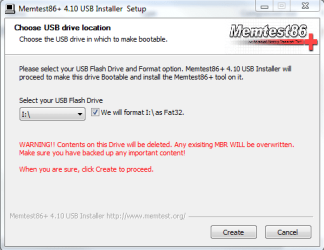
4. Follow the setup utility. To reduce the risk of problems, it is advised to format the drive.​

installer.PNG


Method 2: With a CD

1. Download the latest version of the "Precompiled Boot ISO (.zip) from this link: Memtest86+ - Advanced Memory Diagnostic Tool

You want the "Precompiled Boot ISO (.zip)".​

2. Open the .zip file you downloaded, and then drag the .ISO file inside onto the Desktop.​


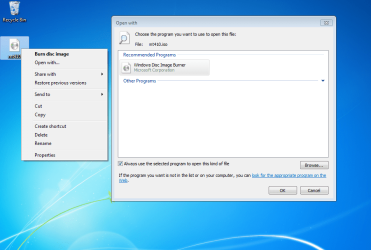
3. Right-click on the ISO, and select Open with>Windows Disc Image Burner.open with.PNG
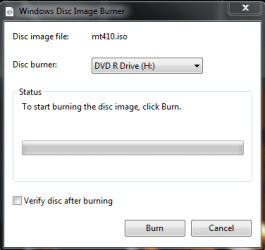
4. Insert a blank CD into the CD drive, and make sure the correct Disc burner is selected.abt2burn.PNG
5. Click on "Burn".

Now the CD is ready to use.


Part 2: Testing

1. With the CD in the drive, or the USB key inserted, reboot your computer. If Memtest does not automatically boot, go into the BIOS and change the CD drive or USB drive to be the first to boot.​

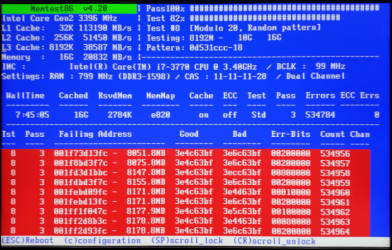
2. Memtest will immediately start testing as soon as it boots. No attendance is needed.​


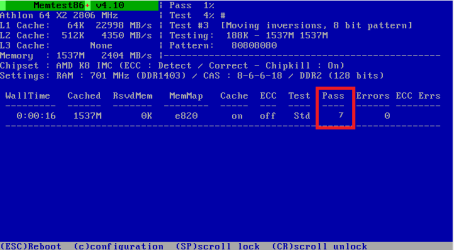
3. Let it run until at least 8 passes are completed, or errors are found (whichever comes first). The longer you run it, the better.Capture.PNG
Seven passes will take several hours, depending on your amount of RAM. It is advised to leave it running overnight.


Part 3: If You Have Errors:


The goal is to test all the RAM sticks and all the motherboard slots.​


Check your motherboard manual to ensure the RAM sticks are in the recommended motherboard slots. Some motherboards have very specific slots required for the number of RAM sticks installed.​


If you get errors, stop the test and continue with the next step.​


user108345_pic7120_1390783159.png


1. Remove all but one stick of RAM from your computer (this will be RAM stick #1), and run Memtest86 again, for 7 passes.​
Be sure to note the RAM stick, use a piece of tape with a number, and note the motherboard slot.
If this stick passes the test then go to step #3.


2. If RAM stick #1 has errors, repeat the test with RAM stick #2 in the same motherboard slot.​
If RAM stick #2 passes, this indicates that RAM stick #1 may be bad. If you want to be absolutely sure, re-test RAM stick #1 in another known good slot.
If RAM stick #2 has errors, this indicates another possible bad RAM stick, a possible motherboard slot failure or inadequate settings.
3. Test the next stick of RAM (stick #2) in the next motherboard slot.If this RAM stick has errors repeat step #2 using a known good stick if possible, or another stick.
If this RAM stick has no errors and both sticks failed in slot#1, test RAM stick #1 in this slot.
4. If you find a stick that passes the test, test it in all the other motherboard slots.


If Part 2 testing shows errors, and all tests in Part 3 show errors, you will need to test the RAM sticks in another computer and/or test other RAM in your computer to identify the problem.​


In this way, you can identify whether it is a bad stick of RAM, a bad motherboard, or incompatibility between the sticks.​


Thanks to Dave76 for his assistance in this part.​


   Note
While the same concept is completely valid for other operating systems, a different image burner will be needed. A good free program is ImgBurn.


Last edited by a moderator:
An excellent tutorial for all those that want to test their RAM. In addition, the BSOD Squad can give this tutorial to an OP with a BSOD that may be related to memory. Bravo.
 

My Computer

Computer type
PC/Desktop
Computer Manufacturer/Model Number
Dell XPS 420
OS
Windows 10, Home Clean Install
CPU
Intel Core2 processsor Q8200(2.33Ghz 1333FSB) Quad Core Tech
Motherboard
Dell
Memory
6 gb
Graphics Card(s)
ATI Radeon 256MB HD3650
Sound Card
Intergrated 7.1 Channel Audio
Monitor(s) Displays
Dell SP2009W 20"
Hard Drives
640 GB Serial ATA Hard drive
Cooling
Fan
Keyboard
Dell USB Keyboard
Mouse
Dell Premium Optical USB
Internet Speed
DSL 2.85
Thanks. :)

Now we don't all have to use my Memtest canned speech. :party:
 

My Computer

Computer Manufacturer/Model Number
Custom
OS
Windows 7 Professional x64
CPU
Intel i7 2600K OC'd @ 4620 MHz
Motherboard
Asus P8Z68-V Pro
Memory
16GB GSkill Sniper 2133 Mhz (4x4GB)
Graphics Card(s)
EVGA GeForce GTX 480 SuperClocked+
Sound Card
Realtek High Definition Audio
Monitor(s) Displays
2x Acer S273HLbmii 27"
Screen Resolution
2 x 1920x1080
Hard Drives
64GB Crucial M4 SSD

Storage: Hitachi 1TB 5400RPM, Samsung 1.5TB 5400RPM
PSU
Corsair HW Series 750w (modular)
Case
Cooler Master HAF 932 Advanced Blue Edition
Cooling
CM Hyper 212+ CPU cooler, 3x 230mm + 1x 140mm case fans
Keyboard
Logitech MK320 (wireless)
Mouse
Logitech MK320 (wireless)
Internet Speed
30 Mb/s : 2 Mb/s
Excellent!
 

My Computer

Computer Manufacturer/Model Number
Custom (Self Build)
OS
Windows 7 Home Premium 64bit
CPU
Intel Core i7 2700k
Motherboard
eVGA P67 SLI
Memory
8GB Mushkin Redline Ridgebacks @1866
Graphics Card(s)
EVGA GTX570 SC
Sound Card
XiFi Titanium HD
Monitor(s) Displays
LG W2453V
Screen Resolution
1920x1080
Hard Drives
Intel 320 80GB -- Intel X25-V 40GB --WD Black 1TB x2 -- WD Blue 640GB
PSU
Seasonic x750
Case
Corsair 600T SE White
Cooling
eVGA Superclocked CPU Cooler
Keyboard
Saitek Cyborg
Antivirus
Kaspersky
Browser
IE
Other Info
LG BD/DVD
Superb, Jon; very well done. Thank you much. Tried to rep; but I gotta spread some around first.
 

My Computer

Computer Manufacturer/Model Number
Home built
OS
Windows 7 Ultimate 32 bit
CPU
Intel(R) Pentium(R) 4 CPU 3.00GHz
Motherboard
ASUS P4P800-VM Motherboard Chipset: Intel 865G + ICH5
Memory
2.50 GB RAM
Graphics Card(s)
NVIDIA GeForce 7600 GS
Sound Card
SoundMax Integrated Digital Audio (Chip)
Monitor(s) Displays
ViewSonic VX 1962 wm
Screen Resolution
1680 X 1050
Hard Drives
Seagate Barracuda 7200.10 80 GB
ST380215A ATA Device 18.6 GB
Western Digital "My Book" external hard drive 750 GB
Cooling
Fan based
Keyboard
Microsoft Comfort Curve Keyboard 2000 v10 USB
Mouse
Logitec optic USB
Internet Speed
3.01 Mb/s download 0.64 Mb/s upload
Nice work JK. :D
 

My Computer

Computer type
PC/Desktop
Computer Manufacturer/Model Number
Self Built
OS
Win 10 Pro x64
CPU
Intel I5-2500K @3.3GHz
Motherboard
Asrock P67 Extreme4
Memory
16GB G.Skill Ripjaws X (4x4GB)
Graphics Card(s)
EVGA GeForce 750 Ti SC 2GB
Sound Card
ASUS Xonar DG 5.1 Channels 24-bit 96KHz PCI Interface Sound
Monitor(s) Displays
auria eq2367
Screen Resolution
1920 x 1080
Hard Drives
250GB Samsung 850 EVO SSD
1TB WD Blue
1TB Hitachi
PSU
SeaSonic X 650W 80 Plus Gold
Case
Corsair Obsidian 750D
Cooling
Corsair H60, Three 140mm case fans
Keyboard
Logitech Wireless Keyboard K520
Mouse
Logitech Wireless Mouse M310
Internet Speed
Wave Broadband ~ 100 dn 5 up
Antivirus
Windows Defender, Malwarebytes Premium
Browser
Edge, IE11, Chrome
Other Info
Laptop specs: HP g7-1365dx /
CPU: AMD A6-3420M APU with Radeon(tm) HD Graphics /
RAM: Crucial 8Gb (2x4Gb) /
SSD: Crucial M4-CT128M4SSD2 ATA Device/ FW 000F /
GFX: AMD Radeon HD 6520G /
OS: Windows 10 Pro x64

My Computer

Computer type
PC/Desktop
Computer Manufacturer/Model Number
Dell XPS 420
OS
Windows 10, Home Clean Install
CPU
Intel Core2 processsor Q8200(2.33Ghz 1333FSB) Quad Core Tech
Motherboard
Dell
Memory
6 gb
Graphics Card(s)
ATI Radeon 256MB HD3650
Sound Card
Intergrated 7.1 Channel Audio
Monitor(s) Displays
Dell SP2009W 20"
Hard Drives
640 GB Serial ATA Hard drive
Cooling
Fan
Keyboard
Dell USB Keyboard
Mouse
Dell Premium Optical USB
Internet Speed
DSL 2.85

My Computer

Computer type
PC/Desktop
Computer Manufacturer/Model Number
Self Built
OS
Win 10 Pro x64
CPU
Intel I5-2500K @3.3GHz
Motherboard
Asrock P67 Extreme4
Memory
16GB G.Skill Ripjaws X (4x4GB)
Graphics Card(s)
EVGA GeForce 750 Ti SC 2GB
Sound Card
ASUS Xonar DG 5.1 Channels 24-bit 96KHz PCI Interface Sound
Monitor(s) Displays
auria eq2367
Screen Resolution
1920 x 1080
Hard Drives
250GB Samsung 850 EVO SSD
1TB WD Blue
1TB Hitachi
PSU
SeaSonic X 650W 80 Plus Gold
Case
Corsair Obsidian 750D
Cooling
Corsair H60, Three 140mm case fans
Keyboard
Logitech Wireless Keyboard K520
Mouse
Logitech Wireless Mouse M310
Internet Speed
Wave Broadband ~ 100 dn 5 up
Antivirus
Windows Defender, Malwarebytes Premium
Browser
Edge, IE11, Chrome
Other Info
Laptop specs: HP g7-1365dx /
CPU: AMD A6-3420M APU with Radeon(tm) HD Graphics /
RAM: Crucial 8Gb (2x4Gb) /
SSD: Crucial M4-CT128M4SSD2 ATA Device/ FW 000F /
GFX: AMD Radeon HD 6520G /
OS: Windows 10 Pro x64
About time :thumbsup:

We needed a tut like this one here. The one I used to link to was rather long and technical. Good job

+1
 

My Computer

Computer type
PC/Desktop
Computer Manufacturer/Model Number
Custom built by me.
OS
Windows 10 Pro
CPU
Intel Core i7-4770K (3.5Ghz)
Motherboard
Gigabyte G1 Sniper 5 (F10 Bios)
Memory
32 gig Corsair Dominator Platinum (4x8Gig)
Graphics Card(s)
Sapphire Tri-X R9 Fury
Sound Card
Soundblaster ZXR
Monitor(s) Displays
NEC PA242W 24" LCD Monitor
Screen Resolution
1920 x 1200
Hard Drives
Primary - Samsung 850 Pro (512gig), Samsung 840 Pro (256gig), 2TB WD Caviar Black.
PSU
EVGA Supernova 1000 G2
Case
Cooler Master HAF X
Cooling
Corsair H100i with Corsair Air Series SP120 Quiet Fans
Keyboard
Logitech Wireless Wave
Mouse
Logitech Performance MX
Internet Speed
High Speed Cable
Antivirus
Norton Security
Browser
IE11
Other Info
Memory Timings - 1866MHz @ 9-9-9-27-1T @ 1.5 volts
Nice Job Jonathon, bookmarked for easy access. Fabe
 

My Computer

Computer Manufacturer/Model Number
Self Built
OS
Windows 7 ultimate 64 bit / XP Home sp3
CPU
intel Core 2 Duo E8400 3.0ghz
Motherboard
Asus P5ND bios 1401
Memory
8 gigs 1066 OCZ Fata1ty
Graphics Card(s)
EVGA GTX 580 Call of Duty Black Ops Edition
Sound Card
Creative Soundblaster Audigy 2zs
Monitor(s) Displays
Asus 24in LCD's 2MS X2
Screen Resolution
1920x1080p @60Hz
Hard Drives
WD Caviar 500 Black/ WD Caviar 200 Blue
PSU
OCZ 700W GameXtreme
Case
NZXT Apollo
Cooling
Corsair H50 CPU/120mm x3 /60mm x2 /Corsair Dominator Ram
Keyboard
Logitech Bluetooth Wireless MX5000
Mouse
Logitech Bluetooth Wireless MX1000
Internet Speed
Download 19.83 Upload 0.97
Other Info
Logitech Z2300 Speakers/ Bose Noise Cancelling Headphones/Avermedia PCI-e Hybrid TV Bravo/Epson NX415 all in one/ 4 Port Powered USB Hub/ LG 10x Bluray Burner /TSST Corp DVDRW External
Thank you all!
 

My Computer

Computer Manufacturer/Model Number
Custom
OS
Windows 7 Professional x64
CPU
Intel i7 2600K OC'd @ 4620 MHz
Motherboard
Asus P8Z68-V Pro
Memory
16GB GSkill Sniper 2133 Mhz (4x4GB)
Graphics Card(s)
EVGA GeForce GTX 480 SuperClocked+
Sound Card
Realtek High Definition Audio
Monitor(s) Displays
2x Acer S273HLbmii 27"
Screen Resolution
2 x 1920x1080
Hard Drives
64GB Crucial M4 SSD

Storage: Hitachi 1TB 5400RPM, Samsung 1.5TB 5400RPM
PSU
Corsair HW Series 750w (modular)
Case
Cooler Master HAF 932 Advanced Blue Edition
Cooling
CM Hyper 212+ CPU cooler, 3x 230mm + 1x 140mm case fans
Keyboard
Logitech MK320 (wireless)
Mouse
Logitech MK320 (wireless)
Internet Speed
30 Mb/s : 2 Mb/s
Great work Jon, was hoping someone would do this.

You might want to add a reference or link to putting memtest86+ on a bootable USB memory stick.

It's quick and easy to do, you can add many helpful apps to the bootable memory stick.

The Seven forums tuts are good.

MS-DOS Bootable Flash Drive - Create

Install Windows 7 from USB Pen Drive Using Grub4Dos

Using the same source and Grub method mentioned above, the Corsair site has a nice version: How to Create the Ultimate Bootable USB Flash Drive.
Select the utility you wish to use and it will be loaded. The versatility of this tool is apparent once you begin to use it. The two default utilities, Memtest86+ and FreeDOS, are invaluable during system builds and trouble shooting.

Your flash drive can become a virtual toolbox of utilities that you can carry in your pocket as opposed to carrying archaic floppy disks or bulky CDs and DVDs. You also have the option of far greater storage capacity when using a USB flash drive. Your USB flash drive will still be fully functional as a removable storage drive. This is a great tool for testing memory or running programs from a DOS prompt such as firmware or BIOS updaters. The only real limits are the drive size and your creativity.
After the bootable USB memory stick is prepared just add the program ISO file and do a quick edit of the menu, you'll have a menu list to choose from when you boot from it.
I added LiberKey (listed in FREE Great Programs for Windows 7) to mine, it has a lot of good support apps (305 applications) and a nice interface, not bootable but very nice selection of support programs.

You can add ISO files, edit the menu so they are listed.
Add any files/folders and still use you USB memory stick as you would normally.
 
Last edited:

My Computer

Computer type
PC/Desktop
Computer Manufacturer/Model Number
76~2.0
OS
Windows 7 Ult x64 - SP1/ Windows 8 Pro x64
CPU
Intel Core i5-3570K 4.6GHz
Motherboard
Gigabyte GA-Z77X UD3H, f18
Memory
8GB (2X4GB) DDR3 1600 Corsair Vengeance CL8 1.5v
Graphics Card(s)
Sapphire HD 7770 Vapor-X OC 1GB DDR5
Sound Card
Onboard VIA VT2021
Monitor(s) Displays
22" LCD Dell
Screen Resolution
1680x1050
Hard Drives
Samsung 840Pro 128GB SSD,
Seagate Barracuda 500GB SATA2 7200rpm 32MB cache, Seagate Barracuda 1TB SATA2 7200rpm 32MB cache,
PSU
Corsair HX650W
Case
Cooler Master Storm Scout
Cooling
Corsair H80 2x12cm Noctua NF P12 , 2x14cm case fans
Keyboard
Logitech Wave
Mouse
CM Sentinel
Internet Speed
Dismal
Antivirus
Avast
Browser
Opera Next
Other Info
Haswell laptop: HP Envy 17t-j, i7-4700MQ, GeForce 740M 2GB DDR3, 17.3" Full HD 1920x1080, 16GB RAM, Samsung 840 Pro 128GB, 1TB Hitachi 7200 HDD,
Desktop: eSATA ports,
External eSATA Seagate 500GB SATA2 7200rpm,
External WD USB 500GB
Great work Jon, was hoping someone would do this.

You might want to add a reference or link to putting memtest86+ on a bootable USB memory stick.

It's quick and easy to do, you can add many helpful apps to the bootable memory stick.

The Seven forums tuts are good.

MS-DOS Bootable Flash Drive - Create

Install Windows 7 from USB Pen Drive Using Grub4Dos

Using the same source and Grub method mentioned above, the Corsair site has a nice version: How to Create the Ultimate Bootable USB Flash Drive.
Select the utility you wish to use and it will be loaded. The versatility of this tool is apparent once you begin to use it. The two default utilities, Memtest86+ and FreeDOS, are invaluable during system builds and trouble shooting.

Your flash drive can become a virtual toolbox of utilities that you can carry in your pocket as opposed to carrying archaic floppy disks or bulky CDs and DVDs. You also have the option of far greater storage capacity when using a USB flash drive. Your USB flash drive will still be fully functional as a removable storage drive. This is a great tool for testing memory or running programs from a DOS prompt such as firmware or BIOS updaters. The only real limits are the drive size and your creativity.
After the bootable USB memory stick is prepared just add the program ISO file and do a quick edit of the menu, you'll have a menu list to choose from when you boot from it.
I added LiberKey (listed in FREE Great Programs for Windows 7) to mine, it has a lot of good support apps (305 applications) and a nice interface, not bootable but very nice selection of support programs.

You can add ISO files, edit the menu so they are listed.
Add any files/folders and still use you USB memory stick as you would normally.
Dave- there is a version of Memtest for USB drives here: http://memtest.org/download/4.10/memtest86+-4.10.usb.installer.zip

I'll test it out myself, and when I'm familiar with the process, I'll add it as a Method 2 of the tutorial.

Thanks for the idea!
 

My Computer

Computer Manufacturer/Model Number
Custom
OS
Windows 7 Professional x64
CPU
Intel i7 2600K OC'd @ 4620 MHz
Motherboard
Asus P8Z68-V Pro
Memory
16GB GSkill Sniper 2133 Mhz (4x4GB)
Graphics Card(s)
EVGA GeForce GTX 480 SuperClocked+
Sound Card
Realtek High Definition Audio
Monitor(s) Displays
2x Acer S273HLbmii 27"
Screen Resolution
2 x 1920x1080
Hard Drives
64GB Crucial M4 SSD

Storage: Hitachi 1TB 5400RPM, Samsung 1.5TB 5400RPM
PSU
Corsair HW Series 750w (modular)
Case
Cooler Master HAF 932 Advanced Blue Edition
Cooling
CM Hyper 212+ CPU cooler, 3x 230mm + 1x 140mm case fans
Keyboard
Logitech MK320 (wireless)
Mouse
Logitech MK320 (wireless)
Internet Speed
30 Mb/s : 2 Mb/s
Okay, I added the USB installer to the tutorial. It's easier than the CD, honestly, so I put it first.
 

My Computer

Computer Manufacturer/Model Number
Custom
OS
Windows 7 Professional x64
CPU
Intel i7 2600K OC'd @ 4620 MHz
Motherboard
Asus P8Z68-V Pro
Memory
16GB GSkill Sniper 2133 Mhz (4x4GB)
Graphics Card(s)
EVGA GeForce GTX 480 SuperClocked+
Sound Card
Realtek High Definition Audio
Monitor(s) Displays
2x Acer S273HLbmii 27"
Screen Resolution
2 x 1920x1080
Hard Drives
64GB Crucial M4 SSD

Storage: Hitachi 1TB 5400RPM, Samsung 1.5TB 5400RPM
PSU
Corsair HW Series 750w (modular)
Case
Cooler Master HAF 932 Advanced Blue Edition
Cooling
CM Hyper 212+ CPU cooler, 3x 230mm + 1x 140mm case fans
Keyboard
Logitech MK320 (wireless)
Mouse
Logitech MK320 (wireless)
Internet Speed
30 Mb/s : 2 Mb/s
A very good addition. I was not aware of the version for USB.
 

My Computer

Computer Manufacturer/Model Number
Home built
OS
Windows 7 Ultimate 32 bit
CPU
Intel(R) Pentium(R) 4 CPU 3.00GHz
Motherboard
ASUS P4P800-VM Motherboard Chipset: Intel 865G + ICH5
Memory
2.50 GB RAM
Graphics Card(s)
NVIDIA GeForce 7600 GS
Sound Card
SoundMax Integrated Digital Audio (Chip)
Monitor(s) Displays
ViewSonic VX 1962 wm
Screen Resolution
1680 X 1050
Hard Drives
Seagate Barracuda 7200.10 80 GB
ST380215A ATA Device 18.6 GB
Western Digital "My Book" external hard drive 750 GB
Cooling
Fan based
Keyboard
Microsoft Comfort Curve Keyboard 2000 v10 USB
Mouse
Logitec optic USB
Internet Speed
3.01 Mb/s download 0.64 Mb/s upload

My Computer

Computer Manufacturer/Model Number
Custom
OS
Windows 7 Professional x64
CPU
Intel i7 2600K OC'd @ 4620 MHz
Motherboard
Asus P8Z68-V Pro
Memory
16GB GSkill Sniper 2133 Mhz (4x4GB)
Graphics Card(s)
EVGA GeForce GTX 480 SuperClocked+
Sound Card
Realtek High Definition Audio
Monitor(s) Displays
2x Acer S273HLbmii 27"
Screen Resolution
2 x 1920x1080
Hard Drives
64GB Crucial M4 SSD

Storage: Hitachi 1TB 5400RPM, Samsung 1.5TB 5400RPM
PSU
Corsair HW Series 750w (modular)
Case
Cooler Master HAF 932 Advanced Blue Edition
Cooling
CM Hyper 212+ CPU cooler, 3x 230mm + 1x 140mm case fans
Keyboard
Logitech MK320 (wireless)
Mouse
Logitech MK320 (wireless)
Internet Speed
30 Mb/s : 2 Mb/s
Looks good Jon, I tried the USB installer method and was impressed with the ease of the process.
This can easily be put on a USB and removed when no longer needed.

This led to making a USB rescue drive, which quickly led to approximately 400 apps on 1.44GB.
Including the Windows 7 System Repair Disc and MS Sysinternals Suite.
Most of these will never get used but, it's better to have something when needed than have to look for it.
 
Last edited:

My Computer

Computer type
PC/Desktop
Computer Manufacturer/Model Number
76~2.0
OS
Windows 7 Ult x64 - SP1/ Windows 8 Pro x64
CPU
Intel Core i5-3570K 4.6GHz
Motherboard
Gigabyte GA-Z77X UD3H, f18
Memory
8GB (2X4GB) DDR3 1600 Corsair Vengeance CL8 1.5v
Graphics Card(s)
Sapphire HD 7770 Vapor-X OC 1GB DDR5
Sound Card
Onboard VIA VT2021
Monitor(s) Displays
22" LCD Dell
Screen Resolution
1680x1050
Hard Drives
Samsung 840Pro 128GB SSD,
Seagate Barracuda 500GB SATA2 7200rpm 32MB cache, Seagate Barracuda 1TB SATA2 7200rpm 32MB cache,
PSU
Corsair HX650W
Case
Cooler Master Storm Scout
Cooling
Corsair H80 2x12cm Noctua NF P12 , 2x14cm case fans
Keyboard
Logitech Wave
Mouse
CM Sentinel
Internet Speed
Dismal
Antivirus
Avast
Browser
Opera Next
Other Info
Haswell laptop: HP Envy 17t-j, i7-4700MQ, GeForce 740M 2GB DDR3, 17.3" Full HD 1920x1080, 16GB RAM, Samsung 840 Pro 128GB, 1TB Hitachi 7200 HDD,
Desktop: eSATA ports,
External eSATA Seagate 500GB SATA2 7200rpm,
External WD USB 500GB
One thing that could be mentioned is that if you repeatedly fail a particular test ie Test 5 / Test 8 - it's not always a sign of bad RAM/mobo, but could actually be indicative of too high a mhz, incorrect timings / voltage settings etc.


And when 'tweaking RAM' - ie dialling in Northbridge voltage (775> socket), QPI/DRAM(VTT) (1156/1366) voltages and DRAM voltages and memory timings.

You can shortcut the process by running an individual Test until it passes continually.

Then you can run the full suite of tests to double check all your timings/settings are dialled in. This can significantly cut down the time involved with tweaking.


Another thing worth mentioning is that memtest is not a 100% guarantee as it only stress the RAM, QPI(VTT)/NB and does not stress the CPU.


Also worth mentioning is that the error codes are virtually meaningless - all that counts is Error or No error.
 

My Computer

Computer type
PC/Desktop
Computer Manufacturer/Model Number
Systems by SmartEyeball
OS
8 Pro x64
CPU
i7 3770K 4.6GHz
Motherboard
ASUS P8Z77 WS
Memory
16GB G.Skill Trident X 2666mhz
Graphics Card(s)
x2 EVGA 780 Ti Superclocked SLI
Sound Card
SB X-FI Surround 5.1 PRO USB / ATH-AD900 Headphones
Monitor(s) Displays
x3 Dell U2410 / 58" Samsung
Screen Resolution
5760*1200/ 1920*1200
Hard Drives
2x Intel 520 240GB (RAID 0) * 2x WD Caviar Blacks 2TB (RAID 0) * 2TB WD Caviar Black * Sony Optirac DVD
PSU
Silverstone Strider Evolution 1200W
Case
Thermaltake Level 10 GT Snow Edition
Cooling
Noctua NH-D14
Keyboard
Topre Realforce // Ducky Shine MX Black // Filco Ninja TKL
Mouse
Thermaltake Theron (Highly Recommended) + Razer Imperator
Antivirus
MSE
Browser
IE, FF, WaterFox
Other Info
GT Extreme V2 Sim Racing Cockpit + 40" LCD and K/B Mouse stand ▼
Fanatec CSR Elite Wheel + Clubsport V1 Pedals + CSR shifter/7G-H ▼Saitek X52 Pro ▼ TrackIR 5 Pro
Buttkicker v2 Seat Rumbler with Dedicated 5.1 and Sub Woofer attached to frame ▼
=
Bloody Big Grin
hey Jonathan..that's very nice tut man..

thanx for this..!! :D
 

My Computer

Computer Manufacturer/Model Number
Custom Built (by me)
OS
Windows 8 CP x64
CPU
Intel(R) Core(TM) i7 CPU 920 @ 2.97GHz
Motherboard
DX58SO
Memory
Corsair 6GB DDR3 (1333Mhz)
Graphics Card(s)
Nvidia GeForce 9800GT (1GB)
Sound Card
Creative Sound Blaster Audigy Value (24bit internal)
Monitor(s) Displays
22" Samsung SyncMaster B2230 (1920*1080)
Screen Resolution
1920*1080
Hard Drives
Seagate Barracuda 500gb
PSU
i ball 450W
Case
i ball (Work Horse)
Keyboard
Microsoft Wireless Keyboard 700 v2.0
Mouse
Microsoft Wireless Mouse 700 v2.0
Internet Speed
1MB
Back
Top