RAM?

Sleep

viva la revolucion
Power User
Local time
4:30 PM
Messages
50
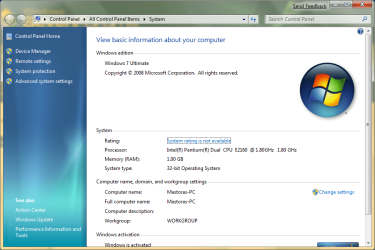
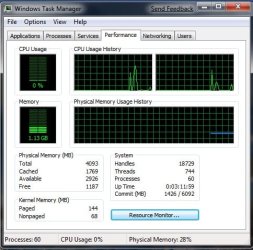
I have 64bit Windows 7 7000, along with it I've had 4 logical gb's of RAM since I've had the computer. I've looked everywhere and I cannot find out where I tell the computer to use all of the RAM because I know it can. On 32 bit OS's the amount the computer uses out of the 4gb is 3,325 mb. I want my other 675mb :P.
 
Last edited:

My Computer

OS
Windows Vista Ultimate x86
CPU
Q6600
Motherboard
X38
Memory
4gb
Graphics Card(s)
nVidia 8800
Sound Card
Integrated
Monitor(s) Displays
2x 22"
Screen Resolution
3360x1050 (2x 1680x1050)
Hard Drives
1x 320gb,
1x 160gb,
1x 1tb
Cooling
Air
Internet Speed
3mbp/s down 1mbp/s up
So right now how much it detects on your 64 bit system?

Can you post this screenshot here?
 

Attachments

  • screen.png
    screen.png
    61 KB · Views: 426

My Computer

Computer Manufacturer/Model Number
ENIAC
OS
Windows 7 RC 7100 32bit/64bit
CPU
Intel Core2Duo E4500 2.20 GHz
Motherboard
ASUS P5LD2-X/1333
Memory
2x1GB Kinsgston DDR2 800MHz
Graphics Card(s)
Nvidia 8500GT
Sound Card
Onboard High Definition Audio Device
Monitor(s) Displays
Sony Bravia 42"
Case
LINKW 2222
Cooling
Standard Intel
Keyboard
Some cheap one
Mouse
Microsoft Intellimouse something
Internet Speed
24MBps ADSL

My Computer

Computer type
PC/Desktop
Computer Manufacturer/Model Number
Airbot 2.0
OS
Windows 7 Ultimate x64 SP1
CPU
Core i7 920 (D0) @ 4Ghz, *26c idle *65c full load on air
Motherboard
Asus P6X58D Premium - Sata 6Gb/s - USB 3.0
Memory
12GB DDR3 Corsair Dominator -CMD12GX3M6A1600C8 at 1600MHz
Graphics Card(s)
Zotac Geforce GTX 770
Sound Card
ASUS Xonar D2X
Monitor(s) Displays
1 LG 24" Flatron W2453V-PF 1 Samsung 24" P2450H both 2ms RT
Screen Resolution
1920x1080@60hz
Hard Drives
1 Samsung 250GB 840 Evo SSD
1 OCZ Vertex2 180GB SSD
1 TB Samsung Spinpoint F1 7200RPM 32MB cache
2 500GB WD Caviar Blacks 7200RPM 32MB cache (WD5001AALS)

Pioneer DVD Burner DVR-S18M
PSU
Corsair HX1000W
Case
Cooler Master HAF 932
Cooling
Case Fans *3 230mm, *1 140mm/CPU - *Tuniq Tower 120 Extreme
Keyboard
Logitech Wireless MK700
Mouse
Logitech Wireless MK700
Internet Speed
DL 15 Mbps UL 0.98 Mbps
Antivirus
None
Browser
Firefox Nightly
Other Info
Processor-7.7 *RAM- 7.9 *Graphics-7.9 *Gaming Graphics- 7.9 *SSD- 7.8 W.E.I final score= 7.7
*Phone- LG Nexus 5
So right now how much it detects on your 64 bit system?

Can you post this screenshot here?

64.png

task.png
 

My Computer

OS
Windows Vista Ultimate x86
CPU
Q6600
Motherboard
X38
Memory
4gb
Graphics Card(s)
nVidia 8800
Sound Card
Integrated
Monitor(s) Displays
2x 22"
Screen Resolution
3360x1050 (2x 1680x1050)
Hard Drives
1x 320gb,
1x 160gb,
1x 1tb
Cooling
Air
Internet Speed
3mbp/s down 1mbp/s up
Not to bad!

2009-01-15_021720.jpg
 

My Computer

Computer Manufacturer/Model Number
Home Brew
OS
Windows 7 Ultimate Vista Ultimate x64
CPU
Core 2 Duo E8500 3.16Ghz @ 3.8Ghz
Motherboard
eVGA 750i FTW
Memory
2x2Gigs Patriot PC2-6400 LL
Graphics Card(s)
Inno3D GeForce GTX260 216 SP
Monitor(s) Displays
ASUS VW222U 22" 2ms Response time
Screen Resolution
1680x1050
Hard Drives
SATA 150GB
SATA II 250GB
USB IDE 750GB Ext.
PSU
HYTEC 600W & Thermaltake 650W Toughpower Power Exp
Case
Thermaltake Armor LCS (Liquid Cooling System)
Cooling
Liquid Cooling System
Keyboard
Logitech G15 Gaming Keyboard
Mouse
Logitech G9 Gaming Mouse

My Computer

OS
Windows Vista Ultimate x86
CPU
Q6600
Motherboard
X38
Memory
4gb
Graphics Card(s)
nVidia 8800
Sound Card
Integrated
Monitor(s) Displays
2x 22"
Screen Resolution
3360x1050 (2x 1680x1050)
Hard Drives
1x 320gb,
1x 160gb,
1x 1tb
Cooling
Air
Internet Speed
3mbp/s down 1mbp/s up

My Computer

Computer Manufacturer/Model Number
Dell Vostro 1510
OS
Windows 7 Build 7100 32-bit, Windows Vista 32-bit
CPU
Intel Core Duo T8100 2,1GHz
Memory
3GB
Graphics Card(s)
NVIDIA GeForce 8400M GS
Screen Resolution
1440x900
Hard Drives
250GB

My Computer

Computer Manufacturer/Model Number
Home Brew
OS
Windows 7 Ultimate Vista Ultimate x64
CPU
Core 2 Duo E8500 3.16Ghz @ 3.8Ghz
Motherboard
eVGA 750i FTW
Memory
2x2Gigs Patriot PC2-6400 LL
Graphics Card(s)
Inno3D GeForce GTX260 216 SP
Monitor(s) Displays
ASUS VW222U 22" 2ms Response time
Screen Resolution
1680x1050
Hard Drives
SATA 150GB
SATA II 250GB
USB IDE 750GB Ext.
PSU
HYTEC 600W & Thermaltake 650W Toughpower Power Exp
Case
Thermaltake Armor LCS (Liquid Cooling System)
Cooling
Liquid Cooling System
Keyboard
Logitech G15 Gaming Keyboard
Mouse
Logitech G9 Gaming Mouse

My Computer

OS
Windows Vista Ultimate x86
CPU
Q6600
Motherboard
X38
Memory
4gb
Graphics Card(s)
nVidia 8800
Sound Card
Integrated
Monitor(s) Displays
2x 22"
Screen Resolution
3360x1050 (2x 1680x1050)
Hard Drives
1x 320gb,
1x 160gb,
1x 1tb
Cooling
Air
Internet Speed
3mbp/s down 1mbp/s up
No such thing as '32 bit RAM'


OP - Hit up your Bios and look for a setting for 'Memory Remapping'. It should be disabled. If it is, try enabling it, restart, then disable it again.
 

My Computer

Computer Manufacturer/Model Number
Home Built
OS
Windows 7 (x64)
CPU
Intel Core i7 960 @ 3.8GHz (3.2GHz stock)
Motherboard
EVGA E758 X-58
Memory
6GB OCZ DDR3 1600
Graphics Card(s)
Powercolor AX5870 (ATI 5870 w/improved cooling)
Sound Card
Omega Claro+
Monitor(s) Displays
1. Acer P243W (24") 2. Samsung T260 HD HDMI HDTV/Monitor
Screen Resolution
1920 x 1200 x 2
Hard Drives
(1) 128GB Kingston SNVP325-S2 SSD for OS/Games
(2) 500GB WD Caviar Black - Storage
PSU
Corsair CMPSU-850HX
Case
Lian Li PC-K60WB
Cooling
Thermalright Venemous-X
Keyboard
Microsoft Natural keyboard 4000
Mouse
Microsoft Sidewinder
Internet Speed
Cable
Other Info
165 bclk, 23 Multi
Well I was just looking in the Bios on my Asus board and it is located in:

Advanced - North Bridge Configuration - Memory Remap Feature [Enabled]
 

My Computer

Computer Manufacturer/Model Number
Home Brew
OS
Windows 7 Ultimate Vista Ultimate x64
CPU
Core 2 Duo E8500 3.16Ghz @ 3.8Ghz
Motherboard
eVGA 750i FTW
Memory
2x2Gigs Patriot PC2-6400 LL
Graphics Card(s)
Inno3D GeForce GTX260 216 SP
Monitor(s) Displays
ASUS VW222U 22" 2ms Response time
Screen Resolution
1680x1050
Hard Drives
SATA 150GB
SATA II 250GB
USB IDE 750GB Ext.
PSU
HYTEC 600W & Thermaltake 650W Toughpower Power Exp
Case
Thermaltake Armor LCS (Liquid Cooling System)
Cooling
Liquid Cooling System
Keyboard
Logitech G15 Gaming Keyboard
Mouse
Logitech G9 Gaming Mouse
No such thing as '32 bit RAM'


OP - Hit up your Bios and look for a setting for 'Memory Remapping'. It should be disabled. If it is, try enabling it, restart, then disable it again.

Wrong, you need it enabled!!
 

My Computer

Computer Manufacturer/Model Number
Home Brew
OS
Windows 7 Ultimate Vista Ultimate x64
CPU
Core 2 Duo E8500 3.16Ghz @ 3.8Ghz
Motherboard
eVGA 750i FTW
Memory
2x2Gigs Patriot PC2-6400 LL
Graphics Card(s)
Inno3D GeForce GTX260 216 SP
Monitor(s) Displays
ASUS VW222U 22" 2ms Response time
Screen Resolution
1680x1050
Hard Drives
SATA 150GB
SATA II 250GB
USB IDE 750GB Ext.
PSU
HYTEC 600W & Thermaltake 650W Toughpower Power Exp
Case
Thermaltake Armor LCS (Liquid Cooling System)
Cooling
Liquid Cooling System
Keyboard
Logitech G15 Gaming Keyboard
Mouse
Logitech G9 Gaming Mouse
No such thing as '32 bit RAM'


OP - Hit up your Bios and look for a setting for 'Memory Remapping'. It should be disabled. If it is, try enabling it, restart, then disable it again.

I did hit up my bios, and there is nothing about Memory Remapping.

Wrong, you need it enabled!!

What do I do if I don't have it? Am I stuck with 3325mb of RAM?
 

My Computer

OS
Windows Vista Ultimate x86
CPU
Q6600
Motherboard
X38
Memory
4gb
Graphics Card(s)
nVidia 8800
Sound Card
Integrated
Monitor(s) Displays
2x 22"
Screen Resolution
3360x1050 (2x 1680x1050)
Hard Drives
1x 320gb,
1x 160gb,
1x 1tb
Cooling
Air
Internet Speed
3mbp/s down 1mbp/s up
What board do you have?
 

My Computer

Computer Manufacturer/Model Number
Home Brew
OS
Windows 7 Ultimate Vista Ultimate x64
CPU
Core 2 Duo E8500 3.16Ghz @ 3.8Ghz
Motherboard
eVGA 750i FTW
Memory
2x2Gigs Patriot PC2-6400 LL
Graphics Card(s)
Inno3D GeForce GTX260 216 SP
Monitor(s) Displays
ASUS VW222U 22" 2ms Response time
Screen Resolution
1680x1050
Hard Drives
SATA 150GB
SATA II 250GB
USB IDE 750GB Ext.
PSU
HYTEC 600W & Thermaltake 650W Toughpower Power Exp
Case
Thermaltake Armor LCS (Liquid Cooling System)
Cooling
Liquid Cooling System
Keyboard
Logitech G15 Gaming Keyboard
Mouse
Logitech G9 Gaming Mouse

My Computer

OS
Windows Vista Ultimate x86
CPU
Q6600
Motherboard
X38
Memory
4gb
Graphics Card(s)
nVidia 8800
Sound Card
Integrated
Monitor(s) Displays
2x 22"
Screen Resolution
3360x1050 (2x 1680x1050)
Hard Drives
1x 320gb,
1x 160gb,
1x 1tb
Cooling
Air
Internet Speed
3mbp/s down 1mbp/s up
  • The chipset must support at least 8 GB of address space. Chipsets that have this capability include the following:
    • Intel 975X
    • Intel P965
    • Intel 955X on Socket 775
    • Chipsets that support AMD processors that use socket F, socket 940, socket 939, or socket AM2. These chipsets include any AMD socket and CPU combination in which the memory controller resides in the CPU.
  • The CPU must support the x64 instruction set. The AMD64 CPU and the Intel EM64T CPU support this instruction set.
  • The BIOS must support the memory remapping feature. The memory remapping feature allows for the segment of system memory that was previously overwritten by the Peripheral Component Interconnect (PCI) configuration space to be remapped above the 4 GB address line. This feature must be enabled in the BIOS configuration utility on the computer. View your computer product documentation for instructions that explain how to enable this feature. Many consumer-oriented computers may not support the memory remapping feature. No standard terminology is used in documentation or in BIOS configuration utilities for this feature. Therefore, you may have to read the descriptions of the various BIOS configuration settings that are available to determine whether any of the settings enable the memory remapping feature.
  • An x64 (64-bit) version of Windows Vista must be used.
 

My Computer

Computer Manufacturer/Model Number
Home Brew
OS
Windows 7 Ultimate Vista Ultimate x64
CPU
Core 2 Duo E8500 3.16Ghz @ 3.8Ghz
Motherboard
eVGA 750i FTW
Memory
2x2Gigs Patriot PC2-6400 LL
Graphics Card(s)
Inno3D GeForce GTX260 216 SP
Monitor(s) Displays
ASUS VW222U 22" 2ms Response time
Screen Resolution
1680x1050
Hard Drives
SATA 150GB
SATA II 250GB
USB IDE 750GB Ext.
PSU
HYTEC 600W & Thermaltake 650W Toughpower Power Exp
Case
Thermaltake Armor LCS (Liquid Cooling System)
Cooling
Liquid Cooling System
Keyboard
Logitech G15 Gaming Keyboard
Mouse
Logitech G9 Gaming Mouse
No such thing as '32 bit RAM'


OP - Hit up your Bios and look for a setting for 'Memory Remapping'. It should be disabled. If it is, try enabling it, restart, then disable it again.

I was joking there :p
 

My Computer

Computer Manufacturer/Model Number
Dell Vostro 1510
OS
Windows 7 Build 7100 32-bit, Windows Vista 32-bit
CPU
Intel Core Duo T8100 2,1GHz
Memory
3GB
Graphics Card(s)
NVIDIA GeForce 8400M GS
Screen Resolution
1440x900
Hard Drives
250GB
  • The chipset must support at least 8 GB of address space. Chipsets that have this capability include the following:
    • Intel 975X
    • Intel P965
    • Intel 955X on Socket 775
    • Chipsets that support AMD processors that use socket F, socket 940, socket 939, or socket AM2. These chipsets include any AMD socket and CPU combination in which the memory controller resides in the CPU.
  • The CPU must support the x64 instruction set. The AMD64 CPU and the Intel EM64T CPU support this instruction set.
  • The BIOS must support the memory remapping feature. The memory remapping feature allows for the segment of system memory that was previously overwritten by the Peripheral Component Interconnect (PCI) configuration space to be remapped above the 4 GB address line. This feature must be enabled in the BIOS configuration utility on the computer. View your computer product documentation for instructions that explain how to enable this feature. Many consumer-oriented computers may not support the memory remapping feature. No standard terminology is used in documentation or in BIOS configuration utilities for this feature. Therefore, you may have to read the descriptions of the various BIOS configuration settings that are available to determine whether any of the settings enable the memory remapping feature.
  • An x64 (64-bit) version of Windows Vista must be used.

Well, crap.
 

My Computer

OS
Windows Vista Ultimate x86
CPU
Q6600
Motherboard
X38
Memory
4gb
Graphics Card(s)
nVidia 8800
Sound Card
Integrated
Monitor(s) Displays
2x 22"
Screen Resolution
3360x1050 (2x 1680x1050)
Hard Drives
1x 320gb,
1x 160gb,
1x 1tb
Cooling
Air
Internet Speed
3mbp/s down 1mbp/s up

My Computer

Computer Manufacturer/Model Number
Home Brew
OS
Windows 7 Ultimate Vista Ultimate x64
CPU
Core 2 Duo E8500 3.16Ghz @ 3.8Ghz
Motherboard
eVGA 750i FTW
Memory
2x2Gigs Patriot PC2-6400 LL
Graphics Card(s)
Inno3D GeForce GTX260 216 SP
Monitor(s) Displays
ASUS VW222U 22" 2ms Response time
Screen Resolution
1680x1050
Hard Drives
SATA 150GB
SATA II 250GB
USB IDE 750GB Ext.
PSU
HYTEC 600W & Thermaltake 650W Toughpower Power Exp
Case
Thermaltake Armor LCS (Liquid Cooling System)
Cooling
Liquid Cooling System
Keyboard
Logitech G15 Gaming Keyboard
Mouse
Logitech G9 Gaming Mouse
3.4 Main Memory Address Space (4 GB to TOUUD)

The MCH supports 36 bit addressing. The maximum main memory size supported is 8 GB total DRAM memory. A hole between TOLUD and 4 GB occurs when main memory size approaches 4 GB or larger. As a result, TOM, and TOUUD registers and RECLAIMBASE/RECLAIMLIMIT registers become relevant.
The new reclaim configuration registers exist to reclaim lost main memory space. The greater than 32 bit reclaim handling will be handled similar to other MCHs.

Upstream read and write accesses above 36-bit addressing will be treated as invalid cycles by PCI Express and DMI.

Top of Memory


The “Top of Memory” (TOM) register reflects the total amount of populated physical memory. This is NOT necessarily the highest main memory address (holes may exist in main memory address map due to addresses allocated for memory-mapped I/O above TOM). TOM is used to allocate the Intel Management Engine's stolen memory.

The Intel

ME stolen size register reflects the total amount of physical memory stolen by the Intel ME. The ME stolen memory is located at the top of physical memory. The ME stolen memory base is calculated by subtracting the amount of memory stolen by the Intel ME from TOM.
The Top of Upper Usable Dram (TOUUD) register reflects the total amount of addressable DRAM. If reclaim is disabled, TOUUD will reflect TOM minus Intel ME stolen
size. If reclaim is enabled, then it will reflect the reclaim limit. Also, the reclaim base will be the same as TOM minus ME stolen memory size to the nearest 64 MB alignment.

TOLUD register is restricted to 4 GB memory (A[31:20]), but the MCH can support up to 16 GB, limited by DRAM pins. For physical memory greater than 4 GB, the TOUUD
register helps identify the address range in between the 4 GB boundary and the top of physical memory. This identifies memory that can be directly accessed (including
reclaim address calculation) which is useful for memory access indication, early path indication, and trusted read indication. When reclaim is enabled, TOLUD must be
64 MB aligned, but when reclaim is disabled, TOLUD can be 1 MB aligned.

C1DRB3 cannot be used directly to determine the effective size of memory as the values programmed in the DRBs depend on the memory mode (stacked, interleaved).
The Reclaim Base/Limit registers also can not be used because reclaim can be disabled.
The C0DRB3 register is used for memory channel identification (channel 0 vs. channel 1) in the case of stacked memory.

Datasheet 45


System Address Map
3.4.1 Memory Re-claim Background
The following are examples of Memory Mapped IO devices are typically located below
4 GB:
• High BIOS
• HSEG
• TSEG
• XAPIC
• Local APIC
• FSB Interrupts
• Mbase/Mlimit
• Memory Mapped IO space that supports only 32 B addressing

The MCH provides the capability to re-claim the physical memory overlapped by the Memory Mapped I/O logical address space. The MCH re-maps physical memory from
the Top of Low Memory (TOLUD) boundary up to the 4 GB boundary to an equivalent sized logical address range located just below the Intel ME's stolen memory.

3.4.2 Memory Reclaiming

An incoming address (referred to as a logical address) is checked to see if it falls in the memory re-map window. The bottom of the re-map window is defined by the value in the RECLAIMBASE register. The top of the re-map window is defined by the value in the
RECLAIMLIMIT register. An address that falls within this window is reclaimed to the physical memory starting at the address defined by the TOLUD register. The TOLUD
register must be 64M aligned when RECLAIM is enabled, but can be 1M aligned when reclaim is disabled.

 

My Computer

Computer Manufacturer/Model Number
Home Brew
OS
Windows 7 Ultimate Vista Ultimate x64
CPU
Core 2 Duo E8500 3.16Ghz @ 3.8Ghz
Motherboard
eVGA 750i FTW
Memory
2x2Gigs Patriot PC2-6400 LL
Graphics Card(s)
Inno3D GeForce GTX260 216 SP
Monitor(s) Displays
ASUS VW222U 22" 2ms Response time
Screen Resolution
1680x1050
Hard Drives
SATA 150GB
SATA II 250GB
USB IDE 750GB Ext.
PSU
HYTEC 600W & Thermaltake 650W Toughpower Power Exp
Case
Thermaltake Armor LCS (Liquid Cooling System)
Cooling
Liquid Cooling System
Keyboard
Logitech G15 Gaming Keyboard
Mouse
Logitech G9 Gaming Mouse
Back
Top