Random BSOD and STOP at *starting* , after windows update...

magimagi

New member
Local time
4:58 AM
Messages
6
Hi, sorry for my english. I'm Mark.
I have a problem of random bsod (only at starting of original windows7 x64) on my new Vaio (May2013 800€).
The problems began on the 6th of january after windows update.
I have tested the ram (memtest and memtest+), graphic and hd (hdtune) also with the sony diagnostic tools, and it's all OK!
I have restored windows at factory state and installed only my software (without the windows update!) but I have not had any problems with bsod... after 15 days I have updated the KB protection windows but reappeared the problems of random bsod and stop message...

NTOSKRNL.sys
NTFS.sys
FLTMGR.sys

or

IRQL_NOT_LESS_OR_EQUAL
BAD_POOL_HEADER
MEMORY_MANAGEMENT
and other


Microsoft and Sony have answer me that I have to pay (160€) to get assistance... -.-'

Do you know what is the update that could create this problem?

Then, can you tell me which are all the updates of the last month jan-feb?

Thank you very much
 
Last edited:

My Computer My Computer

At a glance

windows 7 64bit
Computer type
Laptop
OS
windows 7 64bit

My Computer My Computer

At a glance

Windows 10Intel Core i5 3570K16GB 1600Mhz G.SkillGigabyte GTX 970 G1-Gaming
Computer type
PC/Desktop
OS
Windows 10
CPU
Intel Core i5 3570K
Motherboard
Asus P8Z77V-PRO
Memory
16GB 1600Mhz G.Skill
Graphics Card(s)
Gigabyte GTX 970 G1-Gaming
PSU
Seasonic 1000W Platinum
Case
Fractal Design Define R4
Cooling
Noctua NH-D14
sorry, but the dump aren't available... the folder minidump (and memory.dmp) is every empty after a bsod.. i don't know if it depends by the fact that the error occur at startup.. Also when I restored to factory state, the minidump folder is empty.. and bluescreenview is unusable
 

My Computer My Computer

At a glance

windows 7 64bit
Computer type
Laptop
OS
windows 7 64bit

My Computer My Computer

At a glance

Windows 10Intel Core i5 3570K16GB 1600Mhz G.SkillGigabyte GTX 970 G1-Gaming
Computer type
PC/Desktop
OS
Windows 10
CPU
Intel Core i5 3570K
Motherboard
Asus P8Z77V-PRO
Memory
16GB 1600Mhz G.Skill
Graphics Card(s)
Gigabyte GTX 970 G1-Gaming
PSU
Seasonic 1000W Platinum
Case
Fractal Design Define R4
Cooling
Noctua NH-D14
in this moment another starting stop bsod
NTFS.SYS..

tomorrow I restore again the notebook, but it pains me to know that I can not install updates because I do not know what update is the problem.. :(
 

My Computer My Computer

At a glance

windows 7 64bit
Computer type
Laptop
OS
windows 7 64bit

My Computer My Computer

At a glance

Windows 10Intel Core i5 3570K16GB 1600Mhz G.SkillGigabyte GTX 970 G1-Gaming
Computer type
PC/Desktop
OS
Windows 10
CPU
Intel Core i5 3570K
Motherboard
Asus P8Z77V-PRO
Memory
16GB 1600Mhz G.Skill
Graphics Card(s)
Gigabyte GTX 970 G1-Gaming
PSU
Seasonic 1000W Platinum
Case
Fractal Design Define R4
Cooling
Noctua NH-D14
these are two different types of errors ..
imgur: the simple image sharer


but the HD anche RAM are OK..
tomorrow I restore and it's all ok, then apply the windows update and born the problems..

the bsod occurs average 1 bsod every 5-6 startup, and if it show the desktop I have no problem of bsod

thanks
 

My Computer My Computer

At a glance

windows 7 64bit
Computer type
Laptop
OS
windows 7 64bit
That is your decision to make, let us know for further issues.
A suggestion, when you install updates, do it stages and small chunks doing so
will make it much easier to pin point the offender.
 

My Computer My Computer

At a glance

Windows 10Intel Core i5 3570K16GB 1600Mhz G.SkillGigabyte GTX 970 G1-Gaming
Computer type
PC/Desktop
OS
Windows 10
CPU
Intel Core i5 3570K
Motherboard
Asus P8Z77V-PRO
Memory
16GB 1600Mhz G.Skill
Graphics Card(s)
Gigabyte GTX 970 G1-Gaming
PSU
Seasonic 1000W Platinum
Case
Fractal Design Define R4
Cooling
Noctua NH-D14
you can help me without restore pc?
 

My Computer My Computer

At a glance

windows 7 64bit
Computer type
Laptop
OS
windows 7 64bit
If you're able to reach the desktop even if it is a one off chance, give us more information
by following the http://www.sevenforums.com/bsod-help-support/96879-blue-screen-death-bsod-posting-instructions.html.
Also what about Safe-Mode (see post #6)?

AND

Please export and upload your system event log.

  1. :orb: Start → type eventvwr → hit Enter.
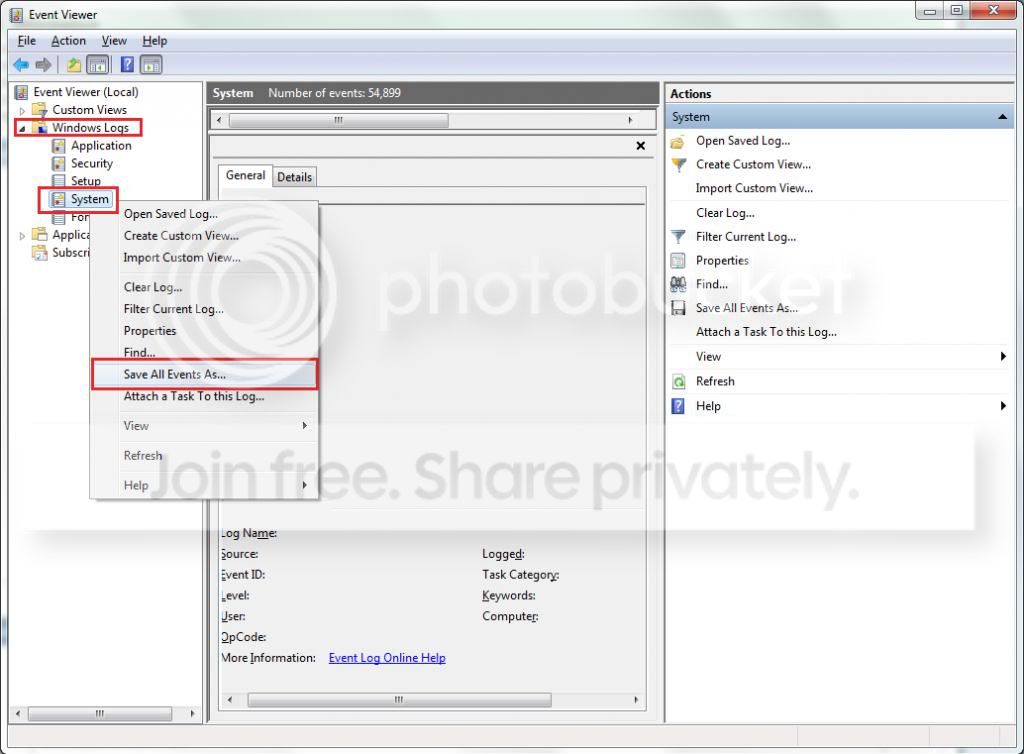
  2. Toggle open the triangle to the left of Windows Logs, right-click on System and choose Save All Events As...
  3. syseventvwrlog1_zps5b0a5395.jpg
  4. A dialogue box will pop up asking you to name the file and select the save directory, name the file the same as your Seven Forums user-name and save it to the desktop.
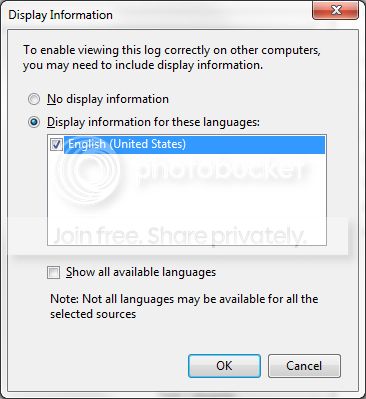
  5. A second dialogue box will appear asking you to select the Display Information, select Display information for these languages and check the box next to English (if you don't have English automatically offered check the box at the bottom to display additional languages - Show all available languages and check English).
  6. syseventvwrlog2_zpsdafa4dba.jpg
  7. Wait a few moments until the cursor returns to normal. The file will now be on your desktop (given it's the directory it was saved to) UserName.evtx, next to it there will be a folder called LocaleMetaData select both the .evtx file as well as the folder and compress them using Winrar / 7zip and attach it in your next post.
 

My Computer My Computer

At a glance

Windows 10Intel Core i5 3570K16GB 1600Mhz G.SkillGigabyte GTX 970 G1-Gaming
Computer type
PC/Desktop
OS
Windows 10
CPU
Intel Core i5 3570K
Motherboard
Asus P8Z77V-PRO
Memory
16GB 1600Mhz G.Skill
Graphics Card(s)
Gigabyte GTX 970 G1-Gaming
PSU
Seasonic 1000W Platinum
Case
Fractal Design Define R4
Cooling
Noctua NH-D14
the error report are:
0x01
0x0a
0x24
0x3b
0xc2
0x7e

then, many problem at driver cdrom at startup (my pc have external cdrom player, don't connect, but I have installed clonedvd and imgburn)
and other problem at windows search
 

My Computer My Computer

At a glance

windows 7 64bit
Computer type
Laptop
OS
windows 7 64bit
What about #6 & #10?
 

My Computer My Computer

At a glance

Windows 10Intel Core i5 3570K16GB 1600Mhz G.SkillGigabyte GTX 970 G1-Gaming
Computer type
PC/Desktop
OS
Windows 10
CPU
Intel Core i5 3570K
Motherboard
Asus P8Z77V-PRO
Memory
16GB 1600Mhz G.Skill
Graphics Card(s)
Gigabyte GTX 970 G1-Gaming
PSU
Seasonic 1000W Platinum
Case
Fractal Design Define R4
Cooling
Noctua NH-D14
Back
Top