Solved Random BSOD's, mainly ntoskrnl.exe but also other errors.

Kreshnak

New member
Member
Local time
2:30 PM
Messages
66
Hello.

I've had BSOD's going on for a while and I've had no idea why until recently when i found out it was because of a .sys file called atikmpag.sys was failing. I solved that by installing new drivers for my graphics card. Then i was "BSOD-free" for about twelve hours until this new ntoskrnl.exe started failing on me aswell. I have no idea how to fix this and I'd like some help with it! The BSOD's come mostly while playing a game for instance WoW. I can sometimes play non-stop for hours, and sometimes it just BSOD on login. Sometimes the whole screen just go blurry and it doesn't go to a BSOD, but it just freezes the whole computer. As I said, I've got no idea how to fix this.

I've uploaded the minidumps from last two days of BSOD's.

I hope that You can help me. I would appreciate it very much!

Kreshnak
 

My Computer My Computer

At a glance

Windows 7 Home Premium x64AMD Athlon II x4 635 @ 2.91ghz4gb Corsair xms3 DDR3AMD Radeon HD7700 Series
Computer type
PC/Desktop
Computer Manufacturer/Model Number
Custom Build
OS
Windows 7 Home Premium x64
CPU
AMD Athlon II x4 635 @ 2.91ghz
Memory
4gb Corsair xms3 DDR3
Graphics Card(s)
AMD Radeon HD7700 Series
Hard Drives
1tb Western Digital
Antivirus
Microsoft Security Essentials
Browser
Chrome

My Computer My Computer

At a glance

Windows 10 Home 64BitIntel Core i5 10400 @ 2.90GHz8.00GB Single-Channel Unknown @ 1329MHz (16-2...
Computer type
PC/Desktop
Computer Manufacturer/Model Number
Self assembled
OS
Windows 10 Home 64Bit
CPU
Intel Core i5 10400 @ 2.90GHz
Motherboard
Intel Corporation DG41WV (PROCESSOR)
Memory
8.00GB Single-Channel Unknown @ 1329MHz (16-20-20-38)
Sound Card
Realtek High Definition Audio
Monitor(s) Displays
DELL E170S
Screen Resolution
1280x1024 pixels
Hard Drives
931GB TOSHIBA DT01ACA100 (SATA)
238GB TEAM TM8PS7256G (SATA SSD)
Case
Nothing Fancy
Cooling
Fans
Keyboard
A4 Tech Co LTD
Mouse
A4 Tech Co Ltd/Logitech
Internet Speed
25 Mbps
Sorry, I rushed it a bit too much.
 

My Computer My Computer

At a glance

Windows 7 Home Premium x64AMD Athlon II x4 635 @ 2.91ghz4gb Corsair xms3 DDR3AMD Radeon HD7700 Series
Computer type
PC/Desktop
Computer Manufacturer/Model Number
Custom Build
OS
Windows 7 Home Premium x64
CPU
AMD Athlon II x4 635 @ 2.91ghz
Memory
4gb Corsair xms3 DDR3
Graphics Card(s)
AMD Radeon HD7700 Series
Hard Drives
1tb Western Digital
Antivirus
Microsoft Security Essentials
Browser
Chrome
Upload a screenshot using:
:tip: For how to upload a screenshot or file, read here

Test your Hard Drive by running:

Reduce items at start up:
Your Antivirus software is basically whats just needed there.

Monitor hardware temperature with system monitoring software like Speccy or HWMonitor:


Test and Diagnose RAM Issues with Memtest86+:
:info: Pay close attention to part 3 of the tutorial "If you have errors"
:tip: Take 10 passes to make sure the RAM is error free

Let us know the results.
 

My Computer My Computer

At a glance

Windows 10 Home 64BitIntel Core i5 10400 @ 2.90GHz8.00GB Single-Channel Unknown @ 1329MHz (16-2...
Computer type
PC/Desktop
Computer Manufacturer/Model Number
Self assembled
OS
Windows 10 Home 64Bit
CPU
Intel Core i5 10400 @ 2.90GHz
Motherboard
Intel Corporation DG41WV (PROCESSOR)
Memory
8.00GB Single-Channel Unknown @ 1329MHz (16-20-20-38)
Sound Card
Realtek High Definition Audio
Monitor(s) Displays
DELL E170S
Screen Resolution
1280x1024 pixels
Hard Drives
931GB TOSHIBA DT01ACA100 (SATA)
238GB TEAM TM8PS7256G (SATA SSD)
Case
Nothing Fancy
Cooling
Fans
Keyboard
A4 Tech Co LTD
Mouse
A4 Tech Co Ltd/Logitech
Internet Speed
25 Mbps
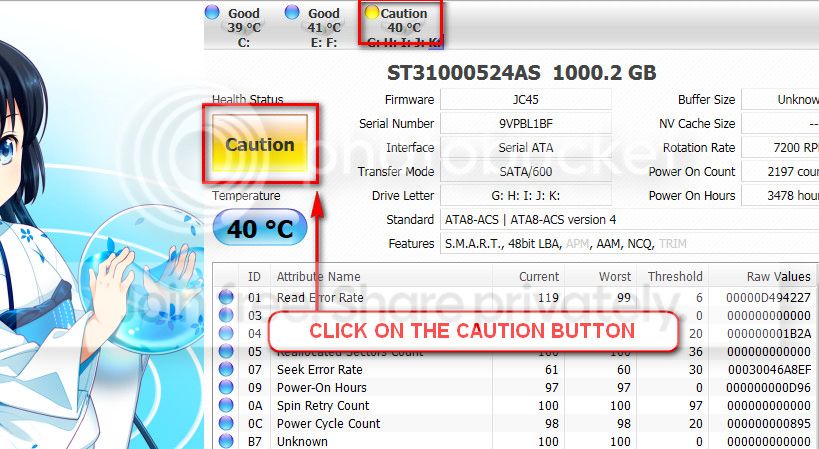
Screenshot of CrystalDiskInfo is attached.

Hard Drive results: "Found bad sectors that may be repairable" and when i clicked repair this came up: "Error was detected while repairing bad sectors."

Only MSE is now enabled on start up.

Attached a screenshot of the CPUID HWMonitor's results.

Ran memtest86 10 passes. No errors.
 

My Computer My Computer

At a glance

Windows 7 Home Premium x64AMD Athlon II x4 635 @ 2.91ghz4gb Corsair xms3 DDR3AMD Radeon HD7700 Series
Computer type
PC/Desktop
Computer Manufacturer/Model Number
Custom Build
OS
Windows 7 Home Premium x64
CPU
AMD Athlon II x4 635 @ 2.91ghz
Memory
4gb Corsair xms3 DDR3
Graphics Card(s)
AMD Radeon HD7700 Series
Hard Drives
1tb Western Digital
Antivirus
Microsoft Security Essentials
Browser
Chrome
Please follow these:
Okay well I am repeatedly asking that cause the BSOD's you are getting 7A and F4 are related to storage device.

From John Carrona's BSOD index: STOP 0x0000007A: KERNEL_DATA_INPAGE_ERROR BSOD Index

Usual causes: Memory, Paging file corruption, File system, Hard drive, Cabling, Virus infection, Improperly seated cards, BIOS, Bad motherboard, Missing Service Pack

STOP 0x000000F4: CRITICAL_OBJECT_TERMINATION BSOD Index
Usual causes:

F4 does not have any usual causes but still related to storage in almost all threads we've solved up to now.

Based on this I am giving you a few links you could go through for a possible solution:
How to Test your Hard Disk Drive for Problems
5 Signs Your Hard Drive Lifetime is Ending & What To Do
Testing a computer hard drive for failures.


Windows Defender Offline: How to Use Windows Defender Offline

Let us know your findings, good luck.

The caution indication can be converted to good using CrystalDiscInfo. Click on the caution Button, you will get another window ....
1_zps1eeadfca.jpg


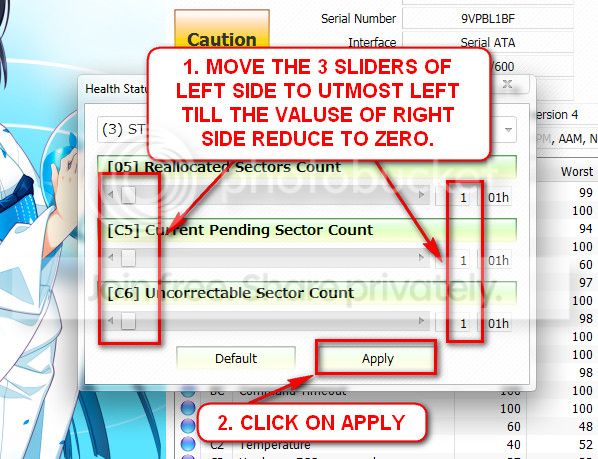
In the resulting window, there are three sliders in the left. Drag them to the ultimate left, and notice the values at the right side are converting to zeros.
2_zps50ae6eec.jpg


Now click the apply button, and notice that the caution is gone.

After these, observe the situation that it is causing more BSODs or not.
 

My Computer My Computer

At a glance

Windows 10 Home 64BitIntel Core i5 10400 @ 2.90GHz8.00GB Single-Channel Unknown @ 1329MHz (16-2...
Computer type
PC/Desktop
Computer Manufacturer/Model Number
Self assembled
OS
Windows 10 Home 64Bit
CPU
Intel Core i5 10400 @ 2.90GHz
Motherboard
Intel Corporation DG41WV (PROCESSOR)
Memory
8.00GB Single-Channel Unknown @ 1329MHz (16-20-20-38)
Sound Card
Realtek High Definition Audio
Monitor(s) Displays
DELL E170S
Screen Resolution
1280x1024 pixels
Hard Drives
931GB TOSHIBA DT01ACA100 (SATA)
238GB TEAM TM8PS7256G (SATA SSD)
Case
Nothing Fancy
Cooling
Fans
Keyboard
A4 Tech Co LTD
Mouse
A4 Tech Co Ltd/Logitech
Internet Speed
25 Mbps
I did the thing with CrystalDiscInfo and didn't notice any difference. It still BSOD as frequently as before. I'll try to find another hard drive to test if it still BSOD with a completely different hard drive. If it doesn't, I'll just buy a new hard drive. If it still BSOD even with another hard drive, I'm left clueless. I'll keep You posted.
 

My Computer My Computer

At a glance

Windows 7 Home Premium x64AMD Athlon II x4 635 @ 2.91ghz4gb Corsair xms3 DDR3AMD Radeon HD7700 Series
Computer type
PC/Desktop
Computer Manufacturer/Model Number
Custom Build
OS
Windows 7 Home Premium x64
CPU
AMD Athlon II x4 635 @ 2.91ghz
Memory
4gb Corsair xms3 DDR3
Graphics Card(s)
AMD Radeon HD7700 Series
Hard Drives
1tb Western Digital
Antivirus
Microsoft Security Essentials
Browser
Chrome

My Computer My Computer

At a glance

Windows 10 Home 64BitIntel Core i5 10400 @ 2.90GHz8.00GB Single-Channel Unknown @ 1329MHz (16-2...
Computer type
PC/Desktop
Computer Manufacturer/Model Number
Self assembled
OS
Windows 10 Home 64Bit
CPU
Intel Core i5 10400 @ 2.90GHz
Motherboard
Intel Corporation DG41WV (PROCESSOR)
Memory
8.00GB Single-Channel Unknown @ 1329MHz (16-20-20-38)
Sound Card
Realtek High Definition Audio
Monitor(s) Displays
DELL E170S
Screen Resolution
1280x1024 pixels
Hard Drives
931GB TOSHIBA DT01ACA100 (SATA)
238GB TEAM TM8PS7256G (SATA SSD)
Case
Nothing Fancy
Cooling
Fans
Keyboard
A4 Tech Co LTD
Mouse
A4 Tech Co Ltd/Logitech
Internet Speed
25 Mbps
Yes, I would like to try a clean reinstall of windows. However I'll do as you suggest and test my hard drive with the other tools first.
 

My Computer My Computer

At a glance

Windows 7 Home Premium x64AMD Athlon II x4 635 @ 2.91ghz4gb Corsair xms3 DDR3AMD Radeon HD7700 Series
Computer type
PC/Desktop
Computer Manufacturer/Model Number
Custom Build
OS
Windows 7 Home Premium x64
CPU
AMD Athlon II x4 635 @ 2.91ghz
Memory
4gb Corsair xms3 DDR3
Graphics Card(s)
AMD Radeon HD7700 Series
Hard Drives
1tb Western Digital
Antivirus
Microsoft Security Essentials
Browser
Chrome
Be sure to post an update.
 

My Computer My Computer

At a glance

Windows 10 Home 64BitIntel Core i5 10400 @ 2.90GHz8.00GB Single-Channel Unknown @ 1329MHz (16-2...
Computer type
PC/Desktop
Computer Manufacturer/Model Number
Self assembled
OS
Windows 10 Home 64Bit
CPU
Intel Core i5 10400 @ 2.90GHz
Motherboard
Intel Corporation DG41WV (PROCESSOR)
Memory
8.00GB Single-Channel Unknown @ 1329MHz (16-20-20-38)
Sound Card
Realtek High Definition Audio
Monitor(s) Displays
DELL E170S
Screen Resolution
1280x1024 pixels
Hard Drives
931GB TOSHIBA DT01ACA100 (SATA)
238GB TEAM TM8PS7256G (SATA SSD)
Case
Nothing Fancy
Cooling
Fans
Keyboard
A4 Tech Co LTD
Mouse
A4 Tech Co Ltd/Logitech
Internet Speed
25 Mbps
I can't seem to do the clean reinstall because i can't do step 4 in the guide. The step where i shall do a recovery disc. I just get an error message saying "Error: The system cannot find the path specified. (0x80070003)" I've tried multiple times and the last time I got another error.
"The backup failed.
"Windows backup failed to create the shared protection point on the source volume (0x8078006B)
"Additional information:
"The specified object was not found. (0x80042308)"
 

My Computer My Computer

At a glance

Windows 7 Home Premium x64AMD Athlon II x4 635 @ 2.91ghz4gb Corsair xms3 DDR3AMD Radeon HD7700 Series
Computer type
PC/Desktop
Computer Manufacturer/Model Number
Custom Build
OS
Windows 7 Home Premium x64
CPU
AMD Athlon II x4 635 @ 2.91ghz
Memory
4gb Corsair xms3 DDR3
Graphics Card(s)
AMD Radeon HD7700 Series
Hard Drives
1tb Western Digital
Antivirus
Microsoft Security Essentials
Browser
Chrome
Sorry I was being a bit vague there. It was when i tried to do the alternative, that i got the errors.
 

My Computer My Computer

At a glance

Windows 7 Home Premium x64AMD Athlon II x4 635 @ 2.91ghz4gb Corsair xms3 DDR3AMD Radeon HD7700 Series
Computer type
PC/Desktop
Computer Manufacturer/Model Number
Custom Build
OS
Windows 7 Home Premium x64
CPU
AMD Athlon II x4 635 @ 2.91ghz
Memory
4gb Corsair xms3 DDR3
Graphics Card(s)
AMD Radeon HD7700 Series
Hard Drives
1tb Western Digital
Antivirus
Microsoft Security Essentials
Browser
Chrome
Another question: Where do I find the Wireless or Ethernet LAN (wired) driver when I have a custom-built computer? Or is that a step that i can skip aswell?
 

My Computer My Computer

At a glance

Windows 7 Home Premium x64AMD Athlon II x4 635 @ 2.91ghz4gb Corsair xms3 DDR3AMD Radeon HD7700 Series
Computer type
PC/Desktop
Computer Manufacturer/Model Number
Custom Build
OS
Windows 7 Home Premium x64
CPU
AMD Athlon II x4 635 @ 2.91ghz
Memory
4gb Corsair xms3 DDR3
Graphics Card(s)
AMD Radeon HD7700 Series
Hard Drives
1tb Western Digital
Antivirus
Microsoft Security Essentials
Browser
Chrome
I'd keep both in my Downloads folder for as long as you have the PC. Find them on the device's Support Downloads webpage, making sure they match the exact make/model/version you have in Device Manager for each.
 
Okay so I've done the clean reinstall of windows. I've had two BSOD already. One because of ntoskrnl.exe and the other because of fltmgr.sys where the error on the last one is BAD_POOL_CALLER.

EDIT:
Also, can't seem to find my external hdd on where i backed up most of my stuff. I had it unplugged while I reinstalled windows, and at first I could find it. But then i got a BSOD while transferring stuff from it and now it's nowhere to be found..
 

My Computer My Computer

At a glance

Windows 7 Home Premium x64AMD Athlon II x4 635 @ 2.91ghz4gb Corsair xms3 DDR3AMD Radeon HD7700 Series
Computer type
PC/Desktop
Computer Manufacturer/Model Number
Custom Build
OS
Windows 7 Home Premium x64
CPU
AMD Athlon II x4 635 @ 2.91ghz
Memory
4gb Corsair xms3 DDR3
Graphics Card(s)
AMD Radeon HD7700 Series
Hard Drives
1tb Western Digital
Antivirus
Microsoft Security Essentials
Browser
Chrome
Is it stable in Safe Mode?

Test your HD using the maker's HD Diagnostic extended CD scan. If WD doesnt have the ISO loaded still then you may need to slave the HD to another PC to run the Windows Long Scan or run bootable Data Lifeguard from a boot disk like Hirens or Ultimate Boot disk.

In addition to those diagnostics run a full Disk Check if necessary from Command Line as shown in the tutorial.

These tests will determine with certainty the HD condition.
 
It seems quite stable in safe mode, yes. I've done both of those tests and the wd disc scan still says "Test found bad sectors that may be repairable", and when I click repair I get the same message as before - "Error was detected while repairing bad sectors."

Also, I have to format my external hdd to be able to open it. But if I do that I'll lose all of my important stuff that is on it. Can I somehow save that before formatting, so that I don't lose it?
 

My Computer My Computer

At a glance

Windows 7 Home Premium x64AMD Athlon II x4 635 @ 2.91ghz4gb Corsair xms3 DDR3AMD Radeon HD7700 Series
Computer type
PC/Desktop
Computer Manufacturer/Model Number
Custom Build
OS
Windows 7 Home Premium x64
CPU
AMD Athlon II x4 635 @ 2.91ghz
Memory
4gb Corsair xms3 DDR3
Graphics Card(s)
AMD Radeon HD7700 Series
Hard Drives
1tb Western Digital
Antivirus
Microsoft Security Essentials
Browser
Chrome
Try plugging the external into another PC to see if it's read. There's no reason it should not be read if you're not using the bad HD, and you didn't touch its data during the reinstall.

Once you plug it into another PC post back a screenshot of http://www.sevenforums.com/tutorial...nt-post-screen-capture-image.html#post2261610

If you can't get Data Lifeguard bootable Extended CD scan to repair the HD then I would replace it.
 
Back
Top