RDP to 7 Running WMC

jamesvdm

New member
Power User
Local time
3:13 PM
Messages
108
Location
Perth, Western Australia
When I remote desktop to a PC running WMC it closes WMC.

This is a pain if I'm at work and have stuff scheduled to record later in the day.

Any way to work around it without creating new user accounts?

cheers
 

My Computer My Computer

Computer Manufacturer/Model Number
Lenovo ThinkPad T400
OS
7 x64
CPU
P8600 2.4Ghz Core 2 Duo
Memory
4096
Graphics Card(s)
3470HD Hybrid
Monitor(s) Displays
14.4"
Screen Resolution
1440 x 900
Hard Drives
60GB OCZ Vertex Turbo + 160GB 5400
Internet Speed
15Mbps
Thanks for the tip but not quite what I'm looking for.

The only real reason I need this is the HTPC runs iTunes and I like to maintain the iTunes library via RDP instead of hooking up a keyboard and mouse.
 

My Computer My Computer

Computer Manufacturer/Model Number
Lenovo ThinkPad T400
OS
7 x64
CPU
P8600 2.4Ghz Core 2 Duo
Memory
4096
Graphics Card(s)
3470HD Hybrid
Monitor(s) Displays
14.4"
Screen Resolution
1440 x 900
Hard Drives
60GB OCZ Vertex Turbo + 160GB 5400
Internet Speed
15Mbps
So, to be clear, at the moment you remote desktop in, from work, you already have your HTPC running WMC, and then you want to manage iTunes remotely also?

I have to ask this question: Can I get a job where you work at?:sarc: and I hope they aren't watching...but perhaps your the boss?

My thought is you're probably pushing it a bit, but I am unsure why WMC would close, except that your system ran out resources?

Not knowing what you use to remote into your home PC, I would be guessing at any answer.

I also think this is a bit off topic for this thread.
 
Last edited:
Haha fair call.

In my iTunes example I might be in another room after work hours.

The computer isn't running out of resources, WMC is designed to close if an RDP session is opened, I just want a way around this.

Thanks anyway.
 

My Computer My Computer

Computer Manufacturer/Model Number
Lenovo ThinkPad T400
OS
7 x64
CPU
P8600 2.4Ghz Core 2 Duo
Memory
4096
Graphics Card(s)
3470HD Hybrid
Monitor(s) Displays
14.4"
Screen Resolution
1440 x 900
Hard Drives
60GB OCZ Vertex Turbo + 160GB 5400
Internet Speed
15Mbps
Oh, I am not stumped, I would need more consistently clear info.

In the case of RDP (in a home environment), in order to remote into a PC, the current user is typically requested to log off, as only one user can be actively logged in.

microsoft windows 7 remote desktop policy - Google Search

Now, we can of course, instead of logging off, use 'switch users' when prompted to log off when a remote user requests control, an option probably turned off on your HTPC, which, of course, would convey the need for an additional & properly configured account.

So, what I would do (at home) on the HTPC that I want to remote into, is this first: Make sure switch users is enabled, then from the local machine directly start up and login as a user and start your WMC, then 'switch user' - now you can RDP in, and do what you like, it should not affect anything running from the other user account, unless a reboot is required, or a currently running service need to be restarted.

As far as remote control of your home PC from work, that is something typically configured and allowed through the companies IT policy, can vary widely, and would need their permission/approval, but... the same principal would apply on the home pc, although I would configure my terminal server to not allow a connection to a remote computer where another user is currently running for security purposes.
 
Thanks for the tips, but...

You must be logged on as the user running iTunes to manage the library. You can't open a concurrent iTunes under another user looking at the same library.
 

My Computer My Computer

Computer Manufacturer/Model Number
Lenovo ThinkPad T400
OS
7 x64
CPU
P8600 2.4Ghz Core 2 Duo
Memory
4096
Graphics Card(s)
3470HD Hybrid
Monitor(s) Displays
14.4"
Screen Resolution
1440 x 900
Hard Drives
60GB OCZ Vertex Turbo + 160GB 5400
Internet Speed
15Mbps
When the current user 'switches user', his apps stay running. When a remote user logs in, if they cannot manage iTunes, just don't have it running already. I am sure my data is accurate, perhaps you could re-review the info presented already? Of course this is the W7 MC thread, I suggest you ask Apple about iTunes.

Also, because you are logged in as an administrator when you remote in, just stop the itunes service the other user is using.

I really believe this is not a W7 WMC issue, which is the thread you are posting in.
 
Last edited:
I'm not just making stuff up to make the problem harder for you. Seriously.

iTunes needs to be running all the time under the HTPC local account because a) people access it via the iPhone remote app, and b) people manage it locally too.

You don't think this should be in the WMC area? My question has always been:

"When I remote desktop to a PC running WMC it closes WMC... Any way to work around it without creating new user accounts?"

Thanks for your help but please, all I'm looking for is something like a reg key that says 'allow wmc to run in rdp session'.
 
Last edited:

My Computer My Computer

Computer Manufacturer/Model Number
Lenovo ThinkPad T400
OS
7 x64
CPU
P8600 2.4Ghz Core 2 Duo
Memory
4096
Graphics Card(s)
3470HD Hybrid
Monitor(s) Displays
14.4"
Screen Resolution
1440 x 900
Hard Drives
60GB OCZ Vertex Turbo + 160GB 5400
Internet Speed
15Mbps
Hi there

Your best bet for Itunes might be to have this running in a Virtual Machine which you don't have to access when you RDP into your main machine. Or use another application which can do recording - there's plenty of streaming / recording etc type applications.

WMC is designed NOT to work in a RDP session.

WMC WILL work in a virtual machine (vmware wks 7 / vmplayer - free) which will get round your problem -- but you won't get VIDEO from TV cards or DVD's -- sound will work of course as well as Web type video.

The virtual machine solution IMO is the best one for you -- needs to be a proper VM - not "Windows XP Mode".

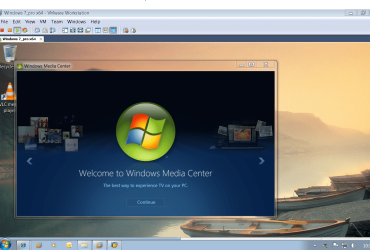
screenshot enc of wmc running on a Virtual machine via RDP

Create a W7 virtual machine - there's enough info on the forums on how to do this- start up WMC on it and then minimize it to the background.

Now RDP to your main machine BUT don't switch into the VM.

If you can set up vmware server (free) this is even better but needs a bit of expertise to get working properly.


Don't forget when you want to finish your RDP session choose DISCONNECT rather than LOGOFF which will actually log you off the host machine. Disconnect still leaves your session running on your remote computer -- you just have to enter your password when you get home as the computer user Locked screen will be displayed.

Some apps like SLINGBOX are good for remote access to video etc.
It's another approach I know but actually might be better for what you want.

Sling Media Slingbox Pro review - IT Reviews

Cheers
jimbo

 

Attachments

  • wmc_vm.png
    wmc_vm.png
    241.9 KB · Views: 81
Last edited:

My Computer My Computer

Computer type
PC/Desktop
Computer Manufacturer/Model Number
Custom built, several laptops HP/ASUS
OS
Linux CENTOS 7 / various Windows OS'es and servers
CPU
Intel i7 Intel i5
Memory
8GB, 16GB
Graphics Card(s)
On Motherboard
Sound Card
Realtek HD audio
Monitor(s) Displays
Apple Cinema display, Samsung LCD
Screen Resolution
1920 X 1080
Hard Drives
4 X 1TB SATA
Mouse
Toshiba wireless laser
Internet Speed
> 20MB up
Back
Top