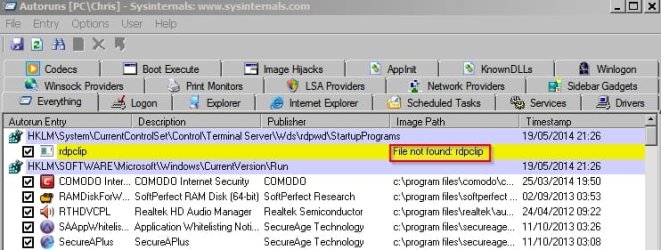
rdpclip File not found: rdpclip

Celaritas

New member
Local time
10:38 PM
Messages
2
Welp I've found that the suggested download to fix this problem. Registry Reviver DID NOT fix the problem. When I ran Autostart Program Viewer, it showed that rdpclip didn't exist. Upon the suggestion of MANY, I bought this registry program. And it did nothing but resolved a few issues. It did not however fix the main reason why I came to this site for help.

Can someone tell me why Windows would recommend this software if it doesn't resolve the issue?

And, is there ANYTHING short of wiping my system to find and fix this "file not found: rdpclip" issue?
 

My Computer My Computer

Computer type
PC/Desktop
Computer Manufacturer/Model Number
Asus
OS
Windows 7 Ultimate x64
CPU
Asus
Motherboard
Asus
Memory
Asus
Graphics Card(s)
Gforce
Hard Drives
Don't know
Antivirus
Bulldog
Browser
Crome
As your first post here, welcome to the forum. I'm not sure where you got the "suggestion of many" but we RARELY suggest registry fixers here. More often than not, they'll scrap a Windows 7 install pretty quick.

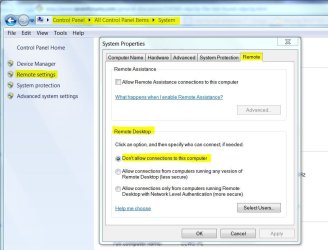
RDPCLIP.EXE is part of the Remote Desktop feature. If you're not using it, it should be disabled for safety. If you are, run SFC /scannow from an elevated command prompt. Report back any console message you get.

Forgot to mention: That program should be in the C:\Windows\System32 folder. If it shows up any place else (other than Winsxs), it could be malware.
 
Last edited:

My Computer My Computer

Computer type
PC/Desktop
Computer Manufacturer/Model Number
Built 2/11/2011
OS
Windows 7 Pro-x64
CPU
i7-2600 3.4GHz - 3.8GHz Turbo
Motherboard
Intel DH67BL-B3
Memory
8Gb - 2x4GB, Muskin 991770 PC3-1333
Graphics Card(s)
Integrated Intel HD 2000
Sound Card
Integrated Intel 10.1 HD, RealTek ALC892
Monitor(s) Displays
Asus LCD VH222H, Haier HL24XSL2a
Screen Resolution
1920x1080, 1920x1080
Hard Drives
Crucial SSD C300-128Gb,
Western Digital WD5002AALX - 500Gb,
Western Digital WD7501AALS - 750Gb
PSU
Seasonic 650W 80+ Gold Modular
Case
Rosewill Defender
Cooling
Stock CPU, Four 120mm case fans, PCH fan added
Keyboard
Logitech EX100 Y-RBH94 Wireless
Mouse
Logitech EX100 M-RCE95 Wireless
Internet Speed
3.0/1.5 Mbs
Antivirus
Microsoft Security Essentials
Browser
Microsoft Internet Explorer 11
Other Info
Antec Veris Premier-Multimedia IR Station,
Cyber Accoustics-3602 Speakers,
AFT XM-5U Card Reader,
Hauppauge TV-HVR-2250,
Sony LX300 USB Turntable
Gotta run for now. Spurs/Heat game crowd showing up. If you want to disable RD, you'll find it here.
 

Attachments

  • Remote Desktop.JPG
    Remote Desktop.JPG
    75.9 KB · Views: 1

My Computer My Computer

Computer type
PC/Desktop
Computer Manufacturer/Model Number
Built 2/11/2011
OS
Windows 7 Pro-x64
CPU
i7-2600 3.4GHz - 3.8GHz Turbo
Motherboard
Intel DH67BL-B3
Memory
8Gb - 2x4GB, Muskin 991770 PC3-1333
Graphics Card(s)
Integrated Intel HD 2000
Sound Card
Integrated Intel 10.1 HD, RealTek ALC892
Monitor(s) Displays
Asus LCD VH222H, Haier HL24XSL2a
Screen Resolution
1920x1080, 1920x1080
Hard Drives
Crucial SSD C300-128Gb,
Western Digital WD5002AALX - 500Gb,
Western Digital WD7501AALS - 750Gb
PSU
Seasonic 650W 80+ Gold Modular
Case
Rosewill Defender
Cooling
Stock CPU, Four 120mm case fans, PCH fan added
Keyboard
Logitech EX100 Y-RBH94 Wireless
Mouse
Logitech EX100 M-RCE95 Wireless
Internet Speed
3.0/1.5 Mbs
Antivirus
Microsoft Security Essentials
Browser
Microsoft Internet Explorer 11
Other Info
Antec Veris Premier-Multimedia IR Station,
Cyber Accoustics-3602 Speakers,
AFT XM-5U Card Reader,
Hauppauge TV-HVR-2250,
Sony LX300 USB Turntable
Welp I've found that the suggested download to fix this problem. Registry Reviver DID NOT fix the problem. When I ran Autostart Program Viewer, it showed that rdpclip didn't exist. Upon the suggestion of MANY, I bought this registry program. And it did nothing but resolved a few issues. It did not however fix the main reason why I came to this site for help.

Can someone tell me why Windows would recommend this software if it doesn't resolve the issue?

And, is there ANYTHING short of wiping my system to find and fix this "file not found: rdpclip" issue?

The members here usually suggest avoiding any registry cleaner software with the exception of CCleaner. Additionally, the reviews for the product don't do much to support its value, do your own search for independent reviews.

I would suggest you discontinue use of the software before you create any real problems by using it.
 

My Computer My Computer

Computer type
PC/Desktop
Computer Manufacturer/Model Number
Custom Built
OS
Windows 7 Professional x64
CPU
Intel i5 quad processor
Motherboard
DP67BG
Memory
16 GB
Graphics Card(s)
Radeon HD 5770
Sound Card
Realtek High Definition Audio
Monitor(s) Displays
Samsung SyncMaster
Screen Resolution
1920X1080
Hard Drives
WD 2TB (SATA Internal)
WD 1TB (USB External)
PSU
Corsair GS800
Case
Tower (Generic)
Cooling
3 Internal Fans
Keyboard
MS Wireless
Mouse
MS Optical Wired
Internet Speed
54 mbps
Antivirus
Emsisoft
Browser
IE-Version 9, Palemoon-Version 24.2.0
Thanks fellas, Carwiz I did just what you suggested. Thanks :)
 

My Computer My Computer

Computer type
PC/Desktop
Computer Manufacturer/Model Number
Asus
OS
Windows 7 Ultimate x64
CPU
Asus
Motherboard
Asus
Memory
Asus
Graphics Card(s)
Gforce
Hard Drives
Don't know
Antivirus
Bulldog
Browser
Crome
For future reference, System File Checker (SFC) is built into Windows and can correct many corrupt or missing system files and/or fix the registry. As mentioned, there's rarely a need for third party software. We often suggest CCleaner but usually with specific settings. It's tried and true for most of us (Seven Forums).
 

My Computer My Computer

Computer type
PC/Desktop
Computer Manufacturer/Model Number
Built 2/11/2011
OS
Windows 7 Pro-x64
CPU
i7-2600 3.4GHz - 3.8GHz Turbo
Motherboard
Intel DH67BL-B3
Memory
8Gb - 2x4GB, Muskin 991770 PC3-1333
Graphics Card(s)
Integrated Intel HD 2000
Sound Card
Integrated Intel 10.1 HD, RealTek ALC892
Monitor(s) Displays
Asus LCD VH222H, Haier HL24XSL2a
Screen Resolution
1920x1080, 1920x1080
Hard Drives
Crucial SSD C300-128Gb,
Western Digital WD5002AALX - 500Gb,
Western Digital WD7501AALS - 750Gb
PSU
Seasonic 650W 80+ Gold Modular
Case
Rosewill Defender
Cooling
Stock CPU, Four 120mm case fans, PCH fan added
Keyboard
Logitech EX100 Y-RBH94 Wireless
Mouse
Logitech EX100 M-RCE95 Wireless
Internet Speed
3.0/1.5 Mbs
Antivirus
Microsoft Security Essentials
Browser
Microsoft Internet Explorer 11
Other Info
Antec Veris Premier-Multimedia IR Station,
Cyber Accoustics-3602 Speakers,
AFT XM-5U Card Reader,
Hauppauge TV-HVR-2250,
Sony LX300 USB Turntable
File not found

Some of those applications that scan for system errors and file errors cannot parse every file or entry and so report "File not found" but it's down to the user to verify that the file really doesn't exist before trying to fix something that might not need fixing.

As far as rdclip goes - you should just leave the entry alone and not delete it!
 

Attachments

  • Autoruns sysinternals.jpg
    Autoruns sysinternals.jpg
    51.9 KB · Views: 0

My Computer My Computer

Computer type
Laptop
Computer Manufacturer/Model Number
ASUS
OS
Microsoft Windows 7 Home Premium 64-bit 7601 Multiprocessor Free Service Pack 1
CPU
AMD C-60 APU with Radeon(tm) HD Graphics
Motherboard
ASUSTeK COMPUTER INC. X501U
Memory
4.00 GB
Graphics Card(s)
AMD Radeon HD 6290 Graphics
Sound Card
(1) AMD High Definition Audio Device (2) Realtek High Defi
Screen Resolution
1366 x 768 x 32 bits (4294967296 colors) @ 60 Hz
Hard Drives
Hitachi HTS545050A7E380 SATA Disk Device
Antivirus
Comodo CIS & FW, SecureAplus App Whitelisting, Threatfire
Browser
Cyberfox 64bit, Opera 64bit, Airfox
Other Info
Spy-The-Spy, HitmanPro.Alert, Norton Connect Safe, MJRegWatcher, BitDefender TrafficLight, Voodoo Shield, Zemana AntiMalware
Back
Top