Solved Re Edge

Yes, I will try. You can pause the videos at the end of each individual part of the procedure.
Can you post a snipped of your Network & Sharing Center please

I have to go to work now, be back on later today.

Snick
 

My Computer

Computer type
PC/Desktop
Computer Manufacturer/Model Number
HP Desktop & Compaq Laptop
OS
Win 10 x64, Linux Lite, Win 7 x64, BlackArch, & Kali
Hard Drives
Samsung 850 Pro 256Gb,
Hitachi HDD 1Tb,
Crucial MX SSD 250Gb
Segate 3Tb USB 3.0 Ext. Backup HDD
Internet Speed
150Mbps dn, 20Mbps up
Antivirus
Avast Free, Malwarebytes Anti-Exploit & Anti-Ransomware
Browser
Firefox, Chrome, Opera, & VPN
I wish I could copy-paste it, but unfortunately it is not possible. I don't know how I could <<post a snipped>>. I appreciate your willingness to help very, very much. I have to go now also.
 

My Computer

Computer type
PC/Desktop
Computer Manufacturer/Model Number
HP
OS
Windows 7 64 bit
Antivirus
Norton

My Computer

Computer type
PC/Desktop
Computer Manufacturer/Model Number
HP Desktop & Compaq Laptop
OS
Win 10 x64, Linux Lite, Win 7 x64, BlackArch, & Kali
Hard Drives
Samsung 850 Pro 256Gb,
Hitachi HDD 1Tb,
Crucial MX SSD 250Gb
Segate 3Tb USB 3.0 Ext. Backup HDD
Internet Speed
150Mbps dn, 20Mbps up
Antivirus
Avast Free, Malwarebytes Anti-Exploit & Anti-Ransomware
Browser
Firefox, Chrome, Opera, & VPN
Here are the instructions to disable IPv6 install Office Starter 2010 and enable IPv6


  1. Click Start Orb lower left corner of your screen
  2. In the searchbox type network and sharing center
  3. When it appears click on it
  4. Next to connections click on Ethernet or WiFi (whichever appears on your screen)
  5. In the popup click Properties
  6. In the scroll box, find the Internet Protocol 6 (IPv6) entry and uncheck the checkbox
  7. Click OK
  8. Click close
  9. Click X in upper right corner of Network and Sharing Center
  10. Restart your computer
  11. Install Office Starter 2010

Follow the procedure again


  1. Click Start Orb lower left corner of your screen
  2. In the searchbox type network and sharing center
  3. When it appears click on it
  4. Next to connections click on Ethernet or WiFi (whichever appears on your screen)
  5. In the popup click Properties
  6. In the scroll box, find the Internet Protocol 6 (IPv6) entry and check the checkbox
  7. Click OK
  8. Click close
  9. Click X in upper right corner of Network and Sharing Center
  10. Restart your computer

Office Starter 2010 should run now and your IPv6 setting is as it was.
 

My Computer

Computer type
PC/Desktop
Computer Manufacturer/Model Number
HP Desktop & Compaq Laptop
OS
Win 10 x64, Linux Lite, Win 7 x64, BlackArch, & Kali
Hard Drives
Samsung 850 Pro 256Gb,
Hitachi HDD 1Tb,
Crucial MX SSD 250Gb
Segate 3Tb USB 3.0 Ext. Backup HDD
Internet Speed
150Mbps dn, 20Mbps up
Antivirus
Avast Free, Malwarebytes Anti-Exploit & Anti-Ransomware
Browser
Firefox, Chrome, Opera, & VPN
We gave you a way to download the free Office Starter which contains Word so I don't know why you have to resort to other software.
 

My Computer

Computer type
Laptop
Computer Manufacturer/Model Number
Dell M6500 Precision Work Station
OS
Windows 7 Pro SP1 64 bit
Memory
8 GB
Screen Resolution
1920x
Internet Speed
30 Mbps
Antivirus
Norton Security
Browser
IE 11
We gave you a way to download the free Office Starter which contains Word so I don't know why you have to resort to other software.

I don't know either, however, I provided info and download for LibreOffice, which, as you are most likely aware, compatible with Microsoft Office. I have numerous Word.docx which have all opened, when formatting completely in tact. Some with extensive formatting. What does have some formatting issues is Excel being opened with LibreOffice Calc, which OP doesn't seem to have a need for.

Apparently OP is having issue with IPv6 blocking Office Starter 2010 as you can see by my repeated attempts to provide step-by-step procedure including video(s). I don't believe they are too complicated. SMH!

As I said before, I received same error message regarding network connection. OS 2010 won't install while IPv6 is enabled in Network & Sharing Center, Ethernet or WiFi properties.

I temporarily disabled IPv6 installed Office Starter 2010 from the link you provided and other download on both my Win7 & Win10 and enabled IPv6 again. Both working.

Snick
 
Last edited:

My Computer

Computer type
PC/Desktop
Computer Manufacturer/Model Number
HP Desktop & Compaq Laptop
OS
Win 10 x64, Linux Lite, Win 7 x64, BlackArch, & Kali
Hard Drives
Samsung 850 Pro 256Gb,
Hitachi HDD 1Tb,
Crucial MX SSD 250Gb
Segate 3Tb USB 3.0 Ext. Backup HDD
Internet Speed
150Mbps dn, 20Mbps up
Antivirus
Avast Free, Malwarebytes Anti-Exploit & Anti-Ransomware
Browser
Firefox, Chrome, Opera, & VPN
Thanks a lot Snick. Let me read your info and try. I will be back tomorrow.
 

My Computer

Computer type
PC/Desktop
Computer Manufacturer/Model Number
HP
OS
Windows 7 64 bit
Antivirus
Norton
When I type Snipping Tool in Start->Search, I get the message <<There is no item that matches your search>>. Any other way to snip?
On the other hand, I downloaded LibreOffice and it works i.e. opens most Word docs, thank God. And, as I have said, another way to open them is to convert them to pdf.
But I still have no way to download Word Starter 2010 by disabling IPv6, or in any other way. Still looking...
 
Last edited:

My Computer

Computer type
PC/Desktop
Computer Manufacturer/Model Number
HP
OS
Windows 7 64 bit
Antivirus
Norton
When I type Snipping Tool in Start->Search, I get the message <<There is no item that matches your search>>. Any other way to snip?
On the other hand, I downloaded LibreOffice and it works i.e. opens most Word docs, thank God. And, as I have said, another way to open them is to convert them to pdf.
But I still have no way to download Word Starter 2010 by disabling IPv6, or in any other way. Still looking...

Yes, there is usually more than one way to perform a function in Windows.

Click Start :orb:
Click All Programs
Click Accessories
It should be there

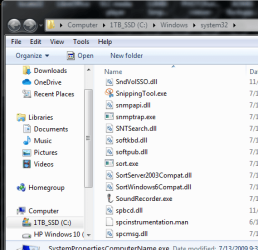
You can also find it via Computer
C:\Windows\system32\SnippingTool.exe
You can also copy and paste the bold text above into the Search Programs and Features textbox

Capture.PNG

Snick
 

My Computer

Computer type
PC/Desktop
Computer Manufacturer/Model Number
HP Desktop & Compaq Laptop
OS
Win 10 x64, Linux Lite, Win 7 x64, BlackArch, & Kali
Hard Drives
Samsung 850 Pro 256Gb,
Hitachi HDD 1Tb,
Crucial MX SSD 250Gb
Segate 3Tb USB 3.0 Ext. Backup HDD
Internet Speed
150Mbps dn, 20Mbps up
Antivirus
Avast Free, Malwarebytes Anti-Exploit & Anti-Ransomware
Browser
Firefox, Chrome, Opera, & VPN
You should be able to open all your Word (.docx) documents with LibreOffice Writer. I have over 100 Word documents that all open with Writer and the formatting is in tact. You can save them as .odt which is default for Writer or numerous other formats, as you can do with M$ Word. Several different Word formats, 200

I had Office 2010 Home & Student one use license. When I upgraded to Win10 on new SSD I couldn't activate it. Therefore, I started using LibreOffice, a free office suite. Little learning curve and I'm satisfied using it.

Snick
 

My Computer

Computer type
PC/Desktop
Computer Manufacturer/Model Number
HP Desktop & Compaq Laptop
OS
Win 10 x64, Linux Lite, Win 7 x64, BlackArch, & Kali
Hard Drives
Samsung 850 Pro 256Gb,
Hitachi HDD 1Tb,
Crucial MX SSD 250Gb
Segate 3Tb USB 3.0 Ext. Backup HDD
Internet Speed
150Mbps dn, 20Mbps up
Antivirus
Avast Free, Malwarebytes Anti-Exploit & Anti-Ransomware
Browser
Firefox, Chrome, Opera, & VPN
Pkpetr

As I stated above, Windows provides more than one way to perform a function or procedure. Accessing IPv6 in properties is no different.

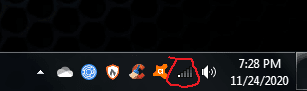
In the lower-right corner of your screen, you can right click the computer icon (Ethernet "wired) connection)

Untitled.png

If you are on WiFi it is the Wifi Icon

Capture.PNG

and choose Open Network and Sharing Center

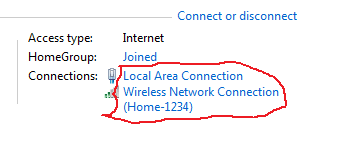
It should open and alongside connections you should see either one or the other as active.
I enabled both which is shown as local connection or Wireless Network Connection (followed by your SSID (Your network name), (mine is Home-1234).

Capture 2.PNG

Click on it and properties should open. From there find IPv6 and uncheck the checkbox, OK, Close, close networ and sharing center, restart your computer, install Office Starter, and repeat the process and recheck IPv6 checkbox, OK, Close, Close network and sharing center, restart. Your Office Starter 2010 Word Starter should be operational and your computer is as it was.

I believe I may have confused you because I posted the Network and Sharing Center from my Windows 10 which, next to connections shows ethernet, not local connection. My apologies if that is the case. Didn't realize it was different wording, however, if you click on the connection hypertext link to the right of the word connections, the properties popup opens.

Don't know why Microsoft changed the term, other than it may be more descriptive as Ethernet is Wired & WiFi is Wireless. Gotta love M$

Snick
 

My Computer

Computer type
PC/Desktop
Computer Manufacturer/Model Number
HP Desktop & Compaq Laptop
OS
Win 10 x64, Linux Lite, Win 7 x64, BlackArch, & Kali
Hard Drives
Samsung 850 Pro 256Gb,
Hitachi HDD 1Tb,
Crucial MX SSD 250Gb
Segate 3Tb USB 3.0 Ext. Backup HDD
Internet Speed
150Mbps dn, 20Mbps up
Antivirus
Avast Free, Malwarebytes Anti-Exploit & Anti-Ransomware
Browser
Firefox, Chrome, Opera, & VPN
Hi Snick. I finally found Snipping Tool and saved my Network & Sharing Center. How do I send it here. Copy-paste doesn't work. Thanks.
 

My Computer

Computer type
PC/Desktop
Computer Manufacturer/Model Number
HP
OS
Windows 7 64 bit
Antivirus
Norton
In one post I am told to remove-uncheck- iPv6, in another iPv3. Which one is correct. I removed iPv6, downloaded Msft Office Starter 2020, then restarted, then enabled iPv6 again, then restarted, but Word documents will not open.
 
Last edited:

My Computer

Computer type
PC/Desktop
Computer Manufacturer/Model Number
HP
OS
Windows 7 64 bit
Antivirus
Norton
(cont'd) I get message <<Msft Office has encountered a problem w/licensing and will need to close>>.
 

My Computer

Computer type
PC/Desktop
Computer Manufacturer/Model Number
HP
OS
Windows 7 64 bit
Antivirus
Norton
I'm glad you finally found out how to get to the settings. I was just getting ready to post an image of my Network and Settings Center, because it's different than what Snick posted when I realized you and Snick solved that.

Just for information, to post an image file from your hard drive, you need to click on Go Advanced at the bottom of the Quick Reply box. There will be a paper clip icon in the tool bar. When you click on that, you can browse to your image file and then upload it.

I assume that when you first started Word, it said it was downloading files and in middle of that it asked you for your name and initials. Is that correct?
 

My Computer

Computer type
Laptop
Computer Manufacturer/Model Number
Dell M6500 Precision Work Station
OS
Windows 7 Pro SP1 64 bit
Memory
8 GB
Screen Resolution
1920x
Internet Speed
30 Mbps
Antivirus
Norton Security
Browser
IE 11
That's correct, if I remember correctly, because Word hasn't worked for months. As to posting an image file from my hard drive, sorry, I did not understand. Where is <<Go Advanced at the bottom of the Quick Reply box>>? And where is the <<paper clip icon in the tool bar>>?
 

My Computer

Computer type
PC/Desktop
Computer Manufacturer/Model Number
HP
OS
Windows 7 64 bit
Antivirus
Norton
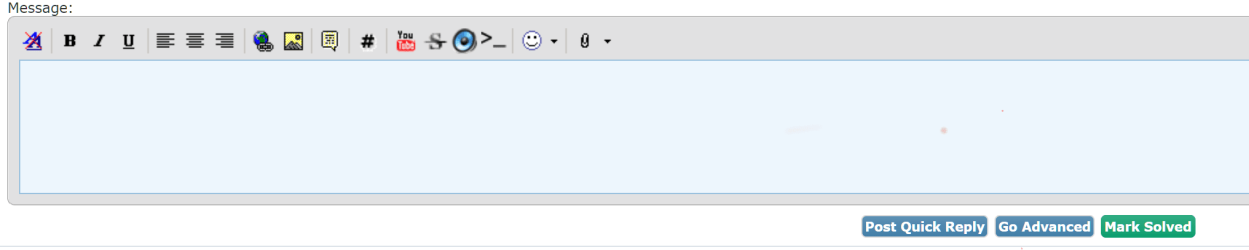
They should both be visible on the Quick Reply Pane under the last post , the Paperclip is an Icon [Last icon in the image below] and the Go Advanced is a button marked with text at the lower right

Annotation 2020-11-26 102454.png
 

My Computers

System One System Two

  • Computer type
    PC/Desktop
    Computer Manufacturer/Model Number
    ChillBlast - Custom to my design
    OS
    Windows 11 Pro x64 [Latest Release and Release Preview]
    CPU
    Ryzen 9 5950X, 3.8 - 5.2 MHz
    Motherboard
    Asus Prime X570-Pro
    Memory
    64GB [2 x 32GB] DDR4 3200MHz
    Graphics Card(s)
    4GB NVIDIA GEFORCE GTX 1650 Ti
    Sound Card
    On-board SPDIF to 5.1 System + HDMI [5.1 system]
    Monitor(s) Displays
    32" UHD 32 Bit HDR Monitor + 43" UHD 4K 32Bit HDR TV
    Screen Resolution
    2 x 3840 x 2160 @60Hz
    Hard Drives
    1TB M2 SSD OS, 500GB Fast Access SSD, 2 x 8TB Data + Various Externals from 1TB to 4TB, 10TB NAS
    PSU
    NZXT C750 80 PLUS Gold 750W Modular PSU
    Case
    Workstation Case [Matt Black]
    Cooling
    NZXT Kraken X63 280mm CPU Cooler +2x Quiet Case fans
    Keyboard
    Logitech Wireless MX Keys & K400 + others
    Mouse
    Logitech Wireless MX Master 3S
    Internet Speed
    920 MB Down 50 MB Up
    Antivirus
    BitDefender Total Security Pro
    Browser
    Chrome (always run latest Non-Beta)
    Other Info
    Also run ...
    Laptop - Quad 8GB - Windows 10 Pro x64
    Nexus 7 Android tablet x2
    Samsung 10.2" tablet
    Blackview TAB 8 4G Android Tablet c/w Keyboard
    Wacom Intuos Pro Medium Pen Pad
    Wacom Intuos Pro Small Pen Pad
    Wacom Expresskeys Remote
    Loopdeck+ Graphics Controller
    Shuttle Pro v2 Control
  • Computer type
    Laptop
    System Manufacturer/Model Number
    Dell XPS 17 10750H
    OS
    Windows 11 Pro x64 Latest RP
    CPU
    Intel I7 10750H 5.0GHz
    Motherboard
    Dell XPS
    Memory
    32GB [2x16GB] DDR4 2933 MHz
    Graphics Card(s)
    nVidia GTX1650Ti 4 GB GDDR6
    Sound Card
    Stock [Realtek] 4 Speaker
    Monitor(s) Displays
    17" IPS UHD+ Infinity Edge Touchscreen
    Screen Resolution
    3840 x 2400
    Hard Drives
    2TB M2 NVMe, 4TB External + various 500GB & 1TB External NVMe (also have access to spinner HDD from
    PSU
    Stock
    Case
    Stock XPS Aluminium & Carbon Fibre
    Cooling
    Stock - Active Fan Control
    Keyboard
    Backlit + Various Logitech
    Mouse
    Stock Track Pad + Logitech MX Trackball
    Internet Speed
    72 MB Down 18MB Up
    Browser
    Chrome
    Other Info
    Also run ...
    Laptop - Quad 8GB - Windows 10 Pro x64
    Nexus 7 Android tablet x2
    10.2" tablet
    Sony Z3 Android Smartphone
    Wacom Intuos Pro Medium Pen Pad
    Wacom Intuos Pro Small Pen Pad
    Wacom Expresskeys Remote
    Loopdeck+ Graphics Controller
    Shuttle Pro v2 Control Pad
    10TB NAS
Network & Sharing Center

OK, I finally managed to upload my <<Network & Sharing Center>>, thanks to your instructions. It is below listed as Capture.PNG. Now what?
 

Attachments

  • Capture.PNG
    Capture.PNG
    38.8 KB · Views: 9

My Computer

Computer type
PC/Desktop
Computer Manufacturer/Model Number
HP
OS
Windows 7 64 bit
Antivirus
Norton
They should both be visible on the Quick Reply Pane under the last post , the Paperclip is an Icon [Last icon in the image below] and the Go Advanced is a button marked with text at the lower right

View attachment 412891

Isn't that interesting. It wasn't there for me yesterday.

Pkptr- We don't a screenshot anymore but what Snick wanted to see was the screen when you opened Control Panel, Network and Sharing Center.

You said earlier-

In one post I am told to remove-uncheck- iPv6, in another iPv3. Which one is correct. I removed iPv6, downloaded Msft Office Starter 2020, then restarted, then enabled iPv6 again, then restarted, but Word documents will not open.

Did you re-enable iPV6 before you installed or after? If after, did you do that before you tried to start Word? The first time you open it, it should display a screen asking you how you want to set it up. "Use Recommended Settings" is first on that screen. If you selected that, it needs to download files and I don't know whether or not iPV6 affects that. Also, in the middle of the downloads, it asks you if you agree to the Microsoft License Agreement. Do you remember seeing that screen and agreeing to it? Note that the latter screen takes a while to come up.
 

My Computer

Computer type
Laptop
Computer Manufacturer/Model Number
Dell M6500 Precision Work Station
OS
Windows 7 Pro SP1 64 bit
Memory
8 GB
Screen Resolution
1920x
Internet Speed
30 Mbps
Antivirus
Norton Security
Browser
IE 11
Pkpetr

Sorry for the delay responding. Work issues!

Internet Protocol only has two iterations
IPv4 & IPv6, there is no IPv3. I assume the 3 is a typo.
I don't know how you arrived at the screen you posted, it was apparently not via control panel, network and internet, network and sharing center
Or start :orb: searchbox typing, network and sharing center.

On wither 2's last post, did you try disabling IPv6 again and try using Office Starter Word 2010. I didn't have an issue on either my Win7 or Win10 opening documents with IPv6 enabled.

Snick
 
Last edited:

My Computer

Computer type
PC/Desktop
Computer Manufacturer/Model Number
HP Desktop & Compaq Laptop
OS
Win 10 x64, Linux Lite, Win 7 x64, BlackArch, & Kali
Hard Drives
Samsung 850 Pro 256Gb,
Hitachi HDD 1Tb,
Crucial MX SSD 250Gb
Segate 3Tb USB 3.0 Ext. Backup HDD
Internet Speed
150Mbps dn, 20Mbps up
Antivirus
Avast Free, Malwarebytes Anti-Exploit & Anti-Ransomware
Browser
Firefox, Chrome, Opera, & VPN
Back
Top