As I have said I have Windows 7 64-bit. I am still looking for a way to download and reinstall a free Word (Word Starter 2010 is the one I lost, when I uninstalled it hoping I could reinstall it), in order to be able to read and/or print my Word docs. Don't be misled by several websites saying "download". It does not work. If you are sure and have tried one that works please let me know. All other Msft Office etc are not free.
I then tried System Restore, but it will only go back a few days, not 2-3 months which is what I need. Even when I click and ask it to do so.
I haven't tried LibreOffice yet, because I am not sure it would open all my Word docs.
IPv6 I don't know what it is or what would do to my PC if I enable or disable it, and anyway when I click Network Connections it is not there.
Only way I have found so far in order to read and/or print my Word docs is -thank God- to convert them to Pdfs.
Thank you all for your help so far, even though my problem of installing a free Word is not yet sold.
Why do you ask for help then not trust us when we try to help you, go to other websites, validate your mistrust then post it here? We provide free help! We are not here to cause you further problems with your computer, but to attempt to resolve your issue, which I have provided a solution for, on more than one of the threads you started regarding this issue.
As to your distrust about temporarily disabling IPv6, it doesn't affect your security. The problem with Office Starter 2010 is this, the install process attempts to access the internet, it is designed to work through IPv4, when IPv6 is enabled, it attempts to use that and it won't work thus the internet connection error.
Therefore, you have to temporarily disable IPv6 so that Office Starter 2010 uses what it was written/designed to use which IPv4. You disable IPv6, reboot to apply the changes, install Office Starter 2010, reboot, enable IPv6, reboot, and Office Starter 2010 is installed, working, and your computer is as it was. Simple!!
Why do you remain pessimistic?
IPv4 & IPv6 are
Internet
Protocol
version
4 &
6 respectively.
IPv4 uses a 32-bit address for its Internet addresses. ...
IPv6 utilizes 128-bit Internet addresses. Therefore, it can support 2^128 Internet addresses—340,282,366,920,938,463,463,374,607,431,768,211,456 of them to be exact. The number of
IPv6 addresses is 1028 times larger than the number of
IPv4 addresses.
IPv4 is a 32-Bit IP Address.
IPv6 is 128 Bit IP Address.
IPv4 is a numeric address, and its binary bits are separated by a dot (.)
IPv6 is an alphanumeric address whose binary bits are separated by a colon

).
With all the IP addresses we now have, it was not considered at the time, we would run out of IPv4 addresses, therefore, IPv6 was rolled out and implemented so that many, many more websites could be added
Snick



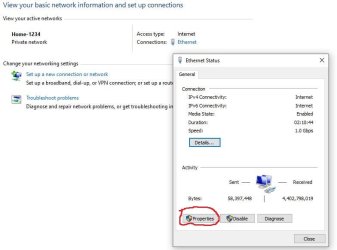

 rb: in search box type network and sharing, click on it when it appears. Next to connections click on Ethernet or WiFi depending on what you screen says, In the popup, click on properties, the find the IPv3 entry, and uncheck the checkbox. click on ok, close, close network and sharing via the x in upper-right hand corner.

