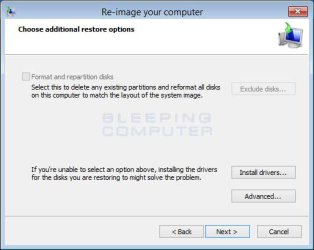
re-image your computer dialog chokes on .vhd file

tomj1

New member
Local time
8:52 AM
Messages
6
I've had a problem with the c drive on a dual drive asus gh73 lap top and have in hand a disk image backup that was created with ms backup on a separate HDD connected to the asus with a usb cable. There is a .vhd file there which I am trying to get the "re-image your computer" to use, but when I select that file I get the error message "the specified location does not contain information about your hardware" There are other files present on the drive that the MS backup software created, but I tried all of them and get the same error. Anyone know what I'm doing wrong?

tom
 

My Computer My Computer

At a glance

win7 home
Computer type
PC/Desktop
OS
win7 home
Windows system image restore needs to see a folder called WindowsImageBackup. Within this folder is important information including the vhd file(s).
http://www.sevenforums.com/tutorials/675-system-image-recovery.html
If you are desperate you can attach the vhd, image the mounted image with Macrium Reflect and attempt to restore that image.
 

My Computer My Computer

At a glance

Windows 7x64 Home Premium SP1Intel i7 2600kG.Skill Ripjaws (DDR3-1600) 2x4GBNvidia GeForce GTS 450; Intel HD Graphics 300...
Computer type
PC/Desktop
Computer Manufacturer/Model Number
Own build
OS
Windows 7x64 Home Premium SP1
CPU
Intel i7 2600k
Motherboard
ASUS P8Z68 Deluxe
Memory
G.Skill Ripjaws (DDR3-1600) 2x4GB
Graphics Card(s)
Nvidia GeForce GTS 450; Intel HD Graphics 3000(GT2+)
Monitor(s) Displays
Dell Ultrasharp IPS panel U2311H, Samsung SyncMaster P2350
Screen Resolution
1920x1080
Hard Drives
Samsung 850 Pro SSD 256GB, Samsung SSD 840 120GB, Seagates 1TB Barracuda ST31000528AS x2
PSU
Seasonic M12II 520W
Case
Lian Li Lancool PC-K60
Cooling
Case: 1x120mm, 3x140mm CPU: Hyper 212+
Keyboard
Logitech MK520 (wireless)
Mouse
Logitech MK520
Internet Speed
6-7 Mbps
Antivirus
Norton Security Premium, Malwarebytes on 2 (MSE on 3rd PC)
Browser
FireFox
Other Info
Audio: Logitech Z523 2.1
Thanks for the link. I navigate to that folder and the dialog box only gives me the option to open it and then it looks like I need to pick and actual FILE inside the folder, all of which give that same error message "the specified location does not contain information about your hardware".
I tried another route and got stuck at the choose additional restore options page, but to my GREAT disappointment the "format and repartition disks" check box is greyed out. Any idea why or where to go next? The Macrium option may be further above my capability than the mess I'm already in!

thanks
tom
 

Attachments

  • additional-options.jpg
    additional-options.jpg
    21.5 KB · Views: 3

My Computer My Computer

At a glance

win7 home
Computer type
PC/Desktop
OS
win7 home
did a little more research-how could it be that re-image your computer may think that I'm restoring from an image file ON THE SAME DRIVE I'M TRYING TO RESTORE? in the "select date and time of the system image to restore" it says

backups available for ellenasus on ellen backup 1 for disk O (I:)
date and time drives in backup
12/13/19 12:24:03 C:

see no.7 here:
http://www.sevenforums.com/tutorials/675-system-image-recovery.html

The backup is on a hdd connected to the pc with a usb cable and is divided into a number of logical drives, I'm trying to restore the c drive (O) on ellenasus (pc name) with the backup file in drive I on the HDD, can't understand why the selection would be greyed out.....
 

My Computer My Computer

At a glance

win7 home
Computer type
PC/Desktop
OS
win7 home
I thought I solved my own problem, I clicked next and it started to do its thing. I did not infer from the above that I could proceed without installing drivers. Gawd, there's plenty of space in the damn dialog box, letting everyone know that would have been nice...BUT, "the system image restore failed" error details: the request could not be performed due to an I/O device error (0x8007045d)
this link:
Backup and Restore - 0x8007045D Error
shows the same error, but only when MAKING the backup not restoring. Not sure where to go from here...could this be because the disk I'm trying to restore to is too far gone to fix? If that's the case I was planning to replace it with an SSD at some point but I was hoping to get it running again as is before I do that.
 

My Computer My Computer

At a glance

win7 home
Computer type
PC/Desktop
OS
win7 home
Back
Top