Re-install Win7 saving Programs and program updates.

chezler

New member
Local time
4:01 PM
Messages
18
Location
Central Ohio
Is it possible to reinstall W7 in order to get rid of Windows updates, without losing my installed Programs and their updates?

I have been building and servicing computers (at home for friends and family) since 1996. About 100 builds total. Taught data entry and maintained 20+ computers for a manufacturing plant for over ten years.
I am NOT a programmer, I am NOT an IT tech, but I do know my way around a computer.

I built my current computer about six years ago to, hopefully last 15+ years: Corsair 600T case. (I think it has a bathroom with a shower in there somewhere, it's huge),| PSU= PC Power&Cooling 760w Silencer (SLI/Crossfire ready), | ASUS MoBo= Sabertooth 990FX (1st version), | CPU= AMD 8320FX 8-core with Noctua air cooler, | 16Gigs HyperX Memory, | Video cards= 2 HIS IceQ-X HD6870 in Crossfire, | Hard Drives=Crucial M4 SSD 128 GiG with W7 Pro using a Seagate 320 Gig Barracuda for Page file and program specific files, | Seagate Constellation 1TB with W7 pro (my gaming drive), | Samsung 850 EVO 500Gig with W10 Home, | Internal Seagate Constellation 1TB for back up, | WD 500 Gig plugged into an external SATA drive dock for back up.

This system ran without issues of any kind until I installed Win 10 in July. Now my Win 7 drive won't boot.
Before conclusions are jumped on, I've tried it.
Been in forums; Windows 10 forum, ASUS forum, MS formu, Bleepingcomputers. I've had E-Mail discussions with four different ASUS techs, Phone calls for total of over an hour with two more ASUS techs.
My particular motherboard has no options to; disable Secure Boot, Change OS type, Change or delete Keys, or enter UEFI Settings.
ASUS is stumped, and I an stumped.

I don't want to Clean install and start over. I have years of building my program base, updating them, tweaking them to my liking. All of them are legally purchased, ( mostly expensive ) and registered.
Starting over would be a huge pain in the ,...

I have been tempted to go into Registry and the system folders and just rip out the update that I want gone. I have done that sort of thing on many occasions, I ain't scared and have had great success at it. Only thing, HUNDREDS of entries relating to it.
(KB3133977). That update is the problem. MS "accidentally" changed it form "OPTIONAL" to "RECOMMENDED" ( which automatically installs ) early this year and screwed up a lot of ASUS based systems.

I can access files and folders through File Explorer, I can even run a couple minor programs. I can see inside most folders. One I did look at was my Restore Points. They are all gone except for 3 in JULY. But can't boot to restore anyway.
Need that update to go away.

Any Ideas? Thanks in advance.
 

My Computer

Computer type
PC/Desktop
Computer Manufacturer/Model Number
Home built
OS
Windows 7 Pro 64 bit
CPU
AMD 8320 FX 8-core
Motherboard
ASUS Sabertooth 990 FX rev.1
Memory
16 gigs HyperX
Graphics Card(s)
HIS IceQ HD6870 (2 each CrossFire)
Hard Drives
Crucial M4 128 gig, 850 EVO 250 gig, 2 each Seagate constellations 1TB each, Seagate Barracuda 320 gig, WD 240gig, WD 500gig.
PSU
PC Power & Cooling Silencer 760
Case
Corsair 600T
Cooling
Noctua
Antivirus
Kaspersky Total security
Browser
Chrome
"I can access files and folders through File Explorer"
How are you doing that if it won't boot?

Did you attempt system restore from some kind of winpe boot media?
 

My Computers

System One System Two

  • Computer type
    PC/Desktop
    OS
    7 X64
    CPU
    i5 8400
    Motherboard
    gigabyte b365m ds3h
    Memory
    2x8gb 3200mhz
    Hard Drives
    various
    PSU
    pure power 11 400w cm
    Case
    Coolermaster
    Cooling
    cryorig m9i
  • Computer type
    PC/Desktop
    OS
    7x64
    CPU
    g5400
    Motherboard
    ga b365m ds3h
    Memory
    8gb ddr4 2400
    PSU
    xfx pro 450w
SIW2, Thanks for reply.

Yes. I used the tools on my Win7 installation disk. It would only give me the option to re-install, losing everything. Tried 3 times, canceled out each time before wiping anything.
According to the restore folder, dates don't go back far enough anyway. I would need to go back to before the update was installed. 2/06/16 Restore dates are only in July 2016.
 

My Computer

Computer type
PC/Desktop
Computer Manufacturer/Model Number
Home built
OS
Windows 7 Pro 64 bit
CPU
AMD 8320 FX 8-core
Motherboard
ASUS Sabertooth 990 FX rev.1
Memory
16 gigs HyperX
Graphics Card(s)
HIS IceQ HD6870 (2 each CrossFire)
Hard Drives
Crucial M4 128 gig, 850 EVO 250 gig, 2 each Seagate constellations 1TB each, Seagate Barracuda 320 gig, WD 240gig, WD 500gig.
PSU
PC Power & Cooling Silencer 760
Case
Corsair 600T
Cooling
Noctua
Antivirus
Kaspersky Total security
Browser
Chrome
SIW2 "I can access files and folders through File Explorer"
How are you doing that if it won't boot?

I can access it like it is a Back-up drive. The drive works fine, all the data is there, it just won't boot because of the Secure Boot issue.

My computer works fine. I have a hard drive with a second installation of W7 Pro that has been in here for about 3 years. I have "Auto update" turned off. That is my gaming hard drive, which is what I am using now.
It never received that update, but it does have all critical and recommended updates that I have installed manually.
I also have W10 on another SSD but I disconnected it til this is resolved. If I do find a way to turn off Secure Boot, W10 would turn it back on.
I like W7 better anyways.
 

My Computer

Computer type
PC/Desktop
Computer Manufacturer/Model Number
Home built
OS
Windows 7 Pro 64 bit
CPU
AMD 8320 FX 8-core
Motherboard
ASUS Sabertooth 990 FX rev.1
Memory
16 gigs HyperX
Graphics Card(s)
HIS IceQ HD6870 (2 each CrossFire)
Hard Drives
Crucial M4 128 gig, 850 EVO 250 gig, 2 each Seagate constellations 1TB each, Seagate Barracuda 320 gig, WD 240gig, WD 500gig.
PSU
PC Power & Cooling Silencer 760
Case
Corsair 600T
Cooling
Noctua
Antivirus
Kaspersky Total security
Browser
Chrome
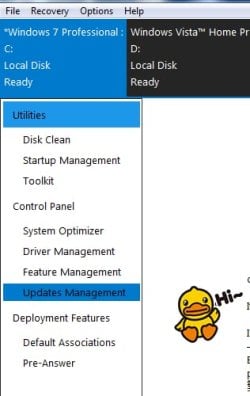
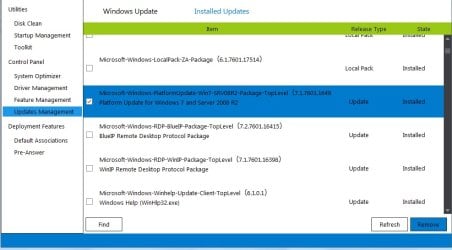
Run this on your other win 7 install, and select (highlight) the affected installation. then select "update management". click "installed updates. It will scan for a few seconds.

Tick what you want to remove.

Or you can use my boot disc which includes that program.

EDIT: Just realized,latest version it isn't included in that boot disc. It is an earler version , but should still do the job
 
Last edited:

My Computers

System One System Two

  • Computer type
    PC/Desktop
    OS
    7 X64
    CPU
    i5 8400
    Motherboard
    gigabyte b365m ds3h
    Memory
    2x8gb 3200mhz
    Hard Drives
    various
    PSU
    pure power 11 400w cm
    Case
    Coolermaster
    Cooling
    cryorig m9i
  • Computer type
    PC/Desktop
    OS
    7x64
    CPU
    g5400
    Motherboard
    ga b365m ds3h
    Memory
    8gb ddr4 2400
    PSU
    xfx pro 450w
SIW2
Just to be clear since I've never heard of this.
Run it on the W7 I'm using now, and select the hard drive that won't boot?
 

My Computer

Computer type
PC/Desktop
Computer Manufacturer/Model Number
Home built
OS
Windows 7 Pro 64 bit
CPU
AMD 8320 FX 8-core
Motherboard
ASUS Sabertooth 990 FX rev.1
Memory
16 gigs HyperX
Graphics Card(s)
HIS IceQ HD6870 (2 each CrossFire)
Hard Drives
Crucial M4 128 gig, 850 EVO 250 gig, 2 each Seagate constellations 1TB each, Seagate Barracuda 320 gig, WD 240gig, WD 500gig.
PSU
PC Power & Cooling Silencer 760
Case
Corsair 600T
Cooling
Noctua
Antivirus
Kaspersky Total security
Browser
Chrome
It will automatically find all windows installations on your machine.

Highlight the sick install, select "open session", then select "update management".


d++.jpg


Click "installed updates" and it will scan then list them. Tick the box next to the one you want to remove.


d++2.jpg
 

My Computers

System One System Two

  • Computer type
    PC/Desktop
    OS
    7 X64
    CPU
    i5 8400
    Motherboard
    gigabyte b365m ds3h
    Memory
    2x8gb 3200mhz
    Hard Drives
    various
    PSU
    pure power 11 400w cm
    Case
    Coolermaster
    Cooling
    cryorig m9i
  • Computer type
    PC/Desktop
    OS
    7x64
    CPU
    g5400
    Motherboard
    ga b365m ds3h
    Memory
    8gb ddr4 2400
    PSU
    xfx pro 450w
SIW2
Disregard last post.
I LIKE that utility.
Have removed the update. Will try to boot to that drive now. Must sign off now and will report what I find.
Thanks
 

My Computer

Computer type
PC/Desktop
Computer Manufacturer/Model Number
Home built
OS
Windows 7 Pro 64 bit
CPU
AMD 8320 FX 8-core
Motherboard
ASUS Sabertooth 990 FX rev.1
Memory
16 gigs HyperX
Graphics Card(s)
HIS IceQ HD6870 (2 each CrossFire)
Hard Drives
Crucial M4 128 gig, 850 EVO 250 gig, 2 each Seagate constellations 1TB each, Seagate Barracuda 320 gig, WD 240gig, WD 500gig.
PSU
PC Power & Cooling Silencer 760
Case
Corsair 600T
Cooling
Noctua
Antivirus
Kaspersky Total security
Browser
Chrome
Good luck.
 

My Computers

System One System Two

  • Computer type
    PC/Desktop
    OS
    7 X64
    CPU
    i5 8400
    Motherboard
    gigabyte b365m ds3h
    Memory
    2x8gb 3200mhz
    Hard Drives
    various
    PSU
    pure power 11 400w cm
    Case
    Coolermaster
    Cooling
    cryorig m9i
  • Computer type
    PC/Desktop
    OS
    7x64
    CPU
    g5400
    Motherboard
    ga b365m ds3h
    Memory
    8gb ddr4 2400
    PSU
    xfx pro 450w
Well, that didn't work. It removed the listing for that update in the list of installed updates, but it is still in the registry and all the packages are still in windows/servicing/packages
Thanks. Still working on it.
 

My Computer

Computer type
PC/Desktop
Computer Manufacturer/Model Number
Home built
OS
Windows 7 Pro 64 bit
CPU
AMD 8320 FX 8-core
Motherboard
ASUS Sabertooth 990 FX rev.1
Memory
16 gigs HyperX
Graphics Card(s)
HIS IceQ HD6870 (2 each CrossFire)
Hard Drives
Crucial M4 128 gig, 850 EVO 250 gig, 2 each Seagate constellations 1TB each, Seagate Barracuda 320 gig, WD 240gig, WD 500gig.
PSU
PC Power & Cooling Silencer 760
Case
Corsair 600T
Cooling
Noctua
Antivirus
Kaspersky Total security
Browser
Chrome
I did some more research at Microsoft regarding UEFI BIOS.
It is a "Requirement" of Microsoft to have the ability to disable Secure Boot, enable CSM, and update the signature database.
I have included some quotes from Microsoft in my communication with ASUS this morning pointing that out, and requesting a higher level tech if they don't know how to do it. I tried to be tactful so as to not ruffle any feathers there. I will see if I get response.
 

My Computer

Computer type
PC/Desktop
Computer Manufacturer/Model Number
Home built
OS
Windows 7 Pro 64 bit
CPU
AMD 8320 FX 8-core
Motherboard
ASUS Sabertooth 990 FX rev.1
Memory
16 gigs HyperX
Graphics Card(s)
HIS IceQ HD6870 (2 each CrossFire)
Hard Drives
Crucial M4 128 gig, 850 EVO 250 gig, 2 each Seagate constellations 1TB each, Seagate Barracuda 320 gig, WD 240gig, WD 500gig.
PSU
PC Power & Cooling Silencer 760
Case
Corsair 600T
Cooling
Noctua
Antivirus
Kaspersky Total security
Browser
Chrome
Yes, that is normal. The update has been uninstalled. Those entries and files should be removed at next boot.
Look at the most recent servicng\sessions xml file. The update is no longer active.

Whatever happened to the Asus secure boot hasn't been reversed.

Very odd you can't get into bios as Asus claim that should be possible:

After installing Microsoft Update KB3133977 for Windows 7, some users may encounter a "Secure Boot Violation" , which makes the system fail to boot into the operating system.


Well, that didn't work. It removed the listing for that update in the list of installed updates, but it is still in the registry and all the packages are still in windows/servicing/packages
Thanks. Still working on it.
 

My Computers

System One System Two

  • Computer type
    PC/Desktop
    OS
    7 X64
    CPU
    i5 8400
    Motherboard
    gigabyte b365m ds3h
    Memory
    2x8gb 3200mhz
    Hard Drives
    various
    PSU
    pure power 11 400w cm
    Case
    Coolermaster
    Cooling
    cryorig m9i
  • Computer type
    PC/Desktop
    OS
    7x64
    CPU
    g5400
    Motherboard
    ga b365m ds3h
    Memory
    8gb ddr4 2400
    PSU
    xfx pro 450w

My Computers

System One System Two

  • Computer type
    PC/Desktop
    OS
    7 X64
    CPU
    i5 8400
    Motherboard
    gigabyte b365m ds3h
    Memory
    2x8gb 3200mhz
    Hard Drives
    various
    PSU
    pure power 11 400w cm
    Case
    Coolermaster
    Cooling
    cryorig m9i
  • Computer type
    PC/Desktop
    OS
    7x64
    CPU
    g5400
    Motherboard
    ga b365m ds3h
    Memory
    8gb ddr4 2400
    PSU
    xfx pro 450w
SIW2 "Is there no way of getting into advanced mode?"

Yes, that is where you find the boot options and other tools.
Just don't have the same options as other versions of the UEFI Utility that are in newer ASUS motherboards.
No Secure Boot option, No option to change the OS type, No option to change the Keys for the signature database. No option to enable CSM.

I think I finally got through to ASUS, they said they are going to turn my case over to a higher level of tech support.
We'll see what that means.
Thanks for your replies.
 

My Computer

Computer type
PC/Desktop
Computer Manufacturer/Model Number
Home built
OS
Windows 7 Pro 64 bit
CPU
AMD 8320 FX 8-core
Motherboard
ASUS Sabertooth 990 FX rev.1
Memory
16 gigs HyperX
Graphics Card(s)
HIS IceQ HD6870 (2 each CrossFire)
Hard Drives
Crucial M4 128 gig, 850 EVO 250 gig, 2 each Seagate constellations 1TB each, Seagate Barracuda 320 gig, WD 240gig, WD 500gig.
PSU
PC Power & Cooling Silencer 760
Case
Corsair 600T
Cooling
Noctua
Antivirus
Kaspersky Total security
Browser
Chrome
Hi,
Yea I was lucky and skipped that update which I'm not sure why MS issued it to 7 pro and home premium we have no support for bitlocker anyway only ultimate and enterprise :/

Have you tried cmos reset jumpers ?
Or unplugging from power line and hold down the power button to discharge the mother board for at least one minute then try using F2 or delete keys on startup ?

You are correct there is no disable secure boot.

F7 if you can get into the bios will switch to advanced mode.

FWIW,
It is a little less painful to clean install now days with the unofficial sp2 KB3125574
Simplifying updates for Windows 7 and 8.1

The return trip back to win-7 from a 10 upgrade is pretty bad anyway.
 

My Computer

Computer type
PC/Desktop
Computer Manufacturer/Model Number
Custom assembled by me :}
OS
Win-7-Pro64bit 7-H-Prem-64bit
CPU
i7-5930K 2nd i9-9940x both water blocked VRM's too
Motherboard
ASUS SABERTOOTH X99 2nd ASUS x299 Apex
Memory
Trident-z 3200C14 2nd Trident-z 3600C16
Graphics Card(s)
EVGA 1080ti ftw3 2nd Titan Xp both water blocked
Sound Card
Built-in Realtek
Monitor(s) Displays
1-AOC G2460PG 24"G-Sync 144Hz/ 2nd 1-ASUS VG248QE 24" 144Hz
Screen Resolution
1920 x 1080 144Hz
Hard Drives
2-Samsung M.2 Evo & Evo Plus
2-Samsung 850 EVO 500GB SSD's/ 3-2.5 W.D. Black 1tb-&3-1tb/3-3.5 WD Black 1tb hdd's
PSU
EVGA SuperNOVA 1000-P2 2nd 1200-P2
Case
2-Corsair Obsidian Series 450D Black ATX Mid Tower
Cooling
Custom water loops
Keyboard
Logitech G710+/ 2nd Logitech G910
Mouse
2-RedDragon M901 Perdition 16400 dpi Gaming mouse = wired
Internet Speed
Comcast Ping 19ms 89.31mbps download speed 6.12mbps upload
Antivirus
Malwarebytes Pro/ Superantispyware Pro
Browser
FireFox & Pale moon
Other Info
2nd ASUS X299 Apex/Intel i9-9940x with Custom water loop/7H-Prem-x64/Corsair 450D case/Ram Trident-z 3600C16 4x8gb / Samsung970Evo plus 500gb SSD/Dual ssd EZ swap evo/PSU EVGA SuperNova 1200w-P2 80+Platinum/GPU Titan Xp /8-ML-140 on push-pull on 2-280GTX rads
Hey there ThrashZone,

MS said it was an accident that the update was upgraded from optional to recommended. I got it in Feb. 2016. I believe by March or April it was changed back to optional.
MS and ASUS both know about the problems it caused, and both have issued fixes for it. Just won't work on my board.

I have tried the cmos reset 4 times. Pulling the battery and change the jumpers, choose default settings. and also the power cord/power button. That gets done any time I do something inside the case.

My advanced mode is just different than later version of the same motherboard. Revision 2 and 3 of my board has newer BIOS version than mine can use (as per ASUS) (don't want to test that out and possibly brick my board), my BIOS is ver.1604. The newer boards also have a newer version of the UEFI Utility. Mine is 2.00.1201 Don't know if that can be updated or not. That is one of the questions I have ask the ASUS tech. No answer on that one yet.

Currently waiting on the "higher level of support" at ASUS to answer my last E-Mail.

Also the clean install doesn't bother me. I rather enjoy it. It is just the programs I have installed, updated, tweaked-to-my-liking; that would take forever to set back up. Would probably never be the same.
Also, clean install is another way of saying "Throwing In The Towel" I hate to give in like that. Can't let it beat me. I will rip into the registry and system folders first. Been there done that. Usually works, sometimes don't.

If I can get this figured out, I have a new install of Win-10 on a new Samsung 850 EVO 480Gig SSD waiting to go back in this system. That W10 install is what enabled Secure Boot in the first place. That was when I learned aaall about that update and aaall the trouble it is.
Live and learn. The option ain't near as much fun. Wow, that ought to be my signature.

Thanks for the post, shows I am on the right track.
 

My Computer

Computer type
PC/Desktop
Computer Manufacturer/Model Number
Home built
OS
Windows 7 Pro 64 bit
CPU
AMD 8320 FX 8-core
Motherboard
ASUS Sabertooth 990 FX rev.1
Memory
16 gigs HyperX
Graphics Card(s)
HIS IceQ HD6870 (2 each CrossFire)
Hard Drives
Crucial M4 128 gig, 850 EVO 250 gig, 2 each Seagate constellations 1TB each, Seagate Barracuda 320 gig, WD 240gig, WD 500gig.
PSU
PC Power & Cooling Silencer 760
Case
Corsair 600T
Cooling
Noctua
Antivirus
Kaspersky Total security
Browser
Chrome
Why can't I get to bed at a normal time?
Good night
 

My Computer

Computer type
PC/Desktop
Computer Manufacturer/Model Number
Home built
OS
Windows 7 Pro 64 bit
CPU
AMD 8320 FX 8-core
Motherboard
ASUS Sabertooth 990 FX rev.1
Memory
16 gigs HyperX
Graphics Card(s)
HIS IceQ HD6870 (2 each CrossFire)
Hard Drives
Crucial M4 128 gig, 850 EVO 250 gig, 2 each Seagate constellations 1TB each, Seagate Barracuda 320 gig, WD 240gig, WD 500gig.
PSU
PC Power & Cooling Silencer 760
Case
Corsair 600T
Cooling
Noctua
Antivirus
Kaspersky Total security
Browser
Chrome
Hi,
Fast or quick start is pretty much the first thing I disable when messing with 10 in bios.
I've lost hdd's because of it during testing so it's well known to mess up os hdd and all other hdd's

Also disable fast startup in win-10 power options and or cmd disable hibernation.

Accident = I don't buy that but we were well aware of 10's push plans and were prepared with many settings changes most importantly unchecking Give me recommended updates the same way as important was a basic never do personally I learned that one when Windows essentials 2011 was released :)

There is always small claims court one lady won a against Microsoft for the forced upgrade and damage to her machine :)
State of New York district attorney was also looking into popping MS's bubble too not sure where that one went ?
 

My Computer

Computer type
PC/Desktop
Computer Manufacturer/Model Number
Custom assembled by me :}
OS
Win-7-Pro64bit 7-H-Prem-64bit
CPU
i7-5930K 2nd i9-9940x both water blocked VRM's too
Motherboard
ASUS SABERTOOTH X99 2nd ASUS x299 Apex
Memory
Trident-z 3200C14 2nd Trident-z 3600C16
Graphics Card(s)
EVGA 1080ti ftw3 2nd Titan Xp both water blocked
Sound Card
Built-in Realtek
Monitor(s) Displays
1-AOC G2460PG 24"G-Sync 144Hz/ 2nd 1-ASUS VG248QE 24" 144Hz
Screen Resolution
1920 x 1080 144Hz
Hard Drives
2-Samsung M.2 Evo & Evo Plus
2-Samsung 850 EVO 500GB SSD's/ 3-2.5 W.D. Black 1tb-&3-1tb/3-3.5 WD Black 1tb hdd's
PSU
EVGA SuperNOVA 1000-P2 2nd 1200-P2
Case
2-Corsair Obsidian Series 450D Black ATX Mid Tower
Cooling
Custom water loops
Keyboard
Logitech G710+/ 2nd Logitech G910
Mouse
2-RedDragon M901 Perdition 16400 dpi Gaming mouse = wired
Internet Speed
Comcast Ping 19ms 89.31mbps download speed 6.12mbps upload
Antivirus
Malwarebytes Pro/ Superantispyware Pro
Browser
FireFox & Pale moon
Other Info
2nd ASUS X299 Apex/Intel i9-9940x with Custom water loop/7H-Prem-x64/Corsair 450D case/Ram Trident-z 3600C16 4x8gb / Samsung970Evo plus 500gb SSD/Dual ssd EZ swap evo/PSU EVGA SuperNova 1200w-P2 80+Platinum/GPU Titan Xp /8-ML-140 on push-pull on 2-280GTX rads
ThrashZone
I agree with all that.
How fast does one really need to start. Going through boot options to choose a drive, waiting on windows, typing password,, waiting on windows; I'm able to start doing something 30 seconds after pushing the start button. And that's on my Seagate platter. only 20 seconds on my M4 SSD. I've never tried Quick start on this computer. And I've never used hibernate on any computer.

Good mention.
 

My Computer

Computer type
PC/Desktop
Computer Manufacturer/Model Number
Home built
OS
Windows 7 Pro 64 bit
CPU
AMD 8320 FX 8-core
Motherboard
ASUS Sabertooth 990 FX rev.1
Memory
16 gigs HyperX
Graphics Card(s)
HIS IceQ HD6870 (2 each CrossFire)
Hard Drives
Crucial M4 128 gig, 850 EVO 250 gig, 2 each Seagate constellations 1TB each, Seagate Barracuda 320 gig, WD 240gig, WD 500gig.
PSU
PC Power & Cooling Silencer 760
Case
Corsair 600T
Cooling
Noctua
Antivirus
Kaspersky Total security
Browser
Chrome
I always disable quick/fast startup on my system.
Windows 7 and W-10.
I found that on my systems, at times all the drivers didn't get installed properly and I had to reboot again.
A few seconds on startup or reboot really doesn't matter that much.

I also believe but can not prove that hibernation can cause driver loading problems. So I don't use hibernation either. If a computer boots in a few seconds what is the purpose of using hibernation other than taking up space.

It only take one driver of many not to load properly to cause all kinds of problems.

So I would recommend to start off not using quick/fast start or hibernation. Get your problems figured out and then add them one at a time and see how things go.
 

My Computer

Computer type
PC/Desktop
Computer Manufacturer/Model Number
Home made Desktop
OS
Windows 10 Pro. 64/ version 1709 Windows 7 Pro/64
CPU
Intel i7-6800K @ 4.3
Motherboard
ASUS X-99 Deluxe II
Memory
Corsair Platinum 16 gig @2400
Graphics Card(s)
EVGA GTX 1070 OC
Monitor(s) Displays
Asus 27" LED LCD/VE278Q
Screen Resolution
1920-1080 or 1280-720 HDMI
Hard Drives
INTEL SSD 730-240 Gb Sata 3.0/
PSU
EVGA Platium 1200W
Case
Phanteks Luxe Tempered Glass 8 fans/ one radiator
Cooling
XSPC/ Water Cooled CPU
Keyboard
Das 4 Professional
Mouse
Logitech M705/MX Anywhere 2-S
Internet Speed
100 mbits
Antivirus
Microsoft Security Essentials/ Malwarebytes Premium 3.0/ SAS
Browser
I.E. 11 default/Firefox/ ISP Time Warner Cable/Spectrum
Other Info
LG BluRay Burner/
Sound system-KLipsch-THX/
Icy Dock ssd Hot Swap bays.
Back
Top