Re installing problem

cabinboy

New member
Local time
4:20 AM
Messages
33
I have had problems with my Windows 7 32bit Home Premium OS and have had to re install a couple of times.I know I cant re install many more times and would like to know who I call to get another activation code if my present one is declined in the future. My install is genuine windows 7 not OEM version. I have searched Microsoft pages for a phone number or email address but they seem to be keeping it a secret from me.
 

My Computer

Computer type
PC/Desktop
OS
Windows 7 32 bit home premium
I have had problems with my Windows 7 32bit Home Premium OS and have had to re install a couple of times.I know I cant re install many more times and would like to know who I call to get another activation code if my present one is declined in the future. My install is genuine windows 7 not OEM version. I have searched Microsoft pages for a phone number or email address but they seem to be keeping it a secret from me.

What makes you think you can't reinstall a bunch more times?

What's an "activation code"?

You need to find your "Product Key". That's what you pay for when you buy Windows.

It's 25 digits in this format: xxxxx-xxxxx-xxxxx-xxxxx-xxxxx

5 groups of 5.

Window OEM is genuine.

If you have activation problems on some future installation, you will probably be asked to interact with Microsoft activation servers by keyboard. Or possibly by interacting with a robotic voice over the phone. As a last resort, you may need to talk to a human. But for now, you don't need to do any of that.

Find your Product Key. If you have it, you shouldn't have any problems in the future. If you don't have it, expect to pay again for Windows if you have to do a clean reinstall.
 

My Computer

Computer type
PC/Desktop
Computer Manufacturer/Model Number
Ignatz Special; 4 speed manual gearbox; factory air conditioning; one of one
OS
Windows 7 Home Premium SP1, 64-bit
CPU
Intel Skylake i5-6600K, not overclocked
Motherboard
AsRock Z170M Extreme 4, micro ATX
Memory
8 GB HyperX DDR4-2666 (2 x 4 GB)
Graphics Card(s)
none; graphics are integrated on CPU
Sound Card
onboard: Realtek ALC1150; external: USB Behringer UF0-202
Monitor(s) Displays
Dell S2340M 23 inch IPS
Screen Resolution
1600 x 900
Hard Drives
System: Crucial MX100 series SSD, 128 GB;
Data: Samsung Spinpoint 103SJ, 1 TB;
Backup: WD Caviar Green WD30EZRX-00D8PB0, 3 TB
PSU
Rosewill SilentNight 500 watt fanless, semi-modular
Case
Antec Solo II
Cooling
Noctua NH-U12S; Noctua F12 intake, Noctua S12A exhaust
Keyboard
Microsoft 200 6JH-00001 USB
Mouse
Dell or Microsoft optical wired; USB
Antivirus
Microsoft Security Essentials and Malwarebytes Premium
Browser
Pale Moon
Other Info
All fans PWM; speeds at idle: CPU circa 500 rpm; intake circa 600 rpm; exhaust circa 600 rpm; CPU temps 27 idle and 47 C load in a warm room (27 C/81 F) when running Intel Extreme Tuning Utility stress test.
I have the product key on a sticker on top of my pc, I was under the impression that after a given number of times re installing then the key will be rejected , that was why I asked how to get in touch with Microsoft for another key. As you say there are options for doing this if the need arises then that is what I need to know.Thanks for the help.
 

My Computer

Computer type
PC/Desktop
OS
Windows 7 32 bit home premium
The key on the sticker will work to activate windows over and over again, as many times as you reinstall windows. But make a disk image after you get windows how you want it and you won`t have to keep reinstalling.

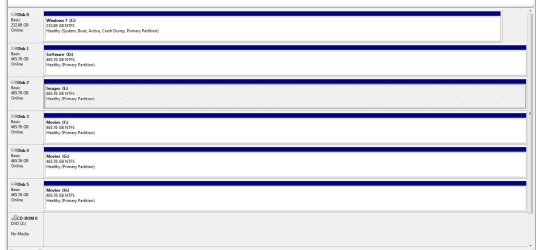
You simply store disk images on another hard drive in the system or on an external hard drive.

Here Disk 2 is strictly used for Disk Images.
 

Attachments

  • Disk Management.JPG
    Disk Management.JPG
    110.4 KB · Views: 2

My Computer

Computer type
PC/Desktop
Computer Manufacturer/Model Number
Skylake Special #666
OS
Windows 10 Pro x64
CPU
Intel Core i7 6700K
Motherboard
Asus Sabertooth Z170 Mark 1
Memory
GSkill TridentZ RGB 16GB 3600 16-16-16-36
Graphics Card(s)
EVGA GTX 980 Ti SC x2
Sound Card
Realtek High Definition
Monitor(s) Displays
AOC G2460PG
Screen Resolution
1920 x 1080 144Hz
Hard Drives
Samsung 860 Pro 256GB, Seagate Barracuda 4TB x2
PSU
EVGA 1000 P2, EVGA White Custom Braided Cables
Case
Corsair Vengeance C70 Gunmetal Black
Cooling
Corsair H100i v2, Corsair ML120 x2, Thermal Grizzly Kryonaut
Keyboard
Logitech G910 Orion Spectrum
Mouse
Logitech G700s
Internet Speed
Verizon Fios Quantum Gateway 75/75
Antivirus
Windows Defender, Malwarebytes Free 3.8.3
Browser
Chrome
Other Info
Corsair SP120 x4, LG Blu-ray Drive, Durabrand HT-395 100 Watt Dolby Digital Amp, Corsair H2100 Wireless 7.1 Headset
Many thanks for the help.
 

My Computer

Computer type
PC/Desktop
OS
Windows 7 32 bit home premium
Back
Top