
Re-Start vs Boot Performance?

grits

New member
Power User
VIP
Local time
4:02 PM
Messages
582
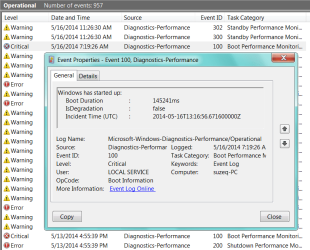
On Tues. I did the Re-Start Time, then this morning in Events Viewer I found Boot Performance error. To me it does seem like it should boot faster although I think my bigger problem is the time it takes to Shut Down.
 

Attachments

  • Capture.PNG
    Capture.PNG
    5.7 KB · Views: 38
  • Boot Performance.png
    Boot Performance.png
    30.7 KB · Views: 0

My Computer

Computer type
PC/Desktop
Computer Manufacturer/Model Number
emachines
OS
Microsoft Windows 7 Home Premium 64-bit 7601 Multiprocessor Free Service Pack 1
CPU
AMD Athlon(tm) II X2 220 Processor
Motherboard
eMachines EL1358G
Memory
3.00 GB
Graphics Card(s)
NVIDIA GeForce 6150SE nForce 430
Sound Card
Realtek High Definition Audio
Screen Resolution
1280 x 1024 x 32 bits (4294967296 colors) @ 60 Hz
Hard Drives
(1) WDC WD10 EADX-22TDHB0 SCSI Disk Device (2) Generic- Multi-Card USB Device
Keyboard
came with PC
Mouse
came with PC
Antivirus
Avast
Browser
IE 9
Other Info
don't know how to get info for the other 5 areas
Event Log - Create Custom Views

Re: Time taken to shut down. That's not necessarily a problem. On my machine it takes quite a long time because data is being save from a ramdisk!

If you apply the following registry tweak windows will display on-screen messages about what it's doing when booting or shutting down. It might give you a clue on where the problem lies.

[HKEY_LOCAL_MACHINE\SOFTWARE\Microsoft\Windows\CurrentVersion\policies\system]
"verbosestatus"=dword:00000001

65 seconds doesn't seem particularly slow!

http://www.pcmag.com/article2/0,2817,2406668,00.asp
 
Last edited:

My Computer

Computer type
Laptop
Computer Manufacturer/Model Number
ASUS
OS
Microsoft Windows 7 Home Premium 64-bit 7601 Multiprocessor Free Service Pack 1
CPU
AMD C-60 APU with Radeon(tm) HD Graphics
Motherboard
ASUSTeK COMPUTER INC. X501U
Memory
4.00 GB
Graphics Card(s)
AMD Radeon HD 6290 Graphics
Sound Card
(1) AMD High Definition Audio Device (2) Realtek High Defi
Screen Resolution
1366 x 768 x 32 bits (4294967296 colors) @ 60 Hz
Hard Drives
Hitachi HTS545050A7E380 SATA Disk Device
Antivirus
Comodo CIS & FW, SecureAplus App Whitelisting, Threatfire
Browser
Cyberfox 64bit, Opera 64bit, Airfox
Other Info
Spy-The-Spy, HitmanPro.Alert, Norton Connect Safe, MJRegWatcher, BitDefender TrafficLight, Voodoo Shield, Zemana AntiMalware
First off 65 sec. for a boot is not slow on many computers.
A eMachine of this kind was not designed to be a fast computer. No that doesn't mean that it doesn't meet your need, just that its a little old with a dual core cpu, very little ram ect.

I'm not really sure how they got 3 gb of ram but this is not much for Windows 7/64

This tutorial by Brink could help. Please note that you don't have to do all the steps but in my opinion #8 is important. Take you time and read through the complete tutorial.

http://www.sevenforums.com/tutorials/11728-optimize-windows-7-a.html

Just a example, their are many more if one care to Google them.

Intel Core i7-4930K @ 3.40GHz13,235
Intel Core i7-3930K @ 3.20GHz12,151
Intel Core i7-4770K @ 3.50GHz10,327
Intel Core i7-4770 @ 3.40GHz9,947
Intel Core i7-3770K @ 3.50GHz9,651
Intel Core i7-3770 @ 3.40GHz9,401
AMD FX-8350 Eight-Core9,043
Intel Core i7-3820 @ 3.60GHz9,021
Intel Core i7-2600K @ 3.40GHz8,603
Intel Core i7-2600 @ 3.40GHz8,303
AMD Athlon II X2 2201,670
PassMark Software © 2008-201
 

My Computer

Computer type
PC/Desktop
Computer Manufacturer/Model Number
Home made Desktop
OS
Windows 10 Pro. 64/ version 1709 Windows 7 Pro/64
CPU
Intel i7-6800K @ 4.3
Motherboard
ASUS X-99 Deluxe II
Memory
Corsair Platinum 16 gig @2400
Graphics Card(s)
EVGA GTX 1070 OC
Monitor(s) Displays
Asus 27" LED LCD/VE278Q
Screen Resolution
1920-1080 or 1280-720 HDMI
Hard Drives
INTEL SSD 730-240 Gb Sata 3.0/
PSU
EVGA Platium 1200W
Case
Phanteks Luxe Tempered Glass 8 fans/ one radiator
Cooling
XSPC/ Water Cooled CPU
Keyboard
Das 4 Professional
Mouse
Logitech M705/MX Anywhere 2-S
Internet Speed
100 mbits
Antivirus
Microsoft Security Essentials/ Malwarebytes Premium 3.0/ SAS
Browser
I.E. 11 default/Firefox/ ISP Time Warner Cable/Spectrum
Other Info
LG BluRay Burner/
Sound system-KLipsch-THX/
Icy Dock ssd Hot Swap bays.
Thanks LBB, I have skimmed thru that tut before & have done some of it only using the safest methods, not anything with registry :eek: . I do have a question however concerning using CCleaner. Brinks screen shot of it doesn't show the other 3 tabs that are in newer versions & I'm not quite sure of them. I do rely on WOT & spell checker which are under IE start up so I have them set to start, that would be correct right? As for the other 2 tabs, guess I need to study them.
 

My Computer

Computer type
PC/Desktop
Computer Manufacturer/Model Number
emachines
OS
Microsoft Windows 7 Home Premium 64-bit 7601 Multiprocessor Free Service Pack 1
CPU
AMD Athlon(tm) II X2 220 Processor
Motherboard
eMachines EL1358G
Memory
3.00 GB
Graphics Card(s)
NVIDIA GeForce 6150SE nForce 430
Sound Card
Realtek High Definition Audio
Screen Resolution
1280 x 1024 x 32 bits (4294967296 colors) @ 60 Hz
Hard Drives
(1) WDC WD10 EADX-22TDHB0 SCSI Disk Device (2) Generic- Multi-Card USB Device
Keyboard
came with PC
Mouse
came with PC
Antivirus
Avast
Browser
IE 9
Other Info
don't know how to get info for the other 5 areas
Back
Top