Solved Re stopping network drive error message

cbrundage

New member
Member
Local time
9:27 AM
Messages
47
The situation I have is that I reformatted and my printer shows up in My Computer with a red X, although it works fine (takes quite a while to make the WiFi connection though). I did a search here and one person suggested right clicking on My Computer and clicking on Disconnect Network Drive to stop the error messages. I know I had this happen on reformatting a long time ago and fixed it somehow - wish I had total recall! My question - before I do that, I want to know if when I want to use the printer, do I have to do some remapping the drive? I'm not very techy. Many thanks - I've had wonderful help here before from you good people!
 

My Computer

OS
Windows 7 Home Premium 64 bit
I did click on Disconnect Network Drive and now my printer doesn't show up in My Computer, no error messages, but it works fine. Will there be a problem with this?
 

My Computer

OS
Windows 7 Home Premium 64 bit
Is it a network printer? or is it connected to your pc?
 

My Computer

Computer type
PC/Desktop
Computer Manufacturer/Model Number
Dell / Lenovo g550
OS
Windows 7 Ultimate 64-bit
CPU
Intel Core 2 Duo E6550 @2.33GHz
Motherboard
foxconn g33m02
Memory
4GB DDR"
Graphics Card(s)
NVIDIA GeForce 8600 GS
Hard Drives
HDD 1 = 150GB
HDD 2 = 1.5TB
PSU
450W
Cooling
Stock fan
Internet Speed
12Mb
Antivirus
AVG Internet Security
It's connected to my home PC.
 

My Computer

OS
Windows 7 Home Premium 64 bit
I'm confused. If it is a local printer, connected by USB, then network drives shouldn't be related to the printer in any way. Are you positive it is a local printer (connected by a cable to your computer)?
 

My Computer

OS
Windows 7 Ultimate x64 SP1
CPU
Intel Core i7-2600
Motherboard
Gigabyte GA-P67A-UD3P-B3
Memory
12 GB Patriot Extreme DDR3-1333
Graphics Card(s)
Nvidia GTX 470
Monitor(s) Displays
Dell UltraSharp 2209WA
Hard Drives
OCZ Agility3 240 GB, WD5001AALS, WD7501AALS
PSU
OCZ ModStream 700W
Case
CoolerMaster HAF 912 Advanced
Cooling
CoolerMaster Hyper 212 Plus
It's wireless.
What I did - I don't know if I should have - is right click on My Computer, click on Disconnect Network Drive. Now I have no error message. The printer doesn't show up in My Computer but it works fine! So I hope it is ok to leave it like that.
 

My Computer

OS
Windows 7 Home Premium 64 bit
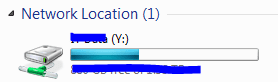
What you are talking about is a mapped network drive. Not a printer. Is it something like this?
 

Attachments

  • Capture.PNG
    Capture.PNG
    2.9 KB · Views: 9

My Computer

Computer type
PC/Desktop
Computer Manufacturer/Model Number
Dell / Lenovo g550
OS
Windows 7 Ultimate 64-bit
CPU
Intel Core 2 Duo E6550 @2.33GHz
Motherboard
foxconn g33m02
Memory
4GB DDR"
Graphics Card(s)
NVIDIA GeForce 8600 GS
Hard Drives
HDD 1 = 150GB
HDD 2 = 1.5TB
PSU
450W
Cooling
Stock fan
Internet Speed
12Mb
Antivirus
AVG Internet Security
Yes, it was where the printer was listed.
 

My Computer

OS
Windows 7 Home Premium 64 bit
do the following please, its a bit hard to follow what you are saying.

Open the start menu and click device and printers. Post a screen shot.
 

My Computer

Computer type
PC/Desktop
Computer Manufacturer/Model Number
Dell / Lenovo g550
OS
Windows 7 Ultimate 64-bit
CPU
Intel Core 2 Duo E6550 @2.33GHz
Motherboard
foxconn g33m02
Memory
4GB DDR"
Graphics Card(s)
NVIDIA GeForce 8600 GS
Hard Drives
HDD 1 = 150GB
HDD 2 = 1.5TB
PSU
450W
Cooling
Stock fan
Internet Speed
12Mb
Antivirus
AVG Internet Security
I see the printer there. (Sorry if I'm not explaining well - although I've had a computer longer than some of you have been around, I still have a 75-year-old's dislike of computer innards!)
error.jpg
 

My Computer

OS
Windows 7 Home Premium 64 bit
Yes your printer is there all right. So yes that all should be fine if it still is printing ok. What you disconnected from seems to me to be a map drive of something. But everything seems ok there :)
 

My Computer

Computer type
PC/Desktop
Computer Manufacturer/Model Number
Dell / Lenovo g550
OS
Windows 7 Ultimate 64-bit
CPU
Intel Core 2 Duo E6550 @2.33GHz
Motherboard
foxconn g33m02
Memory
4GB DDR"
Graphics Card(s)
NVIDIA GeForce 8600 GS
Hard Drives
HDD 1 = 150GB
HDD 2 = 1.5TB
PSU
450W
Cooling
Stock fan
Internet Speed
12Mb
Antivirus
AVG Internet Security
Thank you so much!! I wasn't sure I ought to do that because it seems the printer should have showed up in My Computer, but then I realize other peripherals don't also.
 

My Computer

OS
Windows 7 Home Premium 64 bit
You have a network printer, then, not a local printer. My guess is, it has a card reader, which gets assigned a drive letter. If the wireless took a little while to connect, then it is possible the set drive for the printer's card reader wasn't getting connected in time, and Windows would give the drive error.
 

My Computer

OS
Windows 7 Ultimate x64 SP1
CPU
Intel Core i7-2600
Motherboard
Gigabyte GA-P67A-UD3P-B3
Memory
12 GB Patriot Extreme DDR3-1333
Graphics Card(s)
Nvidia GTX 470
Monitor(s) Displays
Dell UltraSharp 2209WA
Hard Drives
OCZ Agility3 240 GB, WD5001AALS, WD7501AALS
PSU
OCZ ModStream 700W
Case
CoolerMaster HAF 912 Advanced
Cooling
CoolerMaster Hyper 212 Plus
You're right, I'm guessing. To me it would seem the printer was local but I don't think I understand the difference between local and network. If it has a card reader, I don't know anything about it (don't you love trying to get people like me to understand computers!!)
 

My Computer

OS
Windows 7 Home Premium 64 bit
The difference between the two is how they are connected to the computer. If there is a cable connecting them, such as a USB cable, it is considering a local printer. If it uses some type of network to connect, such as wireless, or maybe if the printer uses Ethernet to connect to a home router, then it is a network printer. It's not so much the printer that determines it...but what method of connecting to the computers. Many home printers could be either local or network. My Kodak at home is wireless, has a wired network port, and also a USB connection, giving me three options.

I'm used to help people who aren't tech-savvy! I'm an IT manager for a non-tech company, so I'm the only technical person in the entire company!
 

My Computer

OS
Windows 7 Ultimate x64 SP1
CPU
Intel Core i7-2600
Motherboard
Gigabyte GA-P67A-UD3P-B3
Memory
12 GB Patriot Extreme DDR3-1333
Graphics Card(s)
Nvidia GTX 470
Monitor(s) Displays
Dell UltraSharp 2209WA
Hard Drives
OCZ Agility3 240 GB, WD5001AALS, WD7501AALS
PSU
OCZ ModStream 700W
Case
CoolerMaster HAF 912 Advanced
Cooling
CoolerMaster Hyper 212 Plus
My daughter and son-in-law are both IT techs and build their own computers, but I can't get any help from them!! Many thanks!!

I really appreciate sevenforums- it has bailed me out before. And thanks for the explanation - I am going to add that into my Reformatting Info file for future explanations!
 

My Computer

OS
Windows 7 Home Premium 64 bit
Back
Top