

- Local time
- 12:37 AM
- Messages
- 65
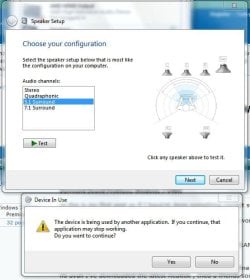
Realtek 5.1 Surround "Device In Use" problem (only stereo works)
Hi all, I've searched through the various threads on this issue, and aside from the complaining and finger-pointing, it appears 'Enhancements>Environment/Speaker Fill' seems to be the only option, which merely gives the illusion of true 5.1 surround sound.
I've just today downloaded and installed the latest Realtek driver (I think I'd forgotten to do that from since I installed the 64-bit version of Windows 7 - and yes, I made sure the Realtek drivers were the 64-bit ones, from Realtek's own website), and it didn't make any difference.
I still haven't yet figured out what it means/why it says "Device In Use", exactly? Does it basically mean they're not working for some reason?
My specs are there to see, anyway. I'll be glad to see the back of this problem for good!
ps. is there anything else I need to download other than that Realtek Driver (in the context of what motherboard I've got [or whatever] - if that makes a difference?)?
Hi all, I've searched through the various threads on this issue, and aside from the complaining and finger-pointing, it appears 'Enhancements>Environment/Speaker Fill' seems to be the only option, which merely gives the illusion of true 5.1 surround sound.
I've just today downloaded and installed the latest Realtek driver (I think I'd forgotten to do that from since I installed the 64-bit version of Windows 7 - and yes, I made sure the Realtek drivers were the 64-bit ones, from Realtek's own website), and it didn't make any difference.
I still haven't yet figured out what it means/why it says "Device In Use", exactly? Does it basically mean they're not working for some reason?
My specs are there to see, anyway. I'll be glad to see the back of this problem for good!
ps. is there anything else I need to download other than that Realtek Driver (in the context of what motherboard I've got [or whatever] - if that makes a difference?)?
Attachments
My Computer
At a glance
Windows 7 Home Premium 64-bit (6.1, Build 7601)AMD Athlon(tm) 64 X2 Dual Core Processor 4400...2048MB RAM DDR2 (now installed a 2GB chip = 4...ASUS EAH5770 CU core, 1GB GDDR5 video memory
- Computer type
- PC/Desktop
- Computer Manufacturer/Model Number
- MSI MS-7325
- OS
- Windows 7 Home Premium 64-bit (6.1, Build 7601)
- CPU
- AMD Athlon(tm) 64 X2 Dual Core Processor 4400+ (2 CPUs), ~2.
- Motherboard
- MSI K9N4 SLI-F nForce 500 SLI chipset
- Memory
- 2048MB RAM DDR2 (now installed a 2GB chip = 4GB altogether)
- Graphics Card(s)
- ASUS EAH5770 CU core, 1GB GDDR5 video memory
- Sound Card
- Realtek AC'97 Audio
- Monitor(s) Displays
- AOC I2367Fh
- Screen Resolution
- 1920x1080
- Hard Drives
- SAMSUNG HD401LJ ATA Device
- PSU
- Tagan TG700-U25 - 700Watts
- Case
- NZXT Zero Aluminium Full Tower
- Cooling
- about 6 fans on case
- Keyboard
- Microsoft Natural MultiMedia Keyboard
- Mouse
- Trust GM-4200 Gamer Mouse Optical
- Internet Speed
- Not sure what speed, but it's broadband - ADSL (I think).
- Antivirus
- Avast! Free Antivirus
- Browser
- Mozillla Firefox


