Solved Realtek Audio Jack Output Assignment Troubleshooting

BlackWhiteX

New member
Local time
3:27 AM
Messages
8
Location
Italy
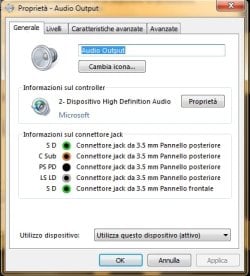
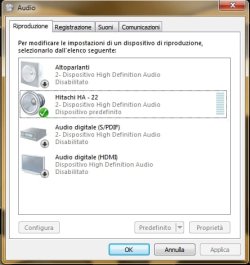
The jack outputs are all bundled into one device. I want to have one device for each output jack, and not all on one. That means to automatically have detected various output devices...I add also a pic, so you can understand my problem. The picture text is in italian, but it shouldn't be a problem
Thanks for helping :)
 

Attachments

  • Unbenannt.jpg
    Unbenannt.jpg
    34 KB · Views: 14

My Computer My Computer

Computer type
PC/Desktop
Computer Manufacturer/Model Number
Acer Aspire M3641
OS
Windows 7 Ultimate x64
CPU
Intel Core 2 Quad Q6600 @ 2.40GHz
Memory
4.00GB
Graphics Card(s)
Nvidia GeForce 9300GE
Monitor(s) Displays
Asus VS228H
Screen Resolution
1920x1080
Hard Drives
Seagate Barracuda ST1000DM (1TB);
Western Digital WD64 (640GB)
Browser
Mozilla Firefox v39.0
1. I see you have the "High Definition Audio" as the device type. That suggests that you do not have the RealTek sound driver installed. Instead just the basic function Microsoft/Windows sound driver.

I have RealTek and I have a RealTek HD Audio Manager that will allow SOME (not all) jack assignment changes.

You can only have one default audio playback device and if I understand you correctly, you can't have different devices for different outputs. You can have "Stereo" (2 channel) or 2.1 speaker system that is connected to the Green speaker jack. OR you could have a 5.1 speaker system with the the THREE connections to the PC. But, you can't have one jack for one device or speaker system and another for a different speaker system.
 

My Computer My Computer

Computer type
PC/Desktop
Computer Manufacturer/Model Number
My Own Build
OS
Windows 10 64 bit
CPU
Intel i7 6700K
Motherboard
ASUS ROG Maximus VIII Hero
Memory
16GB Corsair Dominator
Graphics Card(s)
Intel CPU Graphics
Sound Card
RealTek
Monitor(s) Displays
27" Dell S2719dgf
Screen Resolution
2560X1440
Hard Drives
1 TB Samsung 850 EVO SSD for Win 10 Pro
500GB Samsung 850 EVO SSD for Win 10 Insider
2 TB drive for backup
PSU
EVGA Supernova 750G2
Case
BeQuiet Silent Base 600
Cooling
Deepcool Captain 120EX
Keyboard
Microsoft Wireless 2000
Mouse
Microsoft wireless
Internet Speed
100 MB/sec (Cable)
Antivirus
Microsoft Defender and Malwarebytes
Browser
Edge/Firefox
Other Info
Cakewalk (Sonar) by BandLab and Studio One 4.1 Pro recording studio software. MOTU 896Mk3 Hybrid recording interface, Frontier Tranzport wireless control unit, Behringer X-Touch Control Surface.
Five USB connected optical drives for CD Audio production using Nero BurningROM
Ok, but this is possible with RealTek? I mean, to have these outputs on different devices?
 

My Computer My Computer

Computer type
PC/Desktop
Computer Manufacturer/Model Number
Acer Aspire M3641
OS
Windows 7 Ultimate x64
CPU
Intel Core 2 Quad Q6600 @ 2.40GHz
Memory
4.00GB
Graphics Card(s)
Nvidia GeForce 9300GE
Monitor(s) Displays
Asus VS228H
Screen Resolution
1920x1080
Hard Drives
Seagate Barracuda ST1000DM (1TB);
Western Digital WD64 (640GB)
Browser
Mozilla Firefox v39.0
You can not have both analog and digital outputs active at the same time. You can have Analog (Speakers) or Digital only.

You can run stereo (2 channel) to whatever is connected to the GREEN speaker jack and also some other device connected to the LINE OUT, but they will both have the same PC audio - you can't have one audio, such as Youtube to the speaker out and a different PC audio, such as a game, to the Line out.
 

My Computer My Computer

Computer type
PC/Desktop
Computer Manufacturer/Model Number
My Own Build
OS
Windows 10 64 bit
CPU
Intel i7 6700K
Motherboard
ASUS ROG Maximus VIII Hero
Memory
16GB Corsair Dominator
Graphics Card(s)
Intel CPU Graphics
Sound Card
RealTek
Monitor(s) Displays
27" Dell S2719dgf
Screen Resolution
2560X1440
Hard Drives
1 TB Samsung 850 EVO SSD for Win 10 Pro
500GB Samsung 850 EVO SSD for Win 10 Insider
2 TB drive for backup
PSU
EVGA Supernova 750G2
Case
BeQuiet Silent Base 600
Cooling
Deepcool Captain 120EX
Keyboard
Microsoft Wireless 2000
Mouse
Microsoft wireless
Internet Speed
100 MB/sec (Cable)
Antivirus
Microsoft Defender and Malwarebytes
Browser
Edge/Firefox
Other Info
Cakewalk (Sonar) by BandLab and Studio One 4.1 Pro recording studio software. MOTU 896Mk3 Hybrid recording interface, Frontier Tranzport wireless control unit, Behringer X-Touch Control Surface.
Five USB connected optical drives for CD Audio production using Nero BurningROM
No, I meant something different... I want to have the rear green output for my pc sound system. And I want to have another device listed if I plug in something at front green... So I would have my "Hitachi Amplifier" on rear green and my "Sennheiser headphones" (for example) on front green, but listed as two different devices... And so on for every jack output...
That means, that additionally to my Hitachi HA - 22 I would find a second device
 

Attachments

  • Unbenanntawer.jpg
    Unbenanntawer.jpg
    31.2 KB · Views: 14

My Computer My Computer

Computer type
PC/Desktop
Computer Manufacturer/Model Number
Acer Aspire M3641
OS
Windows 7 Ultimate x64
CPU
Intel Core 2 Quad Q6600 @ 2.40GHz
Memory
4.00GB
Graphics Card(s)
Nvidia GeForce 9300GE
Monitor(s) Displays
Asus VS228H
Screen Resolution
1920x1080
Hard Drives
Seagate Barracuda ST1000DM (1TB);
Western Digital WD64 (640GB)
Browser
Mozilla Firefox v39.0
The RealTek HD Audio Manager will do that. But, You must have the RealTek sound drivers installed, and as I originally noted it looks like you just have the basic Windows installed HD Audio Codec.

Go to your PC vendor and download the correct RealTek drivers. That should also install the RealTek HD Audio Manager.

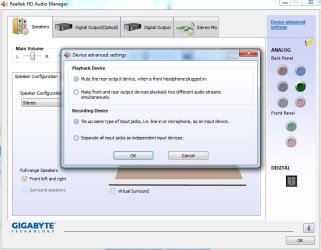
Here is my RealTek and what I think you want to do.
 

Attachments

  • Capture.JPG
    Capture.JPG
    63 KB · Views: 13

My Computer My Computer

Computer type
PC/Desktop
Computer Manufacturer/Model Number
My Own Build
OS
Windows 10 64 bit
CPU
Intel i7 6700K
Motherboard
ASUS ROG Maximus VIII Hero
Memory
16GB Corsair Dominator
Graphics Card(s)
Intel CPU Graphics
Sound Card
RealTek
Monitor(s) Displays
27" Dell S2719dgf
Screen Resolution
2560X1440
Hard Drives
1 TB Samsung 850 EVO SSD for Win 10 Pro
500GB Samsung 850 EVO SSD for Win 10 Insider
2 TB drive for backup
PSU
EVGA Supernova 750G2
Case
BeQuiet Silent Base 600
Cooling
Deepcool Captain 120EX
Keyboard
Microsoft Wireless 2000
Mouse
Microsoft wireless
Internet Speed
100 MB/sec (Cable)
Antivirus
Microsoft Defender and Malwarebytes
Browser
Edge/Firefox
Other Info
Cakewalk (Sonar) by BandLab and Studio One 4.1 Pro recording studio software. MOTU 896Mk3 Hybrid recording interface, Frontier Tranzport wireless control unit, Behringer X-Touch Control Surface.
Five USB connected optical drives for CD Audio production using Nero BurningROM
yeah, you're almost right about how I wanted the setting... On the pic you can see the option "Separate all input jacks as independent input devices". I know from my work-pc, that it is also possible with the basic windows audio codec to tick this option even for output devices. but, oddly, it does not work on my home-pc...
I will download the realtek and try to solve the issue...
thanks for your help :)
 

My Computer My Computer

Computer type
PC/Desktop
Computer Manufacturer/Model Number
Acer Aspire M3641
OS
Windows 7 Ultimate x64
CPU
Intel Core 2 Quad Q6600 @ 2.40GHz
Memory
4.00GB
Graphics Card(s)
Nvidia GeForce 9300GE
Monitor(s) Displays
Asus VS228H
Screen Resolution
1920x1080
Hard Drives
Seagate Barracuda ST1000DM (1TB);
Western Digital WD64 (640GB)
Browser
Mozilla Firefox v39.0
Back
Top