Realtek custom EQ resets

fall11

New member
Local time
10:19 PM
Messages
14
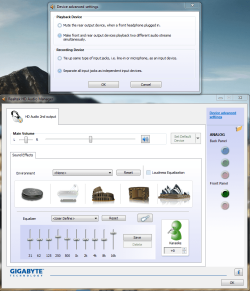
So i had an old 32bit pc with win7 on it,when i set custom equalizer settings and save them they work but after opening any game or a youtube video or soundcloud it resets to default but its still on my custom preset and i can hear it sounds bad(default), now to make it work again i got to go to sound manager and move the 16k bar down and up and then it works again but again after opening any yt vid or a game it resets itself to default , now with windows XP 32bit(dualboot) it didn't have this problem just win7 had.. And now i got a brand new PC, installed windows 7 ultimate 64bit and it does the same! i also installed windows 8.1(dualboot) and it also does the same!

what the heck is wrong with realtek?? not keeping my custom equalizer setting?(presets like pop rock etc doesn't reset) this is so annoying because default sounds bad... Tried different driver versions, running as admin, etc.. :mad:
 
Last edited:

My Computer

Computer type
PC/Desktop
OS
Windows 7 Ultimate x64
CPU
i3-4160
Motherboard
Gigabyte GA-H81M-DS2 rev3.0
Memory
Kingston 8GB 1600mhz
Graphics Card(s)
GTX750Ti
Screen Resolution
1920x1080
Hard Drives
1Tb
PSU
Integra M 450w
Case
Zalman ZM-T4
Antivirus
NOD32
First I've seen someone post with this problem. Do you have Stereo Mix set as the default Recording device? If not, give that a shot. Its a remote chance but the only thing I can think of.

Vista/Win7/Win8/Win8.1 handle some audio functions different than XP did. May be one reason.
 

My Computer

Computer type
PC/Desktop
Computer Manufacturer/Model Number
My Own Build
OS
Windows 10 64 bit
CPU
Intel i7 6700K
Motherboard
ASUS ROG Maximus VIII Hero
Memory
16GB Corsair Dominator
Graphics Card(s)
Intel CPU Graphics
Sound Card
RealTek
Monitor(s) Displays
27" Dell S2719dgf
Screen Resolution
2560X1440
Hard Drives
1 TB Samsung 850 EVO SSD for Win 10 Pro
500GB Samsung 850 EVO SSD for Win 10 Insider
2 TB drive for backup
PSU
EVGA Supernova 750G2
Case
BeQuiet Silent Base 600
Cooling
Deepcool Captain 120EX
Keyboard
Microsoft Wireless 2000
Mouse
Microsoft wireless
Internet Speed
100 MB/sec (Cable)
Antivirus
Microsoft Defender and Malwarebytes
Browser
Edge/Firefox
Other Info
Cakewalk (Sonar) by BandLab and Studio One 4.1 Pro recording studio software. MOTU 896Mk3 Hybrid recording interface, Frontier Tranzport wireless control unit, Behringer X-Touch Control Surface.
Five USB connected optical drives for CD Audio production using Nero BurningROM
Yeah stereo mix didn't do anything.
 

My Computer

Computer type
PC/Desktop
OS
Windows 7 Ultimate x64
CPU
i3-4160
Motherboard
Gigabyte GA-H81M-DS2 rev3.0
Memory
Kingston 8GB 1600mhz
Graphics Card(s)
GTX750Ti
Screen Resolution
1920x1080
Hard Drives
1Tb
PSU
Integra M 450w
Case
Zalman ZM-T4
Antivirus
NOD32
If only i could edit those default presets.. Would make it work forever.
 

My Computer

Computer type
PC/Desktop
OS
Windows 7 Ultimate x64
CPU
i3-4160
Motherboard
Gigabyte GA-H81M-DS2 rev3.0
Memory
Kingston 8GB 1600mhz
Graphics Card(s)
GTX750Ti
Screen Resolution
1920x1080
Hard Drives
1Tb
PSU
Integra M 450w
Case
Zalman ZM-T4
Antivirus
NOD32
I think i solved it by changing device advanced settings and bringing down 16k bar abit


edit: nvm its still doing this....
 

Attachments

  • 21a933636dc9cac0aeaff87a17e348da.png
    21a933636dc9cac0aeaff87a17e348da.png
    100.3 KB · Views: 1

My Computer

Computer type
PC/Desktop
OS
Windows 7 Ultimate x64
CPU
i3-4160
Motherboard
Gigabyte GA-H81M-DS2 rev3.0
Memory
Kingston 8GB 1600mhz
Graphics Card(s)
GTX750Ti
Screen Resolution
1920x1080
Hard Drives
1Tb
PSU
Integra M 450w
Case
Zalman ZM-T4
Antivirus
NOD32
So i go to sound card settings , Enhancements , click on edit equalizer setting bring 16k bar up then close window, click OK and it goes back to default, music is playing while im doing this.. and if i bring other bar up after 16k then 16k bar resets.. guess i just need a new soundcard not this crappy realtek stuff..
 

My Computer

Computer type
PC/Desktop
OS
Windows 7 Ultimate x64
CPU
i3-4160
Motherboard
Gigabyte GA-H81M-DS2 rev3.0
Memory
Kingston 8GB 1600mhz
Graphics Card(s)
GTX750Ti
Screen Resolution
1920x1080
Hard Drives
1Tb
PSU
Integra M 450w
Case
Zalman ZM-T4
Antivirus
NOD32
I would make sure all Sound options are at default (e.g. Mute the rear output device when a front headphone is plugged in). No sound enhancements, no EQ settings. Then see if the sound changes from one application to another.

I don't use any sound enhancements. I have a recording studio and only use my PC audio for checking my mixes. Thus I don't want anything other than the default basic sound for that.
 

My Computer

Computer type
PC/Desktop
Computer Manufacturer/Model Number
My Own Build
OS
Windows 10 64 bit
CPU
Intel i7 6700K
Motherboard
ASUS ROG Maximus VIII Hero
Memory
16GB Corsair Dominator
Graphics Card(s)
Intel CPU Graphics
Sound Card
RealTek
Monitor(s) Displays
27" Dell S2719dgf
Screen Resolution
2560X1440
Hard Drives
1 TB Samsung 850 EVO SSD for Win 10 Pro
500GB Samsung 850 EVO SSD for Win 10 Insider
2 TB drive for backup
PSU
EVGA Supernova 750G2
Case
BeQuiet Silent Base 600
Cooling
Deepcool Captain 120EX
Keyboard
Microsoft Wireless 2000
Mouse
Microsoft wireless
Internet Speed
100 MB/sec (Cable)
Antivirus
Microsoft Defender and Malwarebytes
Browser
Edge/Firefox
Other Info
Cakewalk (Sonar) by BandLab and Studio One 4.1 Pro recording studio software. MOTU 896Mk3 Hybrid recording interface, Frontier Tranzport wireless control unit, Behringer X-Touch Control Surface.
Five USB connected optical drives for CD Audio production using Nero BurningROM
Yeah all on default no enhancements, sound doesn't change.. Equalizer really helps in games like CS:GO , listening to music ,etc. sounds much more clear, I just can't go back to default because I always used that EQ when I had winXP.
 

My Computer

Computer type
PC/Desktop
OS
Windows 7 Ultimate x64
CPU
i3-4160
Motherboard
Gigabyte GA-H81M-DS2 rev3.0
Memory
Kingston 8GB 1600mhz
Graphics Card(s)
GTX750Ti
Screen Resolution
1920x1080
Hard Drives
1Tb
PSU
Integra M 450w
Case
Zalman ZM-T4
Antivirus
NOD32
I just did some testing on mine. I notice yours says "user Define". If I set a custom EQ, and then click Save, I'm prompted to name that user defined setting. From your screen shot it looks like you are not saving it with a custom name.
 

My Computer

Computer type
PC/Desktop
Computer Manufacturer/Model Number
My Own Build
OS
Windows 10 64 bit
CPU
Intel i7 6700K
Motherboard
ASUS ROG Maximus VIII Hero
Memory
16GB Corsair Dominator
Graphics Card(s)
Intel CPU Graphics
Sound Card
RealTek
Monitor(s) Displays
27" Dell S2719dgf
Screen Resolution
2560X1440
Hard Drives
1 TB Samsung 850 EVO SSD for Win 10 Pro
500GB Samsung 850 EVO SSD for Win 10 Insider
2 TB drive for backup
PSU
EVGA Supernova 750G2
Case
BeQuiet Silent Base 600
Cooling
Deepcool Captain 120EX
Keyboard
Microsoft Wireless 2000
Mouse
Microsoft wireless
Internet Speed
100 MB/sec (Cable)
Antivirus
Microsoft Defender and Malwarebytes
Browser
Edge/Firefox
Other Info
Cakewalk (Sonar) by BandLab and Studio One 4.1 Pro recording studio software. MOTU 896Mk3 Hybrid recording interface, Frontier Tranzport wireless control unit, Behringer X-Touch Control Surface.
Five USB connected optical drives for CD Audio production using Nero BurningROM
Yeah i have it saved but in the screenshot i had user defined.
 

My Computer

Computer type
PC/Desktop
OS
Windows 7 Ultimate x64
CPU
i3-4160
Motherboard
Gigabyte GA-H81M-DS2 rev3.0
Memory
Kingston 8GB 1600mhz
Graphics Card(s)
GTX750Ti
Screen Resolution
1920x1080
Hard Drives
1Tb
PSU
Integra M 450w
Case
Zalman ZM-T4
Antivirus
NOD32
Save it again with a different name if you haven't done that and see what happens.

What happens if you use one of the pre-set EQ's?
 

My Computer

Computer type
PC/Desktop
Computer Manufacturer/Model Number
My Own Build
OS
Windows 10 64 bit
CPU
Intel i7 6700K
Motherboard
ASUS ROG Maximus VIII Hero
Memory
16GB Corsair Dominator
Graphics Card(s)
Intel CPU Graphics
Sound Card
RealTek
Monitor(s) Displays
27" Dell S2719dgf
Screen Resolution
2560X1440
Hard Drives
1 TB Samsung 850 EVO SSD for Win 10 Pro
500GB Samsung 850 EVO SSD for Win 10 Insider
2 TB drive for backup
PSU
EVGA Supernova 750G2
Case
BeQuiet Silent Base 600
Cooling
Deepcool Captain 120EX
Keyboard
Microsoft Wireless 2000
Mouse
Microsoft wireless
Internet Speed
100 MB/sec (Cable)
Antivirus
Microsoft Defender and Malwarebytes
Browser
Edge/Firefox
Other Info
Cakewalk (Sonar) by BandLab and Studio One 4.1 Pro recording studio software. MOTU 896Mk3 Hybrid recording interface, Frontier Tranzport wireless control unit, Behringer X-Touch Control Surface.
Five USB connected optical drives for CD Audio production using Nero BurningROM
I changed the name many times.. didn't work and default preset EQs work fine doesnt reset like pop rock party etc.
 

My Computer

Computer type
PC/Desktop
OS
Windows 7 Ultimate x64
CPU
i3-4160
Motherboard
Gigabyte GA-H81M-DS2 rev3.0
Memory
Kingston 8GB 1600mhz
Graphics Card(s)
GTX750Ti
Screen Resolution
1920x1080
Hard Drives
1Tb
PSU
Integra M 450w
Case
Zalman ZM-T4
Antivirus
NOD32
I'm stumped. I've never saw any post about this before and not sure where to go next.
 

My Computer

Computer type
PC/Desktop
Computer Manufacturer/Model Number
My Own Build
OS
Windows 10 64 bit
CPU
Intel i7 6700K
Motherboard
ASUS ROG Maximus VIII Hero
Memory
16GB Corsair Dominator
Graphics Card(s)
Intel CPU Graphics
Sound Card
RealTek
Monitor(s) Displays
27" Dell S2719dgf
Screen Resolution
2560X1440
Hard Drives
1 TB Samsung 850 EVO SSD for Win 10 Pro
500GB Samsung 850 EVO SSD for Win 10 Insider
2 TB drive for backup
PSU
EVGA Supernova 750G2
Case
BeQuiet Silent Base 600
Cooling
Deepcool Captain 120EX
Keyboard
Microsoft Wireless 2000
Mouse
Microsoft wireless
Internet Speed
100 MB/sec (Cable)
Antivirus
Microsoft Defender and Malwarebytes
Browser
Edge/Firefox
Other Info
Cakewalk (Sonar) by BandLab and Studio One 4.1 Pro recording studio software. MOTU 896Mk3 Hybrid recording interface, Frontier Tranzport wireless control unit, Behringer X-Touch Control Surface.
Five USB connected optical drives for CD Audio production using Nero BurningROM
Yeah me too like what the heck man. I saw someone else had this problem and fixed by reinstalling the driver but i tried it so dunno. I tried other EQs like equalizer apo, profound csharp but they sound bad :( .. i need to know where the default presets are stored in the registry or in the install file so maybe i could edit them, i know custom one is stored in MMdevices/Audio/Render/{xxxx}/FxProperties . It's like it won't save, like it was unlocked and i didn't lock it so something changed it.. Thing is the same happened on my old pc with different hardware so it's probably realtek :rolleyes:

Thanks for the help anyways :)
 

My Computer

Computer type
PC/Desktop
OS
Windows 7 Ultimate x64
CPU
i3-4160
Motherboard
Gigabyte GA-H81M-DS2 rev3.0
Memory
Kingston 8GB 1600mhz
Graphics Card(s)
GTX750Ti
Screen Resolution
1920x1080
Hard Drives
1Tb
PSU
Integra M 450w
Case
Zalman ZM-T4
Antivirus
NOD32
Multiple users have been having this problem with 16k bar only as it resets everytime you click refresh on soundcloud or open a game. Other bands work fine.
 
Last edited:

My Computer

Computer type
PC/Desktop
OS
Windows 7 Ultimate x64
CPU
i3-4160
Motherboard
Gigabyte GA-H81M-DS2 rev3.0
Memory
Kingston 8GB 1600mhz
Graphics Card(s)
GTX750Ti
Screen Resolution
1920x1080
Hard Drives
1Tb
PSU
Integra M 450w
Case
Zalman ZM-T4
Antivirus
NOD32
Yes, experiencing the same problem since a month or two.

I play a song or use an app, tweak the EQ while it's playing, save it as a preset, then it remains ok...... until I select a new song in Youtube or new app and the EQ sound goes back to default even though it still shows my custom EQ name and graphic EQ illustration.

I open Realtek Sound Manager, click Reset EQ, then re-select my custom EQ preset and it's ok again while the music/audio plays... until I select a new song or app and the EQ goes back to default, whilst still showing my custom EQ name, etc.

Even pausing a song on youtube, or simply scrubbing a track in youtube, resets the EQ sound after the song re-buffers and starts playing again.

Incredibly frustrating. I always have to have Realtek Sound Manager loaded up on screen and manually set the EQ preset every single time I play a song, scrub a track, or start an application that also uses audio.

Windows 8.1 64-bit
Gigabyte GA-P35-DS4 Rev 2.1
Realtek ALC889A Audio controller
 
Last edited:

My Computer

Computer type
PC/Desktop
Computer Manufacturer/Model Number
Custom
OS
8.1 x64
CPU
Q9450
Motherboard
GA-P35-DS4
Memory
4GB Crucial
Graphics Card(s)
GeForce 8800GT
Antivirus
Avast
Browser
Firefox
Yes, experiencing the same problem since a month or two.

I play a song or use an app, tweak the EQ while it's playing, save it as a preset, then it remains ok...... until I select a new song in Youtube or new app and the EQ sound goes back to default even though it still shows my custom EQ name and graphic EQ illustration.

I open Realtek Sound Manager, click Reset EQ, then re-select my custom EQ preset and it's ok again while the music/audio plays... until I select a new song or app and the EQ goes back to default, whilst still showing my custom EQ name, etc.

Even pausing a song on youtube, or simply scrubbing a track in youtube, resets the EQ sound after the song re-buffers and starts playing again.

Incredibly frustrating. I always have to have Realtek Sound Manager loaded up on screen and manually set the EQ preset every single time I play a song, scrub a track, or start an application that also uses audio.

Windows 8.1 64-bit
Gigabyte GA-P35-DS4 Rev 2.1
Realtek ALC889A Audio controller

for me the solution is to use the 8k instead of 16k bar
 

My Computer

Computer type
PC/Desktop
OS
Windows 7 Ultimate x64
CPU
i3-4160
Motherboard
Gigabyte GA-H81M-DS2 rev3.0
Memory
Kingston 8GB 1600mhz
Graphics Card(s)
GTX750Ti
Screen Resolution
1920x1080
Hard Drives
1Tb
PSU
Integra M 450w
Case
Zalman ZM-T4
Antivirus
NOD32
Just finally fixed it by re-installing old Realtek audio drivers that came with the motherboard rather than the latest drivers. I also took a backup of my custom EQ presets (registry) before I did so, and pasted them into the new registry after reinstalling, and everything works.

Regards the 16KHz bar in the graphic EQ, for me it happened when ANY bar(s) were changed, regardlessly. Normally I like to subtley scoop out the 125 and 250Hz bars to make the sound less boomy and muddy. I didn't touch the 16KHz bar in those cases, but the EQ still reset when a new song/app was loaded.

Anyway, fixed now. Best advice is just to try reinstalling drivers.
 

My Computer

Computer type
PC/Desktop
Computer Manufacturer/Model Number
Custom
OS
8.1 x64
CPU
Q9450
Motherboard
GA-P35-DS4
Memory
4GB Crucial
Graphics Card(s)
GeForce 8800GT
Antivirus
Avast
Browser
Firefox
Back
Top