Realtek HD Audio (Code 10)

Bipedal Hominid

New member
Local time
5:39 PM
Messages
4
Hello,

I have no sound coming from my speakers and when I look at the device manager the "Realtek High Definition Audio" has a yellow icon with an exclamation point. When I right click and click properties it says, "This device cannot start. (Code 10)".

I have uninstalled and reinstalled the drivers several times and have even done a fresh install of Windows 7, but no luck.

Any help is much appreciated.

Thanks in advance.

Under my sound card driver hardware ID it is listed as:

HDAUDIO\FUNC_01&VEN_10EC&DEV_0887&SUBSYS_1043837B&REV_1002
HDAUDIO\FUNC_01&VEN_10EC&DEV_0887&SUBSYS_1043837B

Operating System: Windows 7 Home Premium 64-bit (6.1, Build 7601) Service Pack 1 (7601.win7sp1_gdr.140303-2144)
System Manufacturer: ASUSTeK Computer INC.
System Model: CM5570
Processor: Pentium(R) Dual-Core CPU E5300 @ 2.60GHz (2 CPUs), ~2.6GHz
Memory: 6144MB RAM
Available OS Memory: 6144MB RAM
 

My Computer

Computer type
PC/Desktop
Computer Manufacturer/Model Number
Asus CM5570
OS
Windows 7 Home Premium SP1 64-bit
CPU
Intel Pentium Dual Core E5300
Memory
6GB DDR2
Graphics Card(s)
NVIDIA GeFrorce GTX 650 Ti
Hard Drives
Western Digital 500GB
Browser
Google Chrome
What do you show in the Device Manager, Sound section?
Post a Screenshot of that.

Code 10 can be driver or can be some other hardware issue.
In the Device Manager, RIGHT click on the entry for the RealTek and then LEFT click "Uninstall" ALSO check the box to uninstall the drivers. Then restart the PC. If there are no hardware problems or conflicts, when Windows starts it will detect and and install the generic, basic function, "High Definition Audio Codec" for the sound driver. If this is installed, check to see if you have sound, and if the Speakers (High Definiton Audio Codec) is set as the default Audio playback device in the Control Panel/Hardware and Sound, Playback section.

If this works, you can consider reinstalling the RealTek drivers. Where did you get the drivers you have now?

http://www.sevenforums.com/tutorials/9733-screenshots-files-upload-post-seven-forums.html
 

My Computer

Computer type
PC/Desktop
Computer Manufacturer/Model Number
My Own Build
OS
Windows 10 64 bit
CPU
Intel i7 6700K
Motherboard
ASUS ROG Maximus VIII Hero
Memory
16GB Corsair Dominator
Graphics Card(s)
Intel CPU Graphics
Sound Card
RealTek
Monitor(s) Displays
27" Dell S2719dgf
Screen Resolution
2560X1440
Hard Drives
1 TB Samsung 850 EVO SSD for Win 10 Pro
500GB Samsung 850 EVO SSD for Win 10 Insider
2 TB drive for backup
PSU
EVGA Supernova 750G2
Case
BeQuiet Silent Base 600
Cooling
Deepcool Captain 120EX
Keyboard
Microsoft Wireless 2000
Mouse
Microsoft wireless
Internet Speed
100 MB/sec (Cable)
Antivirus
Microsoft Defender and Malwarebytes
Browser
Edge/Firefox
Other Info
Cakewalk (Sonar) by BandLab and Studio One 4.1 Pro recording studio software. MOTU 896Mk3 Hybrid recording interface, Frontier Tranzport wireless control unit, Behringer X-Touch Control Surface.
Five USB connected optical drives for CD Audio production using Nero BurningROM
Thanks for the reply, fireberd.

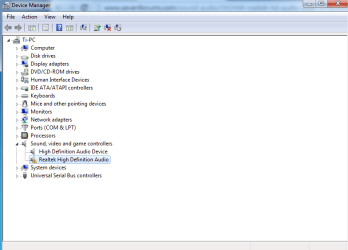
I've attached a picture of what my Device Manager looked like prior to uninstalling the Realtek driver and restarting. Now it looks the same minus the Realtek driver (the other sound device is my from my graphics card's HDMI I think). I still do not have sound and Windows did not recognize the Realtek sound card, so it did not try to automatically install anything. When I go to my sound devices, all that is listed is Digital Audio (HDMI) which is from my graphics card.

The bottom right side of my screen has a speaker with a red X on it indicating that I have no speakers or headphones plugged in (but in reality I do). When I click it it says "detecting problems", then "troubleshooting could not identify the problem."

I got my drivers from the Asus driver page for my specific model computer; ASUSTeK Computer Inc. -Support- Drivers and Download CM5570
 

Attachments

  • Untitled.png
    Untitled.png
    55.1 KB · Views: 1

My Computer

Computer type
PC/Desktop
Computer Manufacturer/Model Number
Asus CM5570
OS
Windows 7 Home Premium SP1 64-bit
CPU
Intel Pentium Dual Core E5300
Memory
6GB DDR2
Graphics Card(s)
NVIDIA GeFrorce GTX 650 Ti
Hard Drives
Western Digital 500GB
Browser
Google Chrome
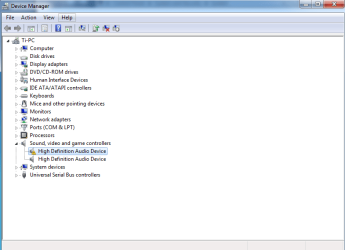
I was messing around with it a little more and realized that I did not uninstall the driver through "programs and features" in the control panel. I uninstalled this way and upon reboot, Windows tried to install the device, but it failed. This has been happening every time I do this.

I have attached a picture of what my device manager looks like now.
 

Attachments

  • Untitled.png
    Untitled.png
    50.7 KB · Views: 2

My Computer

Computer type
PC/Desktop
Computer Manufacturer/Model Number
Asus CM5570
OS
Windows 7 Home Premium SP1 64-bit
CPU
Intel Pentium Dual Core E5300
Memory
6GB DDR2
Graphics Card(s)
NVIDIA GeFrorce GTX 650 Ti
Hard Drives
Western Digital 500GB
Browser
Google Chrome
With only a Pentium Dual Core CPU, this suggests this was an XP PC originally. Some sound chips in older hardware is not Win 7 compatible, and in those cases, a separate Win 7 compatible sound card is needed. I've seen a lot of instances like this.

As a last chance, download and install the Intel motherboard chipset drivers. The chipset drivers define (identify) all the devices on the motherboard, such as the sound device. Reboot the PC after the chipset install and see if the High Definition Audio Device installs (the sound chip). If it does and the sound works you can consider trying the RealTek drivers again. If not, I would suspect yours Is not Win 7 compatible and you will have to install a separate sound card.

Also, I see you only have the High Definition Audio Device, which I assume is the HDMI audio. You should install the correct NVIDIA driver which will replace the High Definition Audio Device with the correct NVIDIA HDMI Sound Driver.
 

My Computer

Computer type
PC/Desktop
Computer Manufacturer/Model Number
My Own Build
OS
Windows 10 64 bit
CPU
Intel i7 6700K
Motherboard
ASUS ROG Maximus VIII Hero
Memory
16GB Corsair Dominator
Graphics Card(s)
Intel CPU Graphics
Sound Card
RealTek
Monitor(s) Displays
27" Dell S2719dgf
Screen Resolution
2560X1440
Hard Drives
1 TB Samsung 850 EVO SSD for Win 10 Pro
500GB Samsung 850 EVO SSD for Win 10 Insider
2 TB drive for backup
PSU
EVGA Supernova 750G2
Case
BeQuiet Silent Base 600
Cooling
Deepcool Captain 120EX
Keyboard
Microsoft Wireless 2000
Mouse
Microsoft wireless
Internet Speed
100 MB/sec (Cable)
Antivirus
Microsoft Defender and Malwarebytes
Browser
Edge/Firefox
Other Info
Cakewalk (Sonar) by BandLab and Studio One 4.1 Pro recording studio software. MOTU 896Mk3 Hybrid recording interface, Frontier Tranzport wireless control unit, Behringer X-Touch Control Surface.
Five USB connected optical drives for CD Audio production using Nero BurningROM
I have the most up to date chipset drivers available, but still no luck. I bought this computer new from Best Buy in 2009 and it was already installed with Windows 7. I have had this issue before when I had to do a clean Windows reinstall several years ago, but I can't remember what the solution was.
 

My Computer

Computer type
PC/Desktop
Computer Manufacturer/Model Number
Asus CM5570
OS
Windows 7 Home Premium SP1 64-bit
CPU
Intel Pentium Dual Core E5300
Memory
6GB DDR2
Graphics Card(s)
NVIDIA GeFrorce GTX 650 Ti
Hard Drives
Western Digital 500GB
Browser
Google Chrome
Reinstall the Intel chipset drivers. Its not a question of you having the latest one, its to reinstall it.

Best option, go to https://downloadcenter.intel.com/default.aspx and run a check to see if you have the latest. If you have the latest, download and install it again. If there is a later version, then download and install that.

I've done computer support on the Dell forum for 10+ years and the proper install procedure was (1) install Windows (2) Install Intel motherboard chipset drivers (3) Install device drivers including video, sound, etc. On Intel chipset motherboards (such as what you have), unless the chipset drivers were installed the sound chip would not be found. Win 7 will install many drives but some may not be a generic driver, not the actual hardware device driver, and in those cases the correct drivers are needed.

A long shot is a BIOS problem.
 

My Computer

Computer type
PC/Desktop
Computer Manufacturer/Model Number
My Own Build
OS
Windows 10 64 bit
CPU
Intel i7 6700K
Motherboard
ASUS ROG Maximus VIII Hero
Memory
16GB Corsair Dominator
Graphics Card(s)
Intel CPU Graphics
Sound Card
RealTek
Monitor(s) Displays
27" Dell S2719dgf
Screen Resolution
2560X1440
Hard Drives
1 TB Samsung 850 EVO SSD for Win 10 Pro
500GB Samsung 850 EVO SSD for Win 10 Insider
2 TB drive for backup
PSU
EVGA Supernova 750G2
Case
BeQuiet Silent Base 600
Cooling
Deepcool Captain 120EX
Keyboard
Microsoft Wireless 2000
Mouse
Microsoft wireless
Internet Speed
100 MB/sec (Cable)
Antivirus
Microsoft Defender and Malwarebytes
Browser
Edge/Firefox
Other Info
Cakewalk (Sonar) by BandLab and Studio One 4.1 Pro recording studio software. MOTU 896Mk3 Hybrid recording interface, Frontier Tranzport wireless control unit, Behringer X-Touch Control Surface.
Five USB connected optical drives for CD Audio production using Nero BurningROM
Back
Top