Realtek HD audio manager interface not showing advanced settings

schwarzennegger

New member
Member
Local time
12:50 PM
Messages
67
Thank's for looking.
I have a Asus-G74sx-91234z laptop,last week when i plugged in headphone i started to hear sound coming from both headphone and the laptop speakers,a quick google search told me change some settings in Realtek HD audio manager,when i opened the user interface i found my realtek HD audio manager interface is totally different from others:cry: not having advanced setting options at all!!
I tried power of THX true studio, also installed the latest driver too,i even asked this question in asus rog forum ,nobody replied yet:(

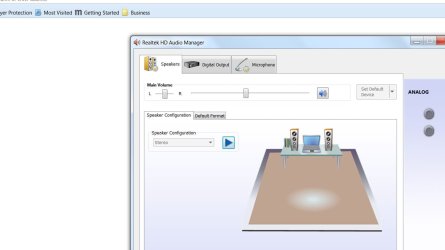
G74SX- Realtek audio manager user interface NOT SHOWING ADVANCED SETTINGS!!!!

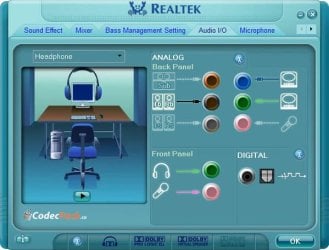
This is how my GUI looks like..


instead of the normal one like this..

Any advice much appreciated,thank's.
 

Attachments
  • Presentation1.jpg
    Presentation1.jpg
    43.5 KB · Views: 2
  • 456.jpg
    456.jpg
    39.7 KB · Views: 42

My Computer My Computer

Computer Manufacturer/Model Number
Asus G74sx-91234z
OS
windows 7 ultimate x64
CPU
2nd gen intel i7
Memory
16gb
Graphics Card(s)
nvidia 560m
Monitor(s) Displays
full hd
Hard Drives
2x 750gb
I have never seen the second version of RealTek. I have RealTek on several PC's and they are all like the first one, however mine does have the Advanced Settings.

There are cases of some PC Vendor's limiting options within the sound. Try installing the generic driver from RealTek and see if that makes any difference. Download the High Definition Audio Codecs (drivers). Realtek
 

My Computer My Computer

Computer type
PC/Desktop
Computer Manufacturer/Model Number
My Own Build
OS
Windows 10 64 bit
CPU
Intel i7 6700K
Motherboard
ASUS ROG Maximus VIII Hero
Memory
16GB Corsair Dominator
Graphics Card(s)
Intel CPU Graphics
Sound Card
RealTek
Monitor(s) Displays
27" Dell S2719dgf
Screen Resolution
2560X1440
Hard Drives
1 TB Samsung 850 EVO SSD for Win 10 Pro
500GB Samsung 850 EVO SSD for Win 10 Insider
2 TB drive for backup
PSU
EVGA Supernova 750G2
Case
BeQuiet Silent Base 600
Cooling
Deepcool Captain 120EX
Keyboard
Microsoft Wireless 2000
Mouse
Microsoft wireless
Internet Speed
100 MB/sec (Cable)
Antivirus
Microsoft Defender and Malwarebytes
Browser
Edge/Firefox
Other Info
Cakewalk (Sonar) by BandLab and Studio One 4.1 Pro recording studio software. MOTU 896Mk3 Hybrid recording interface, Frontier Tranzport wireless control unit, Behringer X-Touch Control Surface.
Five USB connected optical drives for CD Audio production using Nero BurningROM
Thank you Fireberd, even though i tried installing the driver from Realtek before after reading your post i thought i give another go,this time i uninstalled the previous drivers ,restart the computer then installed the latest driver,after installing i got some surprise,i couldn't find Realtek interface at all!!! Audio is working but couldn't find the interface!!!:mad:
 

My Computer My Computer

Computer Manufacturer/Model Number
Asus G74sx-91234z
OS
windows 7 ultimate x64
CPU
2nd gen intel i7
Memory
16gb
Graphics Card(s)
nvidia 560m
Monitor(s) Displays
full hd
Hard Drives
2x 750gb
Sounds Like it didn't install properly.

What do you show in the Device Manager, Sounds section?
 

My Computer My Computer

Computer type
PC/Desktop
Computer Manufacturer/Model Number
My Own Build
OS
Windows 10 64 bit
CPU
Intel i7 6700K
Motherboard
ASUS ROG Maximus VIII Hero
Memory
16GB Corsair Dominator
Graphics Card(s)
Intel CPU Graphics
Sound Card
RealTek
Monitor(s) Displays
27" Dell S2719dgf
Screen Resolution
2560X1440
Hard Drives
1 TB Samsung 850 EVO SSD for Win 10 Pro
500GB Samsung 850 EVO SSD for Win 10 Insider
2 TB drive for backup
PSU
EVGA Supernova 750G2
Case
BeQuiet Silent Base 600
Cooling
Deepcool Captain 120EX
Keyboard
Microsoft Wireless 2000
Mouse
Microsoft wireless
Internet Speed
100 MB/sec (Cable)
Antivirus
Microsoft Defender and Malwarebytes
Browser
Edge/Firefox
Other Info
Cakewalk (Sonar) by BandLab and Studio One 4.1 Pro recording studio software. MOTU 896Mk3 Hybrid recording interface, Frontier Tranzport wireless control unit, Behringer X-Touch Control Surface.
Five USB connected optical drives for CD Audio production using Nero BurningROM
Pls check the image
 

Attachments

  • Presentation1.jpg
    Presentation1.jpg
    50.5 KB · Views: 1

My Computer My Computer

Computer Manufacturer/Model Number
Asus G74sx-91234z
OS
windows 7 ultimate x64
CPU
2nd gen intel i7
Memory
16gb
Graphics Card(s)
nvidia 560m
Monitor(s) Displays
full hd
Hard Drives
2x 750gb
It shows RealTek is installed. The RealTek HD Audio Manager should be in the Control Panel/Hardware and Sound.
 

My Computer My Computer

Computer type
PC/Desktop
Computer Manufacturer/Model Number
My Own Build
OS
Windows 10 64 bit
CPU
Intel i7 6700K
Motherboard
ASUS ROG Maximus VIII Hero
Memory
16GB Corsair Dominator
Graphics Card(s)
Intel CPU Graphics
Sound Card
RealTek
Monitor(s) Displays
27" Dell S2719dgf
Screen Resolution
2560X1440
Hard Drives
1 TB Samsung 850 EVO SSD for Win 10 Pro
500GB Samsung 850 EVO SSD for Win 10 Insider
2 TB drive for backup
PSU
EVGA Supernova 750G2
Case
BeQuiet Silent Base 600
Cooling
Deepcool Captain 120EX
Keyboard
Microsoft Wireless 2000
Mouse
Microsoft wireless
Internet Speed
100 MB/sec (Cable)
Antivirus
Microsoft Defender and Malwarebytes
Browser
Edge/Firefox
Other Info
Cakewalk (Sonar) by BandLab and Studio One 4.1 Pro recording studio software. MOTU 896Mk3 Hybrid recording interface, Frontier Tranzport wireless control unit, Behringer X-Touch Control Surface.
Five USB connected optical drives for CD Audio production using Nero BurningROM
Thank's,its there-I opened the interface,still it looks same,don't know how to short out this issue,when i plugin headphones sound coming from both laptop speakers and headphones!!
 

My Computer My Computer

Computer Manufacturer/Model Number
Asus G74sx-91234z
OS
windows 7 ultimate x64
CPU
2nd gen intel i7
Memory
16gb
Graphics Card(s)
nvidia 560m
Monitor(s) Displays
full hd
Hard Drives
2x 750gb
I've seen some PC vendors remove some options (hardware) and thus its not available in the RealTek HD Audio Manager but in those cases its the opposite way - speakers mute when headset is plugged in.

Did it always work this way, or did it previously mute the speakers when you plugged in headset?
 

My Computer My Computer

Computer type
PC/Desktop
Computer Manufacturer/Model Number
My Own Build
OS
Windows 10 64 bit
CPU
Intel i7 6700K
Motherboard
ASUS ROG Maximus VIII Hero
Memory
16GB Corsair Dominator
Graphics Card(s)
Intel CPU Graphics
Sound Card
RealTek
Monitor(s) Displays
27" Dell S2719dgf
Screen Resolution
2560X1440
Hard Drives
1 TB Samsung 850 EVO SSD for Win 10 Pro
500GB Samsung 850 EVO SSD for Win 10 Insider
2 TB drive for backup
PSU
EVGA Supernova 750G2
Case
BeQuiet Silent Base 600
Cooling
Deepcool Captain 120EX
Keyboard
Microsoft Wireless 2000
Mouse
Microsoft wireless
Internet Speed
100 MB/sec (Cable)
Antivirus
Microsoft Defender and Malwarebytes
Browser
Edge/Firefox
Other Info
Cakewalk (Sonar) by BandLab and Studio One 4.1 Pro recording studio software. MOTU 896Mk3 Hybrid recording interface, Frontier Tranzport wireless control unit, Behringer X-Touch Control Surface.
Five USB connected optical drives for CD Audio production using Nero BurningROM
It was fine before,happened recently,as far as my knowledge i didn't install new software!!!

Sound coming from both speakers and headphone [Solved]

the above link they have a solution for this issue,i couldn't do this bcoz i don't have that option at all in my interface.
 

My Computer My Computer

Computer Manufacturer/Model Number
Asus G74sx-91234z
OS
windows 7 ultimate x64
CPU
2nd gen intel i7
Memory
16gb
Graphics Card(s)
nvidia 560m
Monitor(s) Displays
full hd
Hard Drives
2x 750gb
For testing, uninstall RealTek and delete the drivers. Then restart the PC and Windows will install the generic, basic function, HD Audio Codec sound driver. See if it works properly (speakers mute when you plug in headset) with this driver.
 

My Computer My Computer

Computer type
PC/Desktop
Computer Manufacturer/Model Number
My Own Build
OS
Windows 10 64 bit
CPU
Intel i7 6700K
Motherboard
ASUS ROG Maximus VIII Hero
Memory
16GB Corsair Dominator
Graphics Card(s)
Intel CPU Graphics
Sound Card
RealTek
Monitor(s) Displays
27" Dell S2719dgf
Screen Resolution
2560X1440
Hard Drives
1 TB Samsung 850 EVO SSD for Win 10 Pro
500GB Samsung 850 EVO SSD for Win 10 Insider
2 TB drive for backup
PSU
EVGA Supernova 750G2
Case
BeQuiet Silent Base 600
Cooling
Deepcool Captain 120EX
Keyboard
Microsoft Wireless 2000
Mouse
Microsoft wireless
Internet Speed
100 MB/sec (Cable)
Antivirus
Microsoft Defender and Malwarebytes
Browser
Edge/Firefox
Other Info
Cakewalk (Sonar) by BandLab and Studio One 4.1 Pro recording studio software. MOTU 896Mk3 Hybrid recording interface, Frontier Tranzport wireless control unit, Behringer X-Touch Control Surface.
Five USB connected optical drives for CD Audio production using Nero BurningROM
sorry for delayed reply,i tried just now,still its the same,hearing sounds both in headphone and speaker!!!

Tried again,it worked,that just heared sound from headphone,but again got the same issue!!!
 
Last edited:

My Computer My Computer

Computer Manufacturer/Model Number
Asus G74sx-91234z
OS
windows 7 ultimate x64
CPU
2nd gen intel i7
Memory
16gb
Graphics Card(s)
nvidia 560m
Monitor(s) Displays
full hd
Hard Drives
2x 750gb
Have you tried simply going with the ASUS-provided audio driver, from their driver support site for the G74sx? The support for the advanced features my be something that ASUS incorporated in their own Realtek audio driver installer file, that would not look the same coming from Realtek itself. Just a thought.

The audio driver from Realtek itself probably doesn't provide the ASUS-specific customizations for your laptop. For example, the Lenovo-provided Realtek audio driver for my W530 laptop includes a Dolby Surround app (including EQ, special effects, etc.) whereas I lose that Dolby app completely if I just go to the Realtek site for the driver for the Realtek chip in my W530.

The ASUS-Realtek audio driver normally proceeds as a 2-step process, the first one detecting your existing installed driver and uninstalling it, followed by an automatic re-boot. At re-boot time the installation process normally would automatically pick up again, this time doing the install itself (now that it sees you don't have an older driver currently installed). But there's a chance you may just need to manually run the installer file again after the re-boot, if the automatic-resume doesn't happen by itself.
 

My Computer My Computer

Computer type
PC/Desktop
Computer Manufacturer/Model Number
Home-built, two systems (1) and (2)
OS
Windows 7 Pro x64 (1), Win7 Pro X64 (2)
CPU
i5-3350p 3.1Ghz/6MB-cache (1); E8400 3.0Ghz/6MB-cache (2)
Motherboard
ASUS P8Z77-V Pro (1); ASUS P5Q3 (2)
Memory
8GB PC3-12800 DDR3 (1); 4GB PC3-10600 DDR3 (2)
Graphics Card(s)
ATI HD7750 (1), (see TV cards); ATI R7 250 (2)
Sound Card
Realtek ALC892 HD Audio (1); Realtek ALC1200 HD Audio (2)
Monitor(s) Displays
Eizo HD2441W LCD, Eizo S2433W (1); Eizo 24" S2433W (2)
Screen Resolution
1920x1200, 1920x1200 (1); 1920x1200 (2)
Hard Drives
(1) 1TB SATA-II (7200RPM), 2x2TB SATA-III (7200RPM), 250GB SATA-III (10000RPM) for OS; 2x2TB external USB 3.0

(2) 320GB SATA-II (7200RPM), 750GB SATA-II (7200RPM), 150GB SATA-II (10000RPM) for OS; 2TB external USB 3.0
PSU
Nesteq ECS-6001 600W (1); Nesteq ECS-5001 500W (2)
Case
Acousti-Case 360 (1) and (2)
Cooling
Noctua NH-U12P SE2 for CPU, 2x120mm case fans (1) and (2)
Keyboard
IBM PS/2 (1) and (2)
Mouse
Logitech MX Revolution wireless (1); Microsoft wired (2)
Internet Speed
100mbps down / 10mbps up
Antivirus
Microsoft Security Essentials; Malwarebyte Anti-Malware Pro
Browser
Firefox
Other Info
Ceton InfiniTV 4-tuner cablecard-enabled TV card as well as Hauppauge HVR-2250 OTA/ATSC 2-tuner TV card in (1), running under Win7 WMC
Back
Top