Realtek HD Audio not recognizing speakers.

Tokkemon

New member
Local time
8:57 AM
Messages
17
Location
Philadelphia, PA
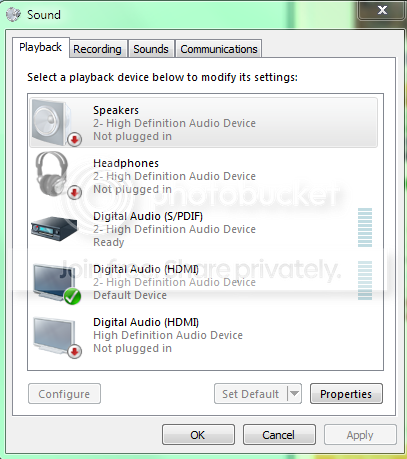
Hi folks. I'm at my wits end on a problem here. The sound on my computer is not working because the Realtek driver (or the motherboard, not sure which) is not recognizing my speakers that are plugged in. I get this:
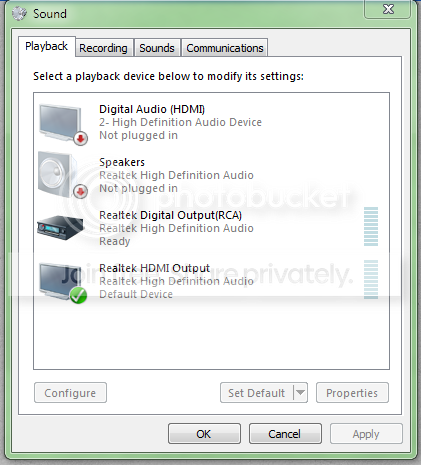
speakersnotpluggedin.png


I have tried to re-install any and all drivers that may be affected with no success. Tried restarting, messing with the BIOS, to no avail. What should I do now? This is seriously holding up my work (I'm a music composer).
 

My Computer My Computer

At a glance

Windows 7 Home Premium 64bitIntel Quad-Core8 GB
Computer Manufacturer/Model Number
Dell Studio 540
OS
Windows 7 Home Premium 64bit
CPU
Intel Quad-Core
Memory
8 GB
Sound Card
None
Monitor(s) Displays
2 Acer G235HAbd 23'' Widescreen LCD
Screen Resolution
1920X1080
PSU
Dynex 520W
Keyboard
Dell L20U
Mouse
Logitech G500
I see the HDMI output is set as Default playback device. Do you have an HDMI cable connected? If you do, disconnect that and then see if you can get your speakers back working.
 

My Computer My Computer

At a glance

Windows 10 64 bitIntel i7 6700K16GB Corsair DominatorIntel CPU Graphics
Computer type
PC/Desktop
Computer Manufacturer/Model Number
My Own Build
OS
Windows 10 64 bit
CPU
Intel i7 6700K
Motherboard
ASUS ROG Maximus VIII Hero
Memory
16GB Corsair Dominator
Graphics Card(s)
Intel CPU Graphics
Sound Card
RealTek
Monitor(s) Displays
27" Dell S2719dgf
Screen Resolution
2560X1440
Hard Drives
1 TB Samsung 850 EVO SSD for Win 10 Pro
500GB Samsung 850 EVO SSD for Win 10 Insider
2 TB drive for backup
PSU
EVGA Supernova 750G2
Case
BeQuiet Silent Base 600
Cooling
Deepcool Captain 120EX
Keyboard
Microsoft Wireless 2000
Mouse
Microsoft wireless
Internet Speed
100 MB/sec (Cable)
Antivirus
Microsoft Defender and Malwarebytes
Browser
Edge/Firefox
Other Info
Cakewalk (Sonar) by BandLab and Studio One 4.1 Pro recording studio software. MOTU 896Mk3 Hybrid recording interface, Frontier Tranzport wireless control unit, Behringer X-Touch Control Surface.
Five USB connected optical drives for CD Audio production using Nero BurningROM
Same issue as what I have posted. If I had to guess he has an Asus MB.
 

My Computer My Computer

At a glance

Windows 7 Pro x64 SP1 and Mac OS X 10.8.3Intel Core i7-3820 Sandy Bridge-E at 4.75 GHz8 x Corsair 8GB DDR3 64 GB Kit @1866 Overcloc...GTX 580 and MSI R6870
Computer Manufacturer/Model Number
Asus
OS
Windows 7 Pro x64 SP1 and Mac OS X 10.8.3
CPU
Intel Core i7-3820 Sandy Bridge-E at 4.75 GHz
Motherboard
ASUS Rampage IV Extreme
Memory
8 x Corsair 8GB DDR3 64 GB Kit @1866 Overclocked @2000
Graphics Card(s)
GTX 580 and MSI R6870
Sound Card
HDMI on GPU and ACL898
Monitor(s) Displays
32" Sony EX-500 120Hz
Screen Resolution
1920x1080P
Hard Drives
1 x Corsair Force Series GT CSSD-F60GBGT-BK (OS)
2 x Western Digital Caviar Black Sata III 750GB (Raid 0)
1 x Western Digital Caviar Black Sata III 1TB (Media)
2 x Western Digital Caviar Black Sata II 640GB (Raid 0)
PSU
Corsair Professional Series Gold AX850
Case
Corsair 800D
Cooling
Corsair H80 High Performance Liquid CPU Cooler
Keyboard
HP Wireless Elite Keyboard
Mouse
HP Wireless Elite Mouse
Internet Speed
Cable, VisionTek Bigfoot Killer 2100 Gaming Network Card
Other Info
4 x GELID Solutions FN-TX12-15 120mm Case Fan with Superior Temperature Control
1 x Corsair 140mm Case Fan
1 x SilverStone FP55B Aluminum front panel 5.25" to a 3.5" bay converter
1 x Ultra Card Reader
1 x Sony Blu-ray Burner BD-5300S-0B
I have an HDMI for my second monitor on my graphics card. Taking that out has no change. That HDMI connection is for the port directly on the board anyway.

It's a Dell Motherboard actually. Part of a Studio 540.

dellmotherboard.png
 

My Computer My Computer

At a glance

Windows 7 Home Premium 64bitIntel Quad-Core8 GB
Computer Manufacturer/Model Number
Dell Studio 540
OS
Windows 7 Home Premium 64bit
CPU
Intel Quad-Core
Memory
8 GB
Sound Card
None
Monitor(s) Displays
2 Acer G235HAbd 23'' Widescreen LCD
Screen Resolution
1920X1080
PSU
Dynex 520W
Keyboard
Dell L20U
Mouse
Logitech G500
With a Dell, you need Dell supplied sound drivers. If you are not using Dell supplied sound drivers, that is the first step - install Dell drivers. I used to do a lot of support on the Dell users forums and non-Dell sound drivers usually do not work or work correctly.

HDMI generally takes priority over the sound card's output and usually the HDMI will set itself as the default audio playback device.

Dell does not support Win 7 on this model, but they do support Vista. Usually, Vista drivers work OK with Windows 7.

Here is the Dell Vista 32/64 bit sound driver: Drivers and Downloads | Dell [United States]
 

My Computer My Computer

At a glance

Windows 10 64 bitIntel i7 6700K16GB Corsair DominatorIntel CPU Graphics
Computer type
PC/Desktop
Computer Manufacturer/Model Number
My Own Build
OS
Windows 10 64 bit
CPU
Intel i7 6700K
Motherboard
ASUS ROG Maximus VIII Hero
Memory
16GB Corsair Dominator
Graphics Card(s)
Intel CPU Graphics
Sound Card
RealTek
Monitor(s) Displays
27" Dell S2719dgf
Screen Resolution
2560X1440
Hard Drives
1 TB Samsung 850 EVO SSD for Win 10 Pro
500GB Samsung 850 EVO SSD for Win 10 Insider
2 TB drive for backup
PSU
EVGA Supernova 750G2
Case
BeQuiet Silent Base 600
Cooling
Deepcool Captain 120EX
Keyboard
Microsoft Wireless 2000
Mouse
Microsoft wireless
Internet Speed
100 MB/sec (Cable)
Antivirus
Microsoft Defender and Malwarebytes
Browser
Edge/Firefox
Other Info
Cakewalk (Sonar) by BandLab and Studio One 4.1 Pro recording studio software. MOTU 896Mk3 Hybrid recording interface, Frontier Tranzport wireless control unit, Behringer X-Touch Control Surface.
Five USB connected optical drives for CD Audio production using Nero BurningROM
Did that. It reset all the playback devices to what they were on the first picture I showed, so no change. It's no longer called a the Realtek HD Audio device though.

speakers2.png


There is no HDMI cable plugged in. But the 3.5 jack is, firmly. Plugging it in on the headphones front panel makes no difference.
 

My Computer My Computer

At a glance

Windows 7 Home Premium 64bitIntel Quad-Core8 GB
Computer Manufacturer/Model Number
Dell Studio 540
OS
Windows 7 Home Premium 64bit
CPU
Intel Quad-Core
Memory
8 GB
Sound Card
None
Monitor(s) Displays
2 Acer G235HAbd 23'' Widescreen LCD
Screen Resolution
1920X1080
PSU
Dynex 520W
Keyboard
Dell L20U
Mouse
Logitech G500
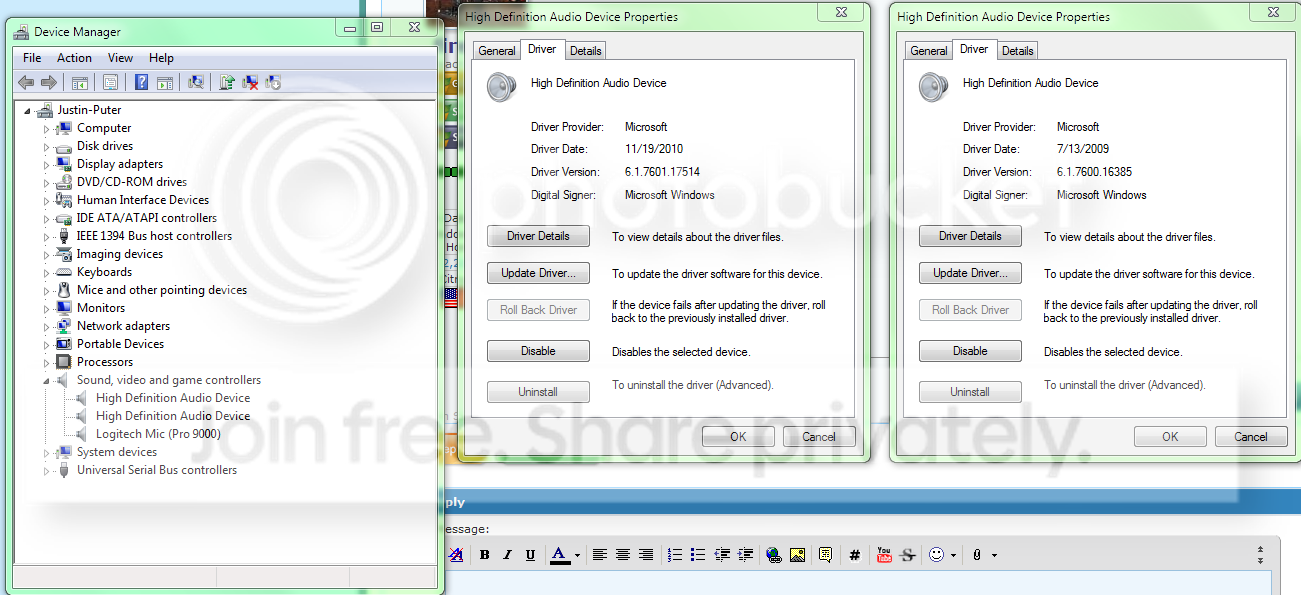
What is listed in the Device Manager for audio? Also what does the Device Manager Properties for the Audio device list as the Driver provider?
 

My Computer My Computer

At a glance

Windows 10 64 bitIntel i7 6700K16GB Corsair DominatorIntel CPU Graphics
Computer type
PC/Desktop
Computer Manufacturer/Model Number
My Own Build
OS
Windows 10 64 bit
CPU
Intel i7 6700K
Motherboard
ASUS ROG Maximus VIII Hero
Memory
16GB Corsair Dominator
Graphics Card(s)
Intel CPU Graphics
Sound Card
RealTek
Monitor(s) Displays
27" Dell S2719dgf
Screen Resolution
2560X1440
Hard Drives
1 TB Samsung 850 EVO SSD for Win 10 Pro
500GB Samsung 850 EVO SSD for Win 10 Insider
2 TB drive for backup
PSU
EVGA Supernova 750G2
Case
BeQuiet Silent Base 600
Cooling
Deepcool Captain 120EX
Keyboard
Microsoft Wireless 2000
Mouse
Microsoft wireless
Internet Speed
100 MB/sec (Cable)
Antivirus
Microsoft Defender and Malwarebytes
Browser
Edge/Firefox
Other Info
Cakewalk (Sonar) by BandLab and Studio One 4.1 Pro recording studio software. MOTU 896Mk3 Hybrid recording interface, Frontier Tranzport wireless control unit, Behringer X-Touch Control Surface.
Five USB connected optical drives for CD Audio production using Nero BurningROM
Here it is.

sounddrivers.png


Usually one of them is Realtek.
 

My Computer My Computer

At a glance

Windows 7 Home Premium 64bitIntel Quad-Core8 GB
Computer Manufacturer/Model Number
Dell Studio 540
OS
Windows 7 Home Premium 64bit
CPU
Intel Quad-Core
Memory
8 GB
Sound Card
None
Monitor(s) Displays
2 Acer G235HAbd 23'' Widescreen LCD
Screen Resolution
1920X1080
PSU
Dynex 520W
Keyboard
Dell L20U
Mouse
Logitech G500
As I suspected, the Dell driver was not installed. The generic Windows installed HD Audio Codec is what is currently installed.
 

My Computer My Computer

At a glance

Windows 10 64 bitIntel i7 6700K16GB Corsair DominatorIntel CPU Graphics
Computer type
PC/Desktop
Computer Manufacturer/Model Number
My Own Build
OS
Windows 10 64 bit
CPU
Intel i7 6700K
Motherboard
ASUS ROG Maximus VIII Hero
Memory
16GB Corsair Dominator
Graphics Card(s)
Intel CPU Graphics
Sound Card
RealTek
Monitor(s) Displays
27" Dell S2719dgf
Screen Resolution
2560X1440
Hard Drives
1 TB Samsung 850 EVO SSD for Win 10 Pro
500GB Samsung 850 EVO SSD for Win 10 Insider
2 TB drive for backup
PSU
EVGA Supernova 750G2
Case
BeQuiet Silent Base 600
Cooling
Deepcool Captain 120EX
Keyboard
Microsoft Wireless 2000
Mouse
Microsoft wireless
Internet Speed
100 MB/sec (Cable)
Antivirus
Microsoft Defender and Malwarebytes
Browser
Edge/Firefox
Other Info
Cakewalk (Sonar) by BandLab and Studio One 4.1 Pro recording studio software. MOTU 896Mk3 Hybrid recording interface, Frontier Tranzport wireless control unit, Behringer X-Touch Control Surface.
Five USB connected optical drives for CD Audio production using Nero BurningROM
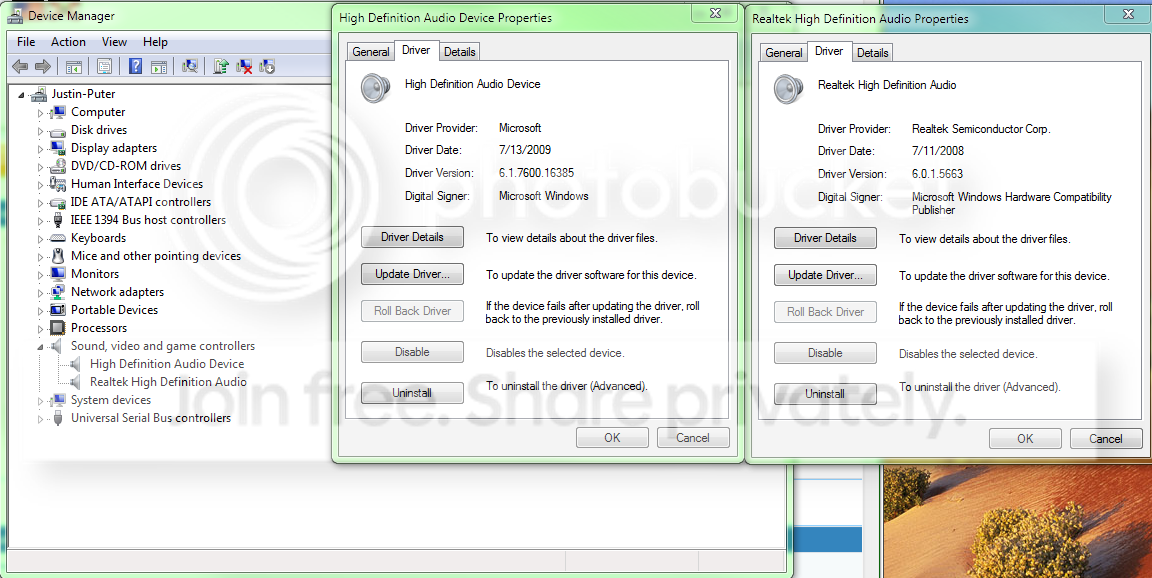
I tried it again by removing the sound devices first in the Device Manager and then installing the Realtek driver from the Dell website. Still no change in the problem but the software is fixed now.

sounddrivers2.png


So.... right back to square one here.

Is it likely to be a hardware failure?
 

My Computer My Computer

At a glance

Windows 7 Home Premium 64bitIntel Quad-Core8 GB
Computer Manufacturer/Model Number
Dell Studio 540
OS
Windows 7 Home Premium 64bit
CPU
Intel Quad-Core
Memory
8 GB
Sound Card
None
Monitor(s) Displays
2 Acer G235HAbd 23'' Widescreen LCD
Screen Resolution
1920X1080
PSU
Dynex 520W
Keyboard
Dell L20U
Mouse
Logitech G500
The High Definition Audio Device should not be there and could be causing the problem. Disable that in the Device Manager then restart the PC and see if anything changes.
 

My Computer My Computer

At a glance

Windows 10 64 bitIntel i7 6700K16GB Corsair DominatorIntel CPU Graphics
Computer type
PC/Desktop
Computer Manufacturer/Model Number
My Own Build
OS
Windows 10 64 bit
CPU
Intel i7 6700K
Motherboard
ASUS ROG Maximus VIII Hero
Memory
16GB Corsair Dominator
Graphics Card(s)
Intel CPU Graphics
Sound Card
RealTek
Monitor(s) Displays
27" Dell S2719dgf
Screen Resolution
2560X1440
Hard Drives
1 TB Samsung 850 EVO SSD for Win 10 Pro
500GB Samsung 850 EVO SSD for Win 10 Insider
2 TB drive for backup
PSU
EVGA Supernova 750G2
Case
BeQuiet Silent Base 600
Cooling
Deepcool Captain 120EX
Keyboard
Microsoft Wireless 2000
Mouse
Microsoft wireless
Internet Speed
100 MB/sec (Cable)
Antivirus
Microsoft Defender and Malwarebytes
Browser
Edge/Firefox
Other Info
Cakewalk (Sonar) by BandLab and Studio One 4.1 Pro recording studio software. MOTU 896Mk3 Hybrid recording interface, Frontier Tranzport wireless control unit, Behringer X-Touch Control Surface.
Five USB connected optical drives for CD Audio production using Nero BurningROM
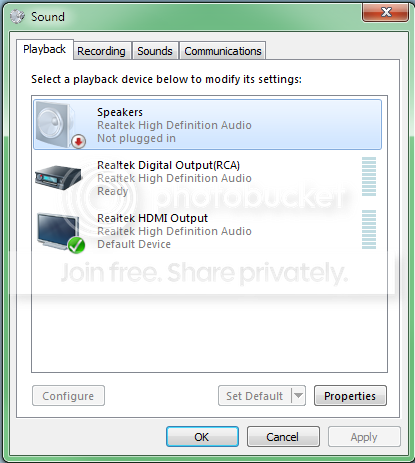
I did that and the other HDMI device disappeared. (which I believe is the graphics card?)

speakersnotpluggedin2.png
 

My Computer My Computer

At a glance

Windows 7 Home Premium 64bitIntel Quad-Core8 GB
Computer Manufacturer/Model Number
Dell Studio 540
OS
Windows 7 Home Premium 64bit
CPU
Intel Quad-Core
Memory
8 GB
Sound Card
None
Monitor(s) Displays
2 Acer G235HAbd 23'' Widescreen LCD
Screen Resolution
1920X1080
PSU
Dynex 520W
Keyboard
Dell L20U
Mouse
Logitech G500
The graphics card should have drivers from the card vendor, not use the generic Windows drivers. If you have a ATI Radeon card, get the drivers from AMD. If its an NVIDIA card get them from NVIDIA.

The Realtek "HDMI" is still a problem. I suspect there is more problems than just the sound problem.
 

My Computer My Computer

At a glance

Windows 10 64 bitIntel i7 6700K16GB Corsair DominatorIntel CPU Graphics
Computer type
PC/Desktop
Computer Manufacturer/Model Number
My Own Build
OS
Windows 10 64 bit
CPU
Intel i7 6700K
Motherboard
ASUS ROG Maximus VIII Hero
Memory
16GB Corsair Dominator
Graphics Card(s)
Intel CPU Graphics
Sound Card
RealTek
Monitor(s) Displays
27" Dell S2719dgf
Screen Resolution
2560X1440
Hard Drives
1 TB Samsung 850 EVO SSD for Win 10 Pro
500GB Samsung 850 EVO SSD for Win 10 Insider
2 TB drive for backup
PSU
EVGA Supernova 750G2
Case
BeQuiet Silent Base 600
Cooling
Deepcool Captain 120EX
Keyboard
Microsoft Wireless 2000
Mouse
Microsoft wireless
Internet Speed
100 MB/sec (Cable)
Antivirus
Microsoft Defender and Malwarebytes
Browser
Edge/Firefox
Other Info
Cakewalk (Sonar) by BandLab and Studio One 4.1 Pro recording studio software. MOTU 896Mk3 Hybrid recording interface, Frontier Tranzport wireless control unit, Behringer X-Touch Control Surface.
Five USB connected optical drives for CD Audio production using Nero BurningROM
What other problems would there be? I haven't noticed any other problems.

The Realtek HDMI out is obviously the onboard sound going through the motherboard's HDMI out port. I don't think this is transferred through the Graphics card but I could be wrong.
 

My Computer My Computer

At a glance

Windows 7 Home Premium 64bitIntel Quad-Core8 GB
Computer Manufacturer/Model Number
Dell Studio 540
OS
Windows 7 Home Premium 64bit
CPU
Intel Quad-Core
Memory
8 GB
Sound Card
None
Monitor(s) Displays
2 Acer G235HAbd 23'' Widescreen LCD
Screen Resolution
1920X1080
PSU
Dynex 520W
Keyboard
Dell L20U
Mouse
Logitech G500
That could be since this has a motherboard HDMI output. Are you actually using that connection? Generally, if there is a cable plugged into the HDMI it automatically becomes the Default audio playback device. However, usually you can manually switch the audio to the "speakers".

Although it should work OK with Windows 7, since Dell does not officially support Win 7 on this, there could be some driver issues. There could also be a Windows issue that is causing your problem and not the actual hardware.

Whether a separate sound card would fix the problem ??? If you install a separate sound card, you will have to disable the Integrated (RealTek) audio in the BIOS (F2 - Setup) and that will apparently also disable your HDMI audio (if you are using this). If the RealTek was not disabled in the BIOS it could (and many times does) conflict with the other audio device and neither works.

If it worked OK at one time, I see two possibilites to fix it and both are not pretty. #1 is to buy a sound card (although you could buy an inexpensive one and have as good a quality audio as the integrated and if it didn't work you wouldn't be out much). #2 is a complete, clean reinstall (but no guarantee that this will fix it if the RealTek audio has a hardware problem).
 

My Computer My Computer

At a glance

Windows 10 64 bitIntel i7 6700K16GB Corsair DominatorIntel CPU Graphics
Computer type
PC/Desktop
Computer Manufacturer/Model Number
My Own Build
OS
Windows 10 64 bit
CPU
Intel i7 6700K
Motherboard
ASUS ROG Maximus VIII Hero
Memory
16GB Corsair Dominator
Graphics Card(s)
Intel CPU Graphics
Sound Card
RealTek
Monitor(s) Displays
27" Dell S2719dgf
Screen Resolution
2560X1440
Hard Drives
1 TB Samsung 850 EVO SSD for Win 10 Pro
500GB Samsung 850 EVO SSD for Win 10 Insider
2 TB drive for backup
PSU
EVGA Supernova 750G2
Case
BeQuiet Silent Base 600
Cooling
Deepcool Captain 120EX
Keyboard
Microsoft Wireless 2000
Mouse
Microsoft wireless
Internet Speed
100 MB/sec (Cable)
Antivirus
Microsoft Defender and Malwarebytes
Browser
Edge/Firefox
Other Info
Cakewalk (Sonar) by BandLab and Studio One 4.1 Pro recording studio software. MOTU 896Mk3 Hybrid recording interface, Frontier Tranzport wireless control unit, Behringer X-Touch Control Surface.
Five USB connected optical drives for CD Audio production using Nero BurningROM
No I don't use the MB HDMI. I use the one on the Graphics card for my second monitor but not for sound.

It seems odd that it would be a Windows issue since I've had Windows 7 on here since the day it came out and it's worked swimmingly. I'm leaning toward solution #1 right now. The onboard sound has always been just adequate, but never stellar, so it may be time for an upgrade. I have no real interest in doing a reinstall if I can't guarantee that would fix the issue. I've had hardware issues with this computer before; Dell's semi-cheap parts tend to fail quicker than they should.

Any good soundcards for good prices these days? :)
 

My Computer My Computer

At a glance

Windows 7 Home Premium 64bitIntel Quad-Core8 GB
Computer Manufacturer/Model Number
Dell Studio 540
OS
Windows 7 Home Premium 64bit
CPU
Intel Quad-Core
Memory
8 GB
Sound Card
None
Monitor(s) Displays
2 Acer G235HAbd 23'' Widescreen LCD
Screen Resolution
1920X1080
PSU
Dynex 520W
Keyboard
Dell L20U
Mouse
Logitech G500
You can use a PCI or a PCIexpress sound card.

Depends on what price range you are in. A nice PCI sound card is the HT Omega "Striker 7.1" that is available from www.newegg.com and probably others. HT Omega also makes PCIex cards. Then there are the SoundBlaster Xfi cards and there is ASUS Xonar sound card that seems to be popular.

I think you are OK with the front panel headphone/mic connection. It looks like a standard connector in the Studio 540 that you have.
 

My Computer My Computer

At a glance

Windows 10 64 bitIntel i7 6700K16GB Corsair DominatorIntel CPU Graphics
Computer type
PC/Desktop
Computer Manufacturer/Model Number
My Own Build
OS
Windows 10 64 bit
CPU
Intel i7 6700K
Motherboard
ASUS ROG Maximus VIII Hero
Memory
16GB Corsair Dominator
Graphics Card(s)
Intel CPU Graphics
Sound Card
RealTek
Monitor(s) Displays
27" Dell S2719dgf
Screen Resolution
2560X1440
Hard Drives
1 TB Samsung 850 EVO SSD for Win 10 Pro
500GB Samsung 850 EVO SSD for Win 10 Insider
2 TB drive for backup
PSU
EVGA Supernova 750G2
Case
BeQuiet Silent Base 600
Cooling
Deepcool Captain 120EX
Keyboard
Microsoft Wireless 2000
Mouse
Microsoft wireless
Internet Speed
100 MB/sec (Cable)
Antivirus
Microsoft Defender and Malwarebytes
Browser
Edge/Firefox
Other Info
Cakewalk (Sonar) by BandLab and Studio One 4.1 Pro recording studio software. MOTU 896Mk3 Hybrid recording interface, Frontier Tranzport wireless control unit, Behringer X-Touch Control Surface.
Five USB connected optical drives for CD Audio production using Nero BurningROM
Really I want to spend as little as possible without getting something crappy. I'm a musician so sound quality is important, but I don't really do sound production with this computer. I also only use 2.1 speakers so I don't need to overkill on surround sound. I'll do some research and find a good one.

Thanks for your help fireberd!
 

My Computer My Computer

At a glance

Windows 7 Home Premium 64bitIntel Quad-Core8 GB
Computer Manufacturer/Model Number
Dell Studio 540
OS
Windows 7 Home Premium 64bit
CPU
Intel Quad-Core
Memory
8 GB
Sound Card
None
Monitor(s) Displays
2 Acer G235HAbd 23'' Widescreen LCD
Screen Resolution
1920X1080
PSU
Dynex 520W
Keyboard
Dell L20U
Mouse
Logitech G500
I'm also a musician and have a recording studio using Sonar X1 software.

In my old DAW PC, I used a Striker 7.1 sound card as it worked great and didn't interfere with my studio recording interface equipment. I had a SoundBlaster and it did interfere (the Striker 7.1 replaced the SoundBlaster).

I don't know what is available in the "under $50" range for sound cards that are fully Windows 7 compatible.
 

My Computer My Computer

At a glance

Windows 10 64 bitIntel i7 6700K16GB Corsair DominatorIntel CPU Graphics
Computer type
PC/Desktop
Computer Manufacturer/Model Number
My Own Build
OS
Windows 10 64 bit
CPU
Intel i7 6700K
Motherboard
ASUS ROG Maximus VIII Hero
Memory
16GB Corsair Dominator
Graphics Card(s)
Intel CPU Graphics
Sound Card
RealTek
Monitor(s) Displays
27" Dell S2719dgf
Screen Resolution
2560X1440
Hard Drives
1 TB Samsung 850 EVO SSD for Win 10 Pro
500GB Samsung 850 EVO SSD for Win 10 Insider
2 TB drive for backup
PSU
EVGA Supernova 750G2
Case
BeQuiet Silent Base 600
Cooling
Deepcool Captain 120EX
Keyboard
Microsoft Wireless 2000
Mouse
Microsoft wireless
Internet Speed
100 MB/sec (Cable)
Antivirus
Microsoft Defender and Malwarebytes
Browser
Edge/Firefox
Other Info
Cakewalk (Sonar) by BandLab and Studio One 4.1 Pro recording studio software. MOTU 896Mk3 Hybrid recording interface, Frontier Tranzport wireless control unit, Behringer X-Touch Control Surface.
Five USB connected optical drives for CD Audio production using Nero BurningROM
Back
Top