Realtek HD Changing Jack output reassignments ( FIX )

Is that the latest version of Realtek HD Audio Manager and drivers? R 2.43

If not get it from here

Realtek


I have the latest version.


I still cannot find "disable front jack panel detection"
 

My Computer My Computer

At a glance

Windows 7 Home Premium
OS
Windows 7 Home Premium
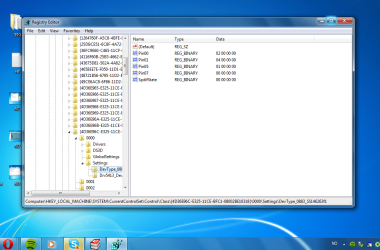
I am having a problem finding the settings section after I get into the regedit section. Can anyone help me?
 

Attachments

  • settings.png
    settings.png
    24.5 KB · Views: 366

My Computer My Computer

At a glance

Windows 7
OS
Windows 7
Hi. Read trough all posts and tried reading on like hundred other places without getting any answers to my problem.

Main problem: The speakers on my laptop are playing at the same time as the headphones are playing. Plugging in/out doesnt make much difference.

I have just installed win7 over my previously Vista. I had some problems from the beginning with the sound, some sparkling when scrolling and doing other stuff on my computer. After trying several realtek drivers, new and old ones, I finally found one giving me perfect sound. Thats when I found out about this other problem. Tried to reinstall everything again and so on. But ended up with same driver version.

I've read some and think I found the problem, or at least a part of it.
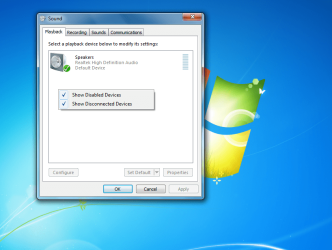
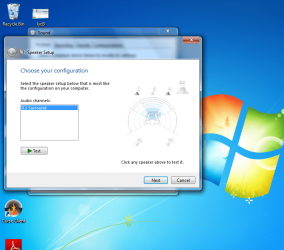
On playback devices I only have "Speakers". And there is not possible to add anything. An other thing I was wondering about is why there is only a 5.1 option on speaker setup.

Want to add that I have a LG E500 laptop, and the driver I've installed are the original one for this model.

I tried edit some values in regedit as listet earlier in this topic, but doesent help me much. Anyone have the slightest clue about whats wrong?

Thanks for help in the advance
-Zill
 

Attachments

  • fil1.png
    fil1.png
    104.4 KB · Views: 132
  • fil2.png
    fil2.png
    120.9 KB · Views: 261
  • fil3.png
    fil3.png
    106.9 KB · Views: 149

My Computer My Computer

At a glance

win7
OS
win7
Zill , if u go to "HKEY_LOCAL_MACHINE\SYSTEM\CurrentControlSet\Control\Class\{4D36E96C-E325-11CE-BFC1-08002BE10318}\0000\Settings\DevType_0888_SS147b1083 or ending in DevType_0885_SS18490890

Do you see Pin00 , Pin01 etc.?
 

My Computer My Computer

At a glance

Windows 7 x64 RTMIntel E2160 1.8 GHz6GB Dual Channel ZeppelinAti Radeon HD3850
Computer Manufacturer/Model Number
ACER
OS
Windows 7 x64 RTM
CPU
Intel E2160 1.8 GHz
Motherboard
ACER EQ35M
Memory
6GB Dual Channel Zeppelin
Graphics Card(s)
Ati Radeon HD3850
Sound Card
Sound Blaster Live 24-Bit External
Monitor(s) Displays
Acer
Screen Resolution
1280*1024
Hard Drives
WD 160 GB
WD 160 GB
WD 160 GB
PSU
No Name
Case
Acer Branded
Cooling
Stock
Keyboard
Acer
Mouse
Microsoft Wireless Notebook Laser Mouse 7000
Internet Speed
6/6
Yes. Think there was only Pin01 or Pin00 with 02 00 00 the first time i checked, so I added the other. Tried the different options posted earlier also with various pin- values . I'll add prt sc under

I see now that the full name isn't the same. Mine is DevType_0883_SS146263f1.
 

Attachments

  • fil4.png
    fil4.png
    98.9 KB · Views: 604
Last edited:

My Computer My Computer

At a glance

win7
OS
win7
Really don't want to, but bump
 

My Computer My Computer

At a glance

win7
OS
win7
Hi, I have a Problem ..................................... First off.. My PC laptop MS-1412 x86 with Realtek HD has a broken Headphone Jack (Seriously Damaged), the (two others) Line In and Mic are OK,

now I once in the past a year ago when I was useing SP2 and XP pro found a way how to listen to music through those two working jacks ( I know they are both input and some of you might say that it is impossible, BUT I did find a way and I used it for about a year like this, UNTIL! the day before yesterday I reeinstalled XP with SP3 and now I cant d*mn remember how I did the trick....

I have tried installing and reeinstalling all types of driver versions, (right now have the latest on me R245.. and I cant figure out how did I manage to get the sound out from these other two..

I have found posts that tell me to go and "disable jack detection" under Connector Settings , but it has only the pop up dialouge option and when selected it says device not supported when I plug in my speakers..

so If any of you know how could I tweak the registry or install whatever it is needed to get those two other jacks (one is eough) sending out sound to my speakers I would be thankfull as a thank. please help me, and I know it is possible 100% I was just not hearing sounds the past year ;) as I was listening to music :) Thanks!
 

My Computer My Computer

At a glance

XP
OS
XP
Oh nice, I got it to work.. now if their is anyone else with Realtek HD sound card out there in the World and googles : I broke my headphone jack can i use the two other jacks ?

then the answer is jes, go to your sound and audio device properties, advanced and choose quadrophonic speakers, and then go to your Realtek HD Manager and choose 4CH speaker and Connector Settings Enable pop up, Plug it in your headphones and when pop up comes select Front Speaker Out :)

I asked and I answered !

Bye Bye
 

My Computer My Computer

At a glance

XP
OS
XP
Biiig problem

I have xp and recently instaled windows 7 on my pc...

I have problem with my speakers i only get 2.1 sound from my 5.1 speakers
even thought in my setting all of 5.1 speakers are working fine...

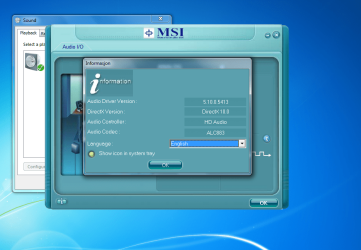
I used several driver default, realtek and msi all of them give same thing...
When i setup mu speakers they work fine...
But when i play it with winamp or gom playe or wmp or eny other i only get 2.1 speakers...

Cao some one explain why!?!


This is my mainboard...

MSI Global ? Computer, Laptop, Notebook, Desktop, Mainboard, Graphics and more

an here is pic of my pc

http://i43.tinypic.com/2novbq.jpg
 

My Computer My Computer

At a glance

7
OS
7
Hey guys...I am wondering if you could help me out. I have a similar problem with the green output not working. I am using a "normal" realtek onboard sound. I´ve tried meddling with some settings without any luck until I saw this thread...and it´s for Realtek HD, but maybe you can help me out. I managed to navigate in regedit but am unable to figure it out what to change, or wether it´s possible or not.

http://img25.imageshack.us/i/speakersn.png/

Uploaded with ImageShack.us

It´s a MSI RS482M2-IL/ L
 

My Computer My Computer

At a glance

Windows 7 32-bitPhenom 4 9600 BE4GBAti 5770
Computer Manufacturer/Model Number
Custom
OS
Windows 7 32-bit
CPU
Phenom 4 9600 BE
Motherboard
Gigabyte GA-790X-UDP
Memory
4GB
Graphics Card(s)
Ati 5770
Sound Card
Realtek HD
Monitor(s) Displays
Samsung 940MW
PSU
Cooler Master 620W
Cooling
Standard
Problem with realtek (p5qld pro)

Hello
How can I forse the default winamp/movie player sound to go not only to fron rear, but to central speaker as well ? I prefer sound from 3 sides for such basic things. I need center/front separation only in DVD
As well I would like to ask how can I manage the basses
If you need the info - the 5.1 speakers are altec - nothing special
Thanks


My Computer My Computer

At a glance

Windows 7QuandCore Intel Q94002x2GB DDR2Ati Radeon HD4870
OS
Windows 7
CPU
QuandCore Intel Q9400
Motherboard
Asus p5qld pro
Memory
2x2GB DDR2
Graphics Card(s)
Ati Radeon HD4870
Sound Card
/
Hello guys,
I just registered and read all 14 pages of this topic, but nothing really solves my problem. I have an Acer Extensa 5210 Laptop and my headphone jack got worn out. I tried regedit but all I can find is shown in the picture below. It would be greatly appreciated if anyone can help me redirect the audio signal throug either my mic jack or spdif jack. Thank you in advance.
90365335.jpg
 

My Computer My Computer

At a glance

Windows 7
OS
Windows 7
I'm sorry of bothering. I saw this awsome post but there is one problem. I tried change pin settings and nothing happened. All settings were just like they used to be. I'm trying get 2 signals cos i need headphones and stereos on sametime and i cant use front panel (aka keyboard haves headphone imputs) I even took backup of those imputs and tried even whit deleting them. Nothing happened...Everything were just like before, if there would be some1 who knows this prob? ALC 892 codecs installed even.

Yes i'm crazy whit testings :P
 
Last edited:

My Computer My Computer

At a glance

Windows 7 Pr0 x64AMD Phenom II x6 1055t 2.80ghz4gigs of crap 1333mhzAti radeon HD4770
OS
Windows 7 Pr0 x64
CPU
AMD Phenom II x6 1055t 2.80ghz
Motherboard
M4A89GTD PRO
Memory
4gigs of crap 1333mhz
Graphics Card(s)
Ati radeon HD4770
Sound Card
Motherboard one :P
Monitor(s) Displays
Benq 21' ich
Hard Drives
One 750g WD in
Iomega 1tb Usb
Case
Hades
Cooling
Alot of fans.
So after reading all of the posts on every single page I'm very familiar with retasking jacks via the registry but I'm trying to figure out if it's possible for example to retask a rear panel jack, let's just say the black jack, to mimic the _FRONT PANEL_ green jack.
What I'm trying to ask is, if using multi-stream for output, so I can have 2 different audio streams from green jacks, one front and one rear. Is it possible for me to multi-stream on two of the rear jacks, for example the rear green and the rear black jack?
I've tried assigning the rear black jack to the front green binary, 02 00 00 00 (Asus P5Q ALC1200 Chipset) but it simply plays what the green jack plays simultaneously.
 

My Computer My Computer

At a glance

Windows 7 Ultimate x64
OS
Windows 7 Ultimate x64
Anyone know how to do these jack output reassignments using a VIA board?
 

My Computer My Computer

At a glance

Win7
OS
Win7
hi,
my green sound output is not working. how I can use line in (blue output) for speaker ?
thanks
 

My Computer My Computer

At a glance

Windows 7 Ultimate 32bit
OS
Windows 7 Ultimate 32bit
hee
i'm so far that i can change my pins in regedit.
but when i listen music and movies (everything with music) it returns to deafualt.
i can restart my pc and it will not return to default but whit music it do.
how can i fix that?
 

My Computer My Computer

At a glance

Windows 7 Ultimate x64T69004gbGeforce 9600M GT
Computer Manufacturer/Model Number
acer
OS
Windows 7 Ultimate x64
CPU
T6900
Memory
4gb
Graphics Card(s)
Geforce 9600M GT
i have logitech x-530. OS windows 7
and i have problem that front speakers plays normal other very "weak" i tried to change pin00 to 04 00 00 00 pin01 pin02 pin03 to 04 00 00 00 but nothing changed :/
tried to change ports in realtek manager but i am able to change jus the green one which is front speakers :/
dunno what to do. please help
 

My Computer My Computer

At a glance

Windows 7
OS
Windows 7
Still working with 2.56 Realek drivers

Well, I just registered to thank the OP (and subsequent posters) for this nice trick, and to confirm that it still works with the latest Realtek chips on LGA1155-based mobos with the latest realtek drivers (2.56 at the time of writing).

As it has been mentionned before, the location of the key depends on your system but with a few searches I found it easily. For me (Windows 7 Pro 64b, Realtek drivers 2.56) it was there :

HKEY_LOCAL_MACHINE\SYSTEM\ControlSet001\Control\Class\{4D36E96C-E325-11CE-BFC1-08002BE10318}\0001\Settings\Drv6278_DevType_0892_SS10438469

From there, I just had to change the value of Pin02 from 05 00 00 00 to 04 00 00 00 to replace rear speaker output by a second front speaker output so that i could plug speakers and headphones simultaneously.

Works like a charm! Thanks again.
 

My Computer My Computer

At a glance

Windows 7 Pro 64b
OS
Windows 7 Pro 64b
Likan:

I will be buying a socket 1155 motherboard with Realtek onboard sound ALC892.

Have you had problems with it regarding recording? General listening? Microphone input? Any issues generally?

Contact me by private message if possible.
 

My Computer My Computer

At a glance

Windows 7 Home Premium SP1, 64-bitIntel Skylake i5-6600K, not overclocked8 GB HyperX DDR4-2666 (2 x 4 GB)none; graphics are integrated on CPU
Computer type
PC/Desktop
Computer Manufacturer/Model Number
Ignatz Special; 4 speed manual gearbox; factory air conditioning; one of one
OS
Windows 7 Home Premium SP1, 64-bit
CPU
Intel Skylake i5-6600K, not overclocked
Motherboard
AsRock Z170M Extreme 4, micro ATX
Memory
8 GB HyperX DDR4-2666 (2 x 4 GB)
Graphics Card(s)
none; graphics are integrated on CPU
Sound Card
onboard: Realtek ALC1150; external: USB Behringer UF0-202
Monitor(s) Displays
Dell S2340M 23 inch IPS
Screen Resolution
1600 x 900
Hard Drives
System: Crucial MX100 series SSD, 128 GB;
Data: Samsung Spinpoint 103SJ, 1 TB;
Backup: WD Caviar Green WD30EZRX-00D8PB0, 3 TB
PSU
Rosewill SilentNight 500 watt fanless, semi-modular
Case
Antec Solo II
Cooling
Noctua NH-U12S; Noctua F12 intake, Noctua S12A exhaust
Keyboard
Microsoft 200 6JH-00001 USB
Mouse
Dell or Microsoft optical wired; USB
Antivirus
Microsoft Security Essentials and Malwarebytes Premium
Browser
Pale Moon
Other Info
All fans PWM; speeds at idle: CPU circa 500 rpm; intake circa 600 rpm; exhaust circa 600 rpm; CPU temps 27 idle and 47 C load in a warm room (27 C/81 F) when running Intel Extreme Tuning Utility stress test.
Back
Top