Realtek HD Changing Jack output reassignments ( FIX )

ignatzatsonic :

When I try to pm I'm told by the forum that I don't have sufficient permission or that I'm pending activation. My account must be too recent. I apologize then for the brief off-topic!

I've got a P8P67 pro, thus with an AL887, and a very unsophisticated sound setup (2.1 system and headphone + mic for gaming). I have not noticed anything special regarding sound output quality which is on par with my previous ALC889A-based system (though I am of course no true audiophile), but I had to activate the mic boost by 10dB, which I don't remember doing on my previous LGA775 board. Other than that, nothing in particular, hardware and software work exactly like previous versions (except - of course - for the jack reassignment which, on my previous box, could be done through driver management on all back panel jacks and is now limited to the front speaker/headphone green jacks of both back and front panels).
 

My Computer

OS
Windows 7 Pro 64b
ignatzatsonic :

When I try to pm I'm told by the forum that I don't have sufficient permission or that I'm pending activation. My account must be too recent. I apologize then for the brief off-topic!

I've got a P8P67 pro, thus with an AL887, and a very unsophisticated sound setup (2.1 system and headphone + mic for gaming). I have not noticed anything special regarding sound output quality which is on par with my previous ALC889A-based system (though I am of course no true audiophile), but I had to activate the mic boost by 10dB, which I don't remember doing on my previous LGA775 board. Other than that, nothing in particular, hardware and software work exactly like previous versions (except - of course - for the jack reassignment which, on my previous box, could be done through driver management on all back panel jacks and is now limited to the front speaker/headphone green jacks of both back and front panels).

I think you are right about your lack of PM. I tried to PM you and that link was unavailable, so you don't have inbound or outbound--yet.

Re sound: all I need is 2 channel, left and right, working with headphones or over a 2 channel home stereo, with recording capability through Audacity.

I'm less interested in "sound quality" than I am in functionality.

Can you confirm this capability:

Recording "what you hear" aka "stereo mix" with the Realtek chip?? Like if you went to youtube and heard something you liked. Easily recordable???

That capability is often difficult on Win 7, depending on sound card/drivers. Much more difficult than XP or Vista.

If you later develop issues not known now, after you get PM going, I'd appreciate a PM. I probably won't buy for a couple of weeks, but would like to know what I am likely to encounter.

Oh---I will be using 64-bit. Are you using that or 32?
 

My Computer

Computer type
PC/Desktop
Computer Manufacturer/Model Number
Ignatz Special; 4 speed manual gearbox; factory air conditioning; one of one
OS
Windows 7 Home Premium SP1, 64-bit
CPU
Intel Skylake i5-6600K, not overclocked
Motherboard
AsRock Z170M Extreme 4, micro ATX
Memory
8 GB HyperX DDR4-2666 (2 x 4 GB)
Graphics Card(s)
none; graphics are integrated on CPU
Sound Card
onboard: Realtek ALC1150; external: USB Behringer UF0-202
Monitor(s) Displays
Dell S2340M 23 inch IPS
Screen Resolution
1600 x 900
Hard Drives
System: Crucial MX100 series SSD, 128 GB;
Data: Samsung Spinpoint 103SJ, 1 TB;
Backup: WD Caviar Green WD30EZRX-00D8PB0, 3 TB
PSU
Rosewill SilentNight 500 watt fanless, semi-modular
Case
Antec Solo II
Cooling
Noctua NH-U12S; Noctua F12 intake, Noctua S12A exhaust
Keyboard
Microsoft 200 6JH-00001 USB
Mouse
Dell or Microsoft optical wired; USB
Antivirus
Microsoft Security Essentials and Malwarebytes Premium
Browser
Pale Moon
Other Info
All fans PWM; speeds at idle: CPU circa 500 rpm; intake circa 600 rpm; exhaust circa 600 rpm; CPU temps 27 idle and 47 C load in a warm room (27 C/81 F) when running Intel Extreme Tuning Utility stress test.
Recording "what you hear" aka "stereo mix" with the Realtek chip?? Like if you went to youtube and heard something you liked. Easily recordable???
Still no pm, sorry, so I'll quickly answer that here. Yes I had access to the stereo mix recording source in the sound menu of the control panel, and I could successfully record (with Windows basic recorder) the sound from a Youtube clip, as you suggested (although the recorded sample sounded much lower than the original clip, but I did not spend much time tinkering the input level). Quite interesting in fact, I had never really looked up how to do this, now I know :)

I'm using a 64b Pro edition of Windows. I'll keep you informed if I find out anything worth mentionning about this sound chip!
 

My Computer

OS
Windows 7 Pro 64b
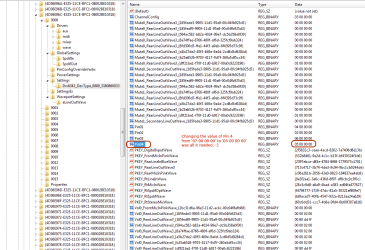
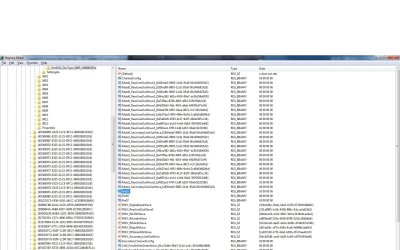
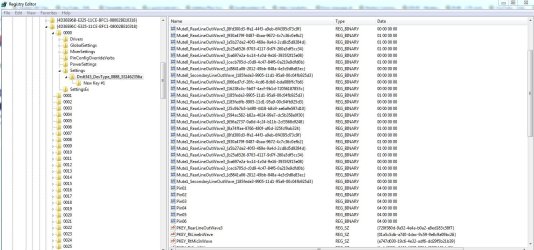
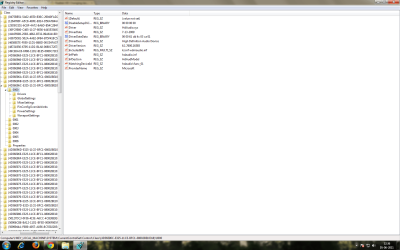
Mappings are saved in the following location "HKEY_LOCAL_MACHINE\SYSTEM\CurrentControlSet\Control\Class\{4D36E96C-E325-11CE-BFC1-08002BE10318}\0000\Settings\DevType_0888_SS147b1083 or ending in DevType_0885_SS18490890

"Pin00" = Rear Green-Coded "FR FL" jack
"Pin01" = Rear black-coded "RR RL" jack

"Pin02" = Center/Subwoofer
"Pin04" = Mic-In

"01 00 00 00" = Mic-in
"02 00 00 00" = headphones
"04 00 00 00" = Front speakers
"05 00 00 00" = Rear speakers
"06 00 00 00" = Center/subwoofer
"07 00 00 00" = Side speakers

Example if i want "Pin01" = rear black-coded "RR RL" jack to be front speakers all i have to do is Pin01 - 04 00 00 00.
]

What about LINE-IN? Why is it not included in the list?

I'm trying to get the card to recognize the input thats currently set to mic-in as a stereo line-in. would that be "08 00 00 00"?
 

My Computer

OS
W7
Man THANK YOU! IT WORKS!!! I can't even believe it..

For Others..
THe specified location is to be found ONLY AFTER INSTALLING Realtek drivers.. in REGEDIT.. look for:

"HKEY_LOCAL_MACHINE\SYSTEM\CurrentControlSet\Control\Class\{4D36E96C-E325-11CE-BFC1-08002BE10318}\0000\Settings\Drv6299_DevType_0862_SS18490862"
There you will find PIN00, PIN01..all to PIN07
And to be shure you find Pin00-07.. I just plugged-in and out all of jack inputs/outputs while PC is running.. and refreshing regedit..
Then after changing for example PIN01 from 02 00 00 00 to 04 00 00 00 please DO RESTART to take effect..

And now i made even two front speaker outputs working in place of one.. Now i can plug my AMPlifier in one and headphones in other and dont have to unplug them every time i want to change audio peripherial...
 

My Computer

OS
Windows 7 Enterprise 32 bit
After Update Realtek Drivers i cant get 5.1 sound

Hi!!
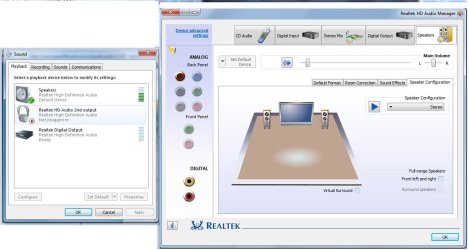
I had 5.1 sound working perfect on Windows 7 Ultimate 32 bit, but i decided to update because i had to change pin assignament every time i reboot the computer through Realtek HD Audio Manager.
I installed v2.57 of the Realtek HD audio driver, and now i am not able to get 5.1 sound, only front speakers work

I connected the speakers and appeared 3 entries in Windows registry

Pin03 : 02 00 00 00
Pin05: 01 00 00 00
Pin07: 00 00 00 00

When i change the output assignments via HD Audio MAnager, registry looks this way:

Pin03 : 02 00 00 00
Pin05: 06 00 00 00
Pin07: 05 00 00 00

I change Pin03 to 04 00 00 00 but nothing happens...Am i Missing something???

Thanks!!!
 

My Computer

Computer Manufacturer/Model Number
Acer Aspire 8920G
OS
Windows 7 Ultimate 32 bit
CPU
Intel Core 2 DUO T5750
Motherboard
Acer
Memory
3GB DDR2
Graphics Card(s)
Ati HD Radeon 3650
Sound Card
ALC 889a
Monitor(s) Displays
18.4"
Screen Resolution
1920*1080
Hard Drives
250 GB
Hi, thank you very much for this post, it has been enlighting.
My issue was the following: my case frontal jacks just sucked, so my idea of having a 5.1 system + headphones (when I need to concentrate/have a better surround sound for fps games I like to use headphones) was difficult.

The thing is that heapdhones didn't work right through the front ports, so I wanted to "clone" the "Frontal Speaker Out" of a 5.1 system output. I did it with OP's info, it worked like a charm.

I have one difficult, though. My home theather doesn't have volume, it always plays at the same level (unless I change it from where I have it connected, ie my pc of course). Compared to the HT, the headphones sound really low, so I wanted now to go a bit further and also change the volume of the port where I have my headphones connected.

Seeing the keys in the registry make me feel this is possible, but I'm just lost and I don't have a clue to where to begin. I mean, there's a lot of Vol0_RearLineOutWave3_{blablabla} and Vol1_RearLineOutWave3_{blablabla} keys that, from the first three letters, I suppose manage the volume for each output. But the value of the keys and the "blablabla" are all in hexa and I don't really know what do they translate to... anyone has any clues?
 

My Computer

OS
Windows 7 Ultimate x64
CPU
AMD Phenom II x940
Motherboard
Asus M3A78-EM
Memory
4Gb. Kingston DDR2-800Mhz
Graphics Card(s)
Nvidia GeForce 9500GT
Sound Card
Onboard
Hi there, I have a problem, that I broke my headset jack, and now when I put something in it it's not holding well


So I fought that I could somehow change the MIC jack with HEADSET, but when I go to

HKEY_LOCAL_MACHINE\SYSTEM\CurrentControlSet\Control\Class\{4D36E96C-E325-11CE-BFC1-08002BE10318}\0000\Settings\Drv6299_DevType_0862_SS1179ff02

and change PINs number from 01 to 02, and from 02 to 01 where nothing happens. I tried restarting computer, I downloaded newest realtek drivers, when I change from 01 to 02, nothing happens, if I unplug the cable and plugin it again and restart regedit the numbers change to their defaults no mater I restart the computer or not. If I restart the PC and don't unplug the cable, speakers still won't play


Any suggestions ?
 

My Computer

OS
windows 7 enterprice x32
Sounds I have no idea problem

Hello I plugged in a cd thingy to my pc yesterday and my pc flashed on and off then my sound just didn't work

I have done reinstalling uninstalling drivers I did lots of stuff off here but I think my problem may be slightly different. I will post a screenshot of everything I can see..the audio is showing the audio is playing but I have no sound.

I need help I'm a youtuber I need my SOUND!

and in reg edit there is no audio settings it's crazy.

And I also need to change it to the speakers I managed to at one point then it changed itself back and messed up. even when I changed it to speakers it didn't work.
 

Attachments

  • audio broken.jpg
    audio broken.jpg
    592.3 KB · Views: 415

My Computer

OS
Windows 64bit
Hi there, I have a problem, that I broke my headset jack, and now when I put something in it it's not holding well


So I fought that I could somehow change the MIC jack with HEADSET, but when I go to

HKEY_LOCAL_MACHINE\SYSTEM\CurrentControlSet\Control\Class\{4D36E96C-E325-11CE-BFC1-08002BE10318}\0000\Settings\Drv6299_DevType_0862_SS1179ff02

and change PINs number from 01 to 02, and from 02 to 01 where nothing happens. I tried restarting computer, I downloaded newest realtek drivers, when I change from 01 to 02, nothing happens, if I unplug the cable and plugin it again and restart regedit the numbers change to their defaults no mater I restart the computer or not. If I restart the PC and don't unplug the cable, speakers still won't play


Any suggestions ?


I have the EXACT same problem. Driver version 2.58.
 

My Computer

OS
Windows 7 Ultimate x86
HI,

I'm pretty much a computer noob when it comes to changing things in regedit.
My front speaker output gives me only sound on the left. So i want to change my line-in to front out. When i was using XP this was possible. In Windows 7 it is not.
This site shows a way to do this but it doesn't work for me.
I have a Asus p5k se motherboard with onboard realtek audio and i'm using a 5.1 speaker system.
When i go to regedit it only shows Pin00 and Pin06. So I was wondering where is the rest? Can i just add them?
I've tried to plug the front speakers into Line-in and change the Line-in into 04 00 00 00 and i have rebooted the computer but still it only works when plug the speakers in the green output (front out).
Is there anybody who can explain in simple English (so that people who don't know that much about computers will understand haha) how to make it work.
Or is there a program out there to download in which you will be able to change this?

Thanks in advance!
Greetings

Edit: I do have the latests drivers from the realtek site.
 

My Computer

OS
Windows 7 ultimate 32bit
Thanks

Changing the 3rd connection from side to rear fix all my problems. Such an easy fix, surprised it isn't part of the driver yet.

Motherboard: Intel DG55WH Media series (7+2 Dolby Digital Live)
Codec: Realtek 889
Speakers: Logitech Z560 5.1
 

Attachments

  • ss-regkeys.png
    ss-regkeys.png
    51.6 KB · Views: 1,541

My Computer

Computer Manufacturer/Model Number
Custom
OS
Windows 7 Ultimate x64
CPU
Core i7-870, HyperThreaded Quad @ 2.93 (OC not needed)
Motherboard
Intel - DG55WB, The ATX Media Series P55
Memory
4x2GB OCZLV1600 DDR3 @ 1600 8-8-8-24-80
Graphics Card(s)
2x EVGA Geforce 460 (Minor OC ~12% for both core and mem)
Sound Card
Intel HD - 7+2 Dobly Home Theater Certfied, Realtek 889
Monitor(s) Displays
2x Acer H233H HDMI @ 1920 x1080 Each
Hard Drives
4 x Seagate 7200.12 500 GB Setup in a matrix array with
188 GB of Raid 0 and 1.22 TB of Raid 5
2 x Seagate 7200.12 1TB in Raid 1 Connected Via a Highpoint Rocketraid 620 PCI-express 2.0 x 1 Lane Sata III Raid Controller
PSU
Cosair 750 TX
Case
Thermaltake v3 Black
Cooling
8x120m (3-In, 3-Out, 2-Zalman CNPS10x Preforma)
Hello,
I need some help.

My green connection is broken so I understand that I can use any another connections.

So I tried edit "Drv6343_DevType_0885_SS8086293e"
Pin2 = from 06 00 00 00 To 02 00 00 00
[pin2=CENTER/SUB]

so i do not hear anything :cry:
 

Attachments

  • SOUNDCARD.jpg
    SOUNDCARD.jpg
    170.1 KB · Views: 319
  • SOUNDCARD1.jpg
    SOUNDCARD1.jpg
    39.6 KB · Views: 82
  • REGE.jpg
    REGE.jpg
    526.6 KB · Views: 398

My Computer

OS
Windows 7 32 bit
FIXED - did a search in the registry for PIN , one was hiding .. Thanks people , this is a nice community ..
 

Attachments

  • Capture.JPG
    Capture.JPG
    224.5 KB · Views: 863
Last edited:

My Computer

Computer type
PC/Desktop
Computer Manufacturer/Model Number
Custom Build
OS
Windows 10 Pro - 64 bit
CPU
Intel i7 2600K
Motherboard
Asus P8P67
Memory
8 Gig ddr3 1600 mhz - viper extreme (Patriot)
Graphics Card(s)
EVGA 980 TI
Monitor(s) Displays
2 - Lg 21" LED , sony 48 " bravia LED
Hard Drives
one - samsung 840 series 465.76 GB SSD
two - wd 2 tB black
one - wd 1.5 tb black
one - wb 1 tb black
PSU
1000 Watt Coolmaster : Silent Pro Gold
Case
antec 1200
Cooling
watercooled
Mouse
logitech wireless
Antivirus
Norton Security 2015
Other Info
powerware 3.1 KVA FERRUPS with 4 - 1000 Amp Deep cycle batteries ...
yup yup, i want to change my jack to front.. i tried ur method but "settings" is not found.. please take a look.
 

Attachments

  • 1.png
    1.png
    263.1 KB · Views: 350

My Computer

OS
Windows 7 Ultimate 32 bit
This actually very interesting.

I have a 2.1 setup for my audio and that is B*TCH to get working properly. I really don't understand why they don't have a 2.1 profile.

But with this I could probably make an reg file I could store somewhere that will setup my speakers correctly with a push of a button.

*giving it a go*
 

My Computer

OS
Windows 7 64x ultimate
I have a problem along the lines of this thread.

I can reassign the jacks fine in the software ( I want them all to be front speakers for my 5.1 system) and in the registry, all the pins are assigned as 04 00 00 00, however, every time I restart, the jacks revert to their original settings.

The registry values are still 04 etc every time, so Im not sure whats happening...

Any help anyone?
 

My Computer

OS
32 bit win7
nice trick ;)
 

My Computer

Computer Manufacturer/Model Number
MSI G31TM-P21
OS
Windows 7 SP1 X64
CPU
Intel Core 2 Due E8400
Motherboard
MSI G31TM-P21
Memory
Kingestone DDR2-800MHZ 4GB 2x2 @ 6-6-6-18
Graphics Card(s)
Palit Ge-Force 9500GT Super Plus
Sound Card
Realtek High Definition
Monitor(s) Displays
Dual Monitor :LG 19" & Samsung 15" !
Screen Resolution
1440x900 @ LG 19" //1152x864 @ Samsung 15"
Hard Drives
Western Digital 320 GB Sata @8MB buffer @ 7200 RPM
Samsung HD502HI 500GB Sata @16MB @ 5400 RPM
Segate Barracuda 80 GB Sata @8MB buffer @ 7200 RPM
PSU
etek 570W
Case
Mercury KM-88
Cooling
Deep Cool Alpha 400 Plus
Keyboard
standard
Mouse
standard
Internet Speed
512 !! very bad :(
I've tried following the instructions but I only get as far as HKEY_LOCAL_MACHINE\SYSTEM\CurrentControlSet\Control\Class\{4D36E96C-E325-11CE-BFC1-08002BE10318}\0000\ and no further than that. I've installed the realtek HD drivers but I still don't have a folder called 'Settings', let alone the strings that should be in that folder.
 

My Computer

OS
Windows 7 Home Premium 64 bit
Back
Top