Realtek HD Changing Jack output reassignments ( FIX )

well i have windows 7 RTM as well and the newest realtek drivers and it didn't work for me. and i know that this version doesn't ask what was plugged like windows xp drivers do, but you can download a single file from windows xp drivers and you'll get that, however you'll be able to change every speaker to be front speaker, which is not really 5.1. and i don't think its a temporary bug cause that has been going on for a while now.

Which file are you talking about?
 

My Computer My Computer

At a glance

Windows 7
OS
Windows 7
My problem solved. I downloaded the drivers from motherboard manufacturer. And it works fine. Just like in XP you can configure each port in back panel. :-)
 

My Computer My Computer

At a glance

Windows 7, windows XP, windows server 2003Intel Pentium 3.06Nvidia GeForce 8600 GT
OS
Windows 7, windows XP, windows server 2003
CPU
Intel Pentium 3.06
Graphics Card(s)
Nvidia GeForce 8600 GT
Hard Drives
80 GB Hitachi
320 GB Samsung
My problem solved. I downloaded the drivers from motherboard manufacturer. And it works fine. Just like in XP you can configure each port in back panel. :-)

Which motheboard you have?
 

My Computer My Computer

At a glance

Windows 7
OS
Windows 7
Well, I have W7 7201 and none of the drivers, MB mfg or Realtek, work properly.
U can't say it works correctly if it half-assed works.
I get a popup if I plug the mike in but not when I plug the HS in.
However, if I plug the HS into the mike jack I still get the popup and can select HS and everything works as if I have plugged into the HS jack.
YEP, the HS works in the mike jack but not in the HS jack. And NO, the wiring hasn't changed.
Of course that makes it hard to use the mike.

SOOO.... something is different in W7 and the drivers have not figured it out yet.
 

My Computer My Computer

At a glance

windows 7
OS
windows 7
i am runing windows 7 ultimate i have aproblem sound

i have realtek hd audio 5.1 but windows detects only one jack slot for speakers but it should use all the 3 so only my 2 speakers are working how do i change it so that it will detect all th 3 slots and my creative 5.1 would start working
 

My Computer My Computer

At a glance

windows 7 ultimateamd athlonx2 440015 gbati radeon x1250
Computer Manufacturer/Model Number
asus
OS
windows 7 ultimate
CPU
amd athlonx2 4400
Motherboard
m2a mx
Memory
15 gb
Graphics Card(s)
ati radeon x1250
Sound Card
internal realtek hd audio
Monitor(s) Displays
samsung sync master 17" 794mg
Hard Drives
hitachi 160 gb
there is a new ver of drivers R2.31
 

My Computer My Computer

At a glance

W7 RTM x64X3220 @ 3.5GHz @ KarakorumHyperX 1066MHz 2x2GB CL5 @ 1033MHzSapphire Radeon 4850 @ def
OS
W7 RTM x64
CPU
X3220 @ 3.5GHz @ Karakorum
Motherboard
P5K PRO
Memory
HyperX 1066MHz 2x2GB CL5 @ 1033MHz
Graphics Card(s)
Sapphire Radeon 4850 @ def
Sound Card
Realtek HD Audio
Monitor(s) Displays
LG W2252TQ
Screen Resolution
1680x1050
Hard Drives
WD 160 AAJS
WD 640 AAKS
PSU
Pentagram SF 620W
Case
Fever Wizard
Cooling
Air
Keyboard
Logitech Deluxe 250
Mouse
Genius:)
Internet Speed
512kB/s
Other Info
SkyStar 2
heh no , because i read somewhere bass are very bad on those and there are new r2.32
 

My Computer My Computer

At a glance

W7 RTM x64X3220 @ 3.5GHz @ KarakorumHyperX 1066MHz 2x2GB CL5 @ 1033MHzSapphire Radeon 4850 @ def
OS
W7 RTM x64
CPU
X3220 @ 3.5GHz @ Karakorum
Motherboard
P5K PRO
Memory
HyperX 1066MHz 2x2GB CL5 @ 1033MHz
Graphics Card(s)
Sapphire Radeon 4850 @ def
Sound Card
Realtek HD Audio
Monitor(s) Displays
LG W2252TQ
Screen Resolution
1680x1050
Hard Drives
WD 160 AAJS
WD 640 AAKS
PSU
Pentagram SF 620W
Case
Fever Wizard
Cooling
Air
Keyboard
Logitech Deluxe 250
Mouse
Genius:)
Internet Speed
512kB/s
Other Info
SkyStar 2

My Computer My Computer

At a glance

Windows 7, windows XP, windows server 2003Intel Pentium 3.06Nvidia GeForce 8600 GT
OS
Windows 7, windows XP, windows server 2003
CPU
Intel Pentium 3.06
Graphics Card(s)
Nvidia GeForce 8600 GT
Hard Drives
80 GB Hitachi
320 GB Samsung
Win7 Realtek drivers 2.32

Wanted to add my experience here. I found the location for my card on an Asus P5Q Pro with newest R2.32 drivers fell under this key ...

HKEY_LOCAL_MACHINE\SYSTEM\CurrentControlSet\Control\Class\{4D36E96C-E325-11CE-BFC1-08002BE10318}\0008\Settings\Drv5928_DevType_0888_SS104382fe

Pin01 04 00 00 00 = Rear Green Front Speakers
Pin02 04 00 00 00 = Rear Black (*Changed to Speakers)
Pin06 01 00 00 00 = Front Mic-in
Pin08 02 00 00 00 = Front Headphones
 

My Computer My Computer

At a glance

Windows 7Intel(R) Core(TM)2 Duo CPU E74002 GIGsNvidia 9600GT
OS
Windows 7
CPU
Intel(R) Core(TM)2 Duo CPU E7400
Motherboard
Asus P5Q Pro
Memory
2 GIGs
Graphics Card(s)
Nvidia 9600GT
Sound Card
Realtek ALC1200 High Definition Audio
Just wanted to say thanks! I've been looking for a soloution to this for a long time! <3

A small tip to something that threw me off: (for people with an AW9d motherboard at least)

If you can't see "Pin01" etc. You will have to re-plug it and then refresh the window.

example; if you want to switch rear black into rear green.

Plug the cable into the green socket and press f5, then the pin will appear, then plug it in to the black socket and hit "f5" again and that pin will appear aswell.

Then just change the valuable of the last "PinXX" to the first "PinXX", Restart your computer, and you're golden :)
 

My Computer My Computer

At a glance

Windows 7Intel Core 2 Duo E6600kingston 2GB 800mhzATI Radeon HD3600
Computer Manufacturer/Model Number
----
OS
Windows 7
CPU
Intel Core 2 Duo E6600
Motherboard
Abit Aw9d-max
Memory
kingston 2GB 800mhz
Graphics Card(s)
ATI Radeon HD3600
Sound Card
AW9D onboard realtek
Monitor(s) Displays
Samsung syncmaster 226BW & 17" CTX
Hard Drives
320GB Seagate barracuda 7200
PSU
Corsair VX450W
Case
Random
Hi Guys,

I've read through the whole of this thread and tried/attempted all of the suggestions but to no avail!

I installed Windows 7 yesterday and since then I've had no sound. I've installed pretty much every Realtek driver under the sun and reinstalled them as well. I've tried the newest one and it didnt do anything.

I did try one version that said because the drivers were not digitally signed by MS I couldnt installed it (I got the option but when I clicked ot carry on, nothing happened, it just kept popping up).

So I've also go on the nVidia website and downloaded a Vista/W7 sound driver package which hasnt helped either. I've also done the 'detect my motherboard' feature and downloaded a 212MB file (roughly that size) and installed it but it didnt work.

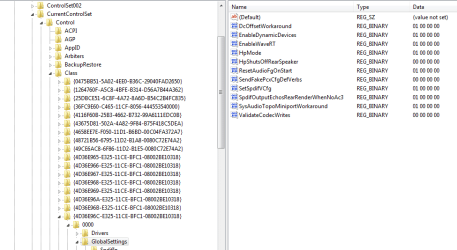
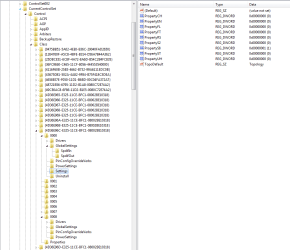
I looked through my registry as advised but cant find the 'DevType...' bit in it.

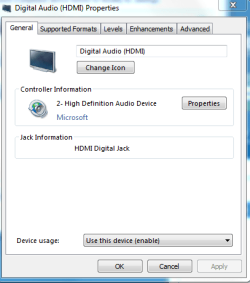
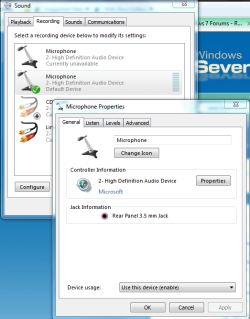
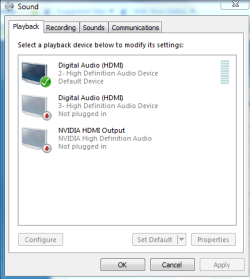
When I go into Control Panel, then Sounds it thinks something is plugged in but nothing plays. I'm using a gaming headset, nothing special which is using 3.5mm jacks for the Mic and Headphones on it - wierd thing is, when I talk on the Microphone test, the bar goes up and down so it recognises something, I've also been on Ventrilo with friends and spoken and they've said on MSN that they'd heard me. My Mic is plugged into the same rear audio panel as the speakers so I can't imagine it being a duff panel as it worked fine before I formatted when I had XP.

I cant find these Pin options in the Registry. I think its just telling the computer to change from HDMI to rear jack. I've also plugged in some external speakers into the front of my machines audio jack to see if they work and nothing happened.

If you look at one of the screenshots of my Registry, I can see some random options with binary values in but I changed them and that didnt work (they've since been changed back)

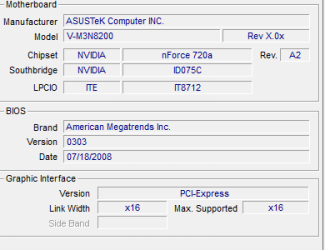
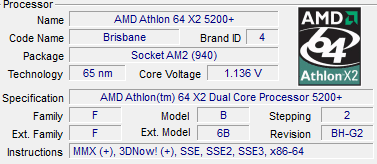
I've uploaded a screenie of my Mobo and CPU info if that helps - I'm running W7 64bit.
 

Attachments

  • DigitalAudioProperties.PNG
    DigitalAudioProperties.PNG
    12.7 KB · Views: 99
  • MicProperties.PNG
    MicProperties.PNG
    35.6 KB · Views: 134
  • RegistryOtherOptions.PNG
    RegistryOtherOptions.PNG
    19.1 KB · Views: 418
  • RegistryOverview.PNG
    RegistryOverview.PNG
    22.8 KB · Views: 493
  • SoundProperties.PNG
    SoundProperties.PNG
    12.6 KB · Views: 111
  • MoboInfo.PNG
    MoboInfo.PNG
    5.4 KB · Views: 102
  • CPUInfo.PNG
    CPUInfo.PNG
    6.7 KB · Views: 67

My Computer My Computer

At a glance

Windows 7
OS
Windows 7
Thanks Neilsouth. After a week searching for a definitive solution, just like most everyone, I was forced to give up trying to find a way to make Windows 7 send music to all speakers with same quality. And since I'm not willing to pay $30 for Creative software (see: Windows 7 RC 64 bit Getting Sound From 2 Speakers and Minor Questions), I guess I'll have to wait for Realtek to provide a solution, as its 3DSoundBack, which is supposed to do the same as Creative's ALchemy, did not solve the problem either. I found yours was the only workaround for the lack of DirectSound in Windows 7.

In addition to this post, I found that in my PC these settings were in a different key (I suppose it's because of the driver version), so you might want to go to "HKEY_LOCAL_MACHINE\SYSTEM\CurrentControlSet\Control\Class\" in regedit and do a Ctrl+F for "DevType_" and find the correct key for your version.
Also, in my version (R236) the "Pin01" controls only the rear speakers, and the "Pin03" controls the side ones. The "Pin02" was not present, but I add it and worked fine.

I set all output jacks to "Front speakers", this way I managed to have good quality sound from every speaker. The bad thing about it is when you want to play games with real surround sound, for all speakers would just play the same thing. My solution was to export 2 registry keys, one with the original configuration, and one with all jacks set to front ( or what suits you best), then just click the .reg files to switch between "real" and "fake" surround. To avoid having to restart the system every time for the changes to take effect, follow these steps:

1) Close every app which may be using the audio device (such as media players).
2) Apply the desired .reg file.
3) Go to Device Manager, select "Sound, video and game controllers". Right-click on the Realtek device and select "Disable" (if no app is using the sound you should not be prompted with the restart message).
4) Right-click it again and select "Enable".

That's all. I hope I could help some of the troubled people like me. I searched day and night everywhere and I was getting sick of this. At least now I have an alternative to this issue.

So long.

 
Last edited:

My Computer My Computer

At a glance

Windows 7Intel Core 2 Quad Q9550 2.83GHz4GB Kingston 800MHzEVGA GeForce 8800GT SC 512MB 256-bit 650MHz
OS
Windows 7
CPU
Intel Core 2 Quad Q9550 2.83GHz
Motherboard
ASUS P5QC
Memory
4GB Kingston 800MHz
Graphics Card(s)
EVGA GeForce 8800GT SC 512MB 256-bit 650MHz
Sound Card
Onboard Realtek HD Audio
Monitor(s) Displays
LG W2284F 22"
Screen Resolution
1680×1050
Hard Drives
Seagate 1,5TB SATAII
+ Samsung 320GB SATAII
I've found a solution!!!

It seems I was wrong about 3D SoundBack! It really does the job! I thought it didn't work because when I clicked it nothing happened. Only after searching through a few sites again I saw a screenshot of it running and realized it was designed to Windows Vista, so all I had to do was run it in compatibilty mode for Windows Vista Service Pack 2, add the applications and voila! I got surround sound again without registry tweaks! :D

http://i50.tinypic.com/2eulyt4.jpg

Download 3D SoundBack Beta 0.1 from Realtek Website

I've tested it with some programs, it worked with Winamp, MediaMonkey, BSPlayer and PowerDVD. Couldn't get it to work with Windows MediaPlayer though... The software is designed for games foremost, so it should work with them as well. There's just one problem when running MediaMonkey: in my PC it will crash if I have QuickTime installed, haven't figured out why.

I'd like to know if anyone has a solution for the QuickTime issue or gets WMP to work as well.

;)
 

My Computer My Computer

At a glance

Windows 7Intel Core 2 Quad Q9550 2.83GHz4GB Kingston 800MHzEVGA GeForce 8800GT SC 512MB 256-bit 650MHz
OS
Windows 7
CPU
Intel Core 2 Quad Q9550 2.83GHz
Motherboard
ASUS P5QC
Memory
4GB Kingston 800MHz
Graphics Card(s)
EVGA GeForce 8800GT SC 512MB 256-bit 650MHz
Sound Card
Onboard Realtek HD Audio
Monitor(s) Displays
LG W2284F 22"
Screen Resolution
1680×1050
Hard Drives
Seagate 1,5TB SATAII
+ Samsung 320GB SATAII
Can i solve my problem with this options ?
problem is this ...My front audio output is not working...
it says not attached even i put headphone in...
i thought may be i can change rear autput with front...What should i do ?

is this a laptop or desktop if its a desktop it could of came unpluged from the back uf your jack or on the bored
 

My Computer My Computer

At a glance

windows7 32bit
OS
windows7 32bit
if u have audio from another output it is possible u have a problem similar to mine.
try plugging the headphone into the mike jack. if u get a popup u may be able to select "headphone" and have it work.
If so the problem is probably the jack switch.
I think I posted the whole issue previously.
 

My Computer My Computer

At a glance

windows 7
OS
windows 7
hey guys um im new to windows 7 forums. i have windows 7 ultimate i dont now were to search the file hkey- local etc plz if any one can help it will be very much apreciated and also will changing the port fix my sound cause its scratched when i play a song or video and some songs dont even hear the music if anyone can help me i thank u very much :)
 

My Computer My Computer

At a glance

windows 7 ultimateintel pentium d1gb ram2.8ghz
Computer Manufacturer/Model Number
asus
OS
windows 7 ultimate
CPU
intel pentium d
Memory
1gb ram
Graphics Card(s)
2.8ghz
@dgenerationx
for me it was scratched when i play some widio coded AC3 (6chanels). I install new codecs (K-Lite_Codec_Pack_544_Full) and now its working fine.
 

My Computer My Computer

At a glance

W7 RTM x64X3220 @ 3.5GHz @ KarakorumHyperX 1066MHz 2x2GB CL5 @ 1033MHzSapphire Radeon 4850 @ def
OS
W7 RTM x64
CPU
X3220 @ 3.5GHz @ Karakorum
Motherboard
P5K PRO
Memory
HyperX 1066MHz 2x2GB CL5 @ 1033MHz
Graphics Card(s)
Sapphire Radeon 4850 @ def
Sound Card
Realtek HD Audio
Monitor(s) Displays
LG W2252TQ
Screen Resolution
1680x1050
Hard Drives
WD 160 AAJS
WD 640 AAKS
PSU
Pentagram SF 620W
Case
Fever Wizard
Cooling
Air
Keyboard
Logitech Deluxe 250
Mouse
Genius:)
Internet Speed
512kB/s
Other Info
SkyStar 2
hey venat0r thanks man i installed it but still scratchy and squeaks is there anything else that u can do to help me. i uninstalled the realtek driver and installed it updated it and downloaded latest codecs for windows 7 and also thank u i installed klite lite codec but still same problem if only someone can help me with how to change the configuration of realtek cause when i plug in my speakers in to the mic input the sound is perfect just i only have one speaker playing not both and the sound does not scratch. but thanks u so much for your help man very much apreciated :)
 

My Computer My Computer

At a glance

windows 7 ultimateintel pentium d1gb ram2.8ghz
Computer Manufacturer/Model Number
asus
OS
windows 7 ultimate
CPU
intel pentium d
Memory
1gb ram
Graphics Card(s)
2.8ghz
OK I have problems with having Logitech 5.1 system and my headphones with mic being plugged in at the same time and working.

First whats the code for side speakers?
And what file do I have to download and where to download it to get the pop up in REaltek HD audio manager to work, cause atm it's not working
 

My Computer My Computer

At a glance

Windows 7 x64Intel i7 920G-Skill 3x1GB 1066 Triple ChannelMSI N250GTS Twin Frozr 1G GeForce GTS 250 1GB...
OS
Windows 7 x64
CPU
Intel i7 920
Motherboard
DFI LANParty DK X58-T3eH6
Memory
G-Skill 3x1GB 1066 Triple Channel
Graphics Card(s)
MSI N250GTS Twin Frozr 1G GeForce GTS 250 1GB 256-bit GDDR3
Sound Card
Integrated
Monitor(s) Displays
Samsung SM2233BW 22''
Screen Resolution
1680x1050
Hard Drives
1 HD - WDC WD5000AADS-00M2B0 (465 GB);
2 HD - Maxtor 6Y080L0 (76 GB)
PSU
Silverstone SST-ST60F 600W modular
Case
Shity
Cooling
Stock
Keyboard
Logitech
Mouse
x7 - Oscar XL750 BK
Internet Speed
2 Mb/s
Back
Top