
Dear all,
I have spent alot of time on Windows 7 using a Realtek 10/100/1000Mb PCIe 8168/8111C built-in NIC with massive problems with UPLOAD only. I am using a 100megabit connection in Hong Kong and while I can download from the Hong Kong Internet eXchange (HKIX) at 10.MBytes constantly, I have been experiencing extreme network stutter and slow uploads (<1MByte/s) within my Internal LAN.
I have been updating to the latest Realtek's drivers in hope of having this bug fixed, but without success.
Long story short, through rigorous and desperate testing, I found that each driver version gave me different results, suggesting a driver related issue.
Working backwards I found
The answer = Version 6.206.0502.2008
Found here: REALTEK - Download driver for RTL8168B/8111B
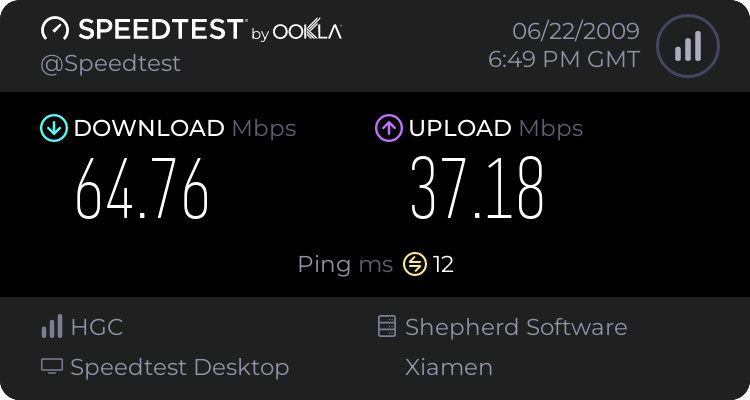
I can now upload at over 7MBytes/s (limited to my 10Mbps NAS) thereby resolving ALL my network issues in Windows 7 (ethernet connectivity drops/connection loss/DNS errors).
I see many who have identified that there is indeed a problem with uploading only to be shunned off by senior members. I too have went through possibilities such as Half Open TCP ports, TCPIP.sys patching and constant fiddling with NIC settings (Speed & Duplex).....This is your answer.
I hope it resolves problems for everyone. Good luck!
I have spent alot of time on Windows 7 using a Realtek 10/100/1000Mb PCIe 8168/8111C built-in NIC with massive problems with UPLOAD only. I am using a 100megabit connection in Hong Kong and while I can download from the Hong Kong Internet eXchange (HKIX) at 10.MBytes constantly, I have been experiencing extreme network stutter and slow uploads (<1MByte/s) within my Internal LAN.
I have been updating to the latest Realtek's drivers in hope of having this bug fixed, but without success.
Long story short, through rigorous and desperate testing, I found that each driver version gave me different results, suggesting a driver related issue.
Working backwards I found
The answer = Version 6.206.0502.2008
Found here: REALTEK - Download driver for RTL8168B/8111B
I can now upload at over 7MBytes/s (limited to my 10Mbps NAS) thereby resolving ALL my network issues in Windows 7 (ethernet connectivity drops/connection loss/DNS errors).
I see many who have identified that there is indeed a problem with uploading only to be shunned off by senior members. I too have went through possibilities such as Half Open TCP ports, TCPIP.sys patching and constant fiddling with NIC settings (Speed & Duplex).....This is your answer.
I hope it resolves problems for everyone. Good luck!
Last edited:
My Computer
- OS
- W7


