MistaObvious
New member
- Local time
- 5:53 PM
- Messages
- 3
Howdy, all. Been using Win7 for a bit now, but just recently built a new system and am having some issues. I'll keep this post to the issue that fits the forum:
I have a Gigabyte EP45-UD3R mobo with Realtek Sound. It all works fine (2.15 drivers), except for the front panel sound. I've tried several clean installs of Win 7 with the front panel being an issue. All attempts prior to this latest one the front panel jacks would be non-existent. Now I see the microphone, but plugging in my headset's mic doesn't change its state from "not plugged in" and the headset doesn't show up.
I've checked the connection on the mobo a couple times to verify that it's hooked up correctly, so that's not the issue. Has anyone else had any issues with this or know of a fix?
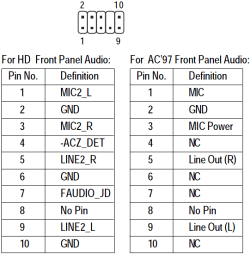
Also, this case doesn't use an HD front panel, if that helps. The connections for the panel are as follows: MIC, GND, MIC PWR, Line Out (R), B-Line Out (R), Line Out (L), B-Line Out (L). I plugged the B-Line Out connections into NC slots since the mobo manual shows nothing for them.
I should also point out that the Audio Manager referred to by the mobo manual as well as that I've seen in other posts regarding the Realtek audio is non-existent. Perhaps having it would solve my issues, so if someone knows how I can install it without rolling back the drivers (which caused issues in prior installs of 7 Beta), I'd greatly appreciate it.
I have a Gigabyte EP45-UD3R mobo with Realtek Sound. It all works fine (2.15 drivers), except for the front panel sound. I've tried several clean installs of Win 7 with the front panel being an issue. All attempts prior to this latest one the front panel jacks would be non-existent. Now I see the microphone, but plugging in my headset's mic doesn't change its state from "not plugged in" and the headset doesn't show up.
I've checked the connection on the mobo a couple times to verify that it's hooked up correctly, so that's not the issue. Has anyone else had any issues with this or know of a fix?
Also, this case doesn't use an HD front panel, if that helps. The connections for the panel are as follows: MIC, GND, MIC PWR, Line Out (R), B-Line Out (R), Line Out (L), B-Line Out (L). I plugged the B-Line Out connections into NC slots since the mobo manual shows nothing for them.
I should also point out that the Audio Manager referred to by the mobo manual as well as that I've seen in other posts regarding the Realtek audio is non-existent. Perhaps having it would solve my issues, so if someone knows how I can install it without rolling back the drivers (which caused issues in prior installs of 7 Beta), I'd greatly appreciate it.
My Computer
- OS
- Windows 7 Beta