
You are using an out of date browser. It may not display this or other websites correctly.
You should upgrade or use an alternative browser.
You should upgrade or use an alternative browser.
rear pc mic jack not working?
- Thread starter meganos
- Start date

Please fill out your system specs, so that we have an idea of what hardware you have. It's much easier to help that way.
It's probably a setting in your audio driver control panel. Do you have front audio ports with a mic plugged in to them? Sometimes doing that will shut off the rear ones.
A little more detail is needed for a better answer. Sorry.
It's probably a setting in your audio driver control panel. Do you have front audio ports with a mic plugged in to them? Sometimes doing that will shut off the rear ones.
A little more detail is needed for a better answer. Sorry.
My Computer
- Computer type
- PC/Desktop
- Computer Manufacturer/Model Number
- Mellon Labs (custom build)
- OS
- Win 7 Pro x64/Win 10 Pro x64 dual boot
- CPU
- AMD FX 8350 Vishera @ 4200
- Motherboard
- ASUS M5A97 R2.0
- Memory
- 16 GB Mushkin Blackline DDR3-2400 @ 1866 (9-10-10-10-31)
- Graphics Card(s)
- XFX Radeon R9 280 Double D Black Edition
- Sound Card
- Realtek HD Audio on MB. Sounds great.
- Monitor(s) Displays
- Acer 24", Acer 22"
- Screen Resolution
- 3840 x 1080
- Hard Drives
- 1 x Mushkin Chronos 120 GB SSD (Win 10)
1 x Samsung 850 EVO 250 GB SSD (Win 7)
1 x WD 1TB SATA Blue
1 x WD 1TB SATA Green
- PSU
- Corsair TX-750
- Case
- CoolerMaster HAF 912+
- Cooling
- Coolermaster Seidon 240M Liquid AIO. 6 case fans
- Keyboard
- Logitech G710+
- Mouse
- Logitech G500s
- Internet Speed
- Much better since I got fiber, but still way overpriced.
- Antivirus
- MSE, Malware Bytes for scanning
- Browser
- Firefox
- Other Info
- Corsair VOID USB headphones.
A Mellon Labs X-1 - LCD Smartie driven system status display.
Brought to you by the letter E
Sorry.
I have a front mic jack too, this works fine. It is empty at the moment. I can survive with that one working but I need to stretch a VGA cable.
My PC is Dell Dimension 5150
4 CPU 3.00 GHz 2.99 GHz
Sound, video and game controllers
Hauppage WIN TV PVR PCI II (26xx)
High Definition Audio Device
Unimodem Half-Duplex Audio Device
??
I have a front mic jack too, this works fine. It is empty at the moment. I can survive with that one working but I need to stretch a VGA cable.
My PC is Dell Dimension 5150
4 CPU 3.00 GHz 2.99 GHz
Sound, video and game controllers
Hauppage WIN TV PVR PCI II (26xx)
High Definition Audio Device
Unimodem Half-Duplex Audio Device
??
My Computer
- OS
- 7
Okay, that's a bit more to work on. HD audio usually has a jack detection feature, and can often be configured to route different audio to different spots. If you open your audio control panel in Control Panel, it might look something like this:
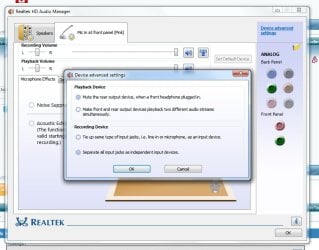
Mine is a Realtek driver. I can separate the Mic jacks, or tie them together if I want to, or I can disable either one. I don't use my rear one, so I have it turned off. You should have something similar in your machine. Snoop around in your Control Panel and have a look. It's probably working fine, just disabled right now.
Post back if you still have some trouble.
Mine is a Realtek driver. I can separate the Mic jacks, or tie them together if I want to, or I can disable either one. I don't use my rear one, so I have it turned off. You should have something similar in your machine. Snoop around in your Control Panel and have a look. It's probably working fine, just disabled right now.
Post back if you still have some trouble.
My Computer
- Computer type
- PC/Desktop
- Computer Manufacturer/Model Number
- Mellon Labs (custom build)
- OS
- Win 7 Pro x64/Win 10 Pro x64 dual boot
- CPU
- AMD FX 8350 Vishera @ 4200
- Motherboard
- ASUS M5A97 R2.0
- Memory
- 16 GB Mushkin Blackline DDR3-2400 @ 1866 (9-10-10-10-31)
- Graphics Card(s)
- XFX Radeon R9 280 Double D Black Edition
- Sound Card
- Realtek HD Audio on MB. Sounds great.
- Monitor(s) Displays
- Acer 24", Acer 22"
- Screen Resolution
- 3840 x 1080
- Hard Drives
- 1 x Mushkin Chronos 120 GB SSD (Win 10)
1 x Samsung 850 EVO 250 GB SSD (Win 7)
1 x WD 1TB SATA Blue
1 x WD 1TB SATA Green
- PSU
- Corsair TX-750
- Case
- CoolerMaster HAF 912+
- Cooling
- Coolermaster Seidon 240M Liquid AIO. 6 case fans
- Keyboard
- Logitech G710+
- Mouse
- Logitech G500s
- Internet Speed
- Much better since I got fiber, but still way overpriced.
- Antivirus
- MSE, Malware Bytes for scanning
- Browser
- Firefox
- Other Info
- Corsair VOID USB headphones.
A Mellon Labs X-1 - LCD Smartie driven system status display.
Brought to you by the letter E
Try 'Manage Audio Devices' then click on the tab 'Recording'
You should see two microphones - One says 'Default Device' - the other says 'Currently unavailable' (if this is not the case then "Right Click" on the microphone and ensure both 'Show Disabled Devices' and 'Show Disconnected Devices' are ticked)
'Right Click' on the microphone which says 'Currently unavailable' and select 'Enable'
The basic system cannot deal with two microphones active simultaneously and will disable the other microphone.
You should see two microphones - One says 'Default Device' - the other says 'Currently unavailable' (if this is not the case then "Right Click" on the microphone and ensure both 'Show Disabled Devices' and 'Show Disconnected Devices' are ticked)
'Right Click' on the microphone which says 'Currently unavailable' and select 'Enable'
The basic system cannot deal with two microphones active simultaneously and will disable the other microphone.
My Computer
- Computer Manufacturer/Model Number
- Packard Bell
- OS
- Windows 7
- CPU
- Dual AMD 1.6Ghz
- Memory
- 2GB
- Graphics Card(s)
- NVIDA GX 6100
- Monitor(s) Displays
- Laptop
- Hard Drives
- 500Gb Samsung
- Case
- Laptop
synytsia1996
New member
problem
I got the same problem as meganos### someone help please
I got the same problem as meganos### someone help please
My Computer
- OS
- MS Windows 7 Ultimate 64-bit SP1
- CPU
- Intel Core 2 Duo E6700 @ 2.66GHz Conroe 65nm Technology
- Motherboard
- Intel Corporation DG965WH (LGA 775)
- Memory
- 4.00 GB DDR2
- Graphics Card(s)
- Generic Non-PnP Monitor (1920x1080@60Hz) 1024MB GeForce 9500
- Sound Card
- IDT High Definition Audio CODEC
- Hard Drives
- 466GB Seagate ST3500413AS ATA Device (SATA)
- Keyboard
- Microsoft USB Dual Receiver Wireless Keyboard
- Mouse
- Microsoft USB Dual Receiver Wireless Mouse

Do you have the same PC, a Dell Dimension 5150 (or E510 which is the same)?
Dell only officially supports Vista 32 bits (will work for Windows 7 32 bits) with drivers for this model. I used to do a lot of support on the Dell forum and we found that only Dell supplied SigmaTel drivers would work properly. Any other drivers are iffy. Many on the Dell forum with these models reported installing a sound card that was Win 7 compatible and using that.
Dell only officially supports Vista 32 bits (will work for Windows 7 32 bits) with drivers for this model. I used to do a lot of support on the Dell forum and we found that only Dell supplied SigmaTel drivers would work properly. Any other drivers are iffy. Many on the Dell forum with these models reported installing a sound card that was Win 7 compatible and using that.
My Computer
- Computer type
- PC/Desktop
- Computer Manufacturer/Model Number
- My Own Build
- OS
- Windows 10 64 bit
- CPU
- Intel i7 6700K
- Motherboard
- ASUS ROG Maximus VIII Hero
- Memory
- 16GB Corsair Dominator
- Graphics Card(s)
- Intel CPU Graphics
- Sound Card
- RealTek
- Monitor(s) Displays
- 27" Dell S2719dgf
- Screen Resolution
- 2560X1440
- Hard Drives
- 1 TB Samsung 850 EVO SSD for Win 10 Pro
500GB Samsung 850 EVO SSD for Win 10 Insider
2 TB drive for backup
- PSU
- EVGA Supernova 750G2
- Case
- BeQuiet Silent Base 600
- Cooling
- Deepcool Captain 120EX
- Keyboard
- Microsoft Wireless 2000
- Mouse
- Microsoft wireless
- Internet Speed
- 100 MB/sec (Cable)
- Antivirus
- Microsoft Defender and Malwarebytes
- Browser
- Edge/Firefox
- Other Info
- Cakewalk (Sonar) by BandLab and Studio One 4.1 Pro recording studio software. MOTU 896Mk3 Hybrid recording interface, Frontier Tranzport wireless control unit, Behringer X-Touch Control Surface.
Five USB connected optical drives for CD Audio production using Nero BurningROM
synytsia1996
New member
reply
2 months ago i had windows 7 ultimate 32-bit and everything worked fine. The mic worked good in the back panel. the audio jacks worked on both front and back panels, i could even connect two headphones at once and it would work fine... I didn't have any of the realtek sound cards or softwares or others. i just used the sound that my computer already had. Two weeks ago my dad reinstalled the computer to windows 7 ultimate 64-bit he did not change anything inside the computer, he didnt even open it. an d after the reinstallization to 64-bit my audio jack only works in the back panel and the mic jack doesnt work at all.
MY COMPUTER IS::
2 months ago i had windows 7 ultimate 32-bit and everything worked fine. The mic worked good in the back panel. the audio jacks worked on both front and back panels, i could even connect two headphones at once and it would work fine... I didn't have any of the realtek sound cards or softwares or others. i just used the sound that my computer already had. Two weeks ago my dad reinstalled the computer to windows 7 ultimate 64-bit he did not change anything inside the computer, he didnt even open it. an d after the reinstallization to 64-bit my audio jack only works in the back panel and the mic jack doesnt work at all.
MY COMPUTER IS::
- Operating system
- MS Windows 7 Ultimate 64-bit SP1
- CPU
- Intel Core 2 Duo E6700 @ 2.66GHz
- Conroe 65nm Technology
- Ram
- 4.00 GB DDR2
- MOTHERBOARD
- Intel Corporation DG965WH (LGA 775)
- GRAPHICS
- Generic Non-PnP Monitor (1920x1080@60Hz)
- 1024MB GeForce 9500 GT (Gigabyte)
- Hard drives
- 466GB Seagate ST3500413AS ATA Device (SATA)
- Optical Drives
- HP DVD Writer 1270d ATA Device
- Audio
- High Definition Audio Device
My Computer
- OS
- MS Windows 7 Ultimate 64-bit SP1
- CPU
- Intel Core 2 Duo E6700 @ 2.66GHz Conroe 65nm Technology
- Motherboard
- Intel Corporation DG965WH (LGA 775)
- Memory
- 4.00 GB DDR2
- Graphics Card(s)
- Generic Non-PnP Monitor (1920x1080@60Hz) 1024MB GeForce 9500
- Sound Card
- IDT High Definition Audio CODEC
- Hard Drives
- 466GB Seagate ST3500413AS ATA Device (SATA)
- Keyboard
- Microsoft USB Dual Receiver Wireless Keyboard
- Mouse
- Microsoft USB Dual Receiver Wireless Mouse
The first thing I see is you have "High Definition Audio Device" which is usually the generic Microsoft sound drivers and not the actual sound drivers for the motherboard. We have found that non-Vendor drivers do not always work properly.
I would first install the Intel motherboard chipset drivers Download from here HERE One of the prime things the chipset drivers do is define (identify) all the hardware devices on the motherboard. Windows 7 install may have installed drivers, but I would still install the actual Intel motherboard drivers.
Then install the correct IDT sound driver HERE Intel lists this driver as "Vista" but normally Vista drivers work OK for Windows 7. If the drivers will not install, install them in the Vista compatibility mode.
I would first install the Intel motherboard chipset drivers Download from here HERE One of the prime things the chipset drivers do is define (identify) all the hardware devices on the motherboard. Windows 7 install may have installed drivers, but I would still install the actual Intel motherboard drivers.
Then install the correct IDT sound driver HERE Intel lists this driver as "Vista" but normally Vista drivers work OK for Windows 7. If the drivers will not install, install them in the Vista compatibility mode.
My Computer
- Computer type
- PC/Desktop
- Computer Manufacturer/Model Number
- My Own Build
- OS
- Windows 10 64 bit
- CPU
- Intel i7 6700K
- Motherboard
- ASUS ROG Maximus VIII Hero
- Memory
- 16GB Corsair Dominator
- Graphics Card(s)
- Intel CPU Graphics
- Sound Card
- RealTek
- Monitor(s) Displays
- 27" Dell S2719dgf
- Screen Resolution
- 2560X1440
- Hard Drives
- 1 TB Samsung 850 EVO SSD for Win 10 Pro
500GB Samsung 850 EVO SSD for Win 10 Insider
2 TB drive for backup
- PSU
- EVGA Supernova 750G2
- Case
- BeQuiet Silent Base 600
- Cooling
- Deepcool Captain 120EX
- Keyboard
- Microsoft Wireless 2000
- Mouse
- Microsoft wireless
- Internet Speed
- 100 MB/sec (Cable)
- Antivirus
- Microsoft Defender and Malwarebytes
- Browser
- Edge/Firefox
- Other Info
- Cakewalk (Sonar) by BandLab and Studio One 4.1 Pro recording studio software. MOTU 896Mk3 Hybrid recording interface, Frontier Tranzport wireless control unit, Behringer X-Touch Control Surface.
Five USB connected optical drives for CD Audio production using Nero BurningROM
synytsia1996
New member
Thank you very very very much!!! :d it works now with your help thank you very much#
My Computer
- OS
- MS Windows 7 Ultimate 64-bit SP1
- CPU
- Intel Core 2 Duo E6700 @ 2.66GHz Conroe 65nm Technology
- Motherboard
- Intel Corporation DG965WH (LGA 775)
- Memory
- 4.00 GB DDR2
- Graphics Card(s)
- Generic Non-PnP Monitor (1920x1080@60Hz) 1024MB GeForce 9500
- Sound Card
- IDT High Definition Audio CODEC
- Hard Drives
- 466GB Seagate ST3500413AS ATA Device (SATA)
- Keyboard
- Microsoft USB Dual Receiver Wireless Keyboard
- Mouse
- Microsoft USB Dual Receiver Wireless Mouse
Great. Glad my suggestions helped.
My Computer
- Computer type
- PC/Desktop
- Computer Manufacturer/Model Number
- My Own Build
- OS
- Windows 10 64 bit
- CPU
- Intel i7 6700K
- Motherboard
- ASUS ROG Maximus VIII Hero
- Memory
- 16GB Corsair Dominator
- Graphics Card(s)
- Intel CPU Graphics
- Sound Card
- RealTek
- Monitor(s) Displays
- 27" Dell S2719dgf
- Screen Resolution
- 2560X1440
- Hard Drives
- 1 TB Samsung 850 EVO SSD for Win 10 Pro
500GB Samsung 850 EVO SSD for Win 10 Insider
2 TB drive for backup
- PSU
- EVGA Supernova 750G2
- Case
- BeQuiet Silent Base 600
- Cooling
- Deepcool Captain 120EX
- Keyboard
- Microsoft Wireless 2000
- Mouse
- Microsoft wireless
- Internet Speed
- 100 MB/sec (Cable)
- Antivirus
- Microsoft Defender and Malwarebytes
- Browser
- Edge/Firefox
- Other Info
- Cakewalk (Sonar) by BandLab and Studio One 4.1 Pro recording studio software. MOTU 896Mk3 Hybrid recording interface, Frontier Tranzport wireless control unit, Behringer X-Touch Control Surface.
Five USB connected optical drives for CD Audio production using Nero BurningROM
Similar threads

- Replies
- 2
- Views
- 1K

- Replies
- 0
- Views
- 571

